01
APIs
Defined application operations
- Best when
- A supported interface exposes the records or actions the workflow needs.
- Design for
- Authentication, versioned contracts, rate limits, transaction behavior, and confirmation of completed writes.
Keep the core. Connect the next capability.
Bring AI and automation into the systems your organization already depends on. GS Consulting builds approved interfaces, reliable data flows, and controlled workflows around existing applications, starting with an integration architecture assessment.
20-minute fit check · One workflow is enough to begin
New capabilities
Integration & control
ERP · CRM · custom applications · databases
Interfaces and write permissions are agreed for each workflow.
API vs middleware vs events vs RPA
The right integration starts with the system's supported interfaces and the work you need to perform. We compare the options against reliability, security, transaction behavior, and the cost of keeping them running.
Defined application operations
Translation and coordination
Work that reacts to change
Controlled screen interaction
These methods can work together. Middleware can coordinate API calls, events can trigger background work, and RPA can support a remaining screen-based step. The assessment documents the tradeoffs for your environment.
Database extraction and normalization
Start with approved exports, read replicas, bounded queries, or supported change data capture. Choose the extraction path around source load, data freshness, licensing, and operational ownership.
AI can help interpret ambiguous content. Extraction rules, validation, and delivery still need explicit software behavior and independent checks.
| Legacy field | Normalized contract |
|---|---|
CUST_NO | Customer identifierPreserve leading zeros and source references. |
AMT | Amount + currencyDefine precision, units, and the currency source. |
LAST_UPD | Timestamp + time zoneConfirm source time semantics before conversion. |
STATUS | Documented business stateMap codes explicitly; route unknown values for review. |
Version the mapping. Keep rejected records visible. Reconcile the result with the source.
Incremental modernization
Retain the core system where it still does its job. Add a bounded capability, prove its operating behavior, and use the result to guide the next investment.
Map one workflow, choose a source and destination, and measure current effort and data quality. A read-only pilot can test analysis or reporting with limited authority.
Validate outputs, exercise exceptions, and confirm receipt in the destination. Where writes are needed, agree permissions, review gates, and reconciliation first.
Add sources or capabilities after acceptance. Plan cutover, recovery, monitoring, and ownership for each change; retire components only when replacement is justified.
Implementation evidence
GS Consulting's cyber-analysis case study shows a private AI pipeline producing structured JSON that a custom integration places into an approved SIEM or database for indexing and search.
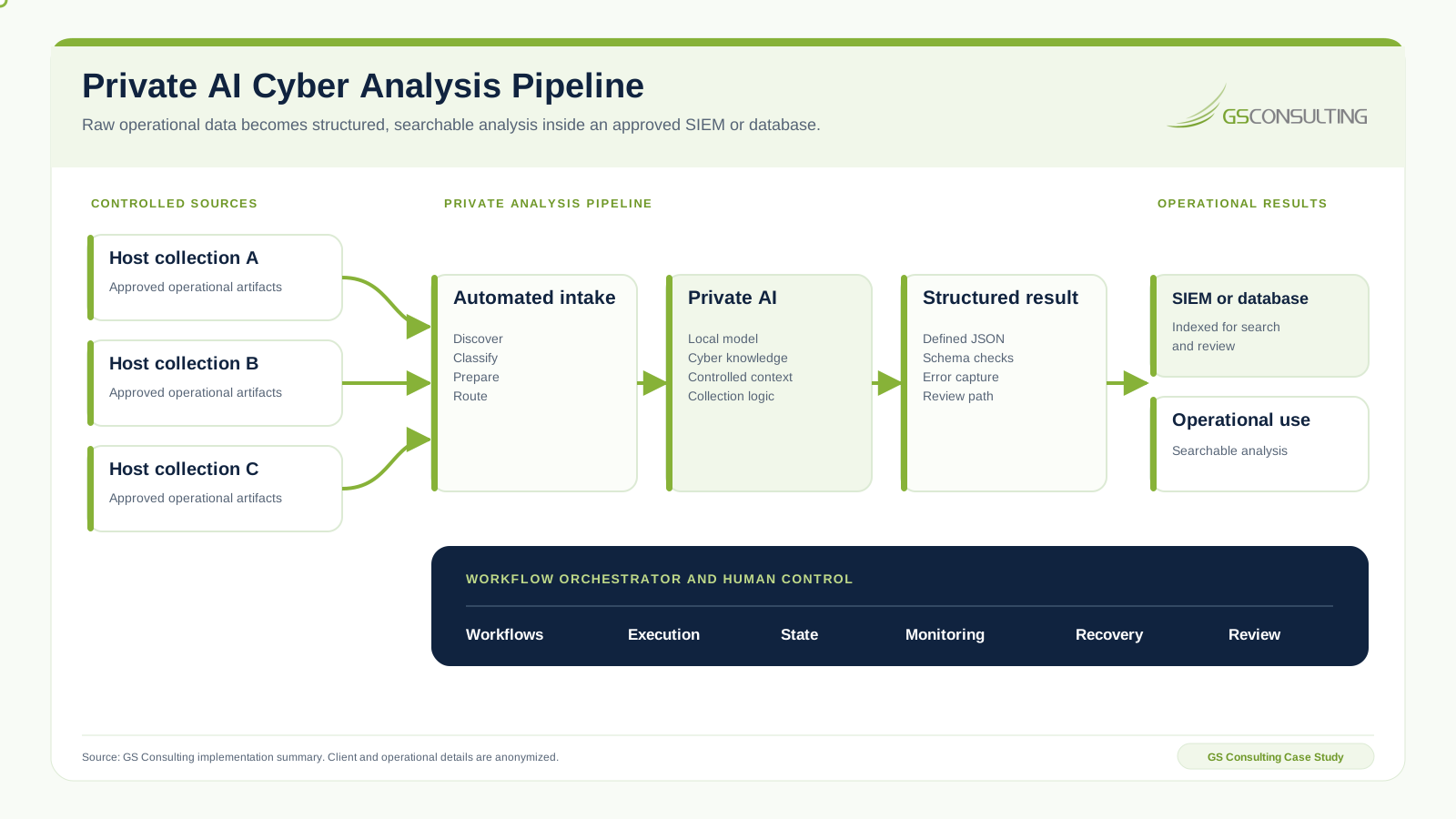
Evidence of connecting specialized automation to an operational system. Your application's interfaces, controls, and acceptance criteria are assessed separately.
Security boundaries and audit logging
Define what data can move, what each identity can do, who approves consequential actions, and what evidence operators need to understand the result. Use the safe legacy write back guide when a workflow will change authoritative records.
Integration architecture assessment
Bring one workflow, the system it depends on, and the result you need. We assess the constraints and define a practical path to a working integration.
Agree the assessment's scope, price, dependencies, and milestones before work begins. A separately scoped pilot can then test the recommended architecture against acceptance criteria.
You leave the assessment with
Illustrative assessment output · Not a client case
Suppose a team manually combines an approved export from an existing application with an internal reporting dataset. The assessment turns that workflow into a recommendation your system owner can review.
The pilot plan names who reviews the evidence, how exceptions are handled, and which freshness and reconciliation targets must be met. Those targets depend on your workflow and baseline.
Go deeper
Design the AI workflow, review process, and operating controls around the connection.
Explore the service →Security operationsSIEM integration & cyber automationConnect security data and specialized analysis to existing operational platforms.
Explore cyber integration →Data movementChange capture vs batch extractionChoose a supported source pattern from freshness, load, completeness, replay, and reconciliation evidence.
Read the guide →Pilot acceptanceLegacy integration pilot acceptanceSet release gates for representative data, reconciliation, recovery, controls, and operating ownership.
Read the guide →Production transactionsSafe legacy write backControl authority, duplicates, conflicts, destination proof, repair, and reconciliation before production updates.
Read the guide →Integration guideLegacy systems and enterprise AIExplore architecture choices for connecting automation to established systems.
Read the guide →Data foundationsLegacy database extractionUnderstand the preparation, validation, and controls behind usable source data.
Read the guide →Need a broader delivery scope? Explore custom software development, data engineering, and workflow automation.
Before an engagement
Architecture, compatibility, data access, and what it takes to begin.
Often, yes. An integration layer can connect new capabilities to an existing system of record while its core transactions continue to run there. We assess interfaces, data access, supportability, and operating constraints first. If a system cannot support a safe connection, the assessment identifies the remediation or replacement decisions needed before that workflow can proceed.
Use supported APIs for defined application operations, middleware for translation and coordination across systems, events for asynchronous reactions to changes, and RPA for suitable screen-based steps when supported interfaces are unavailable. These methods can be combined. The choice depends on vendor support, transaction behavior, latency, change frequency, permissions, and who will maintain the connection.
We assess approved exports, read replicas, bounded read queries, or supported change data capture against production load and freshness requirements. Field mappings define identifiers, types, timestamps, units, and business meaning. Validation and reconciliation check completeness, duplicates, and source totals; invalid records follow an exception path. AI can assist with interpreting ambiguous content, with its output evaluated separately from deterministic extraction and validation.
For an agreed workflow, the assessment documents systems, owners, interfaces, data flows, and constraints. You receive an architecture recommendation, an interface tradeoff analysis, extraction and normalization requirements, security boundaries, an audit logging plan, and a bounded pilot scope with acceptance criteria, dependencies, and a delivery estimate. Scope and price are agreed before assessment work begins.
Write access is a separate design decision. An approved write path needs scoped permissions, input validation, transaction rules, review requirements, and confirmation from the destination. Model output alone does not authorize a change. We define how duplicate requests, partial failures, reconciliation, and recovery are handled before enabling production writes; a read-only pilot can establish value first.
We assess the specific product, version, supported interfaces, licensing, and deployment restrictions before confirming compatibility. The published cyber-analysis case study demonstrates custom integration of structured AI results into an approved SIEM or database. That provides evidence of the integration approach; your application and workflow require their own architecture and acceptance checks.
Start with a 20-minute fit check and a high-level description of the workflow, source system, desired destination, and outcome. Complexity depends on interface access, data quality, volumes, security requirements, write behavior, and vendor dependencies. We agree scope, price, and milestones before delivery. Share initial requirements at a public level; detailed system information can move through an approved channel later.
Your next working connection
Tell us where data gets stuck or work becomes manual. We will help scope an integration architecture assessment around that workflow.