Enterprise AI | | 23 min read
Legacy System Integration for Enterprise AI Automation
Key Takeaways
AI integration must preserve the systems that own business records.
Start with the workflow
Identify the business outcome, systems of record, data, and handoffs.
Choose the integration pattern
Compare APIs, RPA, and data pipelines against system capabilities and operating constraints.
Control writes and recovery
Define permissions, human approvals, monitoring, and how the workflow handles failures.
Enterprise AI does not create real transformation until it connects to how the business actually works.
That is where many organizations get stuck. A company may launch an AI assistant, test a chatbot, summarize documents, or automate a narrow task. The pilot looks promising. But when the company tries to scale the use case, the hard problems appear: data lives in legacy systems, workflows depend on email and spreadsheets, ERP is difficult to integrate, CRM data is inconsistent, HR systems have sensitive data restrictions, and approvals still happen across several tools.
That is not an AI model problem. It is an integration problem.
Need AI automation connected to real enterprise workflows?
GS Consulting helps organizations assess legacy integration gaps, design secure AI automation architecture, build human-in-the-loop workflows, calculate ROI, and scale AI process transformation.
Request a Legacy Integration AssessmentThe lesson is clear: AI transformation is not just about access to AI. It is about connecting AI to workflows, data, systems, controls, and decisions. This article explains how enterprises can integrate AI and automation integration services with legacy systems in a way that is practical, secure, measurable, and scalable.
Use the API vs middleware vs RPA guide to select the connection pattern. Use the automation integration assessment checklist to turn that choice into verified scope, deliverables, and pilot criteria.
Why Legacy System Integration Matters for AI
Most enterprises are not starting from a clean technology environment. They are operating with a mix of modern SaaS platforms, older enterprise systems, custom applications, spreadsheets, shared drives, databases, email workflows, manual approvals, and department-specific tools.
That creates a problem for AI. AI works best when it has access to the right context and can operate within the right workflow. If the AI assistant cannot retrieve current customer information, read the correct policy, update the ticketing system, check inventory, reference the contract record, or route an exception to the right approver, it remains disconnected from the work.
Original Research: The Legacy-to-AI Integration Readiness Index
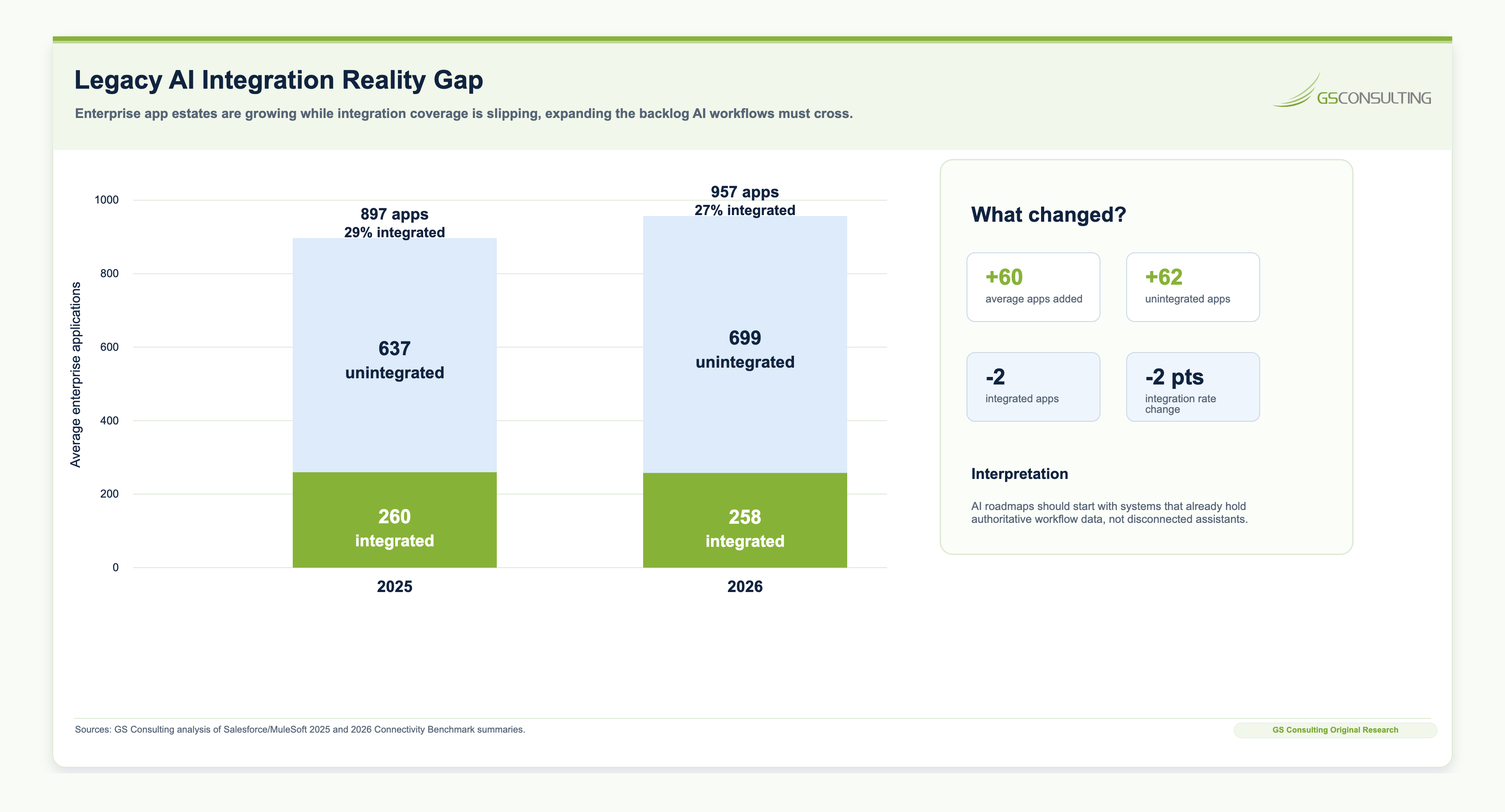
Original GS Consulting research shows that legacy integration is the bridge between AI pilots and enterprise AI scale. GS Consulting analyzed public legacy-modernization, enterprise-integration, AI governance, AI security, and AI adoption sources to create a Legacy-to-AI Integration Readiness Index.
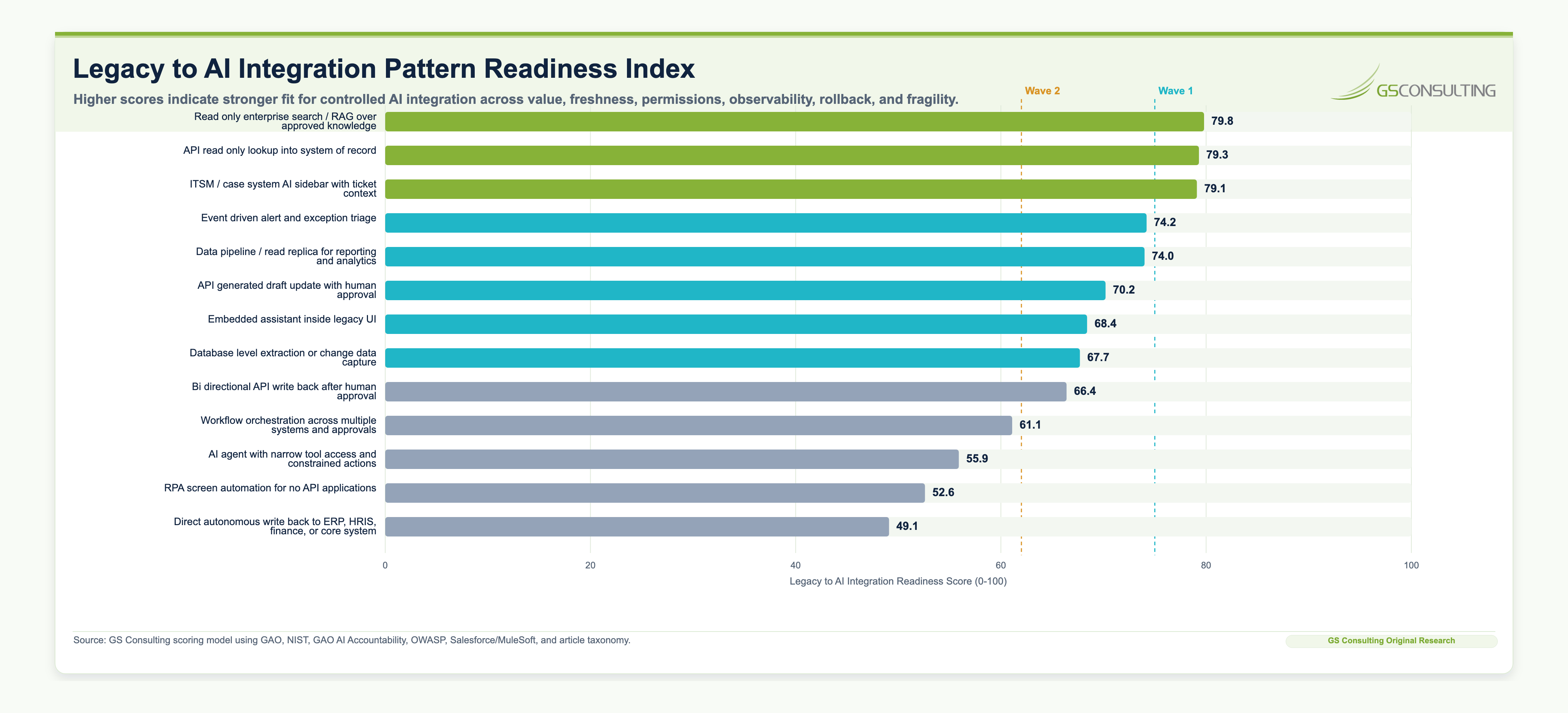
The highest-scoring first-wave patterns were read-only enterprise search over approved knowledge, API read-only lookup into systems of record, and ITSM or case-system AI sidebars. These patterns scored well because they preserve authoritative systems, reduce uncontrolled data copies, support permission-aware access, and keep humans accountable before write-back or action.
The research also shows why enterprises should be cautious with high-autonomy integration patterns. RPA, workflow orchestration, bi-directional write-back, and agentic tool use can create value, but they require stronger evidence: system-of-record maps, data boundaries, least-privilege permissions, human approval gates, action logs, rollback procedures, monitoring dashboards, security review, and change management.
The practical lesson is simple: connect AI to legacy systems one controlled pattern at a time. Start with observe, recommend, and draft. Move to write-back and action only after the workflow, data, permissions, evidence, and rollback model are ready.
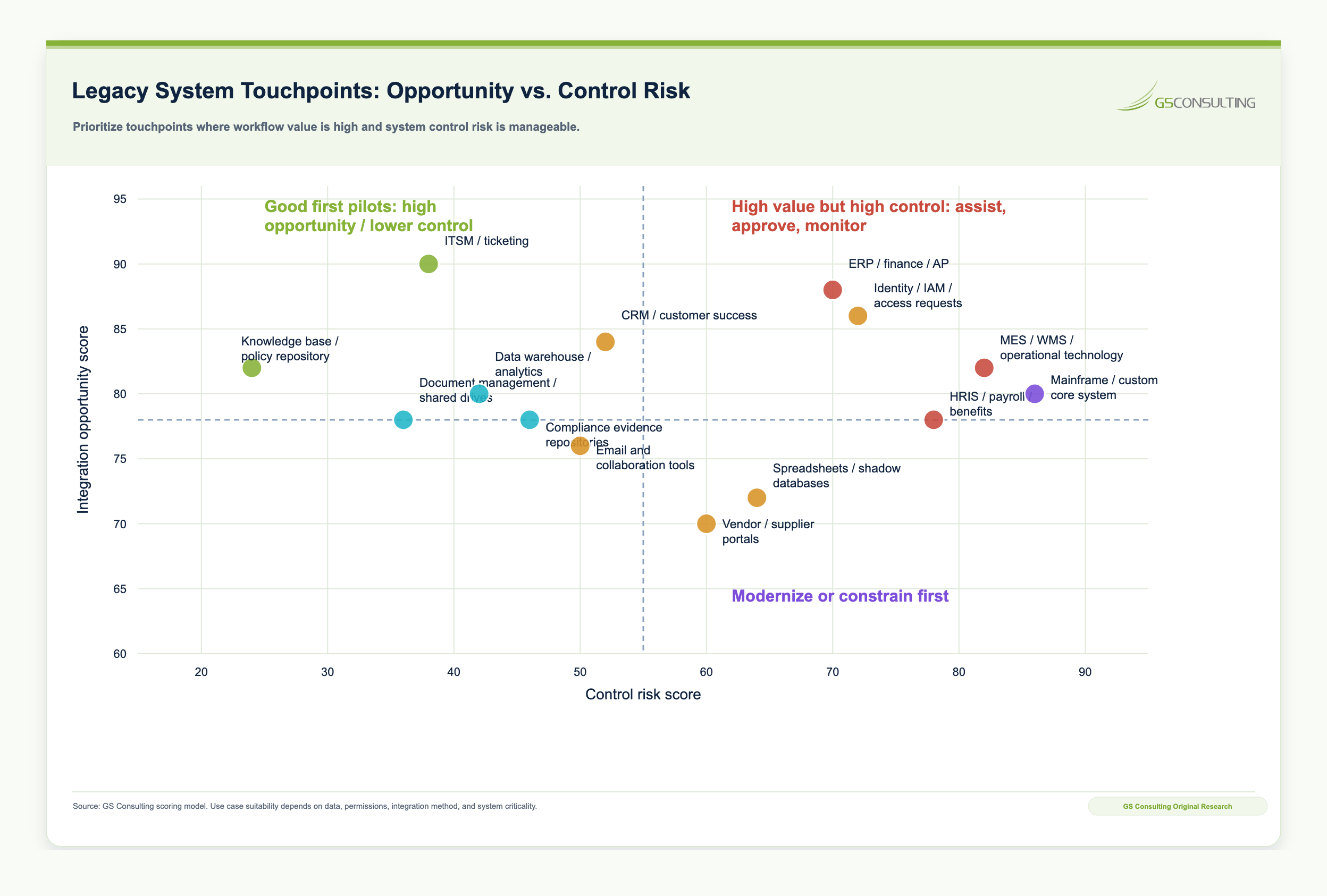
The Legacy-to-AI Integration Readiness Score, Evidence Burden Score, and Touchpoint Opportunity-Risk Matrix are GS Consulting-derived planning tools. They are not official benchmarks, compliance determinations, architecture certifications, legal conclusions, or ROI guarantees. Actual integration readiness depends on the organization's systems, data quality, API maturity, security requirements, legacy fragility, vendor contracts, regulatory exposure, human-review needs, uptime requirements, and tolerance for failed or reversed actions.
What Counts as a Legacy System?
A legacy system is not simply an old system. It is any system that creates friction when the organization tries to improve, automate, integrate, or scale a process.
AI integration must preserve financial, operational, and approval controls.
AI can help summarize and draft updates, but the CRM remains the source of truth.
AI access should be permission-aware and avoid automating sensitive employment decisions.
AI can help structure data, but uncontrolled copies increase risk.
The issue is not whether these systems still work. Many legacy systems are mission-critical and stable. The issue is whether AI can safely and reliably access the right data, support the right decision, and update the right system without breaking controls.
The Goal: Connect AI Without Breaking the Business
The purpose of AI integration is not to rip out every old system. In many enterprises, that is unrealistic, expensive, and unnecessary.
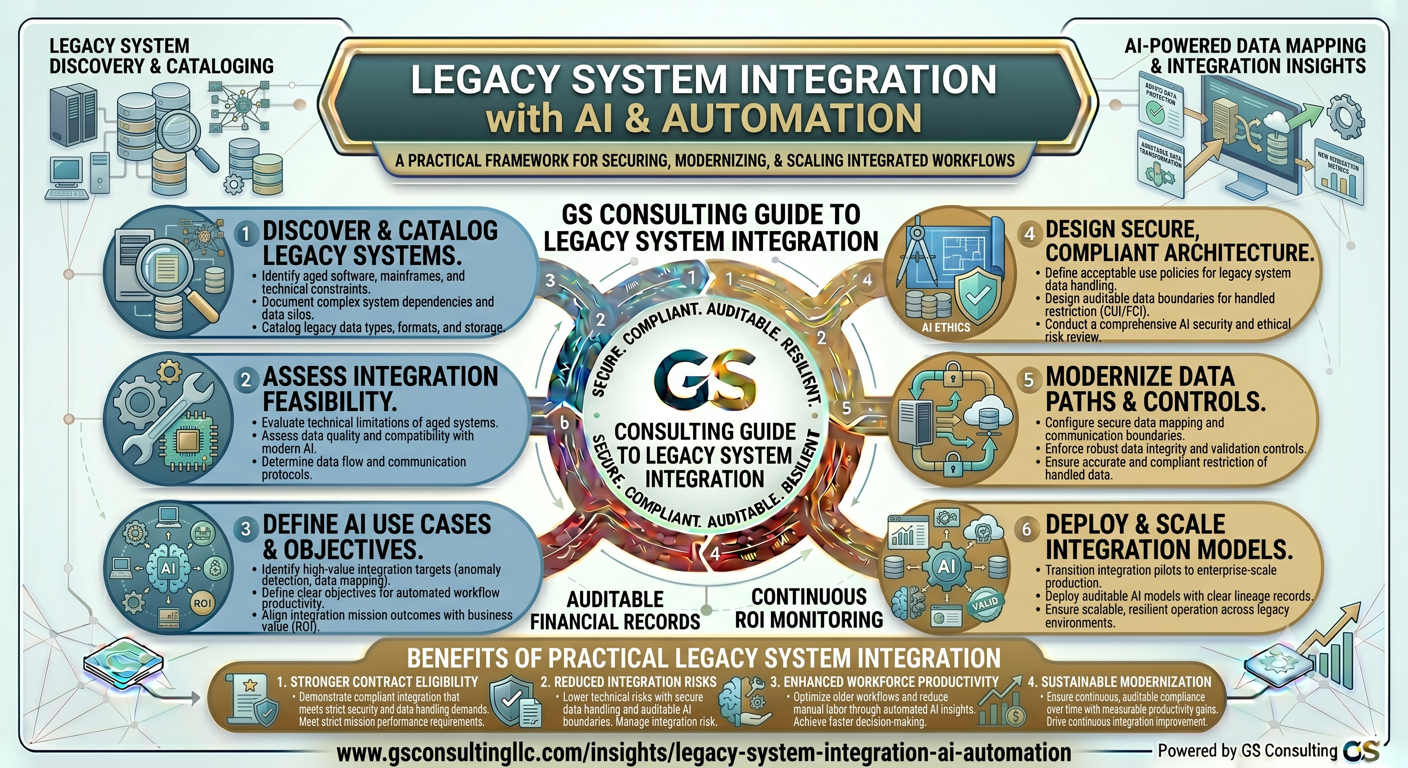
The better goal is to connect AI to legacy environments in a controlled way. A strong AI integration strategy should allow the organization to use existing systems of record, give AI access to approved data, preserve permissions and audit trails, keep humans accountable for high-risk actions, avoid uncontrolled data copies, reduce manual re-entry, and modernize incrementally.
AI integration should make the current environment more usable while creating a path toward modernization.
Legacy System Integration Starts With the Workflow
The first mistake companies make is starting with the technical connector. The better starting point is the workflow.
Before connecting AI to any system, define the business process you are trying to improve. Identify the trigger, inputs, systems, users, handoffs, approvals, exceptions, outputs, and metrics.
For example, an IT service desk automation workflow may require integration with the ITSM platform, identity provider, knowledge base, endpoint management system, asset inventory, and communication tool. But the integration design should follow the workflow, not the other way around.
The right question is not "Can we connect AI to this system?" It is "What does AI need to read, recommend, draft, update, or trigger to improve this workflow safely?"
The Enterprise AI Legacy Integration Framework
1. Define the Business Outcome
Start with a measurable outcome. Examples include reducing invoice exception handling time, shortening employee onboarding cycle time, improving IT ticket resolution speed, reducing support escalation volume, improving operational status reporting, accelerating contract review, reducing compliance evidence gaps, or improving sales proposal turnaround time.
Do not integrate AI just because a system can be connected. Connect AI because a specific workflow will improve.
2. Identify the Systems of Record
Every workflow has authoritative systems where data should be created, updated, approved, and audited. Customer data may live in CRM. Employee records may live in HRIS. Financial records may live in ERP. Tickets may live in ITSM. Contracts may live in contract lifecycle management software.
AI should not become an unofficial system of record. It should retrieve, summarize, recommend, and assist based on approved sources. When data needs to change, the update should flow back to the authoritative system through a controlled process.
3. Map the Data Needed for the Workflow
Data mapping should include data source, system owner, data sensitivity, required fields, data format, access method, refresh frequency, quality issues, permission rules, retention requirements, audit requirements, and write-back requirements.
This step often reveals that the AI use case is not ready for automation yet. The data may be incomplete, duplicated, outdated, poorly labeled, or spread across multiple systems. That does not mean the use case should stop. It means the integration plan must include data cleanup, governance, or staged implementation.
4. Choose the Right Integration Pattern
There is no single integration pattern for every AI workflow. The right pattern depends on the system, data, risk, speed, and action required.
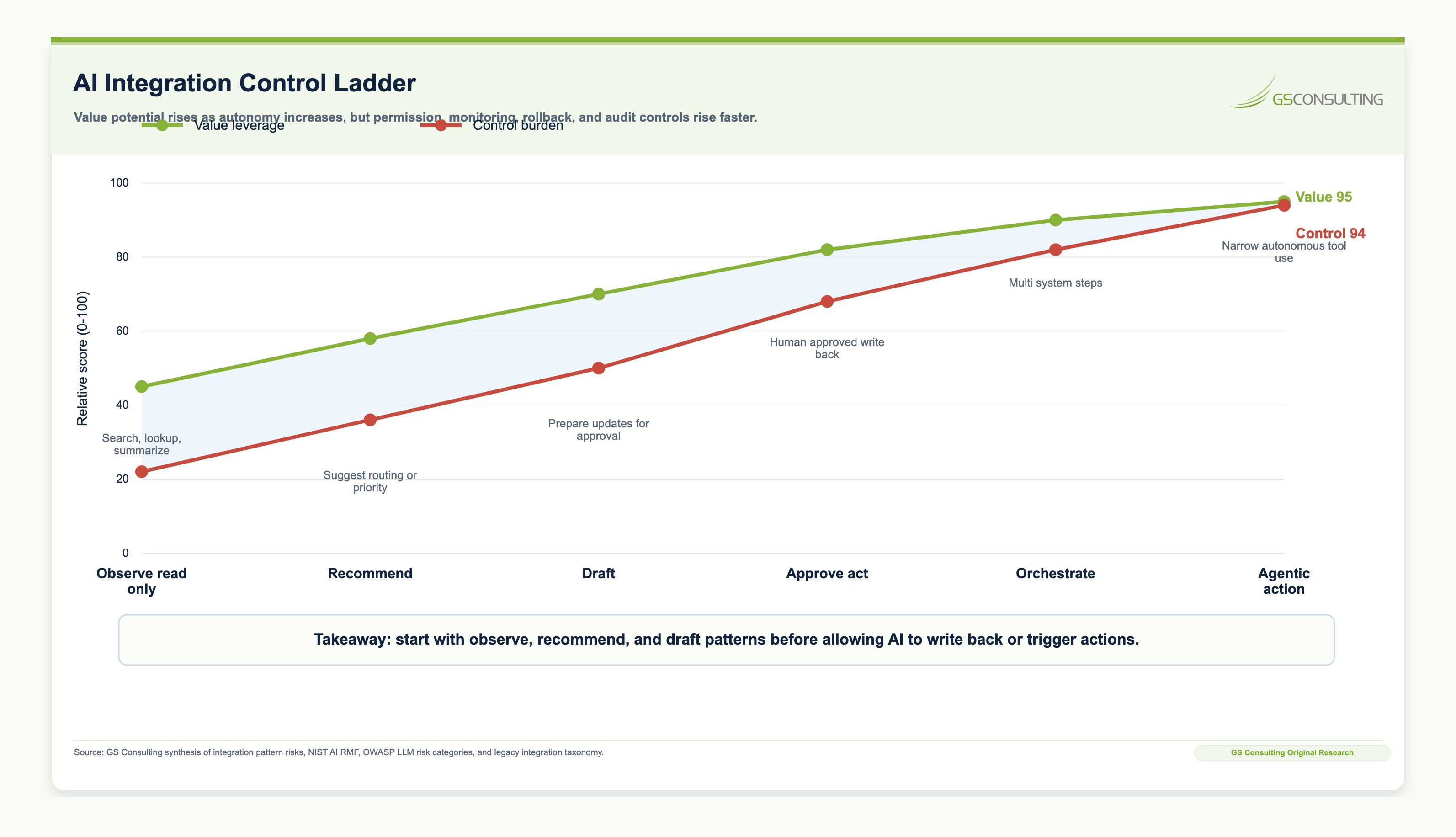
The safest approach is usually to start with read-only or recommendation-based integration before allowing AI to write back to systems or trigger actions.
5. Design the AI Context Layer
AI needs context, but that does not mean copying every enterprise dataset into an AI tool. A better approach is to create a controlled context layer that gives AI access to approved information while preserving security, source attribution, permissions, and auditability.
A strong context layer may include approved document repositories, metadata, permission-aware retrieval, data connectors, search indexes, embeddings or vector databases where appropriate, data catalogs, knowledge graphs, APIs to systems of record, source citation, access logs, and content refresh schedules.
6. Define AI Permissions and Action Boundaries
Once AI is connected to legacy systems, permissions become critical. An AI assistant that can only summarize policy documents is low risk. An AI agent that can approve refunds, change employee records, update invoices, modify customer commitments, create purchase orders, or disable user accounts is much higher risk.
Good for ticket history, policy search, and workflow context.
Good for routing, prioritization, and exception triage.
Good for customer replies, ticket notes, reports, and knowledge articles.
Good for access requests, system updates, and low-risk workflow steps after testing.
Most enterprises should start with observe, recommend, and draft. Fully autonomous action should be reserved for narrow, low-risk, measurable workflows with strong monitoring and rollback.
7. Keep Humans in the Right Places
The goal of AI integration is not to remove humans from every workflow. The goal is to put humans where judgment, accountability, and exception handling matter most.
Human review should be required when AI affects customer commitments, employee decisions, financial approvals, legal interpretations, compliance claims, security enforcement, contractual obligations, high-value transactions, safety or operational risk, sensitive data handling, external communications, or system changes.
A strong AI workflow should make human review easier by summarizing relevant information, highlighting uncertainty, identifying exceptions, showing source references, and asking for approval before action.
8. Monitor the Workflow After Launch
AI integration does not end when the workflow goes live. Legacy systems change. APIs are updated. Data quality shifts. Business rules evolve. Models change. Employees adapt. Vendors modify features. A workflow that worked during a pilot may drift over time.
Monitoring should include AI output quality, human override rates, error rates, system failures, API failures, data freshness, unauthorized access attempts, latency, user adoption, workflow cycle time, audit logs, security exceptions, customer or employee complaints, and cost trends.
Common AI-Legacy Integration Use Cases
Start with AI-assisted ticket triage and knowledge retrieval before write-back automation.
Start with a permission-aware HR knowledge assistant using approved policies.
Start with invoice and procurement intake support where AI drafts, extracts, or flags exceptions.
Start with exception summarization and prioritization before AI recommends operational changes.
Start with AI-assisted summaries and CRM update drafts.
Start with evidence organization, stale artifact detection, and readiness reporting.
The Secure AI Integration Architecture
A secure enterprise AI integration architecture should include several layers.
- InterfaceChat, dashboard, embedded assistant, ticket sidebar, or approval screen.
- OrchestrationPrompts, tools, business rules, workflow steps, approvals, and system connections.
- ContextPermission-aware retrieval, enterprise search, data catalogs, APIs, and source traceability.
- GovernanceIdentity, role-based access, logs, encryption, DLP, monitoring, and incident response.
The more AI is connected to enterprise systems, the more important governance, security, permissions, monitoring, and rollback become.
API, RPA, or Data Pipeline: Which Should You Use?
- Use APIs when the system supports stable, documented access to read or update data. APIs are usually the best option for reliable, auditable, scalable integration.
- Use RPA when there is no practical API and the workflow depends on a user interface. RPA can be useful for legacy applications, but it is often more brittle because user interfaces change.
- Use data pipelines when AI needs to analyze or summarize data across systems but does not need to act immediately in the operational workflow. This is useful for reporting, forecasting, analytics, and executive dashboards.
- Use event-driven integration when AI should respond to real-time or near-real-time business events, such as a new ticket, failed transaction, shipment delay, security alert, or customer escalation.
- Use workflow orchestration when AI must coordinate multiple steps, approvals, systems, and handoffs. Use agentic tool access only when the workflow is mature enough to support stronger autonomy and the tool access is narrow, permissioned, logged, monitored, and reversible.
Legacy Integration and AI ROI
Legacy integration can make or break AI ROI. A pilot may show time savings when users manually upload files into an AI assistant, but the scaled version may require APIs, data cleanup, security review, workflow redesign, user training, audit logging, and ongoing support.
That means the ROI calculation should distinguish between pilot value, operational value, scaled value, and integration cost.
- System integration cost and data preparation cost.
- Legacy modernization effort and technical debt.
- Security, privacy, vendor, and legal review.
- Workflow redesign, human approvals, testing, validation, monitoring, and support.
- Change management, maintenance, and long-term ownership.
The companies that undercount integration cost often overstate AI ROI. The companies that design integration properly can turn AI from a pilot into a repeatable business capability.
Common Mistakes in AI Legacy System Integration
The first mistake is connecting AI to systems before defining the workflow. Integration should serve a business process, not a technology experiment.
The second mistake is allowing AI to create a parallel source of truth. AI outputs should be reviewed, approved, and written back to the proper system of record when appropriate.
The third mistake is using RPA as a permanent workaround for systems that need better integration. RPA can be useful, but brittle automation can create long-term maintenance issues.
The fourth mistake is skipping permission design. If AI can access more data than the user is allowed to see, the integration creates a security problem.
The fifth mistake is allowing AI to write directly into legacy systems without approval, monitoring, or rollback.
The sixth mistake is ignoring data quality. AI cannot reliably automate workflows based on duplicate, stale, incomplete, or inconsistent data.
The seventh mistake is underestimating technical debt. Legacy architecture, undocumented code, customizations, and brittle workflows can make AI integration slower and more expensive than expected.
The eighth mistake is treating AI governance as separate from integration architecture. Governance has to be built into access, logging, approvals, monitoring, and change management.
The 30-60-90 Day Legacy Integration Plan
- Days 1-30Discover workflows and systems.
Map the system landscape, source of truth, data sources, users, approvals, exceptions, pain points, and manual workarounds.
- Days 31-60Choose patterns and controls.
Define read-only access, retrieval, recommendations, drafting, write-back, triggers, permissions, human review, logging, and success metrics.
- Days 61-90Build controlled pilots.
Use approved data, limited users, clear human review, and metrics for time saved, output quality, correction effort, cycle time, adoption, failures, and cost.
Questions Leaders Should Ask Before Integrating AI With Legacy Systems
- What business outcome are we trying to improve?
- Which workflow are we changing?
- Which system is the source of truth?
- What data does AI need, and is it reliable and approved for AI use?
- What can AI read, write, recommend, draft, or trigger?
- Where is human approval required?
- How are prompts, outputs, actions, and approvals logged?
- How are permissions enforced?
- What integration cost is included in the ROI?
- What is the rollback plan if the automation fails?
What Companies Should Build Now
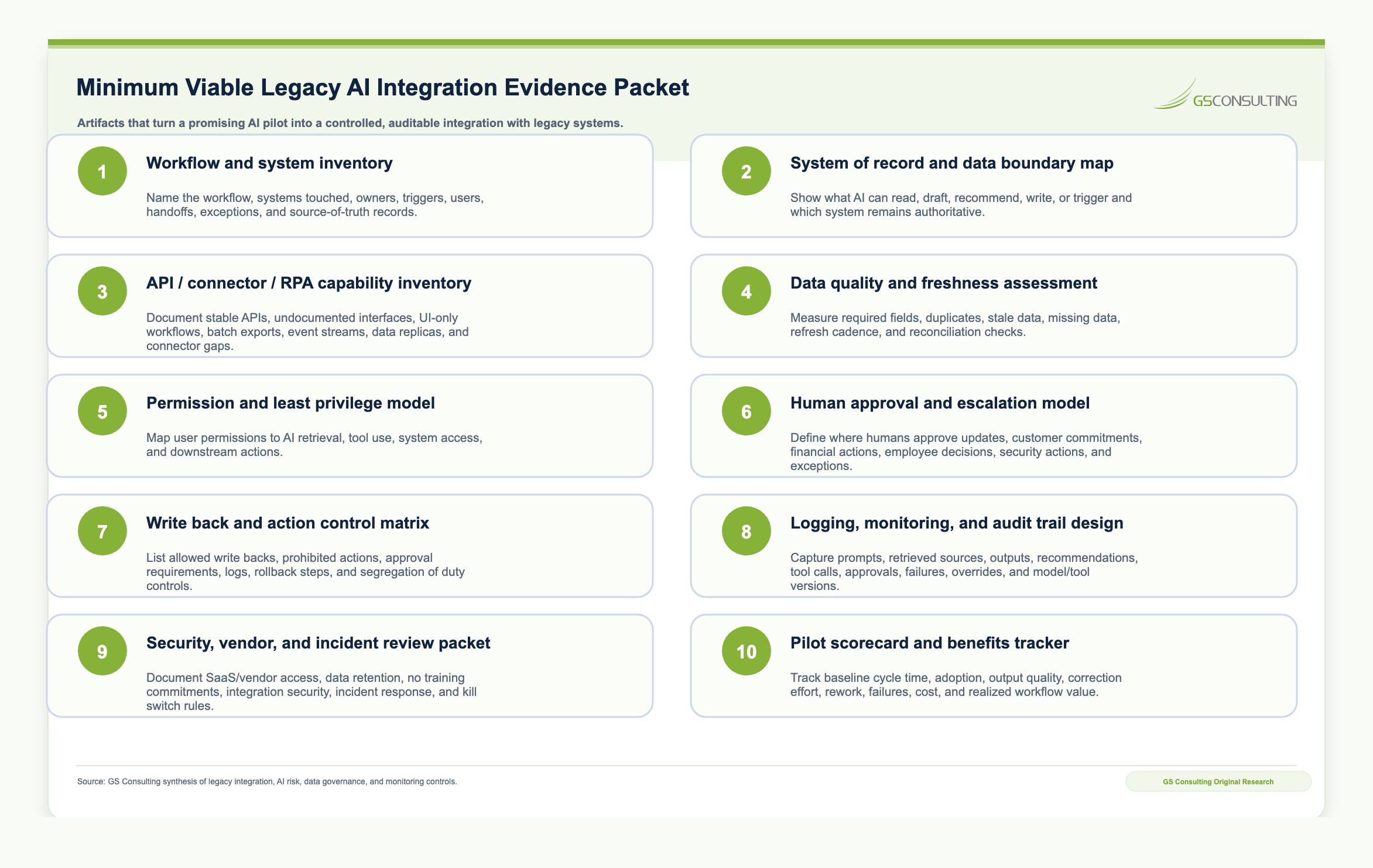
To scale AI across legacy environments, companies should build an AI integration readiness package.
- Workflow inventory and system inventory.
- System-of-record map and data sensitivity matrix.
- API and integration capability inventory.
- Legacy system technical debt assessment.
- AI use case prioritization model and approved tool list.
- Data access rules, human approval model, and logging rules.
- Integration architecture standards, RPA governance, and agent permission model.
- Pilot scorecard, monitoring dashboard, and change management plan.
The Bottom Line
Legacy system integration is the bridge between AI experimentation and enterprise AI transformation.
AI can summarize, classify, recommend, draft, detect, and automate. But to create real business value, it must connect to the systems where work happens: ERP, CRM, HRIS, ITSM, finance tools, operational systems, document repositories, and approval workflows.
The best companies will not try to replace every legacy system before using AI. They will build controlled integration layers, preserve systems of record, improve data quality, manage technical debt, enforce permissions, keep humans accountable, and scale automation one workflow at a time.
GS Consulting helps organizations identify AI-ready workflows, assess legacy system integration gaps, align AI strategy with legacy IT modernization, design secure an integration architecture assessment, evaluate technical debt, build human-in-the-loop workflows, calculate ROI, and implement enterprise AI process transformation across HR, IT, operations, finance, compliance, and customer support.
Ready to connect AI to the systems that run your business?
Contact GS Consulting for an Enterprise AI Legacy Integration and Process Automation Assessment.
Contact GS ConsultingFrequently Asked Questions About AI and Legacy Systems
How do you integrate AI with legacy systems that lack modern APIs?
When legacy systems lack RESTful APIs, organizations typically use secure data extraction pipelines, such as ETL processes, to move data into a modern searchable knowledge layer. For tasks requiring action within the legacy UI, robotic process automation bots can bridge the gap, but this approach requires careful maintenance, credential controls, logging, and exception handling.
What are the security risks of connecting AI to enterprise systems of record?
The primary risk is bypassing existing access controls. If an AI system is over-permissioned, it could expose sensitive data such as CUI or PII to unauthorized users through prompt responses. Autonomous write-back can also corrupt legacy data if AI acts on bad data or unverified outputs without a human approval gate.
Can AI automatically update an ERP or CRM system?
Technically, yes, but enterprise governance should treat direct write-back cautiously. The safer pattern is draft-before-write: AI prepares the CRM update or ERP transaction, but a human reviews and approves it before the system of record is permanently modified.
Sources and Suggested Future Reading
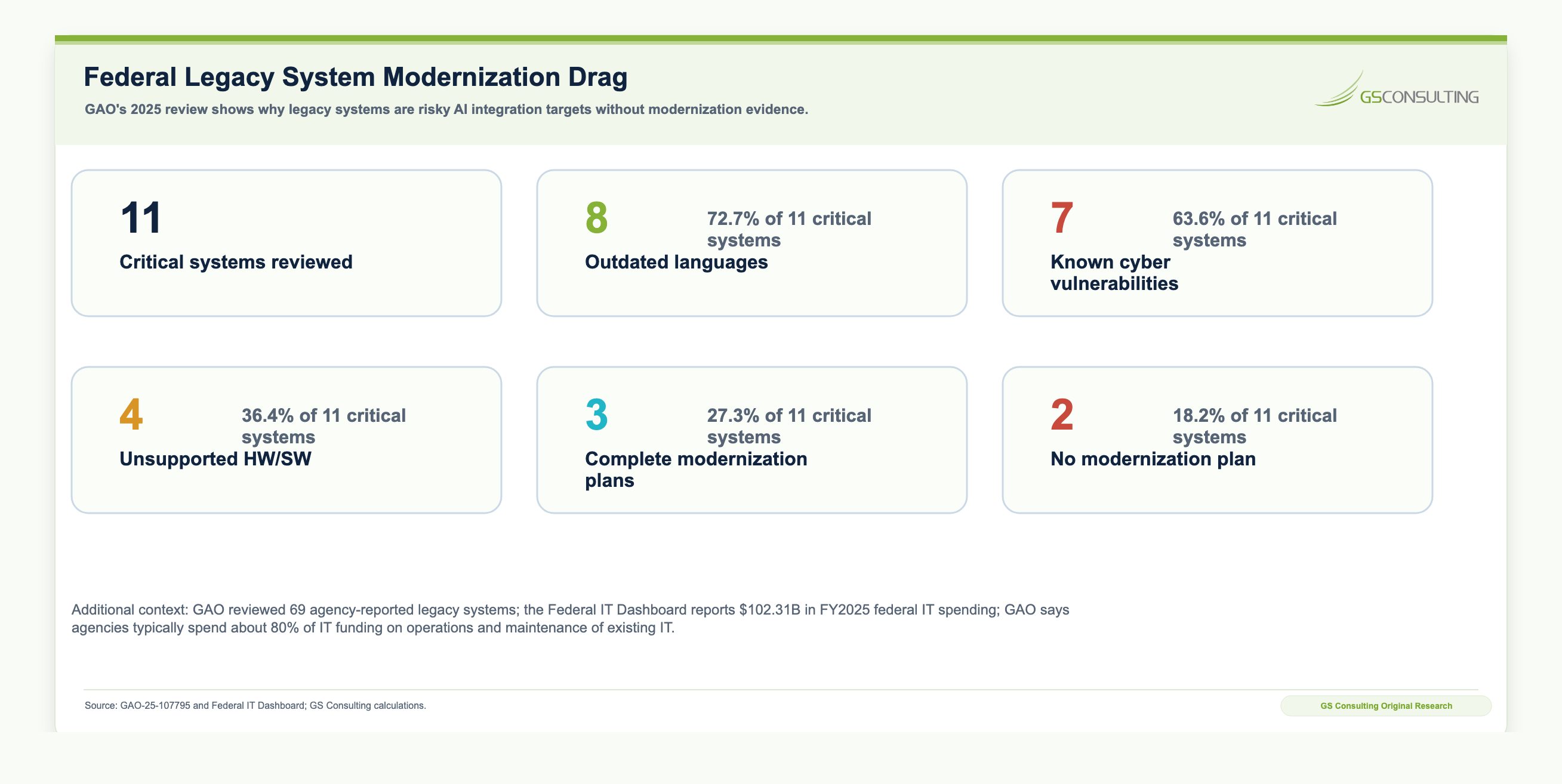
- GAO: Agencies Need to Plan for Modernizing Critical Decades-Old Legacy Systems
- Federal IT Dashboard
- Salesforce/MuleSoft: Connectivity Benchmark Report Insights
- McKinsey: The State of AI
- IBM: CEO Study on AI ROI and Scaling
- NIST AI Risk Management Framework
- GAO: Artificial Intelligence Accountability Framework
- OWASP Top 10 for Large Language Model Applications
- Integrating AI Automations with Legacy GovCon ERPs
- Legacy Database Extraction Workflows Using AI
- Enterprise AI Process Automation Framework: How to Move from AI Pilots to Measurable Business Transformation
- Aligning AI Strategy with Legacy IT Modernization
- How to Identify the Best Workflows for AI Automation
- AI ROI Calculation: How to Measure the Business Case for Enterprise AI
- AI Transformation for HR: Automating Employee Support and Onboarding
- AI Transformation for IT: Service Desk, Ticket Triage, and Knowledge Management
- AI Transformation for Operations: Exception Management, Reporting, and Process Control