Enterprise AI | | 24 min read
Automating NIST SP 800 171 Compliance Evidence Collection

Key Takeaways
Audit ready evidence is an operating workflow.
Evidence Needs Source
The strongest artifacts come from trusted systems of record, not stale screenshots, renamed files, and manual trackers.
Automation Needs Control
Collectors, service accounts, repositories, metadata, reviews, and exceptions need the same discipline as other sensitive systems.
AI Supports Review
AI can summarize, classify, compare, and route evidence, but accountable compliance decisions still require human ownership.
Most compliance evidence is collected the dumb way.
Someone opens a spreadsheet. Someone screenshots a console. Someone exports a report. Someone renames a file. Someone drags it into a folder. Someone updates a tracker. Someone sends an email asking whether the screenshot is current.
Then everyone pretends this is governance.
For government contractors, NIST SP 800 171 evidence collection should not depend on memory, stale screenshots, shared drives, and the one analyst who knows where everything lives. Automating NIST 800 171 evidence is not about replacing compliance judgment. It is about engineering secure background workflows that collect, normalize, timestamp, store, and organize the proof your team already needs.
Build the evidence workflow before the assessment scramble.
GS Consulting helps GovCon firms automate NIST 800 171 evidence collection without turning compliance into another uncontrolled data problem.
Request an Evidence Automation AssessmentWhy Evidence Collection Is the Real Compliance Bottleneck
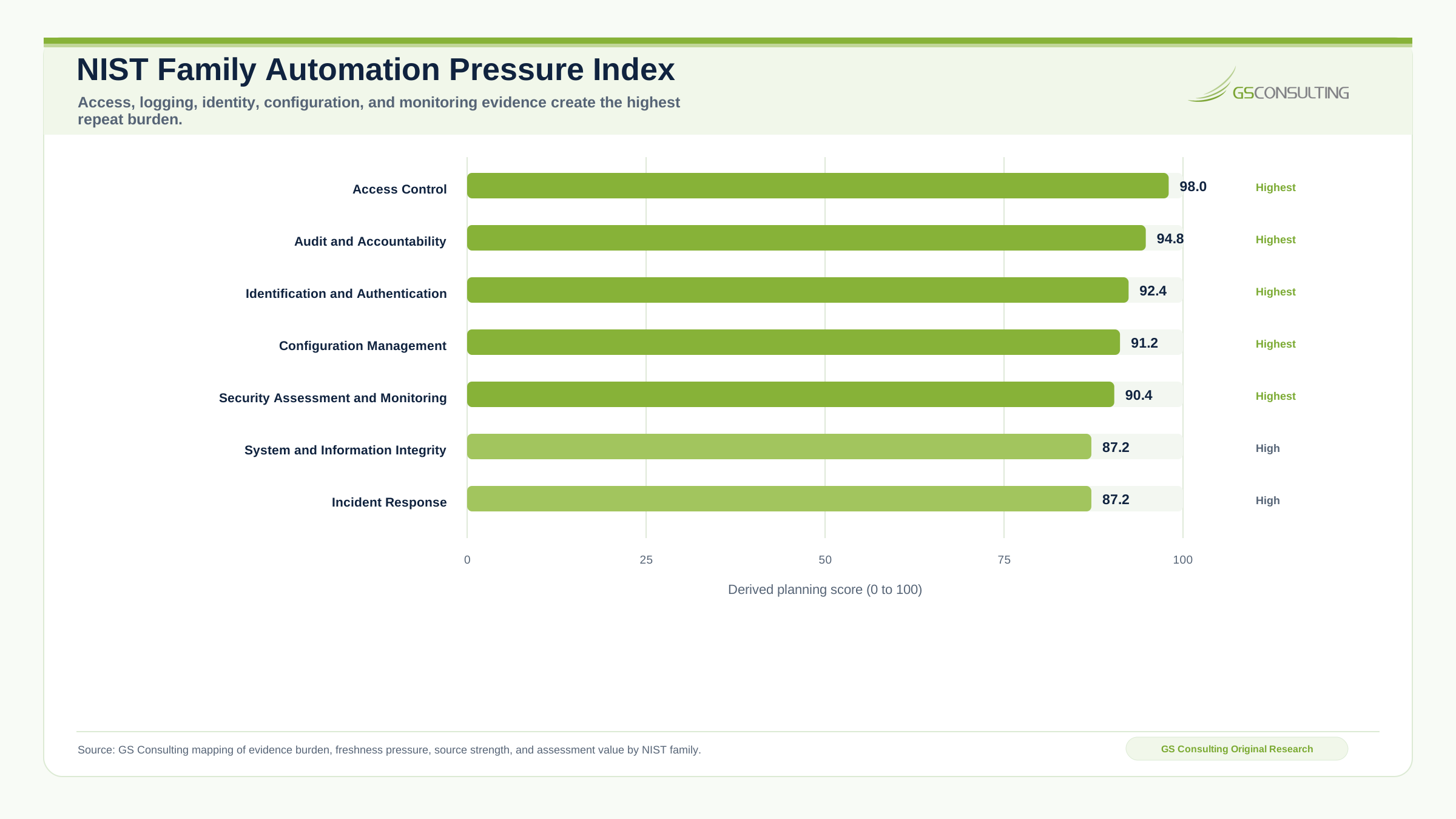
Most organizations talk about controls. Access control, audit logging, configuration management, identification and authentication, incident response, risk assessment, and system and communications protection all matter. But the hard part is not saying the control exists. The hard part is proving it over and over with current evidence from real systems.
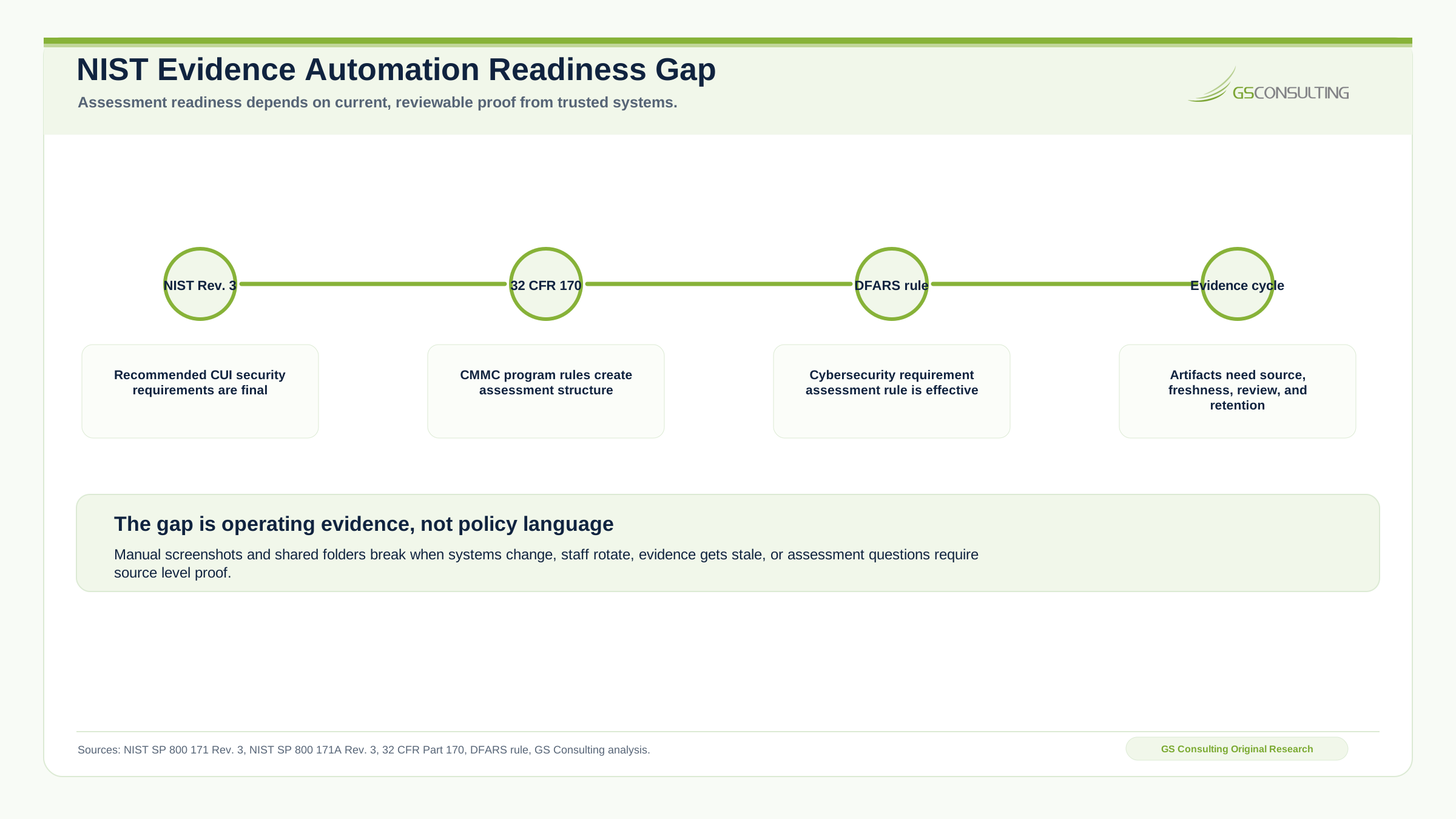
NIST SP 800 171 Revision 3 provides recommended security requirements for protecting the confidentiality of Controlled Unclassified Information when CUI is resident in nonfederal systems and organizations. Its companion, NIST SP 800 171A Revision 3, provides assessment procedures for those requirements.
For GovCon teams, that creates practical questions: can you prove users are reviewed, privileged access is limited, logs are collected, systems are patched, configurations match policy, incidents are tracked, CUI systems are protected, exceptions are documented, and evidence is current?
That last point is where teams get exposed. A screenshot from six months ago may show that something was configured once. It does not prove the control is operating today.
The Bad Assumption: Evidence Is a Document Problem
Too many organizations treat evidence collection like file management. They create folders, name files, store screenshots, track artifacts in spreadsheets, and ask control owners to upload proof. That is not enough.
Evidence is system truth captured at the right time, from the right source, with enough context to prove the control worked. A policy document may show intent. A system export may show configuration. A log query may show activity. An access review record may show oversight. A ticket may show remediation. A workflow approval may show accountability.
If your evidence process treats everything like a PDF in a folder, you are already behind.
Why This Matters More Now
CMMC is no longer something contractors can treat as distant theory. DoD established the CMMC Program through 32 CFR Part 170 to verify cybersecurity requirements for Federal Contract Information and Controlled Unclassified Information. DoD also issued the DFARS final rule for assessing contractor implementation of cybersecurity requirements, effective November 10, 2025.
That means evidence quality matters. Not slogans. Not maturity talk. Evidence.
Manual collection can still work for small, simple environments. Once you have multiple systems, programs, enclaves, contracts, subcontractors, cloud services, identity platforms, endpoint tools, and shared responsibility across teams, manual evidence collection becomes a liability.
Evidence Must Be Tied to the Source of Truth
Every evidence artifact should answer one question: why should anyone trust this?
A dashboard screenshot is less valuable than a timestamped export from the system of record. A manually updated spreadsheet is less valuable than an API pull from the identity provider. A narrative statement from a control owner is less valuable than a ticket record showing review, approval, and closure.
Automated evidence workflows should prioritize direct system sources such as identity providers, endpoint management platforms, vulnerability scanners, SIEM, ticketing systems, cloud control planes, firewall management systems, GRC platforms, asset inventories, backup platforms, code repositories, configuration management tools, mobile device management, email security platforms, and privileged access management tools.
The stronger the source, the stronger the evidence.
The Evidence Repository Matters
Collecting evidence is only half the problem. Storing it badly creates a new mess.
A serious evidence repository should control who can upload, modify, approve, delete, and review evidence. It should also manage naming, tagging, versions, retention, sensitive data handling, stale evidence flags, review status, and requirement mapping.
A useful repository should let a compliance officer quickly answer: show me the latest evidence for this requirement, who collected it, when it was collected, which system it came from, who reviewed it, whether it passed, what changed, and what is missing.
That is what audit ready looks like.
Continuous NIST Monitoring Is Not the Same as Continuous Compliance
Continuous NIST monitoring is useful. Continuous compliance is often oversold.
An automated workflow can continuously collect evidence, flag missing artifacts, detect configuration drift, alert on expired reviews, and show whether certain technical controls appear to be operating. That is powerful. It does not mean the organization is automatically compliant every minute of every day.
Which Evidence Should Be Automated First
Do not try to automate every artifact at once. Start with high burden, high value, repeatable evidence.
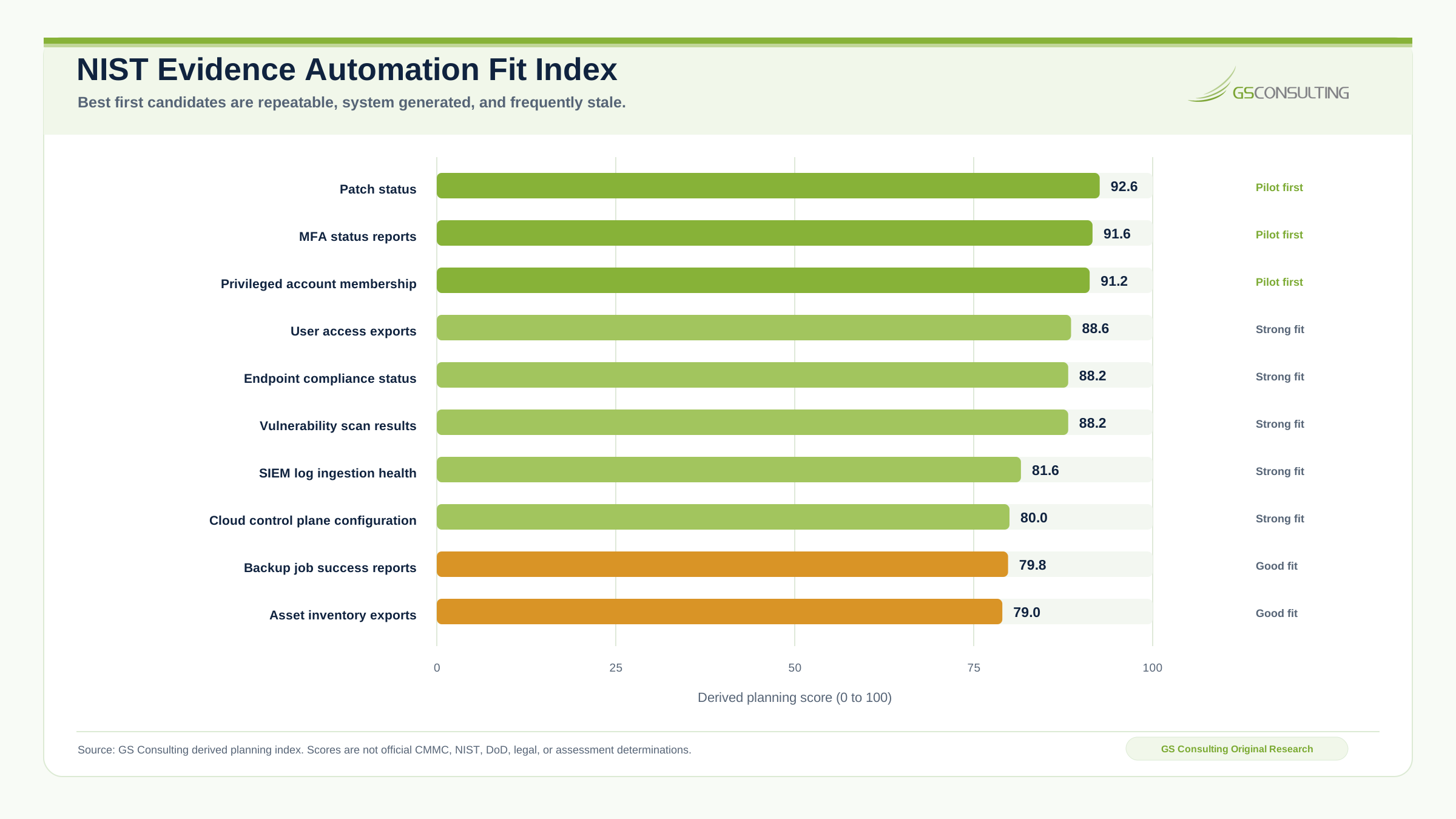
- User access exports.
- Privileged account membership.
- Account review records.
- Endpoint compliance status.
- Vulnerability scan results.
- Patch status.
- SIEM log ingestion health.
- Backup job success reports.
- Asset inventory exports.
- Incident ticket records.
- Change management records.
- MFA status reports.
These evidence types usually have three advantages. They come from systems. They change regularly. They are painful to collect manually.
A Practical Architecture for Automated Evidence Gathering
The architecture does not need to be exotic. A practical compliance workflow automation architecture usually has six layers.
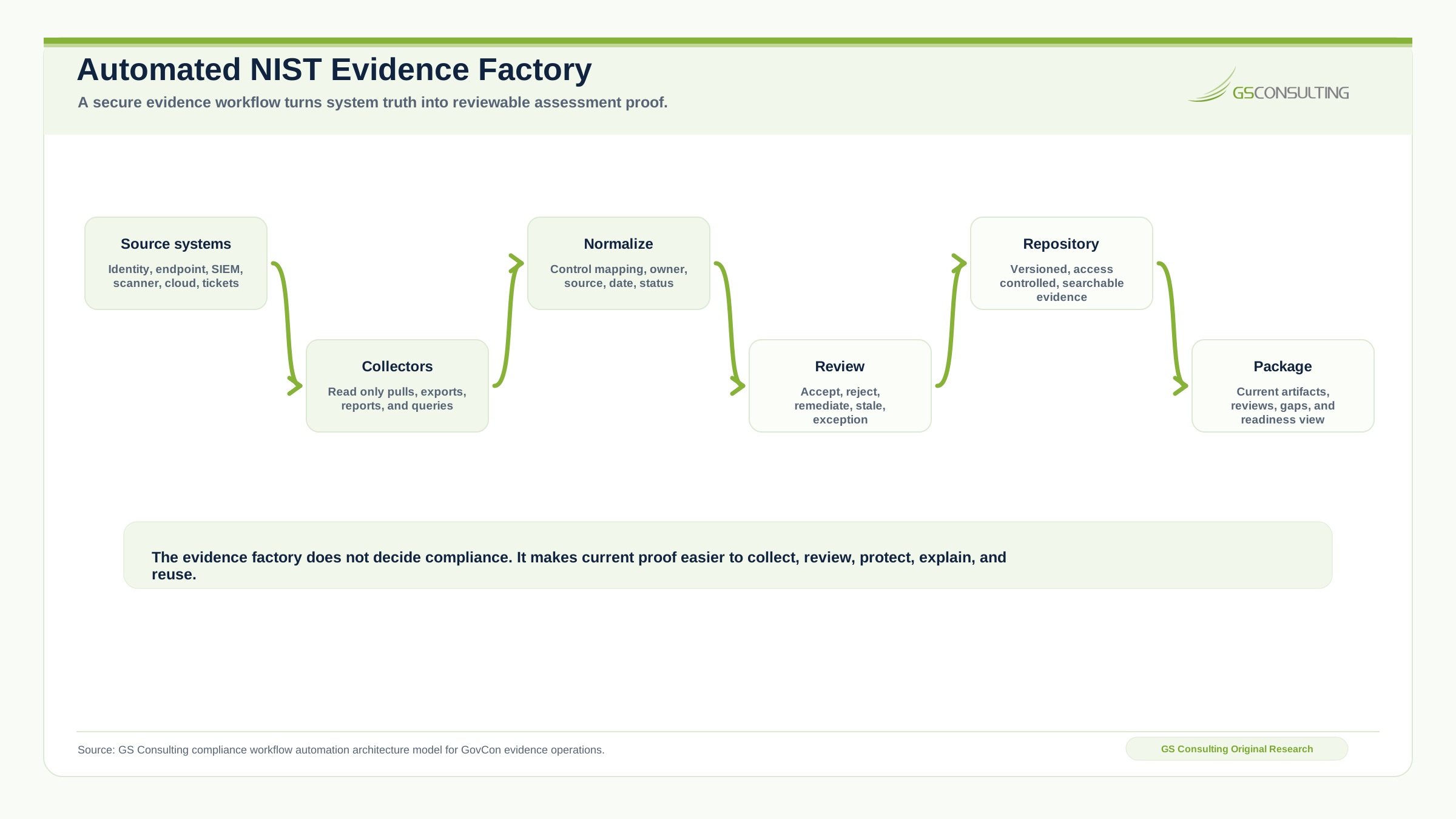
- Layer 1Source systems.
Define the systems where evidence originates, including identity, SIEM, cloud, endpoint, vulnerability, ticketing, firewall, asset inventory, and backup platforms.
- Layer 2Collection connectors.
Use approved APIs, scheduled exports, read only service accounts, secure file transfer, report subscriptions, log queries, and scripted collection jobs.
- Layer 3Normalization.
Turn messy artifacts into consistent metadata such as control mapping, system name, collection date, owner, source, review status, sensitivity, expiration date, and exception status.
- Layer 4Evidence repository.
Store artifacts in a controlled location with access control, version history, retention, search, tagging, review workflow, and audit logs.
- Layer 5Review workflow.
Route artifacts to control owners or reviewers and record accepted, rejected, needs remediation, needs explanation, exception required, stale, or out of scope decisions.
- Layer 6Reporting and alerts.
Show evidence collected, evidence missing, evidence stale, reviews pending, failed collections, control gaps, repeated failures, and upcoming assessment needs.
Service Accounts Are a Serious Control Point
Automated evidence collection usually requires service accounts. That creates risk.
A service account may access identity data, logs, vulnerability information, endpoint posture, cloud resources, ticket records, and sensitive configuration details. It must be managed like a real privileged asset.
The professional approach is least privilege access, approved secrets management, logging, review, documentation, and a defined owner. If evidence automation creates a new uncontrolled account with broad visibility, you solved one compliance problem by creating another.
Do Not Put Sensitive Evidence in Weak Storage
Evidence can be sensitive. Access lists reveal users and roles. Vulnerability scans reveal weaknesses. Firewall exports reveal network structure. System diagrams reveal architecture. Incident tickets reveal security activity. CUI process evidence may reveal controlled data flows.
The repository should have access controls, logging, retention, encryption, and review procedures that match the sensitivity of the artifacts. If the evidence repository becomes a map of your environment, treat it accordingly.
Where AI Helps
AI can help, but not where most people think. The first value is not AI deciding if the organization is compliant.
- Summarizing large evidence artifacts.
- Classifying artifacts by control area.
- Extracting key fields from reports.
- Identifying missing metadata.
- Comparing current artifacts to prior artifacts.
- Drafting reviewer notes.
- Finding stale or duplicate evidence.
- Generating plain language control summaries.
- Routing artifacts to likely owners.
AI should not be the final authority for whether a control is fully implemented, whether CUI scope is correct, whether evidence satisfies an assessor, whether risk is acceptable, whether a POA&M item can be closed, or whether a system is ready for certification.
Let AI organize, extract, summarize, compare, and assist. Do not let it certify.
Building an Evidence Collection Workflow
A good automated workflow starts with a narrow use case. Privileged account review is a strong example.
The workflow might run monthly. It pulls privileged group membership from the identity provider, pulls privileged local administrator membership from endpoint tools, pulls ticket approvals for privileged access changes, compares current membership to the approved list, flags accounts with no approval record, stores the export in the evidence repository, routes the package to the system owner, records approval or remediation, and alerts compliance if review is overdue.
That is real compliance workflow automation. It saves time, but more importantly, it creates a repeatable control operation.
What Can Go Wrong
Automated evidence gathering can fail badly if built carelessly. The failure modes are normal, predictable, and preventable.
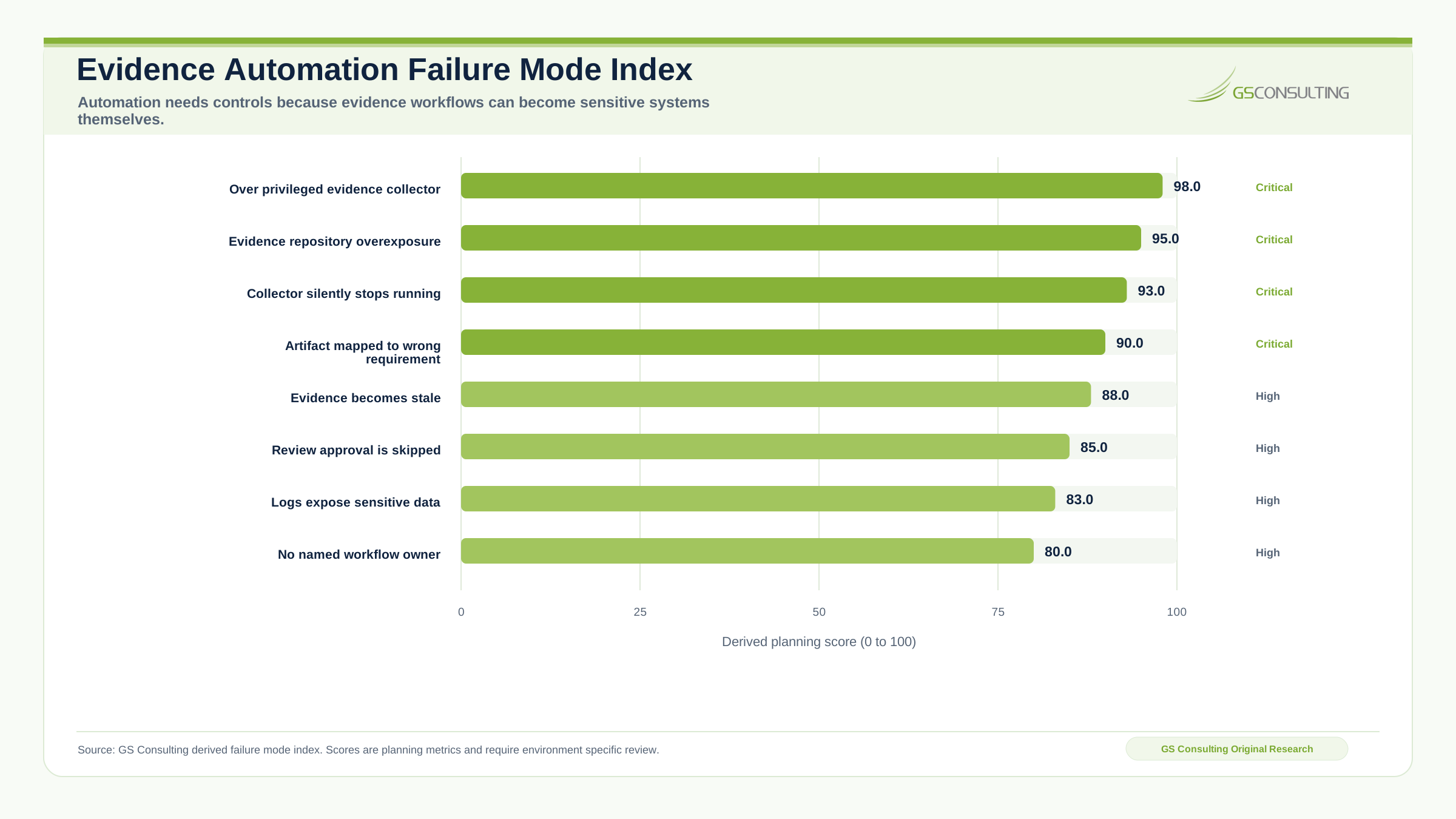
- The workflow collects too much. The automation only needs account status, but it exports unrelated user profile, group, or security data.
- The artifact is mapped incorrectly. The workflow stores a report under the wrong requirement, creating a false sense of coverage.
- Evidence becomes stale. The automation runs once but nobody notices when it stops.
- The collection account is over privileged. The service account has access to far more than it needs.
- Review is skipped. The system collects artifacts, but no human validates whether they are acceptable.
- Logs leak sensitive data. The automation logs raw outputs, vulnerability details, user lists, or CUI metadata.
- Nobody owns the workflow. Production support disappears when the engineer who built it moves on.
Governance for Evidence Automation
Automated evidence workflows need governance. Not bureaucracy. Basic governance.
Define the workflow owner, technical owner, control owner, evidence source, collection schedule, access permissions, storage location, review process, exception path, change process, monitoring requirements, retention period, and risk acceptance process.
Without this, automation becomes another unmanaged system. For GovCon firms, that is a problem because the automation may support CMMC, handle CUI evidence, or touch systems inside the security boundary.
A Practical First Ninety Days
A realistic first phase should not try to automate every requirement. Start with one evidence family. Access control is usually a strong candidate.
- Days 1 to 30Map the evidence.
Identify systems, owners, required artifacts, current manual steps, data sensitivity, review frequency, and repository structure.
- Days 31 to 60Build limited collectors.
Pull identity data, privileged group membership, and access request tickets. Store artifacts with metadata, create review tasks, and flag missing evidence.
- Days 61 to 90Operationalize the process.
Add alerts, exception handling, reviewer approvals, dashboard reporting, freshness checks, workflow documentation, access review, and assessment question testing.
- Next lanesExpand with control.
Move next into logging, vulnerability management, configuration management, incident response, and asset inventory after the first pattern is stable.
What Leadership Should Measure
If leadership wants to know whether evidence automation is working, measure practical outcomes: manual hours reduced, evidence collection success rate, evidence review completion rate, missing artifact count, stale artifact count, failed collection count, time to produce assessment package, repeated evidence requests, control gaps found early, exceptions resolved before assessment, and control owner response time.
Do not measure vanity metrics. A dashboard that says 84 percent automated is useless if the artifacts are stale or unreviewed.
What GS Consulting Builds
This is the kind of problem GS Consulting is built to solve. It is not just compliance advisory. It is not just scripting. It is both.
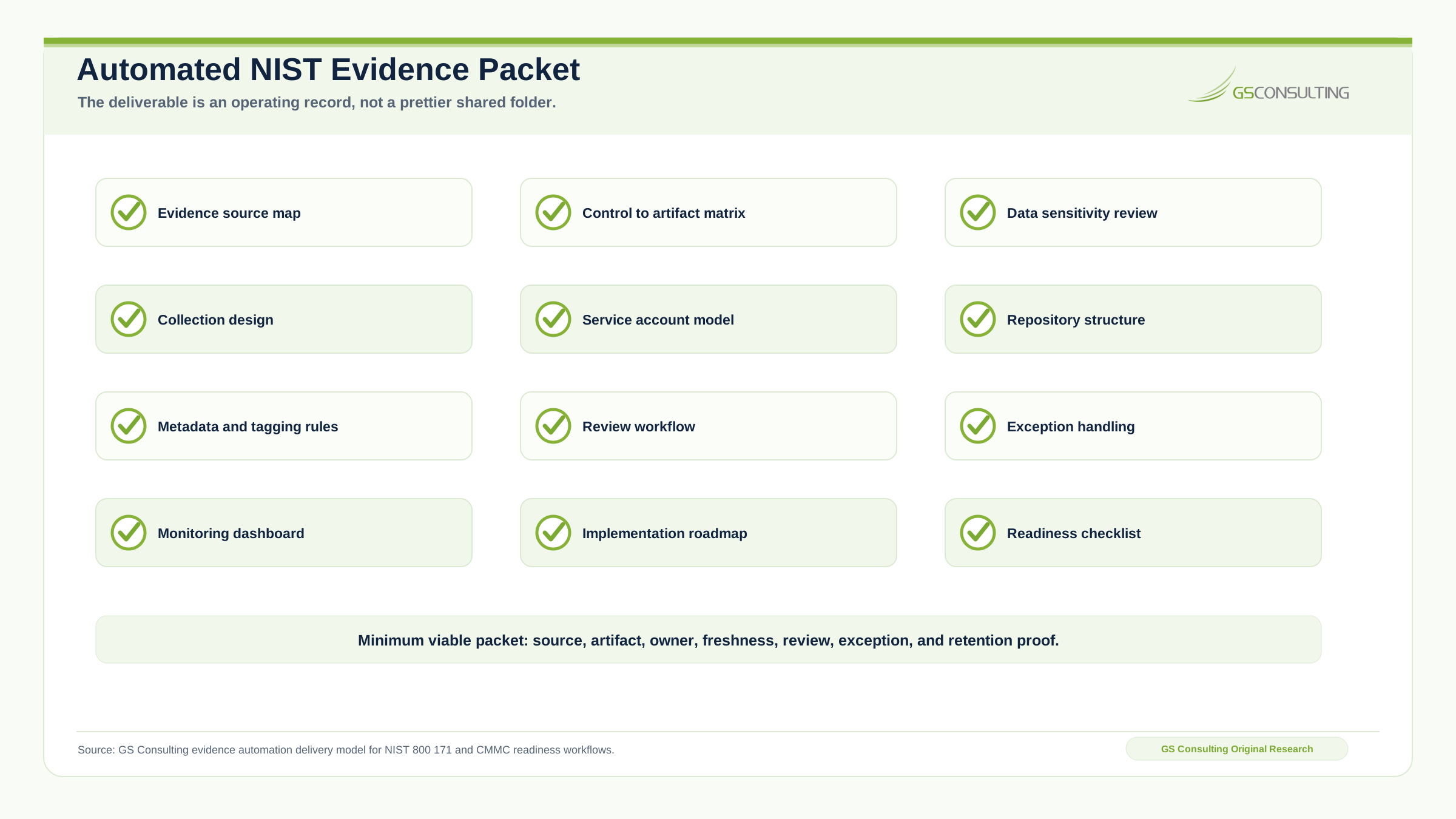
A good engagement should produce an evidence source map, control to artifact matrix, data sensitivity review, automated collection design, service account access model, evidence repository structure, metadata and tagging rules, review workflow, exception handling process, monitoring dashboard, implementation roadmap, pilot collector, and production readiness checklist.
This page is part of our Enterprise AI Process Transformation cluster and supports our main AI workflow automation service. It connects directly to workflow automation security risk assessment, business process mapping for GovCon, legacy database extraction AI, automated data redaction AI, secure AI document processing for CUI, automating federal RFP shredding, AI incident response workflows, and the Enterprise AI Process Automation Framework.
The Bottom Line
Automating NIST 800 171 evidence is not about making compliance look modern. It is about stopping the recurring scramble.
A better model is to engineer compliance evidence as an operating workflow. Pull from trusted systems. Collect on a schedule. Store in a controlled repository. Tag by requirement. Route for review. Alert on gaps. Track exceptions. Preserve proof.
Stop chasing screenshots. Build the evidence workflow.
GS Consulting helps GovCon firms design secure compliance workflow automation for NIST 800 171 evidence collection, automated CMMC evidence gathering, and readiness operations.
Discuss Evidence AutomationResearch Sources and Caveats
The original research in this article uses GS Consulting derived planning metrics based on NIST SP 800 171 Revision 3, NIST SP 800 171A Revision 3, 32 CFR Part 170, the DFARS cybersecurity assessment rule, CMMC evidence expectations, and secure workflow automation design patterns.
The Evidence Automation Fit Index, Family Automation Pressure Index, and Failure Mode Index are planning tools. They are not official CMMC, NIST, DoD, legal, audit, or assessment determinations.
- NIST SP 800 171 Revision 3, Protecting Controlled Unclassified Information in Nonfederal Systems and Organizations
- NIST SP 800 171A Revision 3, Assessing Security Requirements for Controlled Unclassified Information
- Federal Register, Cybersecurity Maturity Model Certification Program
- Electronic Code of Federal Regulations, 32 CFR Part 170 CMMC Program
- Federal Register, DFARS final rule assessing contractor implementation of cybersecurity requirements
- GS Consulting analysis of GovCon evidence automation, compliance workflow automation, CMMC preparation, source system mapping, service account governance, and evidence repository design.
Frequently Asked Questions About Automating NIST 800 171 Evidence
What does automating NIST 800 171 evidence mean?
Automating NIST 800 171 evidence means building secure workflows that collect defined artifacts from approved source systems on a schedule, tag them to requirements, route them for review, and store them in a controlled evidence repository.
Does automated CMMC evidence gathering replace compliance judgment?
No. Automated CMMC evidence gathering improves collection, freshness, traceability, review, and reporting. Compliance judgment still belongs with accountable control owners, security leaders, and assessors.
Which NIST evidence should be automated first?
Start with repeatable, system generated, high burden evidence such as user access exports, privileged group membership, MFA status reports, patch status, vulnerability scan results, endpoint compliance status, SIEM log ingestion health, backup job success reports, and asset inventory exports.
Is continuous NIST monitoring the same as continuous compliance?
No. Continuous NIST monitoring can show current evidence, missing artifacts, stale reviews, failed collections, and control drift. It supports compliance management, but it does not automatically prove every requirement is fully implemented at all times.
What should an automated evidence repository track?
A strong evidence repository should track source system, control mapping, artifact type, owner, collection date, review status, sensitivity, expiration date, exception status, version history, retention, and access permissions.
Suggested Future Reading
- NIST SP 800-171 Explained: Requirements, Controls, and Compliance
- NIST SP 800-171A Assessments: How Evidence Gets Tested
- NIST 800-171 & CUI hub
- AI Workflow Automation
- Enterprise AI Process Transformation
- Workflow Automation Security Risk Assessments
- AI Driven Cybersecurity Incident Response Workflows
- Secure AI Document Processing for CUI
- Automating Federal RFP Shredding with AI
- Automating GovCon Supply Chain Compliance Checks
- Business Process Mapping for Government Contractors
- Enterprise AI Process Automation Framework
- Secure AI Automation Readiness Assessment