Enterprise AI | | 24 min read
Automated Data Redaction Workflows for Public Release

Key Takeaways
Redaction is a release control problem, not a black box problem.
Context Drives Release
A name, location, contract number, or system detail can be harmless in one document and sensitive in another.
Sanitization Must Be Real
The release copy must remove sensitive content, not merely cover it visually while text, metadata, or attachments remain.
Evidence Protects Decisions
Reviewer decisions, validation results, approvals, exceptions, and archive records make public release defensible.
Redaction is not a black box problem. It is an accountability problem.
That is the part most organizations get wrong. They think the goal is to find sensitive words and cover them up. Names. Social Security numbers. Emails. Contract numbers. Locations. System names. Maybe some CUI markings. Maybe some security details.
Run the file through a tool, review the highlights, export the PDF, and move on.
That is not a release process. That is a gamble with nicer software.
Automated data redaction AI can save hundreds of hours, but only if it is engineered as a controlled workflow. The workflow has to know what kind of document it is reviewing, what data is sensitive, what legal or contract rule applies, who approves release, how redactions are validated, and how the final file is proven safe to share.
The tool is not the control. The process is the control.
Automate redaction without losing release control.
GS Consulting helps GovCon firms and regulated organizations map redaction workflows, detect PII and CUI, design human review, validate sanitized output, and preserve public release evidence.
Request a Redaction Workflow AssessmentThis guide supports our main AI workflow automation service and connects directly to secure AI document processing for CUI, NIST SP 800 171 evidence automation, AI audit trails and activity logging, and workflow automation security risk assessment.
Why Redaction Is Harder Than It Looks
Redaction sounds simple until you do it for real. A document may contain obvious sensitive data: names, addresses, phone numbers, dates of birth, email addresses, account numbers, employee IDs, medical details, and financial details.
That is the easy part.
The hard part is context. A name may be public in one document and sensitive in another. A location may be harmless in a press release and restricted in a program file. A contract number may be fine internally and risky when combined with other details. A system name may look ordinary until it reveals architecture.
Redaction is not just entity detection. It is release judgment. That is why AI can help, but AI should not be the final authority.
FOIA Requests Are a Useful Example
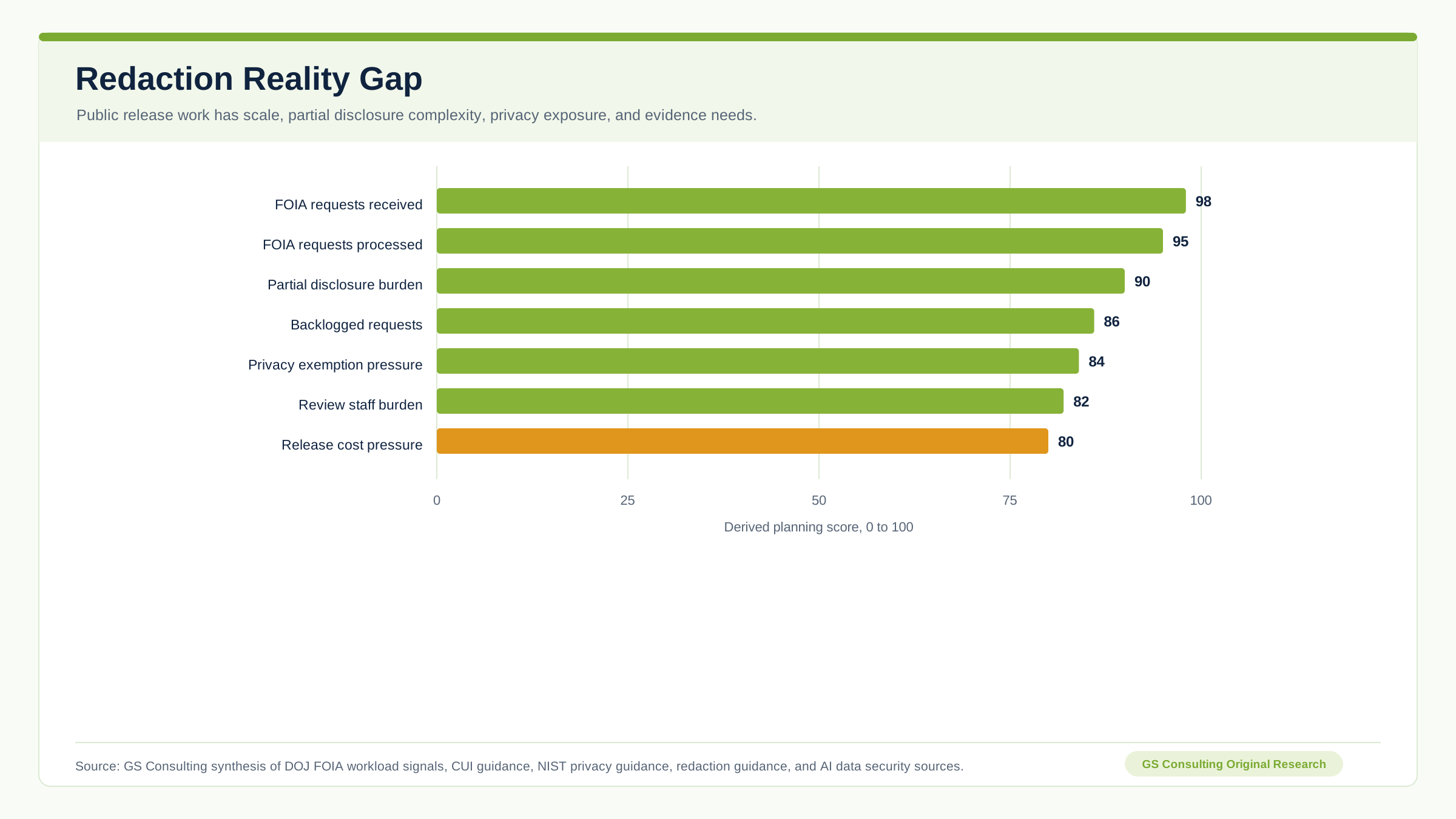
AI for FOIA requests is a strong use case because the process is high volume, repetitive, and legally sensitive. FOIA review usually requires record search, responsive record identification, exemption analysis, redaction, final output review, and preservation of the decision trail.
AI can assist that workflow. It can search, classify, flag, extract, suggest, compare, and prepare review packages. It can reduce the amount of manual reading. It can help reviewers find likely redaction targets faster.
But it should not make final disclosure decisions on its own. The release authority still belongs to accountable humans.
CUI Changes the Risk Profile
Controlled Unclassified Information is not classified, but it still requires safeguarding or dissemination controls. NARA defines CUI as information that requires safeguarding or dissemination controls under applicable law, regulation, and government wide policy.
That matters because public release workflows often deal with mixed content. A file may include ordinary business information, PII, CUI, proprietary details, security details, contract references, and program information in one package.
The redaction workflow has to separate what can be released from what must be protected. A simple PII detector is not enough.
For GovCon firms, CUI may appear in technical reports, contract deliverables, security plans, incident records, engineering diagrams, program status reports, assessment artifacts, subcontractor documents, RFP response materials, configuration records, vulnerability reports, customer correspondence, system inventories, and access records.
If those documents are prepared for external sharing, the redaction workflow needs CUI awareness. Not as a label. As a release control.
NIST, PII, and Privacy Context Still Matter
NIST SP 800 171 Revision 3 provides recommended security requirements for protecting the confidentiality of CUI when that information is in nonfederal systems and organizations. That means a redaction workflow can become part of the controlled environment when it processes CUI, stores source files, stores extracted text, stores AI prompts, stores redaction decisions, or creates sanitized copies.
Automating PII redaction also requires more than finding names. NIST SP 800 122 explains that PII can include information such as names, email addresses, financial records, medical records, and criminal history, and that protection depends on context.
The phrase context matters. A person’s name in a public biography may be releasable. The same name in a witness interview may not be. A work email may be public in one context and sensitive in another. AI can help detect candidates. Humans need to decide release context.
The Bad Assumption: Redaction Means Drawing Black Boxes
Visual redaction is not enough. That is one of the oldest and most damaging mistakes.
A user draws a black rectangle over text in a PDF. The document looks redacted. The underlying text still exists. Or metadata remains. Or comments remain. Or hidden layers remain. Or attachments remain. Or optical character recognition text remains. Or the file history remains.
That is not redaction. That is decoration.
Secure document sanitization must remove the sensitive content from the release copy, not merely hide it visually. The workflow should validate text layers, metadata, comments, hidden content, attachments, bookmarks, file properties, OCR text, version history, export settings, and final output scans.
Redaction Workflows Need Separate Phases
A serious automated redaction workflow should not be one button. It should have controlled phases.
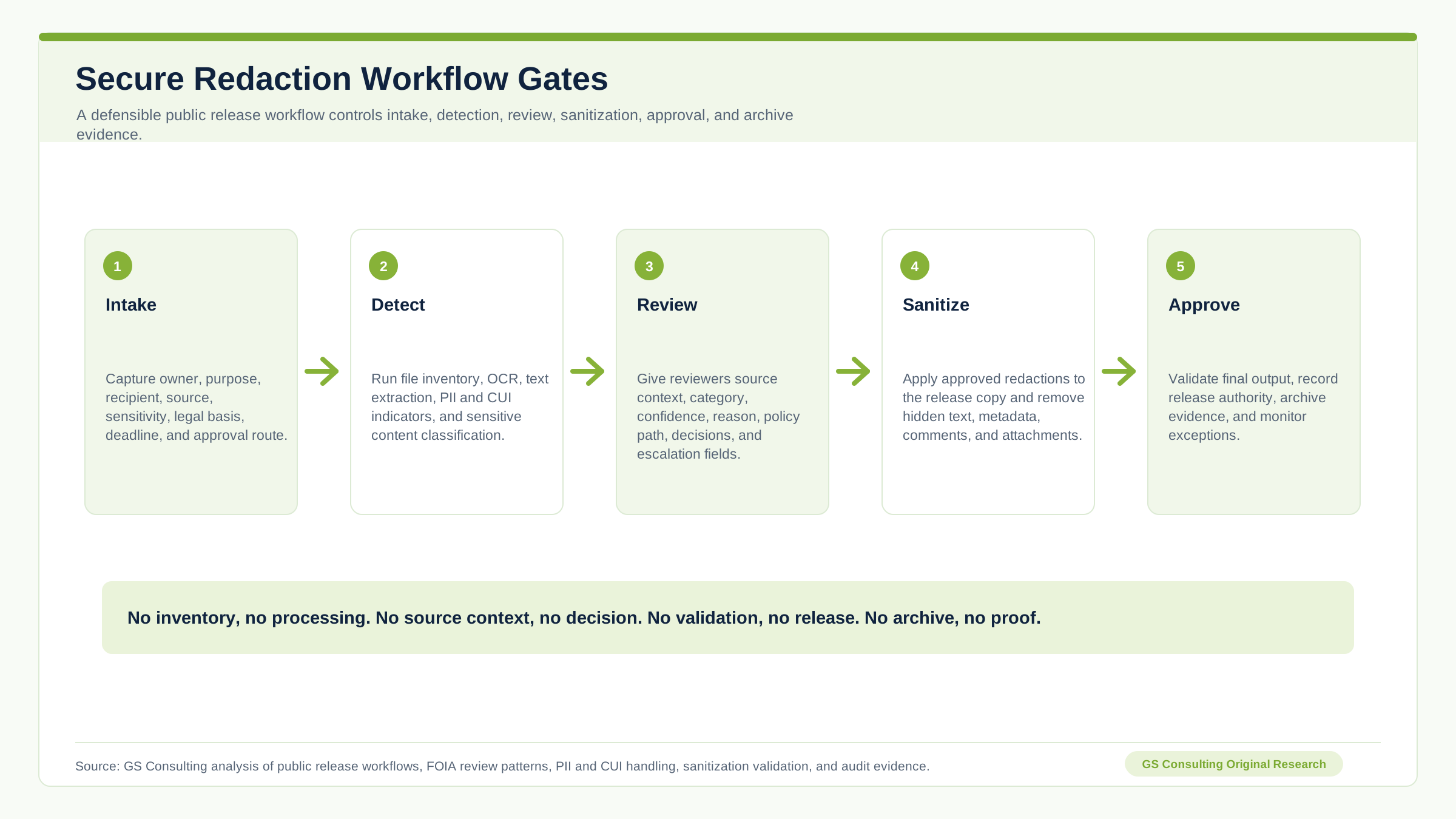
- IntakeCapture document owner, release purpose, recipient, source system, sensitivity, legal basis, deadline, and approval path.
If the workflow does not capture why the document is being released, it cannot support a real decision.
- InventoryList every file, attachment, page count, source, version, author metadata, sensitivity label, status, and reviewer.
Attachments are where mistakes hide.
- ExtractExtract text from digital and scanned files and treat extracted text as sensitive when the source is sensitive.
OCR output can be more dangerous than the original scan because it is searchable and reusable.
- DetectUse rules, AI, pattern matching, dictionaries, metadata, and classification models to find likely sensitive content.
No single method is enough.
- ReviewGive reviewers source context, reason for flagging, confidence, category, decision fields, and escalation paths.
The reviewer should not have to guess why something was flagged.
- ValidateTest whether removed text can be selected, searched, copied, recovered from metadata, or found in attachments and OCR layers.
This is the step that separates real redaction from cosmetic redaction.
Original Research: The Public Release Redaction Control System
GS Consulting analyzed automated redaction as a release control problem, not a document markup problem. The result is the Public Release Redaction Control System, a planning model for deciding which parts of an AI assisted redaction workflow need the strongest controls, evidence, and human review.
The highest priority controls were not the flashiest AI features. They were the controls that make release defensible: CUI and PII context triage, source context candidate records, permanent sanitization validation, classified indicator stop paths, reviewer decision ledgers, document inventory, OCR confidence routing, attachment checks, and audit archive control.
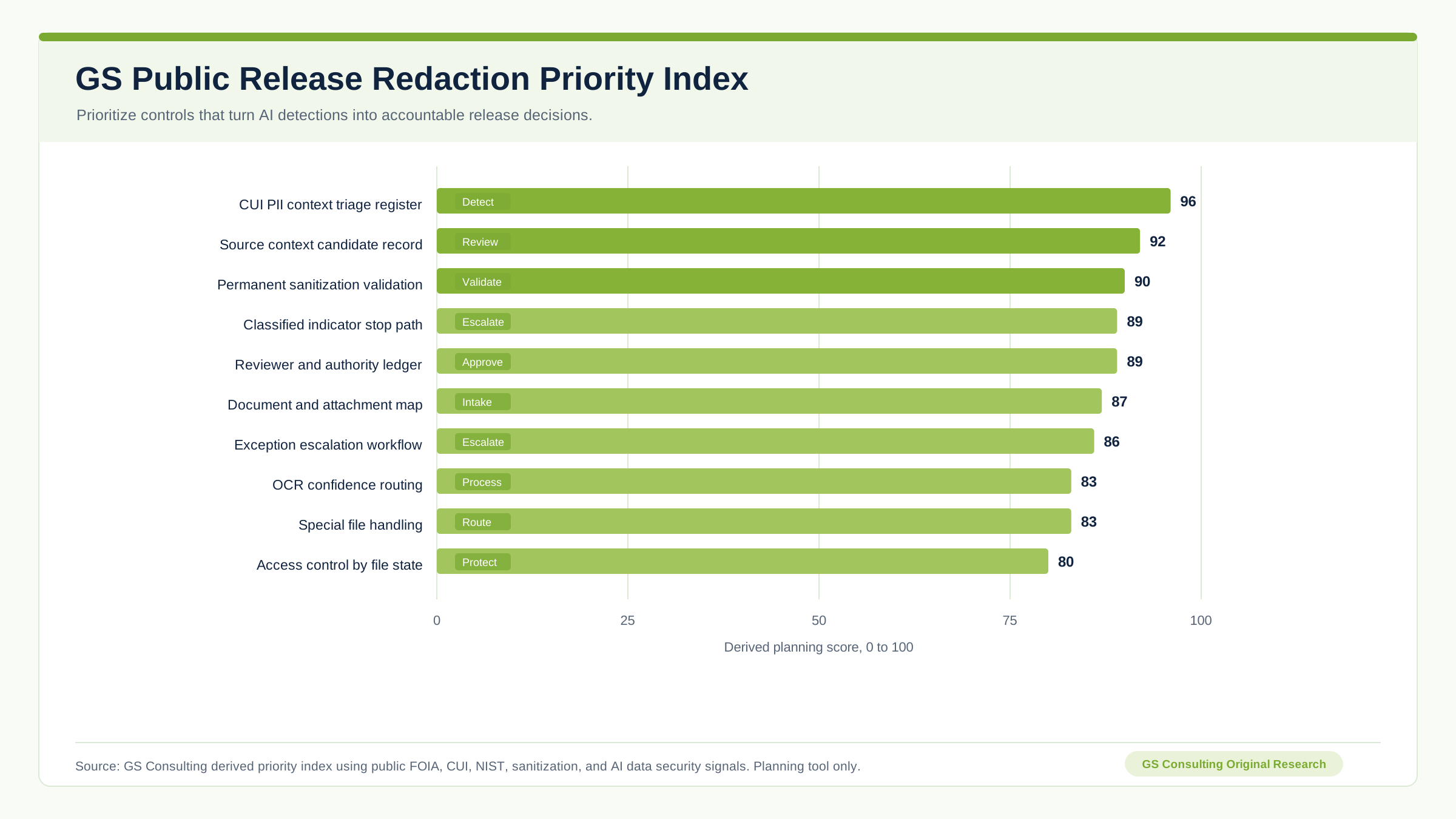
The operating rule is simple: no inventory, no processing. No source context, no decision. No reviewer approval, no redaction. No validation, no release. No archive, no proof.
The GS Public Release Redaction Priority Index, Evidence Burden Model, workflow gates, operating model, and evidence packet are GS Consulting derived planning tools. They are not official legal, FOIA, CUI, CMMC, NIST, DoD, CISA, OWASP, privacy, audit, records management, or regulatory determinations.
Compliance Review Needs Evidence
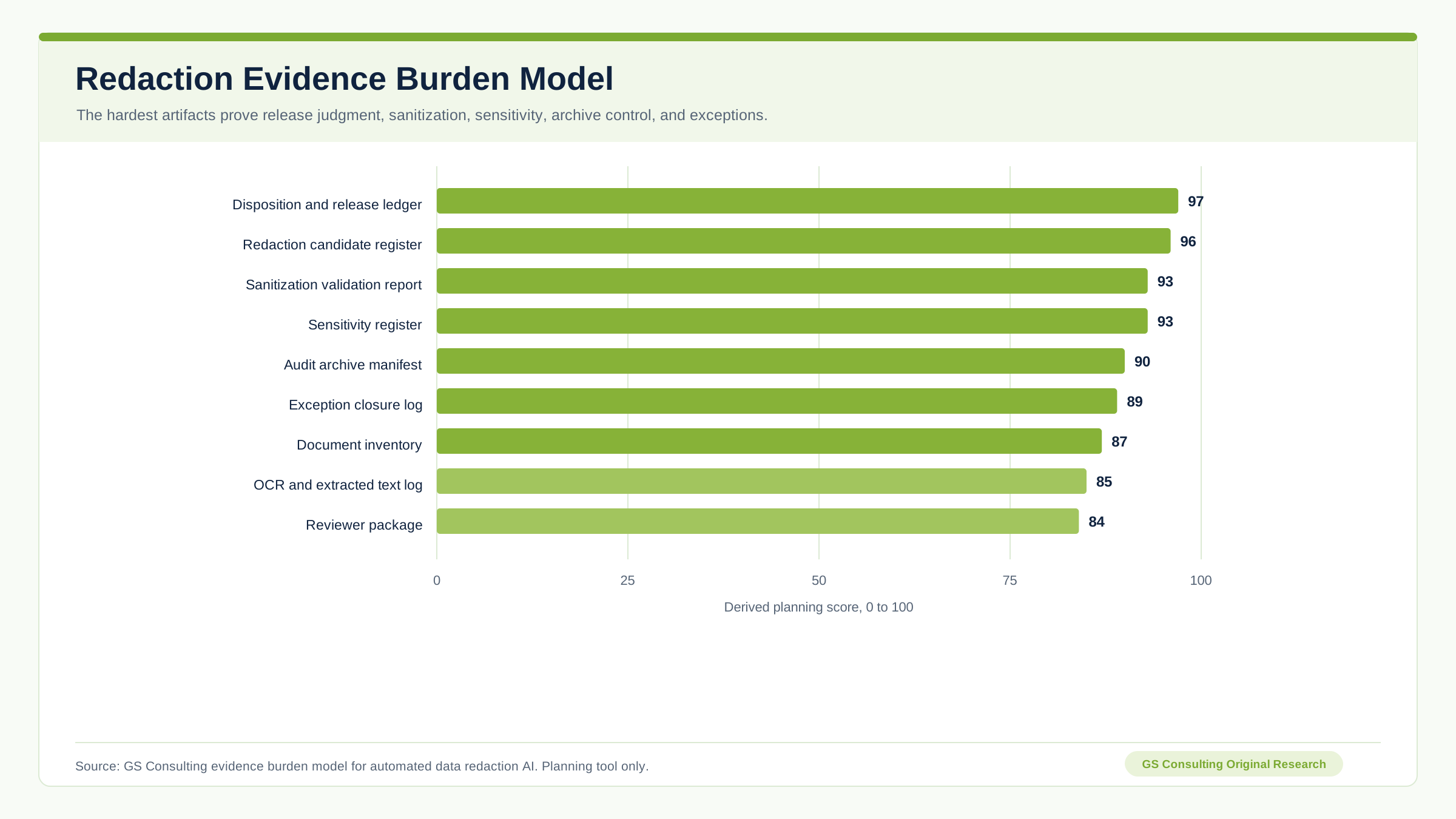
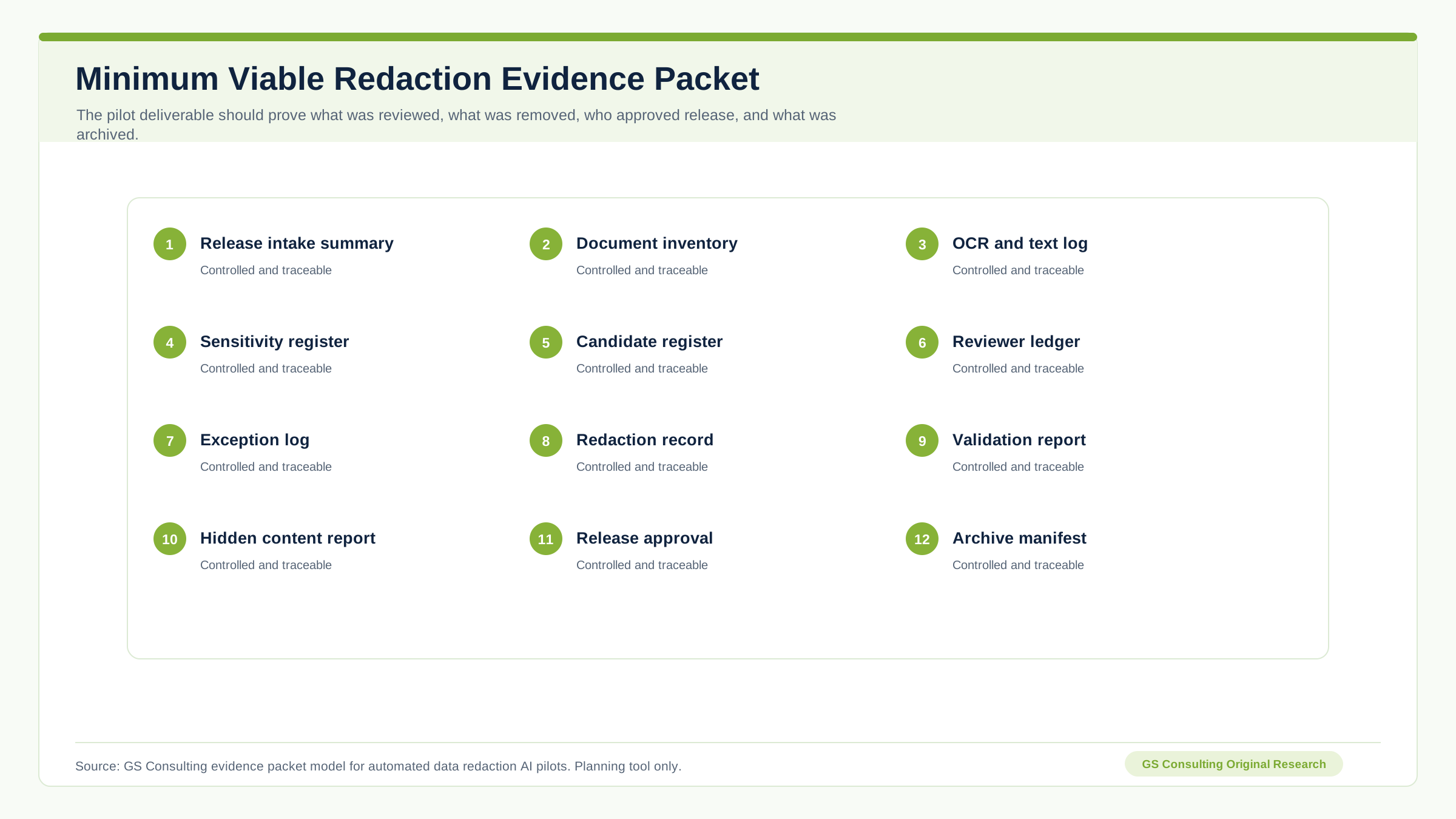
Compliance teams need proof that the release process was followed. A good workflow should prove the document entered through approved intake, sensitive data was flagged, reviewers made decisions, redactions were applied, the output was validated, the final release was approved, the released version was archived, and exceptions were documented.
If compliance has to reconstruct that from email, the workflow failed.
Why AI Helps and Where AI Fails
AI is useful because redaction work is repetitive, dense, and context heavy. AI can help find likely PII, detect CUI markings, identify names in scanned documents, classify document type, summarize release risk, group similar redactions, compare draft and final versions, review attachments, suggest categories, draft reviewer notes, and flag inconsistent decisions.
That can save serious time. For legal and compliance teams, the value is not just faster processing. It is more consistent processing.
But AI will miss things. It may miss sensitive data in tables, misread scanned text, fail on poor image quality, miss context, flag too much, flag too little, misunderstand acronyms, treat all names the same, ignore hidden metadata, or miss information that becomes sensitive only when combined with other information.
That does not mean AI is useless. It means the workflow needs quality control.
Do Not Automate Release Decisions Blindly
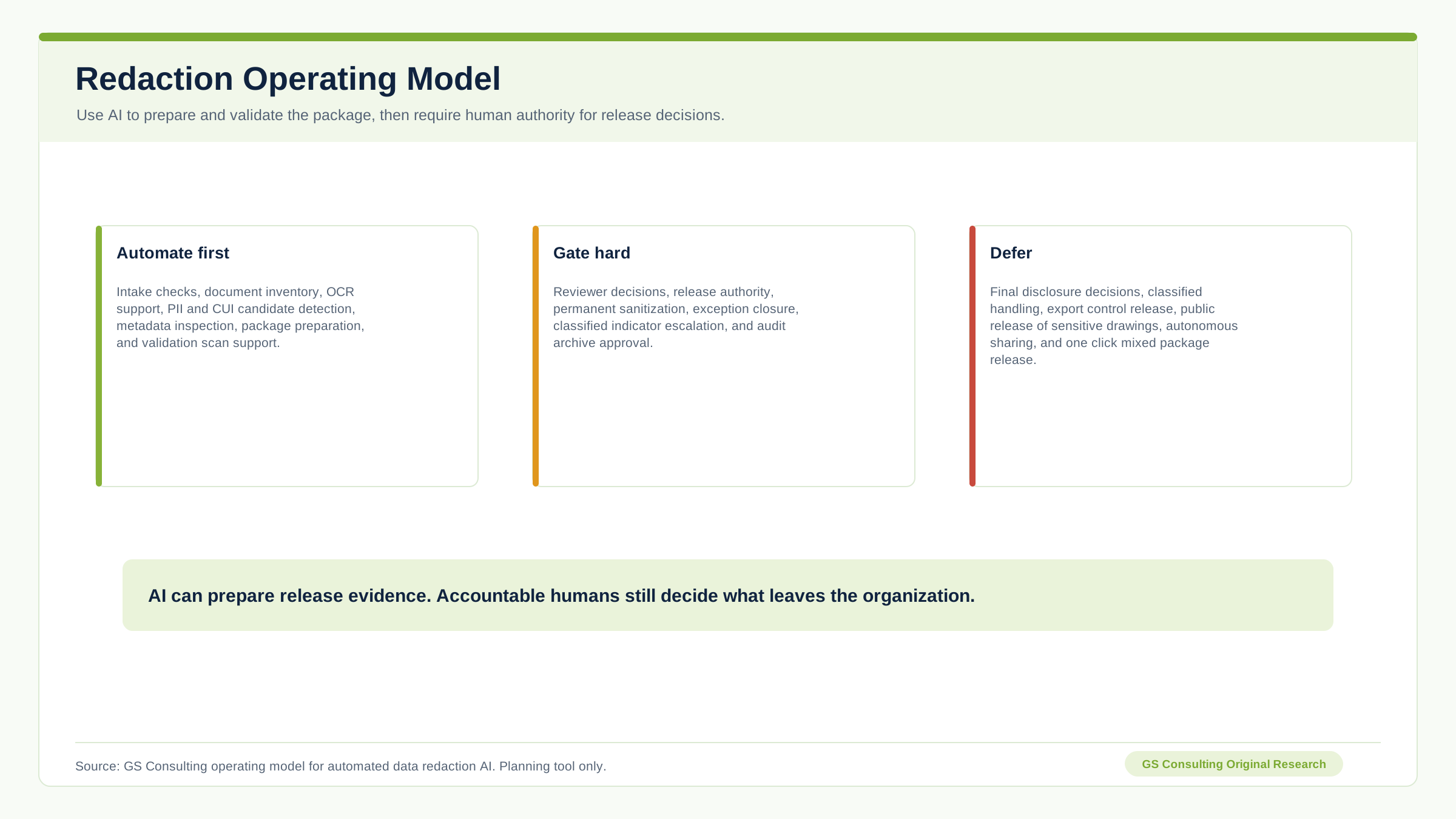
This is the line. AI can recommend. AI can flag. AI can prepare. AI can compare. AI can validate.
AI should not decide on its own that a file is safe for public release.
Public release decisions may involve privacy law, FOIA exemptions, contract obligations, CUI rules, classification concerns, legal privilege, law enforcement sensitivity, customer restrictions, and business risk. That kind of risk management requires more than model output. It requires roles, policy, approval, evidence, and accountability.
Classified Data Requires a Stop Path
Ordinary AI redaction workflows should not be used to process classified information unless the workflow operates in an environment authorized for that classification level with the right personnel, controls, and procedures.
For many GovCon firms, the practical requirement is simple. If a document appears to contain classified markings, classified indicators, or information that may be classified, the workflow should stop normal processing and escalate to the proper security authority.
Do not let an unapproved AI tool process it. Do not let a general release workflow sanitize it casually. Do not let users make their own classification calls.
The Data Model Matters
A redaction workflow needs structured data. Each redaction candidate should become a record with document ID, page number, location, text snippet, detected data type, detection method, confidence, suggested rule, reviewer, reviewer decision, final category, approval status, reason code, exception status, release version, and audit ID.
This lets the organization track patterns: which documents have the most PII, which reviewers are overloaded, which data types create false positives, which release packages have unresolved issues, which tools miss certain patterns, and which programs generate the most redaction burden.
Without structured data, the organization cannot improve the process. It just processes files one at a time forever.
Special File Types Need Special Handling
Spreadsheets, scans, images, and technical drawings are not ordinary PDFs. Sensitive data may exist in hidden columns, formulas, comments, pivot caches, named ranges, metadata, linked data, multiple sheets, filtered rows, external connections, low confidence OCR, handwritten notes, stamps, signatures, diagrams, network names, facility layouts, IP ranges, component labels, part numbers, and data flow descriptions.
If the workflow treats every file type the same, it will miss things. Spreadsheets need spreadsheet checks. Scans need OCR confidence routing. Technical drawings need domain review.
A Practical Architecture for Automated Redaction
A serious redaction workflow should include controlled intake, document processing, a detection engine, review queues, a redaction engine, sanitization validation, approval workflow, audit repository, and reporting dashboard.
This architecture turns redaction from a manual craft into an accountable workflow. It also keeps the redaction work connected to secure workflow automation rather than isolated PDF handling.
- IntakeDocuments enter through approved repositories with owner, purpose, sensitivity, and release context.
- ProcessThe system performs file inventory, OCR, text extraction, metadata inspection, and attachment detection.
- DetectRules, AI, pattern matching, and classification identify likely sensitive content.
- ReviewDetected items route to reviewers based on category, role, risk, and release authority.
- ReleaseApproved redactions are applied, validated, approved, archived, and monitored.
What to Automate First
Start with bounded, repetitive, moderate risk workflows. Good first candidates include FOIA response package first pass review, PII detection in personnel records, CUI marker detection in deliverables, contract document release review, subcontractor package sanitization, incident report public release support, policy document release review, data set deidentification preparation, archive review for public sharing, and PDF metadata sanitization.
Do not start with final legal disclosure decisions, classified document handling, export control release decisions, customer notification approval, public release of sensitive technical drawings, autonomous file sharing, fully automated FOIA release without review, or one click redaction of mixed data packages.
A Practical First 90 Days
A realistic first phase should create an assisted redaction workflow, not a claim that AI can own public release.
- Days 1 to 30Map the release process.
Identify document types, release paths, reviewers, approval authority, current steps, common errors, data categories, file types, storage locations, and the first use case.
- Days 31 to 60Build the assisted workflow.
Create controlled intake, file inventory, OCR and text extraction, PII detection, CUI indicator detection, reviewer queue, decision tracking, categories, and controlled storage.
- Days 61 to 90Validate and harden.
Test real documents, measure missed detections and false positives, inspect metadata sanitization, check hidden text removal, review logs, train reviewers, and define production criteria.
Metrics That Matter
Do not measure only the number of pages processed. Measure manual review hours reduced, time to first redaction package, sensitive items detected, false positive rate, false negative rate, reviewer override rate, OCR failure rate, metadata issue rate, attachment issue rate, validation failure rate, average time to approval, blocked release packages, escalations, missed sensitive items found in quality review, and percentage of releases with a complete audit trail.
The goal is not speed alone. The goal is faster release with fewer mistakes and better proof.
What Leadership Should Demand Before Production
Before using automated redaction for public release, leadership should ask what data types are in scope, what is out of scope, who owns the release decision, how PII and CUI are detected, whether reviewers see source context, whether redactions are permanent, whether metadata and attachments are checked, whether OCR layers are checked, whether logs are safe, where originals are stored, where release copies are stored, and whether the workflow stops on classified indicators.
What GS Consulting Builds
GS Consulting helps GovCon firms and regulated organizations build automated redaction workflows that are secure, reviewable, and defensible. That includes redaction process mapping, document release workflow design, PII detection workflows, CUI indicator detection, sensitive data classification, OCR and file processing design, secure document sanitization, reviewer queue design, human approval workflows, metadata and hidden content validation, audit trail design, exception handling, legal and compliance review routing, secure AI architecture, repository integration, and production support planning.
This is not just a document tool project. It is legal, compliance, security, and engineering working together. That is why it needs a workflow, not a shortcut.
The Bottom Line
Automated data redaction AI is useful when it reduces the manual burden and improves release control. It is dangerous when leaders treat it like a magic eraser.
Public release is one of the worst places to be casual with sensitive information. Once the file leaves, the organization has limited control over what happens next.
A mature workflow can detect PII, flag CUI, identify sensitive technical content, route review, apply permanent redactions, validate the output, and preserve the decision trail. AI can help find the needles. Humans still decide what can leave the building.
Research Sources and Caveats
The original research in this article uses GS Consulting planning metrics. The Public Release Redaction Priority Index, Evidence Burden Model, workflow gates, operating model, and evidence packet are not official benchmarks, compliance determinations, legal conclusions, audit findings, privacy rulings, records decisions, or guarantees of project performance.
FOIA data is a public sector workload signal, not a GovCon contractor benchmark. Any workflow touching PII, CUI, export controlled information, legal privilege, contract sensitive information, customer restricted data, security information, technical drawings, incident records, or classified indicators should be reviewed by the appropriate legal, privacy, security, compliance, records, contracts, and program owners before production use.
- Department of Justice FY 2025 Annual FOIA Report Summary
- FOIA.gov
- NARA CUI Registry
- Code of Federal Regulations CMMC Program rule
- NIST SP 800 171 Revision 3
- NIST SP 800 122 Guide to Protecting PII
- NIST Privacy Framework
- ISOO implementing directive on classified national security information
- NSA Artificial Intelligence Security Center guidance on AI data security
- OWASP Top 10 for Large Language Model Applications
Build the release workflow that proves sensitive data stayed protected.
GS Consulting helps legal, compliance, security, and operations teams automate redaction review without turning public release into an uncontrolled AI shortcut.
Contact GS ConsultingFrequently Asked Questions About Automated Data Redaction AI
What is automated data redaction AI?
Automated data redaction AI uses rules, pattern matching, document classification, OCR, and AI models to identify likely sensitive content, prepare proposed redactions, route human review, apply approved removals, validate sanitized output, and preserve release evidence.
Can AI make final public release decisions?
AI should not make final public release decisions on its own. It can flag, classify, compare, prepare, and validate, but accountable reviewers should decide what can be released based on privacy, CUI, contract, legal, security, records, and program requirements.
Why is visual PDF masking not enough?
Visual masking may only hide text on the screen. Secure document sanitization should permanently remove sensitive content from the release copy and validate that text layers, metadata, comments, attachments, hidden objects, OCR text, and file properties do not still expose the redacted information.
What should be automated first in redaction workflows?
Start with bounded assisted workflows such as FOIA package first pass review, PII detection, CUI marker detection, contract release review, subcontractor package sanitization, incident report release support, policy document review, and PDF metadata sanitization.
What evidence should an automated redaction workflow preserve?
The workflow should preserve the release intake summary, document inventory, OCR and extracted text log, sensitivity register, redaction candidate register, reviewer decisions, exception log, redaction application record, validation report, final release approval, released file manifest, and audit archive manifest.
Suggested Future Reading
- AI Workflow Automation
- Enterprise AI Process Transformation
- Secure AI Document Processing for CUI
- AI Document Processing: A Practical Implementation Guide
- AI Document Processing Hub
- Automating NIST SP 800 171 Compliance Evidence Collection
- AI Audit Trails and Activity Logging
- Workflow Automation Security Risk Assessments
- Legacy Database Extraction Workflows Using AI