Enterprise AI | | 24 min read
Secure AI Document Processing for CUI

Key Takeaways
CUI document AI is a data path control problem.
OCR Creates New Data
Extracted text, metadata, summaries, embeddings, prompts, outputs, logs, and search snippets can inherit sensitivity from the source document.
Search Needs Permissions
A search index over sensitive documents can become a data spill if results and snippets ignore document permissions, program access, and need to know.
Review Needs Sources
AI output should preserve page, section, field, and source references so reviewers can verify the document instead of trusting a polished summary.
Most document automation projects fail because they treat sensitive documents like ordinary paperwork.
Pair the CUI boundary review with document workflow evidence and approval design. Protecting the source does not by itself prove who reviewed an output or where the approved record went.
A GovCon firm does not just have PDFs. It has contracts, technical reports, drawings, deliverables, security plans, assessment evidence, personnel records, subcontractor packages, customer files, vulnerability reports, incident notes, and scanned records that may contain Controlled Unclassified Information.
If your AI workflow reads those documents, extracts text, summarizes them, routes them, stores outputs, or logs prompts, then you are no longer talking about a simple productivity tool. You are building a sensitive data processing workflow.
Secure AI document processing is not upload files and ask questions. It is a controlled engineering problem: identify the data, protect the boundary, extract the text, classify the content, route the document, review the output, preserve the audit trail, and prevent the automation from creating a data spill.
Anything less is just faster mishandling of sensitive information.
Process sensitive documents without losing control.
GS Consulting helps GovCon firms design secure AI document processing workflows for CUI, scanned records, contract files, compliance evidence, and technical documents.
Discuss Secure Document AIWhy CUI Document Processing Is Different
CUI is not classified information, but it is not ordinary business data either. NARA describes CUI as information that requires safeguarding or dissemination controls under applicable law, regulations, and government wide policies.
That definition matters because many companies treat CUI like a label on a document. It is more than that. It changes how the document should be stored, accessed, transmitted, processed, copied, reviewed, logged, retained, and destroyed.
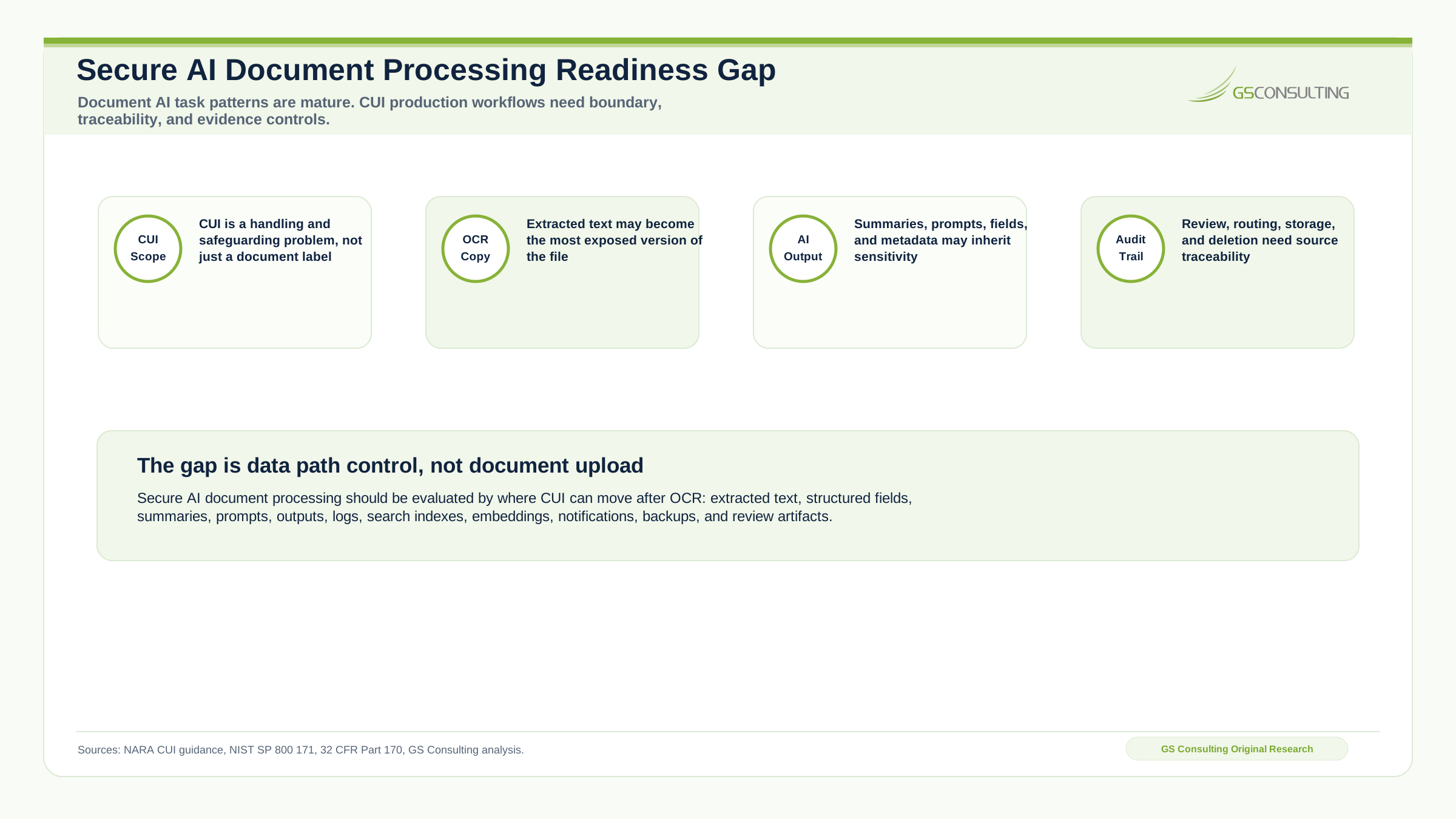
The risk is not only that the original document gets exposed. The extracted text can be sensitive. The summary can be sensitive. The metadata can be sensitive. The embeddings can be sensitive. The search index can be sensitive. The logs can be sensitive. The prompt history can be sensitive. The routing decision can be sensitive. The audit package can be sensitive.
The Bad Assumption: OCR Is Harmless
A lot of teams start with OCR because it feels safe. It is just text extraction.
No. OCR can turn a locked away scanned document into searchable, copyable, reusable text. That can be valuable. It can also increase exposure if the new text is stored in the wrong place or indexed by the wrong system.
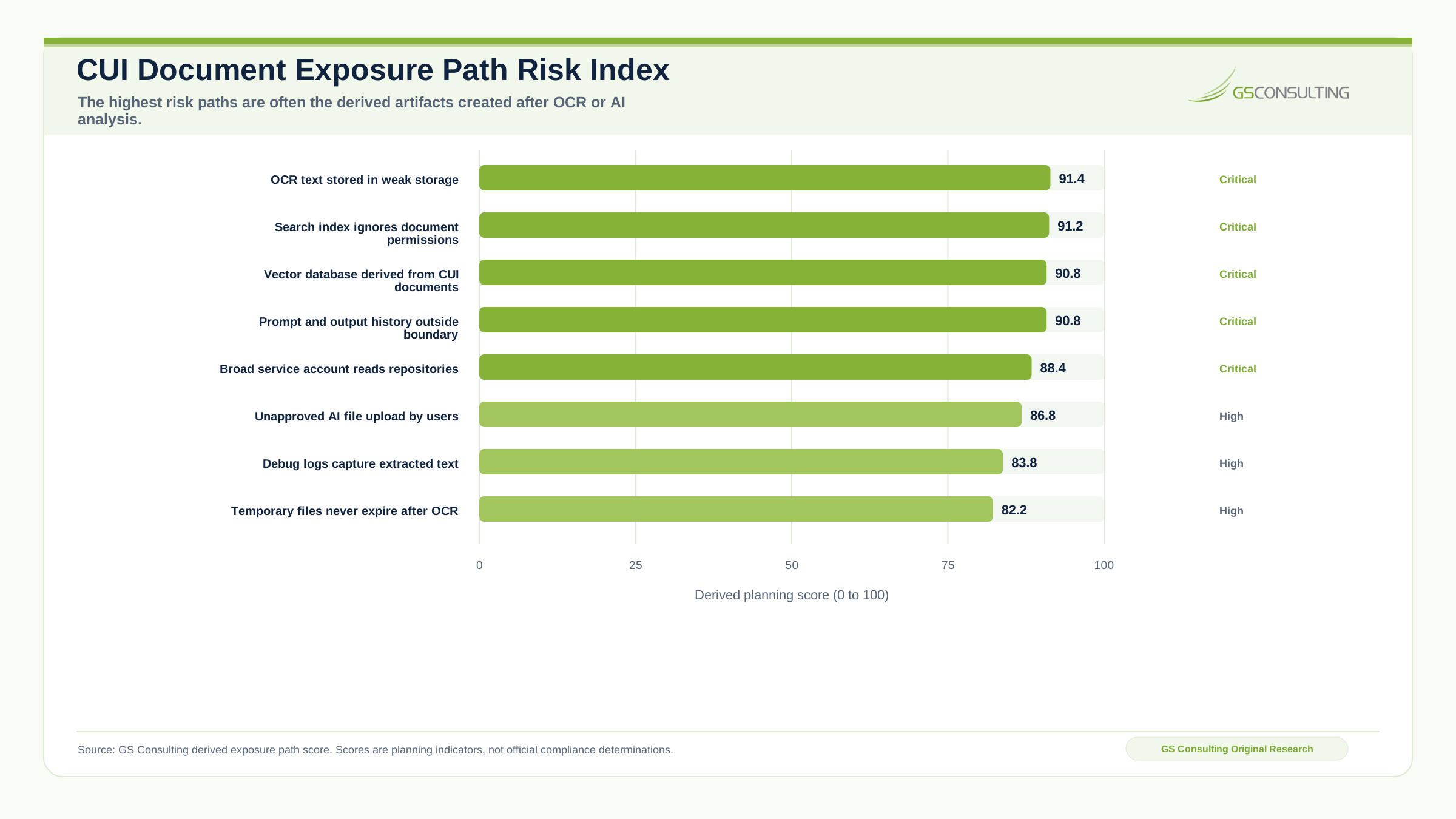
A scanned PDF sitting in a controlled repository may be hard to search, but at least it is contained. After OCR, the text may land in temporary processing folders, model prompts, search indexes, debug logs, application databases, vector stores, workflow queues, email notifications, review dashboards, cloud object storage, error reports, developer tools, or analytics systems.
The question is not can we extract the text. The question is where does the text go after extraction?
CUI Processing Starts With Scope
Before engineering anything, define scope. What documents are being processed? Who owns them? Which contracts do they support? Do they contain CUI, PII, export controlled data, contract sensitive information, technical data, vulnerability information, customer restrictions, or subcontractor information?
NIST SP 800 171 Revision 3 provides recommended security requirements for protecting the confidentiality of CUI when that information is resident in nonfederal systems and organizations. That means a GovCon document automation workflow cannot ignore system boundaries.
If the workflow processes, stores, or transmits CUI, the system components involved in that workflow matter. The OCR engine matters. The AI model matters. The storage layer matters. The search index matters. The logging path matters. The reviewer dashboard matters. The integration with email, ticketing, and document management matters.
CUI scope is not just about the original folder. It follows the data.
Intelligent Document Processing GovCon Teams Actually Need
Intelligent document processing sounds like a software category. For GovCon, it needs to become an operating capability.
- Ingest approved documents from approved locations.
- Detect document type.
- Extract text from scanned or digital files.
- Classify sensitivity.
- Identify CUI indicators and markings.
- Extract key fields.
- Summarize content for approved users.
- Route documents to the right owner.
- Flag missing markings or metadata.
- Create review tasks.
- Store outputs in controlled locations.
- Preserve source references.
- Log actions without leaking content.
That is the job. Not a chatbot. Not a folder search tool. A workflow.
What Types of Documents Make Sense
Good candidates for secure AI document processing are high volume, high friction document sets that are hard to search, operationally important, and sensitive enough to require control.
- Contract documents and statements of work.
- Task orders and RFP attachments.
- Security plans and CMMC evidence.
- NIST evidence and assessment artifacts.
- Technical reports and engineering drawings.
- Subcontractor packages and vendor compliance documents.
- Incident response records.
- Access request packages.
- Program deliverables.
- Policy documents and legacy scanned records.
- Customer correspondence, forms, and certifications.
What Should Not Be Processed First
Do not start with the most sensitive, least understood document set. Avoid documents with unclear ownership, unknown CUI status, mixed classification risk, poor markings, high legal sensitivity, export control concerns, unclear retention requirements, uncontrolled source folders, no defined reviewers, no approved processing environment, no data flow map, or no audit plan.
The first project should prove the workflow can process sensitive documents safely. It should not test the organization’s ability to survive a mistake.
The Workflow Should Start Before the AI Model
A secure AI document processing workflow should have controls before OCR, before AI analysis, before search, before routing, and before production storage.
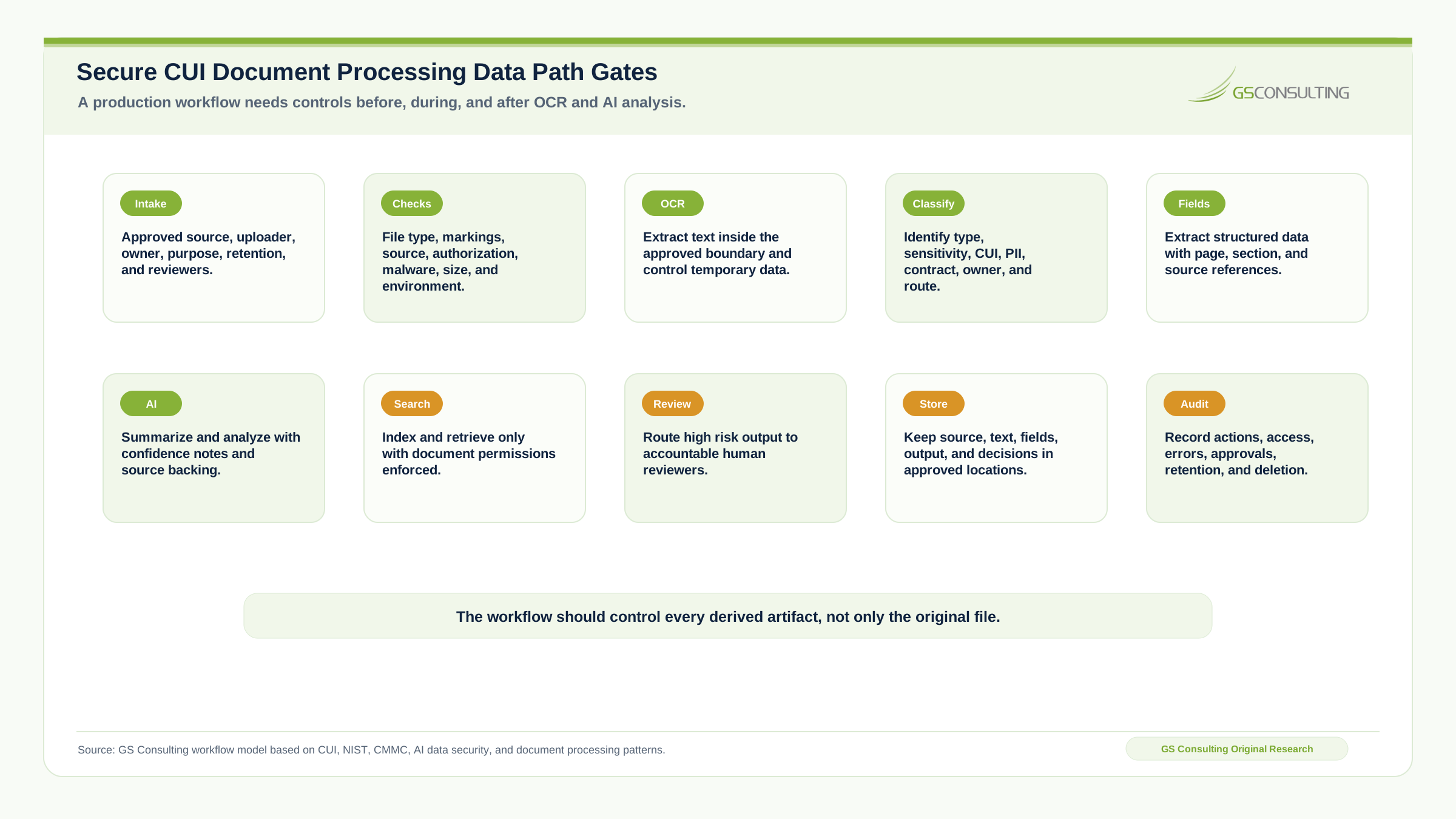
- Gate 1Intake control.
Accept documents only from approved repositories, upload portals, contract systems, GRC platforms, or controlled folders with source, owner, purpose, retention, and reviewer metadata.
- Gate 2Pre processing checks.
Check file type, source, markings, user authorization, malware risk, file size, corruption, encryption, active content, and approved processing environment.
- Gate 3OCR and text extraction.
Run OCR inside the approved boundary and define temporary storage, retention, access, index use, prompt use, error handling, and failed OCR review.
- Gate 4Classification.
Classify document type, sensitivity, CUI indicators, PII indicators, contract association, program association, owner, review route, retention category, and approval level.
- Gate 5Extraction.
Extract structured fields such as contract number, CAGE code, due date, clause number, control reference, system name, finding ID, owner, and required action with source traceability.
- Gate 6AI summary or analysis.
Require summaries and analysis to include source references, confidence notes, known gaps, required review, suggested owner, next action, and sensitivity warnings where needed.
- Gate 7Human review.
Define who reviews output, what they review, what decisions they can make, what happens when they reject output, and where review records are stored.
- Gate 8Controlled routing and storage.
Route by role, need, sensitivity, program, and access rights. Store originals, extracted text, AI outputs, structured data, and review decisions in approved locations.
- Gate 9Search and retrieval.
Enforce identity, role, program access, contract access, document permissions, CUI requirements, need to know, query logging, result filtering, and snippet control.
- Gate 10Audit trail.
Log receipt, OCR, extraction, classification, AI output, review, routing, storage, errors, access, deletion, and exceptions without leaking unnecessary sensitive content.
Search, Embeddings, and Prompt History Need Controls
Search is powerful. Search is also dangerous. Once documents are OCR processed and indexed, users may find information they could not easily find before. That is the point, but it can break access assumptions.
If the search index does not enforce document permissions, sensitive information can leak across teams, programs, contracts, or roles. A search result snippet can leak enough sensitive information to matter.
Many AI document workflows also use embeddings. Some teams assume embeddings are safe because they are not readable text. That is a weak assumption. Treat the vector store as sensitive if it is derived from sensitive documents. It should have access controls, encryption, retention rules, tenant separation, backup controls, monitoring, and deletion procedures.
Prompts and outputs are records too. They may include source text, snippets, extracted data, summaries, user questions, reviewer notes, or structured output. Do not let prompt history become an unmanaged sensitive data repository.
Human Review Should Be Based on Risk
Not every document needs the same review. A mature workflow should use risk based routing. Low risk documents may only need automated metadata extraction. Moderate risk documents may need document owner review. High risk documents may need compliance, legal, security, or program leadership review.
Review triggers include CUI detected, missing CUI markings, PII detected, export control indicators, contract clause detected, incident related content, vulnerability data, external release request, subcontractor package, customer specific restriction, low confidence extraction, conflicting metadata, or unknown document owner.
The workflow should not route everything to everyone. That creates fatigue. Route the right work to the right person.
The Output Must Preserve Source Traceability
For CUI document processing, traceability is everything. If the system extracts a requirement, the reviewer should see the source. If the system summarizes a technical report, the reviewer should see the sections used. If the system flags CUI, the reviewer should see the marking or content indicator. If it extracts a deadline, the reviewer should see the page and sentence.
A summary with no source is a suggestion. A summary with source traceability is a review aid.
Redaction Is a Separate Workflow
Do not confuse document processing with redaction. A workflow that can find sensitive data is not automatically safe for public release.
Redaction requires detection, review, approval, permanent removal, output validation, metadata cleaning, version control, release authority, and audit trail. Masking text visually is not always enough. If a workflow creates redacted documents, the team must validate that underlying text, metadata, comments, hidden layers, and attachments do not still contain sensitive information.
Secure AI document processing can support redaction. It should not casually perform final release.
Common Failure Patterns
- Users upload sensitive documents into unapproved AI tools. A user wants speed, a tool is available, and nobody checks whether the platform is approved for the data.
- OCR output lands in weak storage. The original document was controlled, but the extracted text is dumped into a database with weaker permissions.
- Search ignores access boundaries. The index returns results from programs or contracts the user should not access.
- Logs capture sensitive text. Debug logging copies CUI related content, PII, security details, or extracted text into a different platform.
- AI output gets trusted too quickly. The model extracts a requirement or summary, and a reviewer assumes it is correct because it sounds confident.
- No one owns exception handling. Failed OCR, unreadable files, missing markings, uncertain classification, and conflicting metadata have no accountable queue.
- Temporary files never disappear. Intermediate files persist without retention rules or deletion verification.
- The workflow cannot explain itself. The team cannot show the data flow, access controls, model behavior, review records, or outputs.
A Practical Secure Architecture
A good architecture does not have to be exotic. It does need to be deliberate.
- Layer 1Controlled intake.
Documents enter through approved repositories or upload points with authentication, access control, malware scanning, metadata capture, and purpose limitation.
- Layer 2Processing environment.
OCR and AI processing happen inside an environment approved for the data type, with network controls, access restrictions, encryption, logging, and monitored service accounts.
- Layer 3Classification service.
A rules and AI assisted layer identifies document type, sensitivity, markings, ownership, and routing requirements.
- Layer 4Extraction and AI analysis.
The workflow extracts text and structured fields, preserves source references, summarizes, compares, labels, and recommends without making high risk decisions on its own.
- Layer 5Review and repository.
Authorized humans review classifications, extracted fields, summaries, routing decisions, and exceptions. Approved artifacts are stored with access controls and retention rules.
- Layer 6Search, audit, and integration.
Search respects permissions. The workflow records actions, access, errors, approvals, and data movement, then integrates with contract systems, GRC tools, ticketing platforms, and dashboards through secure APIs.
What to Automate First
Start with document workflows that have clear value and manageable risk. The best first pilots are bounded, measurable, source controlled, and review friendly.
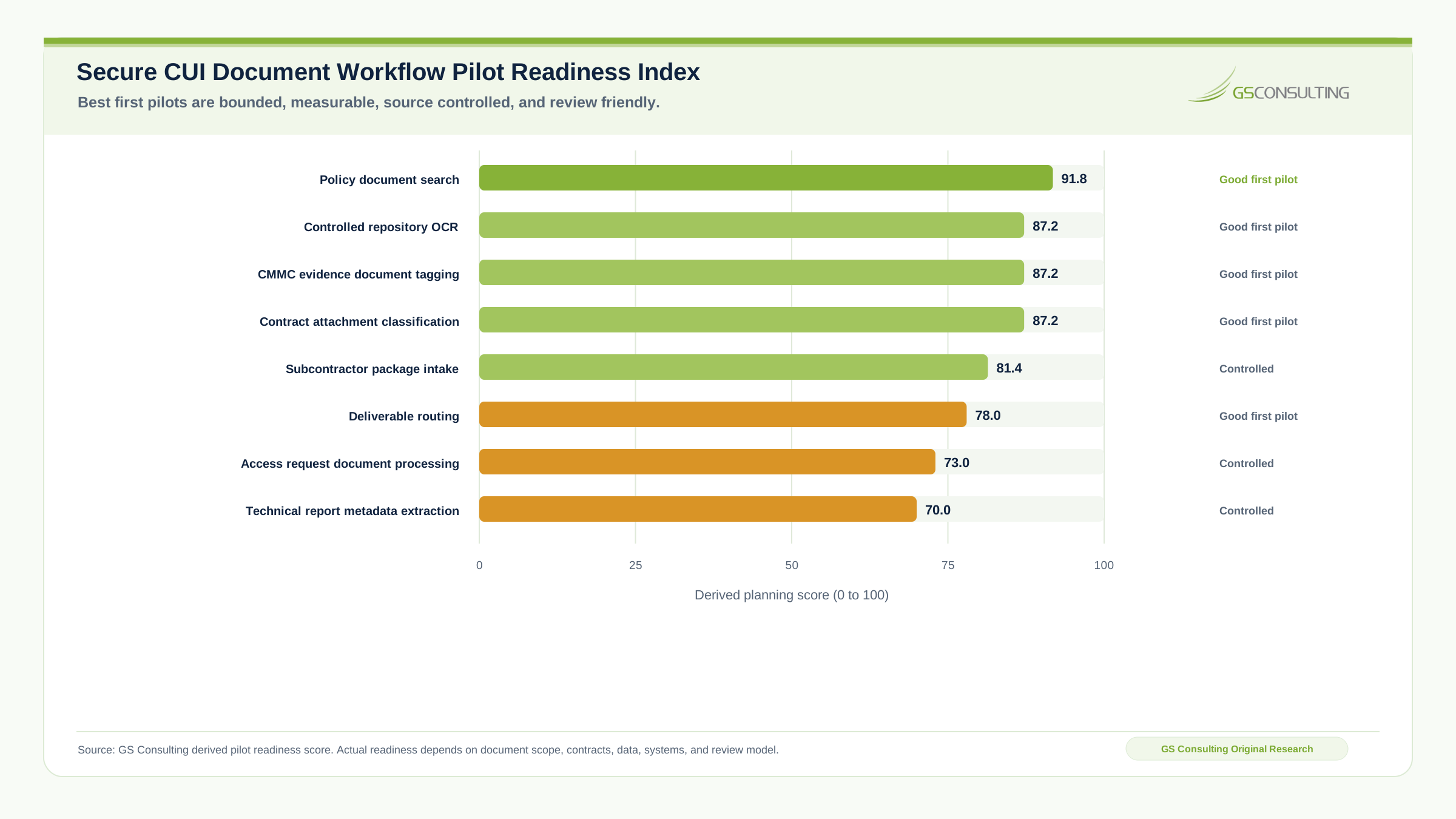
Strong first use cases include policy document search, controlled repository OCR, CMMC evidence document tagging, contract attachment classification, subcontractor package intake, deliverable routing, access request document processing, and technical report metadata extraction.
Avoid starting with public release redaction, legal final interpretation, export control release decisions, incident reportability decisions, customer notification drafting without review, unbounded search across all CUI repositories, or autonomous document sharing.
How to Measure Success
Do not measure success by the number of documents processed. That is a weak metric. A system can process 10,000 documents badly.
Measure manual review hours reduced, time to classify document type, time to locate key information, percentage of documents with correct metadata, OCR accuracy by document type, extraction accuracy by field, review approval rate, exception rate, stale document count, unauthorized access attempts, search result permission failures, time to route documents to owners, evidence package creation time, missing markings detected, and user rework reduced.
What a First Ninety Days Should Look Like
A realistic first phase should focus on one controlled document set.
- Days 1 to 30Map the documents.
Identify document types, owners, repositories, CUI and PII risk, current manual steps, access permissions, storage rules, retention rules, search pain, and the first use case.
- Days 31 to 60Build the controlled pilot.
Create secure intake, OCR inside the approved environment, metadata schema, classification rules, AI assisted summary or extraction, source references, review routing, logging, and controlled storage.
- Days 61 to 90Validate and harden.
Test with real documents, measure extraction accuracy, review false positives and false negatives, inspect logs for sensitive leakage, test search permissions, document the data flow, define support ownership, and create production readiness criteria.
What Leadership Should Demand Before Production
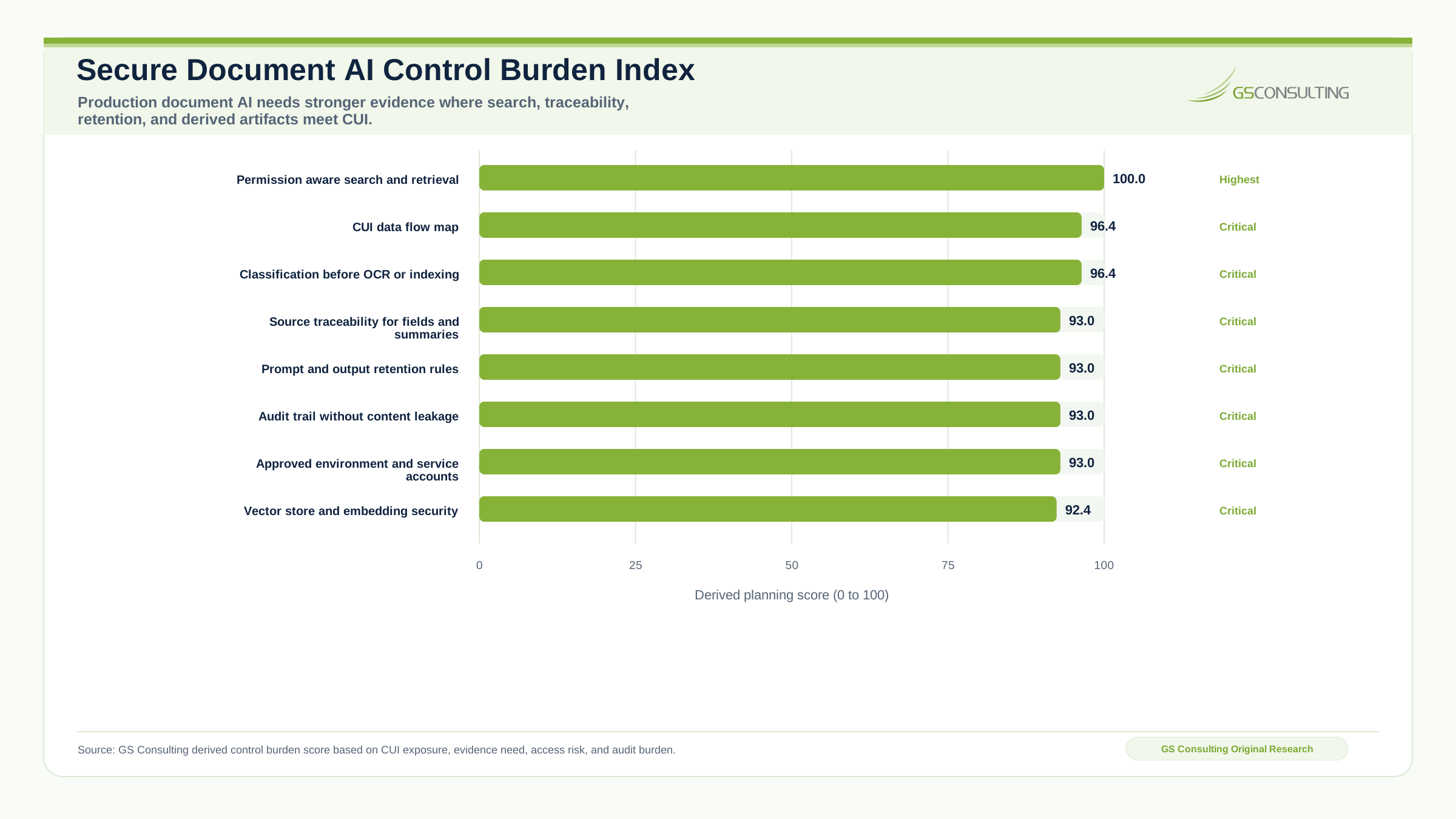
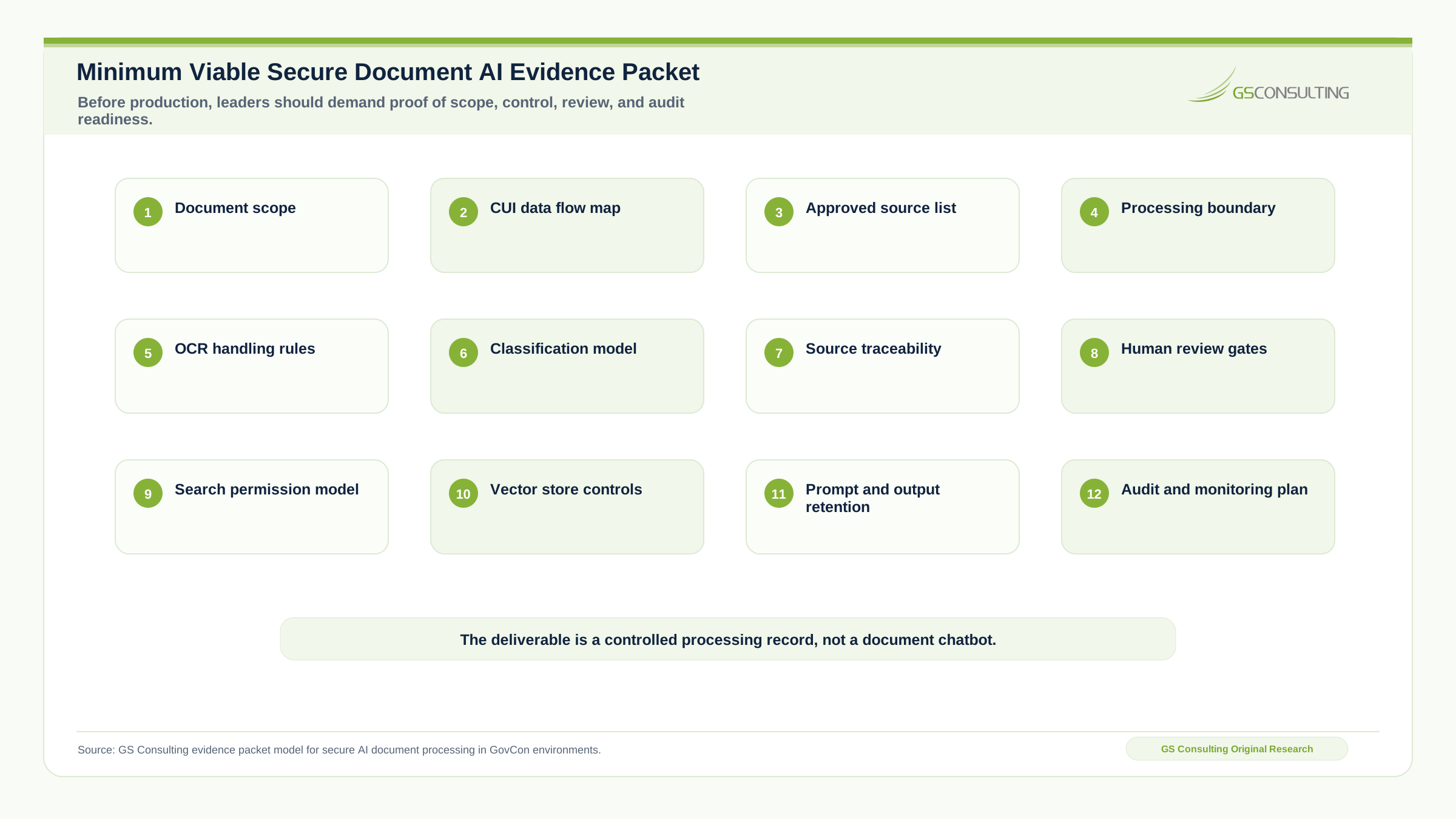
Before approving production, leadership should ask for document scope, data flow map, CUI handling review, access control design, service account permissions, storage architecture, temporary file handling, prompt and output retention rules, search permission model, audit log design, human review points, exception handling process, testing results, accuracy measurements, security review, compliance review, production support owner, and rollback plan.
If the team cannot provide those artifacts, the workflow is still a pilot. Do not confuse a working demo with a controlled production system.
What GS Consulting Builds
GS Consulting helps GovCon firms build secure AI document processing workflows that respect CUI boundaries and operational reality. That includes document workflow mapping, CUI data flow analysis, secure OCR design, AI extraction workflows, metadata and tagging models, access control design, search and retrieval architecture, human review workflows, audit trail design, exception handling, integration with GRC and contract systems, secure API development, production readiness planning, and compliance support for NIST and CMMC environments.
This page is part of our Enterprise AI Process Transformation cluster and supports our main AI workflow automation service. It connects directly to automated data redaction AI, legacy database extraction AI, automating NIST 800 171 evidence, automating federal RFP shredding, AI federal contract management workflows, GovCon supply chain compliance automation, and AI audit trails and activity logging.
The Bottom Line
Secure AI document processing for CUI is not about making PDFs easier to chat with. It is about safely turning sensitive documents into structured, searchable, reviewable, auditable workflows.
The business value is obvious. People spend too much time opening files, searching text, extracting fields, routing documents, building trackers, and recreating evidence. AI and OCR can help. But only if the workflow protects the data after extraction as carefully as it protects the original file.
Do not start with the model. Start with the boundary. Then build the workflow.
Build the document workflow before the document chatbot.
GS Consulting helps GovCon firms process PDFs, scanned records, CUI documents, compliance evidence, contract attachments, and technical reports without creating uncontrolled copies or weak search indexes.
Build the Secure Document WorkflowResearch Sources and Caveats
The original research in this article uses GS Consulting derived planning metrics based on CUI guidance, NIST SP 800 171, NIST SP 800 53, CMMC, AI data security guidance, OWASP GenAI risk themes, document processing workflow patterns, CUI evidence needs, and secure AI architecture design.
The CUI Document Exposure Path Risk Score, Secure Document Processing Control Burden Score, and Workflow Pilot Readiness Score are GS Consulting planning tools. They are not official CMMC, NIST, DoD, NARA, CISA, OWASP, legal, audit, contracting officer, or certification determinations. Actual readiness depends on contracts, CUI categories, document repositories, identity model, OCR engine, AI vendor terms, search architecture, vector database design, logs, retention obligations, redaction requirements, reviewer roles, and CMMC or customer expectations.
- NARA, About Controlled Unclassified Information
- DoD CUI Program
- NIST SP 800 171 Revision 3, Protecting Controlled Unclassified Information
- NIST SP 800 53 Revision 5, Security and Privacy Controls for Information Systems and Organizations
- 32 CFR Part 170, Cybersecurity Maturity Model Certification Program
- NIST AI 600 1, Generative Artificial Intelligence Profile
- AI Data Security, Best Practices for Securing Data Used to Train and Operate AI Systems
- OWASP GenAI Security Project, Top 10 for Large Language Model Applications
- GS Consulting analysis of secure AI document processing, OCR data paths, sensitive derived artifacts, CUI workflow controls, search permission models, vector store controls, and audit trail design.
Frequently Asked Questions About Secure AI Document Processing for CUI
What is secure AI document processing for CUI?
Secure AI document processing for CUI is a controlled workflow that ingests approved documents, performs OCR and extraction inside an approved boundary, classifies sensitivity, routes output for human review, stores derived artifacts in controlled locations, and preserves an audit trail.
Why is OCR risky for CUI documents?
OCR can turn a scanned document into searchable, copyable text. If that text is stored in weak databases, search indexes, prompts, logs, vector stores, or temporary folders, the workflow may expose the most usable version of the sensitive content.
Can AI decide whether a document contains CUI?
AI can suggest likely CUI indicators, missing markings, document type, sensitivity, and routing. It should not be the only control for high risk documents. Rules and authorized human review should confirm classification when the decision affects access, storage, sharing, or compliance.
Which CUI document workflows should be automated first?
Good first pilots include policy document search, controlled repository OCR, CMMC evidence document tagging, contract attachment classification, subcontractor package intake, deliverable routing, access request document processing, and technical report metadata extraction.
What should leaders demand before production?
Before production, leaders should demand document scope, a CUI data flow map, approved source list, processing boundary, OCR handling rules, classification model, source traceability, human review gates, search permission model, vector store controls, prompt and output retention rules, and audit monitoring.
Suggested Future Reading
- AI Workflow Automation
- Enterprise AI Process Transformation
- AI Document Processing: A Practical Implementation Guide
- AI Document Processing Hub
- Automating NIST SP 800 171 Compliance Evidence Collection
- AI Driven Cybersecurity Incident Response Workflows
- AI for Federal Contract Management Workflows
- Automating Federal RFP Shredding with AI
- Automating GovCon Supply Chain Compliance Checks
- AI Audit Trails and Activity Logging