Enterprise AI | | 22 min read
How to Identify the Best Workflows for AI Automation

Key Takeaways
The best AI workflow candidates combine value, readiness, and manageable risk.
Use the five part fit test
Assess business value, repeatability, data readiness, feasibility, and oversight.
Interview the people doing the work
Map handoffs, quantify friction, and identify the task AI would support.
Select a measurable pilot
Define the human review model and compare outcomes against the current workflow.
AI can improve productivity, reduce manual effort, accelerate decision-making, and transform business operations. But not every workflow is a good candidate for AI automation.
That is where many enterprise AI initiatives go wrong. Companies often start with a tool instead of a process. A department adopts a chatbot, a team tests an AI assistant, or leadership asks every function to find AI use cases. The result is usually a long list of ideas, scattered pilots, and unclear ROI.
The better approach is to identify the workflows where AI can create measurable business value, where the data is available, where risk can be controlled, and where employees will actually use the solution.
Need a practical AI workflow automation assessment?
GS Consulting helps organizations identify high-value AI automation opportunities, map workflows, score use cases, calculate ROI, assess data readiness, design governance, and launch controlled pilots.
Request a Workflow AssessmentThis article explains how enterprise leaders can identify, evaluate, and prioritize the best workflows for AI automation. It builds on our Enterprise AI Process Automation Framework, which explains how organizations can move from scattered pilots to measurable business transformation. After selecting a candidate, use our guide to measuring workflow automation ROI to establish the baseline and value case.
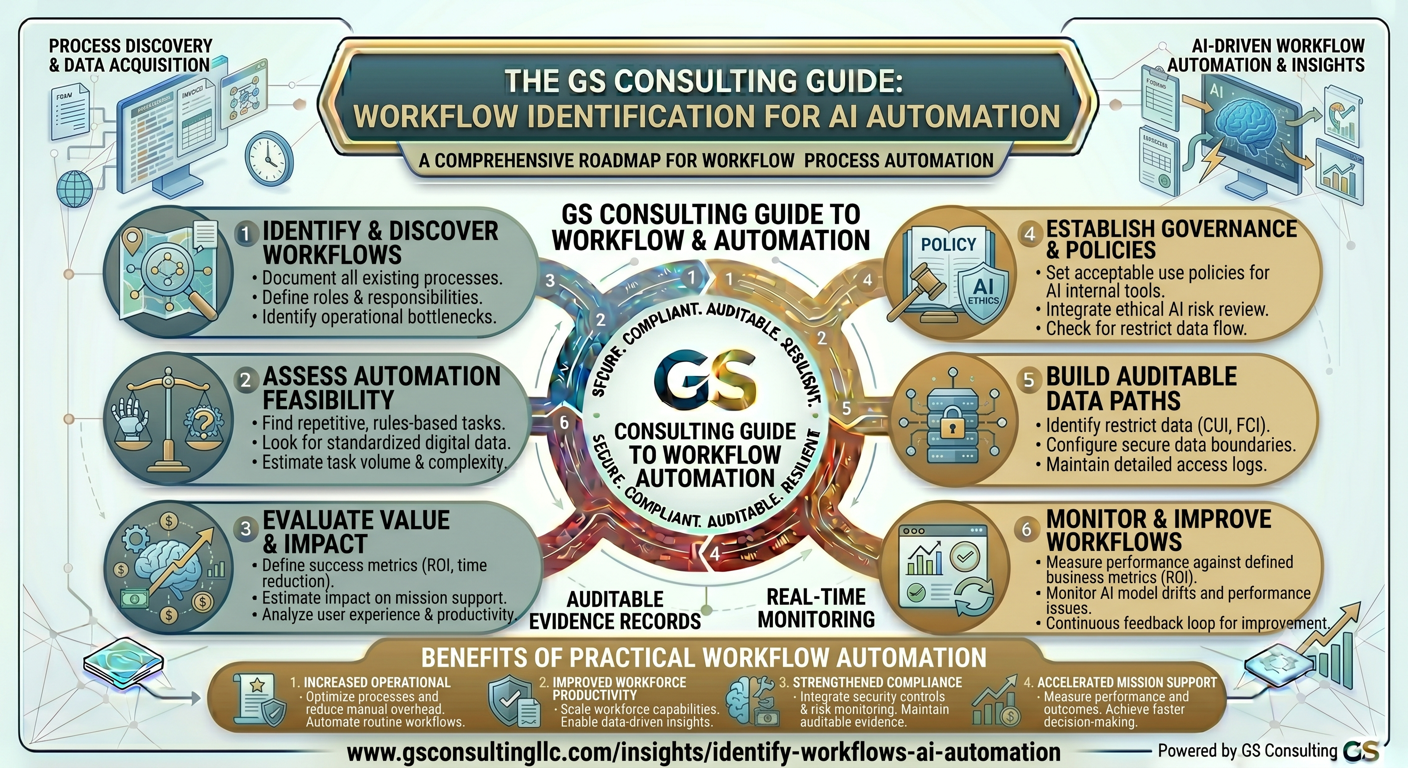
Why Workflow Selection Determines AI ROI
AI automation succeeds when it solves a real business problem. It fails when the technology is impressive but the workflow does not matter enough, does not have usable data, or cannot be changed.
A good AI automation candidate is repetitive, consumes meaningful time or labor, depends on reading or classifying information, has enough volume to justify investment, uses accessible data, has measurable performance metrics, and includes clear human decision points.
A poor candidate may be too rare, too ambiguous, too sensitive, too dependent on undocumented judgment, or too disconnected from systems and data. AI may still help, but it may not be the best starting point.
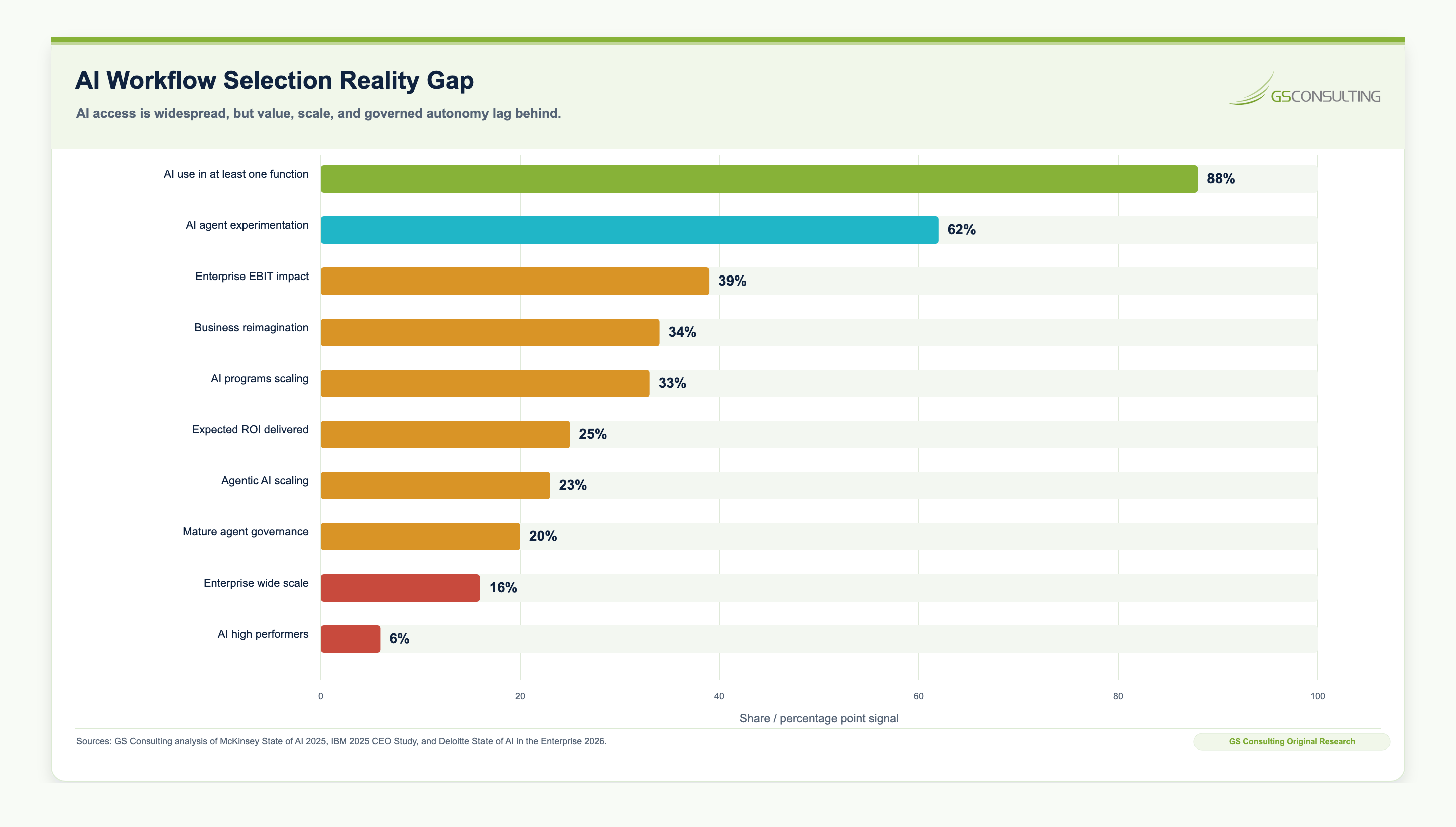
Original Research: The AI Workflow Automation Fit Index
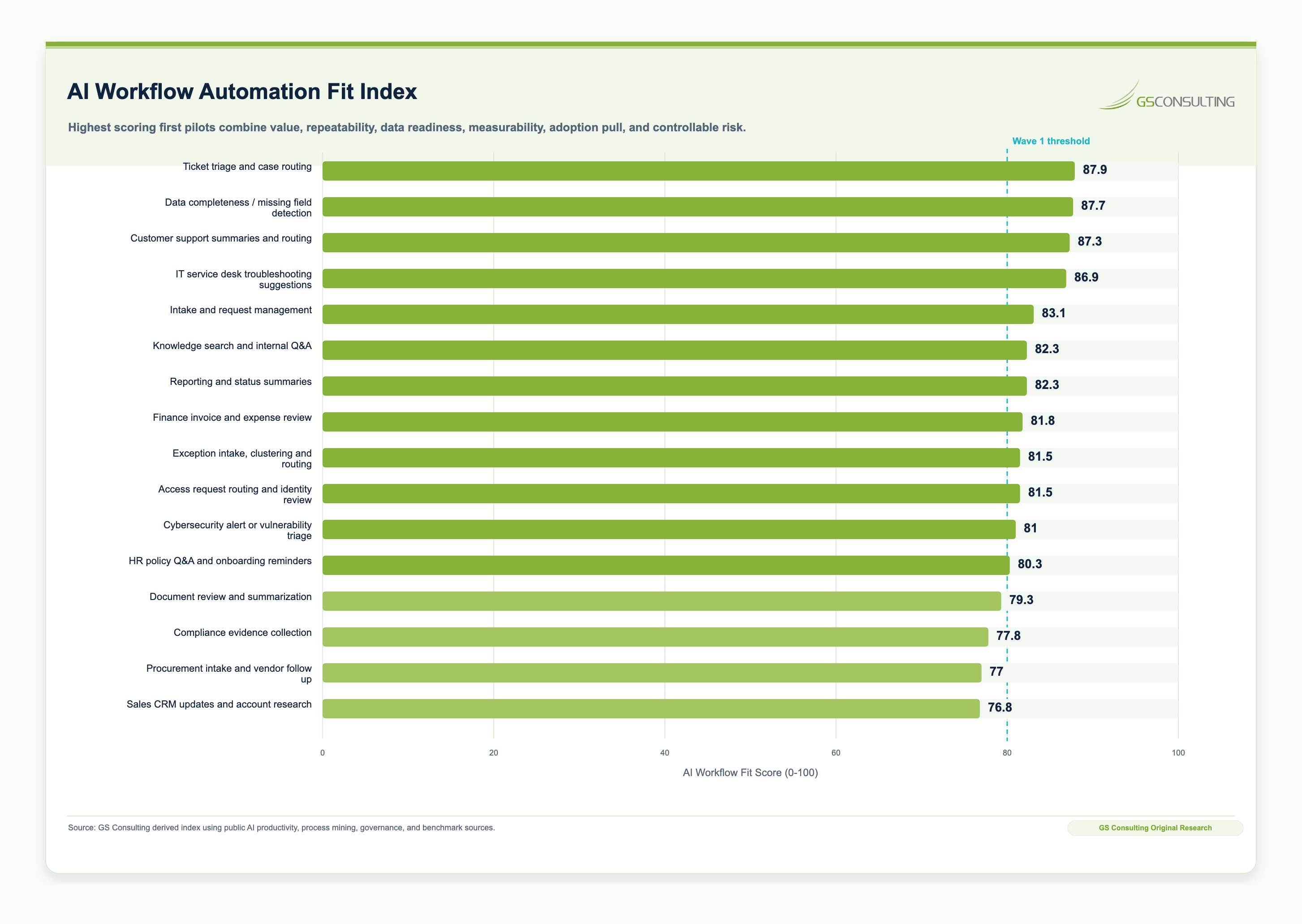
Original GS Consulting research shows that AI workflow selection is the bridge between AI adoption and AI ROI. GS Consulting analyzed public AI adoption research, productivity studies, service-desk benchmarks, process-mining references, public event logs, and AI governance frameworks to create an AI Workflow Automation Fit Index across common enterprise workflows.
The highest-scoring first-wave candidates were ticket triage and case routing, data completeness and missing-field detection, customer support summaries and routing, IT service desk troubleshooting support, intake and request management, knowledge search and internal Q&A, reporting and status summaries, finance invoice review, and exception routing.
The practical takeaway is simple: start where the workflow is valuable, repetitive, measurable, data-accessible, and controllable. Avoid beginning with workflows that require autonomous final decisions, customer commitments, legal conclusions, regulated financial decisions, safety actions, or high-stakes approvals. AI should first summarize, classify, extract, search, draft, route, and recommend while humans remain accountable for approvals, exceptions, and risk decisions.
The AI Workflow Fit Score, Evidence Burden Score, and Opportunity-Control Matrix are GS Consulting-derived planning tools. They are not official benchmarks, audit findings, legal conclusions, compliance determinations, or ROI guarantees. Actual workflow selection should use each organization's real transaction volume, process data, labor rates, data permissions, system architecture, employee adoption signals, customer commitments, compliance exposure, and risk tolerance.
Start With the Business Problem, Not the AI Tool
The first question should not be, "Where can we use AI?" The better question is: which workflows are slow, expensive, inconsistent, error-prone, high-volume, or strategically important enough to improve?
This shifts the conversation from technology adoption to business transformation. Instead of asking whether HR should use AI, ask which employee requests take too long to resolve, which onboarding steps create bottlenecks, and which policies generate the most confusion.
Instead of asking whether IT should use AI, ask which tickets are repetitive, which incidents require the same troubleshooting steps, which knowledge articles are hard to find, and which access requests create delays.
Instead of asking whether operations should use AI, ask where exceptions pile up, which reports take too long to produce, which handoffs cause delays, and which data sources must be manually compared.
The best AI opportunities usually appear where work is already painful.
The Five-Part AI Workflow Fit Test
Before investing in an AI automation project, evaluate the workflow against five criteria.
1. Business Value
The workflow should matter to the business. AI automation is easier to justify when the workflow affects cost, speed, revenue, risk, customer experience, employee productivity, or operational reliability.
Examples of high-value outcomes include reducing ticket resolution time, shortening contract review cycles, improving invoice processing speed, reducing manual reporting effort, increasing customer support capacity, improving employee onboarding, reducing compliance evidence gaps, improving sales response speed, and reducing operational exceptions.
2. Workflow Repeatability
AI works best when there is a pattern. A workflow does not have to be simple, but it should have enough repetition for AI to learn from, support, or automate parts of the process.
Good candidates include workflows with recurring inputs, repeated decisions, standard outputs, predictable handoffs, common exceptions, or consistent review steps.
3. Data Readiness
AI needs usable data. Before selecting a workflow, determine whether the required data exists, whether it is accessible, whether it is reliable, and whether the AI system is allowed to use it.
- Where does the data live, and who owns it?
- Is it structured, unstructured, or both?
- Is it accurate enough to use?
- Is it sensitive, regulated, or customer-controlled?
- Can the AI tool access it securely?
- Are APIs, connectors, permissions, and retention rules clear?
A workflow with strong value but poor data access may still be worth pursuing, but it should be treated as a longer-term transformation initiative, not a quick win.
4. Automation Feasibility
Not every workflow should be fully automated. Some should only be assisted. The right question is: what level of AI involvement is appropriate for this workflow?
Best for low-risk productivity improvement where employees remain fully responsible.
Best for human-in-the-loop decision support and review queues.
Best for repetitive, low-to-moderate risk tasks with clear boundaries.
Best for mature workflows with strong controls, integrations, and monitoring.
Many organizations jump too quickly to autonomous agents. Autonomy should be earned. Start with assistive or human-in-the-loop automation, prove value, then increase automation where the workflow, data, controls, and adoption are ready.
5. Risk and Oversight
AI automation should be matched to the risk of the workflow. A low-risk workflow may involve summarizing internal meeting notes or drafting a first version of a non-sensitive document. A higher-risk workflow may involve customer communications, financial decisions, regulated data, employee decisions, cybersecurity actions, legal interpretations, safety issues, or compliance claims.
For each workflow, define who owns the process, what data AI can access, what the AI is allowed to do, where human review is required, what outputs must be verified, what errors could cause harm, how performance will be measured, and what happens if the AI fails.
Risk does not always mean do not automate. It means automate with the right controls.
The AI Workflow Opportunity Matrix
A simple way to prioritize use cases is to score each workflow across value, feasibility, and risk.
- ValueDoes it affect cost, speed, revenue, quality, risk, or customer experience?
- FeasibilityAre the process, data, integrations, and users ready enough to pilot?
- OversightAre human review, approvals, and escalation points clear?
- AdoptionWill employees use it because it solves real daily friction?
A strong first-wave candidate will usually score high in business value, volume, repeatability, data readiness, and adoption likelihood, while having manageable risk.
Compare your AI workflow candidates now
Use the free Secure AI Workflow Fit & Prioritization Matrix to score two to five workflows across opportunity, delivery readiness, secure controls, risk exposure, and appropriate AI authority.
Build Your Workflow Matrix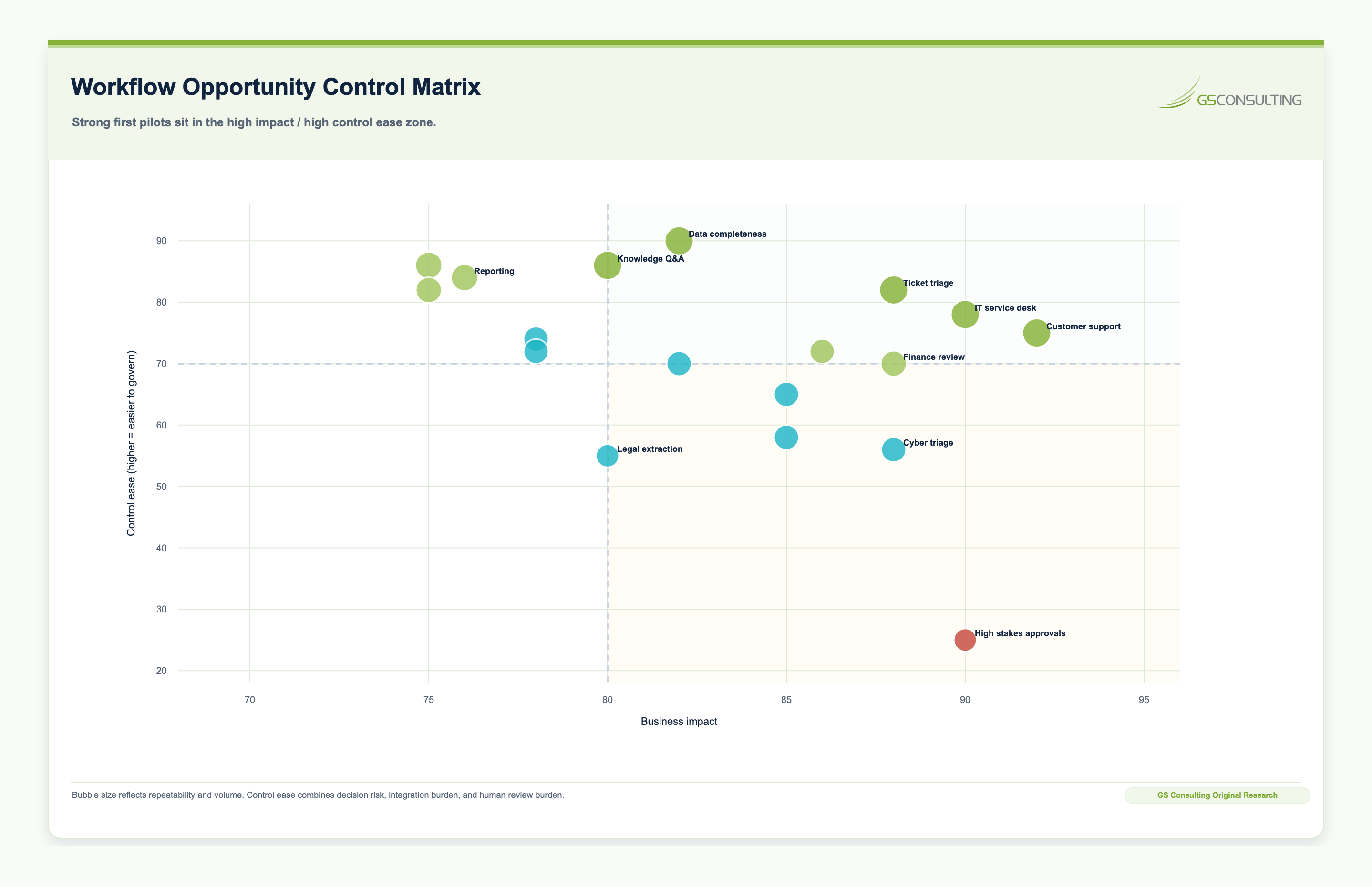
Best First Workflows for AI Automation
Every organization is different, but certain workflows are consistently strong candidates for AI automation.
1. Knowledge Search and Internal Q&A
Many employees waste time looking for policies, procedures, templates, past work, training material, product information, or customer documentation. AI can improve knowledge retrieval by allowing employees to ask questions in plain language and receive answers grounded in approved internal content.
Good candidates include HR policy Q&A, IT troubleshooting knowledge bases, sales enablement libraries, customer support knowledge bases, operations SOPs, compliance policies, training repositories, and technical documentation.
2. Ticket Triage and Case Routing
Ticket-heavy departments are excellent AI candidates because they often have structured systems, measurable volume, and repeatable categories. AI can classify incoming tickets, summarize requests, identify priority, recommend routing, detect duplicates, suggest knowledge articles, and draft first responses.
Good candidates include IT service desk tickets, HR employee cases, customer support requests, facilities requests, finance help desk questions, compliance inquiries, and procurement intake.
3. Document Review and Summarization
Many enterprise workflows require employees to read large volumes of documents before taking action. AI can summarize documents, extract key fields, compare versions, identify missing information, and flag unusual language.
Good candidates include contracts, invoices, vendor questionnaires, policy documents, audit evidence, customer correspondence, resumes, insurance documents, procurement packages, and technical reports.
4. Reporting and Status Summaries
Reporting is often manual, repetitive, and spread across systems. AI can help gather status information, summarize updates, identify risks, draft narratives, and produce executive-ready summaries.
Good candidates include project status reports, operational performance summaries, weekly leadership updates, customer account summaries, sales pipeline summaries, compliance readiness reports, incident summaries, and financial variance narratives.
5. Exception Management
Operations teams often spend time finding and resolving exceptions: delayed orders, failed transactions, missing approvals, unusual expenses, customer escalations, out-of-tolerance metrics, or incomplete records.
AI can detect patterns, group similar exceptions, summarize likely causes, recommend next actions, and route issues to the right owner.
6. Intake and Request Management
Many departments receive requests through email, forms, chat, spreadsheets, and meetings. AI can standardize intake, extract required details, identify missing information, classify the request, and route it to the right workflow.
7. Compliance Evidence Collection
Compliance teams often struggle to collect evidence across tools, owners, policies, tickets, screenshots, logs, and review records. AI can help identify missing evidence, summarize control status, organize artifacts, detect stale documentation, and draft internal readiness reports.
Workflows That Are Usually Poor First Candidates
Some workflows may eventually benefit from AI, but they are poor first choices. Avoid starting with workflows that are rare, poorly understood, highly political, dependent on undocumented expert judgment, based on unreliable or inaccessible data, too risky for early experimentation, hard to measure, or unconnected to business priorities.
Use extra caution with workflows involving final employment decisions, legal conclusions, regulated financial decisions, safety-critical actions, customer commitments, cybersecurity enforcement, or high-stakes approvals. AI may still assist in those workflows, but they need stronger governance and human accountability.
Department-by-Department AI Workflow Opportunities
Use caution with candidate ranking, performance evaluation, discipline, and sensitive employee relations.
Use caution with automated system changes, access grants, enforcement, and incident closure.
Use caution where recommendations could affect safety, regulation, or critical service delivery.
Use caution with payment approvals, financial reporting, audit conclusions, tax positions, and vendor decisions.
Use caution with customer-facing automation that makes promises, changes pricing, or handles sensitive customer data.
Use caution with final legal interpretations, contract approval, regulatory signoff, and risk acceptance.
A Practical Workflow Discovery Process
Step 1: Build a Workflow Inventory
Ask each department to identify its most repetitive, time-consuming, high-volume, or error-prone workflows. Capture workflow name, business owner, current systems, estimated volume, average time per transaction, pain points, data sources, outputs, risks, bottlenecks, and potential AI role.
Step 2: Interview the People Doing the Work
Process documentation often differs from reality. Interview employees who perform the work daily. Ask what slows them down, what they copy and paste repeatedly, what they search for repeatedly, where errors happen, what information is missing when work arrives, and what would save the most time.
Step 3: Quantify the Pain
Estimate the cost of the current workflow. Useful inputs include transactions per month, handling time, number of employees involved, fully loaded labor cost, error rate, rework time, customer wait time, SLA failures, escalation volume, revenue impact, compliance risk, and employee frustration.
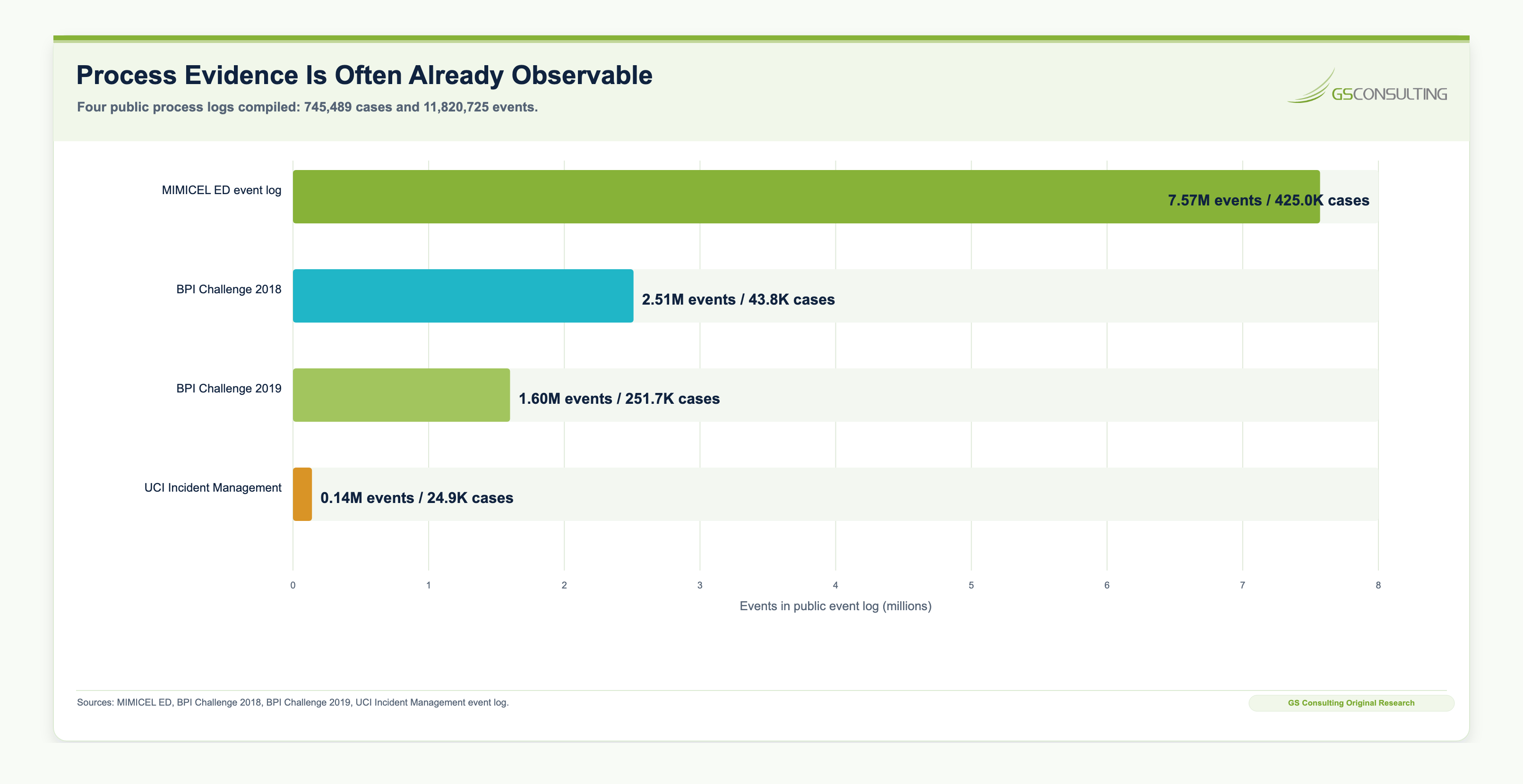
Step 4: Identify the AI Task Type
Break the workflow into task types. AI is often useful for summarizing, classifying, extracting, comparing, drafting, searching, routing, predicting, detecting anomalies, generating recommendations, monitoring patterns, and creating structured data from unstructured inputs.
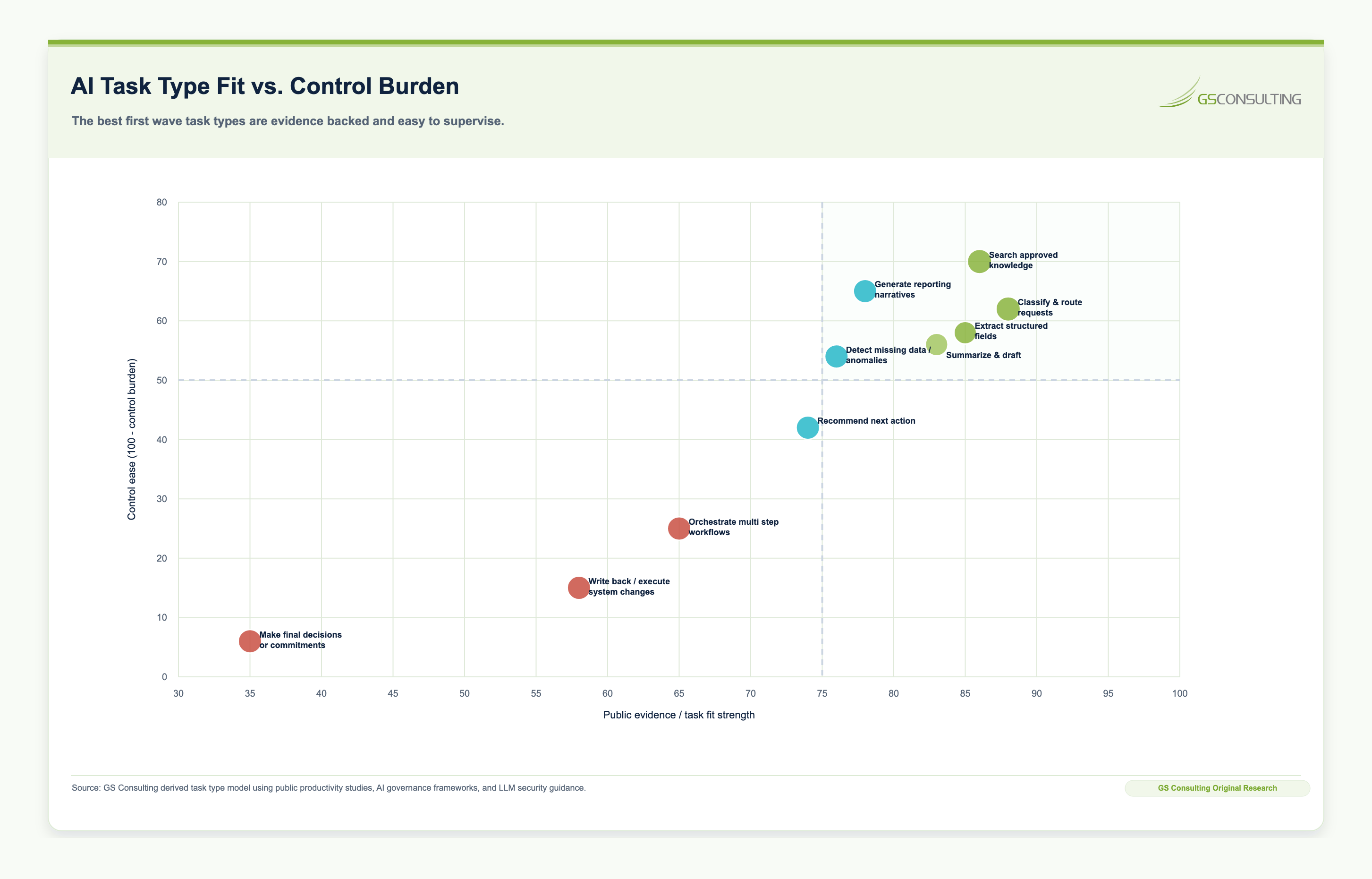
Step 5: Define the Human-in-the-Loop Model
Before piloting, define where human review is required. Options include AI drafts and a human approves, AI recommends and a human decides, AI routes and a human handles, AI extracts and a human validates exceptions, or AI automates low-risk cases and escalates exceptions.
Step 6: Select the Pilot
Choose a workflow that is valuable, visible, manageable, and measurable. A good pilot should be narrow enough to implement but meaningful enough to prove business value.
AI Workflow Prioritization Scorecard
Use a simple 1-to-5 scoring model to compare candidate workflows. Prioritize workflows with the highest total score and the lowest unmanaged risk.
Score higher when the workflow affects outcomes leadership already cares about.
Score higher when the process can be piloted without rebuilding the whole operating model first.
Score higher when review and approval points are already obvious.
Score higher when the people doing the work want the workflow to improve.
What to Measure Before and After AI Automation
Every AI automation project should begin with a baseline. Useful baseline metrics include average handling time, cycle time, cost per transaction, ticket volume, error rate, rework rate, escalation rate, backlog size, customer satisfaction, employee satisfaction, SLA performance, compliance evidence completeness, manual reporting hours, revenue conversion rate, and quality review findings.
After the pilot, compare actual results against the baseline. Do not rely only on time saved. Measure quality, adoption, error rates, human override rates, risk issues, and user trust.
Common Mistakes to Avoid
The first mistake is starting with the most complex workflow. Start where value is meaningful but the risk and implementation complexity are manageable.
The second mistake is automating a broken process. If the workflow is poorly designed, AI may only make bad work happen faster.
The third mistake is ignoring employees. The people closest to the process usually know where automation will help and where it will fail.
The fourth mistake is skipping baseline measurement. Without a baseline, ROI becomes a story instead of a business case.
The fifth mistake is assuming every AI opportunity requires full automation. Many of the best first use cases are assistive or human-in-the-loop.
The sixth mistake is overlooking data access. AI cannot transform a workflow if the needed data is locked in disconnected systems, poor-quality records, or unapproved repositories.
The seventh mistake is ignoring governance. AI workflow automation should define ownership, approved data, human review, monitoring, error handling, and change control from the start.
A 30-60-90 Day Plan to Identify AI Automation Workflows
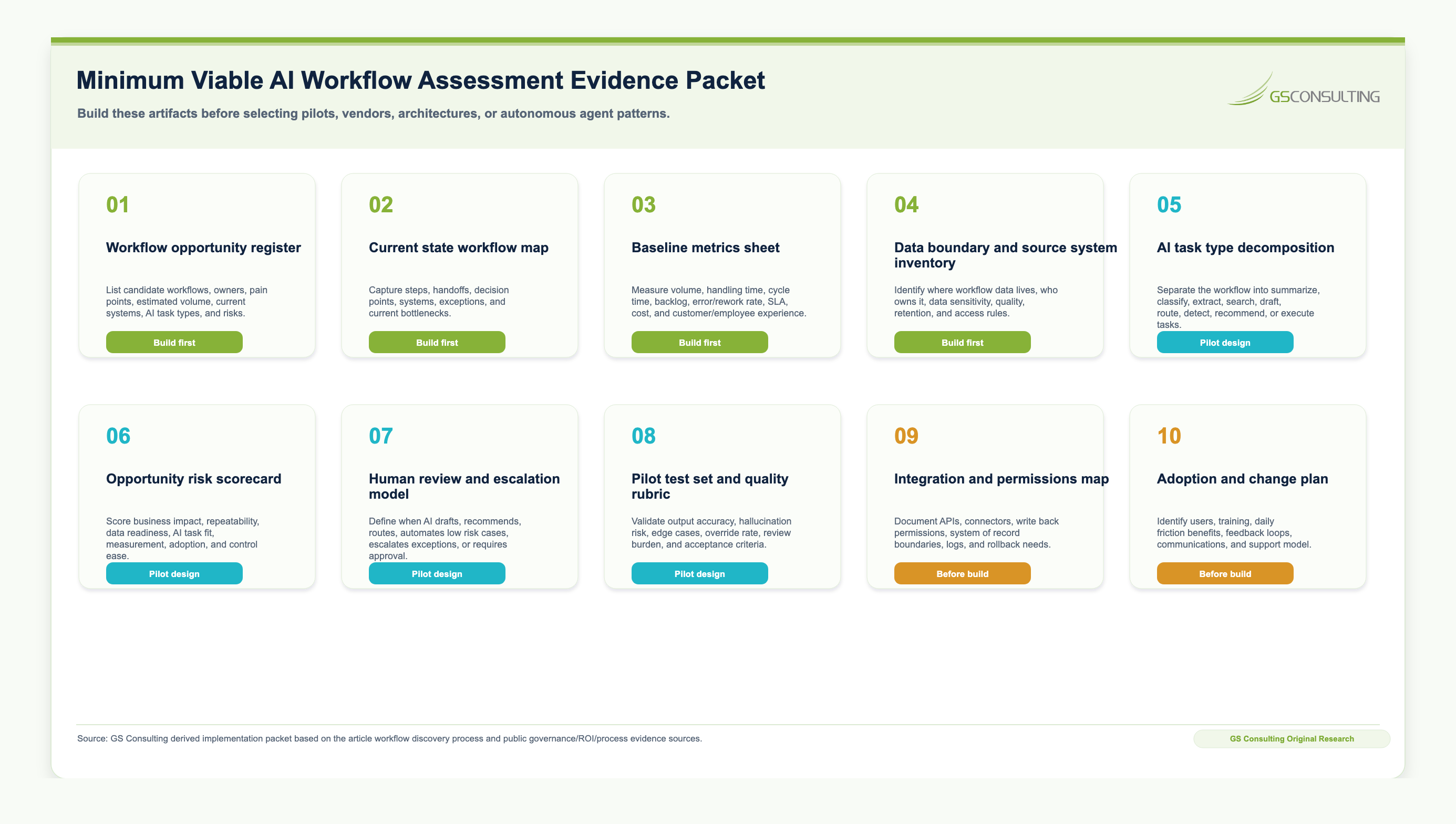
- Days 1-30Build visibility.
Inventory current AI use, interview department leaders, collect workflow pain points, identify repetitive tasks, and document shadow AI use.
- Days 31-60Score and prioritize.
Map the top workflows, estimate business value, assess data readiness, evaluate risk, and identify human review points.
- Days 61-90Design the pilots.
Define baselines, user groups, approved data, workflow changes, governance controls, success criteria, and implementation requirements.
By the end of 90 days, leadership should be able to answer which workflows are the best AI automation candidates, what outcomes are targeted, what data and systems are required, what risks need controls, where humans will review AI outputs, how ROI will be measured, and which pilots are ready to launch.
The Bottom Line
The best AI automation opportunities are not always the flashiest. They are the workflows where business pain, data readiness, repeatability, measurable value, and manageable risk intersect.
Companies that identify workflows systematically will make better AI investments than companies that chase tools or trends. They will launch stronger pilots, calculate ROI more accurately, improve adoption, and scale AI with greater confidence.
Enterprise AI transformation starts with a simple discipline: follow the work.
GS Consulting helps organizations identify high-value AI automation opportunities, map workflows, score use cases, calculate ROI, assess data readiness, design governance, and launch controlled pilots across HR, IT, operations, finance, compliance, and customer support.
Ready to find the best AI automation opportunities in your organization?
Contact GS Consulting for an Enterprise AI Workflow Automation Assessment.
Contact GS ConsultingFrequently Asked Questions About Identifying AI Workflows
What makes a business workflow a good candidate for AI automation?
The best AI workflow candidates possess five traits: they are high-volume, highly repetitive, backed by accessible and reliable data, tied to measurable business outcomes like SLA metrics or cycle time, and have clear human-in-the-loop escalation paths for exceptions.
Which workflows should NOT be automated with AI first?
Organizations should avoid automating workflows that involve final employment decisions, legal conclusions, regulated financial approvals, safety-critical actions, or direct customer commitments. These workflows carry high regulatory and operational risk and require strict human governance before AI augmentation is considered.
How do we measure the ROI of an AI-automated workflow?
AI ROI should be measured by establishing a current-state baseline for a specific workflow, such as ticket triage time or invoice processing cost, and comparing it against the AI-assisted performance. A true ROI calculation must factor in gross time saved, minus the cost of software, integration, governance, and the time required for human review of the AI output.
Sources and Suggested Future Reading
- McKinsey: The State of AI
- IBM: CEO Study on AI ROI and Scaling
- Deloitte: State of AI in the Enterprise
- NBER: Generative AI at Work
- MIT News: ChatGPT and Writing Productivity
- Harvard Business School: Navigating the Jagged Technological Frontier
- Fixify: IT Help Desk Benchmark Report 2026
- ProcessMining.org: Event Data
- GAO: Artificial Intelligence Accountability Framework
- OWASP Top 10 for Large Language Model Applications
- Enterprise AI Process Automation Framework: How to Move from AI Pilots to Measurable Business Transformation
- AI ROI Calculation: How to Measure the Business Case for Enterprise AI
- Measuring Workflow Automation ROI in GovCon
- Secure AI Workflow Fit & Prioritization Matrix
- Legacy System Integration for Enterprise AI Automation
- AI Transformation for HR: Automating Employee Support and Onboarding
- AI Transformation for IT: Service Desk, Ticket Triage, and Knowledge Management
- AI Transformation for Operations: Exception Management, Reporting, and Process Control