Enterprise AI | | 24 min read
Workflow Automation Security Risk Assessments

Key Takeaways
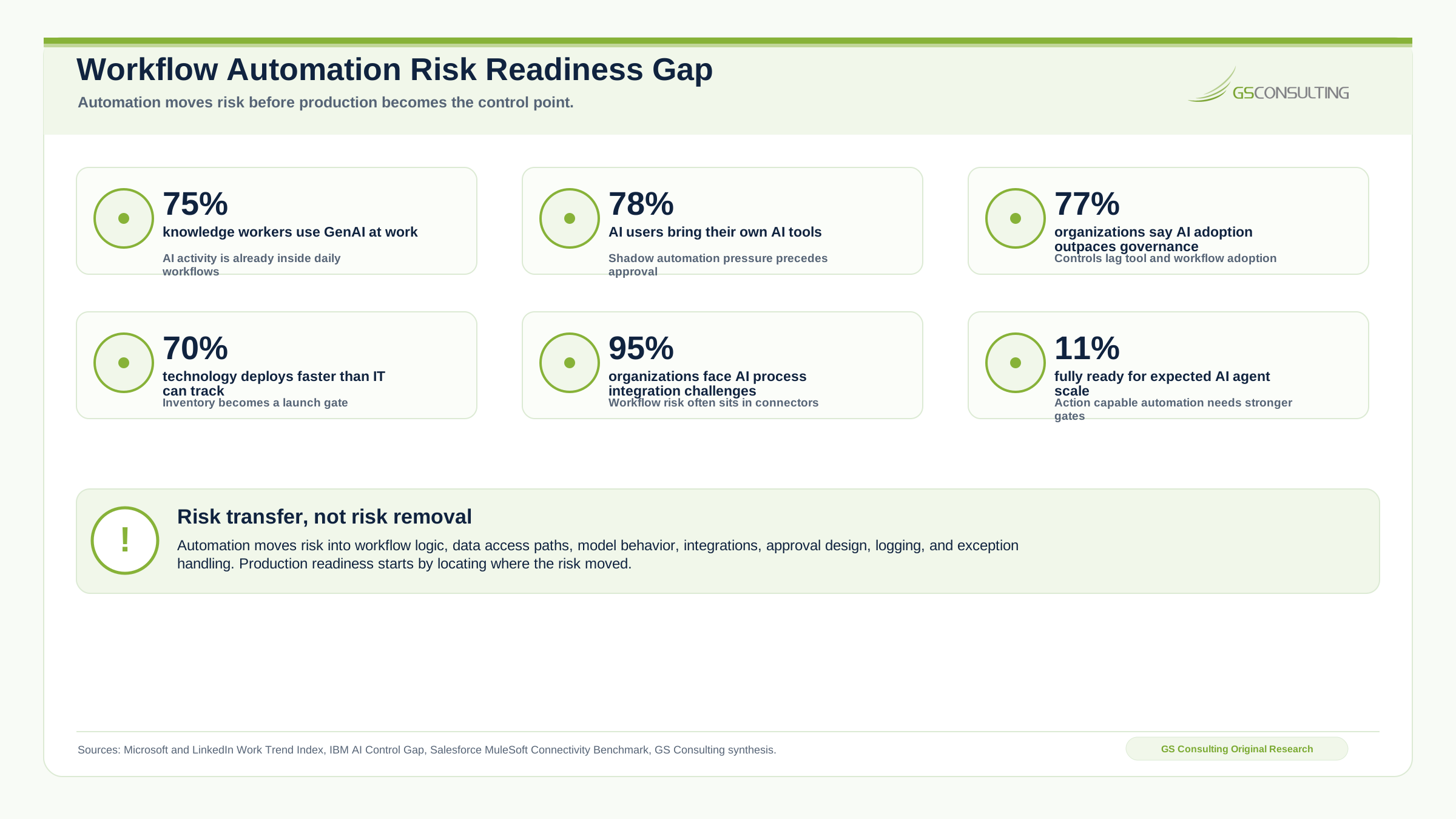
Automation risk does not disappear. It moves.
Risk Moves Into Design
Automation moves risk into data paths, permissions, workflow logic, model behavior, integration layers, logs, and exceptions.
Action Raises Risk
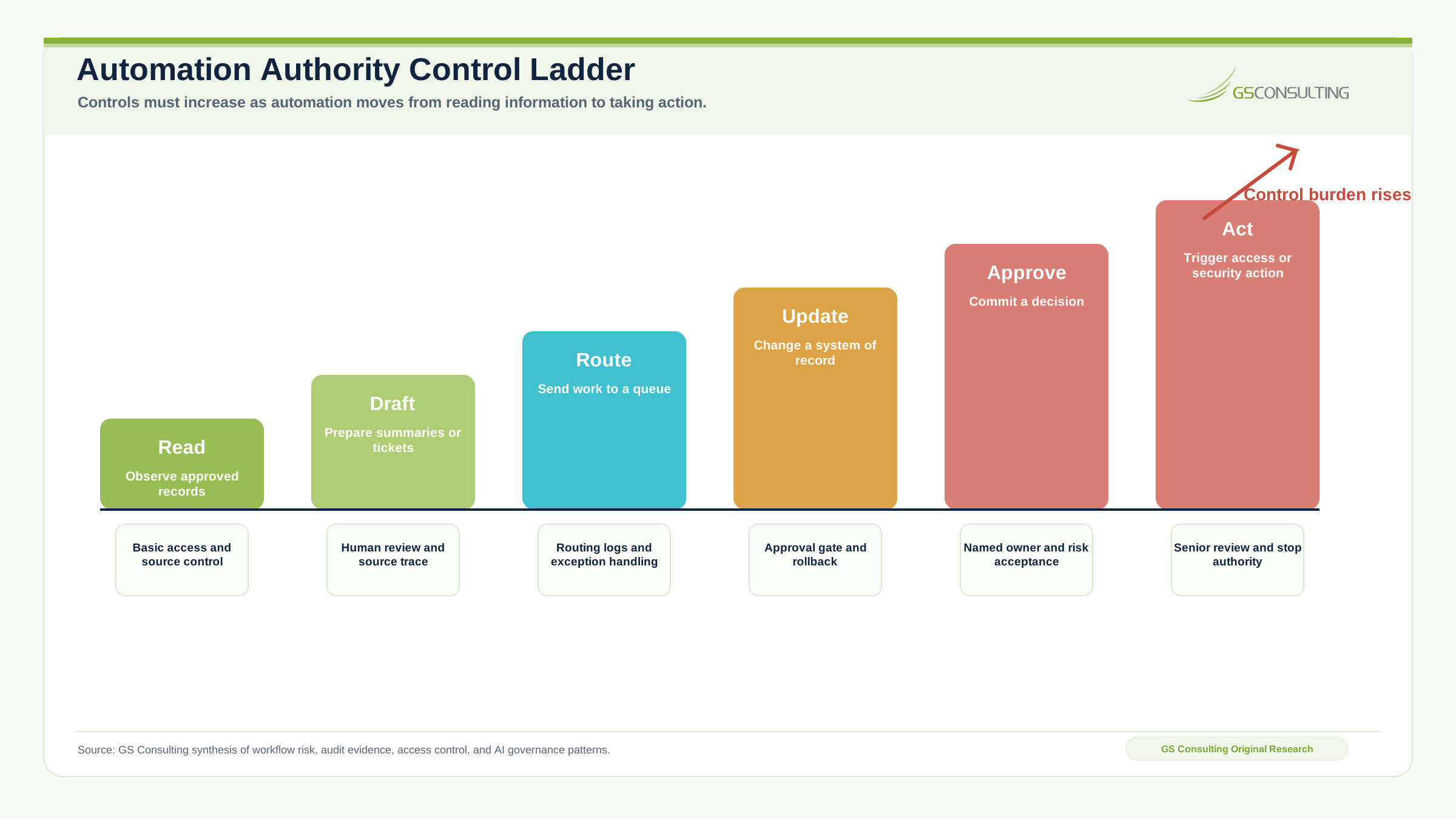
A workflow that reads and drafts is different from one that updates records, grants access, closes tickets, or sends external messages.
Evidence Builds Trust
Regulated automation needs proof of what happened, what data was used, who approved it, and how failures are handled.
Automation does not remove risk. It moves risk.
Risk moves into workflow logic, data access paths, model behavior, integration layers, approval design, logging, exception handling, and recovery. That movement has to be understood before the workflow reaches production.
A workflow automation risk assessment should happen before a pilot is connected to sensitive data, before an AI agent receives tool access, and before a script, connector, queue, or approval workflow starts changing operational records.
If the workflow touches GovCon operations, CMMC evidence, incident response, contract data, access requests, CUI, PII, logs, subcontractor information, or customer deliverables, it needs a real assessment. Human in the loop is not a control by itself.
Assess workflow automation risk before production.
GS Consulting helps GovCon firms and regulated organizations map automated workflows, review data flows, assess access, define approval controls, and build risk based implementation plans.
Request a Workflow Risk AssessmentThe Bad Assumption: Automation Is Just a Faster Version of the Current Process
The fastest way to create risk is to assume automation is just the current workflow with less manual work.
That is rarely true. When work is automated, hidden human judgment can disappear, broad service accounts can replace individual permissions, logs can capture sensitive content, integrations can fail silently, and model output can sound confident even when it is wrong.
Why This Matters More in GovCon
GovCon workflows are often data flows, access flows, evidence flows, and control flows at the same time. A workflow that routes a document, summarizes a clause, updates a tracker, or collects evidence may touch CUI, contract sensitive information, security data, or customer restricted content.
NIST SP 800 171 Revision 3 applies recommended security requirements to nonfederal system components that process, store, or transmit CUI, or that protect those components. An automated workflow can become part of that security story when it touches or protects controlled information.
32 CFR Part 170 governs the CMMC program and reinforces the need to safeguard FCI and CUI on contractor information systems. That is why workflow automation for regulated organizations has to treat data movement, approval, evidence, and system access as design questions, not cleanup tasks.
What a Workflow Automation Risk Assessment Should Evaluate
A useful assessment asks what the workflow does, what it touches, what it decides, what it stores, what it changes, and what happens when it fails.
- Area 1Data access risk.
Identify every email, PDF, contract, ticket, spreadsheet, portal, repository, log, system record, and shared drive the workflow can read or create. Tag CUI, PII, contract sensitive, security sensitive, export controlled, customer restricted, proprietary, internal, and public data.
- Area 2Authorization risk.
Review the service account, API token, connector, application permission, owner, rotation schedule, approval record, and action scope. A pilot shortcut with broad permission is a control failure.
- Area 3Decision risk.
Classify whether the automation observes, extracts, summarizes, recommends, routes, drafts, updates, approves, notifies, closes, grants access, or triggers a security action.
- Area 4Model risk.
For AI enabled workflows, document the model, hosting environment, data retention terms, approved data types, prompt control, source traceability, validation method, model change process, confidence handling, and residual risk owner.
- Area 5Prompt and input risk.
Assess whether users, emails, documents, tickets, PDFs, copied web content, or subcontractor submissions can manipulate the model through instructions hidden inside input data.
- Area 6Integration risk.
Review APIs, connectors, webhooks, scripts, tokens, scheduled jobs, queues, middleware, email rules, browser automation, retries, rate limits, monitoring, and support ownership.
- Area 7Audit and evidence risk.
Define what evidence proves the automation acted correctly without creating a new sensitive data spill through over broad logs.
NIST AI 600 1, the Generative AI Profile, is useful for this problem because it helps organizations identify and manage generative AI risks in ways aligned to their goals and priorities. OWASP also identifies prompt injection as a risk where prompts can alter model behavior and attempt to bypass safety measures.
The Risk Assessment Should Follow the Workflow, Not the Tool
Too many organizations assess the tool vendor and skip the workflow. That is incomplete. A tool may be secure in general and still be dangerous in a specific environment.
The assessment should walk the actual path from beginning to end:
- Step 1Trigger and input.
Identify what starts the workflow, who can start it, and what data enters the process.
- Step 2Data access and logic.
Map what systems, files, records, prompts, rules, and models are used to produce an output.
- Step 3System action and human review.
Define what the automation can update, route, send, approve, or trigger, and where human approval is required.
- Step 4Output and storage.
Document where outputs go, how they inherit sensitivity, and where the final record is retained.
- Step 5Exception, audit, monitoring, and rollback.
Define failure handling, evidence, monitoring, owner notification, manual fallback, and rollback.
The tool is only one piece. The workflow is the risk surface.
What Can Go Wrong When This Is Skipped
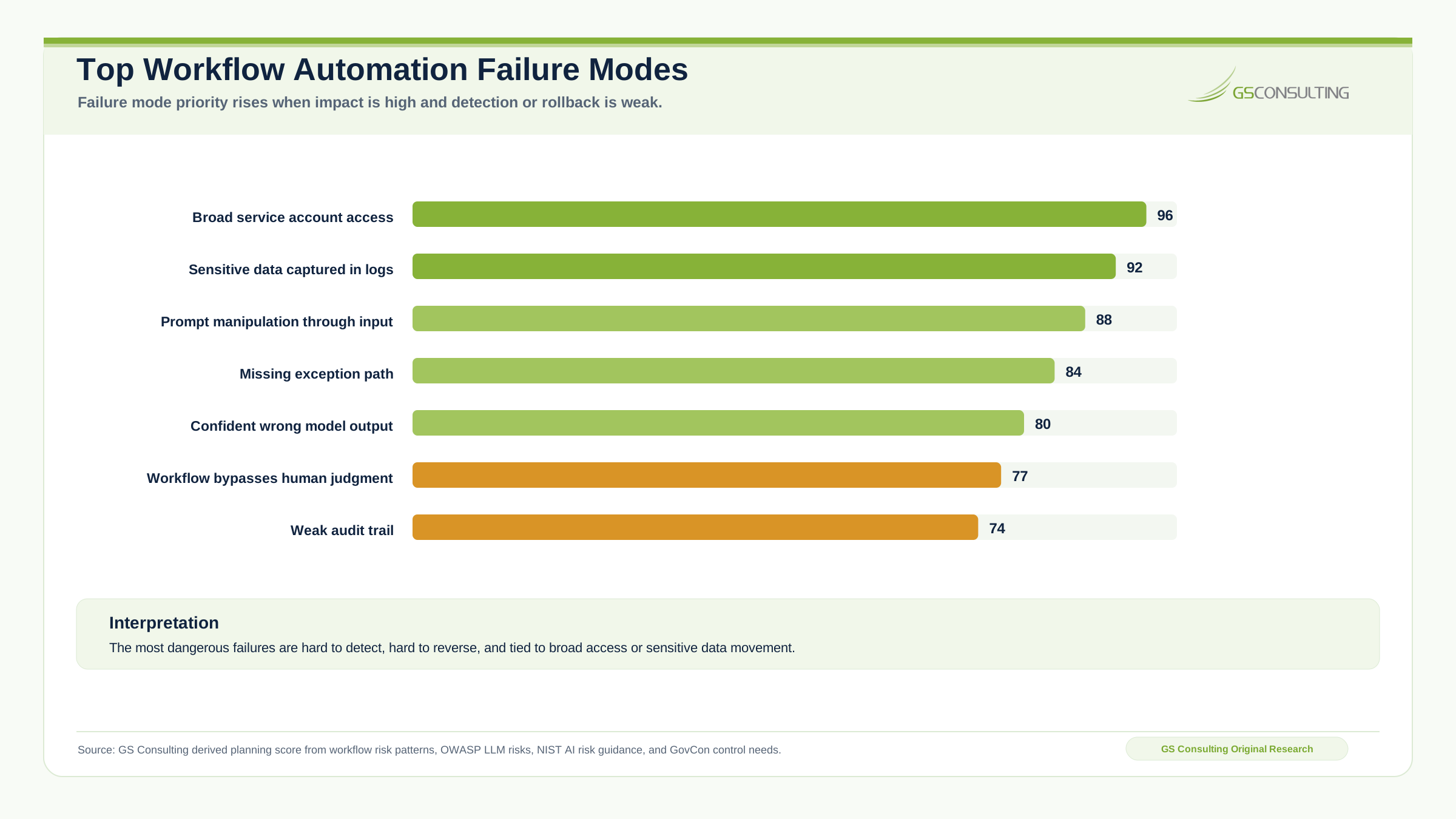
The failure patterns are predictable. They are not edge cases. They are normal outcomes when automation reaches production without risk assessment.
- The automation over collects data. The workflow needs one document field, but the connector gets access to the full folder.
- The service account has too much power. The automation needs to create draft tickets, but it can also close tickets, delete records, or reach unrelated projects.
- The model produces a confident wrong answer. A contract clause is summarized incorrectly and the mistake enters a compliance matrix or customer response.
- The workflow bypasses informal human controls. A senior analyst used to catch edge cases, but the new rule routes those edge cases to the wrong place.
- The logs expose sensitive data. Prompts, source text, outputs, tokens, or system responses are captured without protection.
- The exception path is missing. The workflow fails silently or sends a generic message to a shared inbox that nobody owns.
- The audit trail is useless. The system shows that an action occurred, but not what data was used, what rule triggered it, or who approved it.
A Practical Workflow Automation Risk Assessment Framework
A useful assessment can be structured around ten questions.
- 1What is the workflow supposed to accomplish?
Define the outcome in plain language, such as collecting NIST evidence, routing CUI documents, summarizing security alerts, extracting contract clauses, or drafting an RFP compliance matrix.
- 2What is the automation allowed to do?
Separate read only, draft only, recommend only, route only, notify only, update records, close tickets, approve requests, change access, and send external messages.
- 3What data does it touch?
Name every system, folder, field, document type, record, and data class. Do not summarize the data boundary.
- 4Who owns the workflow?
Assign one accountable business owner and one technical owner. A committee is not an owner.
- 5What control did the human provide before automation?
Identify hidden judgment such as context checks, bad data detection, customer nuance, exception escalation, or refusal to act.
- 6Where does human approval belong?
Define what the reviewer sees, what they can edit, reject, approve, or escalate, and how approval is logged.
- 7How will errors be detected?
Use sampling, exception reports, quality checks, confidence thresholds, manual review queues, user feedback, dashboards, and periodic audits.
- 8What happens when the workflow fails?
Define retries, timeout behavior, fallback, escalation, owner notification, data recovery, rollback, incident triggers, and business continuity impact.
- 9What evidence is created?
Capture inputs, data accessed, model output, rule applied, action taken, approval, exception, updated record, notification, and error handling.
- 10Who accepts residual risk?
Risk acceptance should match impact. A project team should not quietly accept enterprise risk on behalf of the business.
Risk Scoring for Automated Workflows
A practical scoring model rates the workflow from 1 to 5 across data sensitivity, system privilege, decision authority, external exposure, model uncertainty, integration complexity, audit importance, error impact, exception frequency, human review strength, logging quality, and recovery difficulty.
The score does not need to be perfect. It needs to force the right discussion.
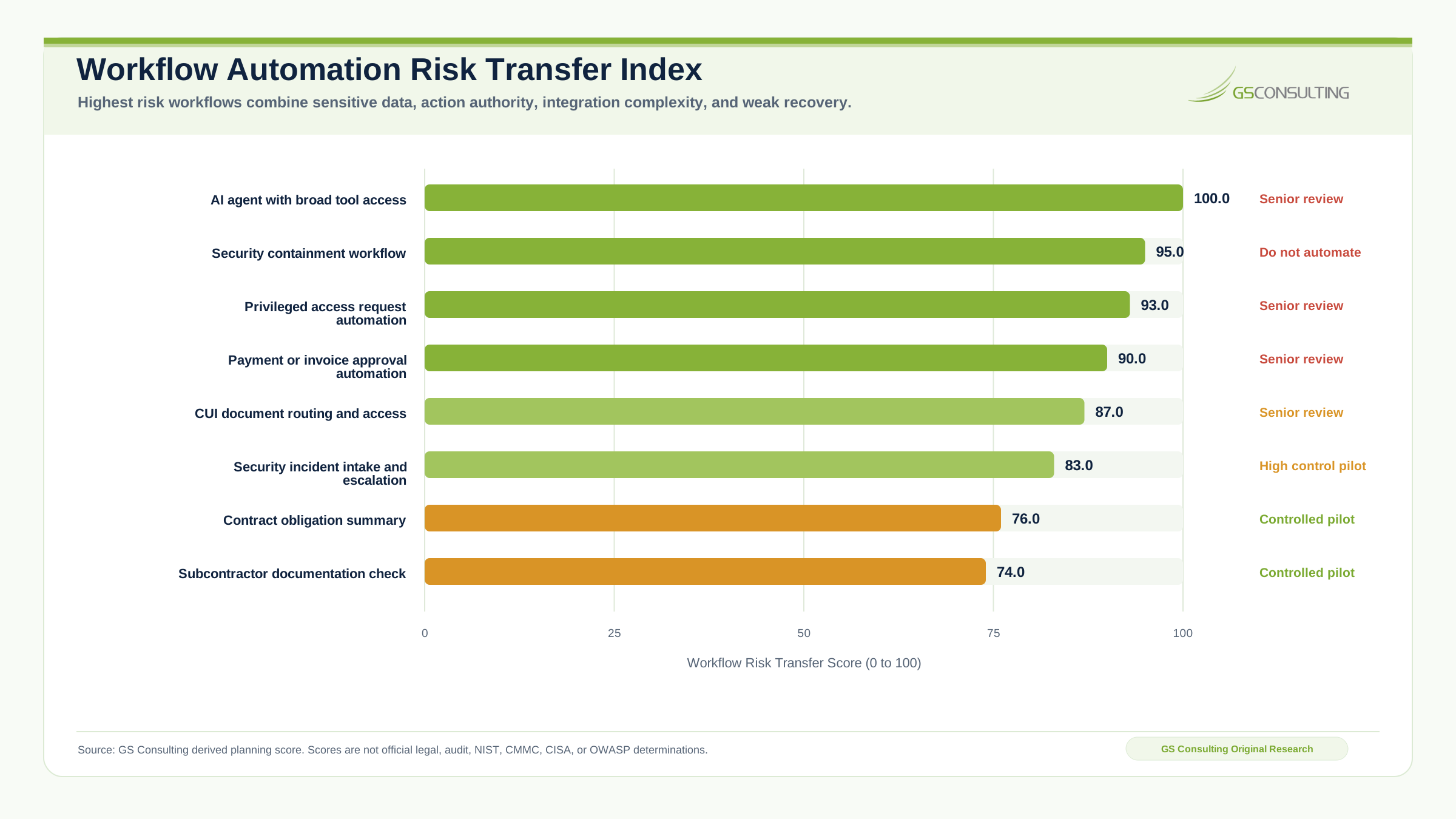
A workflow that reads public documents and creates draft summaries may be low risk. A workflow that reads CUI, interprets contract requirements, updates a compliance tracker, and notifies leadership is higher risk. A workflow that can change user access, close security tickets, or send external communications may require formal approval, stronger testing, monitoring, and rollback.
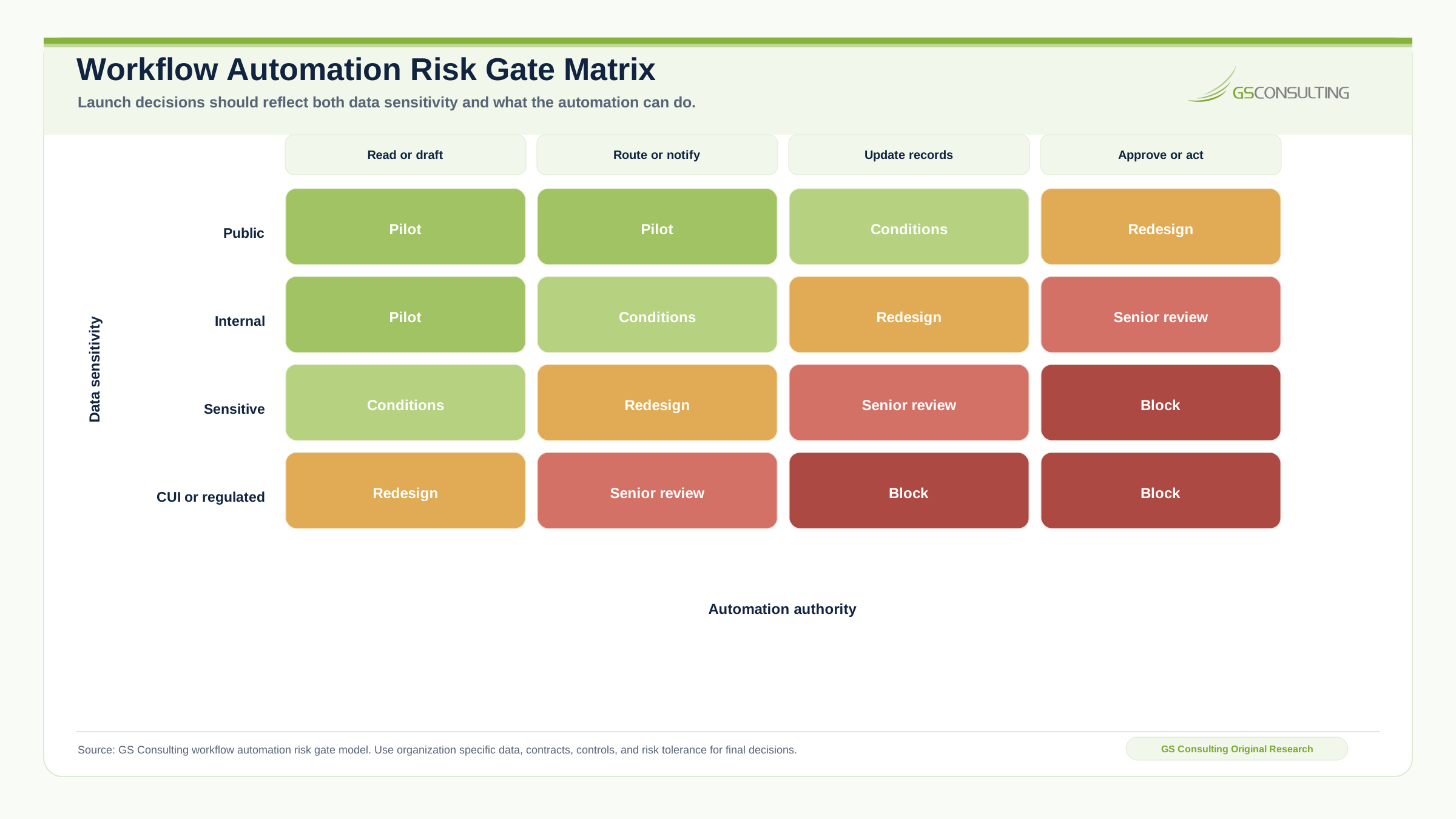
What Good Controls Look Like
A secure automated workflow should include controls that match its risk.
Scope access by system, role, contract, program, folder, and action.
Prevent unnecessary copying and keep sensitive data inside approved environments.
Use review gates for compliance, security, legal, customer, and access risk.
Keep enough evidence to prove behavior without turning logs into a data spill.
Use schemas, thresholds, reviewer feedback, source references, and quality samples.
Know who can stop the workflow, correct bad records, and escalate incidents.
What Leaders Should See Before Approval
A CISO should not be asked to approve a vague automation concept. Security, compliance, and operations leaders need an assessment package they can evaluate.
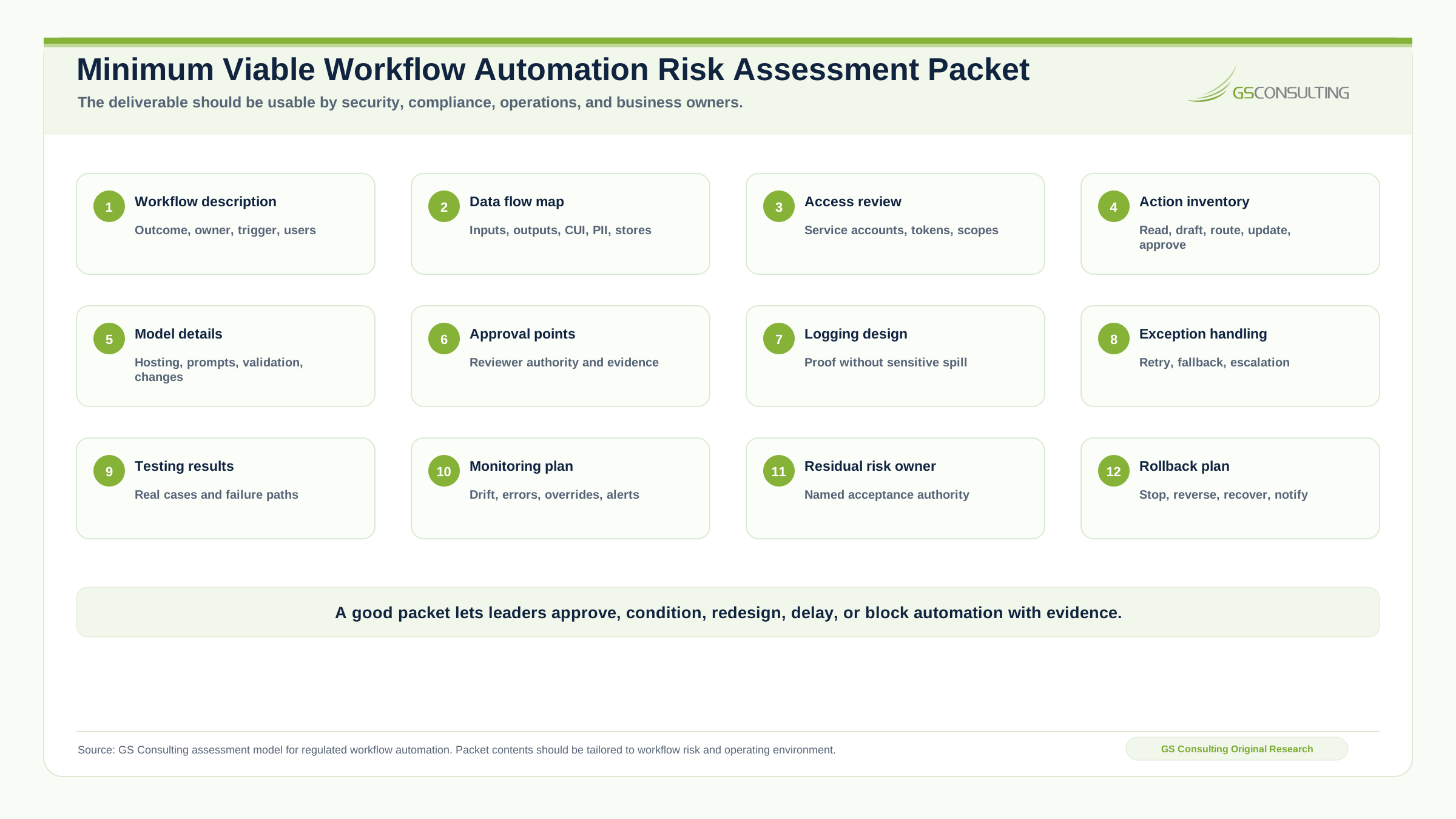
The package should include workflow description, business owner, technical owner, data inventory, data flow map, system access list, service account permissions, model details, prompt design notes, human approval points, logging design, exception handling, testing results, known risks, mitigations, residual risk owner, production monitoring plan, and rollback plan.
This connects directly to AI workflow automation. Production readiness is not only whether the automation works. It is whether the organization can control it, explain it, and support it after launch.
When Automation Should Be Blocked
A risk assessment should be able to say no. Block or delay automation when the workflow is not ready.
- Data ownership is unclear.
- CUI boundaries are not understood.
- The system of record is disputed.
- Service account access is too broad.
- Human approval is undefined.
- The workflow makes high impact decisions without review.
- Logs capture sensitive content without protection.
- The model cannot be used in the required environment.
- The integration is fragile.
- Exception handling is missing.
- No one owns production support.
- Residual risk has not been accepted.
The right answer may be to map the process first, clean up data, reduce permissions, add approval gates, redesign logging, test with real cases, limit the first release, and then automate.
The Bottom Line
Workflow automation security risk assessment is not a compliance tax. It is how you keep automation from becoming a new attack path, data spill, audit failure, or operational mess.
The real question is not, can we automate this? The real question is whether the organization can automate it safely, prove what happened, preserve accountability, and support it in production.
For GovCon firms and regulated organizations, that question matters. AI automation can reduce manual work, speed up compliance activity, improve security operations, and clean up back office workflows, but only if the risk moves into a controlled design.
Automate the work without automating risk blindly.
GS Consulting helps teams evaluate automated workflow security, AI automation compliance risks, data flows, access models, approval controls, audit trails, and production readiness.
Contact GS ConsultingSources and Related Reading
- NIST SP 800 171 Revision 3
- 32 CFR Part 170, Cybersecurity Maturity Model Certification Program
- NIST AI Risk Management Framework and Generative AI Profile
- OWASP LLM01: Prompt Injection
- OWASP Top 10 for Large Language Model Applications
- Microsoft and LinkedIn Work Trend Index
- IBM 2026 AI Control Gap Study
- AI Workflow Automation
- Enterprise AI Process Transformation
- Business Process Mapping for Government Contractors
- AI for Federal Contract Management Workflows
- Automating Federal RFP Shredding with AI
- Automating GovCon Supply Chain Compliance Checks
- Automating NIST SP 800 171 Compliance Evidence Collection
- AI Driven Cybersecurity Incident Response Workflows
- Enterprise AI Process Automation Framework
- How to Identify Workflows for AI Automation
- Human in the Loop AI Automation
- AI Audit Trails and Activity Logging
Frequently Asked Questions About Workflow Automation Risk Assessment
What is a workflow automation risk assessment?
A workflow automation risk assessment is a structured review of what an automated workflow does, what data it touches, what systems it can access, what decisions it influences, what evidence it creates, and what happens when it fails.
When should a workflow automation risk assessment happen?
The assessment should happen before production, before a pilot receives sensitive data or system access, and again when the data, model, connector, permission model, workflow logic, or action authority changes.
Why is workflow automation risk assessment important for GovCon?
GovCon workflows often touch CUI, contract data, security evidence, access approvals, customer deliverables, subcontractor information, and audit records. Automation can become part of the controlled environment if it processes, stores, transmits, or protects sensitive data.
What should the assessment produce?
A good assessment should produce a workflow description, data flow map, access review, action inventory, control gap list, risk score, mitigation plan, monitoring requirements, rollback plan, and a clear go or no go decision.
Is human in the loop enough to control automated workflow risk?
No. Human in the loop only works when the exact review point, reviewer authority, source context, approval options, evidence record, escalation path, and stop condition are designed into the workflow.