Secure AI Automation | | 21 min read
How to Identify Safe AI Automation Use Cases

Key Takeaways
A safe first AI use case has bounded data and action authority.
Choose workflow pain
Start with a real process burden rather than a vendor capability.
Apply the use case filter
Review value, data, repeatability, risk, and oversight before selecting a pilot.
Keep consequences controlled
Favor support tasks with reviewable outputs before automating high impact actions.
The easiest AI automation ideas are not always the safest ones.
That is where a lot of organizations get into trouble. A team sees a painful workflow. Someone says AI can automate it. A vendor shows a clean demo. The business gets excited. Then the hard questions show up.
What data does the AI need? Is that data regulated? Who approved the use case? Can the AI see information the user should not see? Does the output become a business record? What happens if the AI is wrong? Who is accountable when the workflow touches customers, employees, contracts, or compliance?
Safe AI automation is not about being scared of AI. It is about choosing the right first use cases. Regulated organizations do not have the luxury of learning every lesson the hard way. They need use cases that create value, prove the model, and build trust without exposing the organization to unnecessary risk.
Need help choosing safe AI automation pilots?
GS Consulting helps regulated organizations identify practical AI automation opportunities, map data exposure, score use case risk, define human review, and build controlled implementation roadmaps.
Request a Use Case AssessmentWhat Makes an AI Automation Use Case Safe?
A safe AI automation use case is not a use case with zero risk. That does not exist.
A safe use case is one where the value is clear, the workflow is understood, the data is approved, the security controls are in place, the compliance exposure is known, and people remain accountable where judgment matters.
If a use case cannot pass those tests, it may still be a future opportunity. It just should not be the first AI automation project.
Why Regulated Teams Need a Different Use Case Filter
A standard business team may look at AI automation and ask one question: will this save time?
A regulated team has to ask more. Will this expose sensitive data? Will this affect a regulated decision? Will this create audit evidence? Will this violate a contract? Will this create a record the organization needs to retain? Will this change who is accountable for the outcome? Will this introduce a new vendor risk? Will this create a security path into a system that used to be closed?
A bad AI automation choice does not just waste money. It can create data exposure, compliance problems, operational confusion, customer trust issues, and cleanup work nobody budgeted for.
The goal is not to avoid AI. The goal is to start with use cases where the organization can learn, prove value, and build muscle without betting the business on an immature workflow.
Original Research: Safe AI Automation Is an Authority Boundary Problem
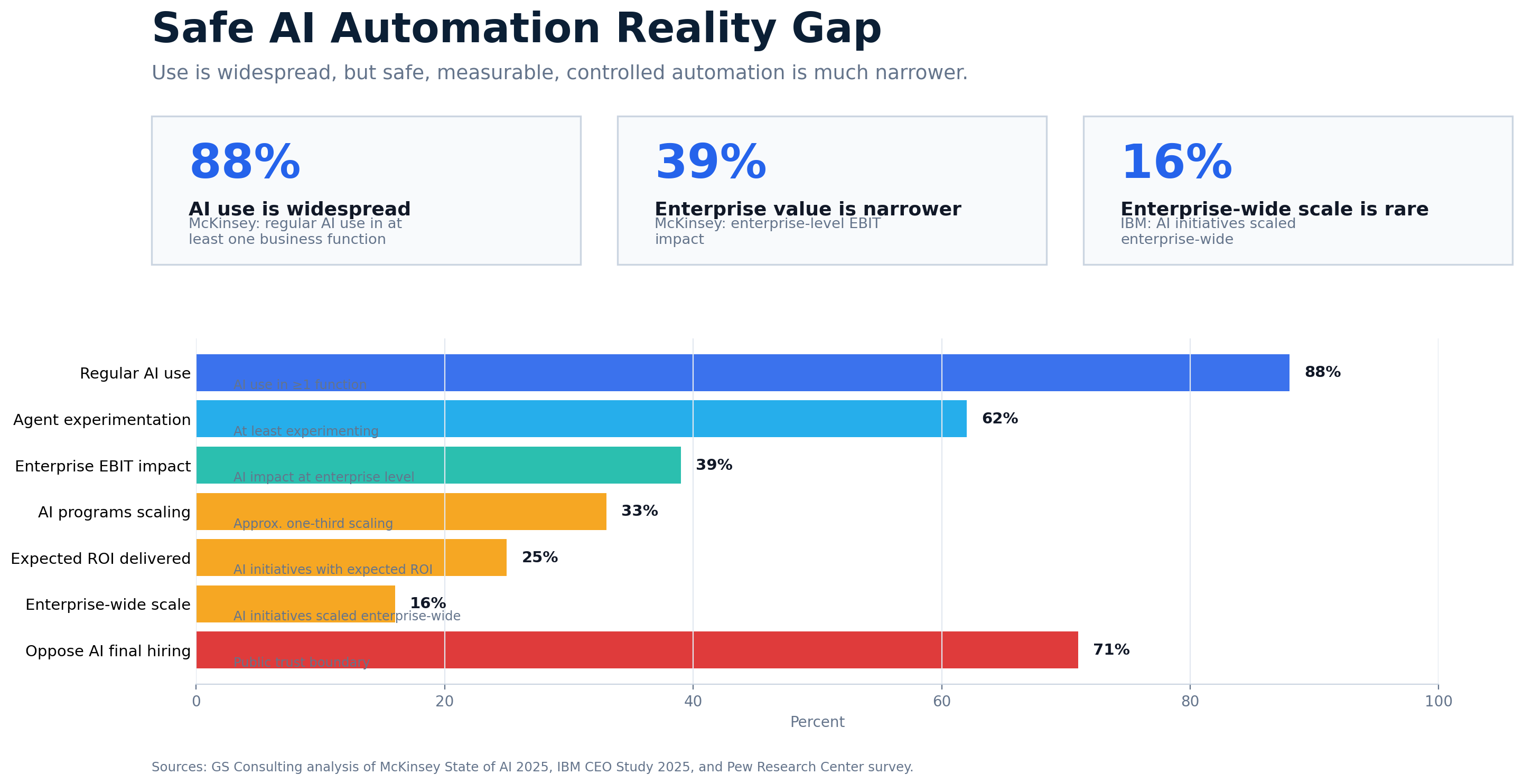
AI adoption is not the same thing as safe AI automation.
That distinction matters. Public market signals show that AI use is spreading faster than governed, measurable, enterprise scale automation. McKinsey reports that 88% of organizations use AI in at least one business function and 62% are experimenting with AI agents, but enterprise level EBIT impact and scaled adoption remain much narrower. IBM has also reported that many AI initiatives still miss expected ROI and only a smaller share scale across the enterprise.
That gap is the point. A team using AI informally is not the same as a workflow being approved, measured, governed, monitored, and safe enough to scale.
GS Consulting analyzed 57 common AI automation use cases across IT, HR, finance, operations, and compliance and risk. Each use case was scored against business value, process clarity, data safety, security fit, compliance manageability, human review clarity, measurement clarity, authority risk, sensitive data risk, system action risk, and external impact risk.
We built two planning metrics from that analysis. The Safe Pilot Score ranks use cases by first wave pilot suitability. The Evidence Burden Score ranks the controls most consistently reinforced by public AI governance, security, regulatory, and accountability sources.
These are GS Consulting planning tools. They are not legal opinions, regulatory determinations, audit findings, or compliance certifications. They are meant to help leaders ask better questions before a workflow turns into an AI project.
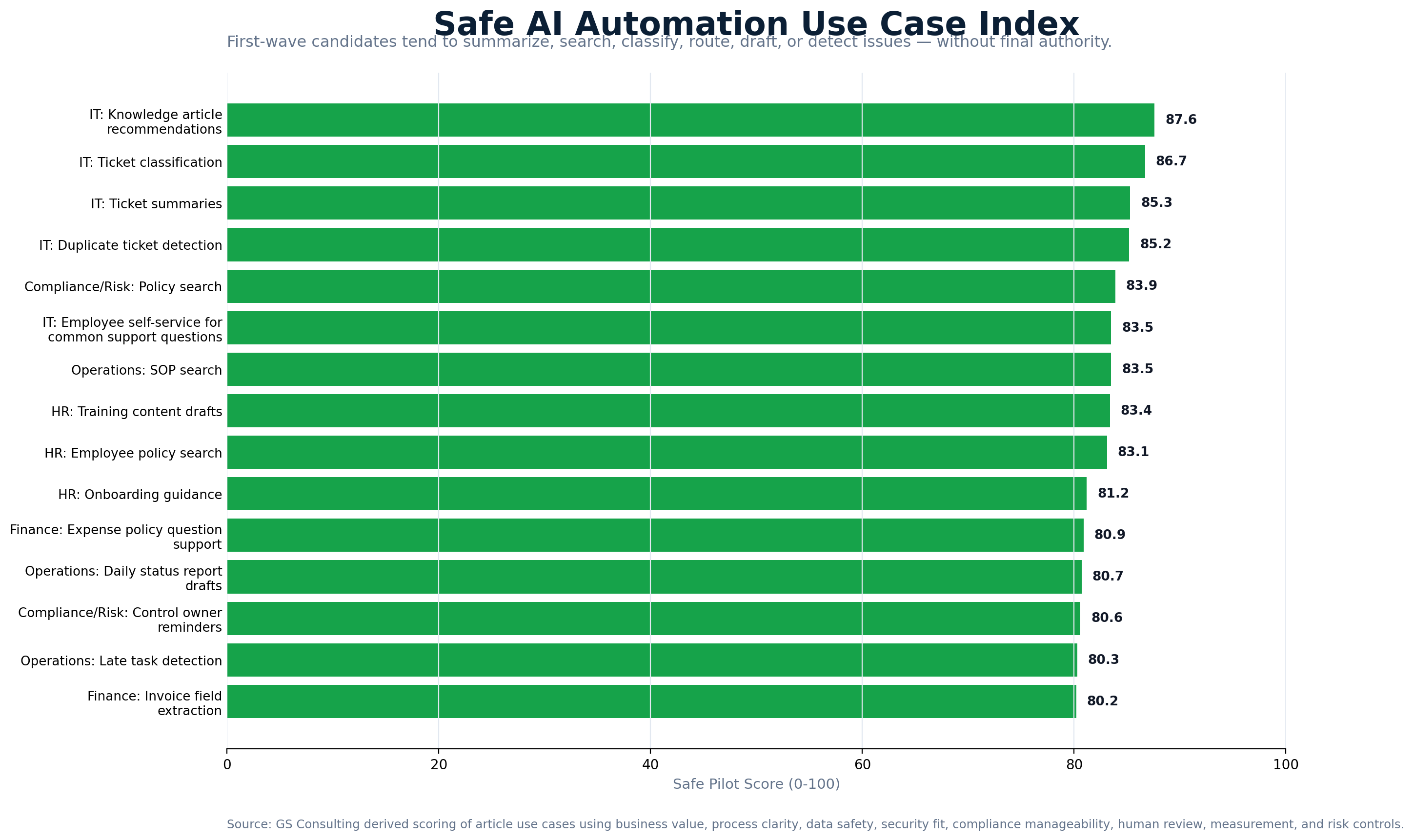
The highest scoring candidates were practical: knowledge article recommendations, IT ticket classification, ticket summaries, duplicate ticket detection, policy search, employee self service for common support questions, SOP search, training content drafts, employee policy search, and onboarding guidance.
The lowest scoring candidates were not worthless. Many were high value. The problem was authority. Discipline, termination, accommodation support, vendor banking changes, production changes without approval, hiring decisions, fraud determinations, payment approvals, safety related actions, and final compliance certification all carry consequences that make them poor first wave automation candidates.
That is the nuance leaders need. Red does not always mean never. It means do not start there. AI may support intake, summarization, evidence organization, or draft preparation later, but final authority should stay with accountable people.
Start With Workflow Pain, Not AI Capability
Most AI conversations start in the wrong place. They start with the tool.
A better conversation starts with the workflow. What is slow? What is repetitive? What is expensive? What creates errors? What requires too much manual review? What creates reporting burden? What causes customer or employee frustration? What forces skilled people to spend time on work that does not need their judgment?
That is where AI automation belongs.
For example, imagine an operations team that spends 25 hours a week manually reviewing exception reports. They copy data from one system into a spreadsheet, compare status notes, email process owners, and write a weekly summary for leadership.
AI may be able to summarize exceptions, group related issues, identify missing information, draft follow up notes, and prepare a first version of the report. The manager still reviews it. The system of record still owns the data. But the team gets time back and sees problems earlier.
That is a useful use case. Not because it sounds flashy. Because it removes real friction.
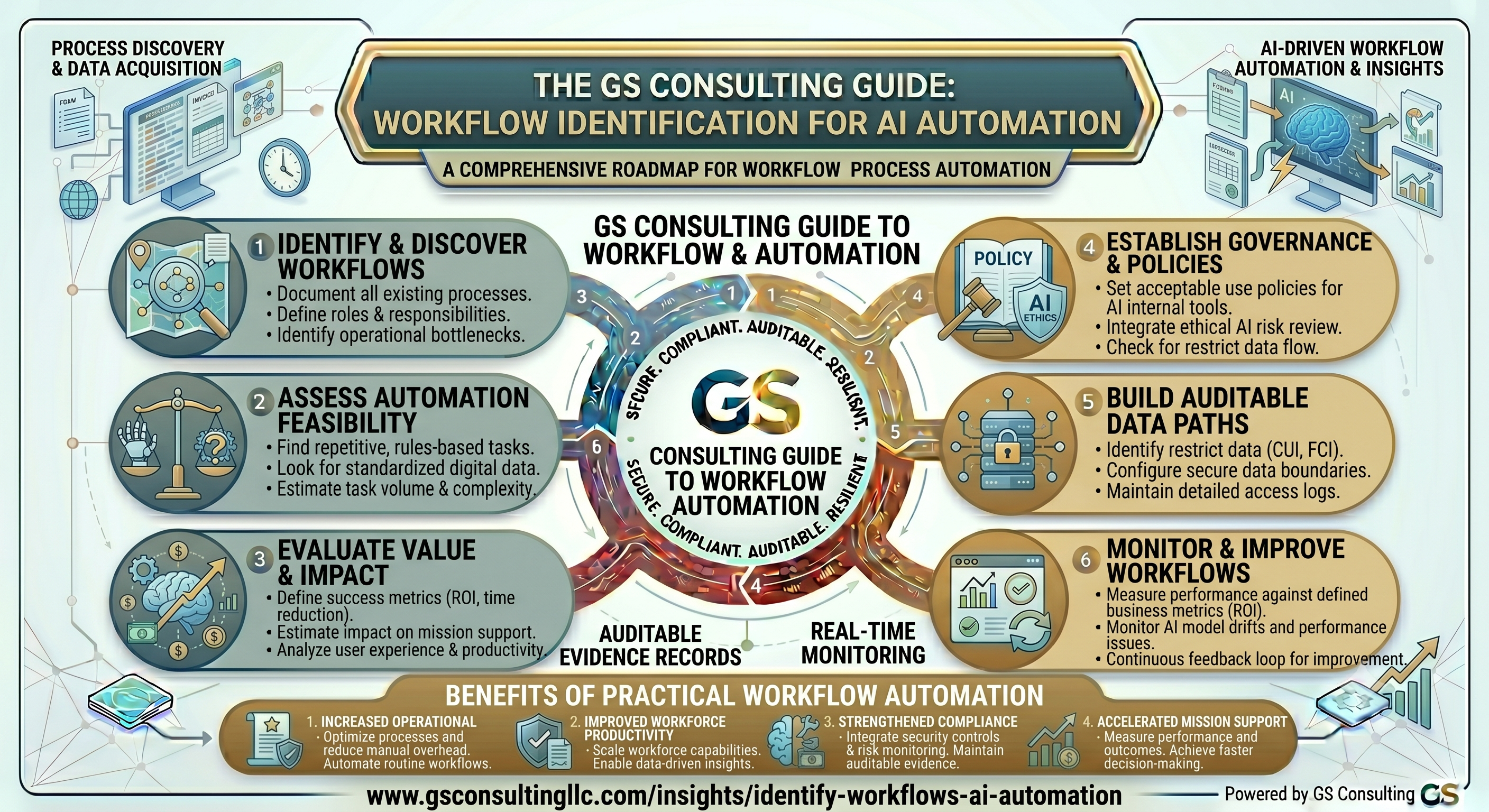
The Safe AI Automation Use Case Test
Before approving a use case, put it through a practical test.
- 1Is the workflow important enough?
AI should not be wasted on tiny problems. Look for enough volume, cost, risk, or frustration to matter.
- 2Is the workflow mature enough?
Do not automate a process no one can explain. If five people describe the workflow five ways, fix process clarity first.
- 3Is the data approved for AI use?
Know what data the AI needs, where it lives, who owns it, whether it is sensitive, and whether the tool can process it.
- 4Can the AI role be limited?
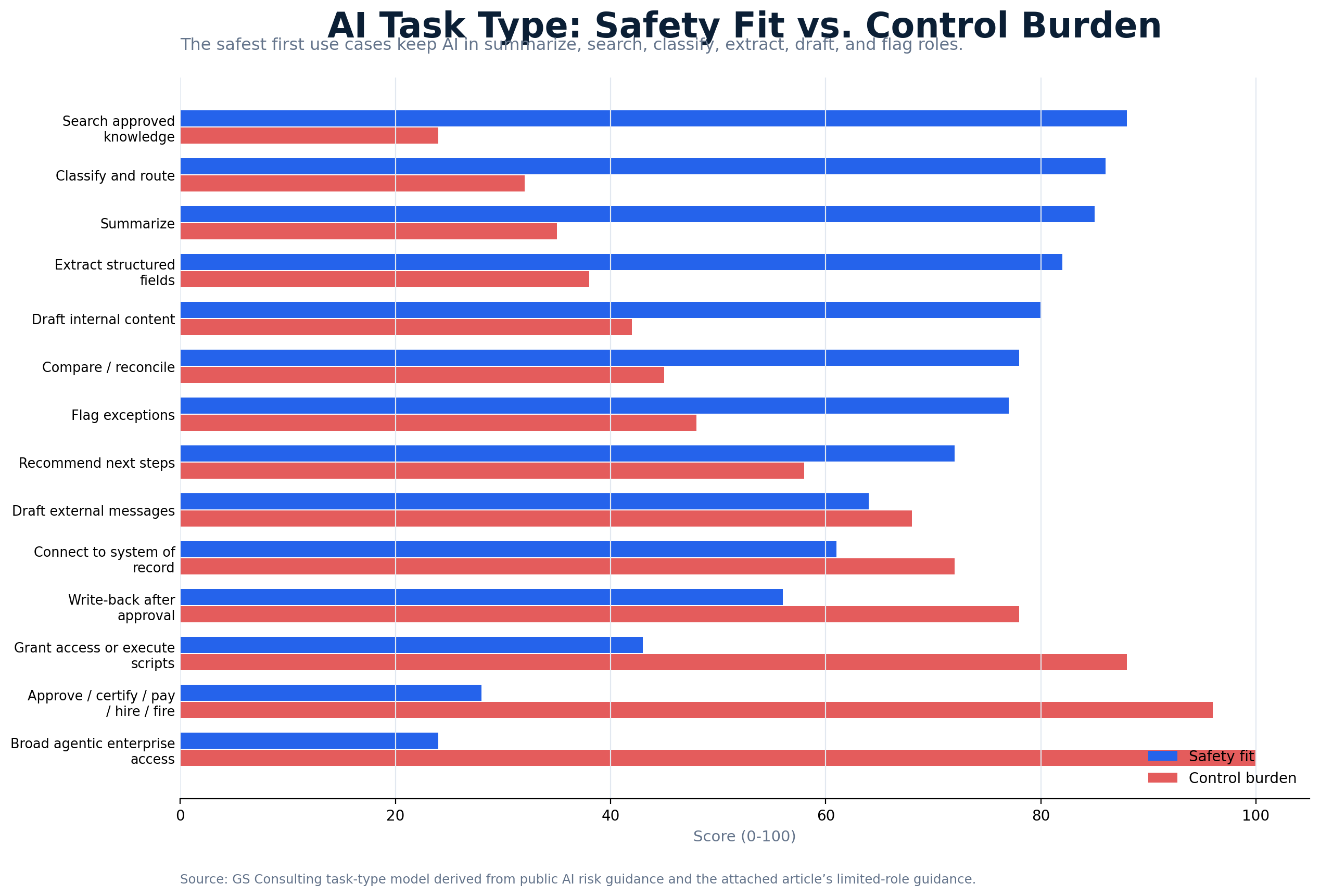
The safest first move is usually read, summarize, classify, draft, route, flag, or recommend. Broader action can come later.
- 5Is human review clear?
Human review only works if the reviewer knows what to check, when to approve, and when to stop or escalate.
- 6Can you measure the result?
Pick use cases with a baseline, such as time saved, cycle time reduced, error rate reduced, or exceptions found earlier.
If the AI summarizes a sensitive contract, the summary may still be sensitive. If it summarizes an employee relations case, the summary is still sensitive. If it summarizes a cyber incident, the summary may still be sensitive. The output does not magically become safe because AI rewrote it.
The Three Categories of AI Automation Use Cases
Use case selection gets easier when leaders group candidates into three categories.
Approved knowledge search, internal policy support, IT ticket classification, non sensitive meeting summaries, compliance evidence organization, operations exception summaries, invoice field extraction with review, and customer support response drafts with approval.
Customer record analysis, employee case work, contract review, security alert summarization, vulnerability prioritization, external customer message drafts, financial exception review, and AI connected to systems of record.
Final hiring decisions, payment approval, legal conclusions, compliance certification, production system changes without approval, privileged access grants, external commitments without review, and broad access AI agents.
AI can summarize, classify, draft, route, monitor, and prepare decisions. The person still owns the decision.
Safe AI Automation Use Cases by Department
Different teams can use the same basic filter, but the risk profile changes by department.
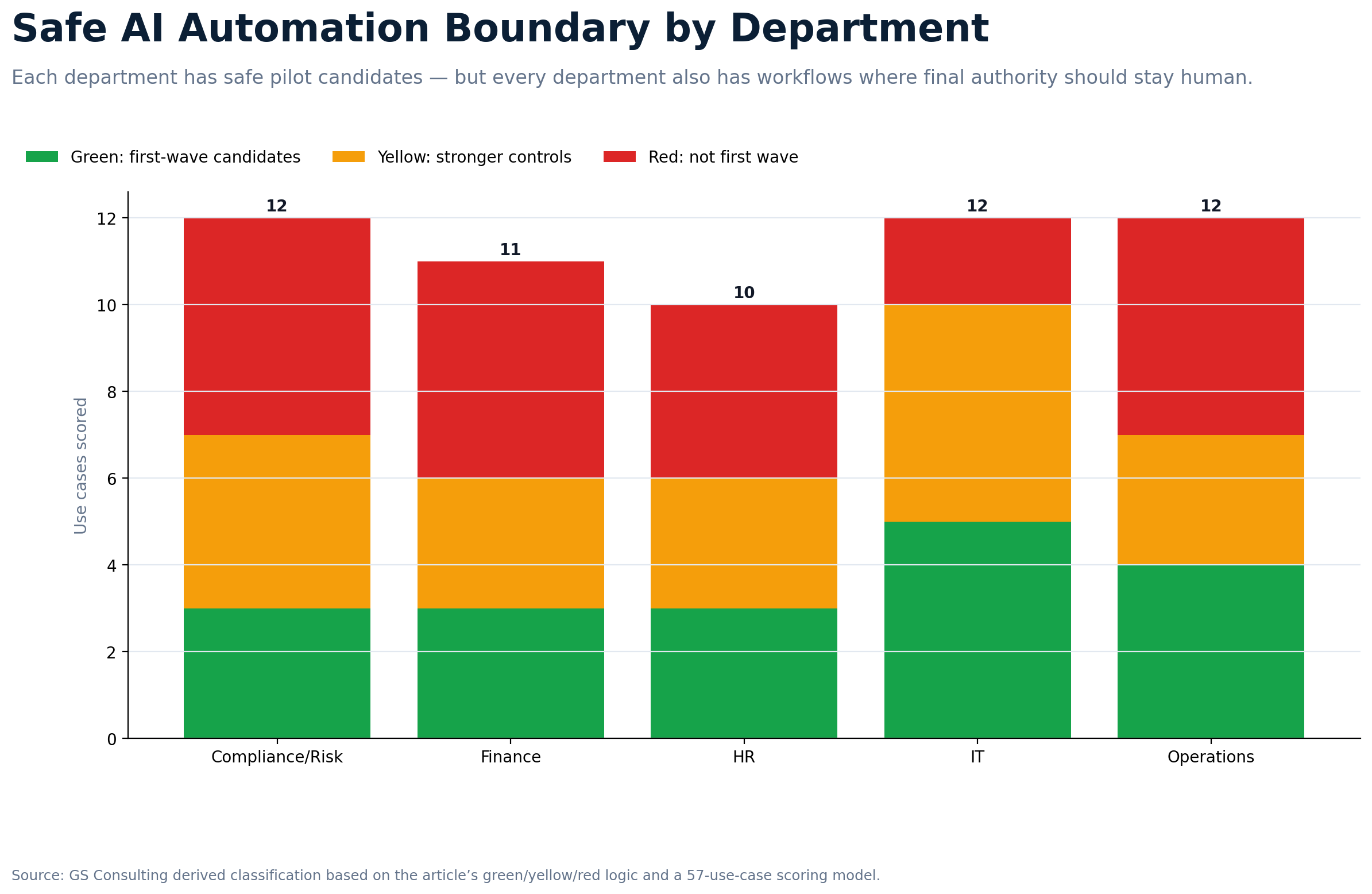
IT
Good first use cases include ticket classification, ticket summaries, knowledge article recommendations, duplicate ticket detection, incident timeline drafts, access request intake summaries, and employee self service for common support questions.
Be careful with access grants, production changes, security enforcement, script execution, and incident closure. IT is often a strong place to start because the data is structured, the volume is high, and the metrics are clear.
HR
Good first use cases include employee policy search, onboarding guidance, HR case classification, benefits question support from approved content, training content drafts, and manager checklist support.
Be careful with hiring decisions, performance reviews, compensation recommendations, discipline, termination, accommodations, and employee relations findings. HR AI needs trust. If employees think AI is making sensitive people decisions in the background, adoption will suffer.
Finance
Good first use cases include invoice field extraction, expense policy question support, variance explanation drafts, procurement intake classification, audit evidence organization, and payment exception summaries.
Be careful with payment approval, vendor banking changes, financial reporting conclusions, tax positions, and fraud determinations without review. Finance use cases can have strong ROI, but approval and audit trails matter.
Operations
Good first use cases include exception summaries, daily status report drafts, SOP search, late task detection, vendor follow up drafts, quality issue classification, and process adherence monitoring.
Be careful with customer delivery commitments, major schedule changes, safety related actions, regulatory decisions, and production changes without approval.
Compliance and Risk
Good first use cases include evidence inventory, policy search, control owner reminders, audit artifact summaries, risk register cleanup, stale evidence detection, and internal readiness reports.
Be careful with final compliance certification, regulatory interpretations, risk acceptance, audit conclusions, and customer or regulator responses without review. AI can help compliance teams organize the work. It should not become the person signing the work.
A Simple Scoring Model for Safe AI Use Cases
Score each candidate from 1 to 5 in seven areas. A use case with a high score and manageable risk is a good pilot. A use case with high value but low data safety or weak oversight may still be important, but it needs foundation work first.
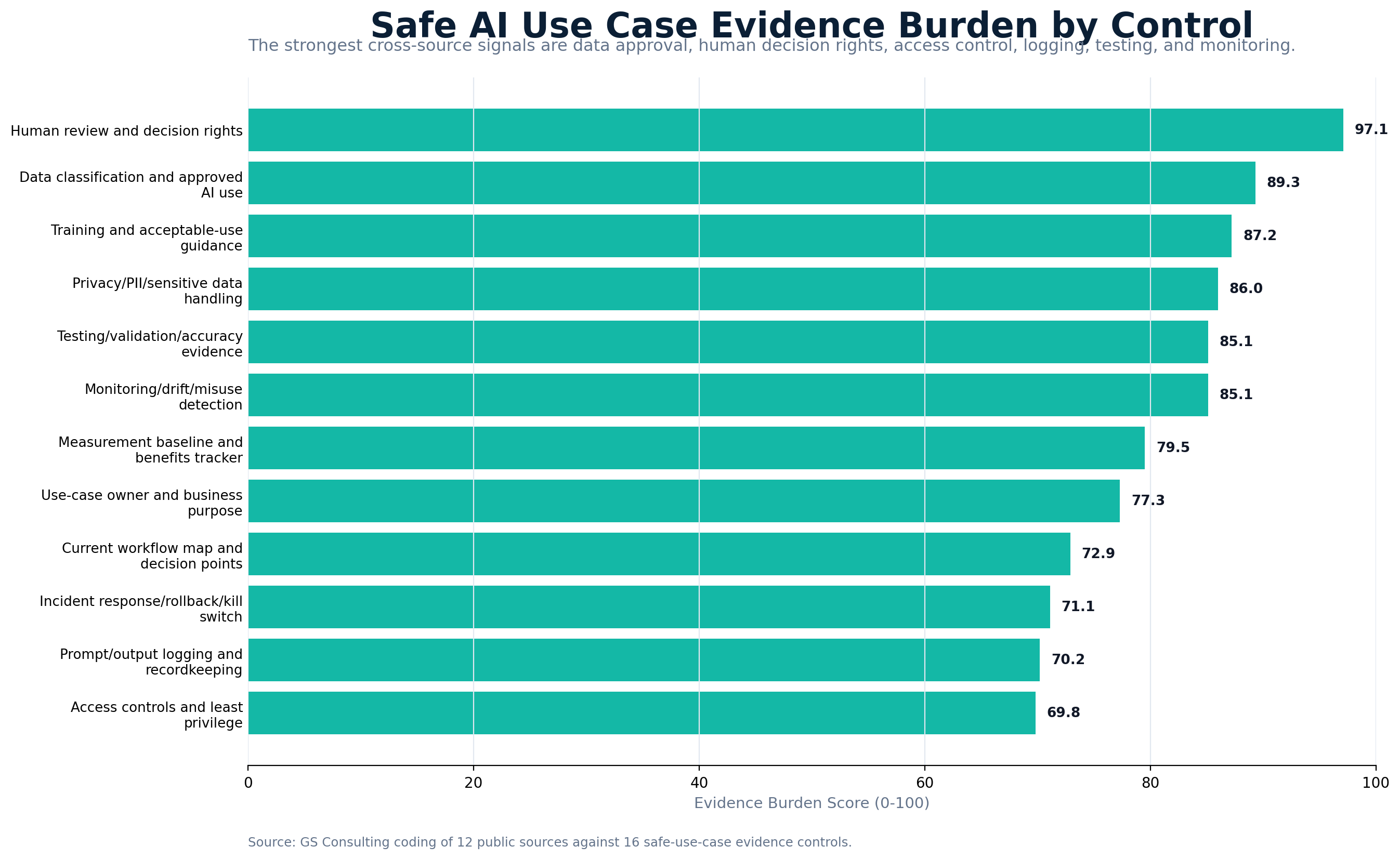
The highest evidence burden controls were human review and decision rights, data classification and approved AI use, training and acceptable use guidance, privacy and sensitive data handling, testing and validation evidence, monitoring for drift and misuse, measurement baselines, and a clear use case owner.
This is where many AI pilots fall apart. They have a demo. They do not have evidence. In regulated environments, that gap matters.
Questions Leaders Should Ask Before Approving a Use Case
Before giving the green light, leaders should be able to answer the basic operating questions.
- What business problem are we solving?
- Why is AI the right tool for this workflow?
- What part of the process will AI handle?
- What data will AI access, and is the tool approved for that data?
- Will AI output become a record?
- Can users only see what they are allowed to see?
- Will the AI connect to any system of record or write anything back?
- Who reviews the output?
- What happens if the AI is wrong?
- How will the team measure value and monitor the workflow after launch?
- Who owns the risk?
If the team cannot answer those questions, the use case is not ready.
The First 90 Days
The first 90 days should not be spent debating theory. They should be spent finding safe, useful pilots.
- Days 1 to 30Find current AI use and workflow pain.
Inventory public tools, vendor features, department pilots, informal workarounds, high volume workflows, recurring questions, reporting burden, frequent exceptions, and sensitive data exposure.
- Days 31 to 60Score candidates and choose controlled pilots.
Pick five to ten candidate workflows, map data and systems, review compliance exposure, and choose two or three specific pilots.
- Days 61 to 90Launch, measure, and decide what survives.
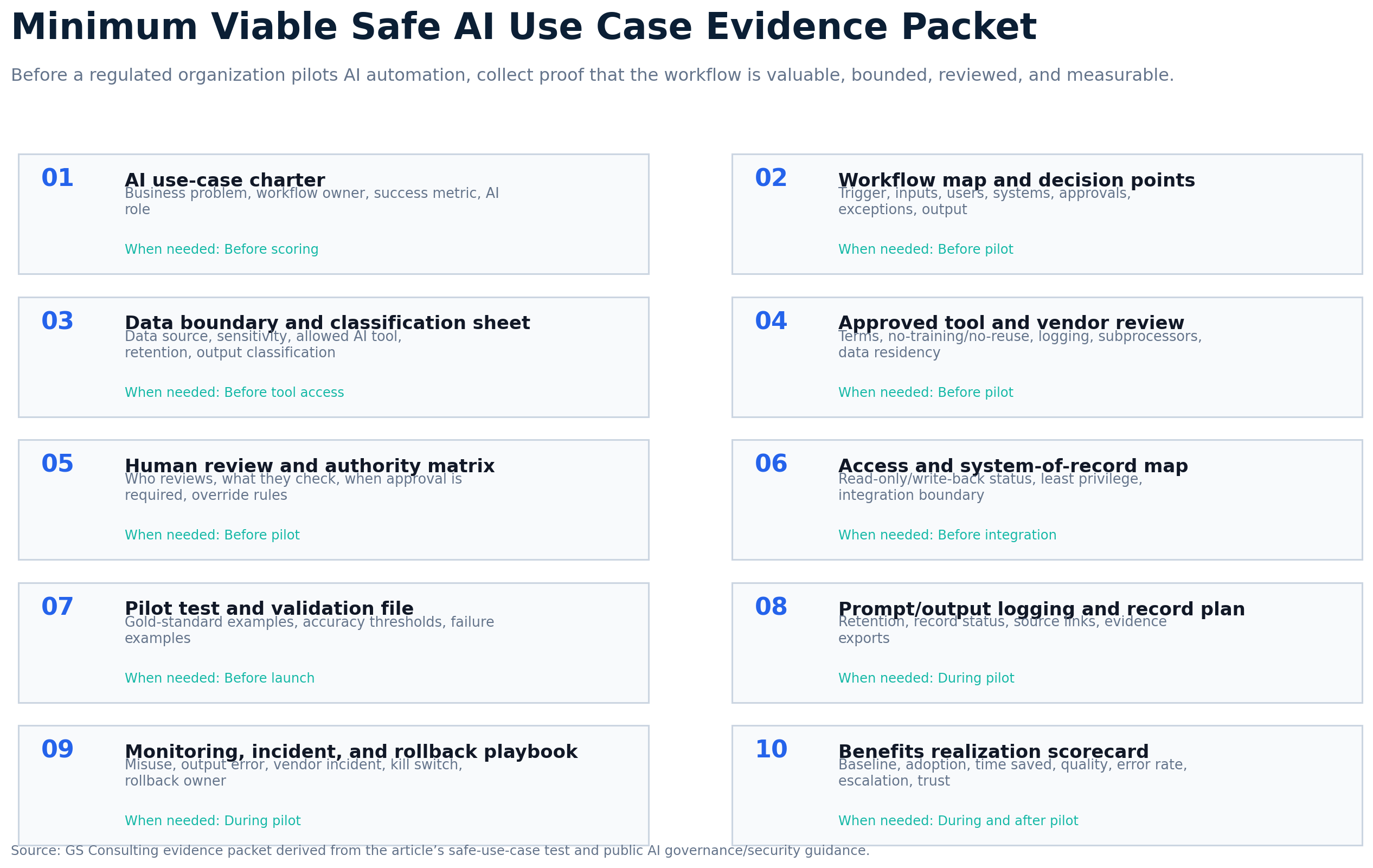
Run pilots with clear owners, approved data, human review, logging, and success measures. Scale what works, redesign what is weak, and stop what creates risk.
Good pilot examples include AI assisted IT ticket classification, AI assisted operations exception summary, AI assisted compliance evidence inventory, AI assisted employee policy search, and AI assisted invoice exception summary.
How This Fits Secure AI Automation
This article is one part of a broader secure AI automation approach. Secure AI Automation for Regulated Organizations explains how GS Consulting helps organizations adopt AI automation with the right strategy, workflows, security controls, governance, and measurable outcomes.
This guide focuses on one specific question: how do we choose the right AI automation use cases in the first place?
That question matters because use case selection is where the risk curve starts. Pick the wrong use case and everything gets harder. Pick the right use case and you build momentum.
The Bottom Line
Safe AI automation starts with use case discipline.
Do not start with the tool. Start with the workflow. Do not start with the flashiest idea. Start with the one that has real value, approved data, clear ownership, manageable risk, and measurable results.
Regulated organizations can move fast with AI, but they should not move blind. The safest first use cases usually help people summarize, classify, draft, route, monitor, and prepare decisions. They do not give AI broad authority over sensitive systems or final outcomes.
That is how you build trust. That is how you create value. And that is how AI automation becomes something the organization can actually scale.
GS Consulting helps regulated organizations identify safe AI automation use cases, map workflows, evaluate data and compliance exposure, define human review, assess security risk, and build practical AI automation roadmaps that create value without losing control.
Ready to find the safest AI automation opportunities in your organization?
Contact GS Consulting for a Secure AI Automation Use Case Assessment.
Contact GS ConsultingResearch Sources and Caveats
The Safe Pilot Score, Evidence Burden Score, and green, yellow, and red classifications are GS Consulting planning metrics. They are not official legal, regulatory, security, audit, procurement, or compliance determinations.
Actual use case approval should account for the organization's workflow data, contracts, data classification, regulatory exposure, system architecture, vendor terms, security controls, human review model, risk tolerance, and business objectives.
- NIST AI Risk Management Framework
- NIST Generative AI Profile
- OWASP Top 10 for Large Language Model Applications
- CISA: Careful Adoption of Agentic AI Services
- European Commission: AI Act
- GAO Artificial Intelligence Accountability Framework
- McKinsey: The State of AI
- IBM Institute for Business Value: CEO Study on Generative AI
- Pew Research Center: AI in Hiring and Evaluating Workers
Frequently Asked Questions About Safe AI Automation
What makes an AI automation use case safe?
A safe AI automation use case has clear business value, a well understood workflow, approved data, access controls, known compliance exposure, specific human review, and measurable outcomes. It is not risk free, but the risk is understood and controlled.
What are good first AI automation use cases for regulated organizations?
Good first use cases usually keep AI in an assist, summarize, classify, draft, route, or recommend role. Examples include approved knowledge search, IT ticket classification, compliance evidence organization, operations exception summaries, invoice field extraction with review, and employee policy support from approved content.
Which AI automation use cases should not be first wave projects?
Regulated organizations should avoid first wave projects where AI makes final hiring decisions, approves payments, certifies compliance, grants privileged access, changes production systems, issues legal conclusions, sends external commitments, or uses sensitive data in unapproved tools.