
Secure AI Automation | | 16 min read
What Is Secure AI Automation?

Key Takeaways
AI adoption has to move fast and stay controlled.
Start With Mission Value
Prioritize use cases tied to measurable business, delivery, or mission outcomes.
Protect the Data Boundary
Define what data AI tools can touch before selecting vendors or architectures.
Keep Humans Accountable
Use AI to support workflows while retaining trained review and escalation paths.
Document the Controls
Maintain inventories, testing evidence, monitoring plans, and risk decisions.
AI automation is moving quickly from experiment to expectation, but regulated organizations need more than speed. Secure AI automation is the controlled use of AI to improve or automate business workflows while protecting data, enforcing access rules, preserving human accountability, logging activity, monitoring performance, and managing AI-specific risks.
Business leaders want faster workflows. Employees want less manual work. IT teams want better ticket triage. Compliance teams want easier evidence collection. Operations teams want earlier warning when something is about to break. And in almost every department, someone is already asking, "Can AI handle this?"
For regulated organizations, the better question is not just whether AI can automate a task. The better question is whether AI can automate that task securely, reliably, and with the right controls.
Need a Secure AI Automation Readiness Assessment?
GS Consulting helps regulated organizations identify practical automation opportunities, map data risk, design human-in-the-loop controls, and build secure AI workflows that can withstand operational and compliance scrutiny.
Talk to GS ConsultingSecure AI automation is not the same thing as giving employees a chatbot. It is not the same thing as basic robotic process automation. It is not simply connecting a generic AI tool to company data. And it is definitely not allowing an AI agent to roam through enterprise systems with broad access and unclear accountability.
A Simple Definition of Secure AI Automation
Secure AI automation is AI-enabled workflow automation designed with security, compliance, governance, human oversight, and auditability built in from the start.
In plain English, it means AI can help with work, but it does not get unlimited trust. It can summarize, classify, draft, route, recommend, detect, and in some cases act. But it operates inside a controlled environment. It uses approved data. It follows defined permissions. It escalates when needed. It creates records. It can be reviewed. And it is monitored after deployment.
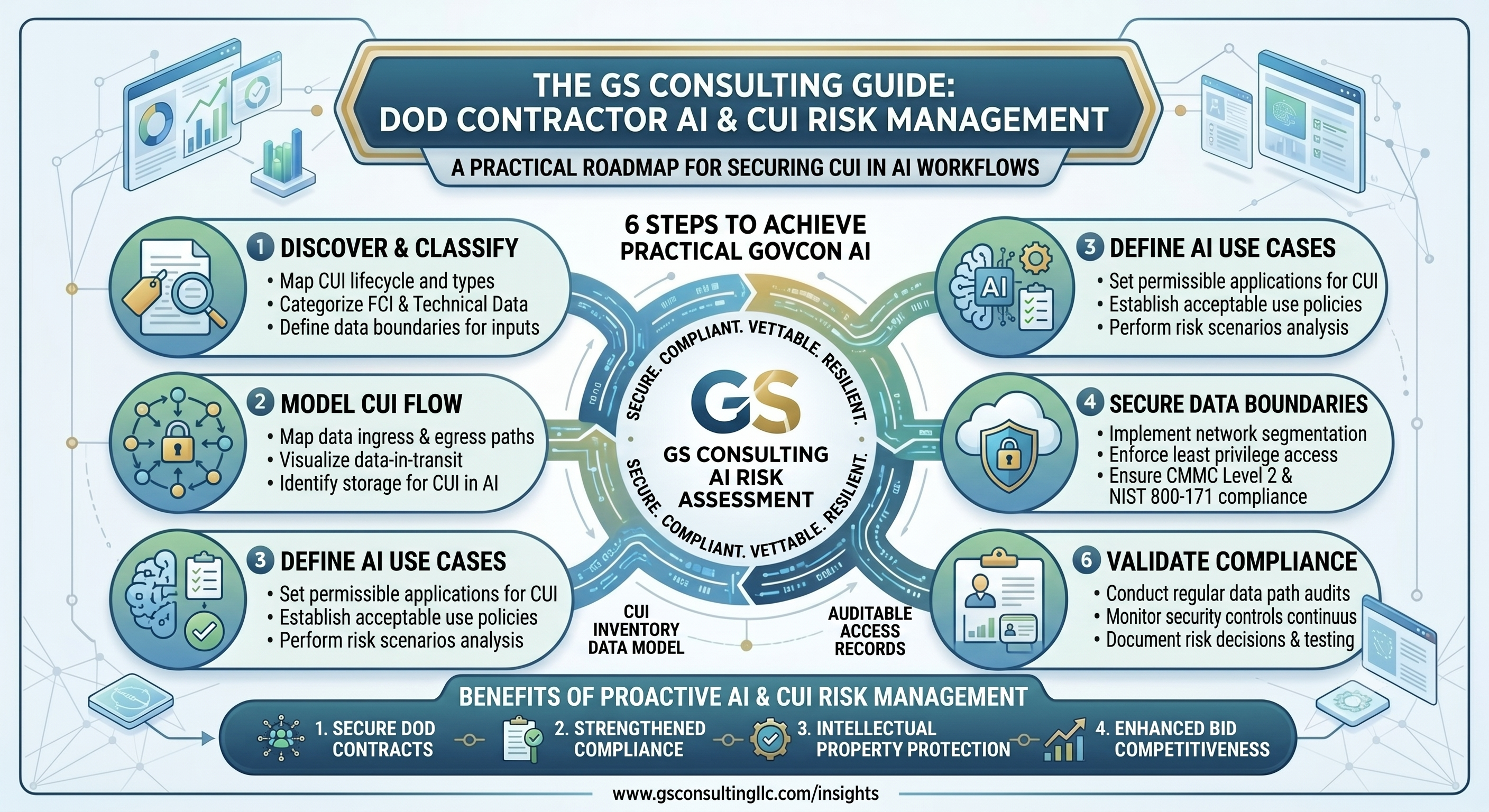
For a regulated organization, secure AI automation should answer five basic questions:
- Who is allowed to use it?
- What data is it allowed to access?
- What actions is it allowed to take?
- Where does a human need to review or approve?
- How do we prove what happened if something goes wrong?
That is the difference between AI experimentation and AI that can support real business operations.
Why Regulated Organizations Need a Different Approach
Regulated organizations cannot treat AI automation the way a small team might treat a productivity app. A healthcare company may handle protected health information. A financial institution may handle sensitive customer and transaction data. A government contractor may handle CUI or other controlled information. A critical infrastructure operator may have systems where automation failures can affect availability, safety, or public trust.
In those environments, AI mistakes are not just annoying. They can create legal, contractual, operational, cybersecurity, privacy, and reputational risk.
The practical message is simple: regulated organizations should not bolt AI onto workflows and hope for the best. They should design AI automation the way they would design any sensitive enterprise capability: with risk management, access control, testing, monitoring, and accountability.
Secure AI Automation vs. Chatbots, RPA, and Generic AI Tools
Secure AI Automation vs. a Basic Chatbot
A basic chatbot answers questions. Secure AI automation changes how work gets done. A chatbot might help an employee ask, "What is our travel policy?" or "Summarize this document." That can be useful, but it is still mostly a conversation.
Secure AI automation goes further. It connects AI to a controlled workflow. Instead of simply answering a policy question, a secure AI automation workflow might identify the policy category, retrieve the answer from approved internal documents, show the source, ask for missing information, create a case if the issue is sensitive, route the case to the right specialist, log the interaction, and flag outdated content for review.
The problem with basic chatbots is that they often lack the controls regulated organizations need. They may not enforce enterprise permissions. They may not know which documents are approved. They may not produce useful audit logs. They may not distinguish between low-risk questions and sensitive cases. They may also encourage users to paste sensitive data into tools that were never approved for that data.
Secure AI Automation vs. RPA
Robotic process automation, or RPA, is usually rules-based. It is good at performing predictable, repetitive tasks: clicking buttons, copying data between fields, moving files, generating reports, or following a fixed sequence of steps.
AI automation is different because it can handle ambiguity. AI can read messy text, summarize long documents, classify requests, extract key details, compare language, detect patterns, draft responses, and recommend next actions. That makes it useful for workflows where the input is not always clean or structured.
But AI also introduces risks that traditional RPA does not. It can misunderstand a request. It can sound confident while being wrong. It can be manipulated through prompt injection. It can disclose sensitive information if access controls are weak. It can take inappropriate actions if it has too much authority.
RPA is useful when a process is predictable, screen-based, and follows the same sequence every time.
AI is useful when the workflow requires interpretation, summarization, classification, drafting, or pattern recognition.
A good rule of thumb: use RPA when the process is stable and rule-based. Use AI when the workflow requires language, context, judgment support, or pattern recognition. Use secure AI automation when the workflow touches sensitive data, regulated decisions, enterprise systems, or operational risk.
Secure AI Automation vs. Generic AI Tools
Generic AI tools are built for broad use. Secure AI automation is built for controlled enterprise use. A generic AI tool may be fine for brainstorming a public blog title or rewriting non-sensitive content. But regulated organizations need much more when AI touches business workflows.
Secure AI automation should include approved vendors, data handling rules, access control, identity management, role-based permissions, prompt and output retention policies, model training restrictions, source grounding, human review rules, audit logging, incident response procedures, and monitoring after deployment.
Secure AI Automation vs. Unsecured Workflow Automation
Unsecured workflow automation is automation that moves fast but does not adequately control risk. It might connect apps together without reviewing data sensitivity. It might allow broad API access. It might trigger actions without approval. It might store sensitive outputs in the wrong place. It might lack logging. It might let users create automations that no one in IT, security, legal, or compliance has reviewed.
When AI is added to that kind of environment, the risk increases. Now the automation is not just moving data. It is interpreting data, generating outputs, choosing next steps, and possibly triggering actions.
The Core Components of Secure AI Automation
Secure AI automation is not one product. It is an architecture and operating model. A mature program usually includes the following components.
Approved Use Cases
The organization should define where AI automation is allowed. Not every workflow should be automated. Some workflows are low risk and high value. Others involve sensitive data, legal obligations, customer commitments, safety, financial decisions, employment decisions, or regulated records.
Low-risk examples may include summarizing public documents, drafting internal templates, or routing routine service tickets. Moderate-risk examples may include invoice exception triage, HR case routing, compliance evidence review, or customer support drafting. High-risk examples may include cybersecurity enforcement, hiring recommendations, medical decision support, financial approvals, legal interpretations, or actions affecting regulated data.
Data Classification and Data Boundaries
Secure AI automation starts with the data. Before an AI tool is approved for a workflow, the organization should know what data the workflow uses. Public information, internal business data, customer data, employee data, regulated data, confidential contracts, financial records, and security logs all require different handling.
This is one of the most common mistakes organizations make. They review the source document but forget that the AI output may also become sensitive because it summarizes or derives from the source.
Identity and Least Privilege
The AI workflow should know who the user is, what role they have, what information they are allowed to access, and what actions they are allowed to request. A user who cannot access a sensitive document directly should not be able to ask an AI assistant to summarize it.
Least privilege also applies to AI agents and automation tools. If an AI workflow only needs read access to a knowledge base, it should not have write access to the HRIS, CRM, ERP, ticketing system, or file repository.
Human Review, Action Boundaries, and Auditability
Secure AI automation does not remove humans from every workflow. It puts humans in the right places. AI can draft, summarize, classify, and recommend. But humans should remain accountable for sensitive decisions and high-impact actions.
Action boundaries should be explicit. A practical model is read, summarize, recommend, draft, act with approval, and act autonomously only within narrow, low-risk limits. Most regulated organizations should start with read, summarize, recommend, and draft. Autonomy should increase only after testing, monitoring, and risk review.
The organization should be able to answer who used the system, what data the AI accessed, what output was generated, what sources were used, who approved an action, whether the output was edited, and whether the workflow escalated. AI automation without logging may feel efficient until something goes wrong. Then it becomes very hard to explain what happened.
Testing, Monitoring, and Vendor Review
Secure AI automation should be tested before it is trusted. Testing should include accuracy, consistency, data leakage risk, prompt injection resilience, inappropriate output handling, user acceptance, workflow fit, and failure behavior.
It also needs ongoing monitoring. Models are updated. Vendors change features. Data changes. Users find workarounds. Business rules evolve. New threats appear. A workflow that was safe during a pilot may become risky after integrations expand.
Vendor review is not optional. Organizations should understand where data is stored, whether data is used for model training, who can access prompts and outputs, how logs are retained, what subprocessors are used, how incidents are reported, and whether the tool supports enterprise access controls and audit logs.
Standards and Risk References
Secure AI automation should also align with recognized AI risk and security guidance. The NIST AI Risk Management Framework organizes AI risk work around govern, map, measure, and manage functions. The OWASP Gen AI Security Project highlights risks such as prompt injection, sensitive information disclosure, improper output handling, excessive agency, and vector or embedding weaknesses. ISO/IEC 42001 provides a management-system approach for organizations developing or using AI.
Those references reinforce the same operating principle: AI automation should be governed as part of the enterprise security and risk model, not treated as an isolated productivity shortcut.
What Secure AI Automation Looks Like in Practice
- HR employee support: An approved HR assistant answers from current policies, respects permissions, escalates sensitive cases, avoids making employment decisions, logs the interaction, and routes unresolved issues to HR.
- IT service desk: AI classifies tickets, suggests knowledge articles, drafts responses, identifies missing information, and routes tickets. Access changes, security issues, and production incidents require approval.
- Finance operations: AI extracts invoice fields inside an approved environment, flags exceptions, compares against purchase orders, routes anomalies to finance, logs decisions, and prevents payment approval without human review.
- Compliance monitoring: AI works inside an approved compliance workspace, reviews evidence mapped to controls, flags stale artifacts, drafts internal summaries, and keeps humans responsible for final compliance claims.
- Customer support: AI drafts responses based on approved knowledge articles, flags uncertain answers, prevents regulated or contractual advice without review, and routes sensitive cases to trained staff.
The Secure AI Automation Maturity Model
For most regulated organizations, Level 3 and Level 4 are where the biggest near-term value will be. Jumping straight to broad autonomous agents is usually unnecessary and risky.
Common Mistakes to Avoid
- Treating secure AI automation as a tool purchase instead of a workflow, security, governance, and change management effort.
- Allowing sensitive data into unapproved AI tools.
- Giving AI too much access too soon.
- Skipping human review for sensitive outputs or high-impact actions.
- Failing to log AI activity for audit, investigation, and improvement.
- Assuming vendor security is enough while ignoring internal workflow and data controls.
- Automating a broken process before fixing ownership, handoffs, data quality, and approval paths.
A Practical Checklist for Secure AI Automation
Before launching an AI automation workflow, ask:
-
01
What business process are we improving?
-
02
What data will the AI access, and is that data regulated, sensitive, proprietary, or customer-owned?
-
03
Is the AI tool approved for that data type?
-
04
Can users only access information they are authorized to see?
-
05
What sources ground the AI output?
-
06
What actions can the AI take, and which actions require human approval?
-
07
What actions are prohibited?
-
08
Are prompts, outputs, logs, and embeddings protected?
-
09
Is activity logged for audit and investigation?
-
10
How will we test accuracy, prompt injection exposure, data leakage, and failure behavior?
-
11
How will we monitor the workflow after launch?
-
12
What is the incident response process?
-
13
Who owns the risk?
If those questions cannot be answered, the automation is not ready for regulated use.
A 30-60-90 Day Plan for Secure AI Automation
Identify where AI is already being used, where unofficial tools may exist, which workflows touch sensitive data, and what immediate guardrails are needed.
Choose use cases with clear value and manageable risk. Map data, owners, approved tools, review rules, logging requirements, and escalation paths.
Track time saved, output quality, user adoption, error rates, escalation quality, security issues, and whether the workflow should scale, stop, or be redesigned.
The Bottom Line
Secure AI automation is what separates AI experimentation from AI that regulated organizations can trust. A basic chatbot can answer questions. RPA can follow fixed rules. Generic AI tools can help individuals move faster. Unsecured automation can connect systems quickly.
But secure AI automation does something more important: it brings AI into real business workflows with the controls needed to protect data, preserve accountability, support compliance, and manage risk.
GS Consulting helps regulated organizations identify secure AI automation opportunities, map workflows, assess data risk, design human-in-the-loop controls, evaluate vendors, integrate AI with enterprise systems, and build practical governance frameworks that support automation without sacrificing trust.
Ready to explore secure AI automation?
Contact GS Consulting for a Secure AI Automation Readiness Assessment.
Contact GS ConsultingSuggested Future Reading
- Secure AI Automation for Regulated Organizations
- Secure AI Automation Readiness Assessment
- Enterprise AI Process Automation Framework
- How to Identify the Best Workflows for AI Automation
- Legacy System Integration for Enterprise AI Automation
- How DoD Contractors Can Use AI Without Putting CUI at Risk