Secure AI Automation | | 22 min read
Human in the Loop AI Automation

Key Takeaways
Human review controls risk only when authority and evidence are clear.
Specify the review decision
Define what the reviewer checks and which actions require approval.
Give reviewers real authority
Provide the ability to reject, stop, or escalate the workflow.
Supply the evidence
Show approved sources, uncertainty, and the proposed action so review is more than a checkbox.
The biggest mistake organizations make with AI automation is assuming "human in the loop" solves the risk problem.
It does not.
A human in the loop only helps if the human knows what they are reviewing, has the authority to stop the workflow, understands the risk, and has enough context to catch the mistake.
Otherwise, it is theater. Someone clicks approve because the system looks confident. The AI output sounds polished. The workflow moves faster. Everyone assumes control exists because a person was technically involved.
That is not control. That is a rubber stamp with better software.
Human in the loop AI automation is not about slowing everything down. It is about putting people in the right places so AI can do the work it is good at while humans remain responsible for judgment, approvals, exceptions, and high risk decisions.
Need to design AI workflows with real approval controls?
GS Consulting helps regulated organizations define human review, approval gates, decision rights, exception handling, logging, and monitoring for secure AI automation workflows.
Request an AI Workflow AssessmentWhat Human in the Loop AI Automation Actually Means
Human in the loop AI automation means AI supports a workflow, but people remain accountable for the parts of the workflow that require judgment, approval, exception handling, or risk acceptance.
AI can summarize a contract. A person decides what matters. AI can draft a customer response. A person approves what gets sent. AI can classify an HR case. A person decides whether it needs escalation. AI can flag a cyber alert. A person investigates and decides the response. AI can recommend an invoice exception. A person approves payment or rejection.
That is the model. AI does not disappear. Humans do not do everything manually. The workflow is designed so each side does what it is best suited to do.
Why This Matters for Secure AI Automation
Secure AI automation is not just about protecting data. It is also about protecting decisions.
A workflow can be technically secure and still operationally dangerous if AI is allowed to make decisions it should only support. That matters because AI tools are getting more capable. They can connect to systems, call tools, trigger actions, write records, route cases, and operate with more autonomy than a simple chatbot.
The NIST AI Risk Management Framework is useful here because human review is not a single step. It is part of how the organization governs AI use, maps where risk exists, measures whether the workflow works, and manages the system over time.
OWASP also warns about excessive agency when AI systems are granted too much autonomy, and overreliance when people fail to critically assess AI outputs. Those are exactly the failure modes human in the loop design is supposed to prevent.
Human in the Loop Is Not One Thing
A lot of teams use the phrase like it means one simple control. It does not.
A weak version looks like this: AI produces an output, a person glances at it, the person clicks approve, and nobody knows what they were supposed to check.
A strong version looks different. AI produces an output, the workflow shows the source data, the system explains what changed or what it found, the reviewer has clear criteria, the reviewer can approve, edit, reject, or escalate, the decision is logged, and the workflow tracks override rates and errors.
A person in the process is not the same thing as accountability. Accountability has to be designed.
Original Research: When Human in the Loop AI Actually Controls Risk
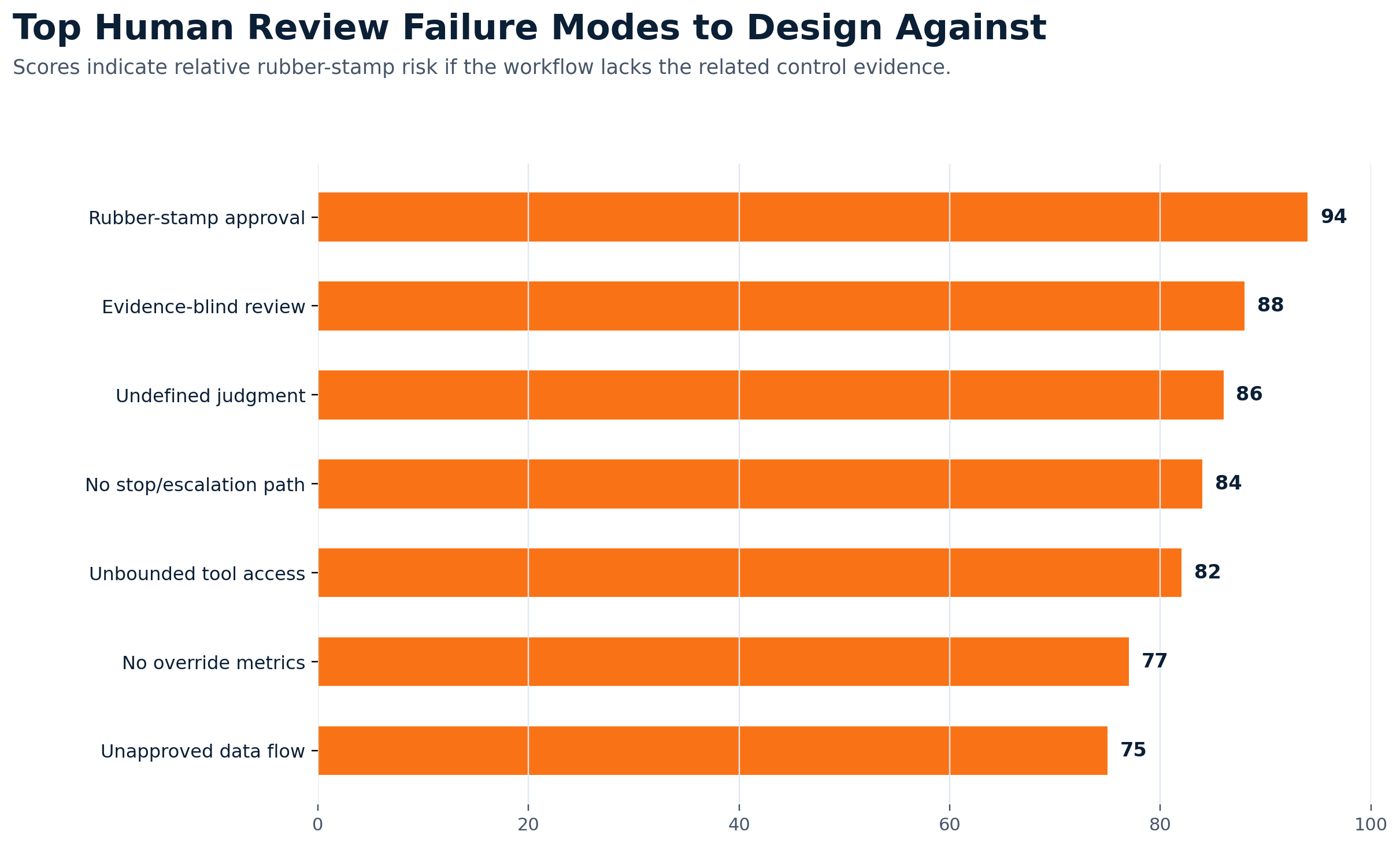
Original GS Consulting research shows that human in the loop AI automation is not a staffing model. It is an approval gate evidence model.
GS Consulting analyzed 11 public AI governance, security, regulatory, accountability, research, and enterprise adoption sources against 16 human in the loop controls. The source set included NIST AI RMF, the NIST Generative AI Profile, OWASP Top 10 for LLM Applications, NSA and CISA agentic AI guidance, EU AI Act Article 14, GAO's AI Accountability Framework, Microsoft research on overreliance, Pew Research Center's AI in hiring survey, McKinsey's 2025 State of AI survey, IBM's 2025 CEO Study, and Deloitte's 2026 State of AI in the Enterprise.
The research ranked controls by a GS Consulting Human in the Loop Evidence Burden Score. The score is a planning metric, not a legal, audit, security, or compliance determination.
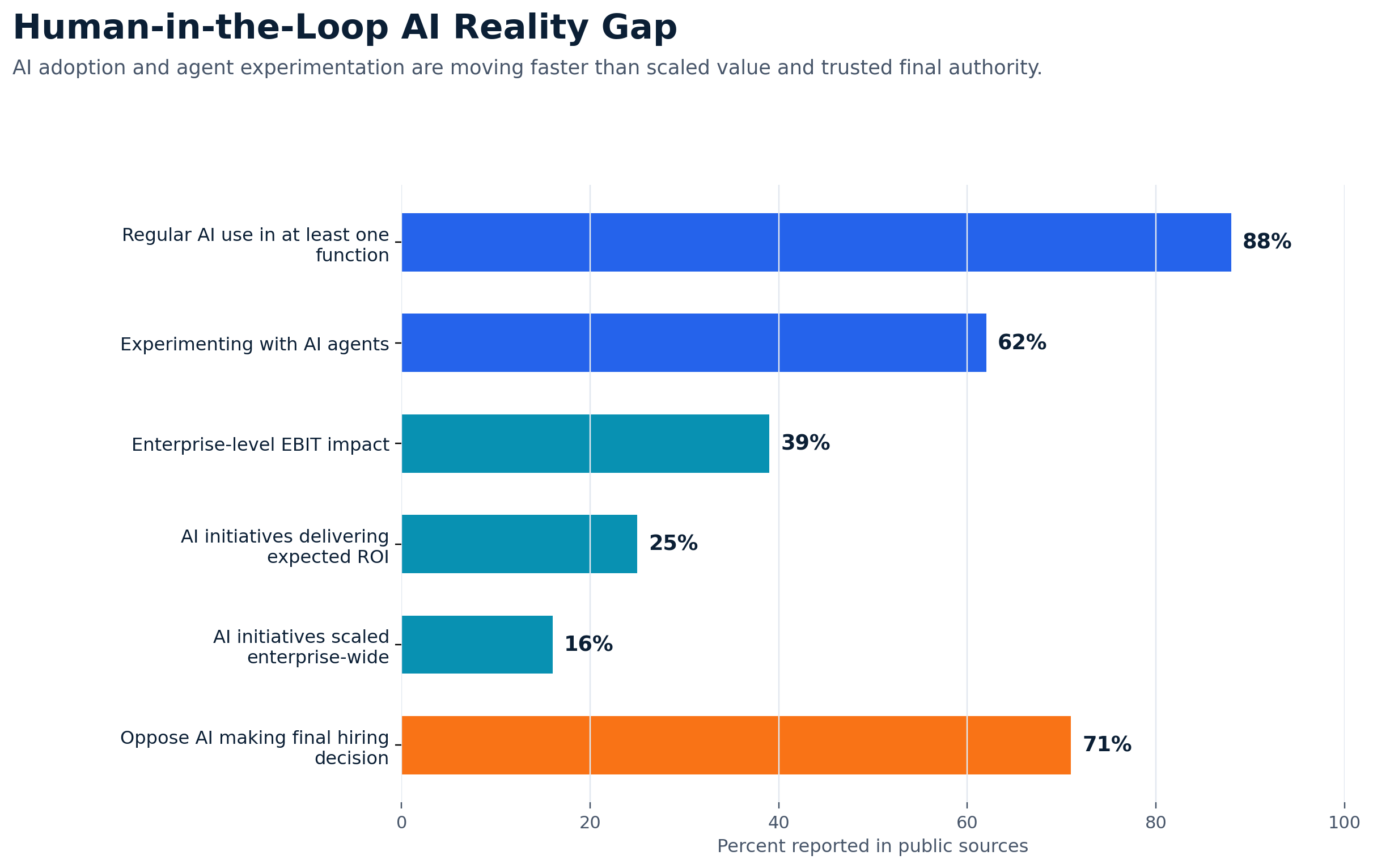
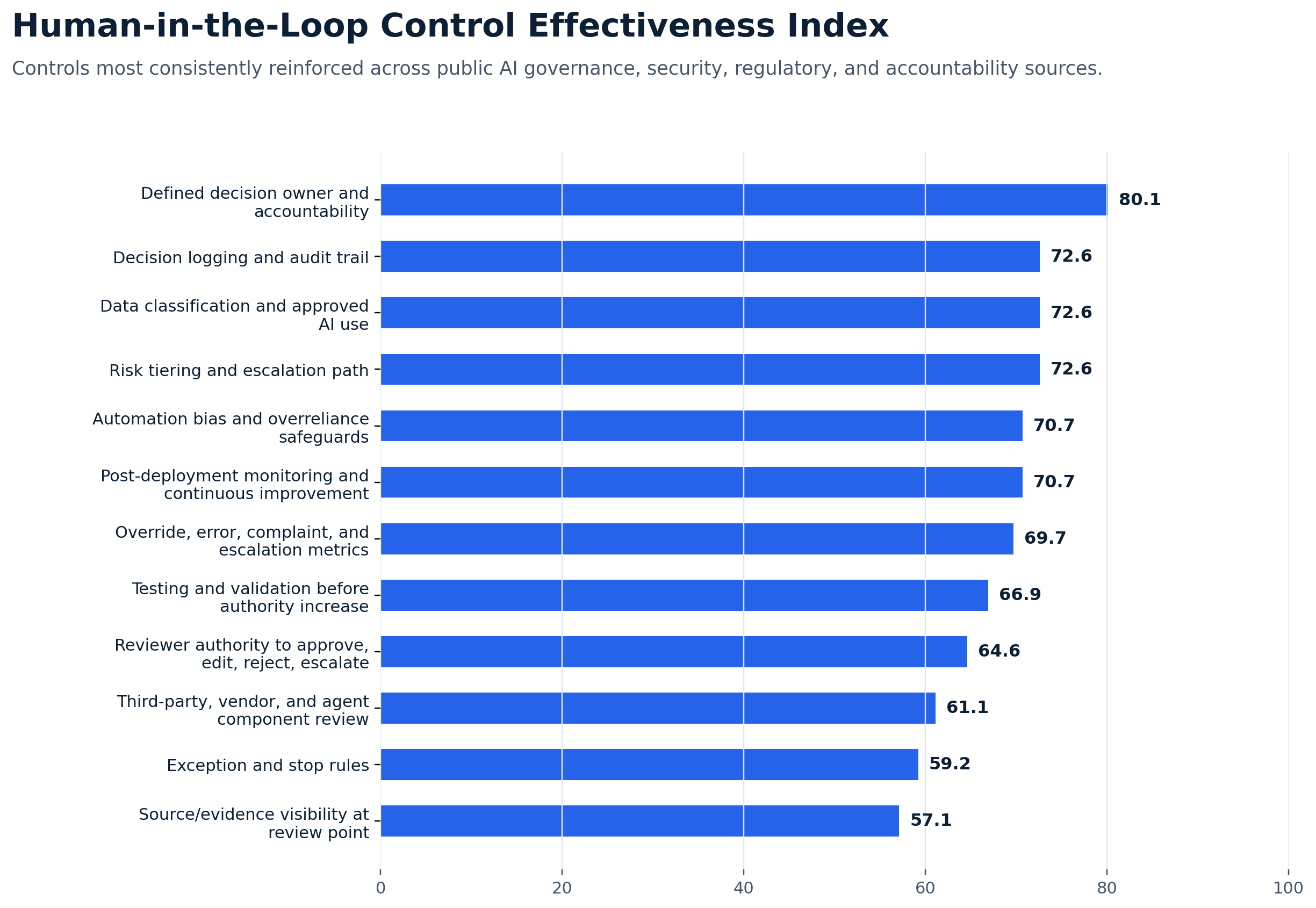
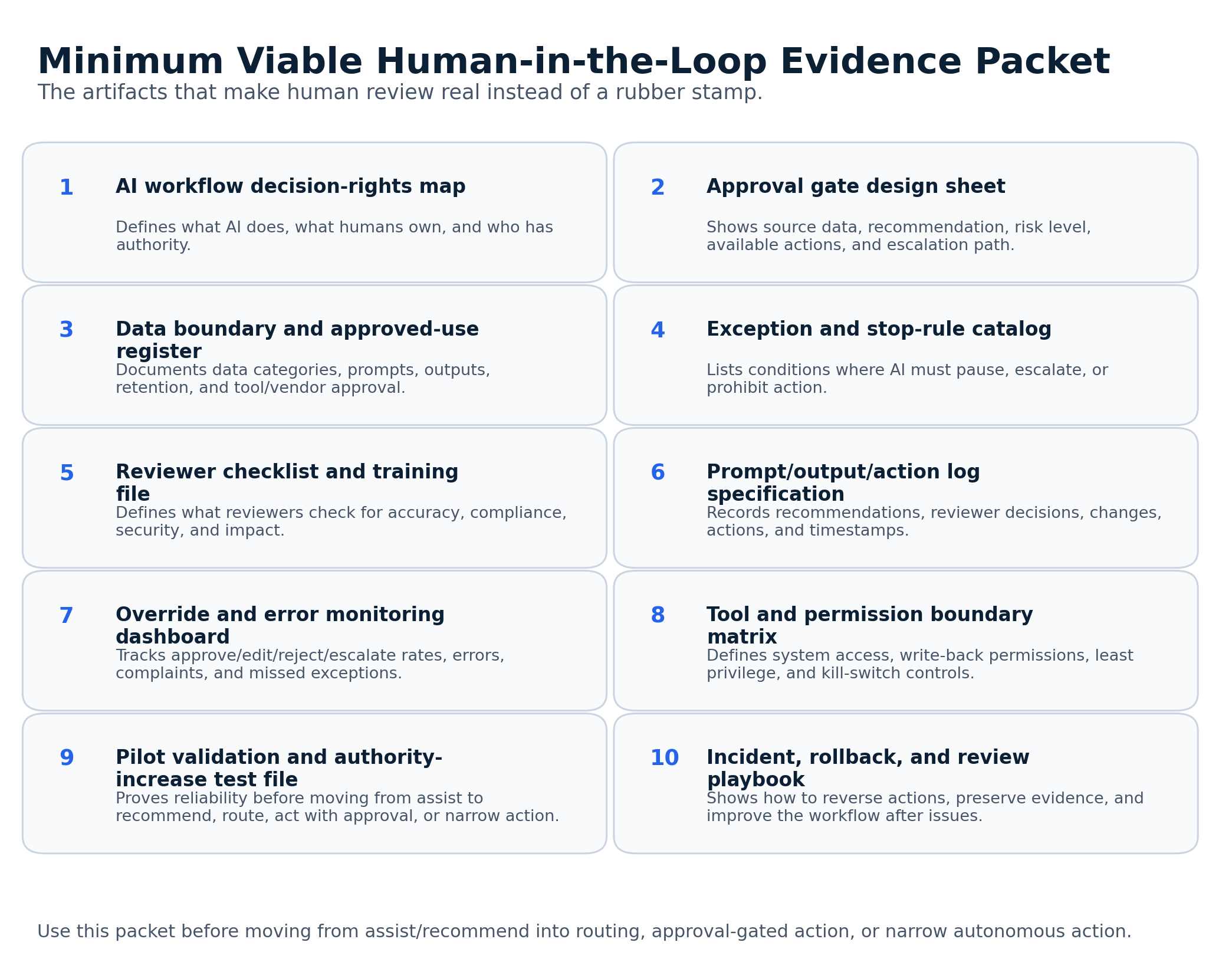
The practical takeaway is simple: human review is only a real control when the workflow defines what decision the person owns, what evidence they see, what actions they can take, when AI must stop, what gets logged, and how the organization tracks overrides, errors, complaints, and escalations.
The Five Levels of AI Workflow Control
The easiest way to design human in the loop automation is to define how much authority AI has.
- Level 1AI assists.
AI summarizes documents, drafts first versions, searches approved knowledge, extracts key fields, or creates meeting summaries. The human still owns the work.
- Level 2AI recommends.
AI suggests ticket priority, invoice exception handling, risk category, compliance gaps, or customer response language. A person decides.
- Level 3AI routes.
AI moves work to the right person, team, or queue. Bad routing creates delays and missed work, so monitoring matters.
- Level 4AI acts with approval.
AI prepares a customer message, change request, vendor response, access request, or compliance report draft. A person approves before execution.
- Level 5AI acts within narrow limits.
AI completes limited actions such as sending routine reminders or updating a status field. This should be narrow, tested, logged, reversible, and monitored.
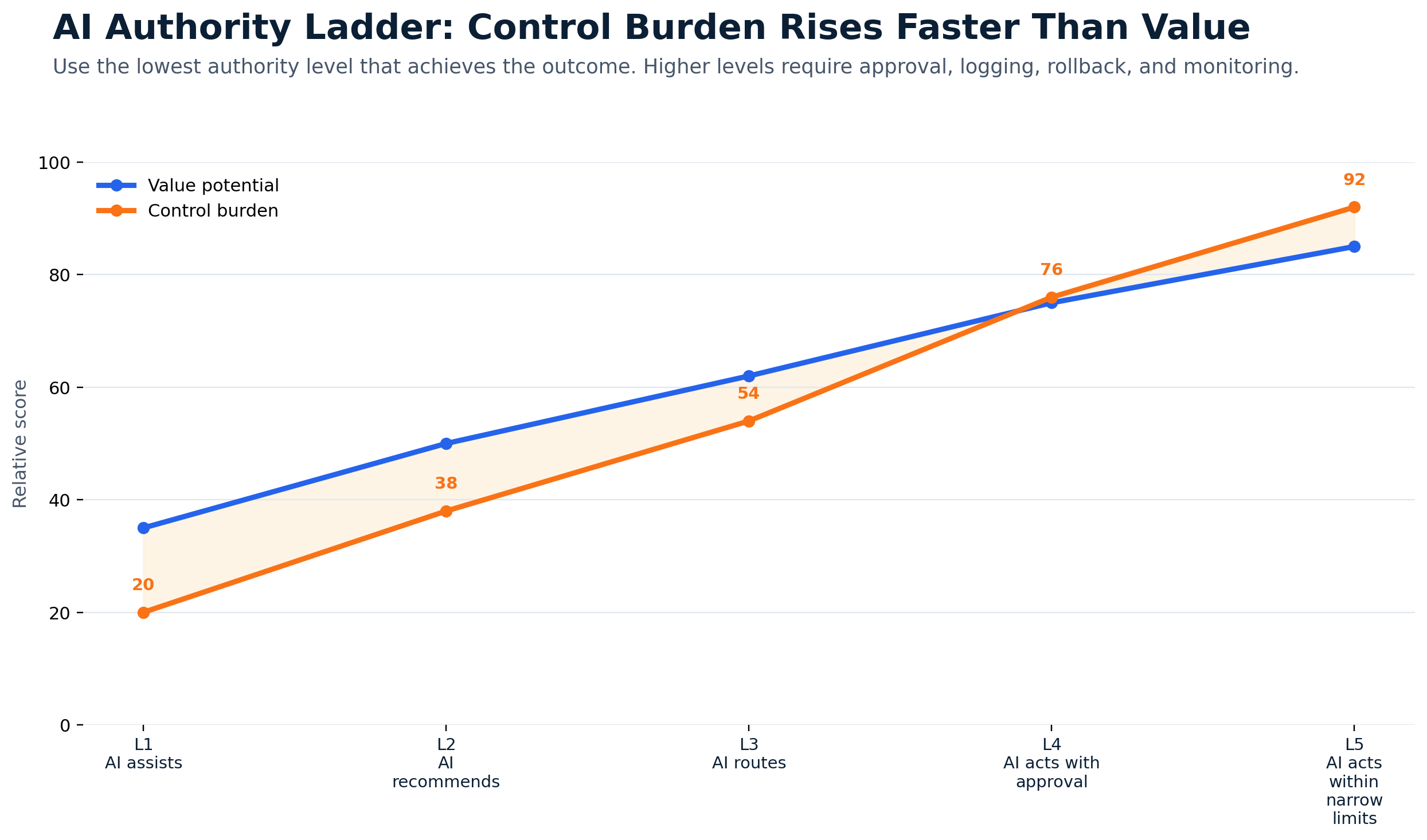
For regulated organizations, Level 5 should not be the starting point. It should be earned.
Where Humans Must Stay Responsible
Some decisions should not be handed to AI without a very strong control model. In many organizations, people should stay clearly responsible for customer commitments, employee decisions, legal conclusions, compliance certifications, financial approvals, security enforcement, access grants, vendor risk decisions, medical or safety related actions, contract obligations, regulatory responses, public statements, high value transactions, and production system changes.
AI can help prepare the work. It can organize the facts. It can identify patterns. It can draft options. But the person owns the decision.
The Real Problem: Most Workflows Do Not Define Judgment
Here is what usually breaks. The organization says a human will review the AI output. But it never defines what review means.
Review for accuracy? Review for tone? Review for compliance? Review for customer impact? Review for legal risk? Review for data exposure? Review for contract obligations? Review for security impact?
Those are different reviews. A manager approving an invoice exception is not doing the same thing as a lawyer reviewing contract language or a security analyst reviewing a cyber alert.
Human review only works when the reviewer has the right expertise for the decision. That means every AI workflow needs to define the judgment being preserved.
How to Design a Human in the Loop AI Workflow
A good workflow design starts with one question: what decision should a person still own?
- Step 1Define the workflow outcome.
Start with the business process, not the AI tool. If the outcome is vague, the workflow will be vague.
- Step 2Identify the AI task.
Be specific. Reading, classifying, summarizing, drafting, comparing, flagging, and recommending carry different risks.
- Step 3Define the human decision.
Do not just say human approval required. Say who approves what.
- Step 4Set the approval gate.
The reviewer should see what AI found, what data it used, what action it recommends, what uncertainty exists, and what options are available.
- Step 5Define exceptions.
Set rules for incomplete data, conflicting sources, sensitive personal data, contract commitments, privileged access, missing evidence, and other stop points.
- Step 6Log the decision.
Capture what AI recommended, what data it used, who reviewed it, what changed, whether it escalated, and what action happened.
- Step 7Monitor overrides and errors.
Track approval rates, edit rates, rejection rates, escalation rates, error rates, missed exceptions, time saved, user trust, and incidents.
Good Human in the Loop Use Cases
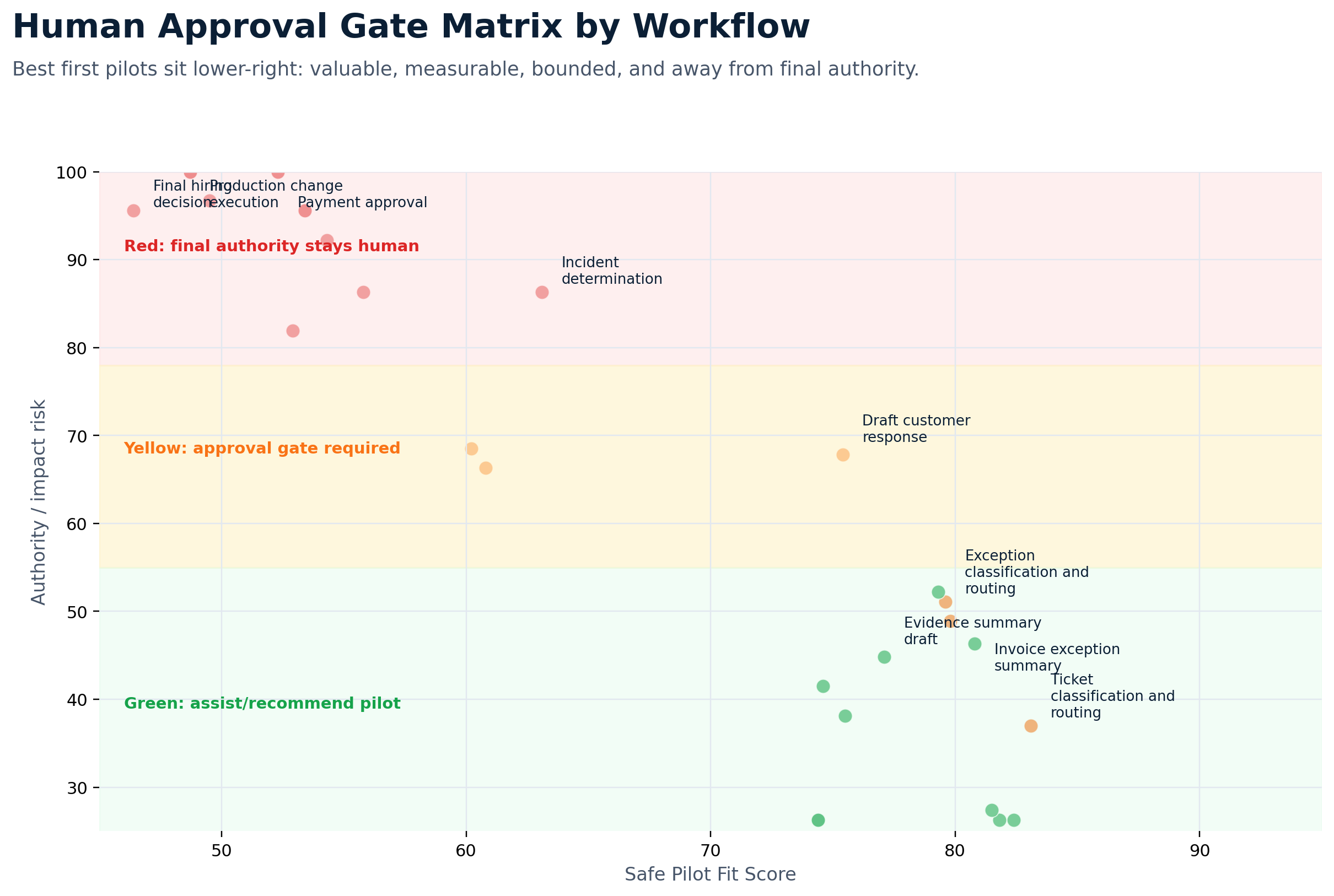
Human in the loop AI automation works best where AI reduces manual work without taking final responsibility away from people.
AI can classify tickets, summarize issues, recommend routing, and suggest knowledge articles. Humans review access requests, security issues, and production impacts.
AI can answer basic policy questions from approved documents and route cases. Humans handle accommodations, complaints, discipline, compensation, and termination matters.
AI can extract fields, compare invoice data, flag mismatches, and summarize exceptions. Humans approve payments, vendor changes, write offs, and high value exceptions.
AI can organize evidence, flag stale documents, summarize control status, and draft readiness notes. Humans approve final compliance statements and risk acceptance.
AI can draft responses, summarize customer history, and recommend next steps. Humans approve responses involving refunds, legal terms, pricing, regulated information, or commitments.
AI can summarize alerts, group related signals, and create incident timelines. Humans decide whether an event is an incident and what response is required.
Bad First Use Cases
Some workflows should not be first wave AI automation projects. Avoid starting with final hiring decisions, performance ratings, compensation recommendations, payment approval, legal advice, compliance certification, regulatory reporting, privileged access grants, production changes, security enforcement actions, safety related decisions, medical decisions, customer commitments, and contract interpretation without expert review.
AI may support parts of these workflows later. But if the organization is still building governance, controls, and trust, these are not the starting point.
The Approval Matrix
Every human in the loop workflow should answer four questions.
For low impact tasks like reminders or grouping duplicate records, maybe.
For summaries, drafts, classifications, and recommendations, often yes.
For customer, employee, finance, compliance, security, or contract workflows, usually yes.
For final high risk decisions, often yes.
Human Review Needs Evidence, Not Just Confidence
One reason AI is risky is that it can sound right even when it is wrong. That means reviewers need evidence.
A good AI workflow should show sources. It should show what documents, records, logs, tickets, policies, or data points were used. It should make it easy for the human to verify the output.
Do not make reviewers hunt for the source. If the system gives a polished answer with no source trail, the human review becomes much weaker.
Human in the Loop for AI Agents
AI agents make approval design even more important.
A normal AI assistant may answer a question or draft text. An AI agent may call tools, access systems, trigger workflows, update records, or take multiple steps toward a goal. That adds value. It also adds risk.
CISA guidance on careful adoption of agentic AI services highlights security challenges tied to autonomy, tool use, permissions, and integration with IT environments. For agentic workflows, human review should be built into the action path.
AI can prepare an access request, but a system owner approves it. AI can draft a customer response, but a support lead approves it. AI can recommend a system change, but change management approves it. AI can summarize a security alert, but an analyst decides containment.
Common Mistakes
Most human in the loop failures are design failures, not model failures.
- Using human review as a checkbox. If the reviewer is not trained, does not know what to check, and has no time to investigate, that is not oversight.
- Giving AI authority before proving reliability. Start with summaries and recommendations. Measure performance. Review errors. Then decide whether more automation is justified.
- Ignoring exceptions. The normal cases work. The exceptions break the process. Design escalation rules before launch.
- Letting AI write directly into systems too soon. Start with drafts and recommendations. Add write back only when access, logging, approval, and rollback are clear.
- Not tracking overrides. If people keep changing the AI output, learn from it. If people never change it, check whether they are reviewing it.
- Making the approval screen useless. Show the source data, recommendation, reason, risk level, and available actions. Do not show only the AI output.
- Forgetting accountability. AI is not accountable. People are. If no one owns the decision, the workflow is not ready.
A Practical Design Checklist
Before launching a human in the loop AI workflow, leaders should be able to answer the operating questions.
- What workflow are we improving?
- What part of the workflow will AI handle?
- What decision still belongs to a person, and who is that person?
- What must they review, and what evidence will they see?
- Can they reject or escalate?
- What actions can AI take without approval?
- What actions require approval?
- What actions are prohibited?
- What data does AI access, and is that data approved for this tool?
- Where are prompts and outputs stored?
- What gets logged?
- What exceptions stop the workflow?
- How do we measure errors and overrides?
- Who owns the final outcome?
If the team cannot answer these questions, do not scale the workflow.
A 30 Day Build Plan
You do not need a six month committee process to start designing human in the loop workflows. Start with one workflow. Pick something useful but controlled.
- Week 1Choose a controlled workflow.
Good candidates include IT ticket classification, invoice exception summaries, operations status reports, compliance evidence review, customer support drafts, and HR policy routing.
- Week 2Map the decision.
Document what comes in, what AI does, what the human decides, what can go wrong, what needs to be logged, and what metric proves value.
- Week 3Build with limited data and limited users.
Keep the scope narrow. Define the approval gate, reviewer actions, escalation rules, and evidence shown to the reviewer.
- Week 4Measure and improve.
Track time saved, error rate, override rate, escalation rate, and user trust. Improve the workflow before expanding it.
How This Supports Secure AI Automation
Human review is one part of a broader secure AI automation approach. Secure AI Automation for Regulated Organizations explains how GS Consulting helps organizations automate workflows with the right security, governance, data controls, and measurable outcomes.
This guide answers one specific question: how do we keep people responsible when AI starts doing more of the work?
That question matters because most regulated organizations do not fail with AI because the model cannot produce an answer. They fail because the workflow does not define who owns the decision.
The Bottom Line
Human in the loop AI automation is not about putting a person somewhere in the process and hoping that counts as control.
It is about designing the workflow so AI does the repeatable work and people stay responsible for judgment, approvals, exceptions, and high risk decisions.
The best workflows are clear about what AI can do, what AI can recommend, what requires approval, and what AI is not allowed to touch.
That is how regulated organizations get the value of AI automation without giving up control.
GS Consulting helps regulated organizations design human in the loop AI workflows, define approval gates, map decision rights, document exceptions, evaluate security and compliance exposure, and build secure AI automation systems that people can actually trust.
Ready to design AI workflows that keep people accountable?
Contact GS Consulting for a Human in the Loop AI Automation Assessment.
Contact GS ConsultingResearch Sources and Caveats
The Human in the Loop Evidence Burden Score, Workflow Gate Matrix, and Failure Mode Score are GS Consulting planning tools. They are not official NIST, CISA, NSA, EU, GAO, OWASP, legal, audit, security, or compliance determinations.
Actual workflow approval should depend on the organization's data sensitivity, contracts, regulatory exposure, system architecture, vendor terms, human review capacity, operational risk, and business objectives.
- NIST AI Resource Center: AI RMF Core
- NIST AI 600-1: Generative Artificial Intelligence Profile
- OWASP Top 10 for Large Language Model Applications
- CISA: Careful Adoption of Agentic AI Services
- NSA: Joint Guidance on Agentic Artificial Intelligence Systems
- EU Artificial Intelligence Act Article 14: Human Oversight
- GAO Artificial Intelligence Accountability Framework
- Pew Research Center: Americans' Views on AI in Hiring
Frequently Asked Questions About Human in the Loop AI Automation
What does human in the loop AI automation mean?
Human in the loop AI automation means AI supports a workflow while people remain accountable for judgment, approvals, exceptions, risk acceptance, and final decisions. The person is not just present in the process. Their role, authority, review criteria, and escalation path are designed into the workflow.
Is human review enough to make AI automation safe?
No. Human review only helps when reviewers know what to check, have enough source evidence, understand the risk, can reject or escalate, and have authority to stop the workflow. A simple approval click without context is not a real control.
Which AI workflows need human approval before action?
Human approval is usually needed for workflows that affect customers, employees, finances, security, compliance, contracts, legal obligations, production systems, safety, regulated decisions, or high value transactions.