Enterprise AI | | 20 min read
Business Process Mapping for Government Contractors

Key Takeaways
GovCon process maps need to show control, not just sequence
Map the Real Workflow
Interview the people doing the work and follow a recent case through emails, folders, approvals, tools, exceptions, and evidence.
Expose Data Movement
Show where CUI, contract data, security data, and evidence enter, move, copy, transform, store, and leave the process.
Automate After Clarity
Use the map to decide what to fix first, what to automate next, and which accountable decisions must stay human.
You cannot automate a process you cannot explain.
That sounds obvious until operations, IT, security, compliance, contracts, finance, and program leadership sit in the same room and try to answer one question: how does this workflow actually work?
Not how the policy says it works. Not how the system was supposed to work when it was implemented. How it works on a Tuesday afternoon when a contract deliverable is late, a spreadsheet is wrong, a subcontractor email is missing an attachment, and the person who knows the workaround is out of office.
That is where AI workflow automation for government contractors has to start. If you skip business process mapping and jump straight to automation, you are not modernizing the business. You are speeding up confusion.
Why GovCon Process Mapping Is Different
A commercial company can often start process mapping by asking who does the work, what system they use, and what output gets produced. That is not enough for a government contractor.
A GovCon workflow may involve CUI, contract sensitive information, export controlled data, PII, security logs, customer restrictions, subcontractor access, cloud tools, legacy systems, and evidence that may be needed later for a CMMC assessment or customer review.
The CUI program exists because the federal government needed a standard way to handle unclassified information that still requires safeguarding or dissemination controls. NARA describes CUI as information that requires those controls under law, federal regulation, or government policy. NIST SP 800 171 Revision 3 provides recommended security requirements for protecting CUI when it resides in nonfederal systems and organizations.
That means a GovCon workflow is rarely just a workflow. It is usually also a data flow, an access flow, an evidence flow, and a control flow.
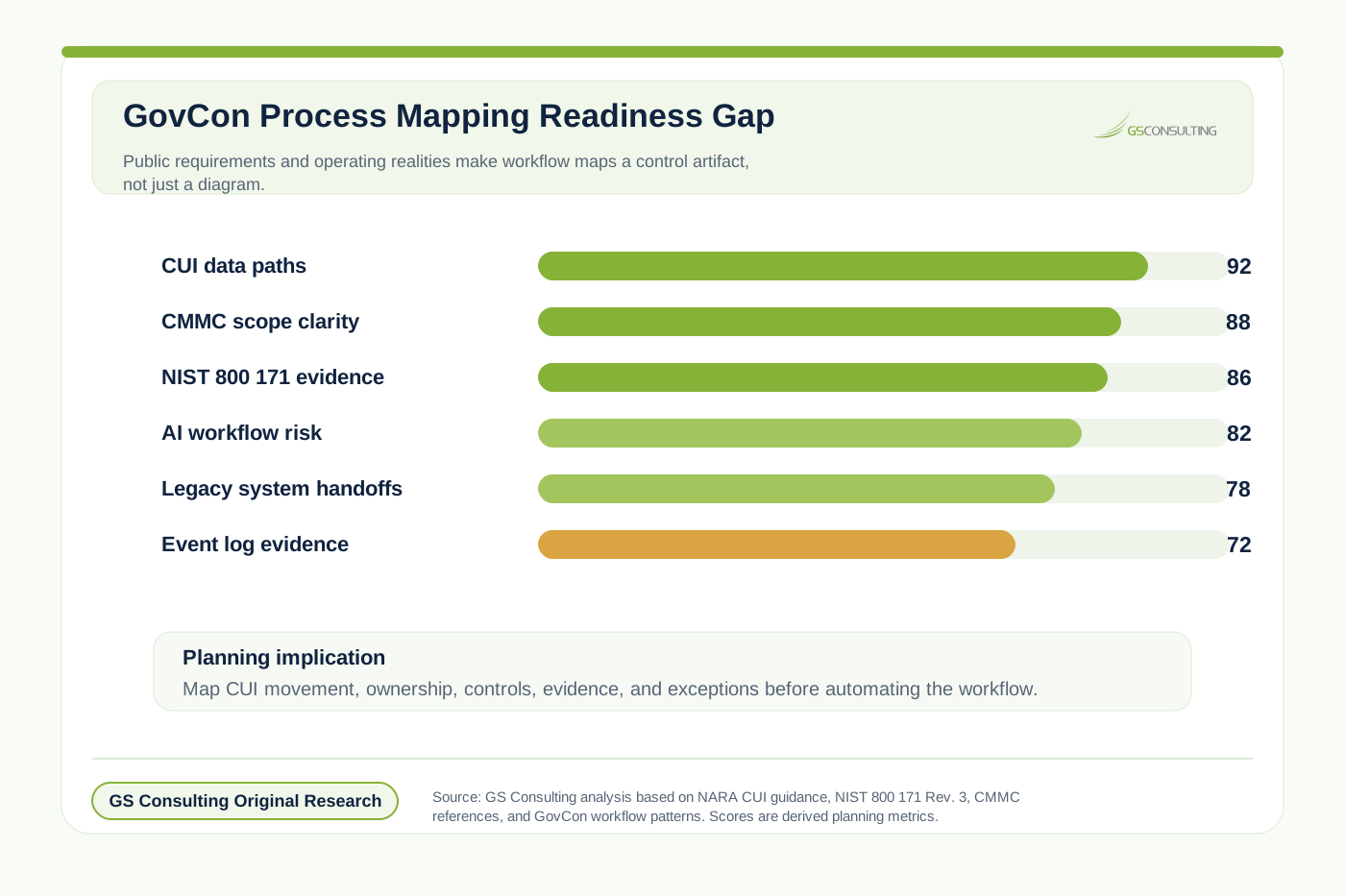
What Business Process Mapping Should Produce
A useful GovCon process map is not a pretty diagram for a slide deck. It is a practical operating picture that helps leaders answer three questions: what is happening, where is the risk, and what can we improve or automate?
At minimum, the map should show the workflow trigger, business owner, system owner, data owner, input sources, output artifacts, systems involved, roles involved, approval points, security boundary, CUI touchpoints, exception paths, evidence created, storage location, audit trail, failure points, and automation opportunities.
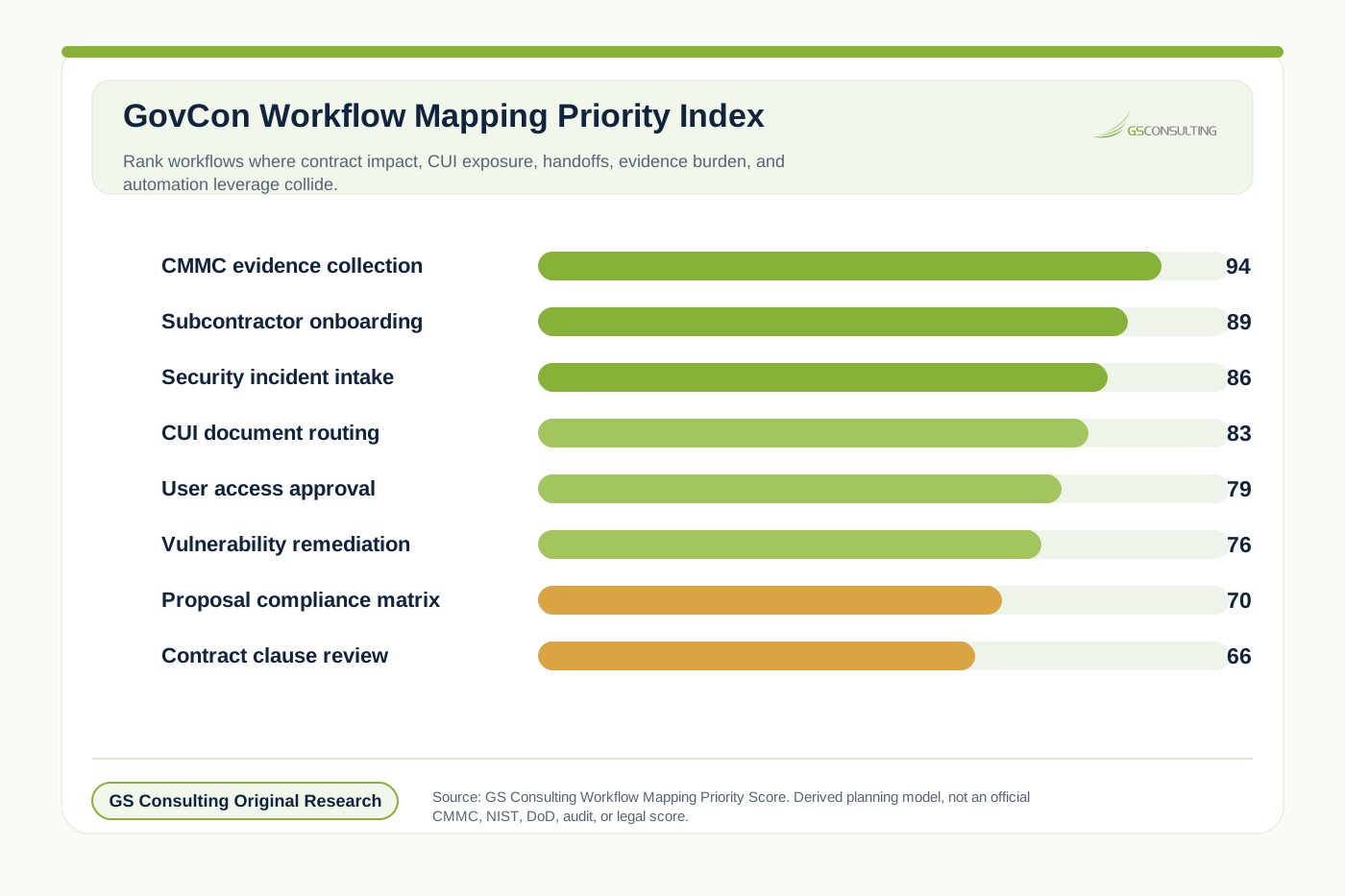
GS Consulting scored common GovCon workflows using a derived Workflow Mapping Priority Score across contract and mission criticality, CUI exposure, handoff complexity, system fragmentation, evidence burden, exception frequency, and automation leverage. CMMC evidence collection ranked highest because it combines compliance pressure, sensitive data handling, multiple owners, scattered artifacts, and high evidence demand.
The Workflow Mapping Priority Score is a GS Consulting planning metric. It is not an official CMMC, NIST, DoD, audit, legal, or automation readiness score.
Start With the Mission Outcome
Bad process mapping starts with activities. Good process mapping starts with outcomes.
Do not start with "send email to compliance." Start with the outcome the process is supposed to produce: approve a new subcontractor, collect CMMC evidence, review a contract clause, submit an invoice, generate a monthly program report, grant system access, respond to a security alert, route a CUI document, or prepare a proposal compliance matrix.
Once the outcome is clear, map backward. What data is needed? Who approves it? Which system stores the final record? What proof is required later? What can go wrong? Who fixes the exception?
Map CUI and Sensitive Data Movement
This is where GovCon process mapping becomes serious. The map needs to show where sensitive data enters, moves, changes, gets stored, and leaves the workflow.
- Where does CUI enter the process?
- Who identifies and marks it?
- Where is it stored?
- Who can access it?
- Does it move through email, cloud tools, tickets, exports, or spreadsheets?
- Does a subcontractor receive it?
- Does an AI tool process it?
- How long is it retained, removed, or archived?
If CUI is copied from a controlled folder into an uncontrolled spreadsheet, that is not a small detail. That is the kind of process reality that can break compliance and create risk.
CMMC Process Mapping Is Not Just Compliance Paperwork
CMMC process mapping is often treated like a compliance exercise. That is too narrow. It is really an operational readiness exercise.
If a company wants to prove it protects CUI, it needs more than policies. It needs repeatable processes that generate evidence. A process map helps show who approves access to CUI systems, how users are removed, how configuration changes are reviewed, how audit evidence is collected, how incidents are escalated, how vendors are reviewed, how assets are tracked, how exceptions are documented, and how security requirements are flowed down.
The point is not to make the map look compliant. The point is to expose whether the business actually operates in a way that can support compliance.
The Core Layers of a GovCon Process Map
A normal flowchart is not enough for a regulated contractor. A strong map should show business flow, data flow, system flow, role flow, control flow, evidence flow, and exception flow.
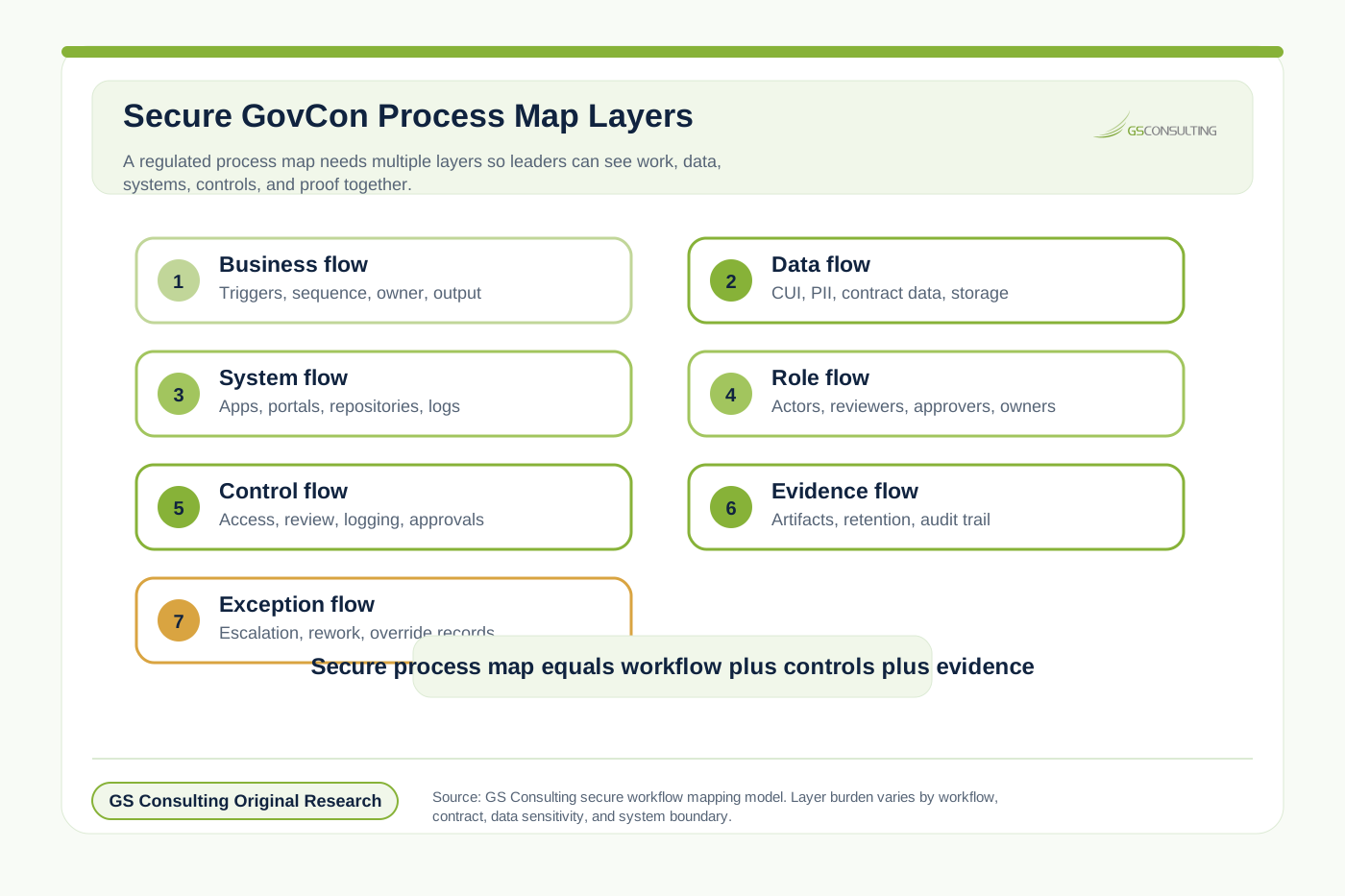
- Layer 1Business flow.
Show the normal process sequence, trigger, owner, output, and completion point.
- Layer 2Data flow.
Show what data is created, received, copied, transformed, stored, and sent outside the workflow.
- Layer 3System flow.
Show every application, database, shared folder, customer portal, and tool involved.
- Layer 4Role flow.
Show who acts, approves, reviews, receives, owns, or is accountable for each step.
- Layer 5Control flow.
Show security, compliance, approval, logging, review, and exception controls embedded in the workflow.
The Places Where GovCon Workflows Usually Break
The patterns are predictable. The trigger is unclear. Data is manually copied. Approval paths are informal. Exceptions live outside the system. Evidence is created after the fact.
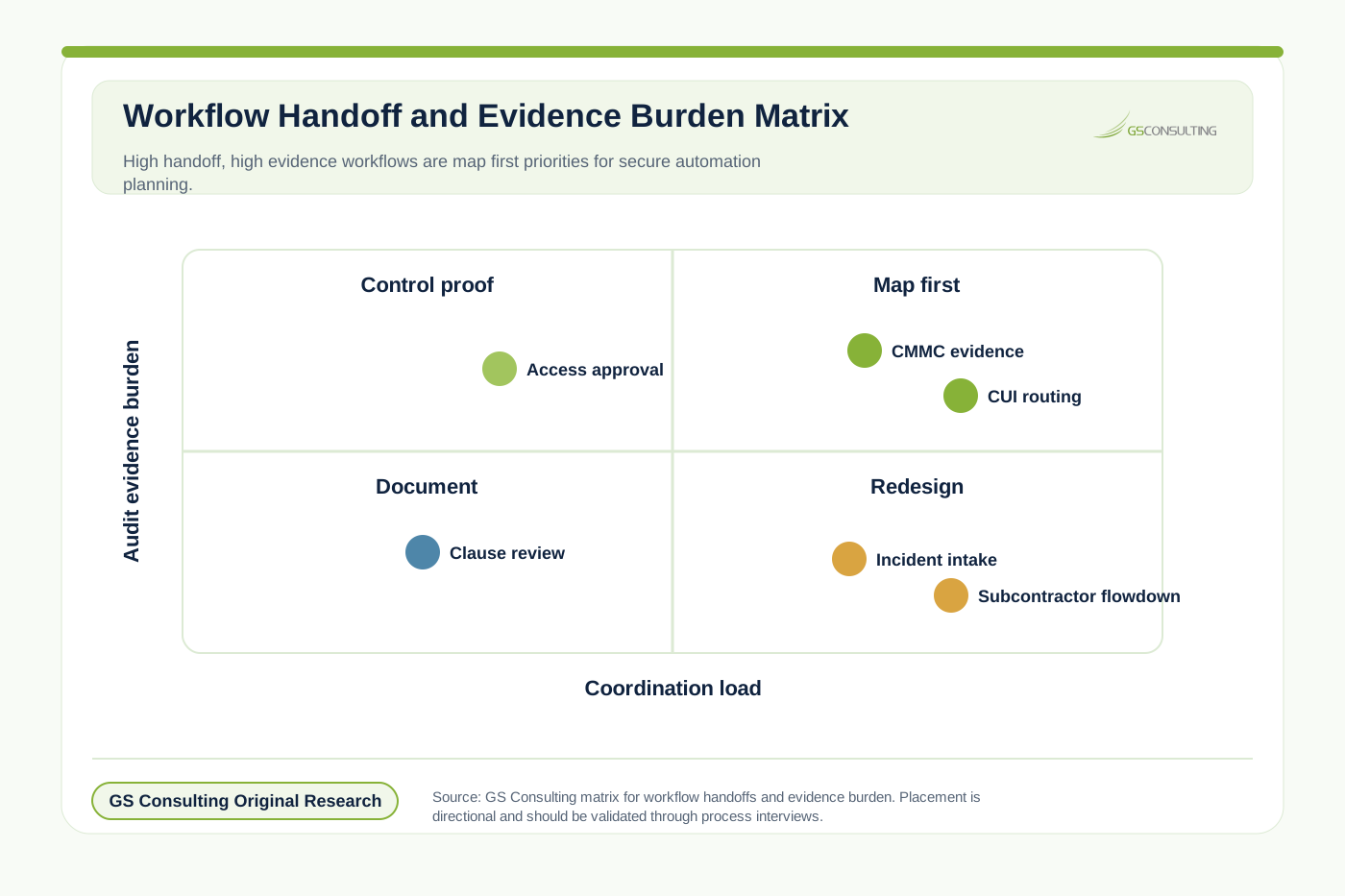
Evidence is one of the clearest maturity tests. Many organizations do the work first and reconstruct proof later. That is backwards. A mature workflow generates evidence as it runs: access approvals, review decisions, change records, artifacts, logs, and exception decisions should already exist in the right place.
How Process Mapping Leads to Automation
Good process mapping naturally produces automation candidates: document review, manual data extraction, duplicate entry, email routing, status chasing, evidence gathering, approval reminders, report generation, exception triage, vendor follow up, control testing, log review, and data reconciliation.
But the map also tells you what not to automate yet. Do not automate a workflow with unclear ownership, unreliable data, undefined decisions, uncontrolled sensitive data movement, or a workaround pretending to be a process.
This connects directly to identifying workflows for AI automation. Workflow discovery is stronger when it starts with a real process map rather than a list of ideas from a vendor demo.
A Practical Mapping Method for GovCon Leaders
- Step 1Pick a process with real business value.
Start with a workflow tied to contract performance, compliance, revenue, delivery speed, audit readiness, or security risk.
- Step 2Define the start and finish.
Every map needs a boundary. Define what starts the workflow and what completes it.
- Step 3Walk the real path.
Use a recent case. Ask to see the email, spreadsheet, folder, ticket, approval, system record, and evidence location.
- Step 4Mark every handoff.
Track person to person, team to team, system to system, company to subcontractor, and internal to customer handoffs.
- Step 5Mark every data boundary.
Show where CUI, PII, contract data, security data, and evidence leave controlled storage or enter third party systems.
- Step 6Identify control points.
Mark identity checks, access approvals, CUI reviews, security reviews, legal reviews, evidence capture, audit logs, and exception approvals.
- Step 7Score automation readiness.
Compare business value, manual effort, repeatability, data quality, system access, sensitivity, approval clarity, exception volume, integration complexity, evidence needs, and operational risk.
The Automation Roadmap Comes After the Map
The map should produce a roadmap with three categories: fix first, automate next, and keep human.
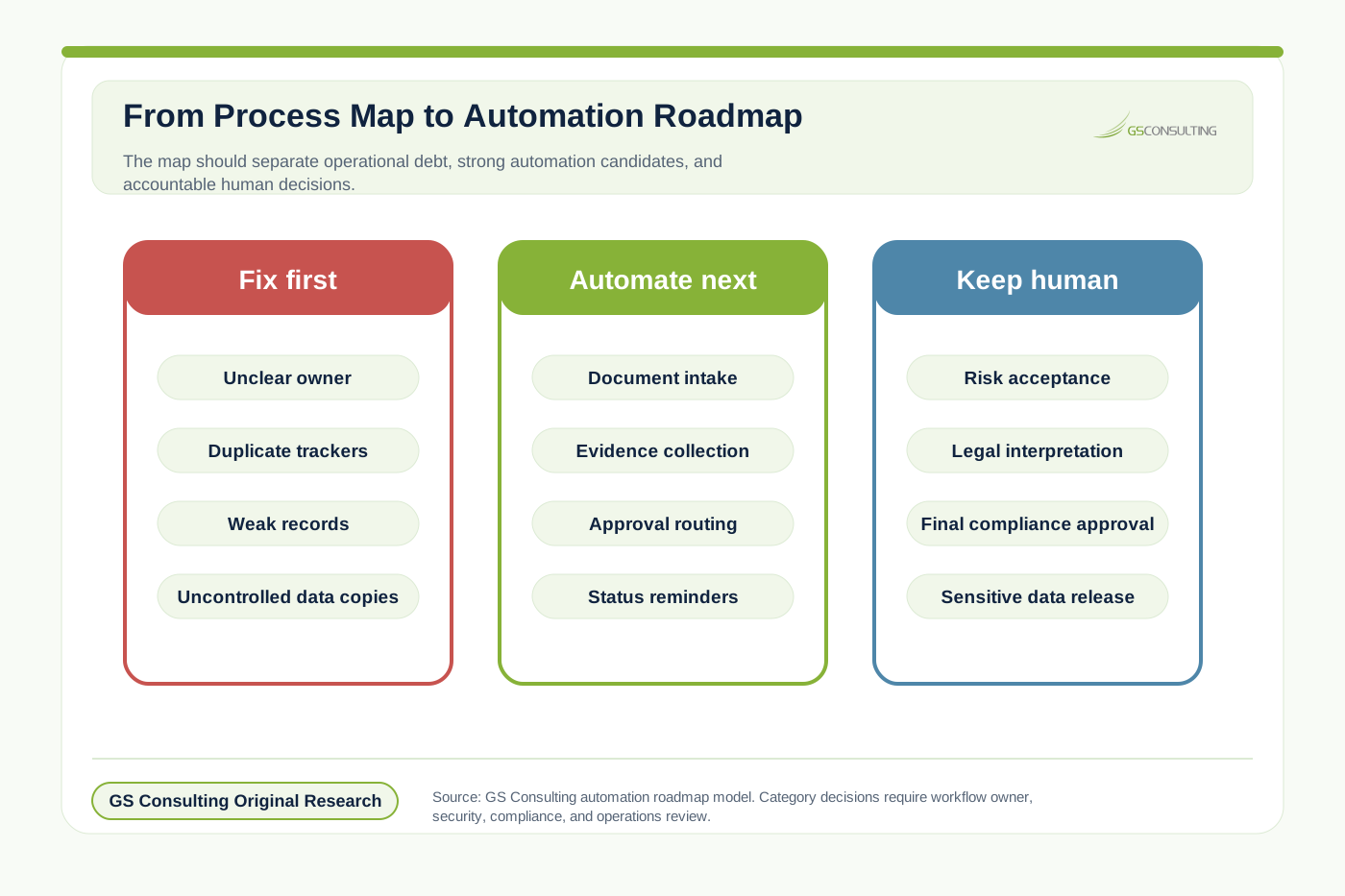
Resolve unclear systems of record, duplicate trackers, uncontrolled data movement, weak approval records, unreliable inputs, and undefined exceptions.
Strong candidates include document intake, metadata extraction, status reminders, evidence collection, system comparisons, report drafting, approval routing, and ticket enrichment.
Legal interpretation, final compliance approval, security risk acceptance, customer commitment, access exceptions, sensitive data release, and vendor risk acceptance need accountable review.
What Good Looks Like
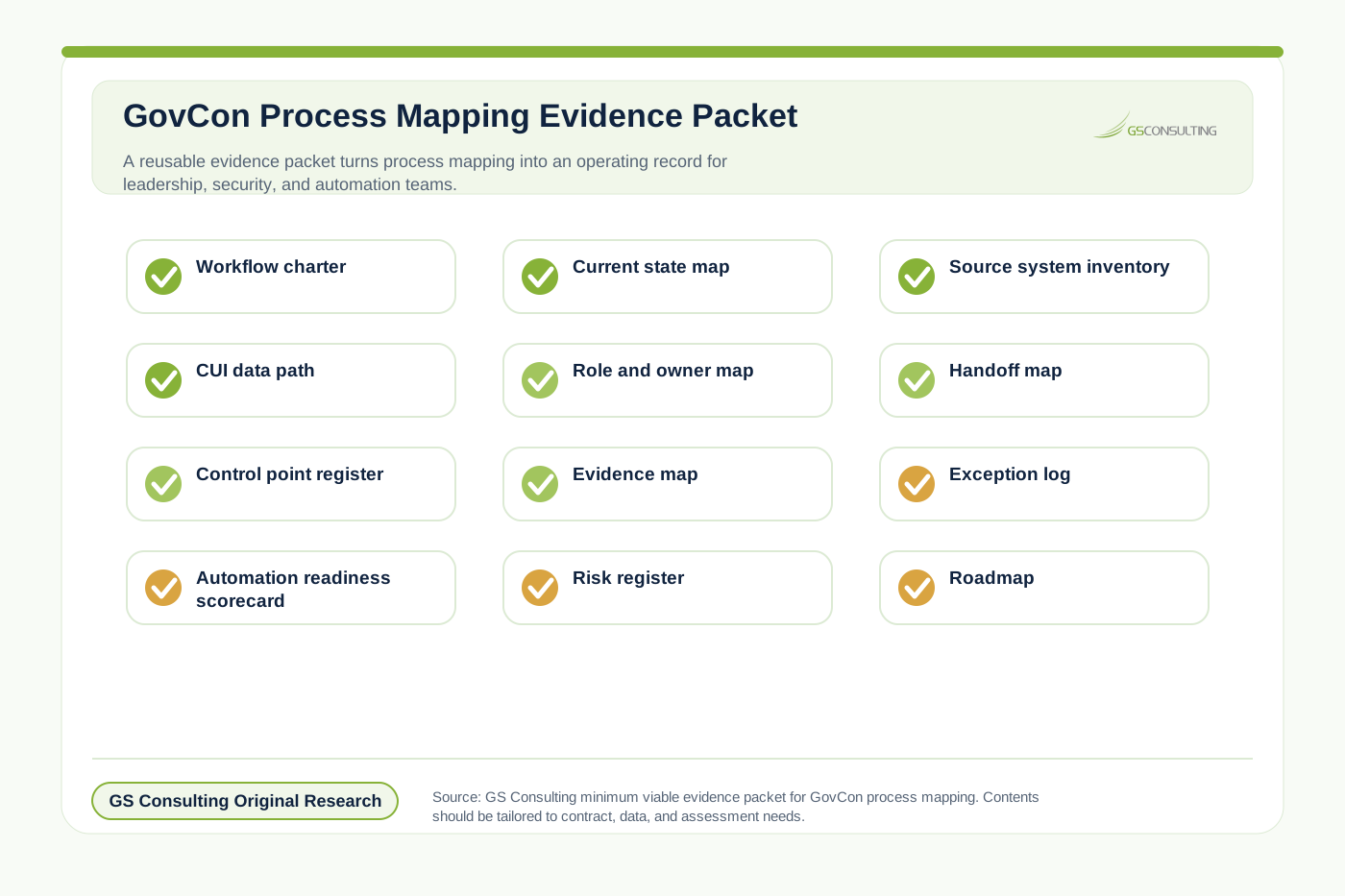
A mature process map lets a CIO or operations leader say: we know who owns this workflow, where it starts and ends, which systems it touches, where CUI appears, who can access the data, which approvals matter, what evidence is created, where the process breaks, which steps are automation candidates, and which steps must stay human.
Why GS Consulting Starts With Mapping
A lot of firms want to sell automation first. That is backwards.
GS Consulting starts with how the work actually runs because that is where the truth is. If your process is broken, automation will expose it. If your data is messy, automation will magnify it. If your access model is unclear, automation will create risk. If your evidence is scattered, automation will not magically make you audit ready.
Business process mapping gives leaders the operating picture needed to improve the workflow, secure the data, design the approval path, and decide what automation is actually worth building.
This page is part of our Enterprise AI Process Transformation cluster and supports our main AI workflow automation service. It also connects to automating federal RFP shredding, legacy database extraction AI, integrating AI with legacy GovCon ERPs, the Enterprise AI Process Automation Framework, and Legacy System Integration for Enterprise AI Automation.
The Bottom Line
Business process mapping for GovCon is not a documentation exercise. It is how you find the real business.
It shows how work moves, where data goes, who approves decisions, where CUI appears, where systems fail, where evidence is created, and where automation can create measurable value.
You cannot optimize federal contracting operations with vague process knowledge. Map the workflow, define the data boundary, identify the control points, and expose the handoffs that slow everything down. Then automate what deserves to be automated.
Ready to map the workflows that actually run your GovCon business?
GS Consulting helps government contractors document real workflows, identify secure automation candidates, expose CUI and evidence risks, and build a practical roadmap that leadership can act on.
Request a Workflow Mapping AssessmentResearch Sources and Caveats
The original research in this article uses GS Consulting derived planning metrics based on the article taxonomy, NARA CUI guidance, NIST SP 800 171 Revision 3, CMMC program and scoping references, legacy system modernization research, integration research, and process mining event log concepts.
The Workflow Mapping Priority Score, Mapping Layer Burden Index, Handoff Evidence Matrix, and automation roadmap are planning tools. They are not official CMMC, NIST, DoD, audit, legal, or compliance determinations.
- National Archives, Controlled Unclassified Information
- NIST SP 800 171 Revision 3, Protecting Controlled Unclassified Information in Nonfederal Systems and Organizations
- Defense Pricing and Contracting, DFARS publication notices
- Electronic Code of Federal Regulations, 32 CFR Part 170 CMMC Program
- Process Mining, Event Data
- GS Consulting analysis of GovCon workflow mapping, CUI movement, control points, handoff complexity, evidence burden, and automation readiness.
Frequently Asked Questions About Business Process Mapping for GovCon
What is business process mapping for GovCon?
Business process mapping for GovCon is the discipline of documenting how regulated contractor work actually moves across people, systems, data, approvals, CUI boundaries, evidence, exceptions, and handoffs before leaders redesign or automate the workflow.
Why is GovCon process mapping different from commercial process mapping?
GovCon process mapping must account for CUI, contract requirements, customer restrictions, access rules, approval authority, evidence retention, system boundaries, subcontractor flowdown, and audit expectations. A simple activity flowchart is not enough.
How does process mapping support CMMC readiness?
Process mapping supports CMMC readiness by showing where CUI enters a workflow, who touches it, which systems store it, how access is approved, what evidence is created, where artifacts are retained, and where exceptions or uncontrolled copies create risk.
Which GovCon workflows should be mapped first?
Map workflows first when contract impact, CUI exposure, handoff complexity, system fragmentation, audit evidence burden, exception frequency, and automation potential are all high. CMMC evidence collection, subcontractor onboarding, incident intake, CUI routing, and access approval are common priorities.
Should companies automate immediately after mapping a process?
No. A good process map should separate fix first issues, automate next candidates, and keep human decisions. Automating unclear ownership, unreliable data, uncontrolled CUI movement, or undefined exceptions usually makes the operating problem worse.
Suggested Future Reading
- AI Workflow Automation
- Enterprise AI Process Transformation
- Enterprise AI Process Automation Framework
- Automating Federal RFP Shredding with AI
- AI for Federal Contract Management Workflows
- Automating NIST SP 800 171 Compliance Evidence Collection
- How to Identify the Best Workflows for AI Automation
- Integrating AI Automations with Legacy GovCon ERPs
- Legacy System Integration for Enterprise AI Automation