Enterprise AI | | 24 min read
AI Transformation for IT: Service Desk, Ticket Triage, and Knowledge Management

Key Takeaways
Service desk AI needs reliable knowledge and controlled ITSM workflows.
Fix the knowledge foundation
Remove stale articles, assign owners, and verify permissions before relying on AI answers.
Preserve the system of record
Keep tickets, routing, notes, approvals, and outcomes in ITSM.
Measure resolution quality
Track routing, resolution, escalation, and reopens while keeping access and production changes controlled.
AI will not fix a messy service desk. It will expose it faster.
The best IT AI programs do not start with a chatbot. They start with the work behind the ticket: what users ask for, how requests are classified, where knowledge lives, who approves access, how escalations happen, what gets logged in ITSM, and whether technicians trust the recommendation.
AI can help IT move faster. But only when the workflow, knowledge base, system of record, security boundary, and human review model are ready.
Do not automate the service desk before you understand the workflow.
GS Consulting helps organizations map service desk workflows, clean up knowledge foundations, identify ticket categories ready for AI, integrate AI with ITSM, define human review rules, calculate ROI, and launch controlled IT AI pilots.
Request an IT AI AssessmentIT is one of the best places to start with enterprise AI because the work is visible, repetitive, measurable, and already tracked in systems.
Service desks know ticket volume, categories, assignments, response times, resolution times, SLA misses, escalations, knowledge usage, asset context, and user satisfaction. That gives AI something useful to work with.
But that does not mean the first move should be to drop a chatbot in front of employees.
If ticket categories are inconsistent, knowledge articles are stale, approvals are unclear, escalation paths are broken, or ITSM records are incomplete, AI will not solve the problem. It will move bad information faster.
The smart move is to start where AI can assist: classify tickets, ask for missing information, recommend knowledge, summarize incidents, route requests, draft responses, and help technicians resolve issues faster. Let AI prove itself in the workflow before it gets permission to act.
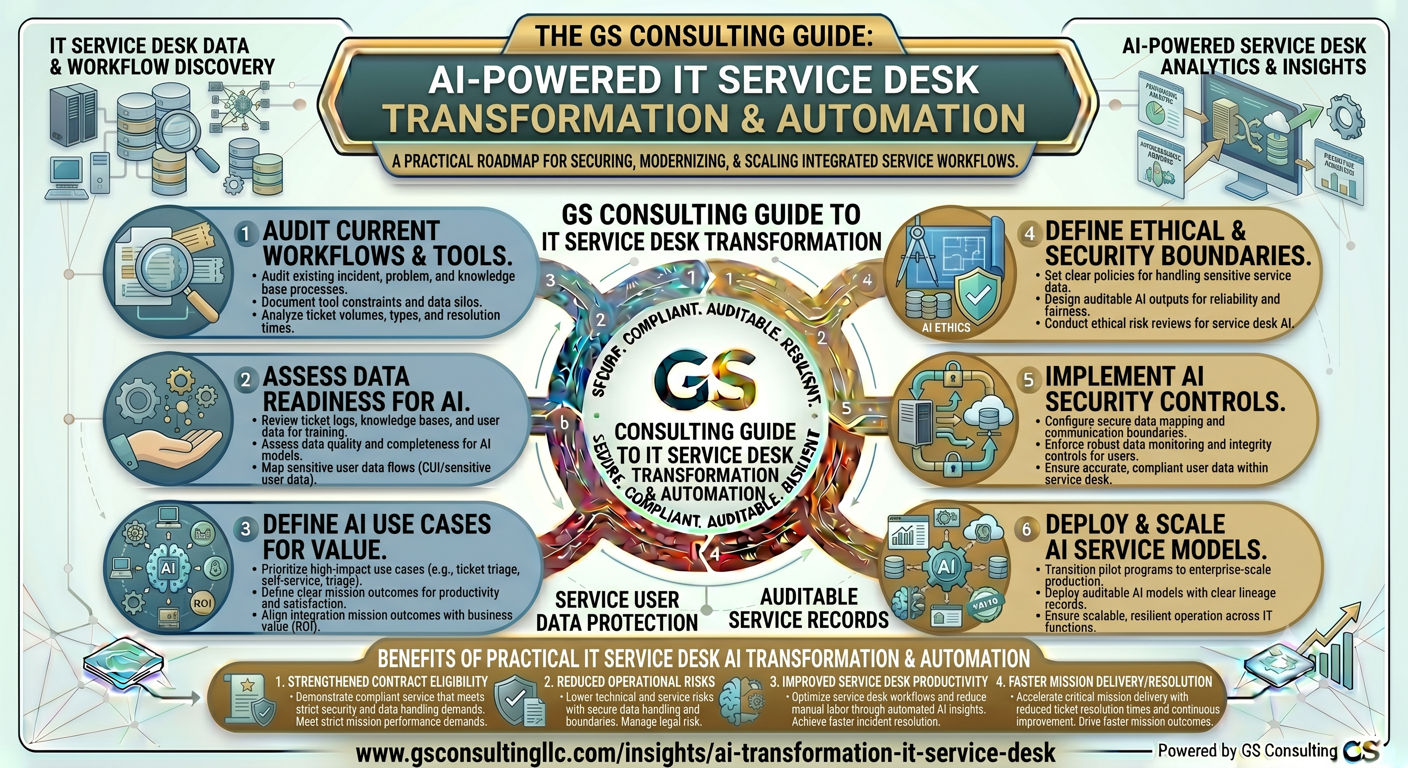
Why IT Is a Strong Starting Point for AI Transformation
IT is a strong AI starting point because the work is already instrumented.
Unlike many business workflows, the service desk already captures the evidence leaders need: ticket volume, categories, assignments, SLA performance, escalation paths, resolution notes, recurring incidents, user satisfaction, assets, systems, and knowledge articles.
That creates a practical path. Do not try to automate everything. Start where the workflow is repetitive, the knowledge is available, the baseline is measurable, and technicians can validate the output before AI is allowed to take larger actions.
Original Research: Where IT Service Desk AI Should Start
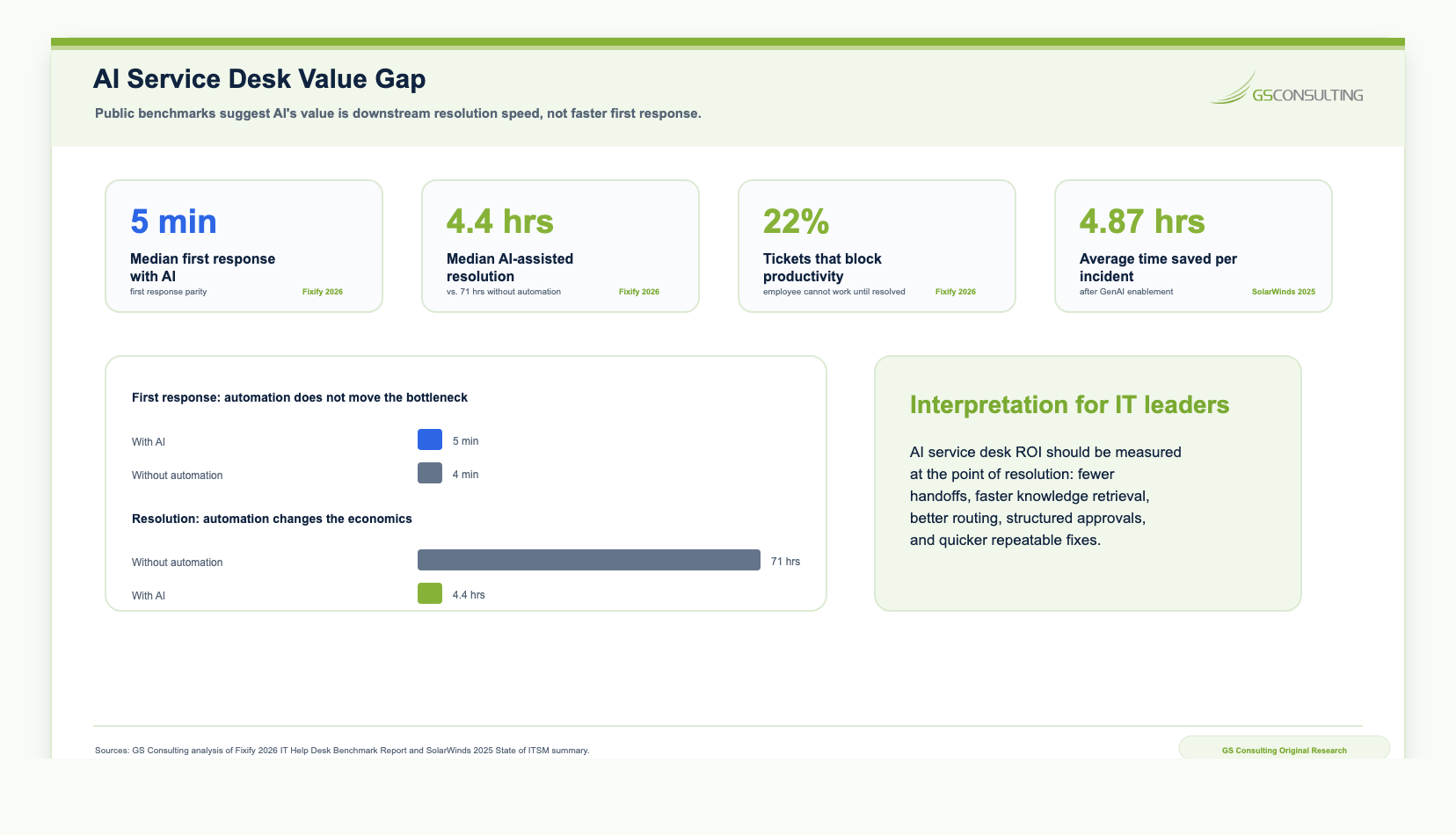
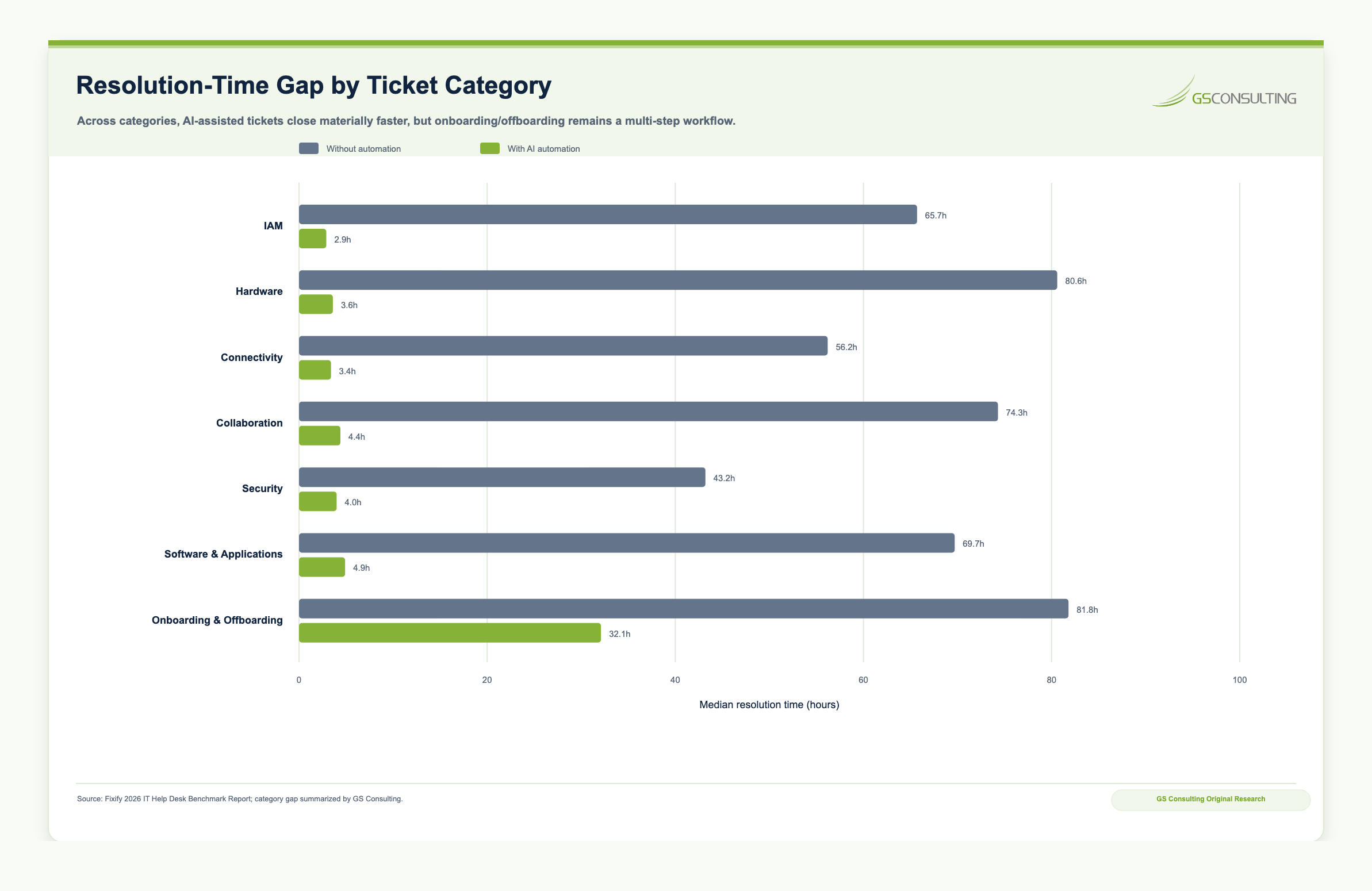
The research points to a simple conclusion: the service desk value gap is not first response. It is resolution.
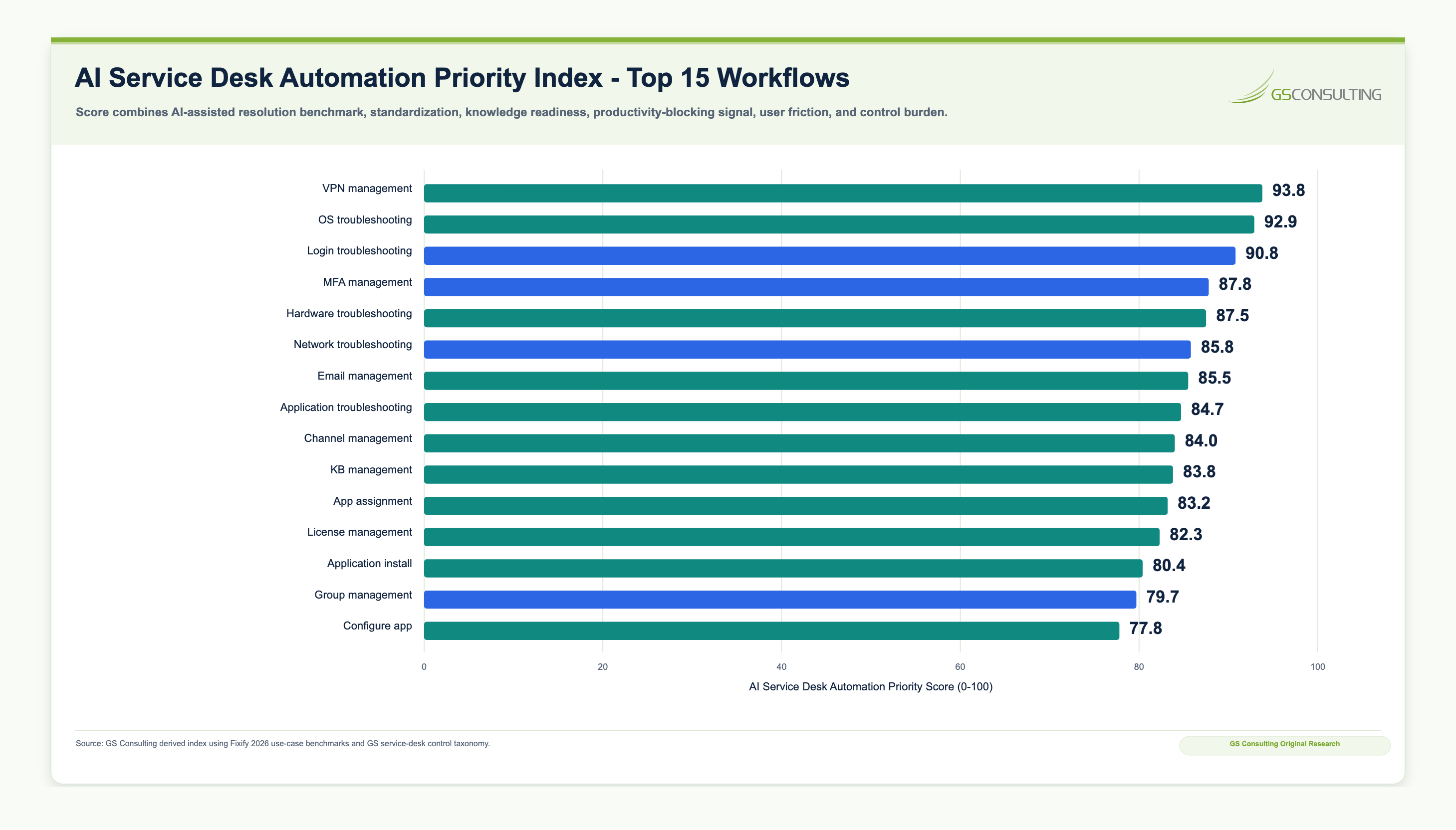
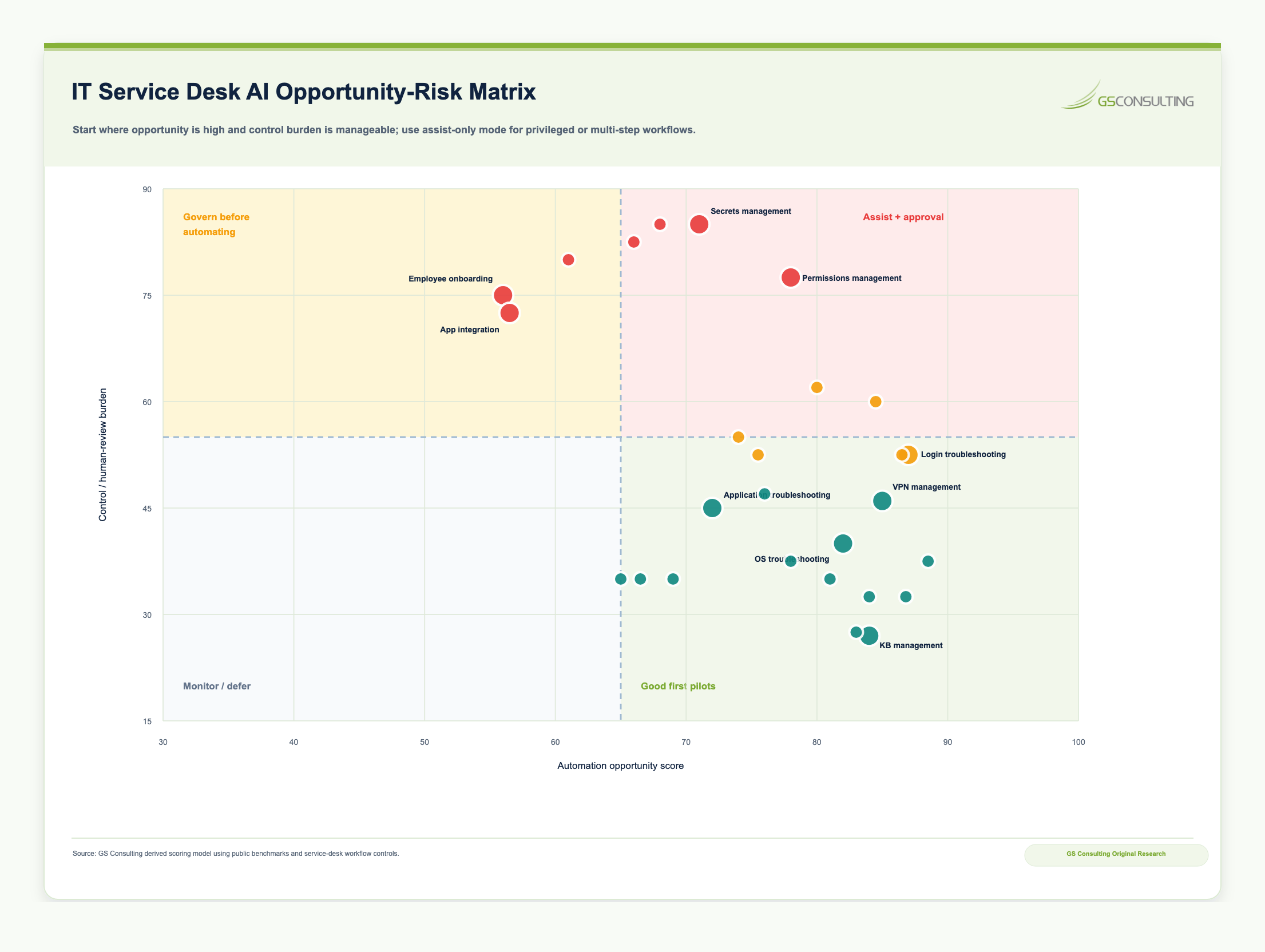
GS Consulting's analysis found that the best first wave IT AI pilots are repeatable, measurable, backed by knowledge, and likely to block productivity, while still allowing humans to approve privileged or sensitive actions. That is the right starting point because AI creates the most value when it reduces handoffs, improves routing, retrieves the right knowledge, and gives technicians better context.
Methodology and caveat
The AI Service Desk Automation Priority Score, Evidence Burden Score, and Opportunity Risk Matrix are GS Consulting planning tools. They are not official benchmarks, security determinations, audit conclusions, or compliance scores. Actual ROI depends on ticket volume, labor rates, baseline resolution time, current ITSM maturity, knowledge base quality, automation adoption, user behavior, technician review time, approval burden, integration cost, and security controls.
The practical takeaway is simple: stop obsessing over first response vanity metrics. Focus on classification, routing, knowledge retrieval, technician context, handoff reduction, validated resolution, and the evidence trail inside ITSM.
The Best IT Workflows for AI Automation
The best IT AI use cases are boring in the right way.
They happen often. They follow patterns. They are backed by knowledge. They have a measurable baseline. They can be escalated to humans when the risk changes.
Good first candidates include ticket triage, employee self service, knowledge recommendations, incident summarization, access request intake, onboarding support, change request drafting, problem management, asset routing, software request routing, vulnerability and patch prioritization support, and executive IT status reporting.
Poor first candidates include autonomous production changes, security enforcement without review, privileged access changes, complex root cause decisions, script execution, patch deployment, firewall changes, or anything that can break a system faster than a human can explain it.
High Value IT AI Use Cases
The strongest IT AI use cases improve technician leverage without removing accountability.
AI should help teams classify, summarize, search, recommend, route, draft, and document. It should not quietly become the person granting access, changing production, closing high risk incidents, or deciding root cause.
1. AI Service Desk Automation
The service desk is the best first IT AI target because the pain is visible and the numbers are measurable.
Backlog, handling time, resolution time, misrouting, escalation rate, first contact resolution, SLA misses, and employee satisfaction already show where the workflow is struggling.
AI can classify incoming tickets, summarize user issues, identify duplicates, recommend priority and urgency, suggest assignment groups, draft first responses, recommend knowledge articles, detect missing information, provide self service answers, and escalate complex or sensitive issues to humans.
A practical AI service desk workflow should read the request, ask for missing information, classify category and urgency, identify related incidents, search approved knowledge, draft a response or recommendation, route for human approval where needed, update ITSM, and feed resolved cases back into the knowledge improvement backlog.
2. AI Ticket Triage and Routing
Ticket triage is where AI can create value fast because bad routing wastes everyone's time.
A misrouted ticket creates delay for the employee, rework for technicians, noise in SLA reporting, and frustration for the team that eventually has to fix the issue.
AI can analyze ticket title and description, user role or department, historical patterns, affected application or device, related incidents, keywords, configuration item data, known errors, urgency indicators, and similar resolved tickets.
Start with AI recommended and human validated routing. Let the system prove accuracy before low risk categories move toward automated routing. Keep security incidents, executive escalations, production outages, access related issues, and regulated data workflows under stronger human control.
3. AI Knowledge Management for IT
Knowledge management is the hidden bottleneck in most service desks.
The answer often exists somewhere. The problem is that it is buried in old tickets, vendor docs, internal wikis, runbooks, chat threads, spreadsheets, monitoring notes, and the memory of senior technicians.
AI can support natural language search across approved IT documents, knowledge article recommendations, employee self service answers, runbook retrieval, known error identification, drafting new knowledge articles from resolved tickets, identifying outdated articles, summarizing incident history, and creating troubleshooting guides.
The control point is grounding. AI should answer from approved, current, permissioned sources. If the knowledge base is stale, duplicated, unowned, or too broadly permissioned, the AI assistant will create confident wrong answers or expose information users should not see.
4. AI Incident Summarization and Escalation Support
Incident work is messy because the facts are scattered while the clock is running.
Tickets, logs, alerts, chats, status updates, timelines, monitoring data, affected users, affected services, and troubleshooting notes all move at once. AI can help teams create a clearer picture faster.
AI can summarize incident timelines, group related alerts and tickets, draft internal status updates, identify affected users or services, summarize troubleshooting steps, prepare handoff notes, draft incident review notes, and identify recurring patterns.
Use AI to summarize and structure the incident. Do not use it to make final root cause declarations, reportability decisions, production change decisions, or customer facing incident statements without human validation.
5. AI for Access Requests and Identity Workflows
Access requests are a good AI use case until they become an access control problem.
AI can gather missing information, classify the request, map it to a standard access package, check similar users, flag unusual access, route to the right approver, and summarize access history.
That is useful. It is not the same as granting access.
AI should not grant access to sensitive systems, privileged roles, financial systems, HR systems, production environments, customer data, or regulated data without proper approval. A good design has AI gather and structure the request, recommend the likely access package, route to the manager or system owner, execute through approved identity workflows, log the action, and support later access review.
6. AI Onboarding and Offboarding Support
Onboarding and offboarding are where IT service quality becomes visible to the whole company.
AI can generate IT onboarding checklists by role, route access requests by role and department, answer new hire IT questions, track missing equipment or access, summarize onboarding status, flag offboarding tasks, identify unused licenses, draft manager reminders, and coordinate HR, IT, security, and facilities workflows.
This is a strong shared workflow because it improves employee experience while reducing repetitive IT coordination. The control point is still access. AI can coordinate the work, but approved identity workflows should control sensitive access and termination steps.
7. AI for IT Operations and Problem Management
The bigger opportunity is not closing tickets faster. It is preventing tickets that should not happen.
Beyond the service desk, AI can support IT operations by identifying patterns across incidents, alerts, changes, and system performance. It can detect recurring incidents, identify root cause themes, summarize problem records, recommend preventive actions, prioritize unstable services, analyze change related incidents, flag services with rising ticket volume, draft problem updates, and create executive service health summaries.
The long term opportunity is fewer preventable tickets, better service reliability, and stronger alignment between IT and business operations.
The IT AI Automation Maturity Model
IT AI maturity is not about how much autonomy the tool claims. It is about how much control the organization can prove.
Level 5 is controlled autonomous IT operations: AI resolves narrow, low risk requests, detects recurring issues, triggers approved remediation, updates records, and escalates exceptions. Strong monitoring, rollback, and control rules are required.
The IT AI Architecture
A practical IT AI architecture should keep AI close to the workflow and away from uncontrolled system access.
The architecture has to respect the system of record, the knowledge layer, identity controls, observability data, and security boundaries. If AI sits outside that structure, it becomes another support channel to govern.
AI should integrate with ITSM rather than creating a parallel support process.
This layer should be curated, permissioned, and reviewed.
AI permissions should be limited and controlled.
AI can summarize and correlate signals, but humans validate incident conclusions.
Additional layers include endpoint and asset management, orchestration for prompts and workflow steps, and controls for role based access, logging, approval records, retention, monitoring, vendor review, incident response, and change management.
AI Governance for IT Workflows
IT AI control is not paperwork. It is the difference between a helpful assistant and a tool that can create operational risk faster than the team can respond.
IT teams are often responsible for enabling AI across the enterprise, but they also need controls for their own AI workflows. The operating model should define ownership, approved tools, acceptable use, data rules, technician validation, vendor review, and escalation paths.
AI should not be allowed to operate freely across IT systems simply because it can. Be careful before allowing AI to grant access, reset privileged credentials, disable users, modify production systems, deploy patches, execute scripts, change firewall rules, close incidents automatically, delete data, modify endpoint configurations, approve changes, make final root cause determinations, or make security enforcement decisions.
The rule is simple: AI may recommend quickly, but it should act carefully and only inside approved controls.
How to Measure ROI for IT AI Transformation
Do not measure IT AI like a demo. Measure it like an operating workflow.
Useful IT AI metrics should show whether tickets move through the system faster, cleaner, and with less rework. They should also show whether risk stayed controlled.
- Ticket triage time, average resolution time, first contact resolution, misrouting, backlog, and SLA performance.
- Technician handling time, employee satisfaction, self service resolution, escalation rate, and human override rate.
- Knowledge article usage, deflection rate, AI response acceptance, incident summary time, access request cycle time, and cost per ticket.
Annual value = ticket volume x time saved per ticket x fully loaded labor rate x adoption rate x usable output rate
The most important metric is not how many AI features are deployed. The most important metric is whether AI improves service quality, speed, cost, reliability, technician trust, and user experience.
The IT AI Implementation Framework
1. Inventory Current IT Workflows
Start with the tickets. Review categories, average handling time, resolution time, escalation rate, backlog trends, SLA misses, knowledge base usage, employee satisfaction, manual reporting, onboarding and offboarding requests, access request volume, recurring incidents, misrouting, reopen rate, technician pain points, and ITSM data quality.
2. Identify Use Cases Ready for AI
Score candidate workflows by value, volume, repeatability, data readiness, integration feasibility, and risk. Strong first candidates include ticket classification, knowledge article recommendations, employee self service, incident summarization, VPN troubleshooting, login troubleshooting, MFA guidance, and onboarding support.
3. Clean Up the Knowledge Base
AI support quality depends on source quality. Remove outdated articles, merge duplicates, assign content owners, standardize article formats, add metadata, define review cycles, identify gaps from ticket history, mark sensitive content, and verify permissions.
4. Integrate With the ITSM Platform
AI should work where IT work already happens. Integrate AI with the ITSM platform so tickets, categories, assignments, notes, responses, approvals, and metrics remain in the system of record. Avoid creating a separate AI channel that resolves issues without updating the ticketing system.
5. Define Human Review Rules
Define what AI can do alone and what requires approval. AI may recommend categories and assignment groups, draft responses, suggest knowledge articles, ask users for missing information, and summarize incidents. It may not grant access, execute scripts, close high risk incidents, or make final security or production change decisions without approval.
6. Pilot With Clear Metrics
Start with one or two workflows. Good pilots include password reset guidance, software installation requests, VPN troubleshooting, ticket classification for one service category, knowledge recommendations for Tier 1 support, new hire IT onboarding questions, and incident summary drafting.
7. Expand Through an IT AI Operating Model
Once pilots prove value, build an operating model with AI use case intake, tool approval, knowledge governance, workflow owners, integration standards, human review rules, security review, change management, metrics dashboards, model and workflow monitoring, feedback loops, and continuous improvement.
Common Mistakes in IT AI Transformation
Most IT AI mistakes come from giving the tool more authority than the workflow has earned.
Mistake 1: Deploying a chatbot without fixing the knowledge base. If source content is outdated, duplicated, unowned, or too broadly permissioned, the assistant will produce weak answers faster.
Mistake 2: Automating bad workflows. AI will not fix unclear ownership, poor ticket categories, inconsistent data, broken escalation paths, or missing approvals. It will move the mess faster.
Mistake 3: Giving AI too much access too quickly. Start with read, recommend, draft, summarize, and route. Do not rush into access changes, production actions, script execution, patching, or security enforcement.
Mistake 4: Measuring only ticket deflection. Deflection matters, but it is not the whole story. Measure service quality, routing accuracy, employee satisfaction, technician trust, escalation quality, reopen rate, SLA impact, and risk.
Mistake 5: Ignoring technicians. Technicians know where the ticket data is messy, where knowledge articles are wrong, where escalations break, and which recommendations are realistic. Build with them.
Mistake 6: Failing to integrate with ITSM. If AI activity does not update the system of record, reporting, SLA tracking, auditability, and accountability suffer.
Mistake 7: Skipping security review. AI tools connected to IT systems may touch sensitive data, credentials, logs, endpoint data, system configurations, vulnerability information, or privileged workflows. That deserves a real security review.
Mistake 8: Letting AI close tickets too early. A closed ticket is a service commitment. For anything beyond narrow, low risk, well tested requests, humans should validate the fix before the ticket is officially closed.
Mistake 9: Treating pilot success as scaled readiness. A small pilot can work with handpicked tickets and motivated technicians. Scale requires integration, knowledge governance, monitoring, rollback, training, and support.
Mistake 10: Forgetting rollback. If AI misroutes tickets, gives bad advice, triggers the wrong workflow, or creates noisy recommendations, the team needs a clean way to pause, roll back, and correct the workflow.
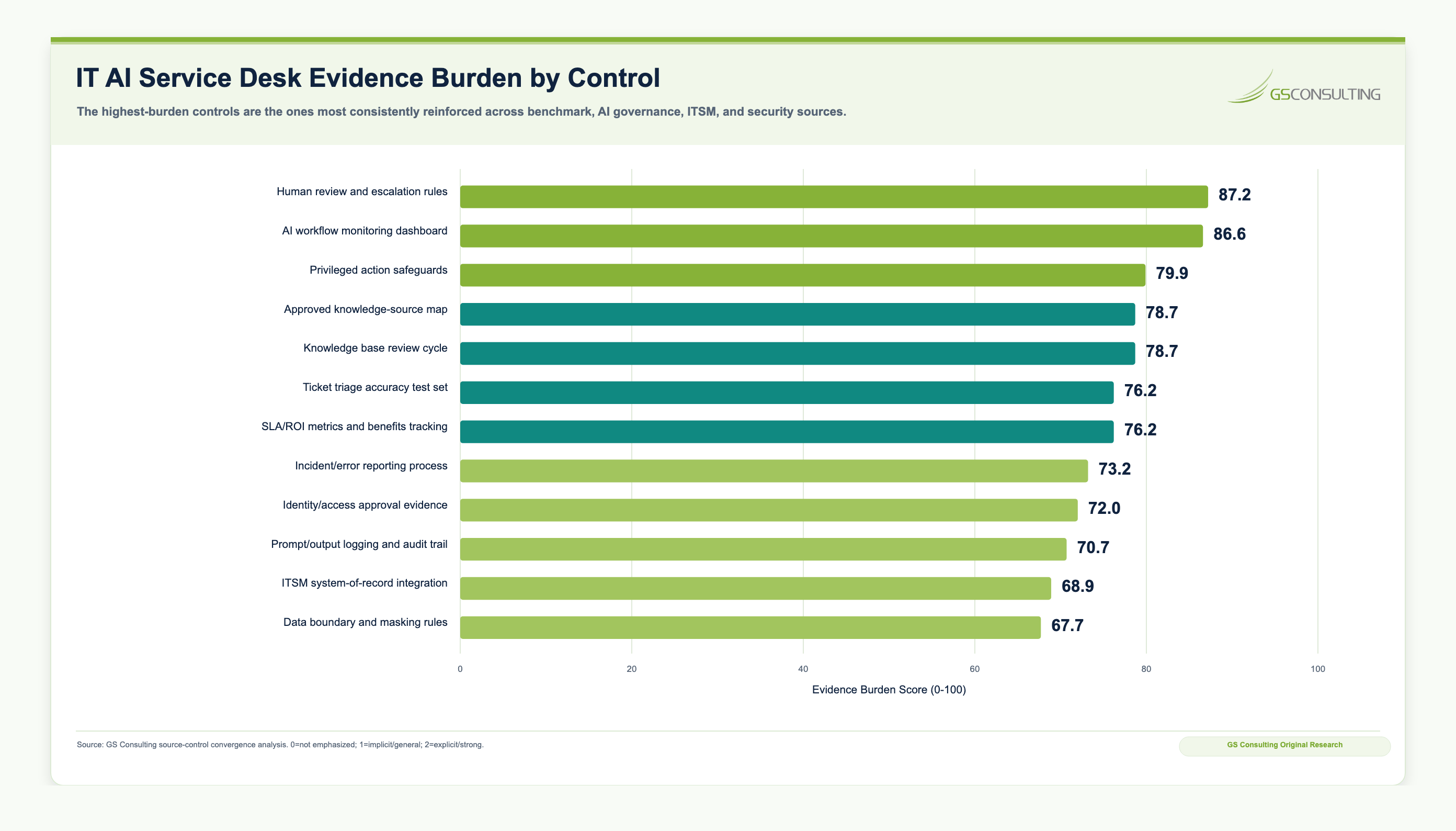
Minimum Viable IT AI Service Desk Evidence Packet
A useful IT AI pilot should produce evidence from day one.
The evidence packet should show what AI reviewed, which sources it used, what actions it was allowed to take, what humans approved, what changed in ITSM, how errors were handled, and whether the workflow actually improved.
- RegisterIT AI use case register with workflow owner, tool, users, approved actions, prohibited actions, data sources, systems touched, and risk tier.
- BaselineTicket baseline and ROI sheet covering volume, handling time, resolution time, SLA performance, misrouting, escalation, deflection, backlog, reopen rate, and cost per ticket.
- KnowledgeApproved knowledge source map, source owners, review cycle, permissions, sensitive content labels, outdated article backlog, and knowledge improvement plan.
- TestingAI triage accuracy test set, routing quality test, response quality review, incident summary validation, prompt and output logging policy, false positive review, and error reporting process.
- ControlsHuman review rules, privileged action safeguard map, security review, vendor review, rollback playbook, exception handling, approval records, and access control documentation.
- MonitoringAI service desk monitoring dashboard tied to ITSM records, adoption, routing quality, technician feedback, employee satisfaction, SLA impact, ROI tracking, override rate, and risk findings.
A 30 60 90 Day IT AI Plan: Move From Ticket Noise to Controlled Pilots
Ninety days is enough time to stop guessing.
The goal is not to automate the entire service desk in one quarter. The goal is to find the right workflows, clean up the minimum knowledge needed, define the control model, launch controlled pilots, and create evidence leadership can trust.
- Days 1 to 30Find the workflow friction.
Inventory ticket categories, service desk metrics, ticket volume, handling time, resolution time, SLA misses, backlog, escalation rate, misrouting, reopen rate, knowledge base quality, onboarding requests, access request volume, recurring incidents, technician pain points, ITSM data quality, security sensitive workflows, and shadow AI use.
- Days 31 to 60Design the first pilots.
Select two or three pilot workflows. Good candidates include VPN troubleshooting, login troubleshooting, MFA guidance, ticket classification, Tier 1 knowledge recommendations, password reset guidance, software installation requests, new hire IT onboarding questions, and incident summary drafting. Define approved sources, ITSM integration, review rules, security controls, success metrics, rollback, and technician feedback loops.
- Days 61 to 90Launch controlled pilots.
Run pilots inside the ITSM workflow with approved data, approved users, approved knowledge, human validation, and clear escalation. Track accuracy, adoption, handling time, routing quality, resolution time, SLA impact, employee satisfaction, technician trust, override rate, errors, and support burden.
By the end of 90 days, leadership should be able to answer eight questions without scrambling: which workflows improved, how much time AI saved, whether routing improved, whether employees got better answers, whether technicians trusted the recommendations, what errors occurred, what risks need stronger controls, and which workflows are ready to expand, redesign, pause, or stop.
What IT Leaders Should Build Now
IT leaders do not need a massive AI program to start. They need enough structure to keep the first pilots useful, measurable, and controlled.
Build the basics first.
- IT AI use case inventory and service desk automation roadmap.
- Ticket baseline and ROI dashboard.
- Knowledge base cleanup plan.
- Approved knowledge source map with owners, review cycles, and permissions.
- AI ticket triage pilot.
- Employee self service pilot.
- Incident summarization pilot.
- ITSM integration plan.
- Human review, approval, access, and permission model.
- Privileged action safeguard map.
- Security and vendor review checklist.
- Prompt and output logging policy.
- Technician training and feedback loop.
- Rollback and exception handling process.
- Metrics dashboard for routing quality, resolution speed, adoption, satisfaction, risk, and ROI.
- Continuous improvement process for knowledge, workflows, prompts, and controls.
The Bottom Line
IT is one of the best places to start with enterprise AI because the work is measurable, repetitive, system based, and directly tied to employee experience.
But the value does not come from putting a chatbot in front of a broken workflow. The value comes from better classification, better routing, better knowledge retrieval, better technician context, cleaner ITSM records, faster resolution, and fewer preventable tickets.
AI should help the service desk move faster without losing control of access, systems, evidence, or accountability.
The best first pilots are practical: ticket triage, employee self service, knowledge recommendations, VPN troubleshooting, login troubleshooting, MFA guidance, incident summarization, onboarding support, and low risk request routing.
That is the standard: faster tickets, cleaner knowledge, trusted technicians, and no uncontrolled access.
GS Consulting helps organizations use AI in IT where it improves the workflow, not just the demo.
That means identifying high value IT AI opportunities, mapping service desk workflows, cleaning up knowledge foundations, prioritizing ticket triage and self service pilots, integrating AI with ITSM and legacy systems, defining human review rules, calculating ROI, designing controls, and expanding reliable IT AI operations.
The goal is not to make the service desk look more innovative. The goal is to reduce ticket burden, improve resolution speed, strengthen knowledge quality, help technicians work faster, and keep access, systems, and accountability under control.
Research Sources and Caveats
The original research in this article uses GS Consulting planning metrics based on public IT help desk benchmark research, open incident management event log data, AI service desk guidance, and AI governance and security references.
The AI Service Desk Automation Priority Score, Evidence Burden Score, and Opportunity Risk Matrix are planning tools. They are not official benchmarks, security determinations, audit conclusions, or compliance scores.
Benchmark data should be adapted to each organization's ITSM maturity, ticket mix, knowledge quality, labor rates, integration costs, technician review time, approval burden, user behavior, automation adoption, and security controls.
- Fixify, 2026 IT Help Desk Benchmark Report
- UCI Machine Learning Repository, Incident management process enriched event log
- NIST AI Resource Center, AI RMF Core
- GS Consulting analysis of public IT service desk benchmarks, event log fields, AI service desk workflow controls, and AI governance and security references.
Ready to fix the service desk workflow before scaling AI?
GS Consulting helps organizations map IT workflows, clean up service desk knowledge, prioritize ticket categories ready for AI, integrate AI with ITSM, define review rules, calculate ROI, and launch controlled IT AI pilots that improve service delivery without losing control.
Contact GS ConsultingFrequently Asked Questions About AI in IT Operations
Should AI automatically resolve and close IT service desk tickets?
Only for narrow, low risk, well tested requests with clear rollback and logging. AI may be able to point a user to a password reset portal, collect missing information, recommend a knowledge article, or resolve a simple known issue. Most enterprise IT workflows should start with AI triage, classification, recommendations, and technician validation. A closed ticket is a service commitment, so high risk incidents, access related issues, production problems, security events, and unclear fixes should stay under human control.
How does AI integrate with existing ITSM platforms?
AI should integrate with the ITSM system through approved APIs or platform native capabilities so classifications, drafted responses, routing recommendations, approvals, notes, knowledge links, SLA updates, and resolution data remain in the system of record. Avoid creating a separate AI support channel that resolves work without updating ITSM. That breaks reporting, auditability, metrics, and accountability.
What are the security risks of AI in the IT service desk?
The biggest risks are excessive permissions, data leakage, bad recommendations, and unauthorized actions. An AI service desk tool may touch tickets, user context, logs, system names, endpoint data, access requests, configuration details, knowledge articles, credentials, or privileged workflows. Tools should be constrained by role based access control, least privilege, logging, human approval, vendor review, prompt and output controls, retention rules, and security review before they connect to sensitive IT systems.
Suggested Future Reading
- Enterprise AI Process Automation Framework: How to Move from AI Pilots to Measurable Business Transformation
- How to Identify the Best Workflows for AI Automation
- AI ROI Calculation: How to Measure the Business Case for Enterprise AI
- Legacy System Integration for Enterprise AI Automation
- AI Transformation for HR: Automating Employee Support and Onboarding
- AI Transformation for Operations: Exception Management, Reporting, and Process Control