Enterprise AI | | 23 min read
AI Transformation for HR: Automating Employee Support and Onboarding

Key Takeaways
AI adoption has to move fast and stay controlled.
Start With Mission Value
Prioritize use cases tied to measurable business, delivery, or mission outcomes.
Protect the Data Boundary
Define what data AI tools can touch before selecting vendors or architectures.
Keep Humans Accountable
Use AI to support workflows while retaining trained review and escalation paths.
Document the Controls
Maintain inventories, testing evidence, monitoring plans, and risk decisions.
HR AI should start with employee service, not people decisions.
The best first use cases are not AI deciding who gets hired, promoted, disciplined, paid more, accommodated, or terminated. The best first use cases are simpler and safer: answering policy questions from approved sources, guiding onboarding, routing HR cases, finding knowledge, drafting routine content, and helping HR teams respond faster.
That is where AI can reduce real friction without turning sensitive employment decisions into a black box.
Do not let HR AI move faster than employee trust.
GS Consulting helps organizations identify HR AI opportunities, map employee and applicant data boundaries, automate support and onboarding, evaluate vendors, design governance, calculate ROI, and build evidence workflows that HR, legal, privacy, security, and executives can trust.
Request an HR AI AssessmentHR teams are being asked to do more with less room for error.
Employees want fast answers. New hires need smoother onboarding. Managers need policy guidance. Recruiters are under pressure to move faster. Learning teams need scalable content. HR operations teams are buried in repetitive questions, case routing, forms, reminders, and follow up.
AI can help with that. But HR is not a normal back office automation target.
When AI touches employees or applicants, it can affect trust, privacy, opportunity, fairness, documentation, and legal exposure. A chatbot that answers PTO questions is not the same as a tool that ranks candidates, evaluates performance, recommends discipline, or influences compensation.
The smart move is not to avoid HR AI. The smart move is to start where the work is repetitive, documented, measurable, and service oriented, then keep humans accountable for sensitive people decisions.
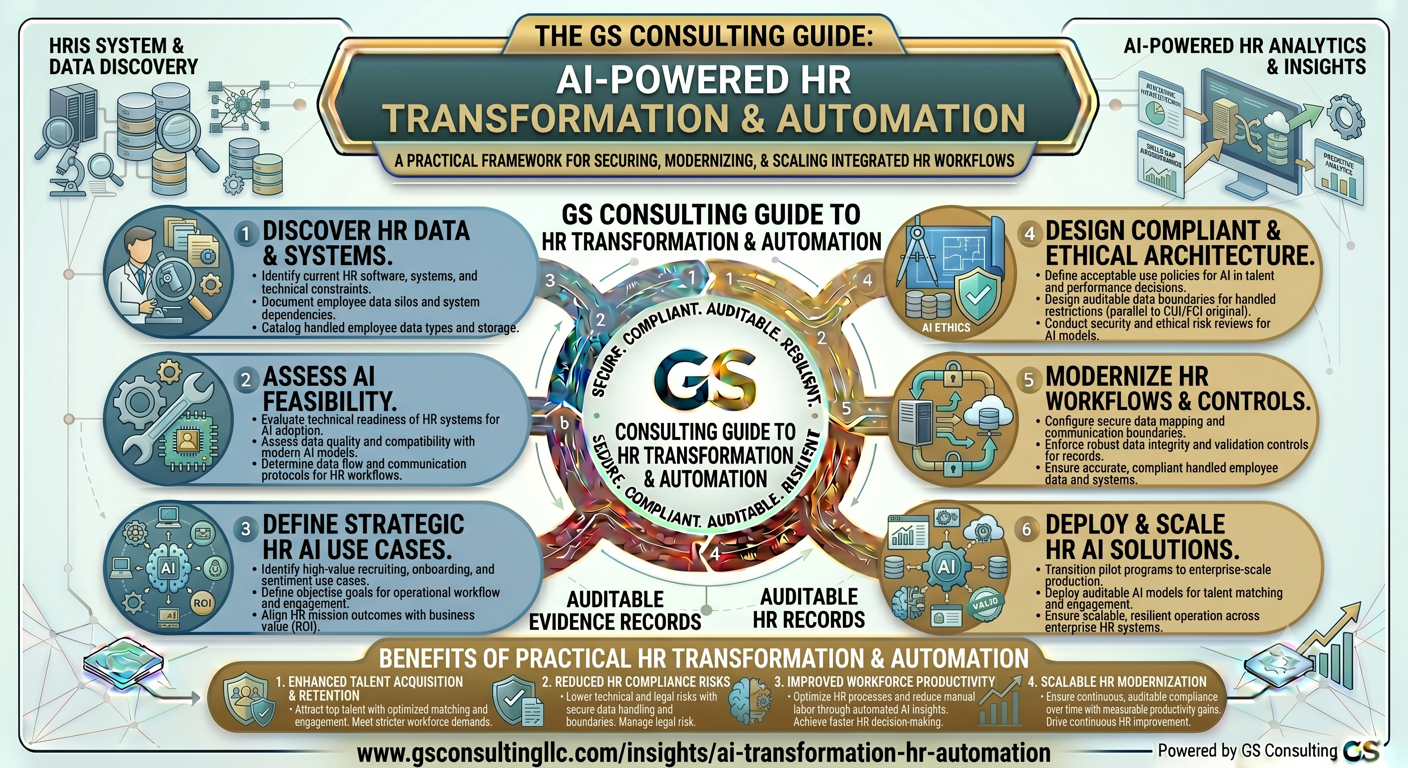
Why HR Is a Strong Starting Point for AI Process Transformation
HR is a strong AI starting point because the work is full of repeatable friction.
Employees ask the same policy questions. New hires get stuck on the same onboarding steps. Managers look for the same guidance. HR teams route the same case types. Learning teams create similar content. Recruiters draft similar materials. That does not make the work unimportant. It makes parts of the work good candidates for controlled AI assistance.
The goal is not to remove the human side of HR. The goal is to stop wasting HR judgment on repetitive work that approved systems can help prepare, route, summarize, or answer.
Original Research: Where HR AI Should Automate First
The research points to a practical sequence: service automation first, people decision automation later.
GS Consulting analyzed public HR AI adoption, trust, labor and employment, AI governance, and jurisdictional regulatory sources against 18 HR AI controls and 13 common HR workflows. The pattern was clear. The best early pilots are not the most dramatic use cases. They are the workflows where demand is high, source content can be approved, the process is measurable, and escalation to humans is clear.
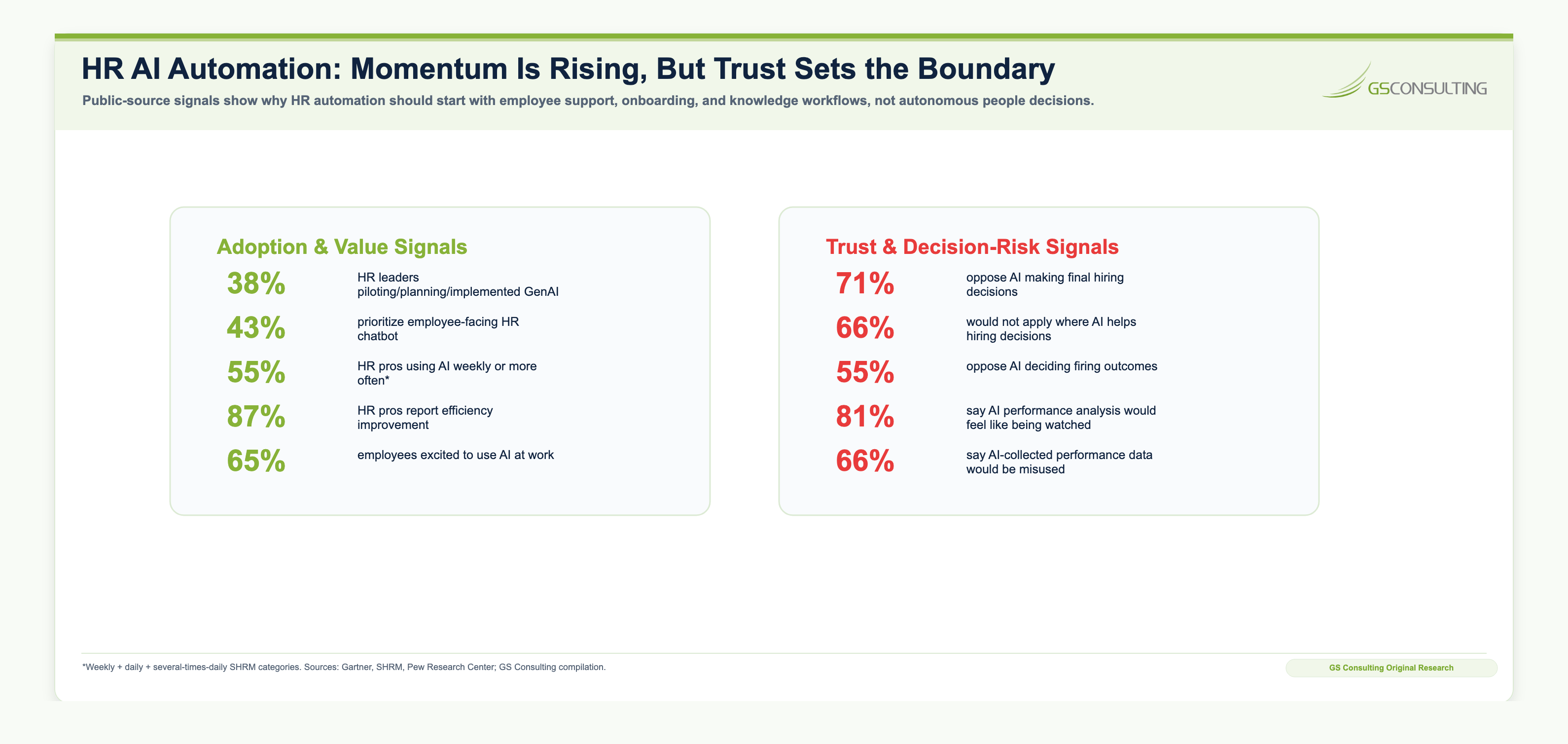
Methodology and caveat
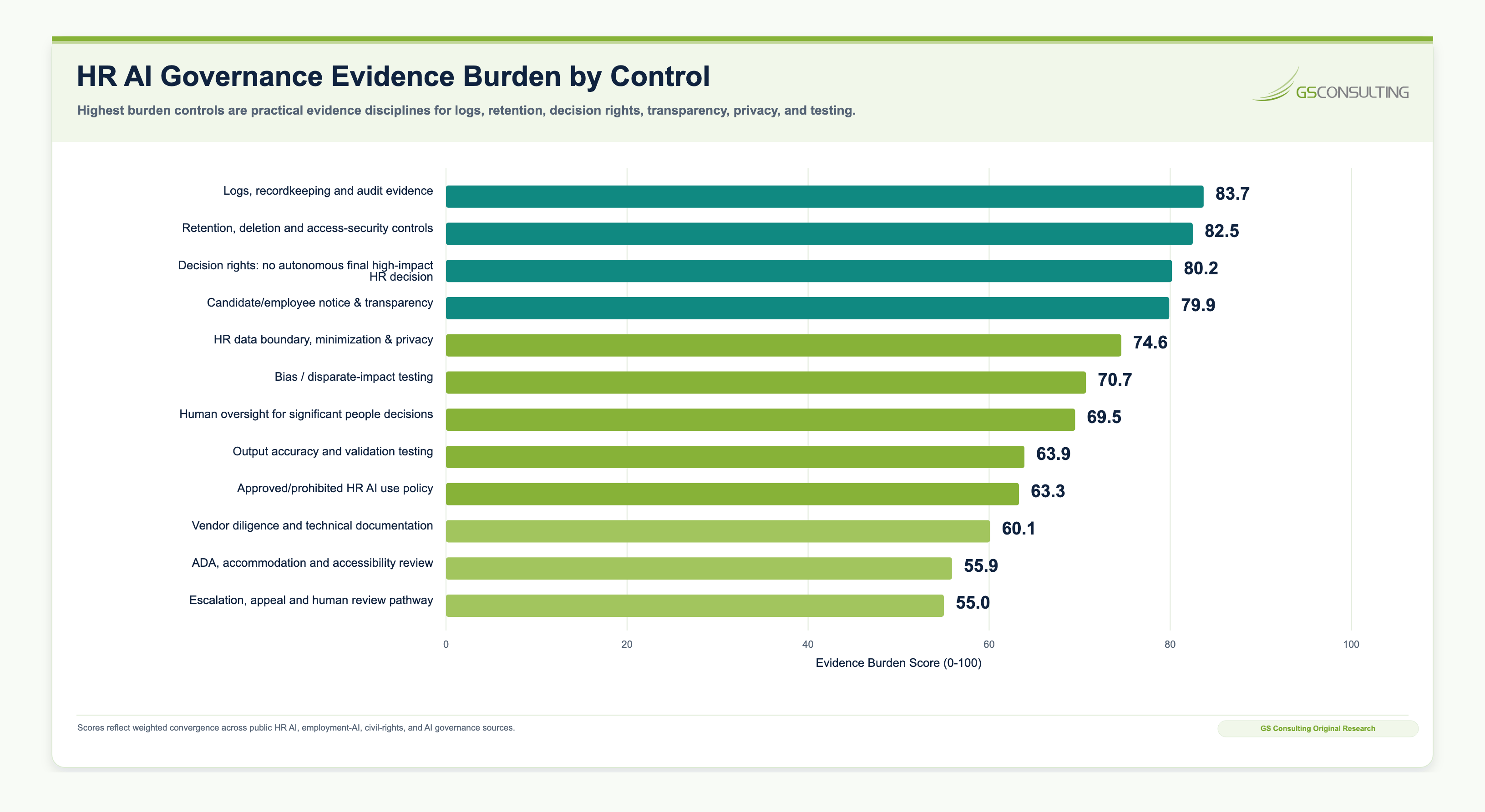
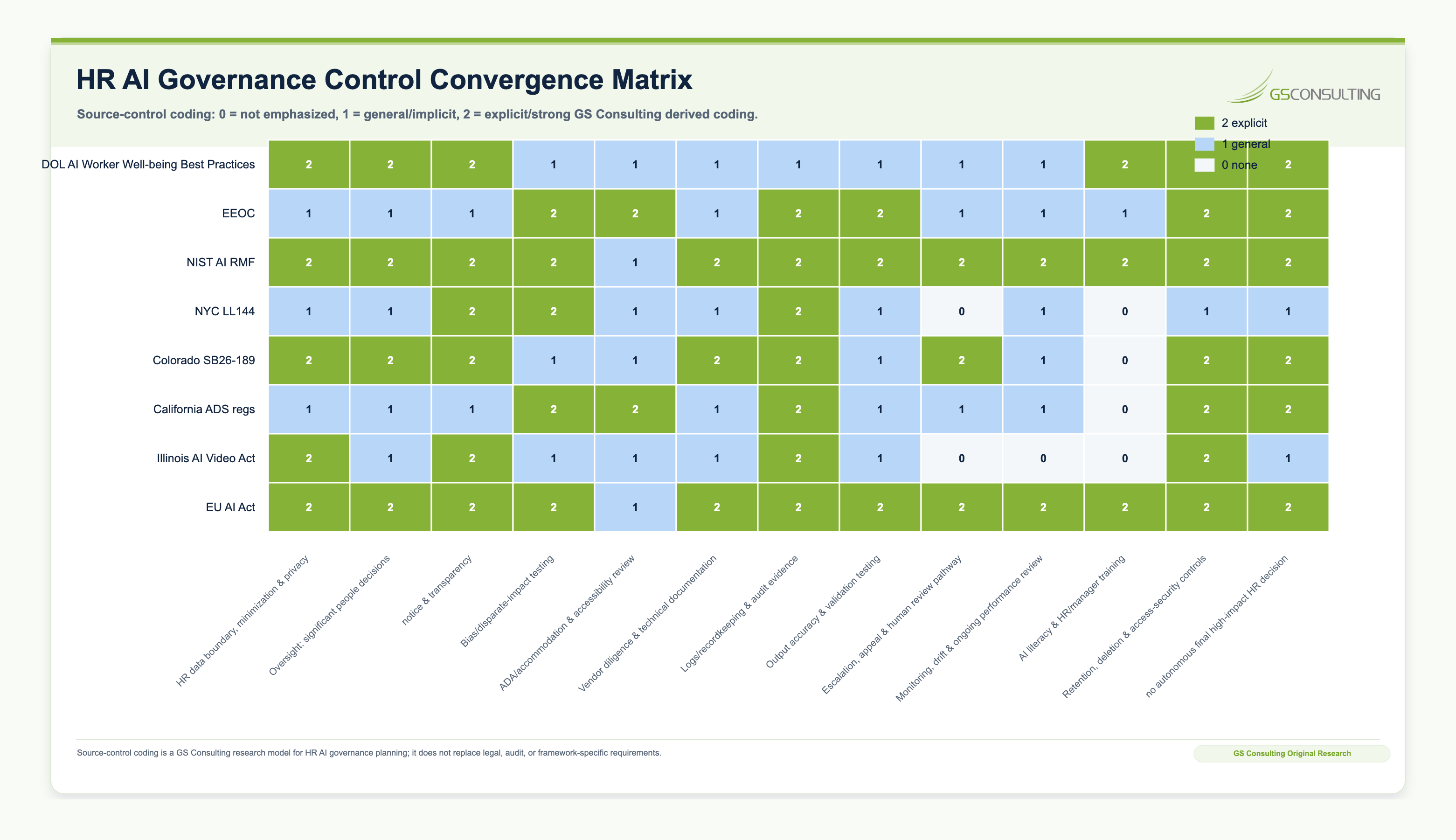
The HR AI Automation Priority Index, People Impact Risk Score, Governance Evidence Burden, and Evidence Burden Score are GS Consulting planning metrics. They are not official legal, regulatory, audit, or compliance determinations. Employment AI obligations vary by jurisdiction, use case, employer role, vendor role, data type, protected class impact, effective date, and whether the system assists or materially influences a consequential employment decision.
The practical takeaway is simple: HR AI should prove value in service workflows before it is allowed near high impact employment decisions.
The Best HR Workflows for AI Automation
The best HR AI use cases are boring in the right way.
They happen often. They depend on approved content. They can be measured. They have clear escalation paths. They improve employee support without asking AI to make sensitive employment decisions.
A poor first use case is one where AI makes final decisions about hiring, discipline, termination, promotion, compensation, performance, or accommodations without careful human review and legal oversight.
The right starting point is usually not "AI decides." It is "AI helps HR respond faster, find information, prepare work, and route cases more effectively."
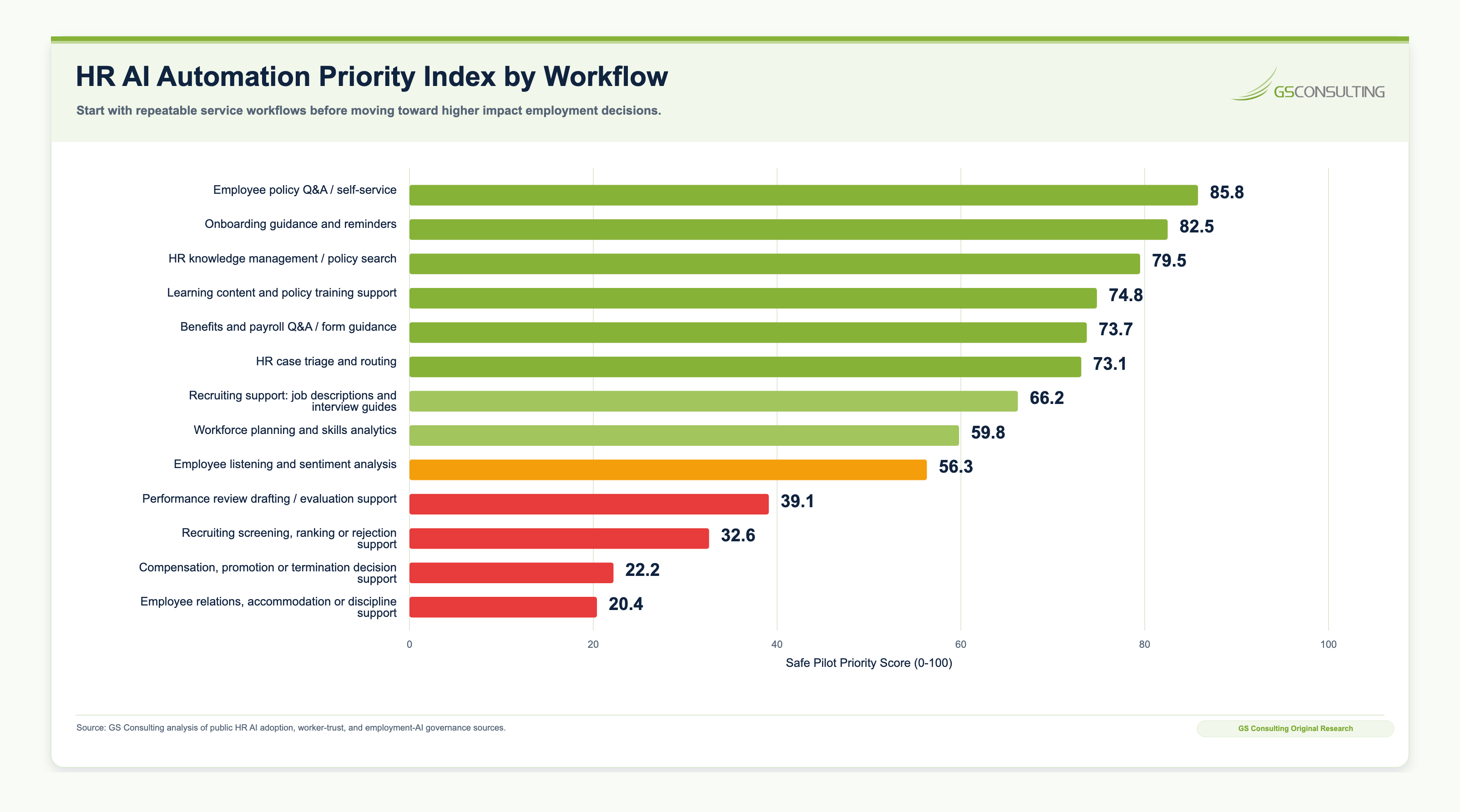
High Value HR AI Use Cases
The strongest HR AI use cases reduce friction without moving final accountability away from people.
That means AI should help HR answer, draft, summarize, route, remind, search, and prepare. It should not quietly become the decision maker for hiring, discipline, pay, accommodation, promotion, termination, or employee relations outcomes.
1. AI Employee Support and HR Policy Q&A
Employee support is usually the best first HR AI use case because the pain is obvious and the risk can be managed.
Employees ask recurring questions about PTO, holidays, parental leave, benefits, payroll timing, remote work, expenses, onboarding, training, internal mobility, and manager responsibilities. HR should not need to answer the same approved policy question hundreds of times by hand.
An AI employee support assistant can help employees ask questions in plain language and receive answers grounded in approved HR content. It can provide links to source documents, recommend forms, and escalate complex or sensitive cases to HR.
The assistant should answer from approved HR content only. It should cite source documents, avoid inventing policy, avoid legal advice, avoid exceptions, and escalate sensitive or unclear cases to HR.
2. AI Onboarding Automation
Onboarding is a strong HR AI use case because it is repetitive, touches several teams, and is highly visible to the employee.
A weak onboarding process creates avoidable friction: too many emails, inconsistent manager checklists, missing IT access, delayed payroll steps, benefits confusion, and HR answering the same first week questions over and over.
AI can create personalized onboarding checklists, answer new hire questions, summarize role specific policies, guide benefits enrollment, recommend training, draft manager onboarding plans, flag missing tasks, route unresolved issues, and create first week and first month check in prompts.
The most valuable onboarding AI is not a chatbot sitting off to the side. It is a workflow layer that keeps the new hire, manager, HR, IT, payroll, finance, security, learning, and facilities aligned.
3. HR Case Triage and Routing
HR case triage is a good AI target because the manual work is repetitive and the stakes vary.
Some requests are routine. Some are urgent. Some are sensitive. Some need legal, employee relations, benefits, payroll, security, or manager involvement. AI can help classify and route the work, but it should not decide the outcome.
AI can classify requests, summarize issues, detect urgency, identify missing information, recommend categories, and route cases to the right HR specialist. Sensitive employee relations, medical, accommodation, disciplinary, or legal matters should be escalated quickly to trained professionals.
The value is faster routing, better completeness, fewer dropped cases, and cleaner escalation, not automated HR judgment.
4. Recruiting Support and Hiring Workflow Automation
Recruiting is valuable, but it is not the place to be casual.
AI can support recruiters by drafting job descriptions, interview guides, candidate communications, intake notes, and interview summaries. That is different from AI screening, ranking, or rejecting candidates.
The closer AI gets to employment opportunity, the heavier the governance should be: human decision rights, bias or disparate impact testing where relevant, notice, documentation, vendor review, retention controls, and legal oversight.
5. Learning and Development Automation
Learning is a practical HR AI use case because the work is content heavy and constantly changing.
AI can help learning teams draft first versions, adapt content for audiences, create quizzes, summarize policy changes, build learning paths by role, and support learner Q&A. The control point is source quality and review.
Training content still needs an owner. AI can draft the material. It should not become the authority on policy, compliance, safety, harassment prevention, benefits, or role requirements.
6. HR Knowledge Management
HR knowledge is usually more scattered than leaders think.
Policies live in handbooks, PDFs, intranet pages, benefits portals, shared drives, email templates, ticket histories, and individual HR team members' experience. That is why employees get inconsistent answers.
A strong HR knowledge management system can search approved HR documents, answer questions with source references, identify conflicting or outdated policies, recommend updates, help HR staff find prior case patterns, and improve consistency across HR responses.
The goal is approved HR source content with owners, review dates, permissions, and source references. If HR cannot tell which source the answer came from, the workflow is not ready.
7. Employee Listening and Sentiment Analysis
AI can help HR teams analyze employee feedback at scale, including survey comments, exit interview notes, engagement feedback, internal mobility feedback, onboarding surveys, and open text responses.
This use case requires careful privacy and trust controls. Employees should understand how feedback is used, sensitive data should be protected, and AI should not be used to retaliate, profile, or unfairly evaluate employees.
HR AI Risk: Why Governance Matters
HR AI governance is not a policy document sitting on a shelf. It is the operating model that decides what AI can touch, what humans still own, and what evidence the organization keeps.
AI in HR is different from AI in many other departments because it can affect people directly. Every HR AI use case should answer who owns the workflow, what employee or applicant data it uses, what decision it supports, what could go wrong, where human review is required, how performance will be tested, how employee concerns will be handled, how data will be protected, and how the tool will be monitored after launch.
This does not mean HR should avoid AI. It means HR should implement AI in a way that protects trust.
Still requires approved data, source references, and escalation paths.
Requires stronger testing, documentation, legal review, privacy review, and human oversight.
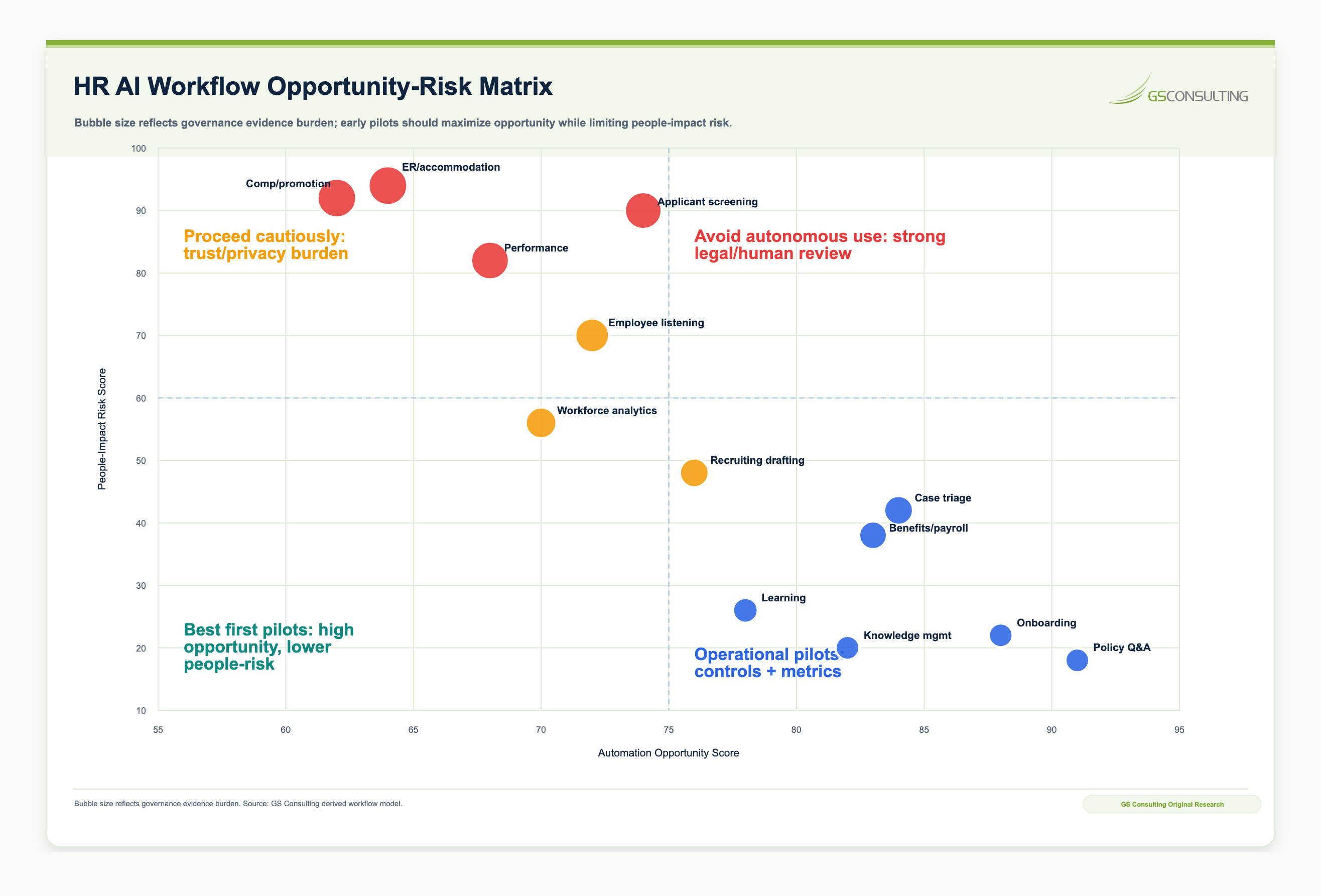
The lowest scoring workflows in the research were recruiting screening, ranking, and rejection support; performance evaluation support; compensation, promotion, and termination decision support; and employee relations, accommodation, and discipline support. These workflows should receive legal review, human decision rights, bias or disparate impact testing, documentation, notice, retention controls, vendor review, and escalation procedures before deployment.
The HR AI Automation Framework
1. Identify High Volume HR Friction
Start by identifying repeated employee questions, high volume case categories, slow onboarding steps, manual recruiting tasks, policy confusion, manager support bottlenecks, training content gaps, manual reporting work, inbox overload, and employee experience pain points.
2. Map the Current HR Workflow
For each workflow, document what starts the request, who receives it, what systems are used, what data is needed, what approvals are required, where the work gets delayed, which cases require escalation, what outputs are created, and how success is measured.
3. Separate Lower Risk and Higher Risk Use Cases
Lower risk workflows can often move into controlled pilots quickly. Higher risk workflows require stronger testing, documentation, legal review, privacy review, and human oversight before automation is expanded.
4. Build an Approved HR Knowledge Base
HR AI is only as reliable as the information it uses. Create a governed knowledge base that includes approved policies, benefits documents, onboarding guides, manager resources, training materials, job architecture, HR procedures, and employee support content.
Assign owners, define review cycles, remove outdated documents, track source references, and use access controls for sensitive content.
5. Choose the Right AI Automation Pattern
- Assist: draft job descriptions, summarize cases, and create training content.
- Answer: support employee policy Q&A, manager self service, and onboarding guidance.
- Triage: classify HR cases, route requests, and identify missing information.
- Recommend: suggest learning paths, knowledge articles, and next steps.
- Automate with approval: trigger onboarding reminders, draft case responses, and prepare forms.
For HR, human review with escalation authority is especially important. Employees should not feel that sensitive issues are being judged by a black box.
6. Integrate With HR Systems Carefully
AI may connect to HRIS, payroll, benefits platforms, applicant tracking systems, learning management systems, case management systems, identity tools, collaboration platforms, document repositories, and employee engagement tools. Before integration, define what AI can read, what it can write, what is restricted, what requires approval, how access is logged, how permissions are enforced, and how employee data is retained or deleted.
AI should not become an unofficial HR system of record. HRIS, ATS, payroll, benefits, and case management platforms should remain authoritative.
7. Measure ROI and Employee Experience
HR AI should be measured like any other process transformation effort. Metrics should include support response time, case resolution time, case deflection, onboarding completion, time to productivity, recruiting cycle time, HR time saved, employee satisfaction, manager satisfaction, policy answer accuracy, escalation rate, human override rate, and training completion.
The best HR AI programs measure both efficiency and trust.
8. Monitor and Improve Continuously
HR AI does not stay safe by itself. Policies change. Benefits change. Roles change. Hiring needs change. Regulations change. Employee expectations change. AI tools change.
Monitoring should cover answer accuracy, escalation quality, adoption, employee feedback, vendor changes, source freshness, errors, complaints, policy updates, and legal or privacy changes.
Practical HR AI Workflow Examples
AI Onboarding Workflow
A company wants to improve onboarding for corporate employees. Today, new hires receive multiple emails, managers use inconsistent checklists, IT access is sometimes delayed, HR answers repeated questions, and onboarding progress is hard to track.
In the AI supported workflow, the new hire receives a personalized onboarding guide based on role, location, department, and start date. AI answers common questions using approved HR content, routes payroll and access issues, prompts the manager for key meetings, alerts IT if access is missing, and gives HR a dashboard showing completion progress and friction points.
AI Employee Support Workflow
A company wants to reduce repetitive HR questions. Employees ask through email, chat, managers, and the HR case system. HR spends significant time answering routine policy questions.
In the AI supported workflow, employees ask questions through an HR assistant. The assistant retrieves answers from approved policy documents, includes source references, asks clarifying questions, escalates sensitive topics, creates cases when needed, and gives HR analytics showing which policies create confusion.
What HR Should Not Automate Too Quickly
This should be one of the clearest lines in the HR AI program.
Do not start with final hiring decisions, candidate rejection decisions, performance ratings, promotion decisions, compensation decisions, discipline, termination, layoff selection, disability accommodations, employee relations findings, harassment or discrimination complaints, medical or protected information, and labor relations matters.
AI may assist with intake, summarization, documentation, routing, or issue tracking in some of these workflows. But final accountability should stay with trained humans, and the governance burden should rise as the impact on employees or applicants rises.
HR AI Vendor and Governance Checklists
HR AI governance is becoming an evidence problem. HR teams should not only ask whether AI can answer a question. They should ask whether they can prove what source was used, what data was touched, who reviewed the output, whether employees or candidates were notified, whether the tool was tested, and whether final decision rights remained with an accountable human.
Vendor Review Questions
- What HR workflow does the tool support, and does it assist, recommend, automate, or make decisions?
- What employee or applicant data does it process, and does it use data for model training?
- Where are prompts, outputs, logs, and documents stored?
- Can outputs be audited, and does the tool support role based access?
- Has the tool been evaluated for bias or disparate impact where relevant?
- How are errors reported and corrected?
- What security controls protect HR data?
- Can the organization export records for audit or investigation?
Governance Model
- Inventory of HR AI tools and use cases.
- Approved and prohibited HR AI uses.
- Data handling rules for employee and applicant data.
- Human review requirements and sensitive case escalation.
- Employee transparency guidance and feedback process.
- Vendor, privacy, security, and bias review processes.
- Policy content owners, monitoring, metrics, and change management.
Common HR AI Mistakes
Most HR AI problems do not start with bad technology. They start with bad sequencing.
Mistake 1: Starting with recruiting automation before building governance. Recruiting can be valuable, but it is one of the highest risk HR AI areas. Start with service workflows first unless the organization is ready for legal review, bias testing where relevant, notice, documentation, vendor controls, and human decision rights.
Mistake 2: Using AI on outdated HR policies. If the source material is wrong, the AI answer will be wrong. HR knowledge cleanup is not optional.
Mistake 3: Failing to define escalation paths. Employees need a clear path to a human HR professional for sensitive, unclear, urgent, or high impact issues.
Mistake 4: Treating AI as an HR only project. HR AI requires HR, IT, security, legal, privacy, operations, communications, and business leader involvement.
Mistake 5: Measuring only speed. Time savings matter, but so do accuracy, employee satisfaction, escalation quality, case completeness, and trust.
Mistake 6: Ignoring employee trust. Employees need to understand where AI is used, what it does, what it does not do, and when humans remain responsible.
Mistake 7: Allowing shadow AI. HR employees may paste sensitive employee data into unapproved tools if official solutions are not clear or usable.
Mistake 8: Letting AI draft policy without ownership. AI can help draft. HR, legal, and policy owners still need to approve.
Mistake 9: Skipping vendor change monitoring. HR AI vendors can change models, features, retention settings, integrations, subprocessors, or terms. Governance has to continue after purchase.
Minimum Viable HR AI Evidence Packet
A useful HR AI pilot should produce evidence from day one.
Even a low risk employee service assistant should leave behind records that HR, legal, privacy, security, and executives can understand. The goal is not a binder. The goal is a working evidence packet that shows what AI is doing, what data it touches, how employees are protected, and where humans remain accountable.
- InventoryHR AI use cases, workflow purpose, business owner, users, approved uses, prohibited uses, tools, vendors, and decision impact.
- BoundaryEmployee and applicant data map, source content map, vendor data handling, access controls, retention rules, and system integrations.
- OversightHuman review model, escalation path, final decision rights matrix, employee or candidate notice templates, and complaint or feedback process.
- TestingOutput validation log, bias or adverse impact testing file where relevant, error review, escalation testing, and remediation records.
- RetentionPrompt, output, log, audit, deletion, recordkeeping, and evidence retention rules tied to HR data handling requirements.
- MonitoringDashboard for accuracy, escalation, employee feedback, adoption, drift, policy changes, source freshness, vendor changes, and improvement actions.
A 30 60 90 Day HR AI Plan: Move From Interest to Controlled Pilots
HR AI should move quickly enough to prove value and slowly enough to protect trust.
- Days 1 to 30Identify HR friction and risk.
Inventory current HR AI use, repeated employee questions, high volume case types, onboarding pain points, recruiting bottlenecks, training gaps, policy sources, vendor tools, and employee or applicant data use.
- Days 31 to 60Prioritize use cases and governance.
Select two or three service focused pilots. Define approved uses, prohibited uses, source content, data rules, review requirements, escalation paths, vendor checks, employee communications, and metrics.
- Days 61 to 90Launch controlled pilots.
Use approved data, defined users, clear escalation rules, source references, monitoring, and metrics for answer accuracy, time saved, satisfaction, case reduction, adoption, and trust.
By the end of 90 days, leadership should be able to answer where AI is used in HR, what employee or applicant data it touches, which workflows are improving, how humans review sensitive outputs, what risks have been identified, what metrics prove value, and which use cases are ready to scale.
Frequently Asked Questions About HR AI Automation
Is it legal to use AI for recruiting and hiring?
It can be legal, but it is high risk and highly jurisdiction specific. Using AI to draft job descriptions, summarize interview notes, or prepare recruiter materials is different from using AI to screen, rank, reject, or materially influence candidate decisions. Higher impact recruiting uses may trigger requirements related to notice, bias or disparate impact testing, recordkeeping, human review, vendor documentation, and legal oversight depending on the jurisdiction and use case.
What are the safest HR workflows to automate with AI first?
The safest starting points are usually employee service workflows that rely on approved content and clear escalation. Good candidates include HR policy Q&A, onboarding checklists and reminders, benefits guidance, HR knowledge search, learning content support, and HR case triage. These workflows are frequent, measurable, and easier to govern than tools that screen candidates, evaluate performance, recommend discipline, or influence compensation.
Can AI answer sensitive employee relations questions?
AI can point employees to official policy or explain how to contact HR, but it should not resolve sensitive employee relations matters. Complaints involving harassment, discrimination, accommodations, discipline, medical information, retaliation, labor relations, or serious workplace conduct should be escalated to trained HR, legal, or employee relations professionals.
What Companies Should Build Now
Companies do not need to build the perfect HR AI program before starting. They do need enough structure to avoid turning a service pilot into a trust problem.
Build the basics first.
- HR AI use case inventory and workflow automation roadmap.
- Governed HR knowledge source library with owners and review dates.
- Employee support assistant pilot using approved content.
- Onboarding automation pilot with manager, HR, IT, payroll, and learning tasks.
- Vendor review checklist and HR data sensitivity matrix.
- Human review model and sensitive case escalation process.
- Decision rights matrix for HR AI workflows.
- Employee communication, notice, and feedback process.
- HR AI monitoring and evidence packet.
- HR AI ROI and trust dashboard.
The Bottom Line
HR AI can make HR faster, more responsive, and more useful, but only if it protects trust.
The wrong starting point is AI making sensitive people decisions. The right starting point is AI helping employees get answers, helping new hires get productive, helping HR route work, helping managers find guidance, and helping teams create evidence they can defend.
That is the standard: improve the employee experience without turning trust into collateral damage.
GS Consulting helps organizations use HR AI where it creates value without losing control of employee trust, data, or decision rights. We help teams identify the right use cases, map workflows, define human review, evaluate vendors, design governance, calculate ROI, and launch controlled pilots for employee support and onboarding, HR case triage, knowledge management, learning support, and recruiting operations.
Research Sources and Caveats
The original research in this article uses GS Consulting planning metrics based on public HR AI adoption, employee trust, employment law, AI governance, transparency, recordkeeping, and human oversight sources. The HR AI Automation Priority Index, People Impact Risk Score, Governance Evidence Burden, and Evidence Burden Score are not official legal, regulatory, audit, or compliance determinations.
High impact HR AI workflows should receive legal, privacy, security, HR, and executive review before deployment. Employment AI obligations vary by jurisdiction, use case, employer role, vendor role, data type, protected class impact, effective date, and whether the system assists or materially influences a consequential employment decision.
- Gartner, HR leaders piloting generative AI
- SHRM, 2026 State of AI in HR
- Pew Research Center, AI in hiring and evaluating workers
- EEOC, 2023 Annual Performance Report
- U.S. Department of Labor, AI best practices for worker wellbeing
- New York City automated employment decision tools
- Colorado SB26 189, automated decision making technology
- California Civil Rights Department, employment AI regulations
- Illinois Artificial Intelligence Video Interview Act
- EU AI Act Annex III
Ready to automate HR support without damaging employee trust?
GS Consulting helps organizations map HR workflows, prioritize safe AI use cases, define employee data boundaries, evaluate HR AI vendors, build governance, calculate ROI, and launch controlled employee support and onboarding pilots.
Contact GS ConsultingSuggested Future Reading
- Enterprise AI Process Automation Framework: How to Move from AI Pilots to Measurable Business Transformation
- How to Identify the Best Workflows for AI Automation
- AI ROI Calculation: How to Measure the Business Case for Enterprise AI
- Legacy System Integration for Enterprise AI Automation
- AI Transformation for IT: Service Desk, Ticket Triage, and Knowledge Management
- AI Transformation for Operations: Exception Management, Reporting, and Process Control