Secure AI Automation | | 28 min read
Secure AI Architecture Patterns for Enterprises

Key Takeaways
Secure AI architecture makes data and action boundaries enforceable.
Define the boundary first
Map permitted sources, users, tools, and outputs before turning a demo into a workflow.
Control the connections
Use gateways, secure connectors, and scoped APIs to manage model and system access.
Separate action zones
Keep consequential changes behind explicit permissions, review, and evidence.
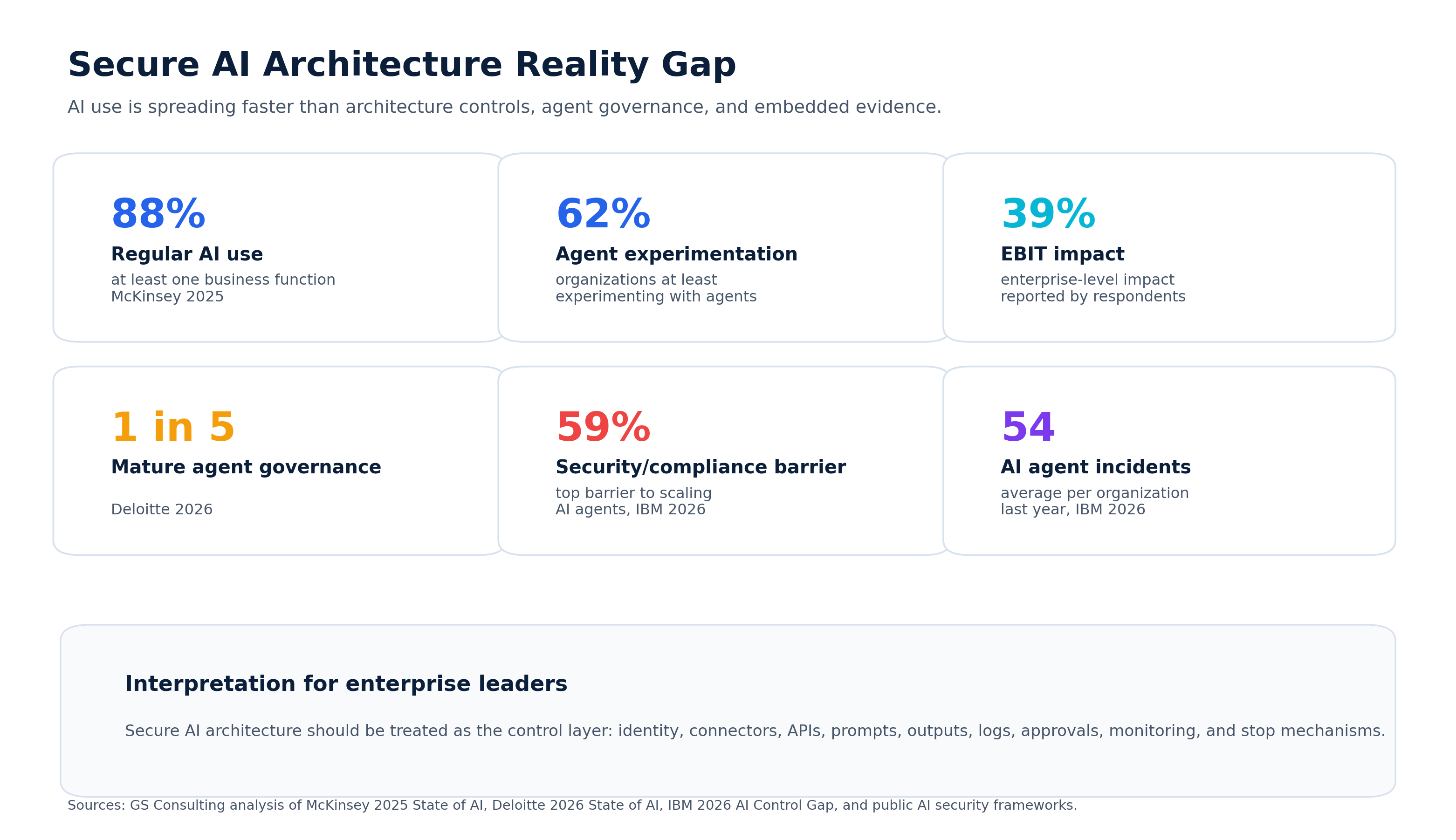
Most AI automation risk does not come from the model.
It comes from the architecture around the model.
That is where organizations get fooled. The demo looks clean. The assistant answers questions. The workflow runs faster. A team can summarize documents, route tickets, draft responses, review records, or generate reports.
Then the real questions show up. What data can the AI see? Can users access information they should not see? Where are prompts stored? Where do outputs go? Can the AI write back to systems? What APIs does it use? What happens if the model is tricked? Can we audit the workflow later? Can we shut it down if something goes wrong?
That is architecture.
Secure AI automation is not just about picking a safe tool. It is about designing the environment so AI can help the business without creating a new path to sensitive data, bad decisions, or uncontrolled system actions.
Do not let the demo become the architecture.
GS Consulting helps regulated organizations design secure AI automation architecture with clear data boundaries, identity controls, connectors, APIs, logging, approval gates, monitoring, and evidence.
Request a Secure AI Architecture AssessmentThe Architecture Matters More Than the Demo
AI demos are usually built around the happy path. A user asks a question. The model gives an answer. Everyone sees the value.
Real enterprise AI does not live on the happy path.
It lives inside document repositories, ticketing systems, HR tools, finance platforms, security tools, customer records, contract systems, data warehouses, APIs, workflow engines, approval queues, and legacy systems.
That is where the risk starts.
AI does not just answer questions once it is connected to enterprise systems. It can retrieve data, summarize records, classify cases, recommend actions, draft updates, call tools, and sometimes trigger workflows.
That means the architecture has to answer one basic question: what is the AI allowed to see, decide, and do?
If the architecture cannot answer that question, the organization is not ready to scale AI automation.
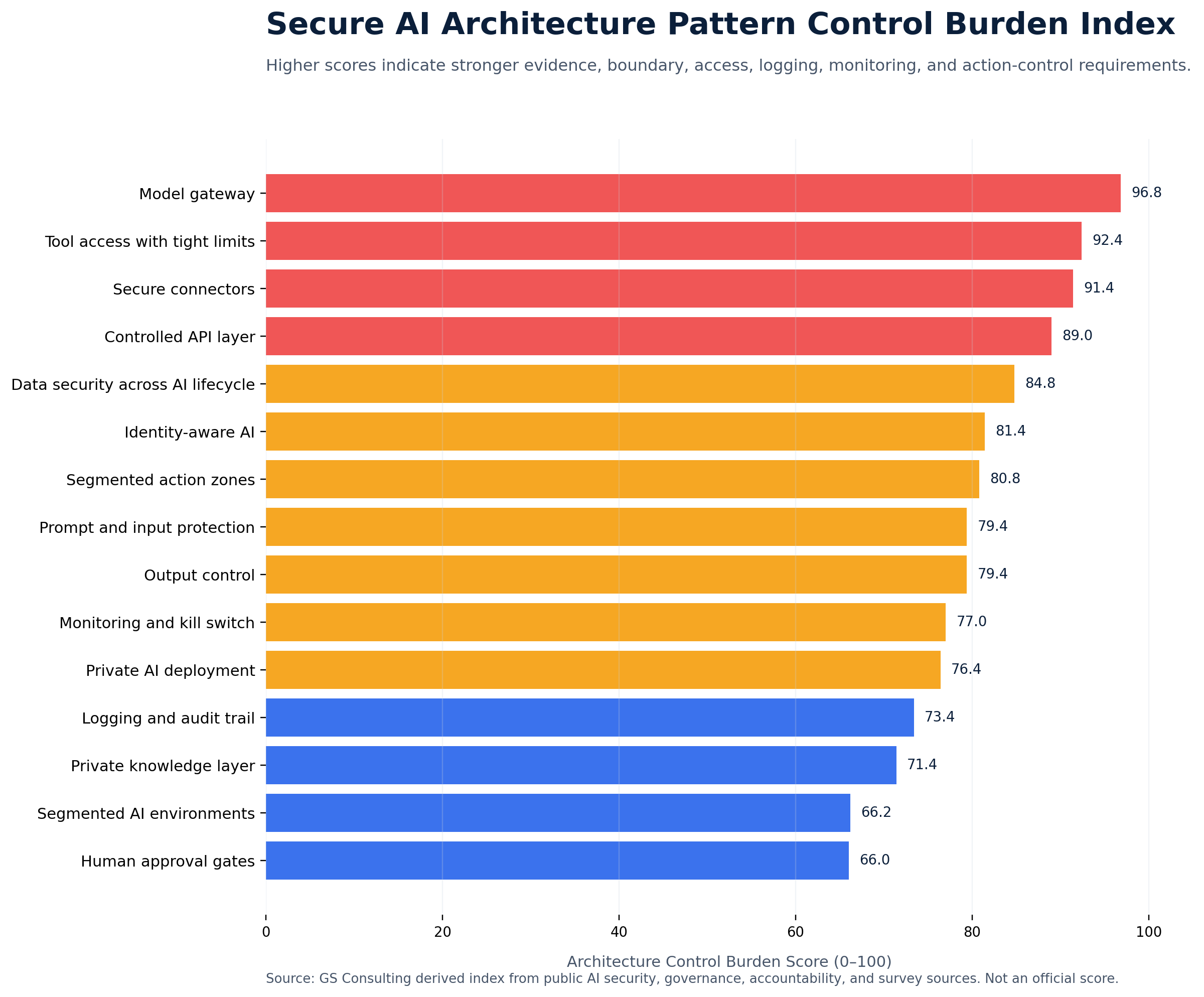
Original Research: The Secure AI Architecture Control Burden Index
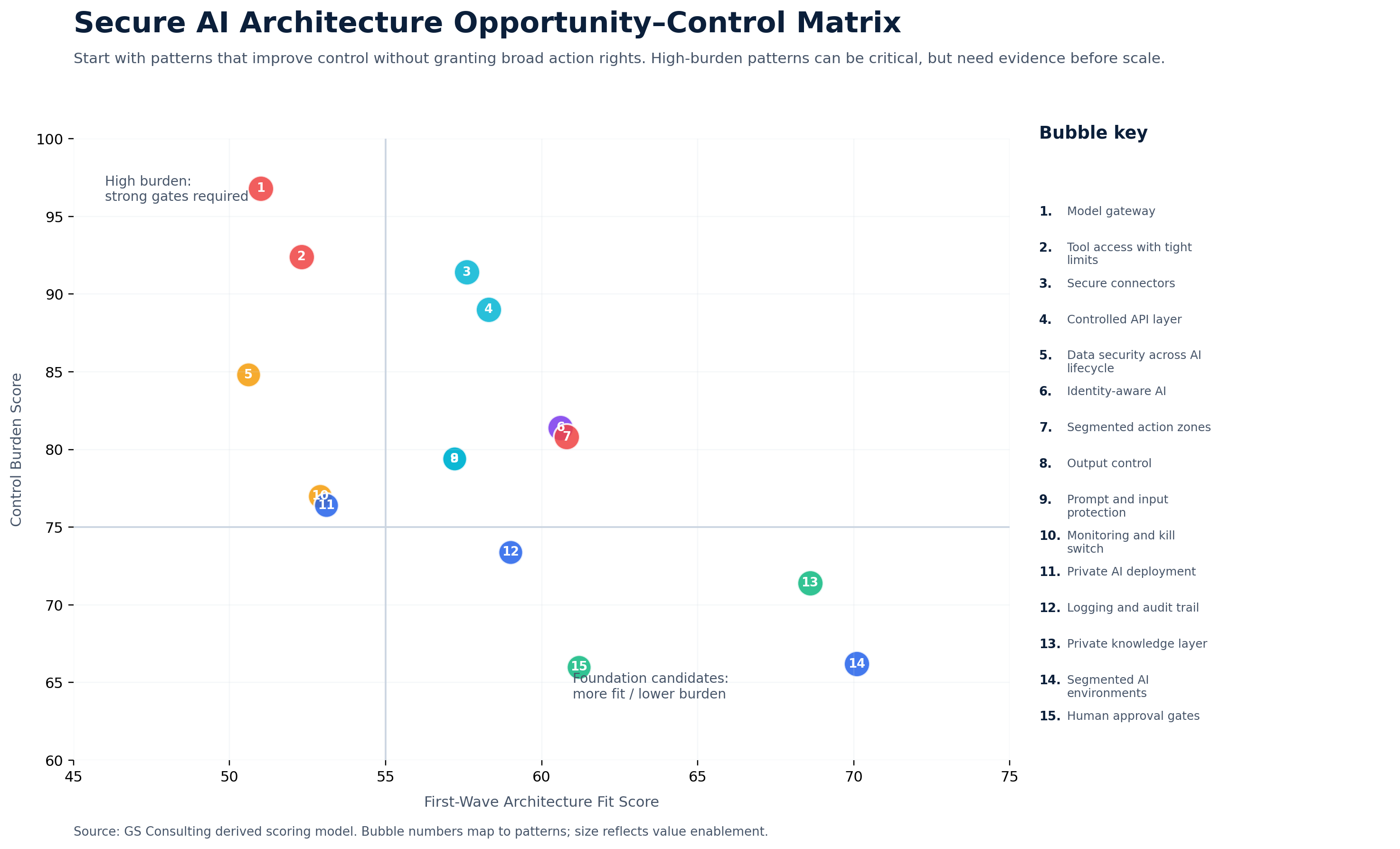
Original GS Consulting research shows that secure AI architecture is a control burden problem, not a model selection problem.
GS Consulting analyzed public AI security, governance, accountability, cloud control, and enterprise adoption sources against 15 secure AI architecture patterns. The highest burden patterns were model gateways, tool access with tight limits, secure connectors, controlled API layers, data security across the AI lifecycle, identity aware AI, segmented action zones, prompt and input protection, output control, and monitoring with stop mechanisms.
The research used two GS Consulting derived planning metrics: Architecture Control Burden Score and First Wave Architecture Fit Score. These are planning tools, not official NIST, CISA, OWASP, CSA, GAO, EU, OECD, IBM, McKinsey, Deloitte, legal, audit, security, or compliance determinations.
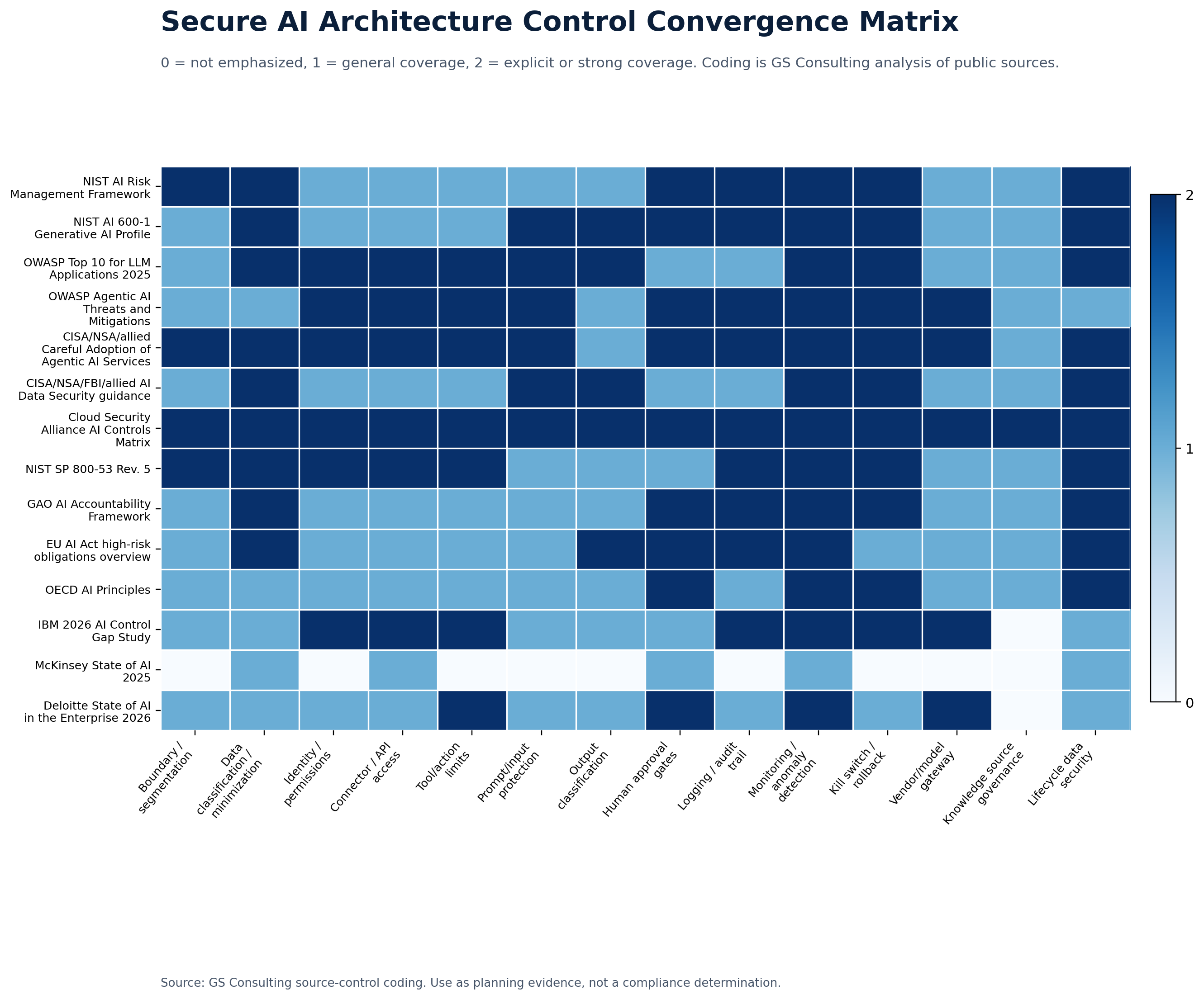
The practical takeaway is simple: secure AI automation should not begin by connecting AI to every system. It should begin by defining boundaries. What can AI see? Which users can access it? Which connectors can it use? What fields can it retrieve? What actions are allowed? What requires approval? What outputs are retained? What gets logged? Who can stop the workflow?
Secure AI Architecture Starts With Boundaries
The first secure architecture pattern is simple. Create boundaries.
Those boundaries depend on classification that systems can use. The data classification tools evaluation guide explains how to test discovery, permissions, persistent labels, policy enforcement, exceptions, evidence, and integration before selecting a product. The Data Classification and Governance hub connects the full operating model.
Do not connect AI to everything. Do not give it broad access because that makes the demo easier. Do not let every department connect every tool in its own way.
AI needs a defined environment. That environment should define what data AI can access, which users can use it, which systems it can connect to, which APIs it can call, which outputs it can create, where logs are stored, where human approval is required, what actions are prohibited, and who owns the workflow.
This is not about slowing the business down. It is about avoiding the mess that happens when AI spreads faster than the control model.
NIST describes the AI Risk Management Framework as a voluntary framework intended to improve how organizations incorporate trustworthiness into AI design, development, use, and evaluation. That maps directly to secure AI architecture: define ownership, map the system context, measure risk and performance, and manage the workflow after launch.
The Core Secure AI Architecture Patterns
Secure AI architecture is not one pattern. It is a layered control system.
This may be a private cloud tenant, dedicated environment, controlled enterprise model service, or approved platform where data retention, access, logging, and training terms are clear.
You do not need the heaviest controls for every AI task, but you do need stronger controls where data and workflow risk demand them.
The API layer should enforce user identity, least privilege, field limits, input validation, output validation, rate limits, action limits, approval gates, logging, and error handling.
A secure connector respects user permissions, limits data returned, logs access, protects outputs, and fails safely when access cannot be verified.
A user who cannot open a file directly should not be able to get the answer through AI. The workflow should inherit the organization's access rules instead of creating a shadow permission model.
AI can draft, summarize, classify, recommend, and prepare records. People should approve high impact actions involving customers, employees, money, access, security, compliance, contracts, or production systems.
Logs should show who used the workflow, what system was accessed, what data was retrieved, what prompt was submitted, what output was created, who reviewed it, and what changed in the system of record.
If AI summarizes sensitive data, the output may need the same protection as the source. Do not protect the original file while letting the AI summary land in an unmanaged workspace.
Prompts can contain contracts, customer records, employee issues, source code, security findings, financial information, or government data. They need rules for retention, logging, scanning, training use, and access.
An AI agent should have a defined purpose, user group, data scope, tool list, action list, approval model, logging model, and stop mechanism. Broad access plus good prompts is not architecture.
A useful knowledge layer has content owners, review dates, source labels, permissions, version control, data classification, approved repositories, retrieval logs, and output handling rules.
If any part of the AI data chain is weak, the workflow is weak.
A gateway can enforce approved model lists, data category restrictions, prompt filtering, output filtering, usage logging, user identity, cost controls, tool limits, and environment routing.
Monitor unusual access, unexpected outputs, prompt injection attempts, tool call failures, cost spikes, sensitive data exposure, approval rates, rejected recommendations, escalations, vendor changes, and security events.
OWASP's GenAI security work focuses on risks in generative AI systems, including large language models and agentic AI systems. That is the right framing. The risk is not just the model response. It is the system around the response.
The Enterprise Control Point: Model Gateway
The model gateway scored highest in the research because it becomes the enterprise control point.
A model gateway is not just a routing layer. It can enforce approved model lists, data category restrictions, prompt filtering, output filtering, usage logging, user identity, cost controls, tool access limits, and environment routing.
For regulated organizations using more than one AI model, vendor, assistant, or agent, the model gateway should be treated as a core architecture pattern. Without it, AI usage scatters across teams, accounts, vendors, and workflows. That makes governance harder and evidence weaker.
Secure Connectors and Controlled APIs
Connectors and APIs are high value because they let AI work with real systems. They are high risk for the same reason.
A customer support AI tool may need case history, but not full billing data. An HR assistant may need approved policy content, but not employee relations files. A finance workflow may need invoice fields, but not vendor banking changes. A security assistant may need alert context, but not the authority to disable accounts.
The rule is simple. AI should get exactly the access it needs to support the workflow. Not more.
That means secure connectors and controlled APIs should filter fields, enforce identity, respect permissions, log access, limit actions, validate inputs and outputs, deny uncertain access, and route higher risk actions through approval.
Segmented Action Zones
Not every AI workflow should have the same action rights.
Use action zones.
- Zone 1Read only.
AI can retrieve and summarize approved information.
- Zone 2Draft only.
AI can prepare text, reports, records, or recommendations.
- Zone 3Route only.
AI can classify work and send it to the right queue.
- Zone 4Act with approval.
AI can prepare an action, but a person must approve it before execution.
- Zone 5Limited autonomous action.
AI can complete narrow actions that are low risk, reversible, logged, monitored, and tested.
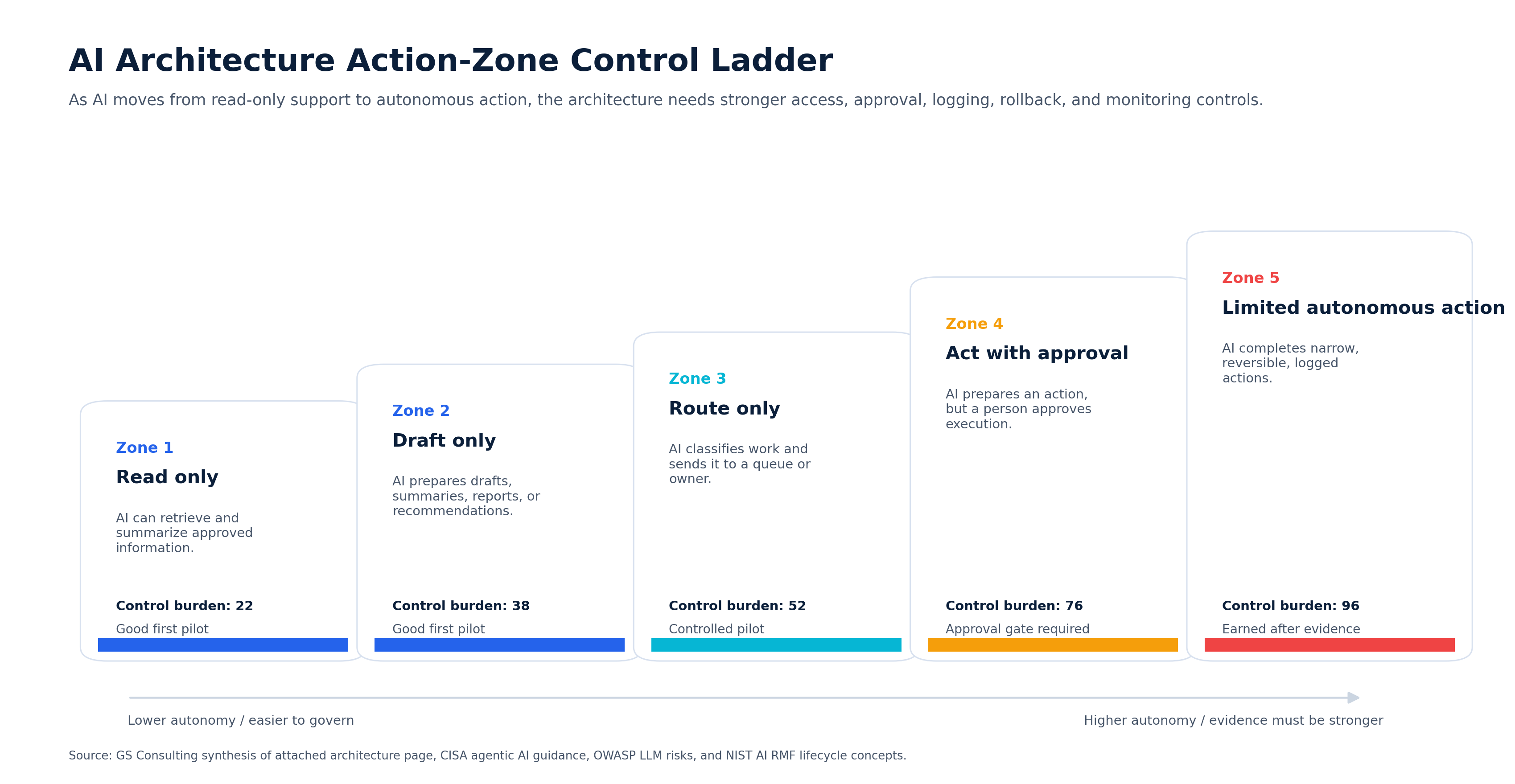
Most regulated organizations should spend early work in Zones 1 through 4. Zone 5 should be earned through evidence.
Do not start by asking, "What can the model handle?" Start by asking, "What action zone is this workflow allowed to enter?"
Architecture Patterns by Use Case
The right architecture depends on the workflow. The pattern for a knowledge assistant should not look the same as the pattern for finance exception handling or security response.
Risk to avoid: AI searching all documents without permission controls.
Risk to avoid: AI closing tickets or routing sensitive cases without review.
Risk to avoid: AI generating final legal interpretation without expert review.
Risk to avoid: AI accessing vendor banking data or approving payment changes.
Risk to avoid: AI disabling accounts or changing controls without approval.
Risk to avoid: AI making decisions about employees or exposing private records.
Common Architecture Mistakes
Most secure AI architecture failures are design failures, not model failures.
- Giving AI broad access. Broad access makes demos easier and incidents worse. Start narrow.
- Skipping identity controls. If AI does not know who the user is, it cannot enforce user access.
- Treating outputs as harmless. Outputs can be sensitive. Protect them.
- Connecting to systems before defining actions. Do not connect AI to an API until you know what it is allowed to do.
- Logging too little. If you cannot reconstruct the workflow, you cannot defend it.
- Letting every team build its own architecture. That creates inconsistent risk. Set common patterns.
- Trusting the model instead of designing the system. Security comes from the architecture, not model confidence.
- Forgetting the stop mechanism. If you cannot pause the workflow quickly, it is not ready.
A Practical Secure AI Architecture Checklist
Before launching an AI automation workflow, leaders should be able to answer the operating questions.
- What environment will run the workflow?
- Is the environment approved for the data involved?
- What data can AI access?
- Who can use the workflow?
- How is identity enforced?
- What systems can AI connect to?
- What APIs can AI call?
- What actions are allowed?
- What actions require approval?
- What actions are prohibited?
- Where are prompts stored?
- Where are outputs stored?
- Are outputs classified?
- Are logs retained?
- Can we audit the workflow?
- Can we detect misuse?
- Can we stop the workflow?
- Who owns the system?
- Who owns the risk?
If the team cannot answer these questions, the architecture is not ready.
The First 30 Days
Start small. Pick one AI workflow that has value and manageable risk.
Good candidates include approved knowledge search, IT ticket summarization, operations report drafting, compliance evidence organization, contract clause summary, and customer case summary.
Then design the architecture around that workflow. Do not start by buying another tool. Start by mapping data, users, systems, connectors, permissions, outputs, approval gates, logs, monitoring, and the stop mechanism.
- Week 1Pick one controlled workflow.
Choose a workflow with clear value, known data, a real owner, and limited action rights. Avoid starting with autonomous decisions or broad system access.
- Week 2Map the architecture boundary.
Define the data, users, systems, connectors, APIs, prompts, outputs, logs, approvals, vendors, and stop mechanism.
- Week 3Build the control pattern.
Implement identity, least privilege, data filtering, approval gates, logging, output handling, monitoring, and error handling.
- Week 4Test and document the evidence.
Validate permissions, test misuse cases, review output handling, confirm logs, rehearse rollback, document ownership, and decide whether the pattern can be reused.
Once that pattern works, reuse it. That is how secure AI automation scales: not through one massive platform decision, but through repeatable architecture patterns.
How This Supports Secure AI Automation
Secure AI architecture is one part of a broader secure AI automation approach. Secure AI Automation for Regulated Organizations explains how GS Consulting helps organizations automate real workflows with the right strategy, security, governance, data controls, and measurable outcomes.
This guide answers one specific question: what architecture patterns keep AI automation secure once it connects to enterprise systems?
That question matters because most AI failures do not happen because the model cannot generate an answer. They happen because the system around the model was too open, too vague, too poorly logged, too broadly connected, or too hard to control.
The Minimum Viable Secure AI Architecture Evidence Packet
A useful architecture should leave evidence behind. For regulated organizations, the minimum viable evidence packet should include:
- Workflow architecture diagram showing data, users, systems, connectors, APIs, models, outputs, logs, approvals, and monitoring.
- Data boundary register showing approved data categories, prohibited data categories, source systems, prompts, outputs, logs, embeddings, and retention rules.
- Identity and access matrix showing users, groups, roles, permissions, service accounts, connector scopes, API scopes, and administrator access.
- Action zone decision record showing whether the workflow is read only, draft only, route only, act with approval, or limited autonomous action.
- Connector and API control file showing field limits, action limits, validation, rate limits, logging, error handling, and failure behavior.
- Human approval design showing what requires review, who approves, what evidence reviewers see, what can be rejected, and what escalates.
- Logging and monitoring plan showing what events are captured, where logs are stored, who reviews them, and what alerts matter.
- Stop and rollback procedure showing who can pause the workflow, what happens to queued actions, and how records are corrected.
- Vendor and environment review showing data processing location, retention terms, training restrictions, access rights, and export options.
- Validation record showing permission tests, prompt injection tests, output checks, misuse scenarios, incident rehearsal, and approval to launch.
The Bottom Line
Secure AI architecture is not about making AI complicated. It is about making AI controllable.
Private deployments, segmented environments, controlled APIs, secure connectors, identity controls, approval gates, logging, output controls, model gateways, monitoring, and stop mechanisms all serve the same purpose.
They make sure AI can help the business without getting uncontrolled access to data, systems, and decisions.
The companies that get this right will be able to scale AI automation faster because they will know where the boundaries are. The companies that skip architecture will eventually have to stop and clean up the mess.
GS Consulting helps enterprises design secure AI architecture patterns for regulated workflows, including private deployments, controlled APIs, secure connectors, logging, identity controls, segmented environments, approval gates, monitoring, and evidence.
Ready to design AI automation architecture your organization can trust?
Contact GS Consulting for a Secure AI Architecture Assessment.
Contact GS ConsultingResearch Sources and Caveats
The Architecture Control Burden Score, First Wave Architecture Fit Score, Control Convergence Matrix, and Action Zone Control Ladder are GS Consulting derived planning tools. They are not official NIST, CISA, OWASP, CSA, GAO, EU, OECD, IBM, McKinsey, Deloitte, legal, audit, security, or compliance determinations.
Actual architecture readiness depends on the organization's data, contracts, vendors, model stack, identity architecture, system integrations, regulatory exposure, workflow authority, logging requirements, incident response process, and risk tolerance.
- NIST AI Risk Management Framework
- NIST AI 600-1: Generative Artificial Intelligence Profile
- OWASP Top 10 for Large Language Model Applications
- OWASP GenAI Security Project
- CISA: Careful Adoption of Agentic AI Services
- CISA: Securing AI Data Guidance Announcement
- NIST SP 800-53 Rev. 5 Security and Privacy Controls
- GAO Artificial Intelligence Accountability Framework
- McKinsey: The State of AI
- IBM: AI Control Gap Study
Frequently Asked Questions About Secure AI Architecture Patterns
What are secure AI architecture patterns?
Secure AI architecture patterns are repeatable design choices that control how AI accesses data, users, systems, APIs, prompts, outputs, logs, approvals, and actions. Examples include private deployments, segmented environments, secure connectors, controlled API layers, identity aware access, human approval gates, model gateways, monitoring, and stop mechanisms.
Why does AI architecture matter more than the demo?
AI demos usually show the happy path. Enterprise AI has to work inside real systems with sensitive data, user permissions, records, vendors, APIs, logs, approvals, and failure modes. Architecture determines what AI can see, decide, do, retain, log, and stop.
Should AI connect directly to enterprise systems?
Usually not. AI should normally connect through controlled APIs, secure connectors, model gateways, identity controls, and approval gates. The architecture should limit fields, actions, users, rate, output handling, logging, and failure behavior before AI touches systems of record.
What is the safest AI automation architecture path for regulated organizations?
Start with read only and draft only workflows, then move to routing, then action with approval, and only later consider limited autonomous action. Higher authority requires stronger testing, logging, monitoring, rollback, human accountability, and evidence.
Suggested Future Reading
- Secure AI Automation for Regulated Organizations
- Data Classification and Governance Hub
- Data Classification Tools: How to Evaluate Them
- Data Classification Before AI Automation
- AI Automation for Sensitive Data Workflows
- Human in the Loop AI Automation
- How to Identify Safe AI Automation Use Cases
- Secure AI Automation Readiness Assessment