Enterprise AI | | 24 min read
Integrating AI Automations with Legacy GovCon ERPs
Key Takeaways
ERP AI integration is a control system before it is a connector project.
Start Read Only
Begin with summaries, alerts, review packets, and data quality reports before any workflow can change ERP records.
Mirror Permissions
The AI layer must enforce project, contract, business unit, field, and need to know rules at least as strictly as the ERP.
Reconcile or Stop
Finance and program teams will not trust AI outputs unless they tie to approved ERP reports or explain every variance.
AI does not fail in GovCon because people lack ideas. It fails because useful data sits inside systems that were never designed for modern automation.
Everyone wants automated ERP workflows. They want AI to reconcile labor charges, summarize project financials, flag contract funding risk, monitor procurement status, assist with invoice packages, compare budgets to actuals, and answer operational questions without forcing people to pull five reports.
Those are real use cases. Then reality shows up. The ERP is old. Integrations are brittle. Reporting logic is fragile. Source data is sensitive. Finance does not want anyone touching production. Security wants to know where CUI might flow. Compliance wants an audit trail. Program managers want answers yesterday. Developers want APIs. The ERP admin wants everyone to stop breaking things.
That is what integrating AI with legacy ERPs actually means. It is system integration, data governance, security architecture, workflow design, and production support.
Need secure AI automation around legacy ERP data?
GS Consulting helps GovCon teams map ERP workflows, design controlled integration layers, protect financial and contract data, and build AI assisted workflows that preserve the system of record.
Request an ERP AI Integration AssessmentThis guide supports our main AI workflow automation service and the Enterprise AI Process Transformation cluster. It connects directly to legacy system integration for AI automation, legacy database extraction AI, business process mapping for GovCon, AI federal contract management workflows, and workflow automation security risk assessment.
Why Legacy ERP Integration Is Hard in GovCon
A GovCon ERP is not just an accounting database. It is where contracts, projects, labor, costs, billing, procurement, vendors, funding, indirect rates, compliance records, timekeeping, and financial controls intersect.
Deltek describes Costpoint as an ERP system built specifically for government contractors, with capabilities for managing projects, finances, people, procurement, and government contracting workflows. That is why integrating around systems like Costpoint takes care.
An AI workflow connected to ERP data may touch contract records, project codes, CLINs and SLINs, labor charges, employee data, vendor data, subcontractor data, purchase orders, invoices, billing support, funding ceilings, indirect cost data, procurement records, timekeeping details, audit support, and CUI related project records.
The Bad Assumption: Just Connect the AI Tool to the Database
This is the fastest way to create a mess. A developer gets database access. A connector pulls tables. A model summarizes results. A dashboard appears. Leadership gets excited.
Then the questions start. Is the data current? Was the query approved? Did the workflow read sensitive fields? Did it bypass ERP permissions? Can users see data from contracts they should not access? Where are prompts stored? Who owns the integration? What happens when the ERP schema changes? Can finance reconcile the result?
If those questions were not answered before the build, the team did not create modernization. They created another uncontrolled reporting layer. The ERP is the system of record for a reason. AI should not casually route around it.
Start With the Use Case, Not the Connector
Before touching APIs or databases, define the workflow. Not the feature. The workflow.
Bad starting point: we want AI integrated with Costpoint.
Better starting point: we want program managers to see daily funding burn risk by contract, with source data from the ERP, reviewable assumptions, and alerts when projected spend approaches funded value.
The integration pattern depends on the use case. A read only reporting assistant is different from a workflow that updates procurement status. A daily data extract is different from a live query. A contract funding alert is different from an AI agent that writes back to an ERP field.
Read Only Should Be the Default Starting Point
For legacy ERP integration, start read only unless there is a strong reason not to. Read only workflows can still create major value: summarize project financials, flag missing procurement data, detect funding burn risk, compare budget to actuals, prepare invoice review packets, monitor labor category usage, create executive dashboards, and support audit evidence packages.
These workflows reduce risk because the automation does not change ERP records. Write back workflows can come later, after governance, testing, access control, exception handling, and approval design are mature.
The ERP Permission Model Must Be Respected
A common mistake is creating an AI layer that ignores ERP access rules. In the ERP, a user may only see certain projects, contracts, business units, or financial details. Then the AI tool gets broad access to the database and answers questions for everyone.
The AI layer must enforce permissions at least as strictly as the source system. That means user identity, role, project access, contract access, business unit access, data sensitivity, need to know rules, administrative permissions, report permissions, and field level restrictions where required.
If a program manager cannot see another program's financials in the ERP, the AI assistant should not reveal them through a summary.
CUI and Sensitive Data Boundaries Still Apply
ERP data may not always be CUI, but some ERP linked records can point to CUI related work. Project names, contract references, deliverable descriptions, vendor details, labor notes, procurement records, and attachments can reveal more than teams expect.
NIST SP 800 171 Revision 3 applies to components of nonfederal systems that process, store, or transmit CUI, or that provide protection for those components. CMMC is designed to ensure defense contractors safeguard FCI and CUI that is processed, stored, or transmitted on contractor systems.
The question is not only whether the ERP database contains CUI. The questions are whether the workflow pulls CUI related fields, combines ERP data with CUI documents, generates sensitive outputs, stores extracts elsewhere, captures contract details in logs, or lets users export results.
A safe integration starts with a data flow map. No map, no production release.
Understand the Integration Options
Modern ERP integration usually has several paths: official APIs, web services, scheduled reports, approved exports, database views, data warehouse replication, flat file exchanges, middleware, enterprise service bus, robotic process automation for last resort cases, and event based workflows where supported.
For Deltek Costpoint, Deltek documentation describes integration capabilities and API guides for building integrations with the product. Official integration mechanisms are usually preferable to unsupported database scraping.
Do not assume the newest integration style is always best. A scheduled approved export may be safer and more reliable than a fragile live connector for some use cases.
APIs Are Not Automatically Safe
APIs are useful. They are not magic safety devices. An API can expose too much data, use weak credentials, bypass user context, create logs full of sensitive records, or fail in ways that corrupt downstream workflows.
A secure API integration should define authentication method, authorization model, data scope, allowed operations, rate limits, error behavior, logging design, credential storage, token rotation, monitoring, retry rules, data retention, owner, and change process.
If the API account can read every project in the ERP, that is a major decision. Not a technical detail.
Database Views Are Often the Practical Middle Ground
For many legacy ERP environments, controlled database views can be a strong option. Instead of giving the AI workflow broad table access, create approved views that expose only the required fields.
A project funding risk workflow may need project ID, contract ID, funded value, actual cost, committed cost, burn rate, period of performance, program owner, funding status, and last updated date. It probably does not need employee personal details, full vendor records, raw labor notes, or unrelated financial fields.
Clean view design is boring. Boring is good. Boring keeps the integration controlled.
Build a Data Layer Between ERP and AI
Do not let AI query the ERP directly unless there is a strong reason and a mature control model. A safer pattern is ERP source, approved extraction, raw data store, clean data layer, security filter, AI retrieval or workflow layer, human review, and approved output.
The data layer can normalize field names, filter sensitive fields, apply access rules, preserve lineage, track freshness, support reconciliation, provide consistent schemas, prevent live ERP load issues, and reduce risk from bad AI queries.
This is especially important when the ERP schema is complex or poorly documented. AI should not be guessing its way through production tables.
Data Freshness Must Be Visible
ERP workflows can break trust if users do not know how fresh the data is. A program manager asks for funding burn. The AI answers. But is the data from this morning, last night, last week, or the last closed accounting period?
Every AI output based on ERP data should show source system, last extraction time, accounting period, report date, known exclusions, pending transactions, and completeness notes where needed. A correct answer from stale data can still create a bad decision.
Reconciliation Is Mandatory
Finance and operations will not trust an AI ERP workflow unless it reconciles to known reports. Compare AI layer outputs against standard ERP reports, finance approved reports, project status reports, invoice support records, budget reports, funding reports, labor reports, procurement reports, known period totals, sample project records, and manual analyst results.
When numbers differ, document why. Maybe the AI layer includes committed cost and the standard report does not. Maybe one report uses a different accounting period. Maybe the extract excludes pending transactions. Maybe the mapping is wrong. You need to know.
Automated ERP Workflows Need Human Review Points
Not every ERP workflow should be fully automated. A workflow can draft an invoice support package, but a finance analyst should approve it. A workflow can flag a funding risk, but a program manager should validate the context. A workflow can suggest vendor record cleanup, but procurement should approve the change.
Human review is not a weakness. It is how you protect the system of record.
Write Back Requires Stronger Controls
Eventually, some workflows may need to update ERP records. That is where the risk increases. Before allowing write back, define who approves the action, which fields can be updated, what validation rules apply, what rollback process exists, what audit trail is created, what segregation of duties applies, and who owns failed updates.
The AI should not write directly to important ERP fields based only on model output. A safer pattern is draft, review, approve, then update through controlled integration.
What AI Can Actually Do Around ERP Data
AI is useful when it helps humans make sense of complex operational data. Good use cases include project financial summaries, funding burn alerts, invoice package preparation, labor charge anomaly detection, procurement status summaries, vendor record cleanup suggestions, contract hierarchy explanation, executive dashboard narratives, data quality grouping, report variance explanation, closeout checklist drafting, audit evidence support, subcontractor spend summaries, and program risk notes.
These are practical. They save time because people already do this work manually. AI can reduce analyst burden, but source data and rules need to be controlled.
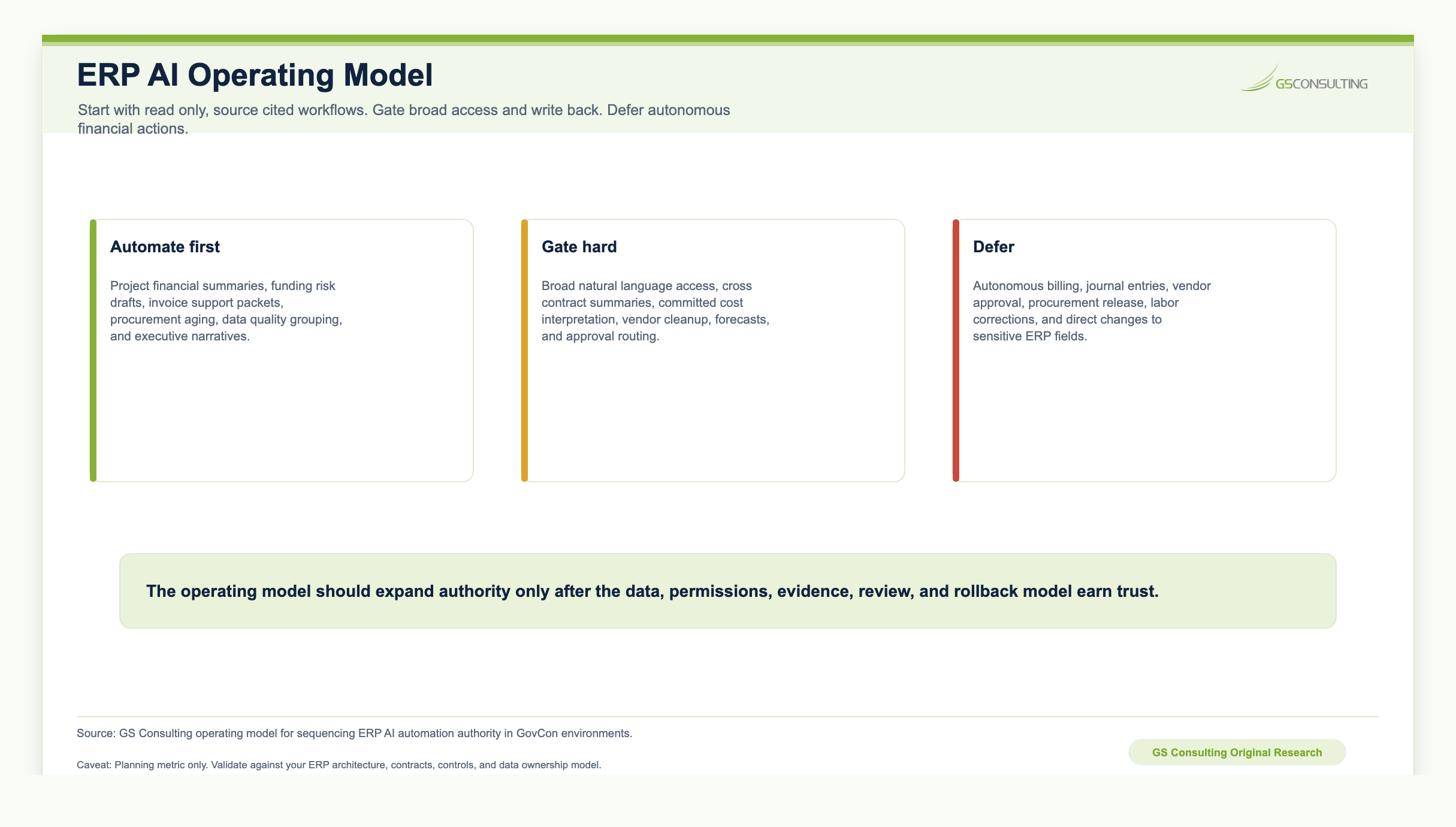
What AI Should Not Do First
Do not start with autonomous billing submission, autonomous journal entries, automatic contract record changes, automatic vendor approval, automatic procurement release, automatic labor correction, unreviewed financial forecasts, uncontrolled executive reporting, direct write back to sensitive ERP fields, or broad natural language access to all ERP data.
These are not impossible forever. They are bad first projects. Start with read only, reviewable, source cited workflows. Earn trust. Then expand authority.
Original Research: The ERP AI Integration Control System
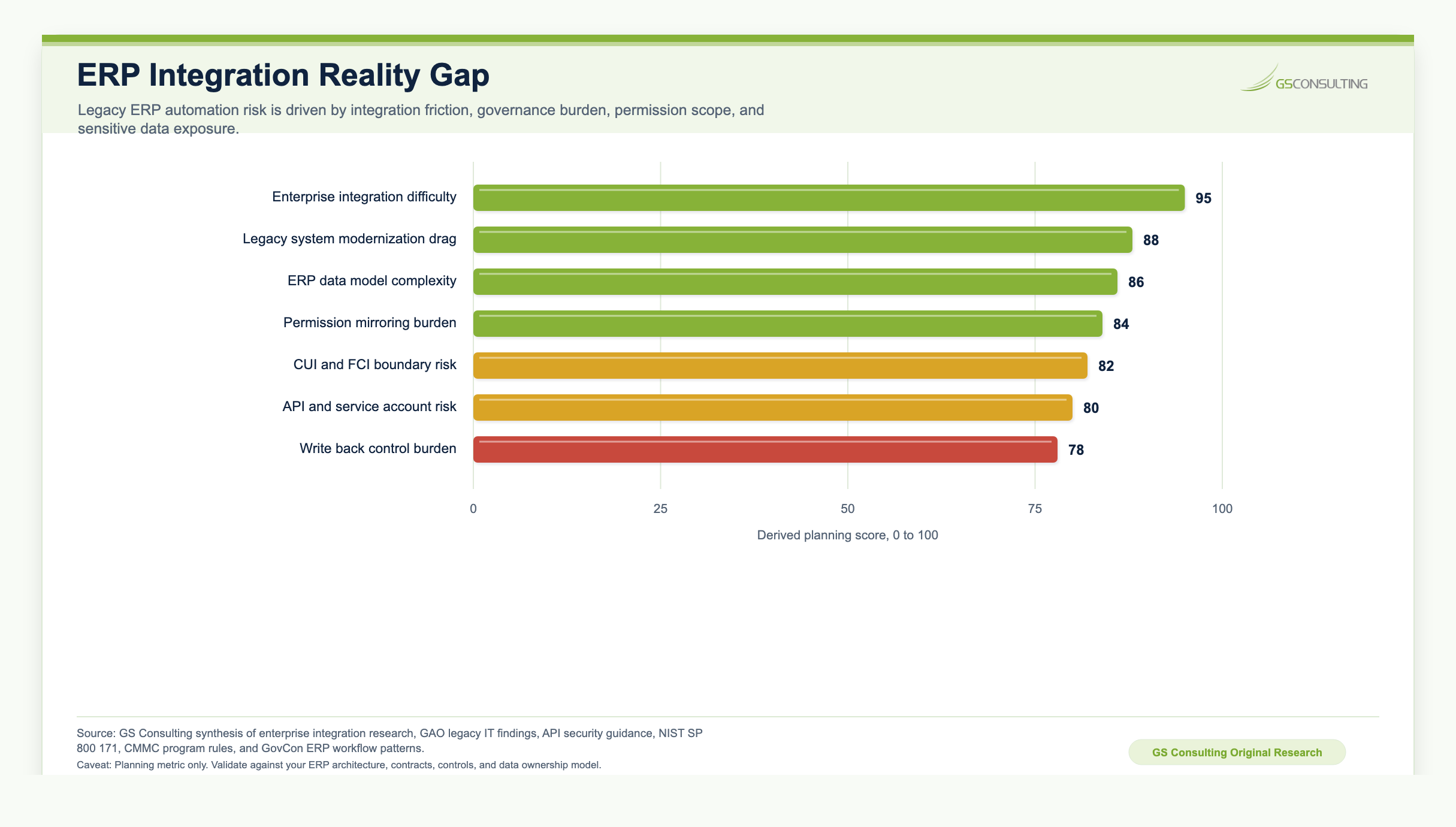
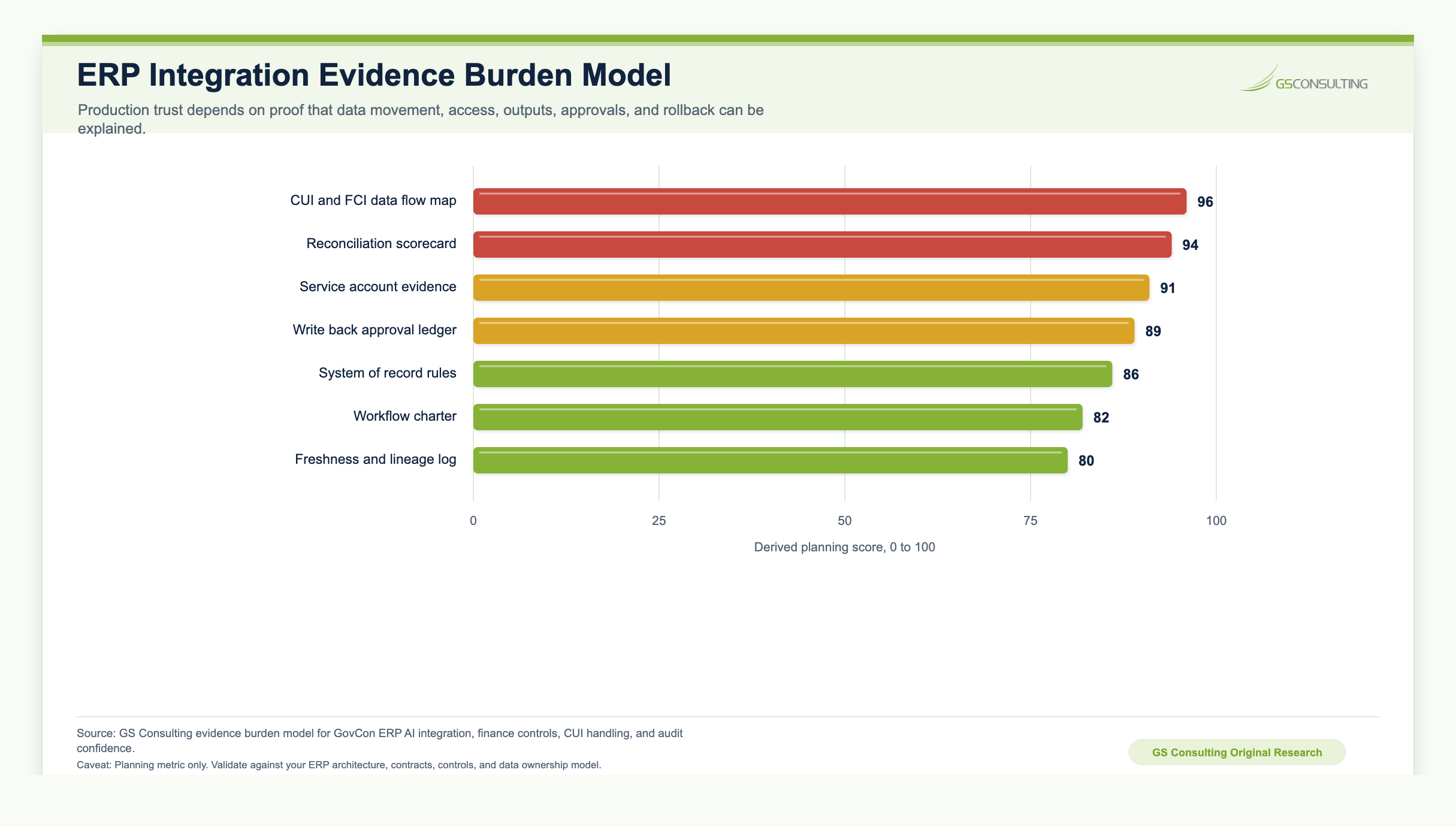
GS Consulting analyzed ERP AI integration as a control system, not a connector project. The result is the ERP AI Integration Control System, a planning model for deciding what must be proven before AI is allowed to read, summarize, route, or write back GovCon ERP data.
The highest priority controls were not the flashiest AI features. They were the controls that protect the system of record: ERP permission mirroring, CUI and FCI data flow mapping, reconciliation to trusted ERP reports, system of record hierarchy, read only service accounts, controlled data views, data freshness labels, prompt and output retention rules, human review queues, and write back rollback evidence.
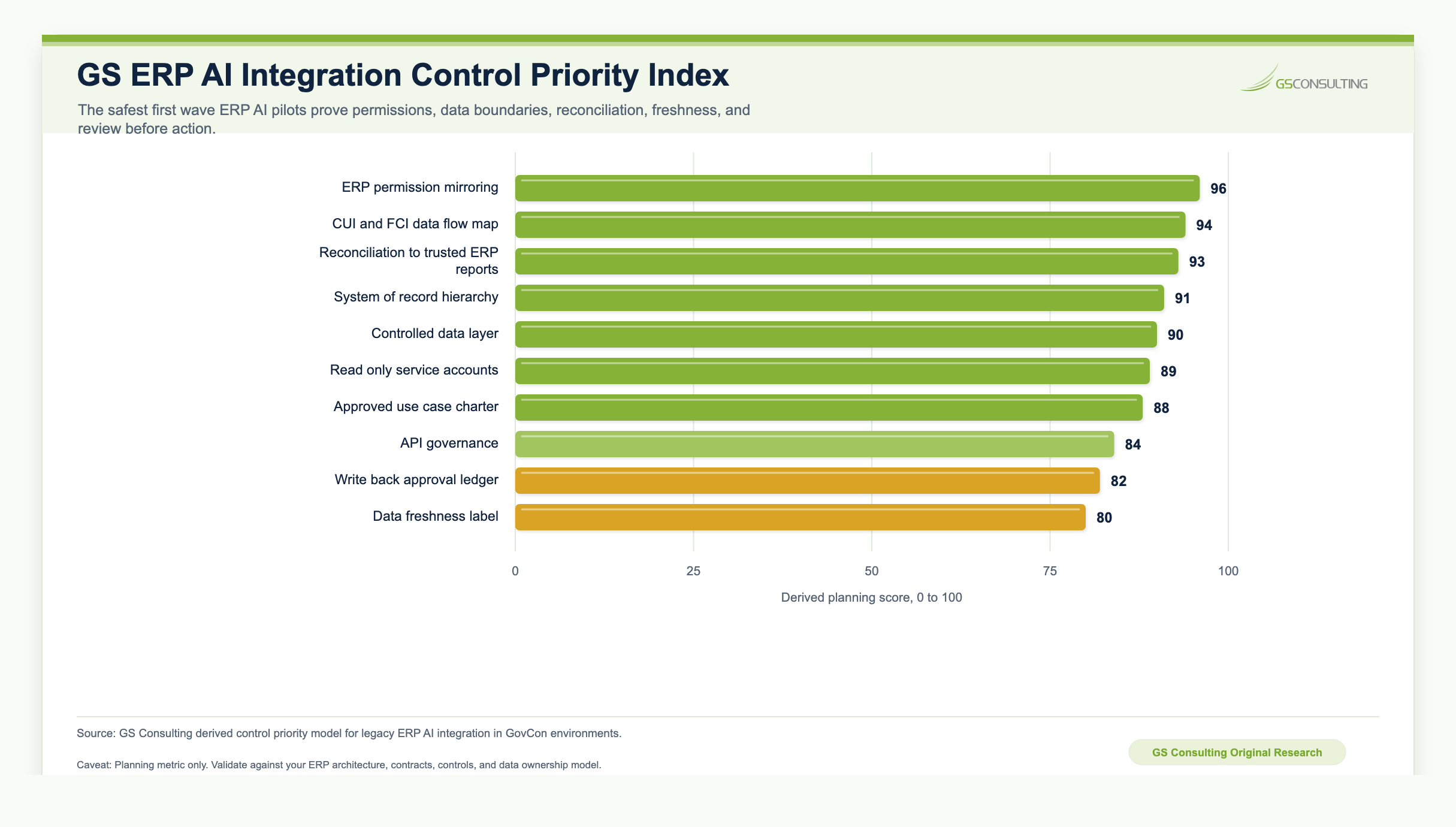
The operating standard is simple: no workflow, no connector. No map, no access. No permission mirroring, no AI answer. No freshness label, no trust. No reconciliation, no finance adoption. No rollback, no write back.
The model is a GS Consulting planning tool, not an official legal, audit, finance, DCAA, DCMA, NIST, CMMC, DoD, CISA, OWASP, FAR, DFARS, CAS, or regulatory determination. Actual readiness depends on contract requirements, ERP architecture, data quality, CUI scope, user permissions, finance controls, retention policy, and the level of automation being introduced.
Practical Use Cases
Calculate burn rate, estimate risk windows, show source fields, route alerts, require acknowledgement, and track resolution.
Identify missing support, draft a checklist, flag anomalies, create a finance review queue, and record approval.
Identify delayed items, map blockers to programs, route alerts, and track aging.
Group issues, recommend cleanup owners, create review tasks, and track approved corrections.
What Usually Breaks
The failure patterns are predictable. The integration bypasses business rules. The data model is misunderstood. Users trust confident summaries too quickly. Permissions are too broad. Data freshness is hidden. Write back is rushed. Support ownership is unclear. The old manual process keeps running beside the new workflow.
That last failure is important. If people do not trust the new workflow, they keep exporting spreadsheets. Now the company has two processes. That is a sign the integration did not earn trust.
Controls That Should Be Built In
A secure ERP AI integration should include approved use case scope, data owner approval, a read only first phase, least privilege service accounts, credential management, source traceability, data freshness labels, reconciliation to ERP reports, role based access control, sensitive field filtering, prompt and output retention rules, human review queues, audit logs, error handling, monitoring, change control, rollback planning, and production support ownership.
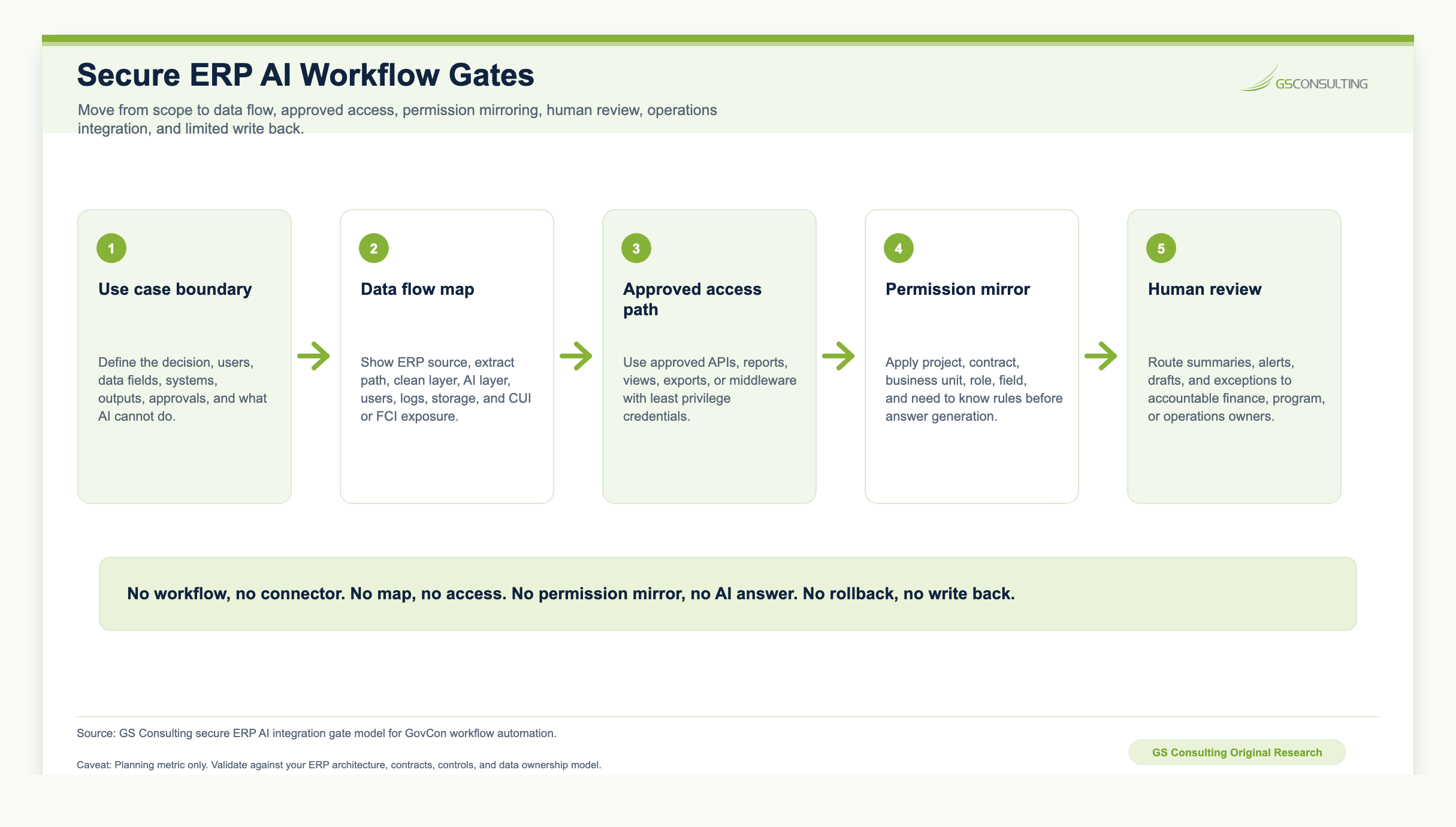
The Integration Roadmap
- Stage 1Discovery.
Map the workflow, data sources, ERP modules, owners, sensitive fields, current reports, pain points, and success metrics.
- Stage 2Controlled extraction.
Use approved APIs, reports, views, or exports. Start read only, preserve raw extracts, create clean data tables, track lineage, and apply access controls.
- Stage 3AI assisted analysis.
Add summaries, anomaly detection, natural language query, or workflow recommendations over approved data with source references and freshness labels.
- Stage 4Human workflow.
Route alerts, tasks, review packets, and approvals to accountable users, then capture decisions.
- Stage 5Operations integration.
Connect approved outputs to ticketing, workflow tools, dashboards, GRC systems, or document repositories.
- Stage 6Controlled write back.
Only after trust is established, allow limited write back with approval, validation, audit logging, and rollback.
What to Measure
Do not measure AI adoption. Measure operational value: manual report hours reduced, time to prepare invoice support, time to identify funding risk, data quality issues resolved, duplicate exports reduced, reconciliation pass rate, workflow completion time, alert response time, stale records flagged, review decisions captured, and spreadsheet based shadow processes reduced.
What Leadership Should Demand Before Production
Before approving production, leadership should ask what use case is in scope, what ERP data is accessed, who owns the data, whether access is read only, which account is used, what permissions it has, how data freshness is shown, how outputs reconcile to ERP reports, whether users only see data they are allowed to see, whether the workflow touches CUI or FCI, where prompts and outputs are stored, whether AI can write back to ERP, who approves actions, what happens when the integration fails, who supports it, and what audit trail exists.
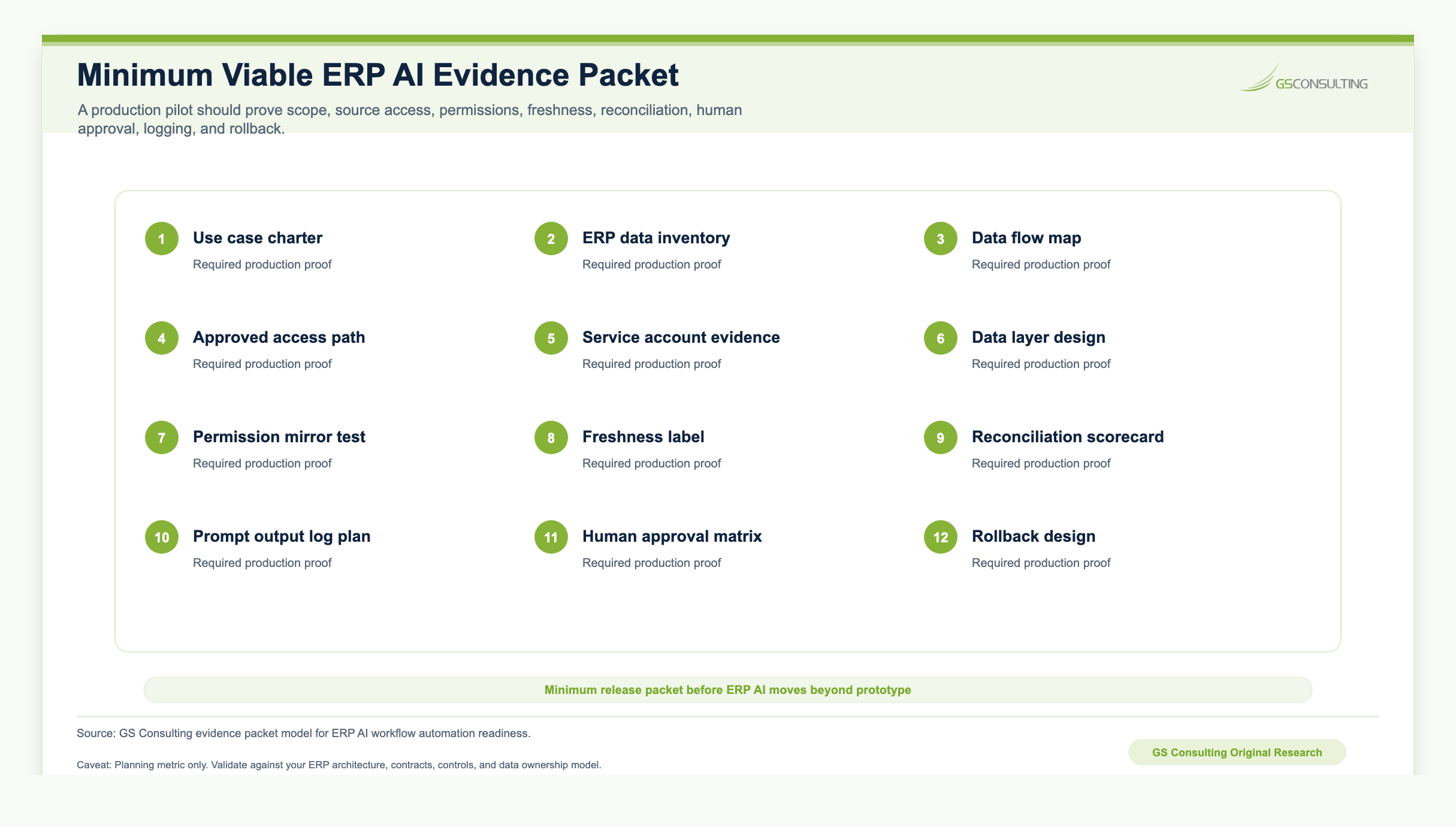
If the team cannot answer those questions, the integration is not ready. It is still a prototype.
What GS Consulting Builds
GS Consulting helps GovCon firms connect AI automations to legacy ERP systems without creating uncontrolled data paths or shadow financial systems. That includes ERP workflow discovery, GovCon data flow mapping, Deltek Costpoint AI integration planning, legacy ERP integration architecture, read only data pipeline design, controlled API and web service integration, database view design, access control mapping, CUI and FCI data review, AI ready data layer design, reconciliation workflows, human approval workflow design, audit trail design, dashboard and alerting workflows, limited write back design, production monitoring, and support planning.
This work sits at the intersection of software engineering, data engineering, GovCon operations, finance controls, and security. That is why it cannot be handled like a simple automation plugin.
The Bottom Line
Integrating AI with legacy ERPs is not about making an old system look modern. It is about safely connecting the operational backbone of the company to workflows that help people make better decisions faster.
For GovCon firms, the stakes are higher because ERP data is tied to contracts, funding, labor, procurement, billing, compliance, and sensitive government work. A good integration respects the system of record, starts read only, uses approved data paths, preserves lineage, enforces permissions, shows freshness, reconciles to trusted reports, keeps humans in control of high impact actions, and creates an audit trail.
That is how AI becomes useful in a legacy ERP environment. Not by bypassing the old system. By building the secure connective tissue around it.
Research Sources and Caveats
The original research in this article uses GS Consulting derived planning metrics based on public integration, AI governance, legacy IT, API security, CUI, CMMC, and breach risk signals. The ERP AI Integration Control Priority Index, Evidence Burden Model, workflow gates, operating model, and evidence packet are planning tools. They are not official legal, audit, finance, DCAA, DCMA, NIST, CMMC, DoD, CISA, OWASP, FAR, DFARS, CAS, or regulatory determinations.
The MuleSoft and Salesforce figures are enterprise IT benchmarks, not GovCon contractor benchmarks. GAO legacy IT findings are federal agency legacy system signals, not contractor ERP benchmarks. Use internal ERP evidence for client specific conclusions.
- Deltek Costpoint ERP for Government Contractors
- MuleSoft 2026 Connectivity Benchmark Report
- Salesforce MuleSoft Connectivity Report announcement
- NIST SP 800 171 Revision 3
- Electronic Code of Federal Regulations, 32 CFR Part 170 CMMC Program
- OWASP API Security Project
- GAO report on modernizing critical legacy systems
Ready to connect AI workflows to legacy ERP data?
GS Consulting helps GovCon firms integrate AI automations with legacy ERP systems without breaking financial controls, security boundaries, or audit confidence.
Contact GS ConsultingFrequently Asked Questions About ERP AI Integration
How do you integrate AI with a legacy GovCon ERP?
Start with a defined workflow, approved data access, and a read only control model. Build a data layer between the ERP and AI, enforce ERP permissions, show data freshness, reconcile outputs to trusted reports, and add human review before any write back is allowed.
Can AI connect to Deltek Costpoint?
AI can support workflows around Costpoint when the integration uses approved APIs, web services, reports, exports, database views, or data layers and respects financial controls, permissions, CUI and FCI boundaries, audit trails, and system of record rules.
Should AI write back to ERP records?
Not as a first project. Most GovCon ERP AI workflows should begin read only, then move to draft and review patterns before limited write back is allowed through approved fields, human approval, validation, audit logging, and rollback.
What ERP AI workflows should GovCon firms automate first?
Good first candidates include project financial summaries, funding risk alerts, invoice support package preparation, procurement status monitoring, data quality cleanup, and executive reporting narratives. These create value without letting AI change financial records on its own.
What controls are required before production ERP AI integration?
The minimum controls include use case scope, data owner approval, least privilege access, ERP permission mirroring, CUI and FCI data flow review, source traceability, freshness labels, reconciliation to trusted ERP reports, human review queues, audit logs, monitoring, change control, and production support ownership.