Secure AI Automation | | 25 min read
Data Classification Before AI Automation

Key Takeaways
Classify the information before AI connects to its storage.
Classify data, not folders
Identify sensitivity and handling rules for the records inside each repository.
Follow derived information
Include prompts, outputs, logs, and other records created by the workflow.
Connect labels to controls
Use classification to set approved tools, permissions, retention, and review rules.
Most AI automation problems start before the AI tool ever runs.
They start with the data.
A team wants to connect AI to a document library. Another team wants AI to summarize tickets. Someone wants AI to review contracts. Operations wants AI to draft reports from system records. HR wants AI to answer employee questions. Compliance wants AI to organize evidence. IT wants AI to triage support requests.
All of that sounds useful.
Then someone asks the question that should have been asked first: what kind of data is the AI about to touch?
That is where the project usually slows down, because the organization often does not know.
The documents are in shared folders. The tickets contain customer details. The contracts contain confidential terms. The HR files contain employee information. The security logs contain system details. The operational records contain customer commitments. The government project folder might contain CUI.
If the organization has not classified the data, AI automation becomes a guessing game.
That is not a good place to be.
Before AI touches the workflow, know what data it is touching.
GS Consulting helps regulated organizations classify data, map sensitive workflows, define AI access rules, review tool risk, and build evidence for secure AI automation.
Request a Secure AI Automation AssessmentThe Basic Rule
Do not connect AI to data you have not classified.
That sounds strict. It is also practical.
AI changes the way data moves. It reads documents. It summarizes records. It creates outputs. It may store prompts. It may create embeddings. It may connect to systems. It may trigger actions. It may expose information to users who should not see it if access rules are weak.
That means the data risk is not limited to the original file.
If AI summarizes a sensitive contract, the summary is still sensitive. If AI summarizes an employee complaint, the summary is still sensitive. If AI summarizes CUI, the summary may still need CUI handling. If AI summarizes a security incident, the summary may still be sensitive.
Classification is how you know what controls apply before the workflow starts moving. The companion data classification policy guide shows how to turn that decision into classes, handling rules, owners, exceptions, and evidence people can use.
Why This Matters More for Regulated Organizations
A regulated organization cannot treat AI like a normal productivity tool.
It may handle CUI, PII, PHI, financial records, contracts, employee data, customer records, security data, legal files, audit evidence, or other restricted information. Those data types do not all have the same rules.
CUI has its own handling expectations. NARA describes the CUI Registry as the government wide online repository for federal level CUI policy and practice, while also directing agency personnel and contractors to consult agency specific guidance.
Privacy data has its own risk model. NIST describes the Privacy Framework as a voluntary tool to help organizations identify and manage privacy risk while building products and services that protect individuals' privacy.
AI data security has its own lifecycle concerns. CISA announced joint guidance in 2025 focused on securing AI data, including the role of data security in AI accuracy, integrity, and trustworthiness.
The point is simple. Regulated organizations do not just need to know what AI can do. They need to know what data AI is allowed to touch.
Data Classification Is Not an IT Exercise
This is where organizations get it wrong.
They treat data classification like an IT task.
It is not.
IT can help with tooling. Security can help with controls. Compliance can help with obligations. Legal can help with risk. But the business owns the data context.
The business knows what the document means. The program team knows whether the file came from a government customer. HR knows whether a record contains employee information. Finance knows whether an invoice includes payment information. Legal knows whether a contract term is confidential. Security knows whether a log reveals protected system details. Operations knows whether a status report includes customer commitments.
That means data classification has to involve the people who understand the workflow.
If classification sits only in IT, the labels may be technically neat but operationally wrong.
Original Research: The AI Data Classification Readiness Index
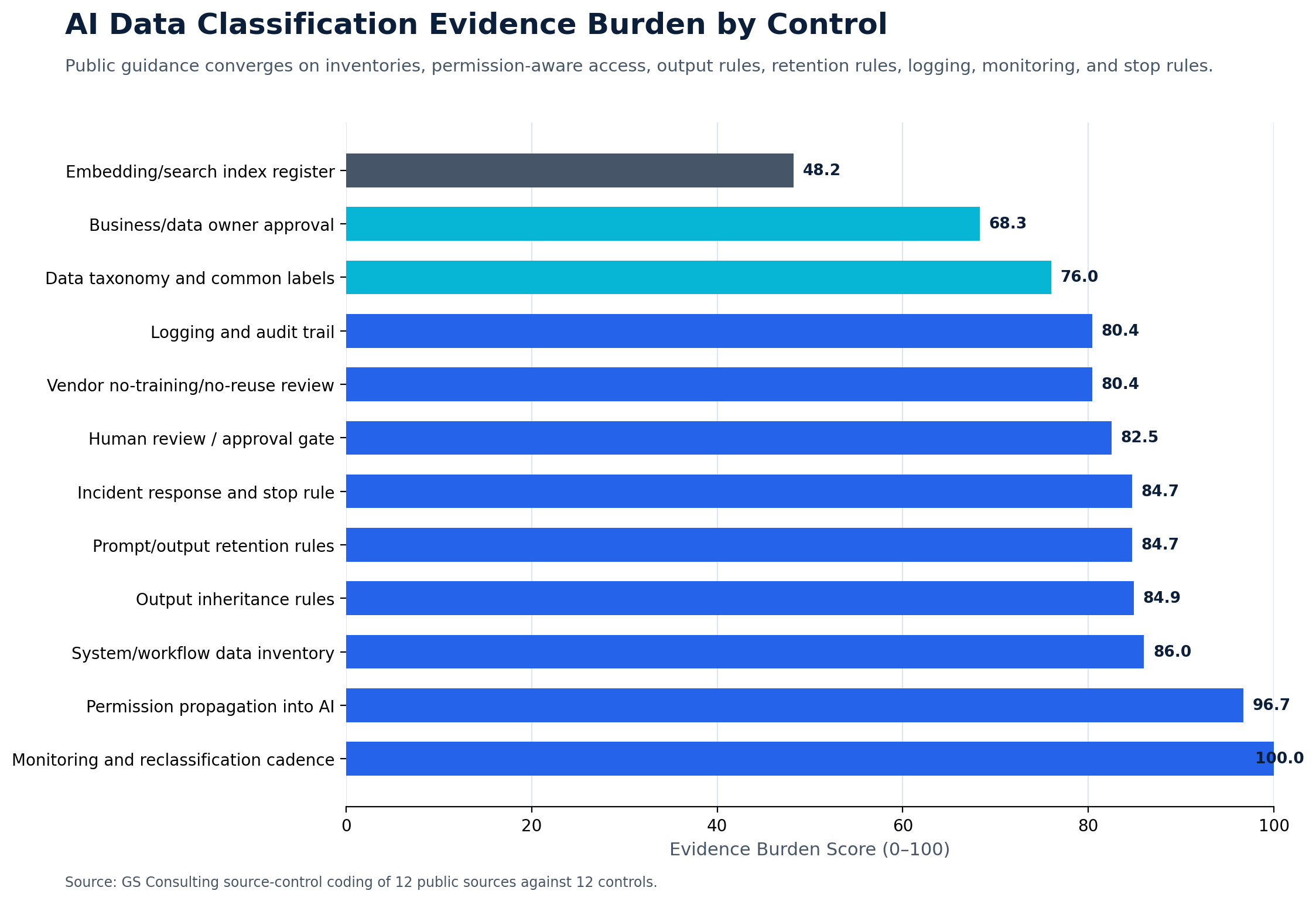
Original GS Consulting research shows that data classification before AI automation is a control system problem, not just a labeling exercise.
GS Consulting analyzed public AI governance, privacy, cybersecurity, CUI, healthcare, financial safeguards, and enterprise AI sources to create an AI Data Classification Readiness Index. The analysis focused on which repositories should be classified first, which sensitive data categories carry the highest control burden, which AI created artifacts may inherit sensitivity, and which controls require evidence before AI automation scales.
The analysis used three GS Consulting derived planning metrics: AI Repository Classification Priority Score, Sensitive Data Control Burden Score, and AI Artifact Inheritance Load. These are planning tools, not official legal, regulatory, NIST, CISA, HIPAA, CMMC, FTC, OWASP, audit, or certification determinations.
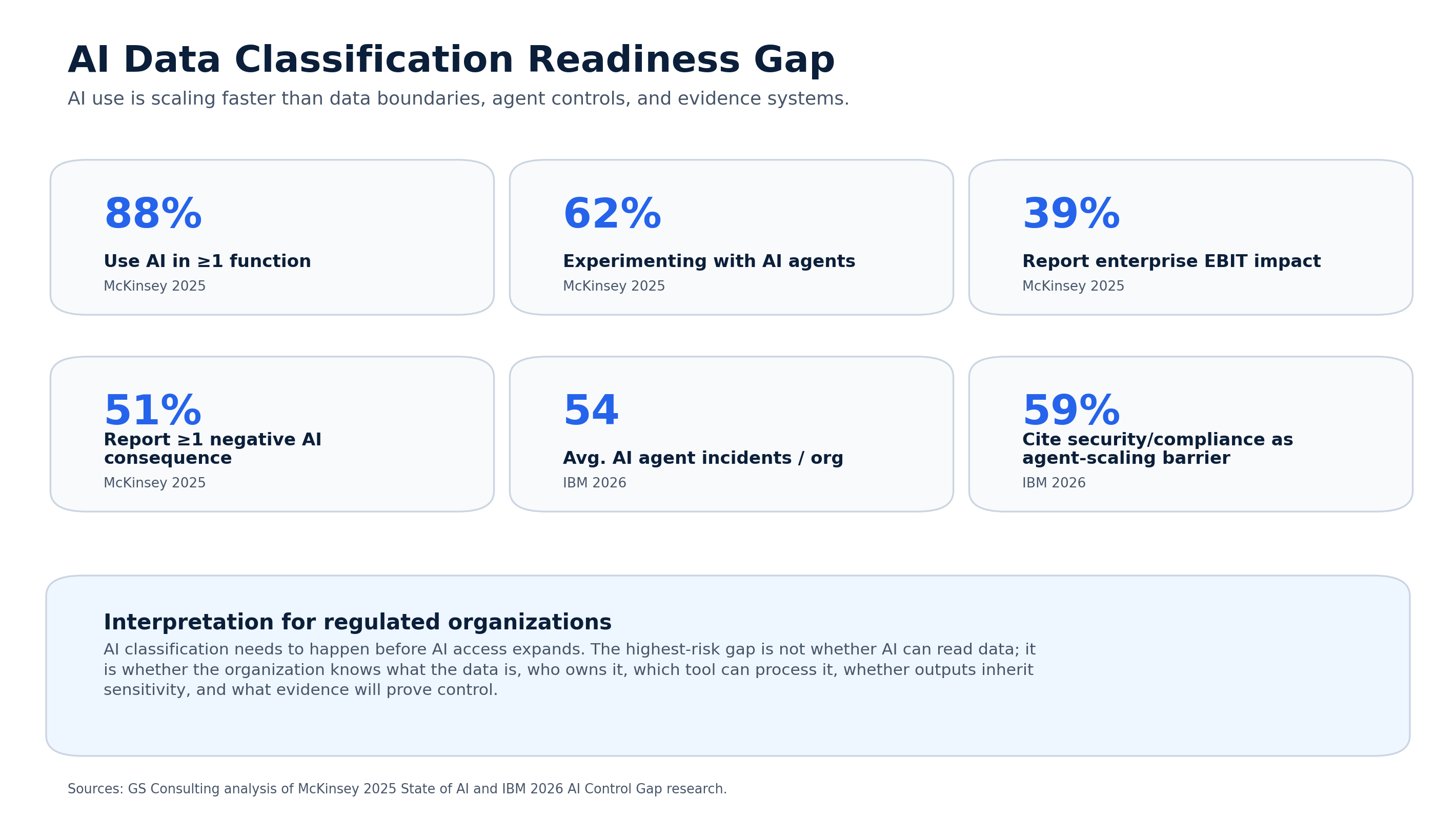
The practical takeaway is direct: classification must follow the data through the AI workflow, not stop at the source document.
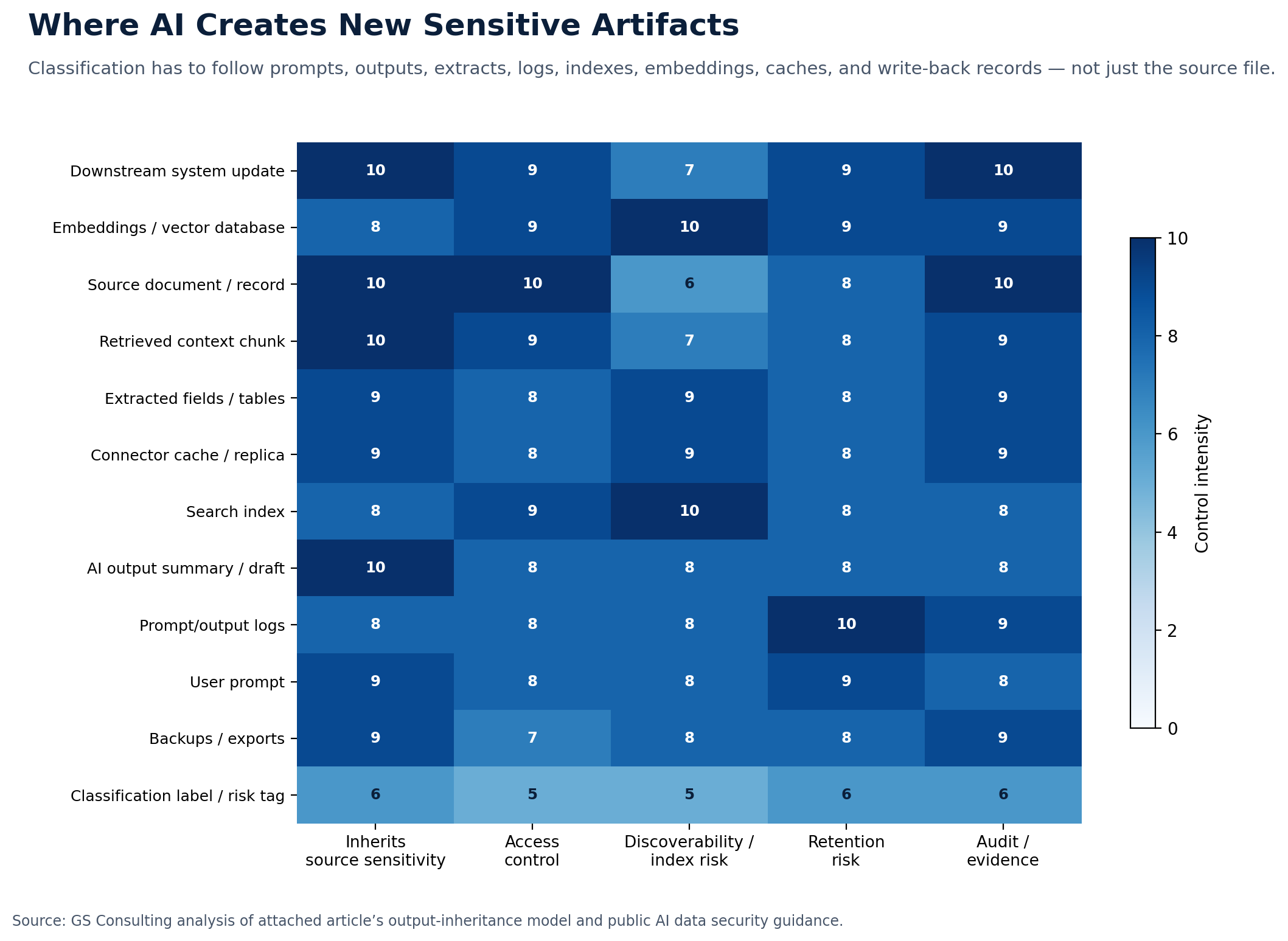
Prompts, outputs, summaries, extracted fields, logs, search indexes, embeddings, connector caches, and downstream records may inherit the sensitivity of the source data. Before connecting AI to documents, systems, tickets, records, or workflows, organizations need to know what data is involved, who owns it, who can access it, which AI tools may process it, whether outputs inherit the classification, where prompts and outputs are retained, and what evidence will be kept.
What Data Classification Actually Means
Data classification means assigning data to categories based on sensitivity, business value, regulatory exposure, and handling requirements.
In practical terms, it tells the organization who can access the data, where the data can be stored, which tools can process it, whether AI can use it, whether outputs need protection, whether sharing is restricted, whether logging is required, whether retention rules apply, whether vendor review is needed, and whether human approval is required.
For AI automation, classification should answer one question first: can this AI workflow use this data in this environment?
If the answer is unclear, the workflow is not ready.
A Simple Data Classification Model for AI Automation
You do not need to start with a complicated model. Most organizations can begin with five practical categories.
Public website content, published marketing material, public policy documents, job postings, press releases, and public regulatory guidance. AI risk is lower here, but accuracy still matters.
Internal procedures, training materials, standard process documents, internal templates, general operating notes, and non sensitive project updates.
Strategy documents, pricing models, vendor terms, sales pipeline data, proprietary methods, sensitive operations reports, and internal financial analysis.
CUI, PII, PHI, financial customer data, employee records, customer records, legal records, audit evidence, security logs, government data, and contract controlled information.
Classified information, highly restricted government data, privileged records, credentials, private keys, sensitive legal strategy, and highly sensitive security data.
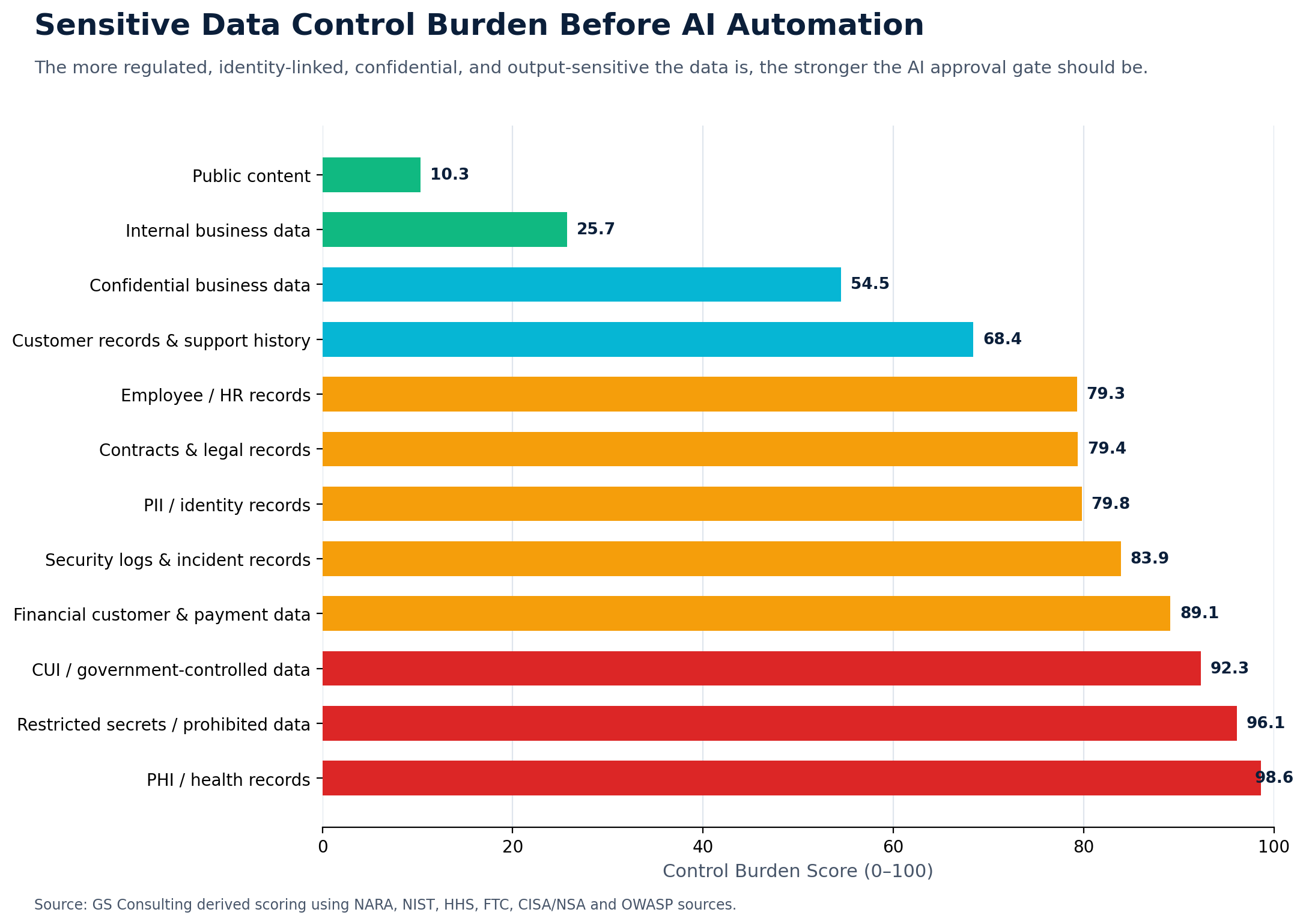
The goal is not to slow everything down. The goal is to match the control to the data.
The Mistake: Classifying the Storage Location Instead of the Data
A common mistake is assuming the system determines the data category.
That is not enough.
A SharePoint site can contain public material, internal material, confidential material, and regulated material. A ticketing system can contain simple help desk requests, customer data, HR issues, security incidents, and system details. An email inbox can contain almost anything. A contract folder can contain public templates, confidential terms, CUI, pricing, customer records, or legal content.
AI does not care what folder the file sits in. It reads what it can access.
That is why classification has to follow the data, not just the system.
What Happens When Data Is Not Classified
Unclassified data creates hidden risk.
Here is what usually happens. A team connects AI to a document library. The AI tool works well in the demo. Employees start asking questions. The AI retrieves answers from documents the user should not have seen. Someone pastes a sensitive record into a prompt. The AI creates a summary that gets stored in a general workspace. A vendor retains prompts or outputs longer than expected. Compliance asks what data the tool processed. No one knows.
That is not an AI failure. That is a data governance failure.
The AI just made the problem visible.
Classify Before You Connect
Before connecting AI to documents, systems, tickets, records, or workflows, classify the data.
The data classification tools evaluation guide shows how to translate that policy into proof scenarios for discovery coverage, permissions, label persistence, enforcement, exceptions, evidence, and operating burden. The Data Classification and Governance hub connects the full guide series.
This includes document repositories, shared drives, ticketing systems, CRM records, HR systems, finance systems, contract repositories, security tools, customer support platforms, operational systems, email archives, knowledge bases, data warehouses, and project management tools.
Each system should be reviewed for data categories, access controls, data owners, retention needs, and AI approval status.
You do not need to classify every single file manually before doing anything. But you do need enough classification to keep AI from accessing information it should not process.
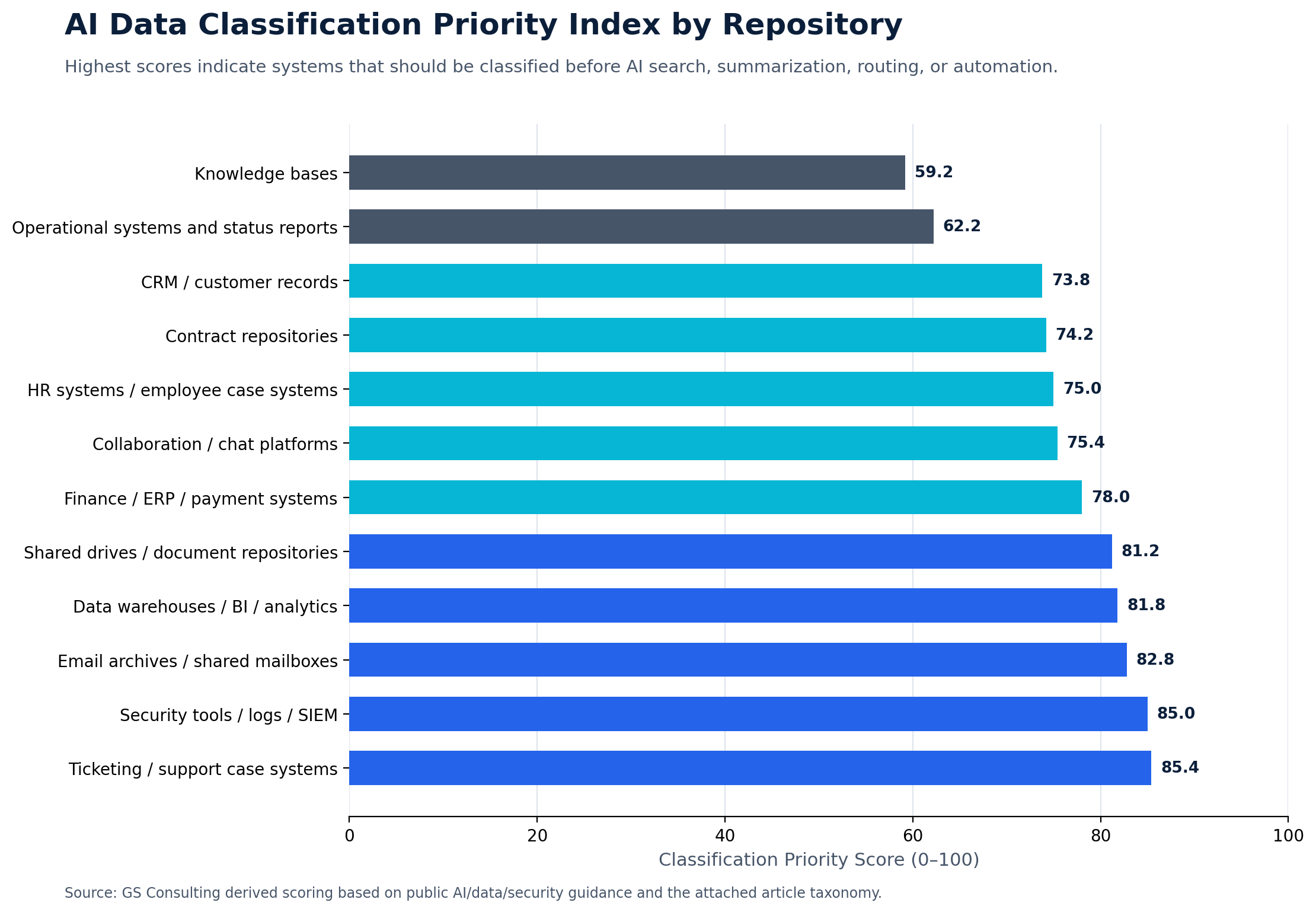
Ticketing systems deserve special attention. They often contain mixed and unpredictable data: IT issues, screenshots, customer details, HR matters, security incidents, system configuration notes, privileged access requests, and vendor support context.
Before using AI for ticket triage or support summaries, classify ticket categories, attachment rules, requester data, assignment group visibility, AI output storage, and escalation triggers.
The AI Data Classification Questions
Before approving an AI automation workflow, ask specific questions. Do not accept vague answers.
- DataWhat data is involved?
Do not say documents. Say contracts, employee files, customer records, invoices, tickets, CUI, PHI, PII, security logs, audit evidence, or operational reports.
- OwnerWho owns the data?
Every sensitive data category needs an owner. If no one owns the data, no one can approve the AI use.
- LocationWhere does the data live?
Identify the source system. If the data lives in five places, say that. Multiple copies create multiple risks.
- AccessWho can access it today?
If access is already too broad, connecting AI can make the problem worse.
- ToolWhat AI tool will process it?
A public chatbot, enterprise AI platform, private model environment, workflow automation system, and vendor embedded AI feature all carry different risk.
- EvidenceWhat evidence will be kept?
For regulated workflows, logs, approvals, output review, retention records, and vendor terms matter.
Also ask whether the tool is approved for that data category, whether the data can be used for model training, whether prompts and outputs are retained, whether outputs inherit the classification, and whether AI can write back to a system.
Why Outputs Need Classification Too
This is one of the most important points.
Organizations often classify the source data but forget the output.
That is a mistake.
AI outputs can contain sensitive summaries, extracted identifiers, customer details, employee details, contract terms, security findings, financial information, health information, government data, compliance conclusions, legal analysis, and operational risk details.
If the source was sensitive, the output probably is too.
This means the organization needs rules for where outputs are stored, who can see them, how long they are retained, and whether they can be reused.
The output is part of the workflow. Treat it that way.
Data Classification and AI Access Control
Classification should drive access.
If the AI workflow is connected to a repository, it must respect user permissions.
A user should not get an AI answer from a document they cannot open directly. This is especially important with retrieval based AI systems.
The AI may search across documents and return a clean answer. But if permission controls are weak, the answer may expose restricted information without showing the original file.
That is dangerous because users may not even realize a boundary was crossed.
Access control should apply to source documents, search results, prompts, outputs, logs, indexes, embeddings, connected systems, and workflow actions.
AI should not become a back door into sensitive data.
Data Classification and AI Governance
Data classification should be built into AI governance.
NIST's AI Risk Management Framework Core is organized around Govern, Map, Measure, and Manage. That structure fits this issue well because organizations need to govern AI use, map the data and workflow context, measure risks and performance, and manage the system after launch.
For practical AI governance, classification should determine which use cases are allowed, which tools are approved, which workflows need review, which data requires legal or compliance input, which outputs need protection, which logs must be retained, which vendors need review, and which human approval gates are required.
A mature AI governance process should not treat all use cases the same.
An AI assistant summarizing public documents should not get the same review as an AI workflow analyzing employee complaints or government controlled data.
Classification gives you that distinction.
Use accuracy review and brand review when needed.
Use approved tools, basic access control, and output review.
Use vendor review, access control, logging, and human review.
Use security review, compliance review, data owner approval, logging, and human approval.
Use executive approval, legal review, security review, and strict environment controls.
Data Classification Before Common AI Workflows
Different workflows need different review. The same AI tool may be acceptable in one workflow and unacceptable in another.
Separate public, internal, confidential, regulated, and restricted content. Do not let AI index everything by default.
IT tickets may contain system details. HR tickets may contain employee issues. Customer tickets may contain personal information. Security tickets may contain incident data.
Contracts can include confidential terms, pricing, customer data, legal obligations, CUI, intellectual property, and renewal details.
AI can help with onboarding, policy support, and case routing, but sensitive employee matters need clear approval, logging, and human oversight.
AI can help with exceptions and summaries. It should not approve payments or change records without human approval.
Security data can reveal systems, vulnerabilities, incidents, user behavior, and attack paths. Classify it before routing it into AI tools.
The Classification Work Does Not Have to Be Perfect
Some organizations get stuck because they think classification has to be perfect before they can start.
It does not.
It has to be good enough to reduce obvious risk and support controlled pilots.
Start with the highest value and highest risk repositories. Where is sensitive data most likely to live? Which workflows are most likely to use AI soon? Which systems contain regulated records? Which shared folders are messy? Which ticket categories include customer or employee data? Which document libraries contain contracts, security records, or government data?
Classify those first.
Do not try to boil the ocean.
The First 30 Days
Here is a practical start.
- Week 1Inventory AI ready systems.
Identify the systems teams want AI to access: document libraries, ticketing systems, contract repositories, HR systems, finance systems, customer support platforms, security tools, and operational records.
- Week 2Identify data owners.
For each system, name the business owner and data owner. If no owner exists, assign one before AI is connected.
- Week 3Classify the data categories.
Do not start file by file. Start by system, folder, workflow, record type, and ticket category. Mark where public, internal, confidential, regulated, and restricted data exists.
- Week 4Define AI access rules.
Decide what AI can access, which tool can process it, who can approve it, where outputs go, what review is required, and what logging is required.
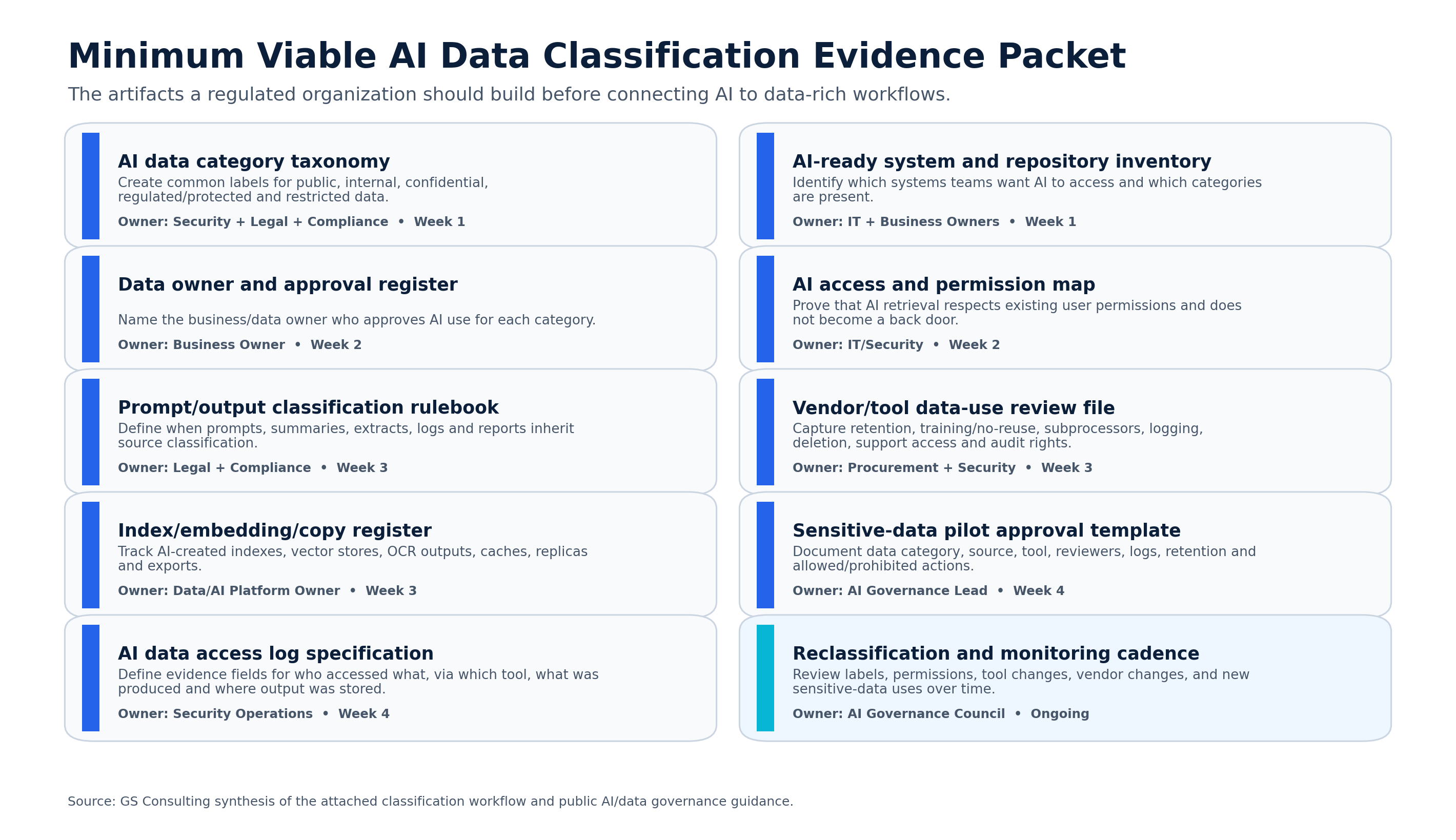
At the end of 30 days, leaders should know which data is safe for early AI pilots and which data needs more work.
Common Mistakes
Most classification failures are not mysterious. They are avoidable.
- Connecting AI to everything. AI should not get broad access just because it is convenient.
- Trusting folder names. A folder called general may contain sensitive data. A ticket category called support may contain customer information.
- Forgetting outputs. AI summaries, drafts, and extracted fields can be sensitive. Classify the output too.
- Ignoring permissions. If permissions are already messy, AI will make the mess more visible and more dangerous.
- Skipping vendor terms. A tool may be approved for public data but not regulated data. Know whether prompts and outputs are retained, reviewed, or used for training.
- Treating classification as one time work. Data changes. Systems change. Workflows change. AI use changes. Classification needs a review cycle.
- Letting every department invent its own labels. That creates confusion. The organization needs a common classification model.
How This Supports Secure AI Automation
This article is one part of a broader secure AI automation approach. Secure AI Automation for Regulated Organizations explains how GS Consulting helps organizations adopt AI automation with the right workflow design, governance, data controls, security, compliance, and measurable outcomes.
This guide answers a specific question: what has to happen before AI connects to documents, systems, tickets, records, and workflows?
The answer is data classification.
Because secure AI automation depends on knowing what the AI is allowed to see. If you skip that step, every other control gets weaker.
The Bottom Line
AI automation does not start with the model.
It starts with the data.
Before connecting AI to documents, systems, tickets, records, and operational workflows, classify the data. Know what is public, internal, confidential, regulated, restricted, or off limits. Know who owns it. Know where it lives. Know what tools can process it. Know whether outputs inherit the classification.
That is how regulated organizations avoid turning AI automation into a data exposure problem.
The companies that get this right will move faster because they will know where AI can safely operate. The companies that skip it will spend their time cleaning up preventable risk.
GS Consulting helps regulated organizations classify data before AI automation, map sensitive workflows, define AI access rules, evaluate tool risk, design human review, and build secure AI automation roadmaps that protect data while improving operations.
Ready to classify your data before connecting AI to your workflows?
Contact GS Consulting for a Secure AI Automation Readiness Assessment.
Contact GS ConsultingResearch Sources and Caveats
The AI Repository Classification Priority Score, Sensitive Data Control Burden Score, AI Artifact Inheritance Load, and Evidence Burden Score are GS Consulting derived planning tools. They are not official legal, regulatory, NIST, CISA, HIPAA, CMMC, FTC, OWASP, audit, or certification determinations.
Actual AI data classification readiness depends on the organization's data, contracts, systems, jurisdictions, vendors, retention obligations, access model, regulatory exposure, workflow design, and risk tolerance.
- NARA CUI Registry
- NIST Privacy Framework
- CISA: Securing AI Data Guidance
- NIST AI Resource Center: AI RMF Core
- OWASP Top 10 for Large Language Model Applications
- McKinsey: The State of AI
Frequently Asked Questions About Data Classification Before AI Automation
Why should data be classified before AI automation?
Data should be classified before AI automation because AI can read, summarize, extract, index, retain, and create new records from source data. Classification tells the organization what AI may access, which tool may process it, who must approve it, and how outputs should be handled.
Do AI outputs inherit the classification of source data?
Often, yes. If an AI output summarizes, extracts, quotes, or transforms sensitive source data, the output may need the same or similar handling controls. That includes summaries, drafts, extracted fields, logs, indexes, embeddings, and downstream records.
Which systems should be classified first before connecting AI?
Start with systems most likely to contain mixed or sensitive data, including ticketing systems, security logs, email archives, data warehouses, shared document repositories, finance systems, collaboration tools, HR systems, contract repositories, and CRM records.