Secure AI Automation | | 27 min read
Common AI Automation Mistakes in Regulated Organizations

Key Takeaways
Avoid AI failures by fixing workflow and control gaps before launch.
Map and classify first
Define the process and data before connecting a model to sensitive work.
Make ownership explicit
Assign approval, review, access, and operating responsibilities instead of assuming someone owns them.
Prove the pilot before scaling
Use source evidence, user testing, outcome metrics, and vendor review to support expansion.
Most AI automation failures are not model failures.
They are leadership failures, workflow failures, data failures, and control failures.
That may sound blunt, but it is usually true.
The AI tool does what it was allowed to do. The problem is that nobody defined the workflow clearly. Nobody classified the data. Nobody decided who owns approval. Nobody checked whether the output needed review. Nobody built the audit trail. Nobody asked what happens when the model is wrong.
Then the organization acts surprised when the pilot creates risk.
If your business handles customer data, employee records, financial records, contracts, CUI, PHI, security logs, audit evidence, legal files, or compliance records, AI automation has to be designed with control from the start.
The goal is not to avoid AI. The goal is to stop making avoidable mistakes.
Find the AI automation risks before they become expensive.
GS Consulting helps regulated organizations review AI workflows, data exposure, access boundaries, human review, audit trails, vendor claims, and pilot controls before automation scales.
Request a Secure AI Automation Risk ReviewWhy AI Automation Fails Before the Model Fails
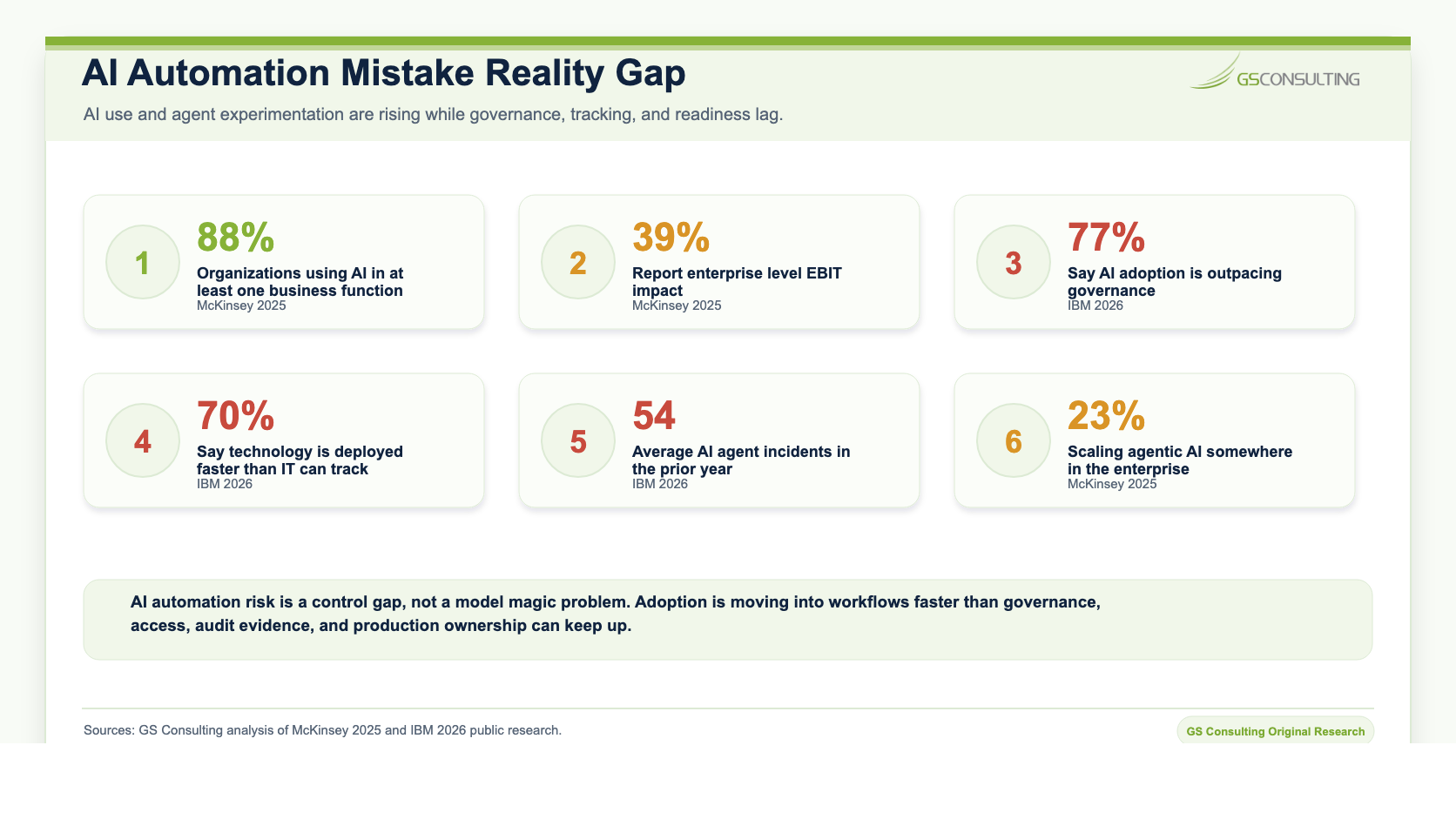
NIST's AI Risk Management Framework organizes AI risk work around Govern, Map, Measure, and Manage. That is a useful way to think about AI automation mistakes because most failures happen when organizations skip one of those steps. They do not govern the use case. They do not map the workflow. They do not measure the risk. They do not manage the system after launch.
That is how a promising pilot turns into a sensitive data issue, a compliance gap, a user adoption problem, or a production workflow no one owns.
Original Research: The Preventable AI Automation Mistake Index
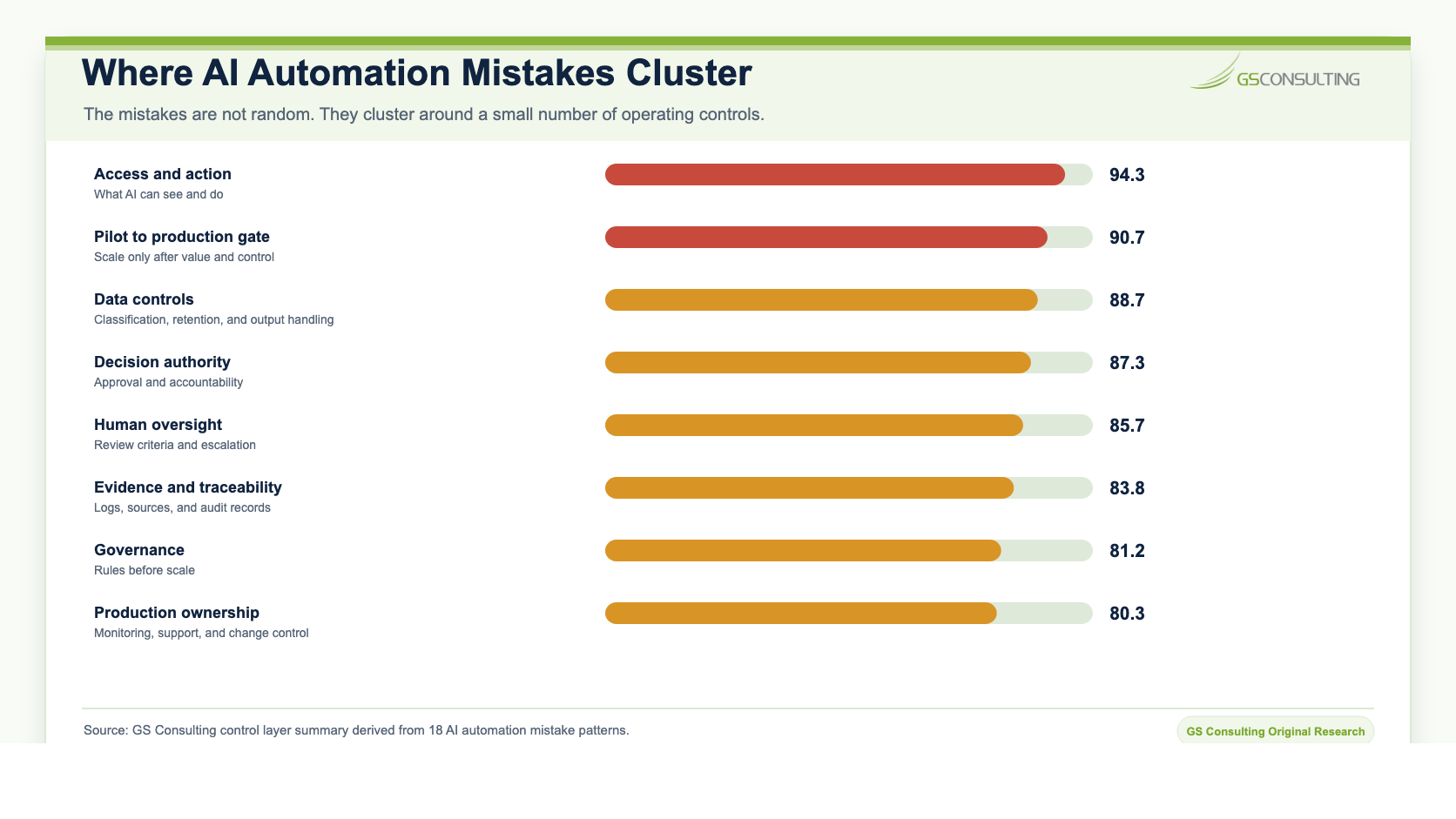
GS Consulting analyzed public AI adoption, governance, security, data security, and control sources against 18 common AI automation mistakes in regulated organizations. The research shows that the most common mistakes are predictable before they become production problems.
The source set included McKinsey's 2025 State of AI, IBM's 2026 AI Control Gap research, OWASP Top 10 for LLM Applications, CISA, NSA, and FBI AI data security guidance, and the Cloud Security Alliance AI Controls Matrix. The scoring model used five factors: business impact, likelihood, detection difficulty, remediation complexity, and source control convergence.
The highest pressure mistakes were giving AI too much access too early, exposing sensitive data, weak permission design, no audit trail, and scaling before the pilot proves control.
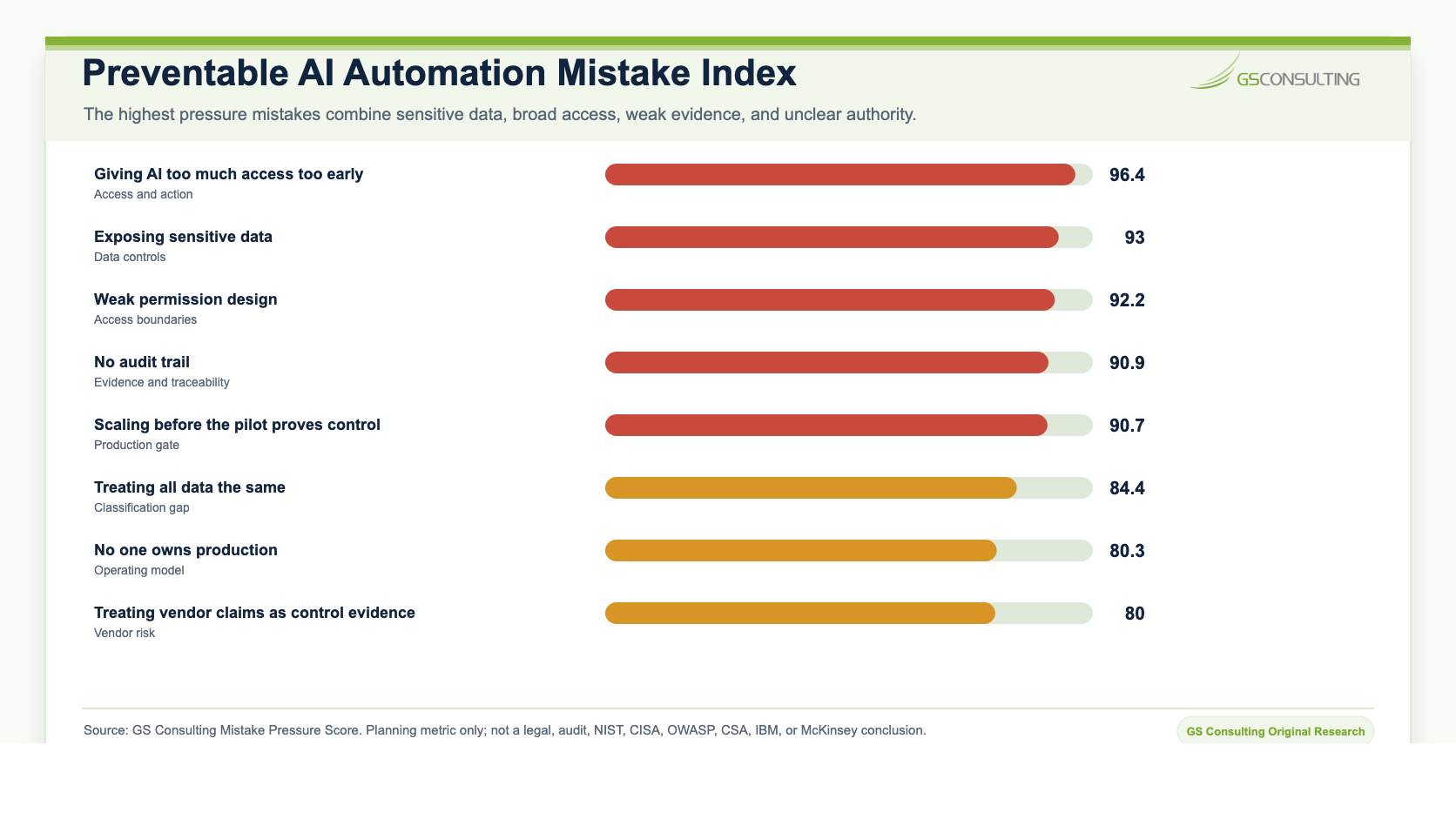
The practical takeaway is simple: AI automation does not fail because the model cannot produce an answer. It fails when the workflow is unclear, the data is not classified, approval authority is missing, AI access is too broad, human review is vague, outputs are not protected, logs are missing, users are ignored, and production ownership is undefined.
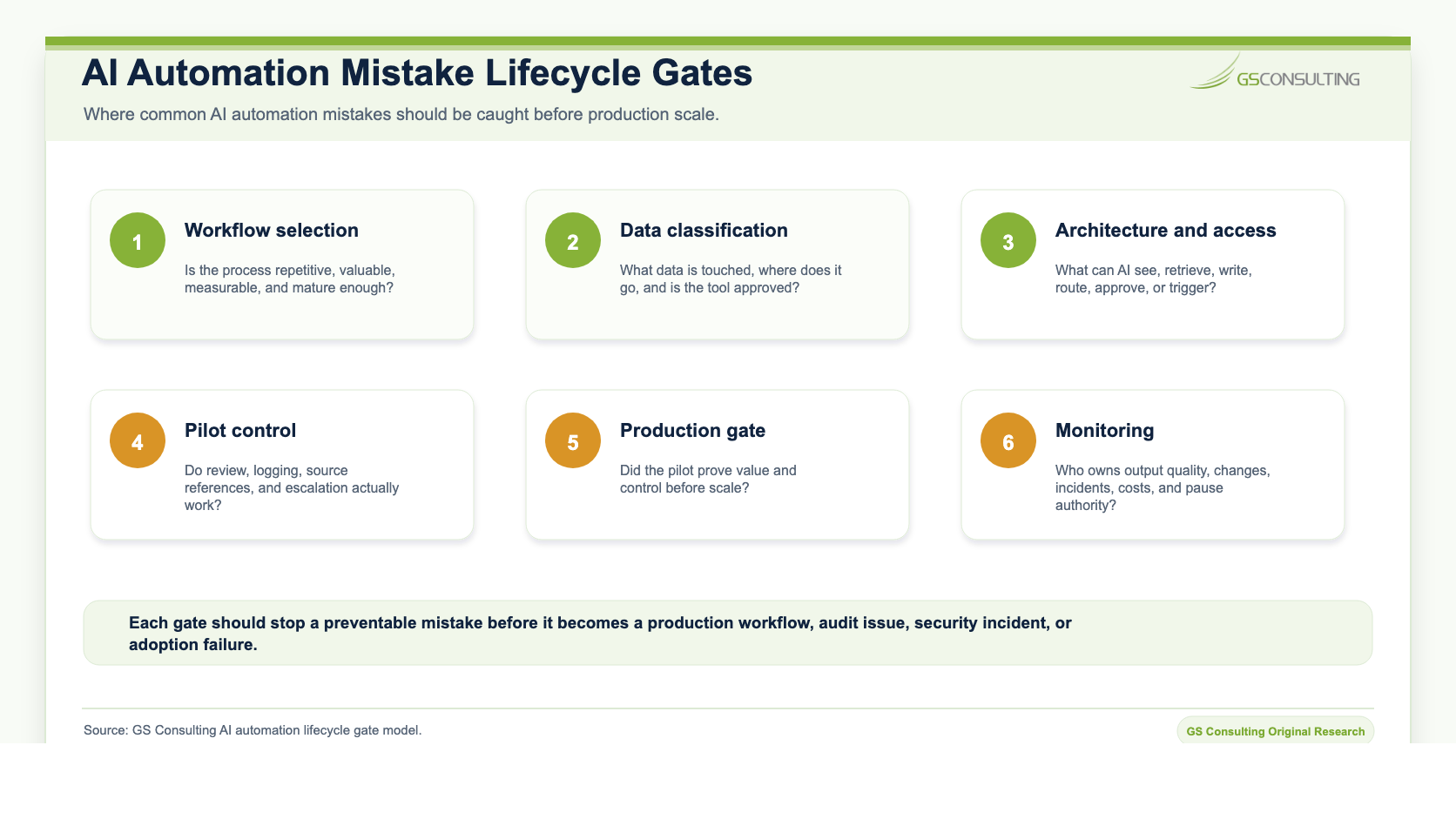
Regulated organizations should treat these mistakes as prevention gates. Before scaling a workflow, leaders should be able to answer five questions: Is this the right workflow? Is the data approved? Is the decision impact understood? Is the control model clear? Can we prove what happened?
Mistakes 1 Through 4: Workflow and Data Readiness
Mistake 1: Automating the Wrong Workflow
The easiest AI automation idea is not always the best one. A team sees a painful task and wants AI to fix it. That is understandable. But pain alone does not make a workflow ready for automation.
Some workflows are painful because they are repetitive and document heavy. Those may be good candidates. Other workflows are painful because nobody owns them, the process is unclear, the data is messy, or the decision is too sensitive. AI will not fix that. It may make it worse.
A bad process with AI added to it is still a bad process. It just moves faster.
Good early use cases usually involve summarization, classification, routing, extraction, first draft responses, evidence organization, ticket enrichment, and internal reporting. Bad early use cases usually involve final hiring decisions, payment approval, legal conclusions, compliance certification, production changes, privileged access, security containment, or customer commitments.
Mistake 2: Starting With the Tool Instead of the Workflow
A vendor shows a demo. The model summarizes a document. The assistant answers a question. The workflow looks simple.
That is not implementation. That is a demo.
A real AI automation project starts with the workflow. What starts the process? Who owns it? What data is used? What systems are involved? What decisions are made? Where does human review happen? Where does the final record live? What happens when the output is wrong?
If the organization cannot answer those questions, the tool is not the problem yet. The workflow is.
Mistake 3: Exposing Sensitive Data
This is the mistake everyone knows about and still keeps making.
Someone copies customer data into a public tool. Someone uploads a contract to summarize it. Someone pastes employee information into a prompt. Someone asks AI to review a security log. Someone uses AI to summarize CUI without checking the environment.
The team may have good intentions. That does not make the data exposure less real.
Sensitive data workflows need approved tools, approved environments, vendor review, retention rules, access control, and output handling. The prompt can be sensitive. The output can be sensitive. The summary can be sensitive. The log can be sensitive. The extracted fields can be sensitive.
Mistake 4: Treating All Data the Same
A public policy document is not the same as an employee file. A general operating procedure is not the same as a contract. An IT ticket is not the same as a security incident. A customer support note is not the same as PHI or CUI.
Regulated organizations need data classification before AI automation. Public data may be fine for broad AI use. Internal data may be fine in approved tools. Confidential data needs stronger controls. Regulated data needs formal review. Restricted data may be off limits unless a specific approved environment exists.
If the organization does not classify data before connecting AI to documents, tickets, systems, and records, it is guessing. Guessing is not governance.
Mistakes 5 Through 9: Governance, Review, and Access
Mistake 5: Skipping Governance Because the Pilot Is Small
"It is just a pilot" creates a lot of risk.
Small pilots still use real data. Small pilots still create outputs. Small pilots still influence users. Small pilots still connect to systems. Small pilots still create habits.
You do not need a massive governance program for every experiment. But you do need basic rules: who approved the pilot, what data it can use, what tool is approved, who reviews output, what gets logged, what is prohibited, and who can stop it.
A pilot without boundaries is not a controlled pilot. It is shadow automation with a nicer name.
Mistake 6: No Clear Approval Authority
AI automation gets messy when everyone has opinions but nobody has decision rights.
Security is concerned. Compliance is concerned. Legal is concerned. The business wants speed. IT wants standards. Users want relief. Executives want results.
All of that is normal. What is not normal is launching AI workflows without knowing who can approve them. If nobody knows who approves what, teams will either stop moving or move around the process. Both outcomes are bad.
Mistake 7: Relying on Human Review Without Designing It
"Human in the loop" is not a control by itself. It becomes a control only when the human knows what to review and has authority to act.
A weak review process looks like this: AI produces an output, a person glances at it, the person clicks approve, and no one knows what they checked. That is not oversight.
A strong review process defines who reviews the output, what they verify, what sources they use, what they can edit, what they can reject, what they must escalate, and how the decision is logged.
Do not write "human review required" as a control. Define the reviewer, evidence, criteria, authority, escalation path, and log record.
Mistake 8: Giving AI Too Much Access Too Early
Broad access makes AI demos look better. It also makes failures worse.
AI does not need access to every document, every ticket, every customer record, every HR file, every system log, and every API to prove value. Start narrow. Give AI only the data it needs for the workflow. Use read access before write access. Use recommendations before actions. Use human approval before system changes. Use limited workflows before autonomous agents.
OWASP lists risks for large language model applications such as prompt injection, sensitive information disclosure, insecure output handling, and excessive agency. Those risks matter more when AI can access tools, retrieve internal data, or take action across systems.
The first control question should be: what can AI see, and what can AI do?
Mistake 9: Weak Permission Design
AI should not see more than the user is allowed to see. That rule sounds simple. It is often violated.
A user cannot open a contract, but the AI summarizes it. A manager cannot view an employee record, but the AI includes details in an answer. A support agent cannot access a customer file, but the AI retrieves it.
Secure AI automation needs identity integration, role based access, document level permissions, record level controls, and least privilege. If the user cannot access the source directly, the AI should not reveal it indirectly.
Mistakes 10 Through 13: Evidence, Sources, Users, and Metrics
Mistake 10: No Audit Trail
If AI touches regulated workflows, you need evidence. Not vibes. Evidence.
Who used the AI? What did they ask? What data did it access? What sources did it use? What output did it create? Who reviewed it? What decision was made? Was anything sent, routed, updated, approved, or escalated?
If you cannot answer those questions, the workflow is not audit ready. This matters in compliance, HR, finance, contracts, customer support, cybersecurity, GovCon, healthcare administration, and operations.
AI audit trails do not need to be complicated. But they need to exist. Without logs, the organization cannot explain what happened.
Mistake 11: Trusting AI Outputs Without Source References
A polished answer is not the same as a correct answer. AI can sound confident and still be wrong.
For regulated work, source grounding matters. If AI summarizes a policy, show the policy. If AI extracts a contract obligation, show the clause. If AI drafts a compliance response, show the evidence. If AI summarizes a ticket, show the ticket.
No source means weaker review. Weak review means the organization is trusting tone instead of evidence. That is a bad trade.
Mistake 12: Ignoring Users
A lot of AI automation fails because the people doing the work were not involved.
Leadership sees the opportunity. The vendor builds the workflow. IT connects the tool. The users get handed a process that does not match how work actually happens.
Then adoption is low. Or worse, users keep using unofficial tools because the approved workflow is clunky.
Users know where the process breaks. They know which fields are missing. They know which tickets are confusing. They know which reports take too long. They know which exceptions matter. Bring them in early.
If the workflow does not make their work easier, they will not use it. If they do not use it, the ROI is fake.
Mistake 13: Measuring the Wrong Outcomes
A lot of AI projects measure activity instead of value: number of users, number of prompts, number of documents processed, and number of AI outputs generated.
Those numbers may be useful, but they do not prove business value.
Better measures include time saved, cycle time reduced, errors reduced, rework reduced, backlog reduced, routing accuracy improved, evidence collected faster, audit preparation time reduced, customer response time improved, security alert triage time reduced, human override rate, output acceptance rate, and risk events reduced.
If AI generates a lot of outputs but does not improve the workflow, it is not working. Measure the process. Not the novelty.
Mistakes 14 Through 18: Scale, Vendors, Decisions, and Ownership
Mistake 14: Scaling Before the Pilot Proves Control
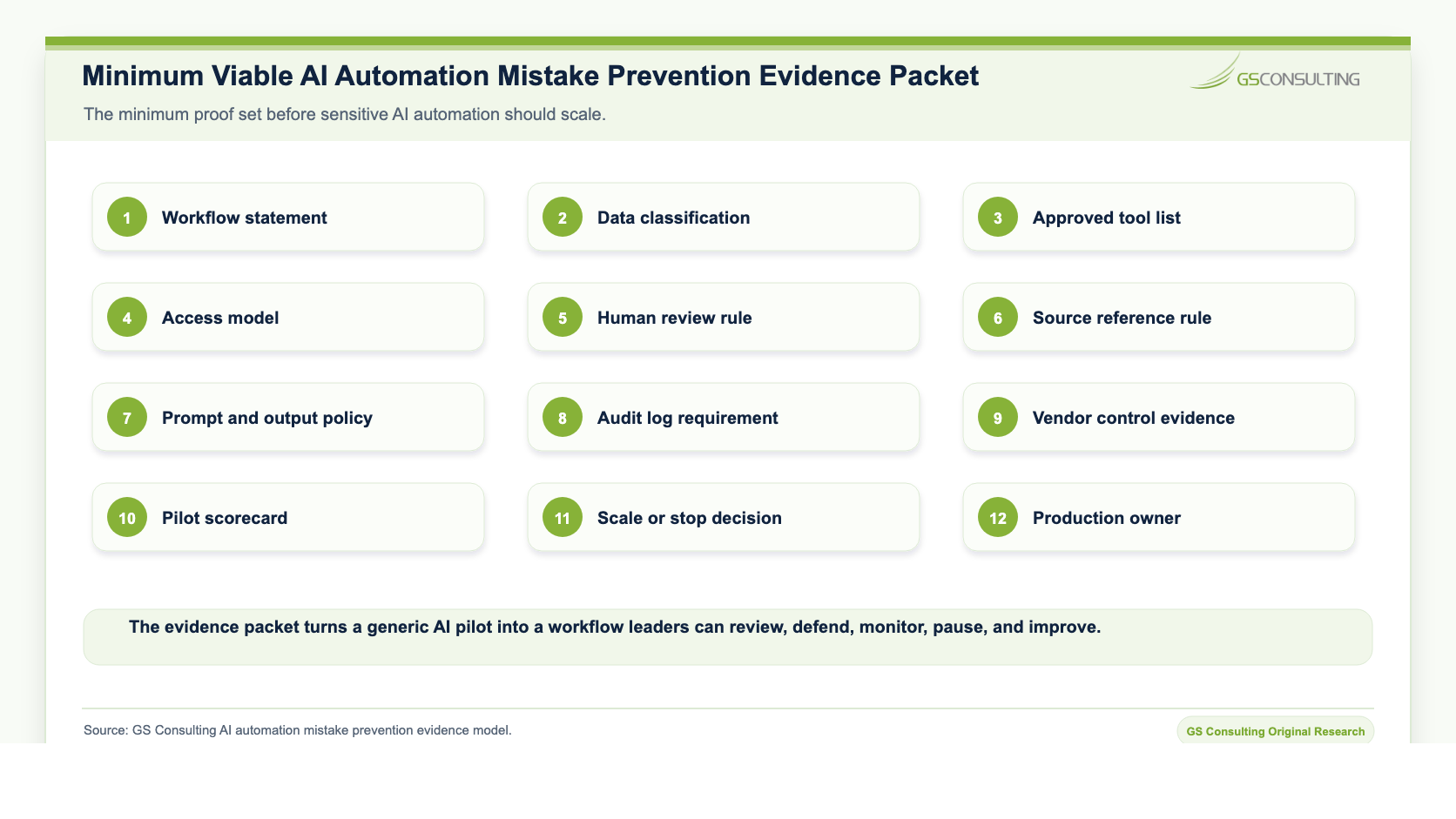
A pilot has two jobs: prove value and prove control.
Most organizations only look at the first one. They ask whether users liked it and whether it saved time. They do not ask whether permissions held, whether logs worked, whether humans reviewed properly, whether sources were correct, whether outputs were stored safely, or whether failure cases were tested.
That is how a pilot turns into production risk. Before scaling, verify that the workflow improved, users adopted it, errors decreased, access worked, logging worked, human review worked, escalation worked, sensitive data was handled correctly, and the output landed in the right system.
If the answer is no, do not scale. Fix it first.
Mistake 15: No One Owns Production
AI automation does not end when the pilot goes live. That is where management begins.
Models change. Data changes. Policies change. Systems change. Users change. Vendors change. Threats change. Workflows change.
Someone has to own the workflow after launch. Who monitors output quality? Who reviews errors? Who updates the knowledge base? Who handles vendor changes? Who responds when AI gives a bad answer? Who approves workflow changes? Who can pause it?
A pilot can survive on enthusiasm. Production needs ownership.
Mistake 16: Treating Vendor Claims as Control Evidence
Vendors will say the tool is secure. That is not enough.
Regulated organizations need to know where data is stored, whether prompts are retained, whether outputs are retained, whether data can be used for training, whether vendor staff can view content, whether subprocessors are involved, whether logs can be exported, whether permissions can be enforced, whether the workflow can be audited, and whether the customer can control retention.
CISA describes AI systems as software systems that should be secure by design, with security prioritized throughout the lifecycle. That expectation should apply to vendors and implementation partners as well as internal teams.
A vendor demo is not evidence. Ask for documentation. Review the terms. Test the controls.
Mistake 17: Automating Decisions Instead of Preparation
AI is often best at preparing decisions, not making them.
It can gather context, summarize, extract, classify, compare, draft, flag exceptions, and recommend. That is valuable. But in regulated organizations, the final decision often needs a person.
Payment approval, hiring decisions, compliance certification, security containment, legal interpretation, customer commitments, access grants, and contract positions usually need human accountability.
Use AI to prepare the work. Keep people accountable for the decision.
Mistake 18: Treating Secure AI Automation as an IT Project Only
IT matters. Security matters. But AI automation is not only an IT project.
It affects how work gets done. That means business owners need to be involved. Legal may need to be involved. Compliance may need to be involved. HR may need to be involved. Finance may need to be involved. Operations may need to be involved. Users definitely need to be involved.
The technology team can implement the tool. The business owns the workflow. If that ownership is missing, AI automation becomes a system looking for a process.
That rarely ends well.
A Practical Way to Avoid These Mistakes
Before launching an AI automation workflow, ask five questions.
- 1Is this the right workflow?
Is it repetitive, valuable, measurable, and mature enough for automation?
- 2Is the data approved?
Do we know what data AI touches, where it goes, and whether the tool is approved for it?
- 3Is the decision impact understood?
Does the output affect customers, employees, money, contracts, compliance, security, or operations?
- 4Is the control model clear?
Who reviews, approves, rejects, escalates, logs, monitors, and pauses the workflow?
- 5Can we prove what happened?
Do we have source references, decision history, user actions, prompt records where needed, and audit logs?
If the answer to any of those questions is no, the workflow is not ready to scale.
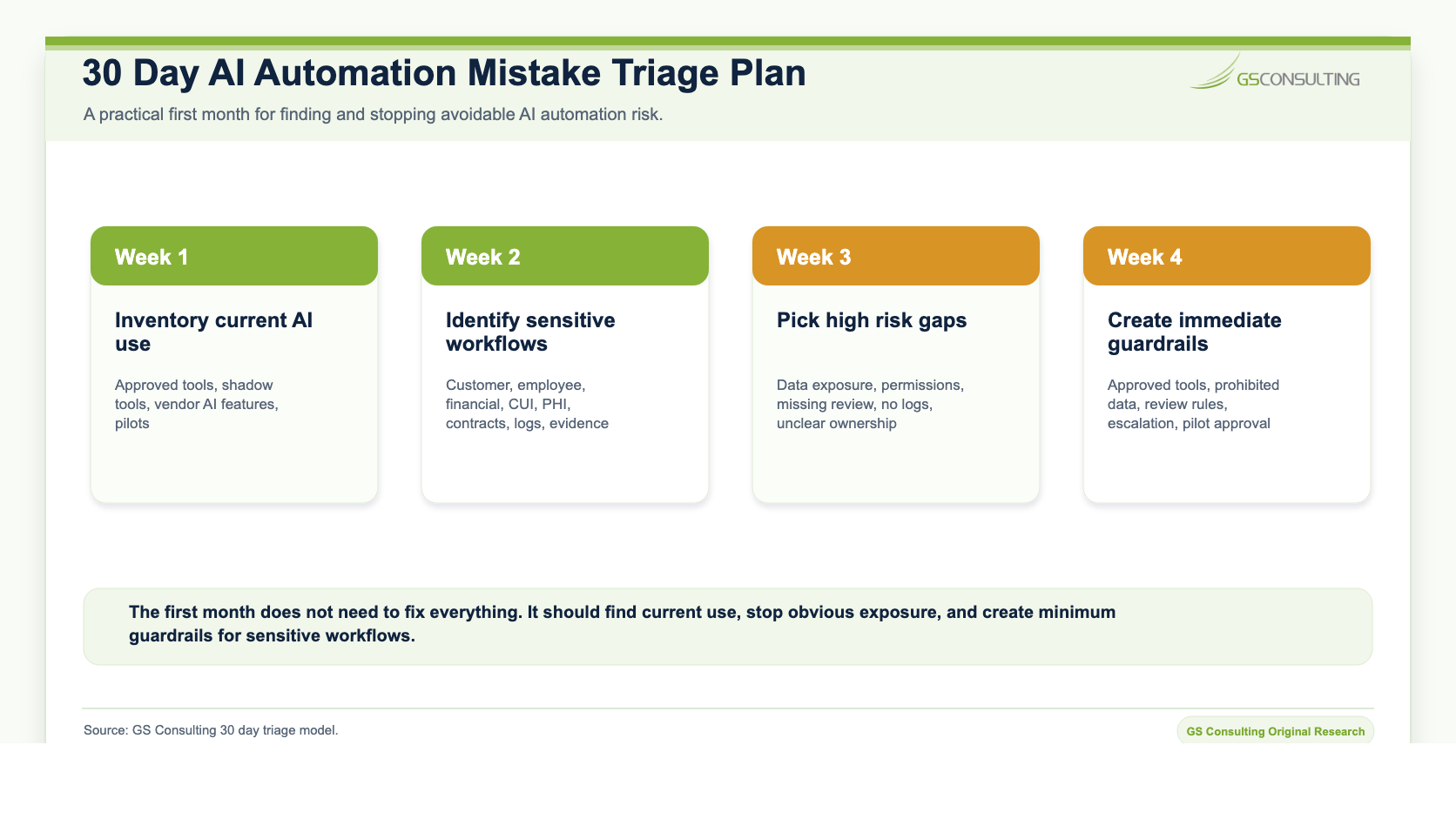
The First 30 Days
If your organization is already using AI automation, do not panic. Get visibility.
Start with these steps.
Week 1: Inventory Current AI Use
Find approved tools, unapproved tools, vendor AI features, pilots, and shadow AI use.
Week 2: Identify Sensitive Workflows
Look for AI touching customer data, employee data, contracts, financial records, CUI, PHI, security logs, compliance evidence, or operational records.
Week 3: Pick the Highest Risk Gaps
Focus on data exposure, weak permissions, missing human review, no audit trail, and unclear ownership.
Week 4: Create Immediate Guardrails
Define approved tools, prohibited data, review requirements, escalation paths, and pilot approval rules.
You do not need to fix everything in a month. But you do need to stop the obvious mistakes.
How This Supports Secure AI Automation
This guide supports the larger secure AI automation service at Secure AI Automation for Regulated Organizations. That service explains how GS Consulting helps organizations automate workflows with the right governance, architecture, data controls, security, and measurable outcomes.
This page answers a specific leadership question: what should we stop doing before AI automation creates preventable risk?
That question matters because most AI automation problems are avoidable. They come from weak workflow selection, weak data controls, weak governance, weak audit trails, weak adoption, and weak measurement.
Fix those and the organization can move faster with more confidence.
The Bottom Line
Regulated organizations do not need to be scared of AI automation.
They need to stop being casual with it.
The common mistakes are predictable: automating the wrong workflow, exposing sensitive data, skipping governance, giving AI too much access, lacking audit trails, ignoring users, trusting vendor claims, and measuring the wrong outcomes.
The fix is also predictable. Start with the workflow. Classify the data. Define approval. Limit access. Keep people accountable. Log the activity. Measure real outcomes. Scale only after the pilot proves value and control.
That is how AI automation becomes an operating advantage instead of a cleanup project.
Stop preventable AI automation mistakes before they scale.
GS Consulting helps regulated organizations design secure workflows, data controls, governance policies, access models, audit trails, pilot scorecards, and implementation roadmaps that can actually scale.
Contact GS ConsultingFrequently Asked Questions About AI Automation Mistakes
What are the most common AI automation mistakes in regulated organizations?
The most common mistakes include automating the wrong workflow, exposing sensitive data, treating all data the same, skipping governance, giving AI too much access, weak permission design, no audit trail, vague human review, poor source references, ignoring users, weak metrics, scaling too early, trusting vendor claims, and unclear production ownership.
Why do AI automation pilots fail in regulated environments?
AI automation pilots fail when teams start with a tool instead of a workflow, skip data classification, ignore approval authority, rely on vague human review, lack audit trails, use broad access, fail to involve users, or scale before proving control.
How can regulated organizations reduce AI automation risk?
They should inventory AI use, classify data, select workflows carefully, define approval authority, limit access, require human review for higher risk outputs, keep audit trails, validate source references, review vendors, measure real workflow outcomes, and scale only after pilots prove value and control.
What should an AI automation pilot prove before scaling?
A pilot should prove that the workflow improved, users adopted it, errors decreased, permissions worked, logging worked, human review worked, escalation worked, sensitive data was handled correctly, outputs landed in the right system, and a production owner is accountable.
Related Reading
- Secure AI Automation for Regulated Organizations
- Secure AI Automation Readiness Assessment
- AI Automation Risk Assessment Framework
- AI Governance Policies for Workflow Automation
- AI Vendor Evaluation for Regulated Enterprises
Research Sources and Caveats
Sources included NIST AI Risk Management Framework, McKinsey 2025 State of AI, IBM 2026 AI Control Gap research, OWASP Top 10 for LLM Applications, CISA AI guidance, and Cloud Security Alliance AI Controls Matrix. The Mistake Pressure Score, Control Layer Score, and 30 Day Triage Model are GS Consulting derived planning tools. They are not official legal, audit, NIST, CISA, OWASP, CSA, IBM, McKinsey, or compliance determinations. Actual AI automation risk depends on the organization's workflows, data sensitivity, contracts, vendors, access model, approval structure, monitoring maturity, security controls, and risk tolerance.