AI Workflow Automation | | 24 min read
Workflow Orchestration for Secure Environments

Key Takeaways
Secure orchestration controls the business process, not only the connections between systems.
Define Authority
Catalog each workflow, assign owners, map systems of record, and limit the exact data and actions it may use.
Enforce State
Use explicit states, valid transitions, bounded approvals, event checks, and safe retry rules before every action.
Operate the Workflow
Monitor health, own exceptions, preserve evidence, test recovery, control changes, and retire access when the process ends.
Simple automations are easy to demonstrate. Enterprise automation is where the operating model becomes visible.
A script pulls a report. A bot moves a file. An AI tool summarizes a ticket. Then the business asks for the real workflow:
- Connect the ERP and other systems of record.
- Read documents that may contain CUI.
- Route work through accountable approvals.
- Handle exceptions and partial failures.
- Preserve evidence for audit review.
- Run across cloud and on premise environments every day.
That is no longer a clever automation. It is workflow orchestration for secure environments.
A simple automation performs a task. Orchestration coordinates the complete business process, including its systems, people, controls, and failure paths. For GovCon firms and regulated enterprises, the goal is not more bots. It is controlled business operations that can run safely at scale.
Need to turn disconnected automations into a controlled operating capability?
GS Consulting maps secure business processes, designs orchestration control planes, constrains AI agent authority, and builds the evidence and support model required for production.
Request a Secure Orchestration AssessmentThis guide supports our main AI workflow automation service and the Enterprise AI Process Transformation cluster. It connects directly to transitioning AI workflows from pilot to production, continuous monitoring for AI agents, human in the loop workflow architecture, and building audit trails for automated workflows.
The Bad Assumption: More Automations Mean More Maturity
More automations can mean more maturity. They can also mean more chaos. A company may have useful scripts, disconnected AI tools, several workflow platforms, shadow databases, and one shared service account that nobody wants to change.
Automation sprawl creates predictable failures. Teams automate the same process differently. Service accounts gain excessive access. Errors disappear into email. Approvals become inconsistent. Data crosses boundaries without review. Logs omit the business context. Dashboards drift away from systems of record. Compliance cannot prove what happened.
Orchestration is therefore an operating model. The organization must decide how work moves, who owns it, and which data and actions are permitted. It must also define how failure is resolved and how the process is monitored.
Why Secure Environments Change the Design
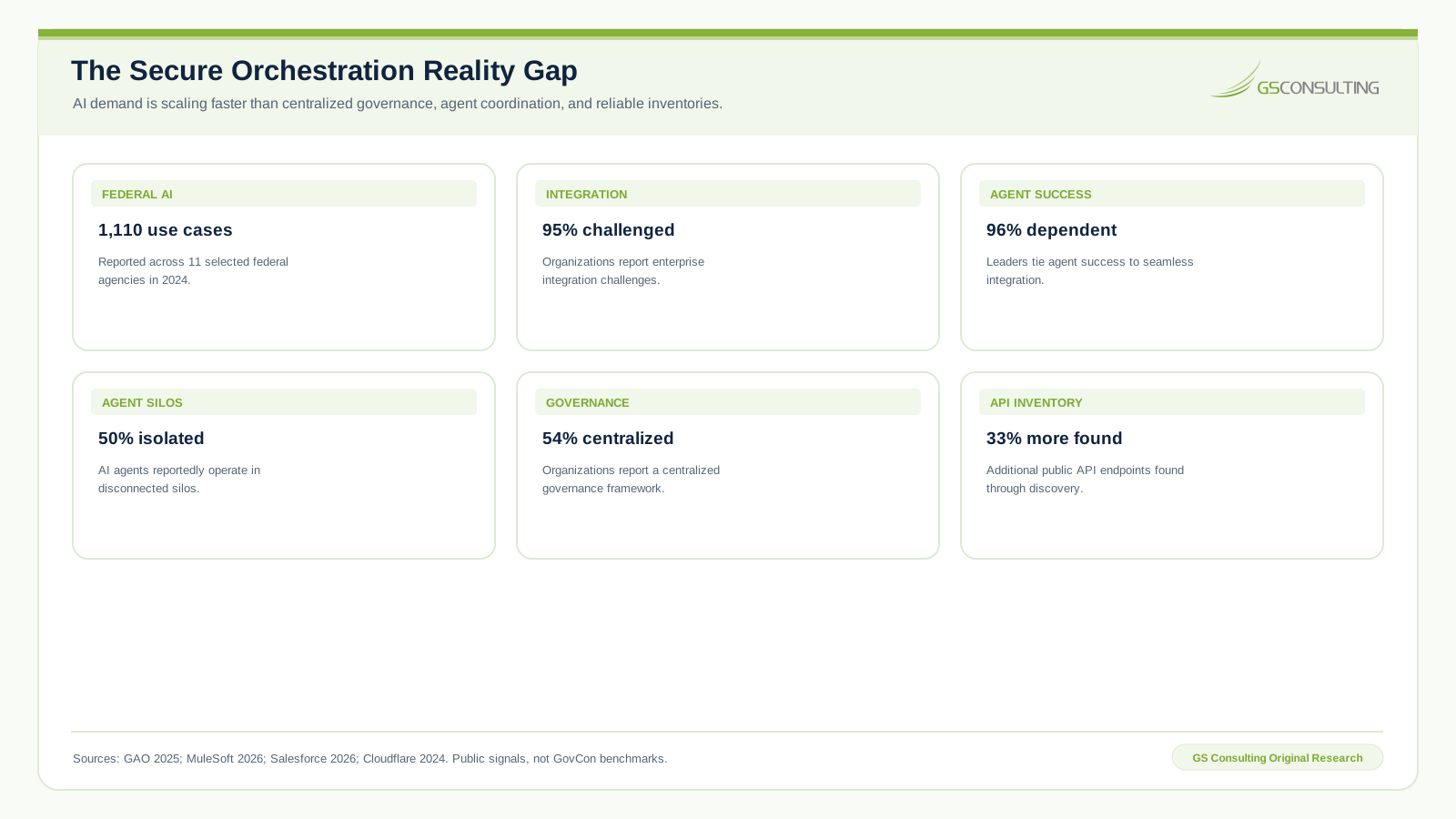
In an ordinary business process, orchestration is mainly about efficiency. In a secure environment, it is about efficiency plus control. A workflow may touch several sensitive information domains:
- CUI and Federal Contract Information.
- Contract obligations and proposal records.
- Security logs and incident records.
- Financial, identity, and customer information.
NIST SP 800 171 Revision 3 applies to nonfederal system components that process, store, or transmit CUI or protect those components. The actual data path determines which orchestration components matter to the protected boundary. Review the components that coordinate work, execute actions, present approvals, store temporary data, or preserve evidence.
The architecture must show what crosses each boundary and why. It must also identify the authorizing identity, retention location, and protective controls. If those answers are unclear, the workflow is not ready to handle regulated data.
Integration connects systems. Orchestration coordinates work.
An API integration can move data from a repository to a ticketing system. An orchestrated workflow decides whether that movement is permitted and which fields are necessary. It also governs approval, failure handling, duplicate prevention, and evidence.
Enterprise automation needs both. Good APIs do not repair weak operating logic, and a sound workflow design cannot compensate for unstable or insecure interfaces.
Start With What the Workflow Is Allowed to Do
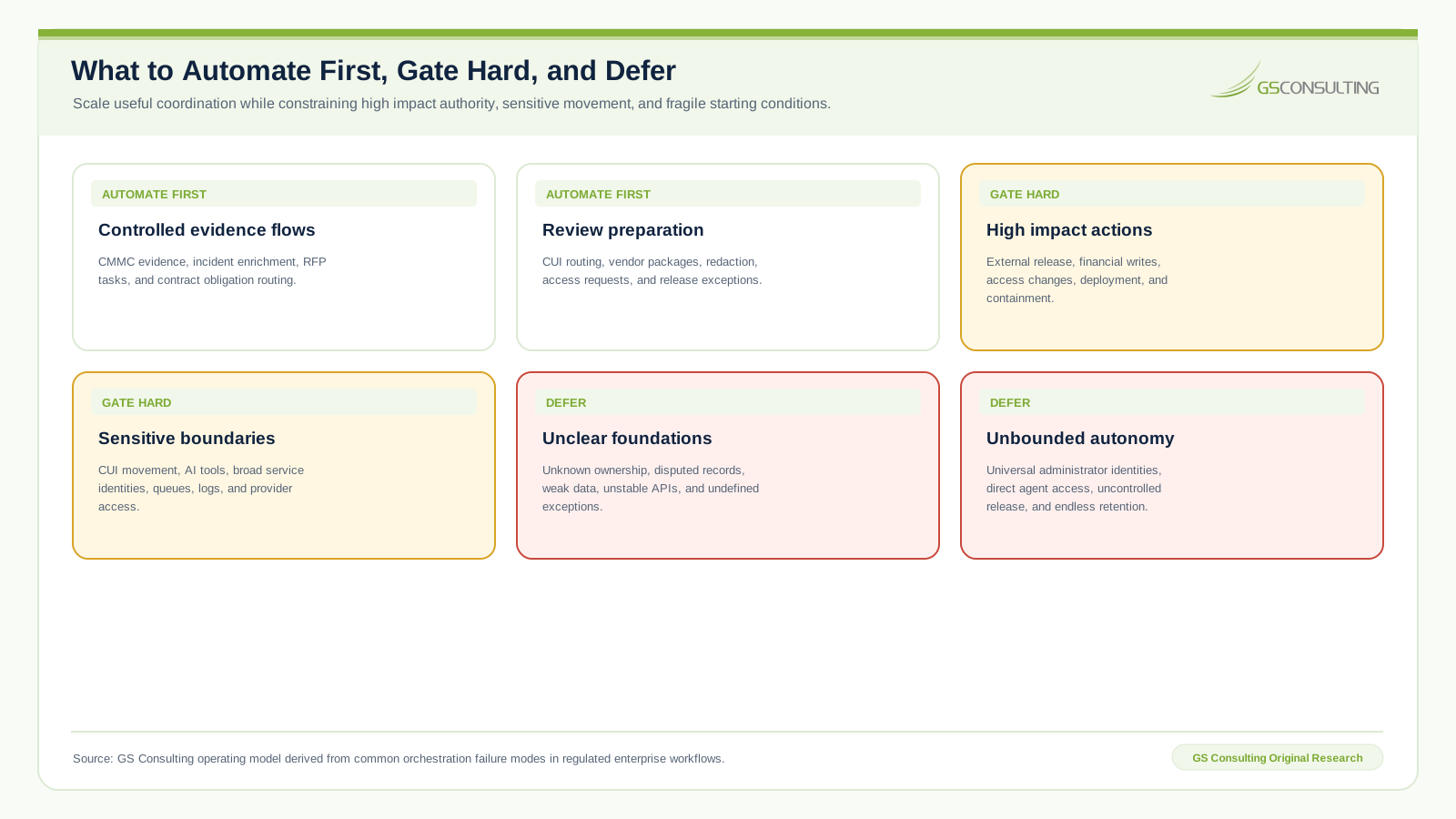
Before selecting tools, define authority. For each workflow, document whether it may:
- Read sensitive data or retrieve source records.
- Create tasks, route documents, or send notifications.
- Write to a system of record or call an external system.
- Change access, close a finding, or trigger a security action.
- Release information or act without human approval.
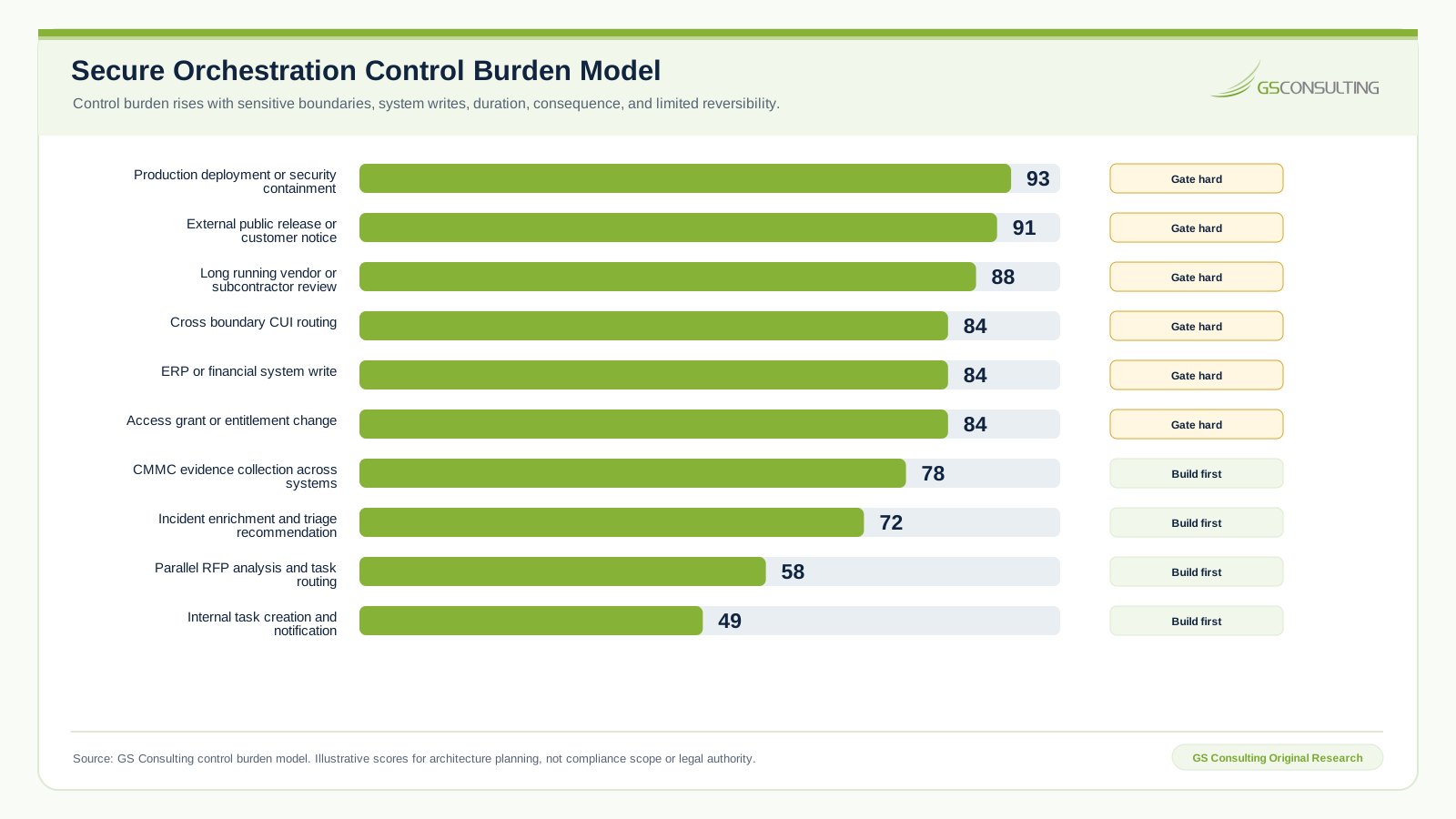
A workflow that reads approved metadata is not equivalent to one that writes ERP records, moves CUI, grants access, or sends a customer notice. Risk should follow the action and its reversibility, not the platform name.
AI agents need brokered authority
An AI agent may read documents, search databases, create tasks, update records, or call APIs. Each tool therefore needs a defined boundary:
- Access: Which data, objects, and systems can it reach?
- Action: Which operation and parameters are permitted?
- Authority: Which user context and approval rules apply?
- Assurance: How are inputs validated, failures handled, and outcomes recorded?
Do not give an agent a broad tool set and hope it behaves. Route calls through controlled domain APIs or a policy broker that enforces these boundaries.
Original Research: The Secure Workflow Orchestration Control Plane
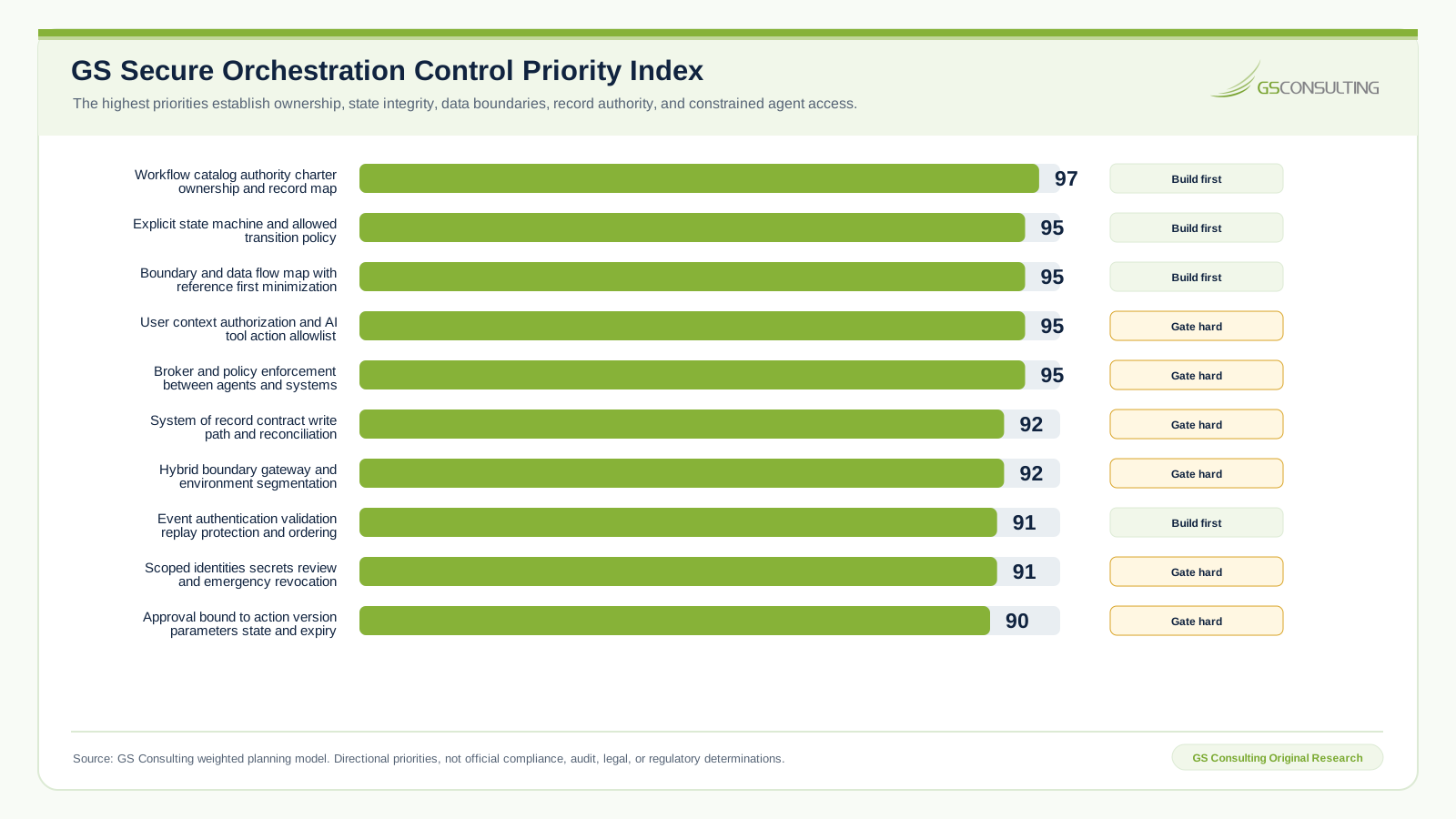
GS Consulting analyzed secure orchestration as a control plane problem rather than a connector problem. Two priority tiers led the planning model:
- 97 out of 100: Workflow catalog, authority charter, ownership model, and system of record map.
- 95 out of 100: Explicit state, boundary mapping, user authorization, constrained agent tools, and a brokered policy layer.
The pattern is direct. The strongest controls are not the most visible automation features. They are the controls that keep the business process inside its approved authority when an event is duplicated, a schema changes, a credential expires, a reviewer is absent, or a downstream system fails.
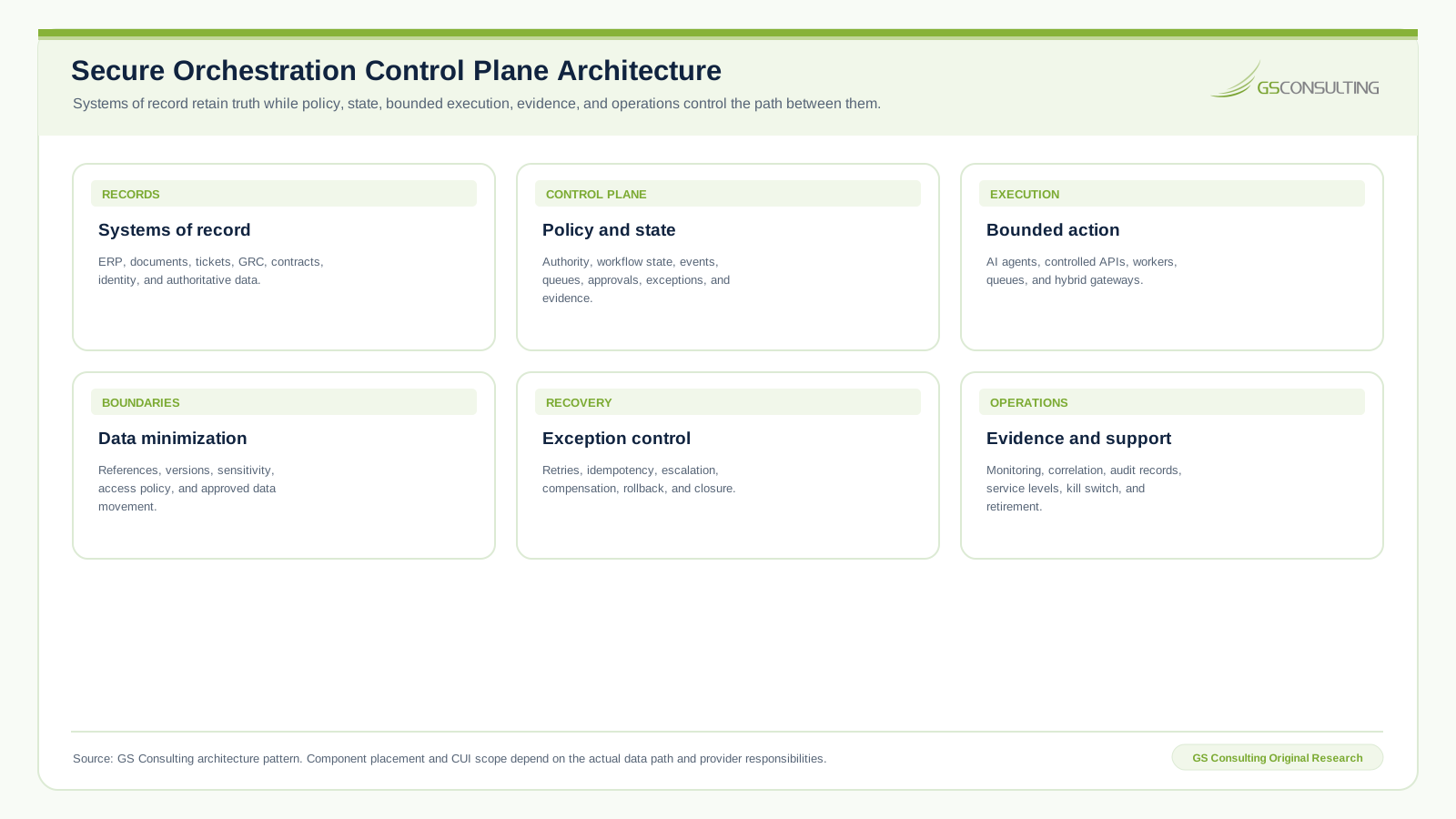
A secure control plane owns workflow policy and state. Systems of record retain authoritative business truth. An execution plane performs bounded work through approved tools and interfaces. The operations layer provides evidence, monitoring, recovery, support, and retirement.
Use State Machines, Not Hope
Complex workflows need explicit state. A document begins with receipt and classification, then moves through review and routing toward completion. It may instead be rejected, escalated, failed, or superseded.
State determines what actions are permitted next. It prevents premature execution, stale retries, duplicate completion, expired actions, and reuse of an old approval after the source changes.
Every orchestrated process also needs a system of record strategy. The ERP owns financial records. The repository owns source documents. The ticketing platform owns incident tasks. The identity platform owns access. The orchestration layer may own workflow state. The audit store owns proof of action.
If the orchestrator stores business truth that belongs elsewhere, it becomes a shadow system. Reconciliation and approved write paths keep the workflow dashboard aligned with authoritative records.
Use references instead of copying sensitive data
The orchestrator often needs to know that a record exists without receiving the full payload. Pass only the reference needed for controlled retrieval:
- The record identifier and authoritative repository.
- The source version and integrity value.
- The sensitivity tag and access policy.
- An approved data view when full content is unnecessary.
This pattern keeps sensitive information closer to its source and reduces what must be stored in prompts, queues, caches, temporary work areas, and logs.
Events, Queues, Retries, and Exceptions Are Control Points
Events, queues, retries, and exceptions each need their own control model:
- Events: Authenticate the source, validate the schema, prevent replay, enforce ordering, and confirm current workflow state.
- Queues: Control who may publish and consume, minimize message content, set retention, and protect failed messages.
- Retries: Use idempotency, confirm current state, limit retry windows, and escalate repeated failure.
- Exceptions: Assign an owner, severity, due date, escalation path, and closure evidence.
A duplicated or stale event can create a task twice or reuse an expired decision. A failed read may be safe to retry, but an uncertain external release or system write requires verification before another attempt. If failure simply moves into email, the orchestration design is incomplete.
Human approval belongs inside the state model
The approval model should define:
- The required reviewer role and authority.
- The source evidence the reviewer must see.
- The exact action, version, and parameters under review.
- The approval period, rejection path, and escalation rule.
A log entry saying approved is not enough. The workflow must block execution until a valid decision exists and must invalidate that decision when the source, output, parameters, recipient, or workflow state changes materially. The complete decision pattern appears in Human in the Loop Workflow Architecture.
Audit trails must be native
The audit trail should connect four evidence groups:
- Context: Trigger, actor, source references, sensitivity, and workflow version.
- Decision: AI output, human review, and the exact action approved.
- Execution: Target system, prior state, resulting state, and verified outcome.
- Recovery: Exceptions, retries, compensation, and closure.
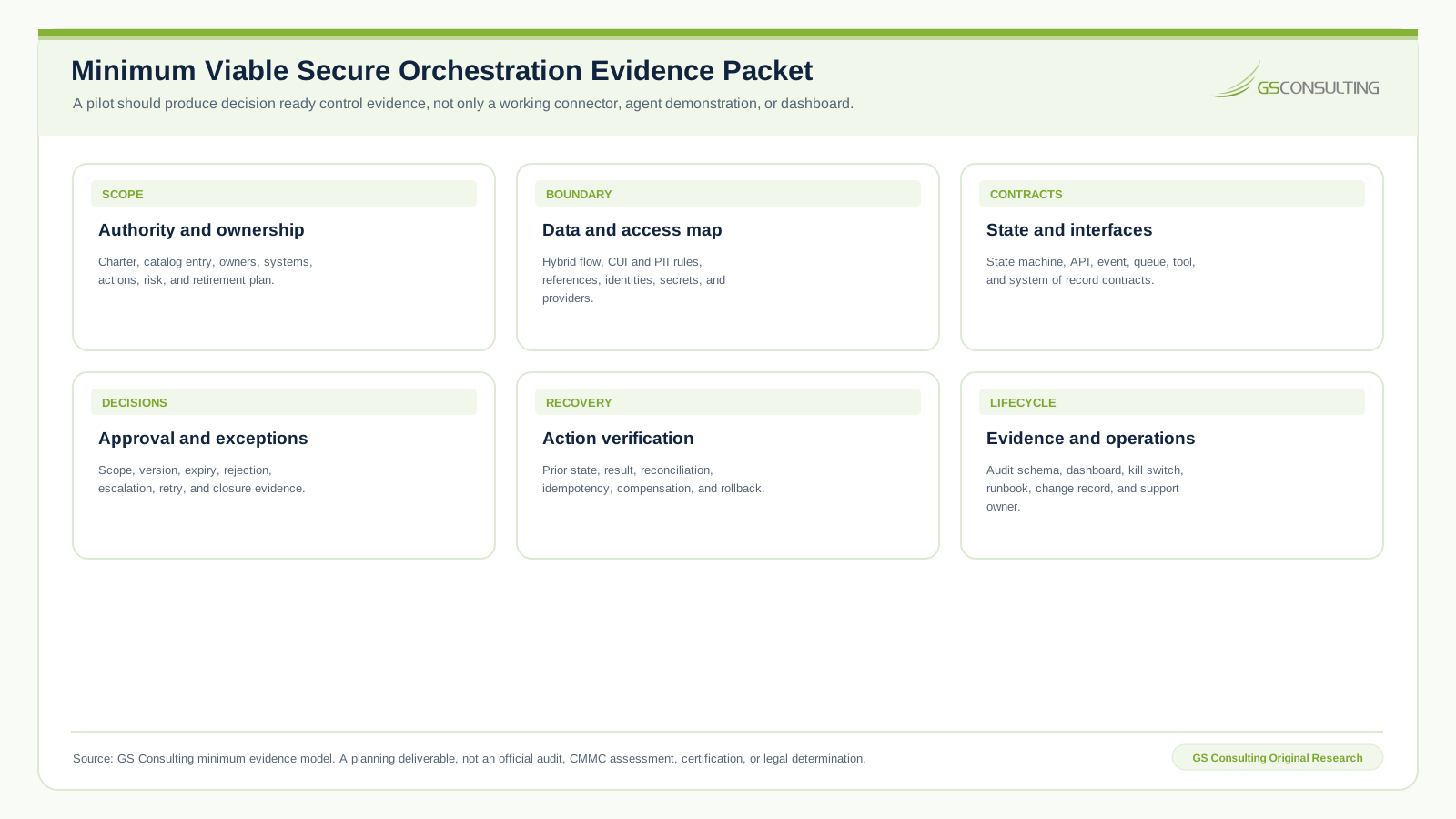
Build this evidence model before production rather than reconstructing it after a failure or assessment request.
For the event and reconstruction model, see Building Audit Trails for Automated Workflows.
Govern the Platform, Own the Workflow
The platform is not the strategy. Commercial workflow tools, cloud services, custom applications, integration platforms, and internal APIs can all participate. The operating model must still define:
- Approved data, systems, and environments.
- Identity, access, secret, and logging standards.
- Approval, testing, monitoring, and change requirements.
- Business, technical, data, security, compliance, and support ownership.
- Production review and decommissioning requirements.
The workflow catalog should make those decisions discoverable. Record why the workflow exists and who owns it. Map its systems, data, authority, and interfaces. Capture operating evidence and the exception path. Close with its risk, production status, and retirement plan.
Test the failure path
Production testing should cover more than the expected path:
- Source, target, API, queue, and identity failures.
- Duplicate, stale, malformed, and out of order events.
- Rejected, expired, and unauthorized approvals.
- Unexpected CUI, invalid AI output, and wrong program access.
- Partial completion, missing audit evidence, compensation, and rollback.
Some actions cannot be reversed. An email cannot be unsent. A public release cannot be unreleased. A customer notice cannot be erased. A security action may interrupt operations. Where rollback is not possible, prevention, stronger approval, and verified parameters matter more.
Monitor day two operations
Source schemas change. Tokens expire. Approvers leave. Queues back up. Data quality drifts. Prompts and models change. Exceptions accumulate. Monitor the signals that reveal those changes:
- Health: Run volume, completion rate, latency, queue depth, and API errors.
- Control: Approval aging, retries, boundary violations, and high impact actions.
- Quality: Human overrides, AI validation failures, and evidence completeness.
- Recovery: Open exceptions, identity failures, and time to restore service.
A Practical First 90 Days
- Days 1 to 30Map one workflow.
Define the process and its owners. Map authoritative systems, sensitive data, approval boundaries, current friction, and success measures.
- Days 31 to 60Design the control plane.
Specify state and action authority. Design the identities and interfaces. Define the evidence, exception handling, monitoring, and recovery model.
- Days 61 to 90Build and validate.
Test expected behavior and realistic failures, train the owners, document production support, and prepare the next controlled use case.
The objective is one reusable secure orchestration pattern, not an attempt to automate the entire enterprise at once.
What Leadership Should Demand Before Production
Before production, leadership should be able to answer:
- Which business process, systems, and sensitive data are involved?
- Which actions are allowed, and where is human approval required?
- How will the workflow handle failure, recovery, and emergency stop?
- Which identities perform the work, and what evidence proves the result?
- Who owns monitoring, support, change control, and retirement?
If those answers are unclear, the workflow may be useful, but it is not yet controlled.
Sources
- U.S. Government Accountability Office, Federal Artificial Intelligence Use Case Inventories
- MuleSoft, Connectivity Benchmark Report
- NIST SP 800 171 Revision 3
- NIST SP 800 207A, Zero Trust Architecture Model for Access Control in Cloud Native Applications
- NIST SP 800 228 Update 1, Guidelines for API Protection
- CloudEvents Specification
- NIST Cybersecurity Framework 2.0
The GS Secure Orchestration Control Priority Index, Control Burden Model, architecture, operating model, and evidence packet are GS Consulting planning tools. They are not official NIST, CMMC, DoD, CISA, audit, legal, or regulatory determinations. Actual scope depends on the systems, data paths, contracts, providers, and controls involved.
Frequently Asked Questions
What is workflow orchestration in a secure environment?
Workflow orchestration coordinates a complete business process across people and technology. It controls how work is authorized, advanced, reviewed, recovered, and proven.
How is orchestration different from integration?
Integration connects systems and moves data. Orchestration applies the operating logic that determines when movement occurs, which state and authority permit it, who must approve it, what happens after failure, and how the outcome is proven.
Can an orchestration platform process CUI?
It can only do so when the technical boundary, provider responsibilities, security controls, and contract requirements support that use. A safer design often passes controlled references and keeps full content inside its approved boundary.
How should AI agent authority be controlled?
Route agent tool requests through a policy and workflow broker. The broker should verify who is requesting the action, which data and tools are allowed, whether approval is required, and whether execution matches the approved scope.
What evidence should a production workflow maintain?
Maintain evidence that shows the workflow is governed, bounded, monitored, and recoverable. The record should cover design authority, operating decisions, recovery, support, and lifecycle changes.