Enterprise AI | | 24 min read
Secure API Development for AI Automation

Key Takeaways
Secure AI automation depends on the authority layer behind the model.
Enforce Object Access
Do not stop at login. APIs need to verify user, object, field, action, workflow state, and approval before returning data or changing records.
Protect Webhooks
Signed events, replay checks, payload validation, idempotency, and monitoring keep retries, forged events, and duplicate actions from corrupting workflows.
Control Service Accounts
AI service identities need owners, least privilege, rotation, logs, reviews, and expiration so technical access does not become unauthorized business authority.
AI automation does not run on magic. It runs on APIs.
APIs move data, check identity, call systems, store outputs, trigger workflows, send webhooks, and decide what AI can touch. That makes secure API development for AI the connective tissue between a promising demo and a production workflow that can be trusted.
If the API layer is weak, the automation may expose credentials, leak CUI, bypass permissions, trigger duplicate actions, store sensitive payloads in logs, or create shadow integrations that nobody owns.
The bad assumption is that the AI tool is the product. It is not. The real product is the workflow. The API layer is where that workflow becomes controlled, observable, and supportable.
Need a secure API foundation for AI automation?
GS Consulting helps GovCon teams design enterprise automation APIs, secure AI webhooks, control service accounts, and build audit ready backend workflows around sensitive systems.
Request an API Automation AssessmentThis guide supports the DevSecOps insights hub and the AI workflow automation service. Read the DevSecOps definition and pipeline guide for the wider delivery model, then use this article to enforce service authority. It also connects directly to integrating AI with legacy GovCon ERPs, legacy system integration for AI automation, workflow automation security risk assessment, NIST SP 800 171 evidence automation, and AI audit trails and activity logging.
Use the API vs middleware vs RPA guide to choose the connection pattern, then use legacy API contract testing to prove shape, behavior, authority, retries, recovery, consumers, and versions before release. The automation integration assessment checklist covers the wider data, control, recovery, and pilot decision.
Why APIs Become the Risk Surface
An AI workflow usually touches more than one system. It may read from a document repository, enrich a ticket, retrieve ERP data, query a GRC platform, send an alert, update a case, or record evidence. Every one of those moves depends on an API, webhook, queue, broker, or backend service.
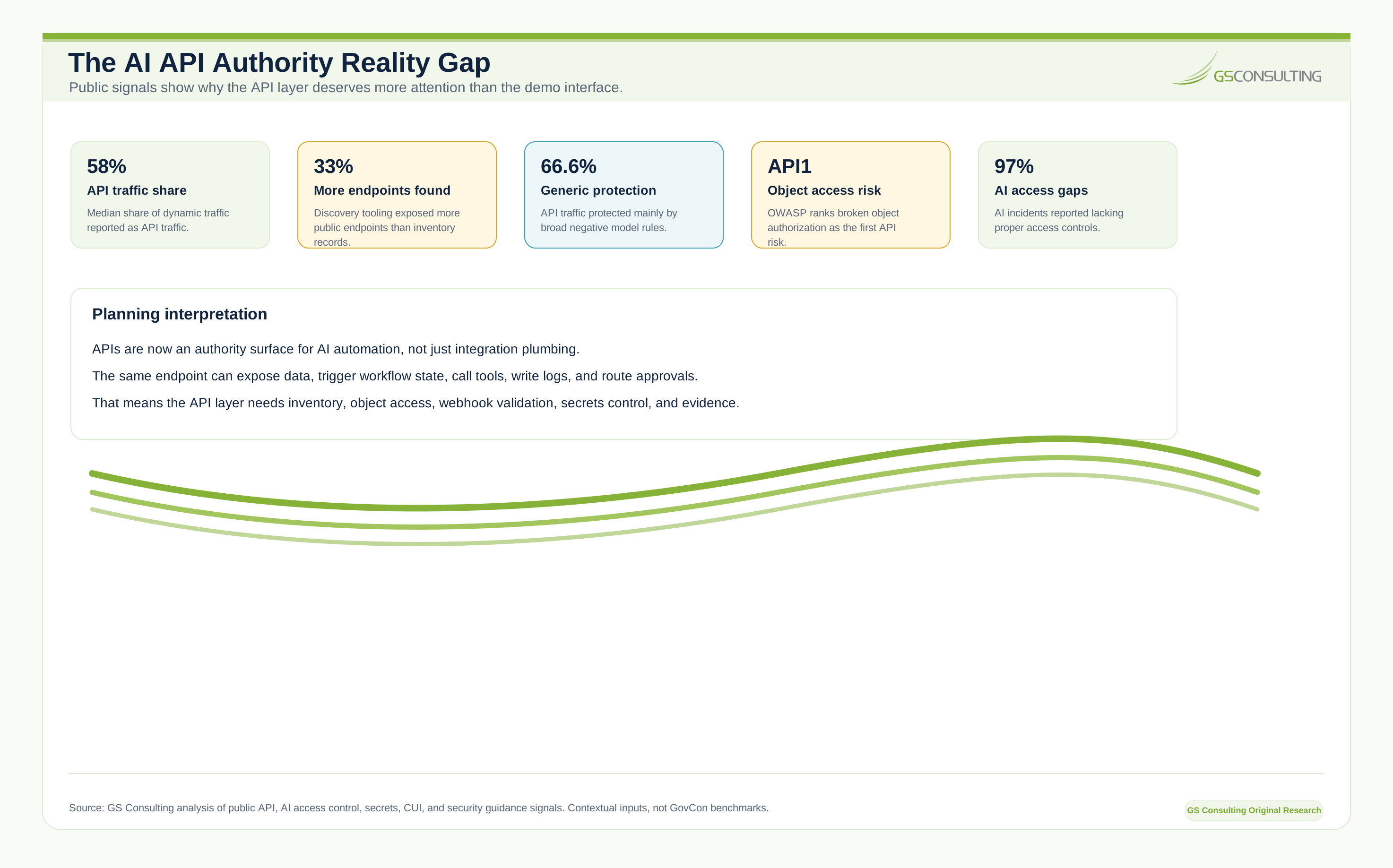
That API layer is where the real authority lives. It decides whether a workflow can read a contract, fetch a project record, retrieve security evidence, summarize a ticket, send a notification, or change a workflow state.
OWASP ranks broken object authorization as the first risk in its 2023 API Security Top 10. The common pattern is simple: a caller changes an object identifier and the API fails to verify that the caller is allowed to access that specific object. For AI automation, that same mistake becomes more dangerous because a backend service account may retrieve data on behalf of a user who could not access it directly.
GovCon API Integration Has More Rules
GovCon API integration is not the same as connecting a generic SaaS workflow. The data may include CUI, FCI, program access restrictions, contract access restrictions, customer restrictions, export control considerations, audit evidence, CMMC scope, subcontractor separation, least privilege service accounts, retention rules, SSP commitments, incident reporting requirements, controlled environments, security review expectations, and assessor visibility.
NIST SP 800 171 Revision 3 applies to nonfederal system components that process, store, or transmit CUI, or that provide protection for those components. If an API moves CUI, protects a CUI workflow, stores CUI related outputs, or logs sensitive payloads, it may be part of the controlled data path.
The right question is not, “Can the API call the system?” The right question is, “Can we prove that this API only exposes the right data, to the right user, for the right workflow, under the right approval, with the right evidence?”
Start With Data Flow, Not Endpoints
Before building endpoints, map the data flow. Identify the source system, data owner, record types, CUI fields, PII fields, contract fields, security logs, financial records, workflow users, service accounts, model interactions, output stores, log stores, retention rules, deletion rules, and approval points.
Be specific. A contract management workflow may handle project number, contract ID, funded value, clause text, reviewer notes, deliverable status, modification history, attachment references, and AI summaries. An ERP workflow may handle labor charges, vendor status, invoice support, procurement records, and billing support. A compliance workflow may handle evidence artifacts, assessor notes, control mappings, system names, and exception decisions.
Generic labels hide risk. Field level mapping exposes it.
The API Should Enforce the Business Boundary
Authentication answers one question: is this caller known? AI automation needs a stronger answer. Is this requesting user allowed to take this action on this object, access these fields, in this program or contract, during this workflow state, under this approval?
Authorization should consider user identity, role, program access, contract access, document access, record owner, data classification, workflow state, approval status, environment, action type, risk level, and need to know.
Do not rely on the prompt to enforce this boundary. Prompts are instructions. Authorization is a control. The API should make unsafe behavior unavailable, not merely discouraged.
Webhooks Are Not Harmless
A webhook can start a workflow. That means it can create a ticket, route a document, trigger enrichment, start a review, send an alert, change a case state, or notify a user that an AI output is ready.
Secure webhook design should include authentication, signature validation, timestamp validation, replay protection, source validation where appropriate, payload validation, event type validation, rate limits, idempotency, error handling, logging, dead letter handling, secret rotation, and monitoring.
Do not accept a webhook because it looks like it came from the right tool. Verify it.
Idempotency Saves You From Weird Failures
If the same request arrives twice, the system should not accidentally do the work twice. This matters because a webhook may retry, a network call may time out, a user may click twice, a message queue may redeliver, a backend job may restart, or an AI workflow may reissue a tool call.
If the API creates a duplicate ticket, that may be annoying. If it charges a cost, approves access, updates a record, sends an external notification, or changes a workflow state twice, it becomes a real problem.
Use request IDs, track processed events, return consistent results, and make retries safe.
Service Accounts Are a Major Control Point
AI automations often need service accounts. That is where teams get sloppy. The automation needs to read from a repository, write to a ticketing system, pull ERP data, query a GRC platform, and send alerts. Someone creates a broad account because the pilot has to move fast.
That shortcut becomes long term risk. A service account should have a named owner, defined purpose, least privilege access, approved systems, approved actions, credential protection, rotation schedule, usage logging, access review, expiration or recertification, and an incident response procedure.
It should not be a generic account named automation admin. It should not use a shared password. It should not have permanent broad access because nobody wants to tune permissions.
If an AI automation account can read all contracts, all CUI documents, all tickets, and all ERP records, you have created a powerful identity. Treat it like one.
Do Not Let the AI Bypass the User
A common design flaw is giving the AI service account more access than the user. The user asks a question. The AI calls an API using a powerful backend account. The API returns data the user could not access directly. The AI summarizes it. Now the user has received restricted information through the assistant.
That is a permission bypass. The better pattern is to enforce user context. The API should know who requested the action, the backend should apply the user permissions, and the workflow should only elevate access through explicit approval paths.
Service accounts may need technical permissions to execute work, but business authorization should still reflect the user and workflow state. Do not confuse technical access with business authority.
Secrets Do Not Belong in Scripts
API keys, tokens, passwords, certificates, and signing secrets should not live in source code, spreadsheets, configuration files in open folders, or developer laptops. They should be stored in an approved secrets manager or secure platform.
The API architecture should define where secrets live, who can read them, how they are rotated, how access is logged, how expired secrets are handled, how secrets are injected into runtime, how secrets are removed from logs, how compromise is detected, and how emergency revocation works.
This is boring engineering. It is also the difference between secure automation and a credential leak waiting to happen.
AI Agents Need Tool Boundaries
An AI agent that can call tools is only as safe as the tools it can call. Tool access must be designed like API access.
For each tool, define what it can do, what data it can access, who can trigger it, what inputs are allowed, what outputs are returned, what approval is required, what logs are created, what happens on error, what rate limits apply, and what actions are forbidden.
An AI agent may be allowed to draft a ticket. It should not automatically close the ticket. It may be allowed to summarize a contract clause. It should not approve a legal interpretation. It may be allowed to prepare an access request. It should not grant access without approval.
This is where human review and API permissions meet.
Logging Must Prove What Happened Without Leaking Data
API logs are essential. They can also become sensitive. A good log should show who called the API, which workflow called it, what action was requested, which object was affected, when it happened, whether it succeeded, which approval applied, which service account was used, which correlation ID ties events together, and what error occurred.
A bad log stores full request bodies, raw CUI, PII, access tokens, model prompts, API keys, document text, security logs, or financial records. Do not dump everything into logs because debugging is easier.
For sensitive workflows, log metadata and references where possible. Store sensitive payloads only when there is a clear need, proper access control, and retention policy. The audit trail should be useful. It should not become a second data spill.
Correlation IDs Are Not Optional
AI workflows often cross many systems: user interface, AI service, API gateway, document repository, ERP, ticketing system, queue, webhook handler, GRC platform, notification service, and audit store.
When something goes wrong, you need to trace the whole path. A user says the AI changed the wrong record. Security asks what data the workflow accessed. Compliance asks who approved the action. The API team asks which service called which endpoint.
If there is no correlation ID, everyone starts searching logs manually. That is not production.
API Gateways Help, But They Do Not Replace Design
An API gateway can provide authentication, rate limiting, routing, TLS termination, request filtering, logging, monitoring, policy enforcement, and key management. Use it.
But do not assume the gateway solves application authorization. The gateway can check whether the caller is allowed into the building. The API must check whether the caller is allowed into the room.
For AI automation, that room may be a contract, project, ticket, evidence artifact, vendor record, incident case, or ERP transaction. Object authorization belongs in the application layer.
API Contracts Should Be Treated Like Engineering Artifacts
An API contract should define endpoint purpose, allowed methods, request schema, response schema, required headers, authentication method, authorization rules, error codes, rate limits, data classification, retention notes, audit requirements, version, owner, and change process.
For enterprise automation APIs, this is critical. If the contract changes without notice, workflows break. If the response schema changes, AI extraction may fail. If a field meaning changes, downstream summaries may become wrong.
Treat APIs as products with owners, versions, documentation, and change controls.
Payload Validation Protects the Workflow
Never trust incoming payloads. That applies to users, systems, webhooks, AI outputs, and internal services.
Validate required fields, data types, allowed values, string length, file type, file size, date format, identifier format, object ownership, workflow state, data classification, and action permission.
AI outputs especially need validation. If a model suggests updating a record, the API should not blindly accept free form text. Use schemas, controlled values, explicit action types, and validation rules. A model can draft. The API should enforce.
Rate Limits and Errors Are Security Controls
AI workflows can generate high request volume. A prompt may cause multiple retrieval calls, an agent may loop, a webhook may retry, a bug may fan out across records, or an attacker may abuse an endpoint.
Use limits by user, service account, workflow, endpoint, tenant, program, data type, and action type. For high risk actions, use tighter limits and approval.
Error messages also need design. Do not return sensitive details such as restricted contract names, program names, repository locations, or security record details to the caller. Log details securely for authorized support staff and return minimal information to the user.
Testing Must Include Abuse Cases
Normal testing asks whether the API works. Secure API testing asks how it fails.
Test another user record request, another program record request, expired service account token, webhook replay attack, invalid signature, duplicate event, malformed payload, oversized file, unauthorized write attempt, missing approval, wrong workflow state, forbidden AI tool field, rate limit exceeded, unauthorized CUI field request, and sensitive data in an error response.
If you only test the happy path, you are not testing the real system.
API Security Reviews Should Happen Before Production
Do not bolt security review on after the workflow is built. Review API design early. A serious review should cover data flow, threat model, authentication, authorization, object access, service accounts, secrets, webhook security, payload validation, logging, audit trail, rate limits, error handling, sensitive data storage, retention, dependency risks, monitoring, incident response, and change management.
CISA secure by design guidance emphasizes building security into products from the start rather than treating it as an afterthought. That same mindset applies inside the enterprise.
Do not make the security team discover the API when the business wants to go live next week.
Original Research: The AI API Authority Control System
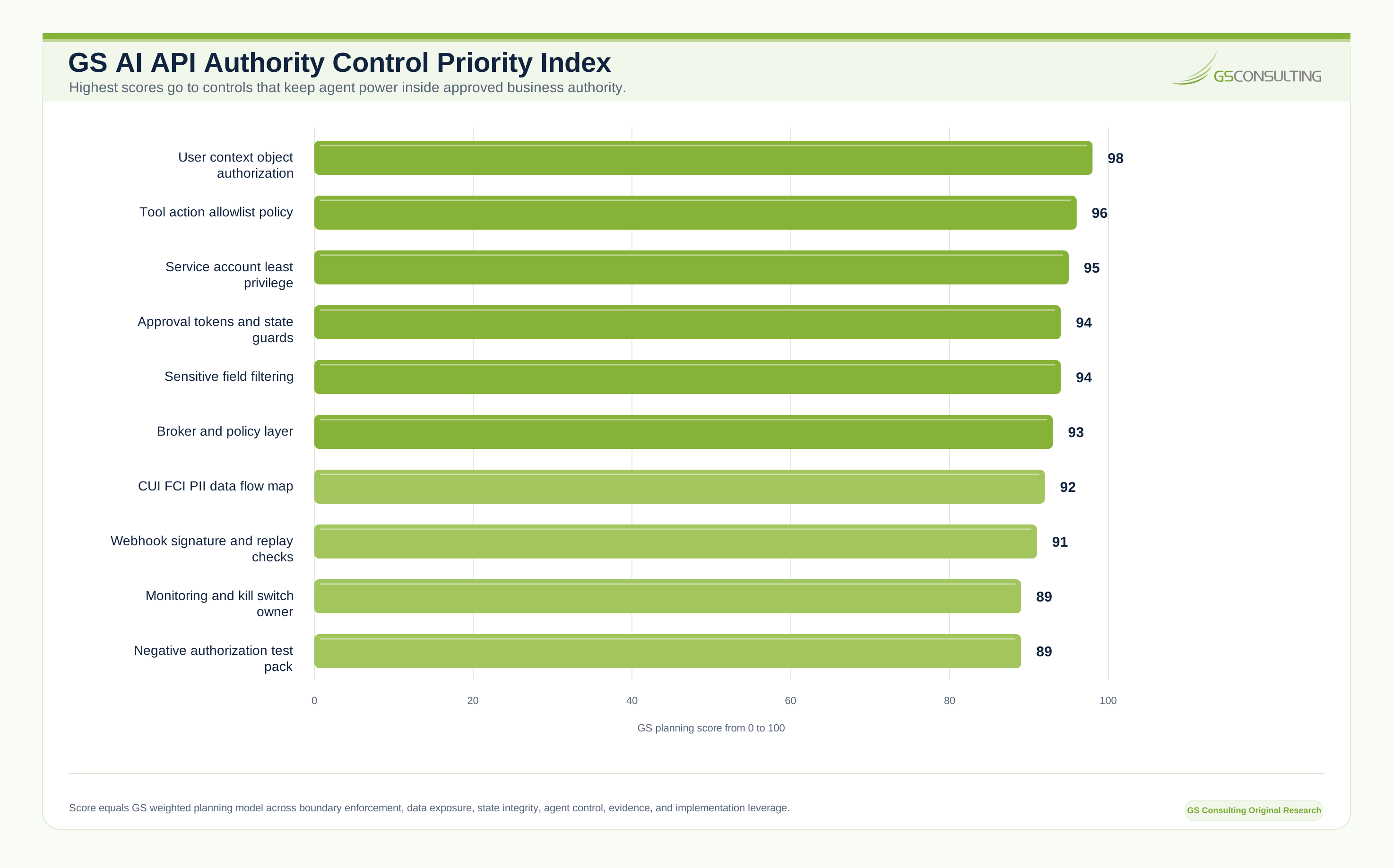
GS Consulting analyzed secure API development as an authority control problem, not an endpoint count problem.
The real production question is not simply whether an API works. It is whether the API can prove that the requesting user, service identity, object, field, action, workflow state, and approval were all authorized at the moment the workflow executed.
That is the authority gap behind AI automation. The user asks for an action. The agent interprets the request. A tool definition converts the request into structured input. A service account calls the API. The API retrieves an object or changes a record. If the service account has more technical access than the user has business authority, the AI workflow can become a permission bypass.
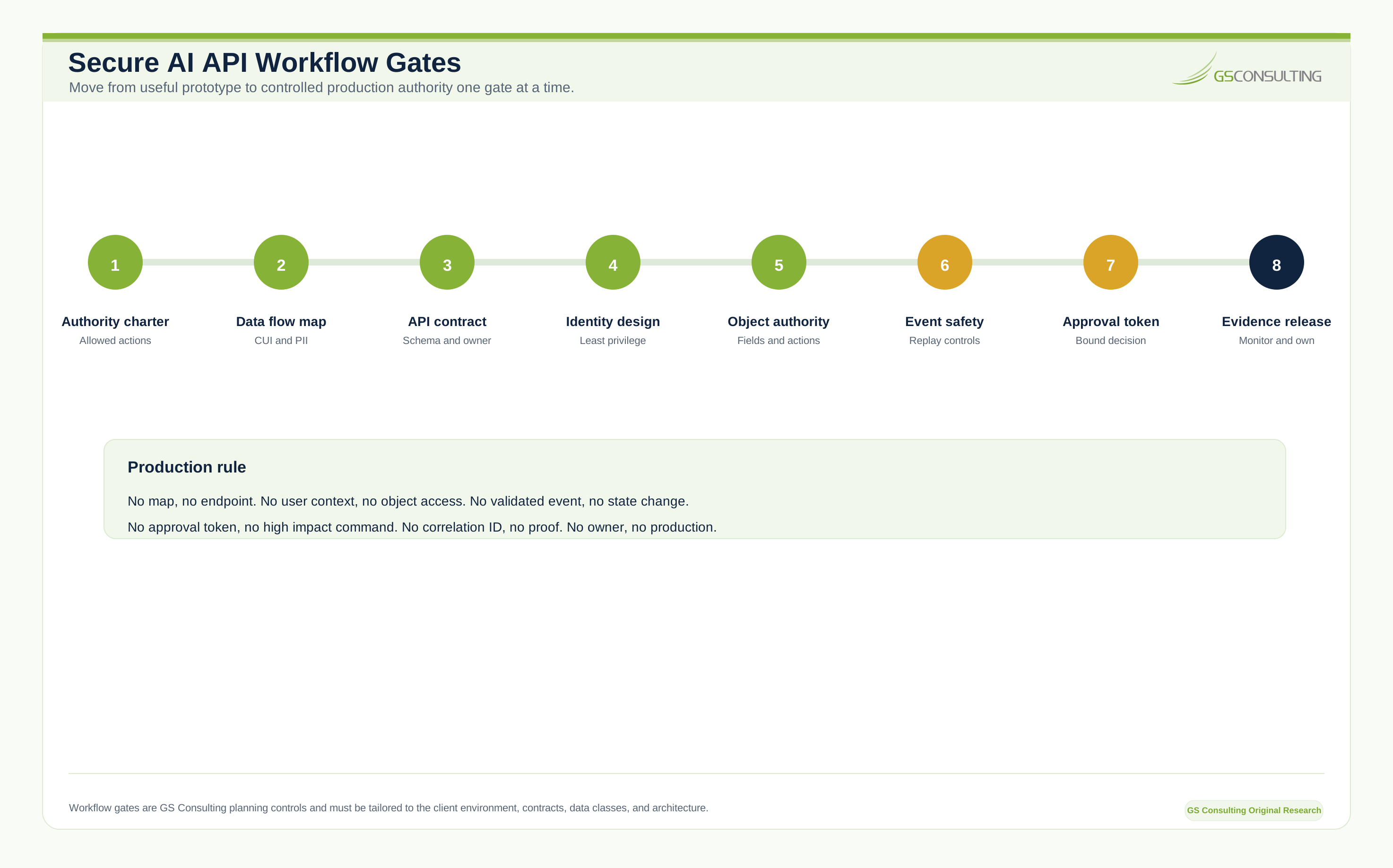
The operating standard is direct: no data flow map, no endpoint. No user context, no object access. No validated event, no state change. No approval token, no high impact command. No correlation ID, no proof. No owner, no production.
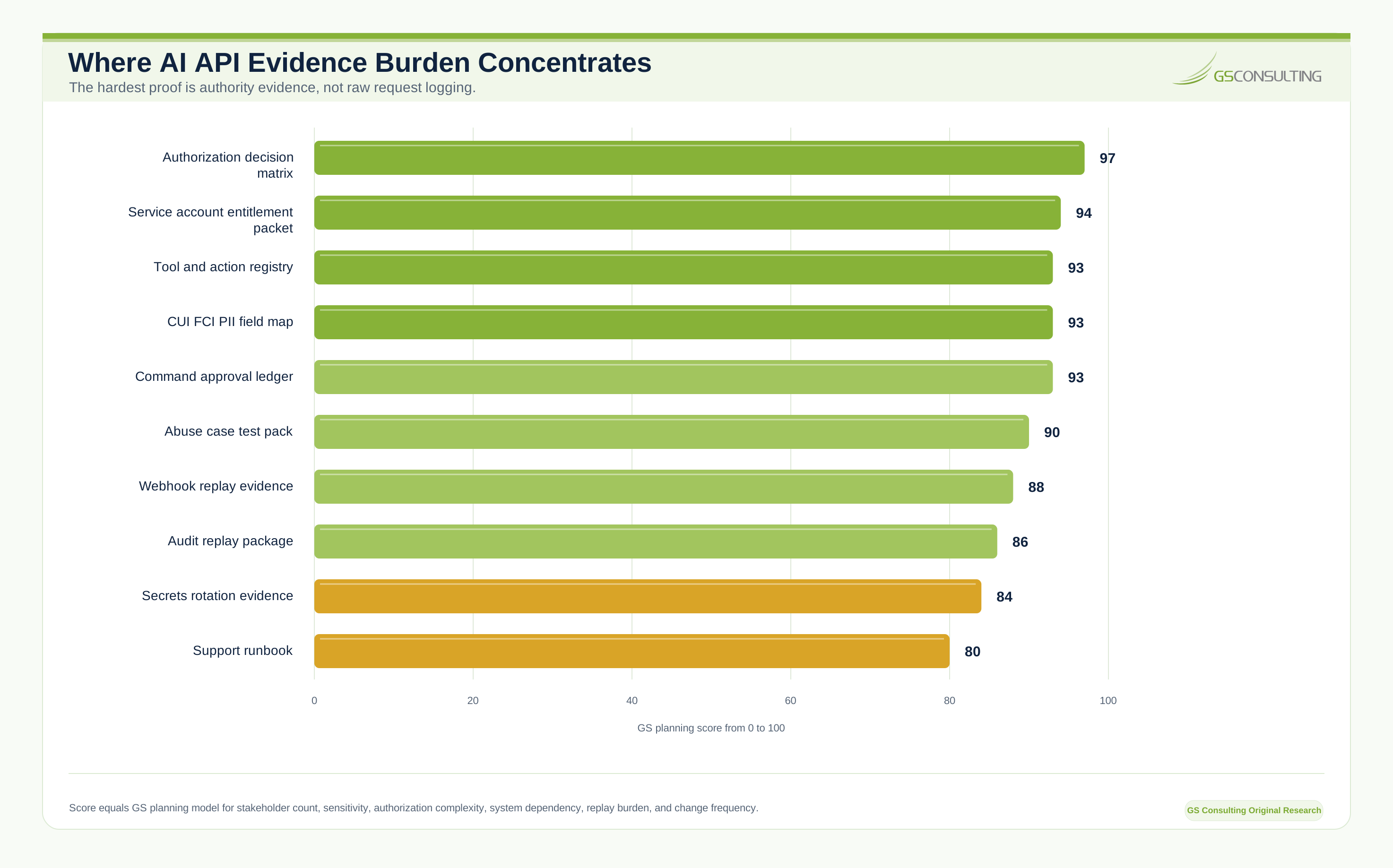
The GS AI API Authority Control Priority Index, Evidence Burden Model, workflow gates, operating model, and evidence packet are GS Consulting derived planning tools. They are not official legal, audit, compliance, NIST, CMMC, DoD, CISA, OWASP, privacy, FAR, DFARS, or regulatory determinations.
What Usually Breaks Inside Organizations
The failure patterns are predictable. The API exposes too much because the endpoint returns the full object and the interface only displays three fields. Authorization checks are too shallow because the API verifies login but not specific record access. Webhooks trust the sender and let reachable endpoints trigger workflow activity. Service accounts become permanent administrators. Logs store full payloads. AI output is accepted as an API command. API changes break automations. No one owns the integration after the developer moves on.
These are operating model failures, not model failures.
Practical API Patterns for AI Automation
The API reads approved data and creates a draft output for human review. Use it for summaries, evidence packages, contract analysis, and reports.
The AI prepares an action, a human approves it, and the API executes only the approved object, action, state, and expiration.
A trusted system emits signed events, the automation validates them, and only expected event types start workflows.
The AI retrieves only records the current user is allowed to access. Use it for document search, contract answers, and knowledge retrieval.
The AI never talks directly to sensitive systems. It talks to a broker that enforces policy, logging, filtering, and rate limits.
The API records what happened, what data was used, who approved it, and what output was created.
What to Build First
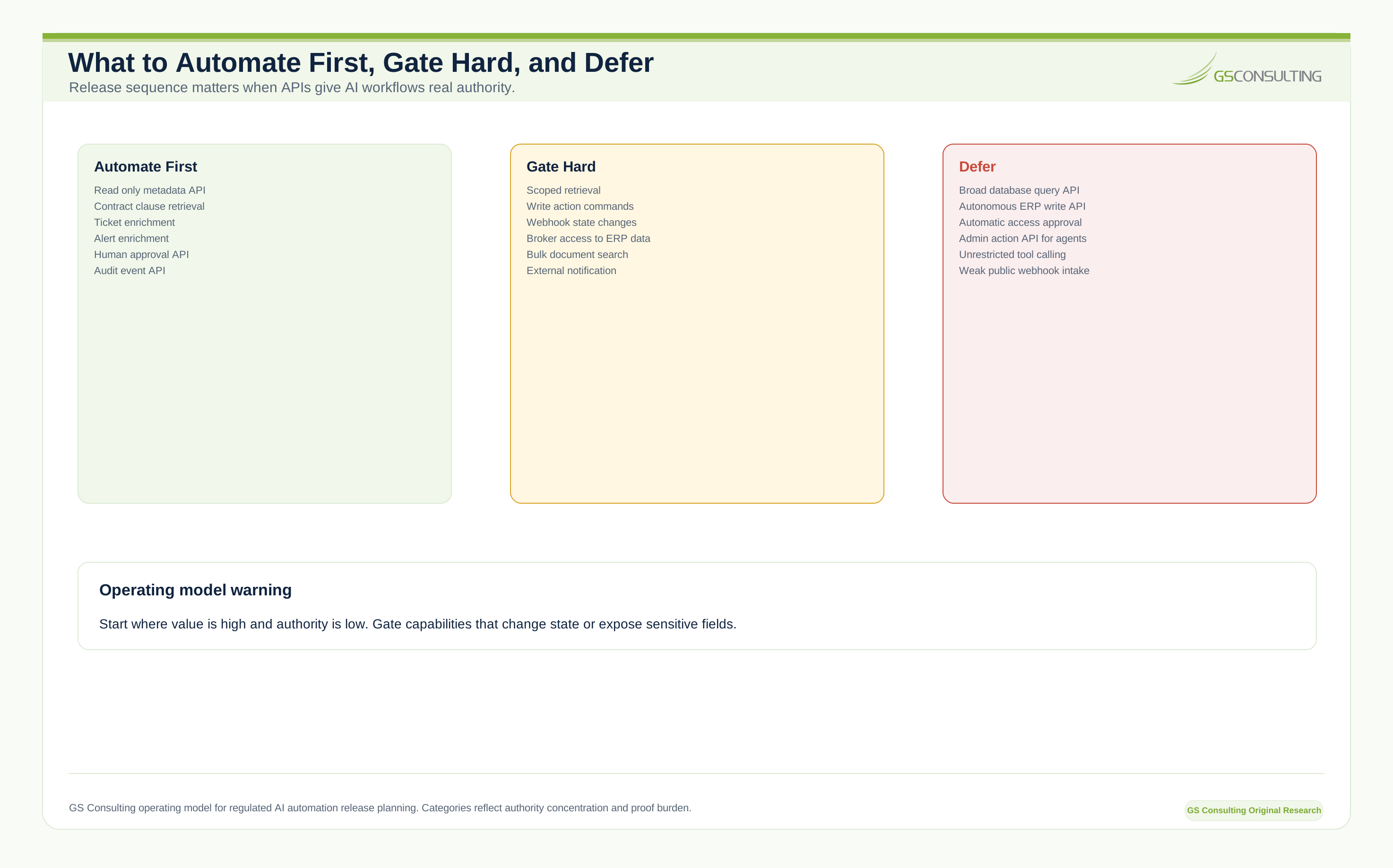
Start with APIs that support low risk, high value workflows. Good first candidates include read only document metadata, approved contract clause retrieval, evidence package status, vendor status lookup, ticket enrichment, alert enrichment, project data summary, workflow task creation, human approval, audit event, and notification APIs.
Do not start with broad database query APIs, universal document retrieval, autonomous ERP write actions, automatic access approval, external notification without review, bulk export over sensitive data, unrestricted tool calling, admin actions for AI agents, or public webhook endpoints with weak validation.
Build trust first. Then add controlled write actions.
A Practical First Ninety Days
- First 30 DaysMap the workflow.
Identify the automation use case, data sources, users, service accounts, sensitive data, allowed actions, forbidden actions, approval points, audit requirements, and first API pattern.
- Next 30 DaysBuild the secure API foundation.
Create endpoint contracts, implement authentication, implement object authorization, add payload validation, scope service account access, validate webhooks, add structured logs, assign correlation IDs, set rate limits, and write abuse tests.
- Final 30 DaysConnect and validate.
Connect the AI workflow, test user permissions, test duplicate events, test bad payloads, test unauthorized access, review secrets handling, review CUI and PII handling, document the API, and define support ownership.
Metrics That Matter
Do not measure number of endpoints. Measure whether the API layer is safe and useful: workflows supported, unauthorized access attempts blocked, permission test pass rate, webhook validation failure rate, duplicate event handling success, API error rate, workflow completion time, approval capture rate, audit event completeness, sensitive data logging findings, secrets rotation compliance, rate limit incidents, time to resolve integration failure, manual handoffs removed, and shadow integrations retired.
The goal is not more APIs. The goal is controlled automation.
What Leadership Should Demand Before Production
Before an AI automation API goes live, leadership should ask what data it exposes, what systems it connects, whether it touches CUI, PII, financial data, contract data, or security logs, who can call it, what service account it uses, whether authorization is enforced at the object level, whether AI can perform write actions, where human approval is required, whether webhooks are signed and validated, whether secrets are stored securely, whether logs are safe, whether the team can trace a workflow end to end, what happens on failure, who owns support, how changes are managed, and what audit evidence is produced.
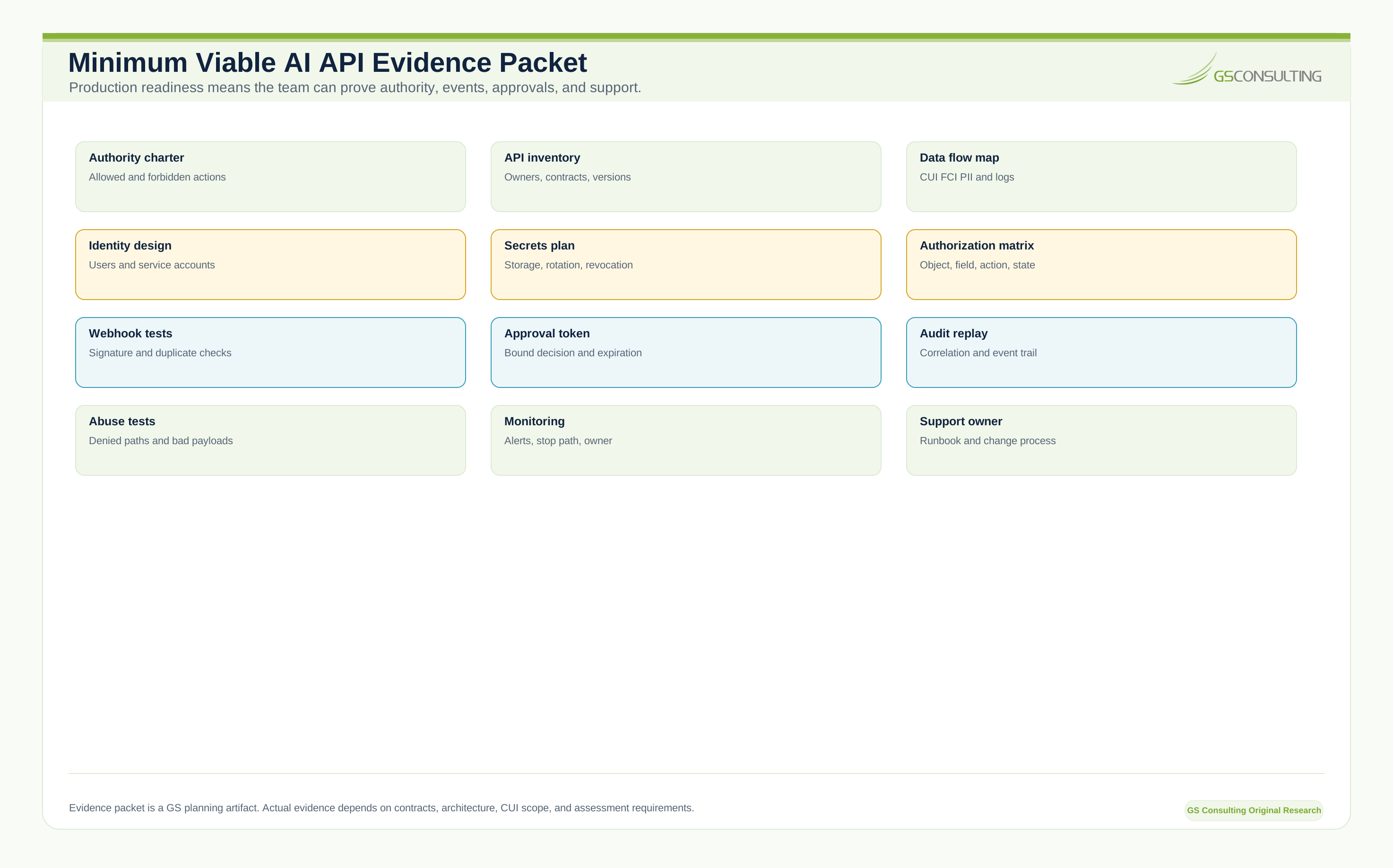
If the answers are weak, the API is not ready. It may work. That does not mean it is safe.
What GS Consulting Builds
GS Consulting helps GovCon firms build secure API layers that make AI automation useful without losing control of data, credentials, or system authority. That includes API architecture design, GovCon API integration planning, secure webhook design, service account access models, object authorization, secrets management design, enterprise automation APIs, AI tool boundary design, data flow mapping, CUI and PII handling review, audit event design, API gateway configuration, backend integration engineering, ERP and legacy system integration, human approval API patterns, abuse case testing, production monitoring, documentation, and support planning.
This is custom software engineering with security and compliance built into the architecture. Not a connector demo. Not a no code shortcut. Not an AI agent with an admin token.
The Bottom Line
Secure API development for AI is where automation becomes real. It is also where it can become dangerous.
APIs decide what data the AI can access, what actions it can take, what systems it can touch, what logs are created, and what proof exists after the workflow runs. For GovCon firms, those decisions affect CUI, contract data, financial records, security operations, compliance evidence, and customer trust.
A good API layer enforces permissions, protects secrets, validates webhooks, limits actions, logs safely, supports human approval, and preserves audit trails. A bad API layer gives the AI too much access and hopes nothing goes wrong.
If you want AI automation to work in a regulated environment, build the secure connective tissue first. The model can only be as trustworthy as the APIs behind it.
Research Sources and Caveats
The original research in this article uses GS Consulting derived planning metrics based on public API security, AI governance, access control, secrets exposure, CUI, CMMC, and secure software guidance. The AI API Authority Control Priority Index, Evidence Burden Model, workflow gates, operating model, and evidence packet are planning tools. They are not official legal, audit, compliance, NIST, CMMC, DoD, CISA, OWASP, privacy, FAR, DFARS, or regulatory determinations.
Public API and breach figures are contextual signals, not GovCon contractor benchmarks. Whether an API, AI service, broker, queue, logging platform, or downstream integration enters a CUI or CMMC assessment boundary depends on actual data handled and applicable contractual and regulatory requirements.
- OWASP API Security Top 10 2023, Broken Object Level Authorization
- NIST SP 800 171 Revision 3
- NIST SP 800 228 Update 1, Guidelines for API Protection
- Electronic Code of Federal Regulations, 32 CFR Part 170 CMMC Program
- CISA Secure by Design
- Cloudflare State of Application Security 2024
Ready to build secure enterprise automation APIs?
GS Consulting helps GovCon firms connect AI workflows to legacy systems, ERPs, document repositories, ticketing tools, GRC platforms, security tools, and custom applications without giving AI uncontrolled authority.
Contact GS ConsultingFrequently Asked Questions About Secure API Development for AI
What is secure API development for AI automation?
Secure API development for AI automation means designing the API layer that controls what data an AI workflow can access, what systems it can call, what actions it can trigger, and what evidence remains afterward. It includes authentication, object authorization, service account controls, webhook protection, payload validation, safe logging, and human approval paths.
How should GovCon firms secure AI webhooks?
AI webhooks should use authentication, signature validation, timestamp checks, replay protection, payload validation, event type allowlists, idempotency, rate limits, logging, monitoring, and secret rotation. A webhook should not trigger workflow activity simply because it appears to come from a familiar tool.
What API controls matter most for enterprise automation APIs?
The highest priority controls are user context object authorization, tool and action allowlists, least privilege service accounts, approval tokens, workflow state guards, sensitive field filtering, webhook replay protection, correlation IDs, safe logs, and abuse case testing.
Should AI agents use service accounts?
AI agents often need service accounts, but those accounts should be treated as production identities with a named owner, defined purpose, least privilege access, credential protection, rotation, logging, review, expiration, and emergency revocation. A broad service account can turn an AI assistant into a permission bypass.
How do APIs affect CMMC or CUI scope?
An API, broker, queue, log store, or AI service may matter to CUI and CMMC scope if it processes, stores, transmits, or protects CUI or related controlled components. Teams should map the actual data flow, fields, logs, outputs, identities, and downstream systems before production use.
Suggested Future Reading
- AI Workflow Automation
- Enterprise AI Process Transformation
- Integrating AI Automations with Legacy GovCon ERPs
- Legacy System Integration for Enterprise AI Automation
- Workflow Automation Security Risk Assessment
- Automating NIST SP 800 171 Compliance Evidence Collection
- AI Audit Trails and Activity Logging