Secure AI Automation | | 26 min read
Private AI vs Public AI vs Hybrid AI Automation
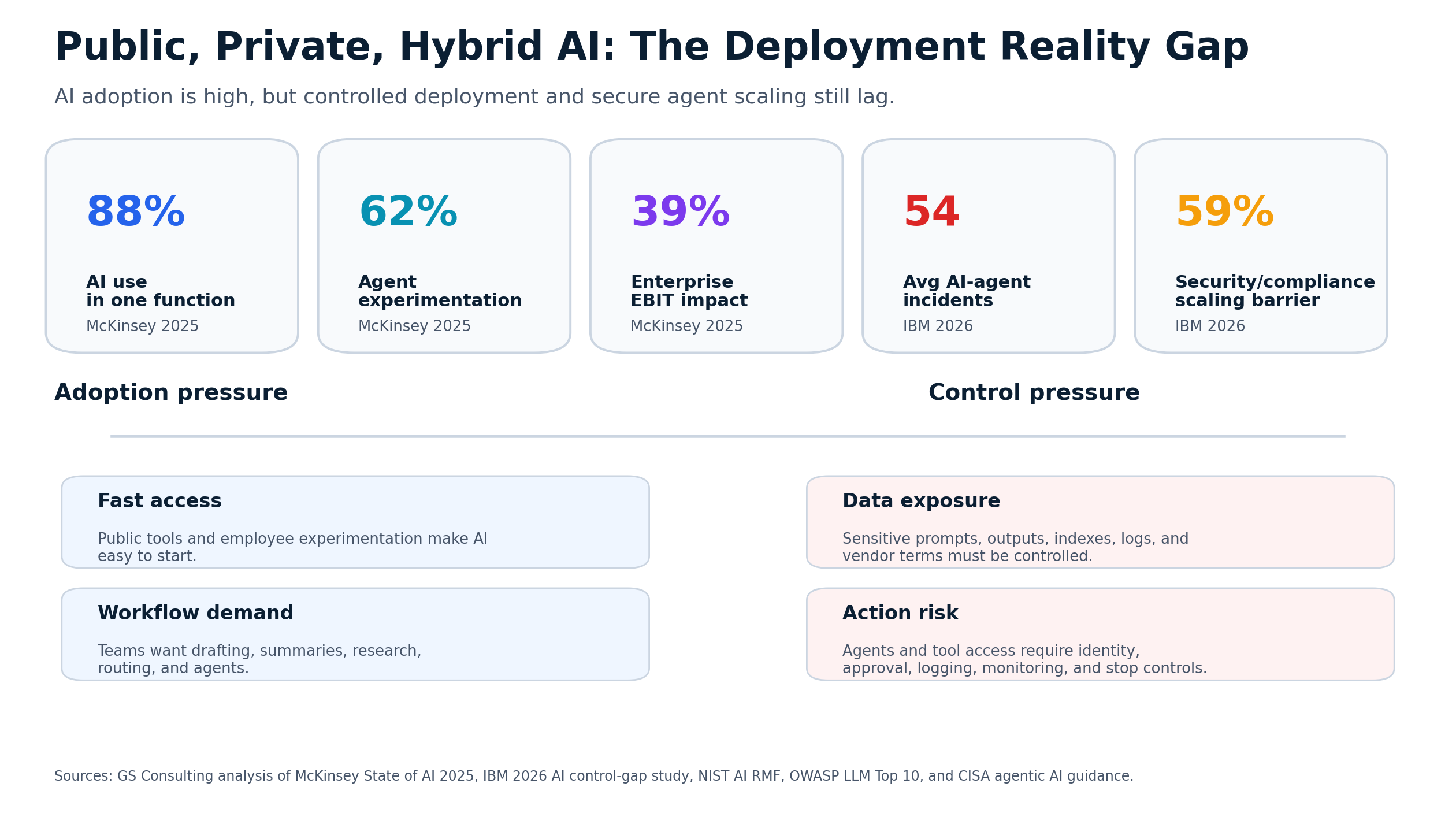
Key Takeaways
Choose an AI deployment lane from the workflow and data.
Separate deployment choices
Compare public, private, and hybrid environments against the intended use.
Include action authority
Assess what AI can do after it connects, as well as what information it can read.
Account for the tradeoffs
Balance control needs with cost, integration, governance, and operating responsibility.
Most organizations are asking the wrong AI deployment question.
They ask, "Should we use public AI or private AI?"
That sounds reasonable. It is also too simple.
The better question is this: what data will AI touch, what workflow will it support, and what can it do once it is connected?
That is what decides the architecture.
A public AI tool may be fine for public research or generic drafting. A private AI environment may be necessary for sensitive records, regulated workflows, or contract controlled data. A hybrid approach may be the most practical answer for organizations that need to move fast without putting every use case into the highest control environment.
The mistake is treating every AI use case like it has the same risk.
It does not.
Do not choose an AI deployment model before you understand the workflow.
GS Consulting helps regulated organizations classify AI use cases, choose public, private, or hybrid AI deployment lanes, evaluate vendor risk, define controls, and build secure AI automation architectures.
Request an AI Deployment AssessmentThe Simple Difference
Public AI, private AI, and hybrid AI are not just technical options. They are control models.
Useful for public research, generic drafting, brainstorming, explanation, and low sensitivity productivity. The risk is sensitive data entering an environment that was not approved for it.
Better suited for regulated data, customer records, employee data, CUI, PHI, contracts, financial records, security logs, and workflows that need audit evidence.
Routes low risk work to lighter environments and sensitive or restricted workflows to controlled environments with stronger identity, logging, approval, monitoring, and vendor controls.
Not every workflow needs the most locked down environment. But sensitive workflows should not be pushed into tools that were never approved for that data.
Why This Matters for Regulated Organizations
Regulated organizations do not just need AI that works.
They need AI they can explain, monitor, restrict, and defend.
That means the architecture has to answer basic questions. What data is being processed? Where does it go? Can the vendor retain it? Can it be used for model training? Who can access prompts and outputs? Can the AI retrieve restricted documents? Can it call tools or APIs? Can it write back to systems? What gets logged? Who approves high impact actions?
If the answer is "we are not sure," the architecture is not ready.
NIST describes the AI Risk Management Framework around Govern, Map, Measure, and Manage. That is a useful way to think about deployment choices because the organization needs ownership, workflow context, measurement, and ongoing control before AI scales.
Original Research: The AI Deployment Lane Control Burden Index
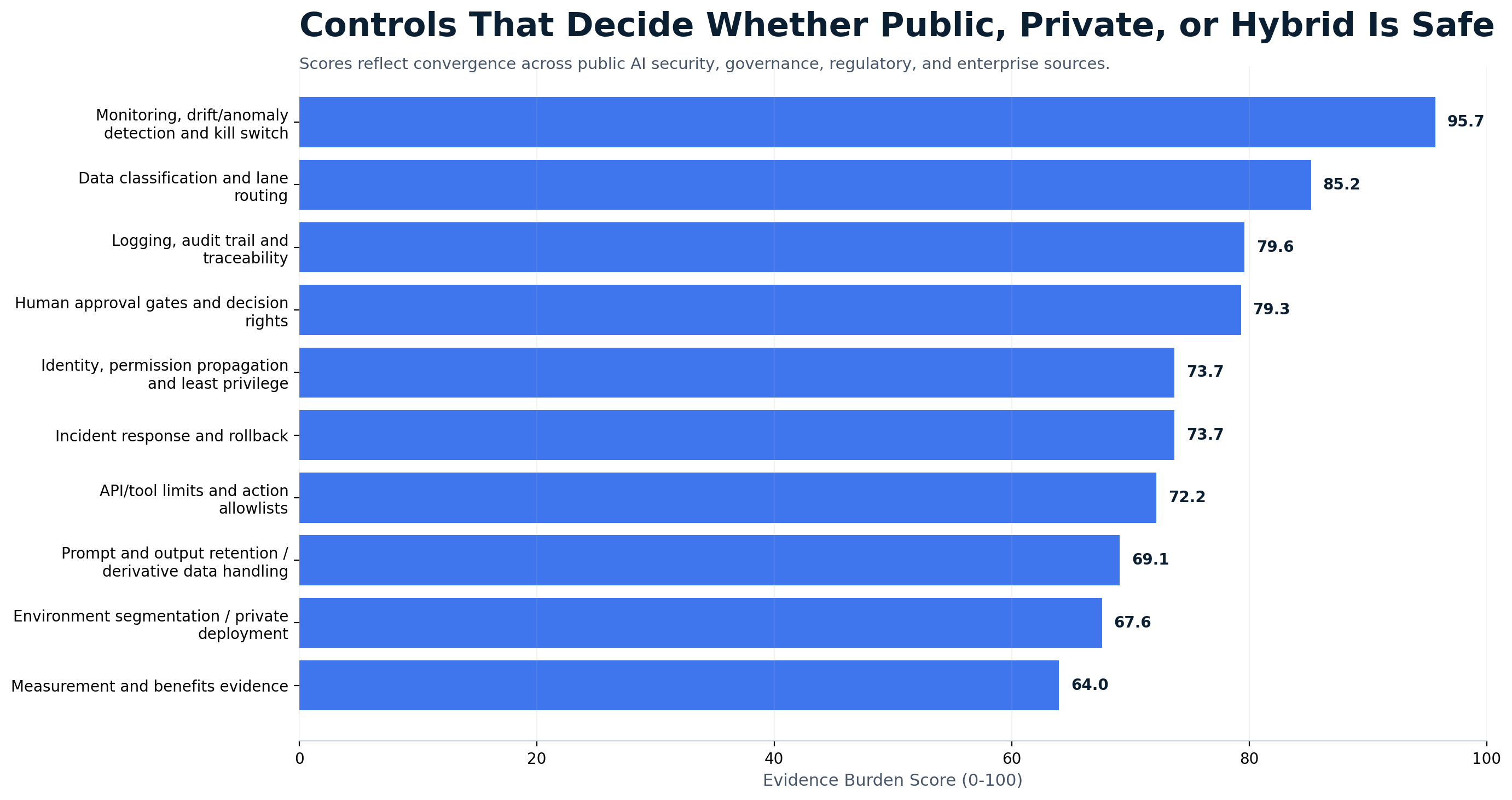
Original GS Consulting research shows that public, private, and hybrid AI should be selected by control burden, not preference.
GS Consulting analyzed public AI governance, cybersecurity, regulatory, accountability, and enterprise adoption sources to create an AI Deployment Lane Control Burden Index. The model scores deployment lanes based on data sensitivity, AI authority, vendor and retention exposure, identity and logging burden, and evidence requirements.
The research used three GS Consulting derived planning metrics: Deployment Lane Control Burden Score, Use Case Routing Index, and Control Evidence Burden Score. These are planning tools, not official legal, regulatory, audit, NIST, CISA, CSA, EU AI Act, OWASP, IBM, McKinsey, or GAO determinations.
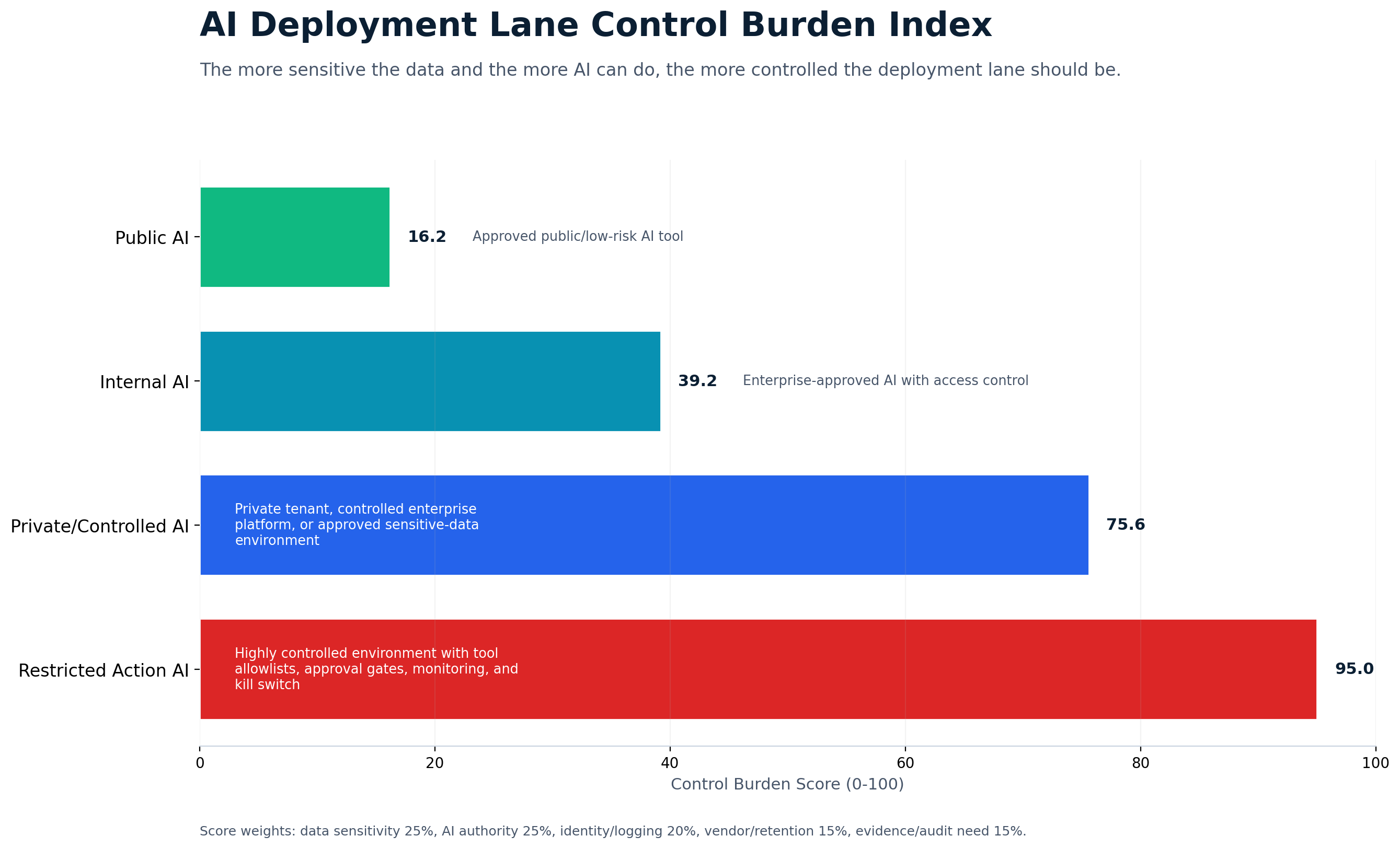
The practical takeaway is simple: do not ask whether public AI or private AI is better. Ask what data AI will touch, what workflow it will support, what authority it will have, what evidence is required, and what happens if it is wrong.
Public AI Tools
Public AI tools are the easiest to start with. They are widely available, fast, and useful. They can help employees draft, summarize, brainstorm, explain, translate, code, research, and organize information.
For low sensitivity work, public AI can be valuable.
Good use cases include public content drafts, public research summaries, generic brainstorming, non sensitive training outlines, general writing support, public policy summaries, and internal productivity where no sensitive data is used.
The problem starts when employees use public AI tools with data that does not belong there: customer records, employee data, contracts, financial information, source code, security logs, government data, health information, or confidential business details.
Public AI is not automatically unsafe. But it should be treated as unsuitable for sensitive workflows unless the organization has reviewed the tool, contract, data terms, security controls, and retention model.
Where Public AI Works Best
Public AI works best when the data is already public or when the work is generic.
- A marketing employee brainstorms blog ideas from public industry trends.
- A training team creates a generic outline for a leadership workshop.
- A business analyst asks for a plain language explanation of a public regulation before doing their own review.
- A sales team drafts a generic email template without customer specific data.
These are reasonable use cases because the data is not sensitive and the output is reviewed before use.
Where Public AI Breaks Down
Public AI starts to break down when users treat it like a secure enterprise workspace.
A user pastes a customer complaint into a prompt. A manager uploads an employee issue for summary. A finance analyst asks AI to review invoices with vendor details. A contracts team pastes confidential terms. An IT analyst enters security logs. A government contractor uploads CUI.
Now the organization has a different problem. It may not know where the data went, whether the prompt is retained, whether the vendor can review it, whether the output is stored in a user account, or whether the data can be used for model improvement.
That is not a productivity issue. That is a governance issue.
Private AI Environments
Private AI is about control.
A private AI environment gives the organization stronger control over data, access, logging, retention, and integration. It can mean a private cloud environment, dedicated enterprise AI tenant, internal model deployment, controlled model gateway, secure retrieval system over approved documents, private workflow automation layer, or regulated data AI environment.
The point is not the label. The point is control.
Private AI is best when the workflow involves sensitive data, regulated data, confidential business records, security data, or systems of record.
Private AI is also a better fit when AI needs to connect to enterprise systems, retrieve documents, write records, trigger workflows, or support human approval processes.
The Tradeoff With Private AI
Private AI gives more control, but it usually takes more work. It may require more architecture planning, security review, vendor review, integration work, data classification, identity controls, logging, monitoring, governance, and cost.
That does not make private AI bad. It means private AI should be used where the control is worth the investment.
If the workflow is low risk, private AI may be overkill. If the workflow touches sensitive data, private AI may be the only responsible option.
Hybrid AI Automation
Hybrid AI is often the most realistic answer.
Most regulated organizations do not need one AI environment for everything. They need a tiered model.
Low risk work can use approved public or enterprise AI tools. Internal work can use controlled business AI tools. Sensitive workflows can use private AI environments. Restricted workflows can use highly controlled environments with limited access and strong human approval.
That is hybrid AI automation.
The organization routes work based on data, risk, and action level.
This is usually the best fit for organizations that want to adopt AI quickly but still protect sensitive workflows.
Why Hybrid AI Makes Sense
Hybrid AI matches the real world.
Not all data is sensitive. Not all workflows are regulated. Not all outputs become records. Not every AI use case needs system access. Not every task needs a private model.
But some do.
Hybrid AI lets the organization move fast where the risk is low and move carefully where the risk is high. That is the right balance.
The Deployment Decision Model
Do not start with public, private, or hybrid. Start with the workflow.
- DataWhat data is involved?
Public data may fit public AI. Sensitive, regulated, customer owned, employee related, contract controlled, or security related data usually needs private or controlled AI.
- AuthorityWhat does AI need to do?
Reading and summarizing is one level of risk. Drafting, routing, writing back, and taking action across tools all require more control.
- OutputWho can access the output?
If AI summarizes a sensitive document, the output may need the same controls as the source. If the output becomes a business record, it needs the right system and retention rules.
- EvidenceWhat evidence is required?
If the workflow may be audited, reviewed, challenged, or reported, logs should show what AI accessed, what it produced, who reviewed it, and what action was taken.
- ImpactWhat happens if AI is wrong?
If the impact affects customers, employees, finances, compliance, contracts, security, or operations, the workflow needs stronger human review and monitoring.
Public AI, Private AI, and Hybrid AI Compared
Main benefit: fast and easy to use. Main risk: sensitive data may enter an environment that was not approved for it.
Main benefit: stronger control over data, access, logging, retention, and integration. Main risk: higher cost and more implementation effort.
Main benefit: flexible control. Low risk work moves faster while sensitive work stays protected. Main risk: unclear rules can confuse users.
The Hybrid Architecture Pattern
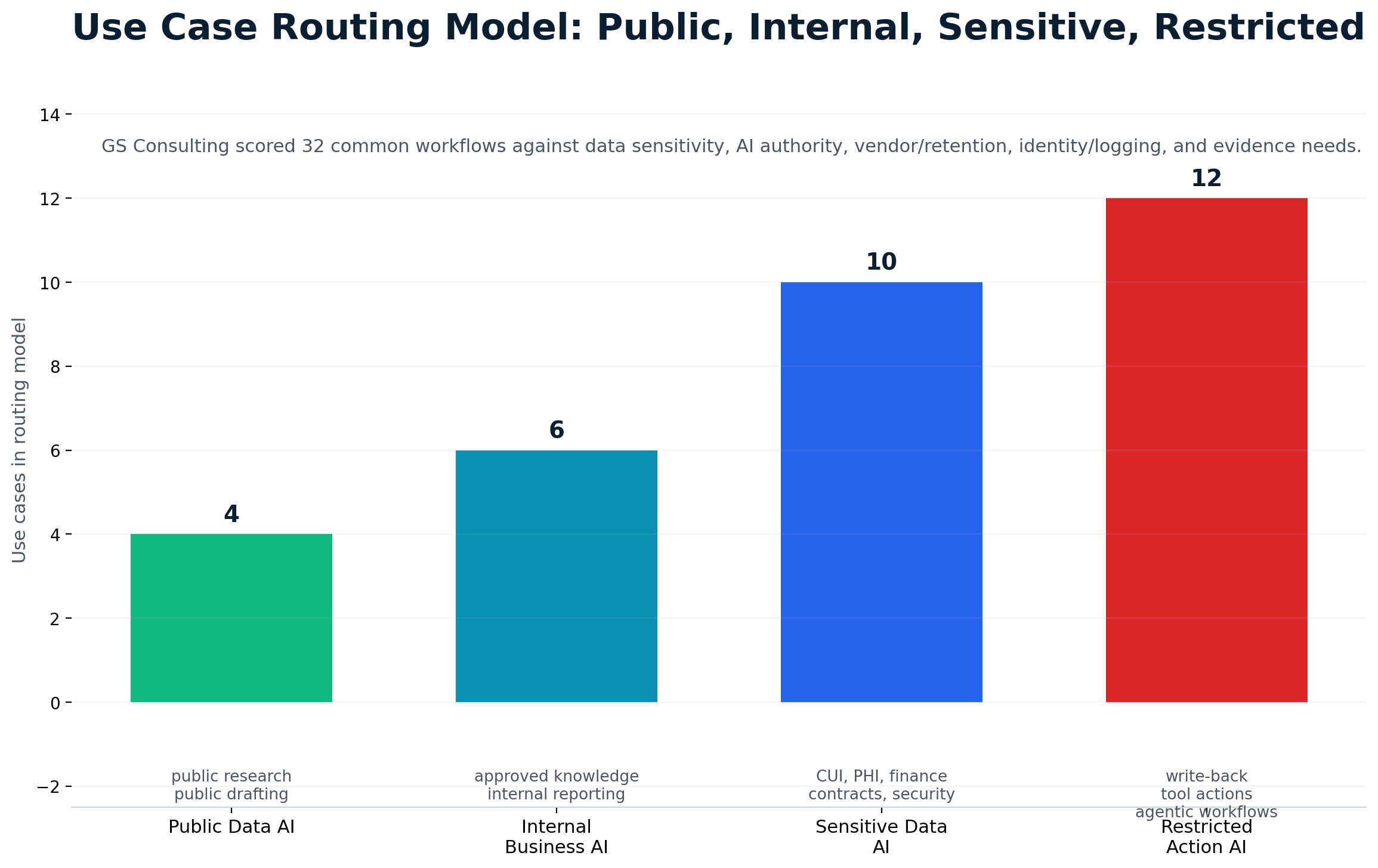
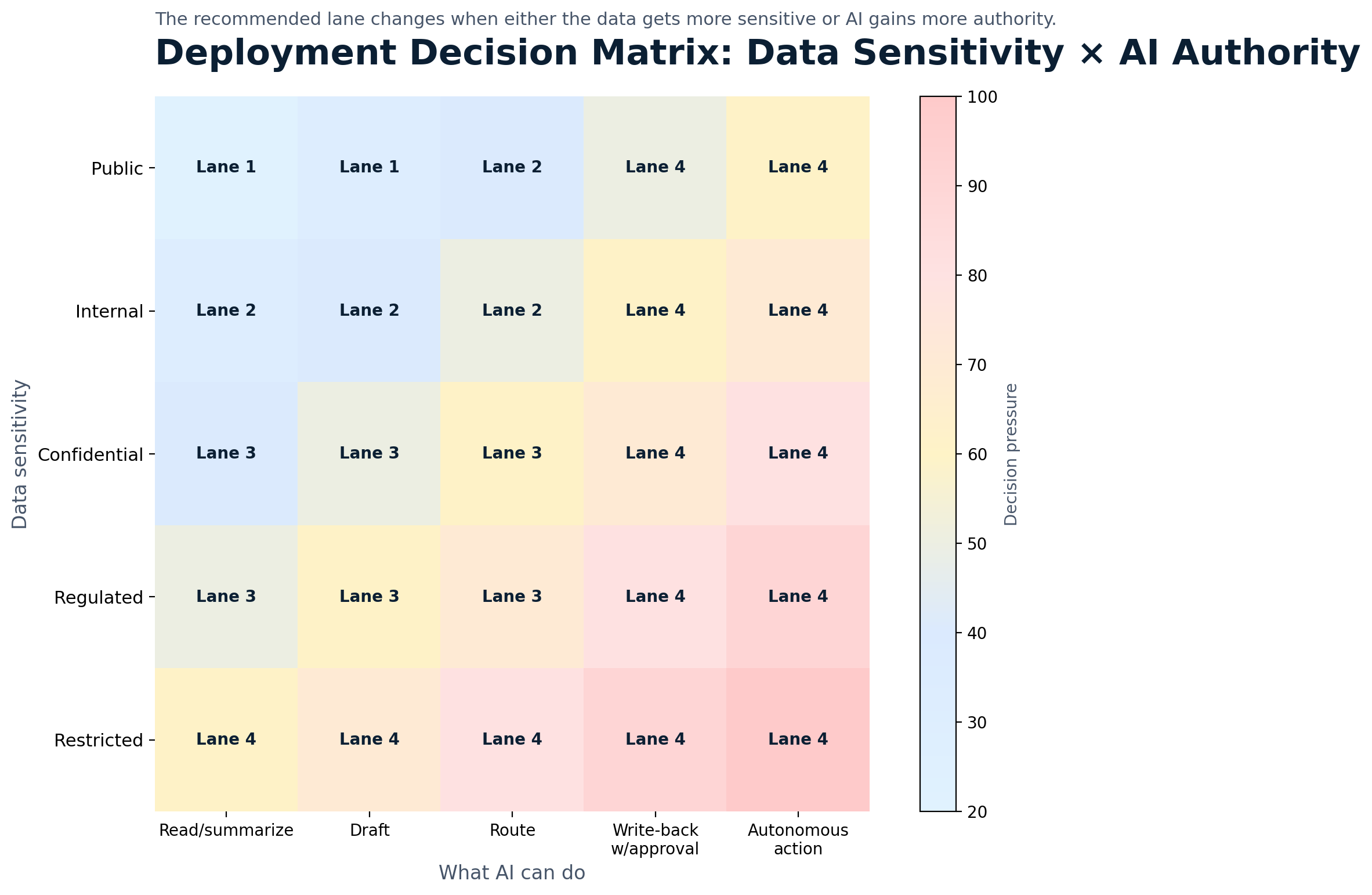
A practical hybrid model has four lanes.
- Lane 1Public data AI for public information and low sensitivity work. No sensitive data, customer data, employee data, regulated data, or system actions.
- Lane 2Internal business AI for approved internal content that is not regulated or highly sensitive. Access controlled, approved tools, basic logging, and human review for important outputs.
- Lane 3Sensitive data AI for confidential, regulated, customer, employee, financial, contract, legal, security, or government related workflows. Private or controlled environment, strong identity, vendor review, logging, human approval, and output protection.
- Lane 4Restricted action AI for workflows where AI can call tools, update systems, trigger actions, or support high impact decisions. Strict access, limited tool rights, approval gates, audit logs, monitoring, stop mechanism, and risk approval where needed.
This lane model is easy for leaders to understand. It is also easy to explain to employees. The more sensitive the data and the more authority AI has, the more controlled the lane.
What Regulated Organizations Should Not Do
The rules are not complicated. The discipline is the hard part.
- Do not let every team choose its own AI tool.
- Do not let employees paste sensitive data into public AI tools.
- Do not connect AI to document libraries without permission review.
- Do not assume private AI is safe without logging and access control.
- Do not let AI outputs land in unmanaged workspaces.
- Do not give AI agents broad system access.
- Do not skip vendor review.
- Do not treat all data the same.
- Do not scale AI without human approval rules.
- Do not wait for an incident to decide who owns AI risk.
Security Risks That Affect All Three Models
Public, private, and hybrid AI all need security thinking.
OWASP identifies risks for large language model applications such as prompt injection, sensitive information disclosure, insecure plug in design, improper output handling, and excessive agency. Those risks do not disappear just because the environment is private.
A private AI system can still be vulnerable to bad permissions, poor connectors, weak logging, prompt injection, bad output handling, or too much autonomy.
CISA and international partners released guidance on secure adoption of agentic AI that highlights risks tied to autonomy, tool use, broad access, and integration with IT environments.
The Decision Checklist
Before choosing public, private, or hybrid AI, ask the questions that actually matter.
- What data will AI process?
- Is the data public, internal, confidential, regulated, or restricted?
- Who owns the data?
- What tool will process it?
- Can the tool retain prompts or outputs?
- Can the data be used for training?
- Can users only access what they are allowed to see?
- Will AI connect to enterprise systems?
- Can AI write back to systems?
- Can AI call tools or APIs?
- Will the output become a record?
- Is human approval required?
- What logs are needed?
- What happens if AI is wrong?
- Who can pause the workflow?
If those questions cannot be answered, the deployment model is not ready.
A Practical 90 Day Rollout Plan
Start with a simple rollout. Do not try to solve every AI deployment problem at once.
- Days 1 to 30Inventory and immediate rules.
Inventory where AI is already being used. Classify common data types. Identify which tools are public, enterprise approved, private, or restricted. Set immediate rules for sensitive data.
- Days 31 to 60Create the lane model.
Decide which use cases belong in public AI, internal business AI, sensitive data AI, and restricted action AI. Review vendors and data terms. Define human approval rules.
- Days 61 to 90Launch controlled pilots.
Start with public AI for public research, internal AI for approved knowledge search, private AI for contract summaries, private AI for HR policy support, controlled AI for IT ticket triage, and restricted AI for security alert summaries with analyst review.
Measure value, errors, overrides, user adoption, and security concerns. Do not scale what you cannot control.
The Minimum Viable AI Deployment Decision Evidence Packet
A deployment decision should leave evidence behind, especially in regulated environments.
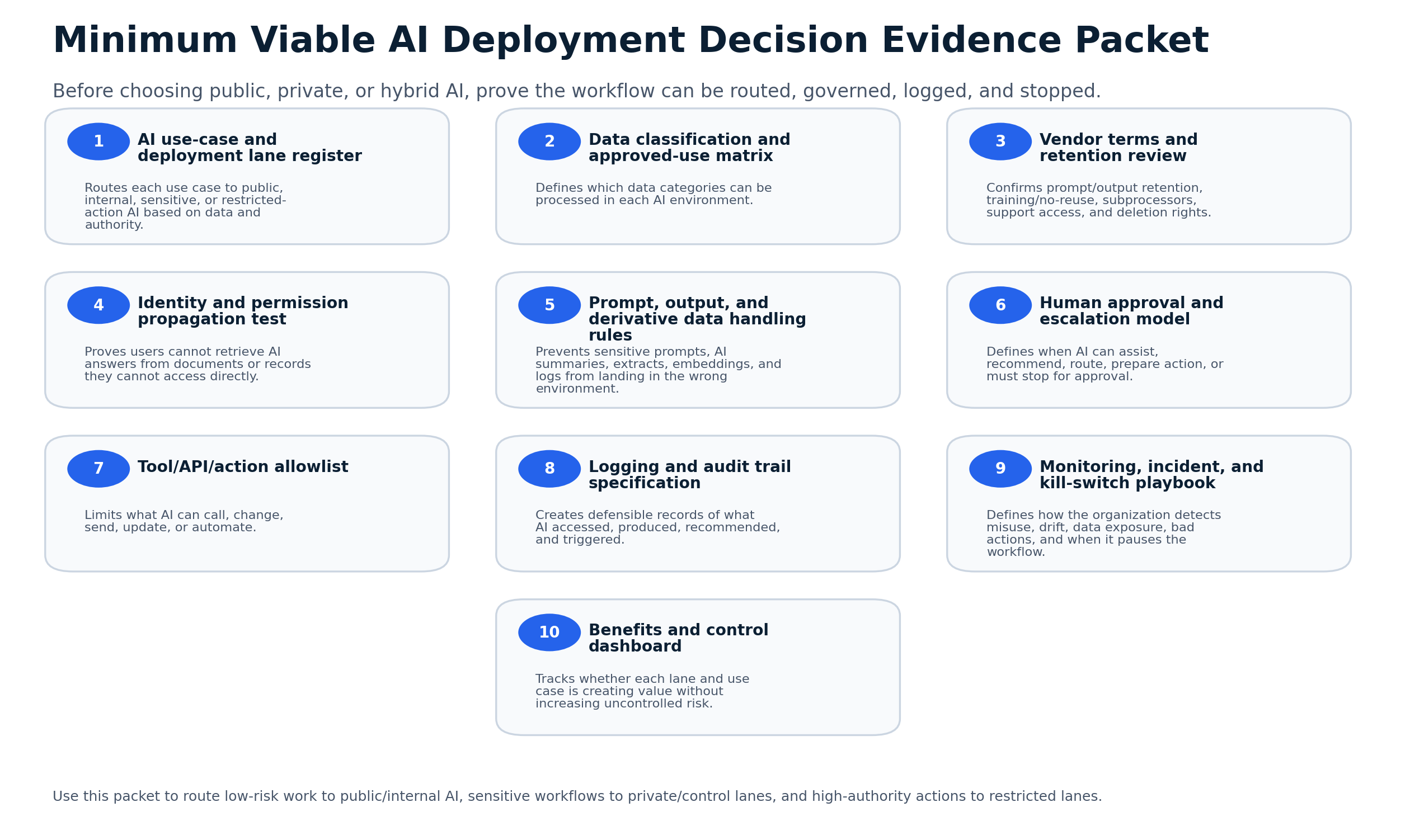
- AI workflow inventory showing current and proposed use cases.
- Data classification map for public, internal, confidential, regulated, and restricted data.
- Deployment lane decision record for public, internal, sensitive, and restricted AI workflows.
- Vendor and retention review for prompts, outputs, logs, training use, storage, and subprocessors.
- Identity and permission review showing who can access source data and AI outputs.
- Logging and audit trail plan showing what evidence is retained and who reviews it.
- Human approval rules for high impact outputs, system actions, and external commitments.
- Monitoring, incident response, rollback, and stop mechanism documentation.
How This Supports Secure AI Automation
Deployment choice is one part of a broader secure AI automation approach. Secure AI Automation for Regulated Organizations explains how GS Consulting helps organizations automate workflows with the right security, governance, data controls, architecture, and measurable outcomes.
This guide answers one specific architecture question: which deployment model should we use for AI automation?
The answer is not always public or private. The answer is the model that matches the data, workflow, action level, and risk.
The Bottom Line
Public AI is useful. Private AI is powerful. Hybrid AI is usually the most practical path.
But none of them are safe by default.
The safest architecture is the one that matches the workflow. Use public AI for public and low sensitivity work. Use private AI for sensitive and regulated workflows. Use hybrid AI when the organization needs both speed and control.
The deployment model should follow the data. It should follow the risk. It should follow what AI is allowed to do.
That is how regulated organizations get the benefit of AI automation without turning every workflow into a security and compliance gamble.
GS Consulting helps regulated organizations choose the right AI deployment model, design private and hybrid AI architectures, classify data, define secure workflow lanes, evaluate vendors, and build AI automation systems that protect sensitive data while improving operations.
Ready to decide which AI deployment model fits your organization?
Contact GS Consulting for a Secure AI Automation Architecture Assessment.
Contact GS ConsultingResearch Sources and Caveats
The Deployment Lane Control Burden Score, Use Case Routing Index, and Control Evidence Burden Score are GS Consulting derived planning tools. They are not official legal, regulatory, audit, NIST, CISA, CSA, EU AI Act, OWASP, IBM, McKinsey, or GAO determinations.
Actual deployment decisions depend on the organization's data, contracts, vendors, jurisdictions, system architecture, retention requirements, AI model terms, access controls, logging capabilities, workflow authority, regulatory exposure, and risk tolerance.
- NIST AI Risk Management Framework
- NIST AI RMF Core
- OWASP Top 10 for Large Language Model Applications
- CISA: Secure Adoption of Agentic AI
- Cloud Security Alliance AI Controls Matrix
- European Commission: AI Act
- GAO Artificial Intelligence Accountability Framework
- McKinsey: The State of AI
- IBM: AI Control Gap Study
Frequently Asked Questions About Public, Private, and Hybrid AI
What is the difference between public AI, private AI, and hybrid AI?
Public AI is usually easiest to access and works best for public or low sensitivity work. Private AI gives the organization more control over data, access, retention, logging, and integration. Hybrid AI uses multiple environments and routes work based on data sensitivity, workflow risk, AI authority, and evidence requirements.
Is private AI always safer than public AI?
No. Private AI can still be unsafe if permissions are weak, logs are missing, outputs are unmanaged, vendors are not reviewed, or AI has too much authority. The safer model is the one with the right controls for the data and workflow.
When should regulated organizations use hybrid AI automation?
Hybrid AI is usually the practical choice when an organization has mixed data and mixed risk. Public or approved enterprise tools can support low sensitivity work, while sensitive and restricted workflows use private or controlled environments with stronger identity, logging, approval, monitoring, and vendor controls.
What should decide the AI deployment model?
The deployment model should follow the data, workflow, action level, evidence requirement, and impact if AI is wrong. Do not start with public or private as a preference. Start with what AI will touch, what it will do, who can see the output, what must be logged, and who can stop the workflow.
Suggested Future Reading
- Private LLM and Secure RAG hub
- What Is a Private LLM?
- Private LLM Deployment Options
- Secure AI Automation for Regulated Organizations
- Secure AI Architecture Patterns for Enterprises
- Data Classification Before AI Automation
- AI Automation for Sensitive Data Workflows
- Human in the Loop AI Automation
- How to Identify Safe AI Automation Use Cases