Secure AI Automation | | 27 min read
Preventing CUI Leakage in LLMs

Key Takeaways
Protect CUI across the entire LLM workflow.
Map more than the prompt
Inspect retrieval indexes, outputs, logs, vendor systems, and downstream integrations.
Start with contract boundaries
Approve the environment and provider path for the data before connecting an LLM.
Test the safeguards
Validate permissions, network paths, retention, and evidence instead of relying on a privacy claim.
The biggest GovCon risk with LLMs is not that the model gives a weak answer.
The bigger risk is that controlled information quietly moves into a tool, log, prompt history, vendor system, retrieval index, or downstream workflow that was never approved for CUI.
That is the real hesitation many CTOs, CISOs, and program leaders feel. They are not anti AI. They are trying to avoid turning a productivity tool into a CUI spill path.
For GovCon teams, the rule is simple: no CUI goes into an LLM unless the tool, environment, contract terms, architecture, logging, access control, and human workflow are approved for CUI.
Need to know whether your LLM workflows can safely touch CUI?
GS Consulting helps GovCon and regulated teams map LLM data paths, block unsafe AI use, design approved CUI lanes, secure RAG pipelines, and build evidence that leaders can review.
Request a CUI AI Risk ReviewThe Problem Is Not Just Public AI Training
A lot of LLM risk discussions start and stop with one question: will the vendor train on our data?
That question matters. It is not enough.
CUI leakage can happen through prompts, file uploads, chat histories, retained outputs, application logs, model feedback, human support access, browser extensions, page capture tools, connectors, RAG indexes, vector databases, workflow automations, and records written back to systems outside the CUI boundary.
In other words, the model training setting is only one control in a much larger data path.
If a contractor focuses only on training, it may miss the places where CUI actually escapes.
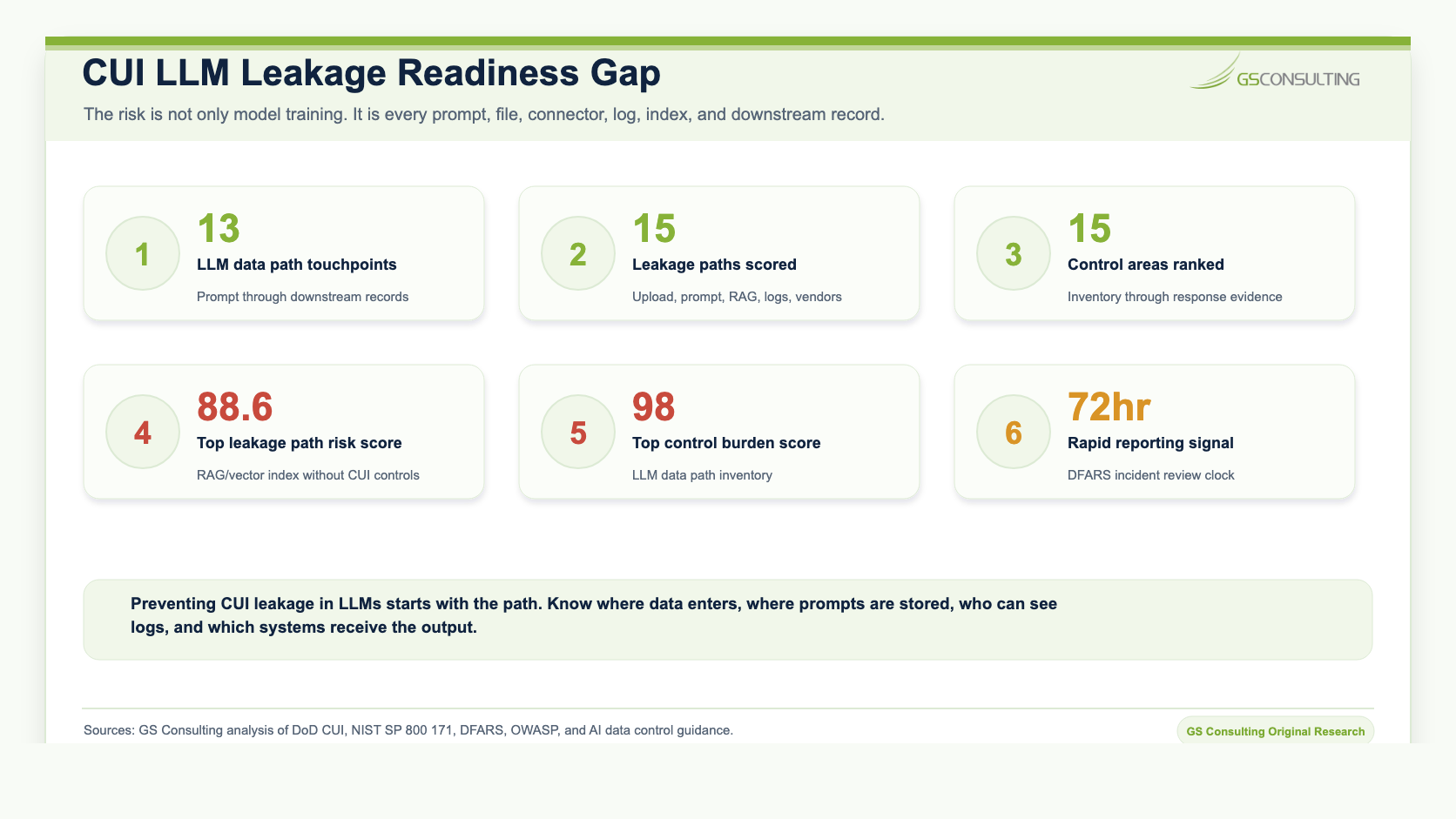
Original Research: CUI Leakage Path Control Burden Index
Original GS Consulting research shows that preventing CUI leakage in LLMs is a data path and evidence boundary problem, not just a model training problem.
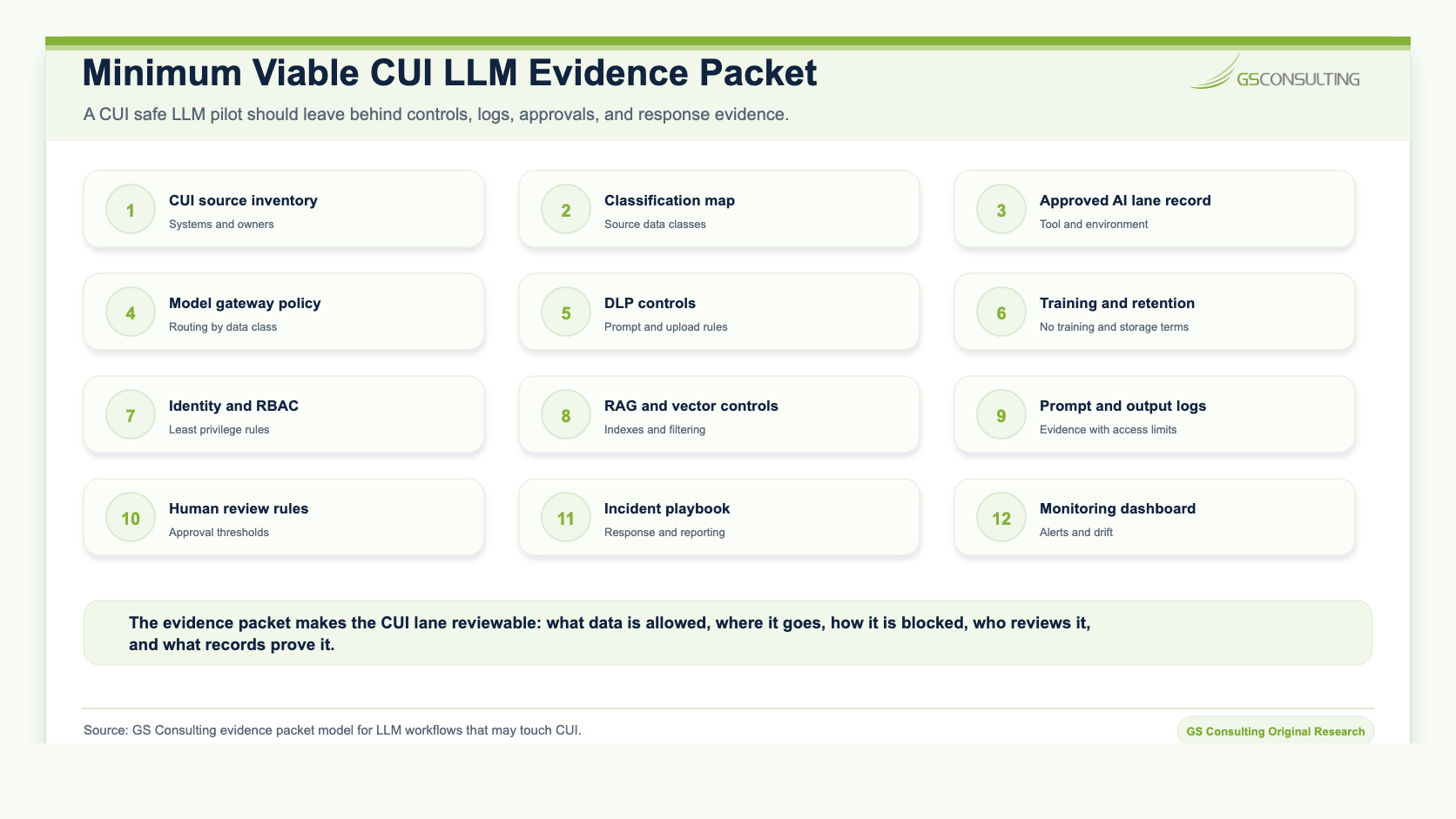
GS Consulting analyzed public CUI, NIST, DFARS, AI security, RAG, data security, and vendor data control sources to identify common CUI leakage paths and the control burden needed to prevent them. The research created a CUI Leakage Path Risk Score, CUI LLM Control Burden Score, architecture lane model, incident response clock, and evidence packet for LLM workflows that may touch controlled information.
The scoring model is a planning tool. It is not an official CMMC, NIST, DFARS, DoD, legal, audit, or C3PAO determination. Actual requirements depend on contract language, customer direction, CUI scope, system boundary, vendor terms, cloud architecture, and assessor expectations.
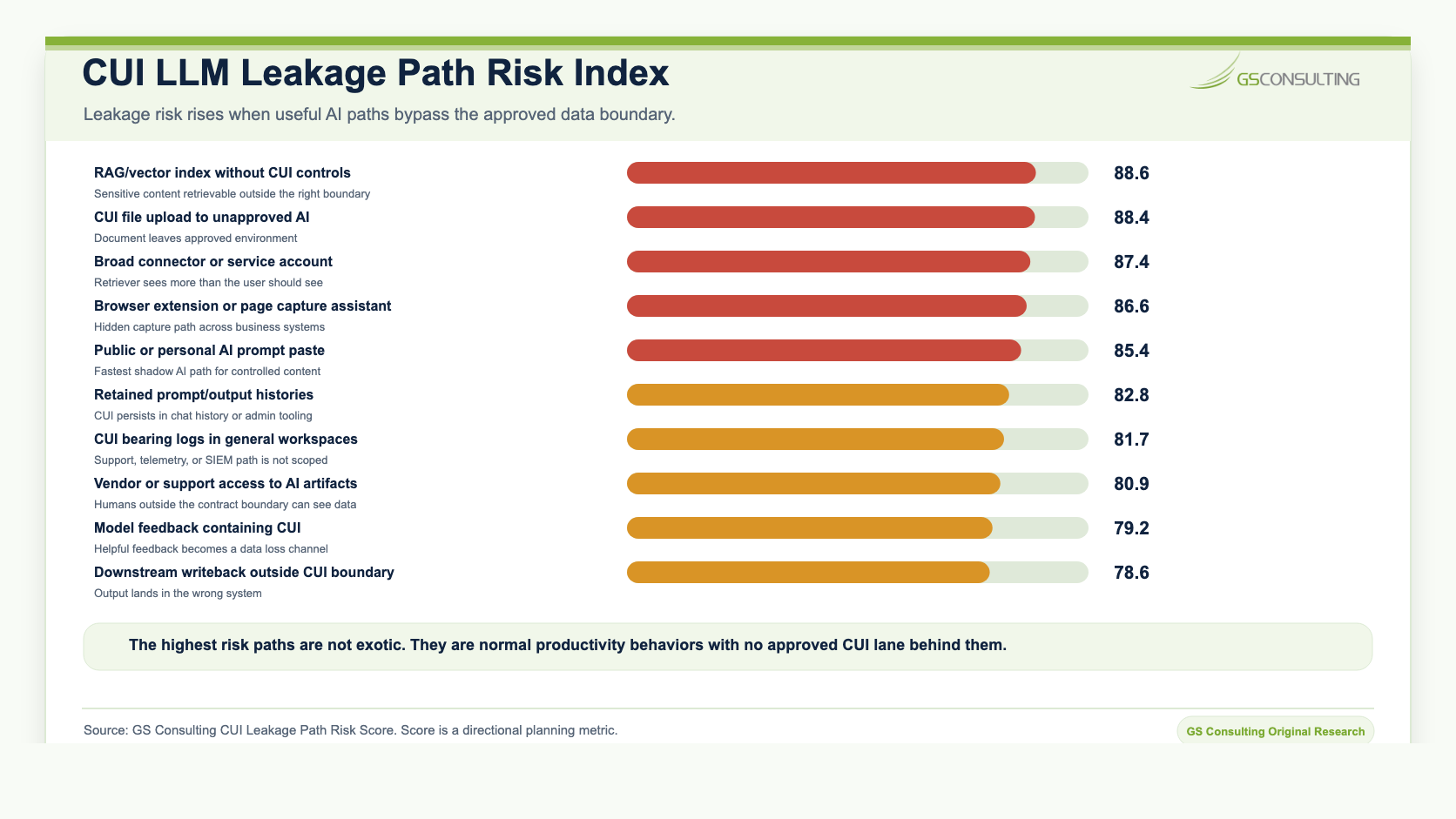
The highest scoring leakage paths were RAG or vector indexes without CUI controls, CUI file upload to unapproved AI, broad connector or service account access, browser extensions or page capture assistants, and public or personal AI prompt paste.
The highest scoring controls were LLM data path inventory, CUI classification at source, a blocked public AI lane for CUI, an approved CUI AI lane, model gateway and data class routing, prompt and file upload DLP, no training and retention controls, identity and least privilege, CUI aware RAG controls, and vector database security.
Start With the Contract Boundary
Do not start by asking whether a model is impressive. Start with the contract boundary, the CUI boundary, and the approved system path.
For DoD contractors, DFARS 252.204 7012 and NIST SP 800 171 matter when systems process, store, or transmit covered defense information or CUI. The DoD CUI Program also points contractors back to the categories, markings, and safeguarding expectations that apply to controlled unclassified information.
The practical question is direct: is the LLM workflow part of an approved path for this data?
If the answer is no, CUI should not enter that workflow. It does not matter that the tool is useful. It does not matter that the output would save time. It does not matter that everyone else is experimenting with AI.
CUI work needs approved tools, approved environments, approved access, approved logging, approved retention, and approved human review.
What Counts as CUI Leakage in an LLM Workflow?
CUI leakage is broader than a public breach.
Leakage can happen when CUI is pasted into a personal chatbot account, uploaded to an unapproved AI workspace, captured by a browser extension, retained in a chat history, sent to a model endpoint without approved terms, indexed in a vector database without CUI controls, written to logs that are available to the wrong administrators, included in feedback that may be reviewed by a vendor, or saved as an output in a system outside the CUI boundary.
It can also happen when a RAG system retrieves controlled documents for a user who does not have permission to see them. The source document may still be protected, but the generated answer leaks the sensitive facts.
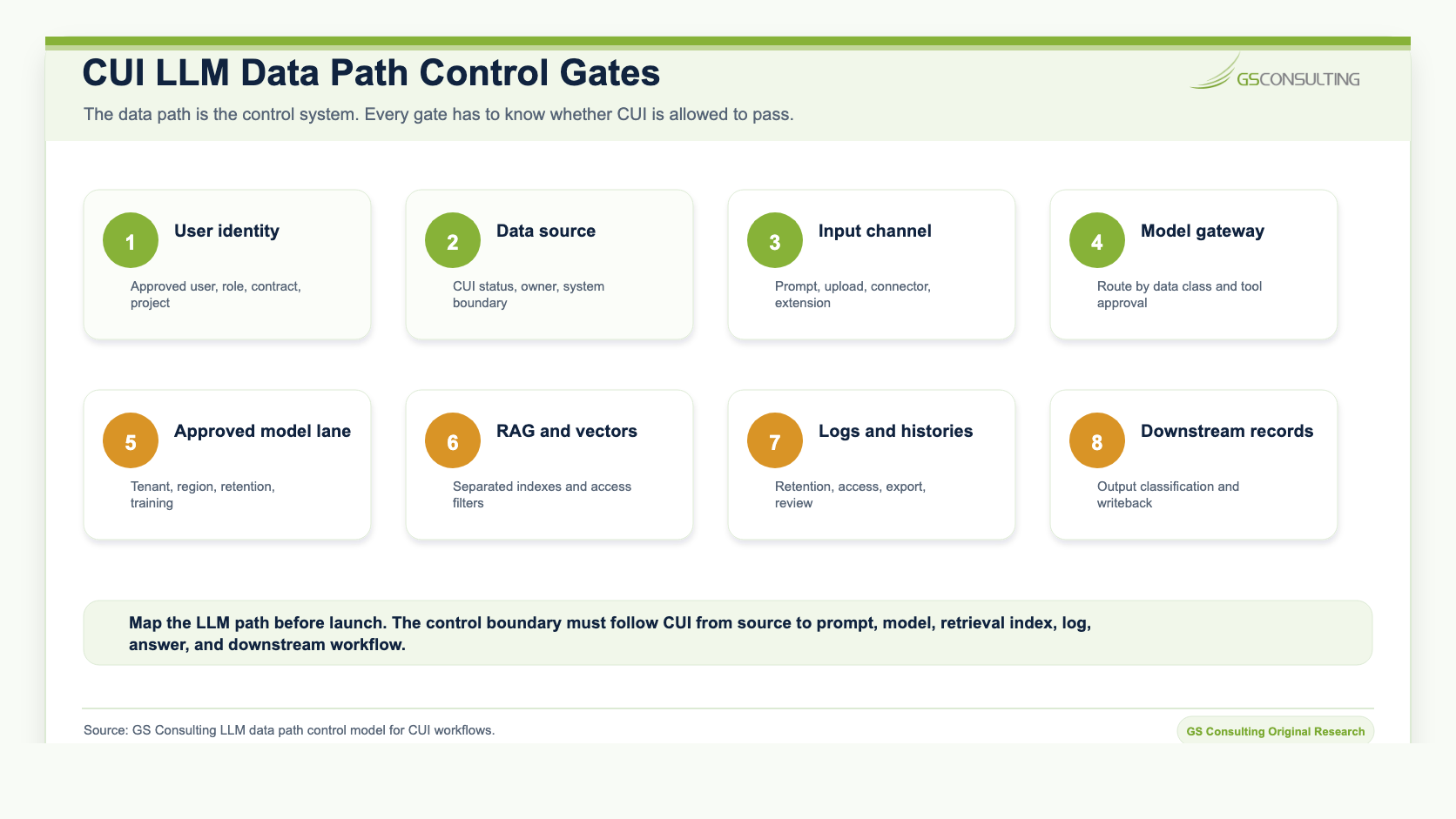
The LLM Data Path You Need to Map
Before a contractor approves an LLM workflow, it should map the full data path.
That path includes the user, identity provider, source system, file upload channel, prompt box, browser extension, connector, model gateway, model endpoint, RAG pipeline, vector database, prompt history, output history, application logs, support access, export function, workflow automation, and downstream system of record.
Most leakage happens because no one mapped the path. Security reviewed the vendor. Legal reviewed the terms. IT approved the application. But nobody drew the line from CUI source to AI input to AI output to log to downstream record.
That is how gaps appear.
Public AI Tools Are Not Your CUI Environment
Public and personal AI tools should not receive CUI.
That includes personal chatbot accounts, free AI tools, consumer browser extensions, personal transcription tools, unsanctioned AI meeting assistants, generic document summarizers, and any AI tool where the company has not reviewed retention, access, training, logging, region, support, subcontractor, and deletion terms.
OpenAI, for example, distinguishes consumer services from business offerings and describes how data use can differ by service and setting. That is exactly why contractors should not assume one vendor policy covers every use case, every license, every workspace, and every contract.
The operating rule is better than a vendor by vendor argument: if the tool has not been approved for CUI, CUI does not go into the tool.
The Secure Architecture Pattern
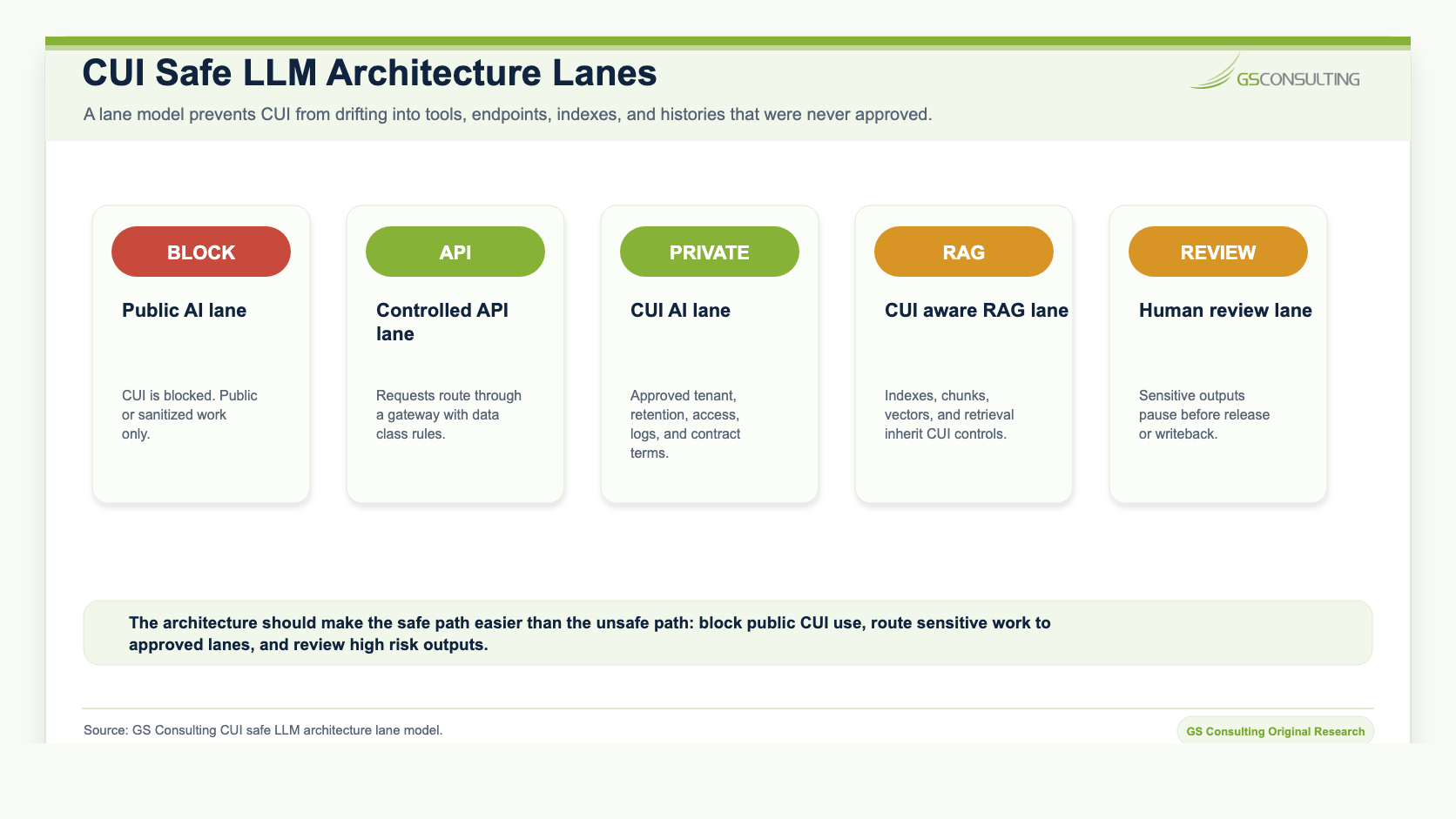
A secure LLM architecture for CUI needs lanes.
The first lane is blocked: public AI is not allowed to receive CUI. That should be enforced through policy, training, browser controls, DLP, CASB or secure web gateway rules where appropriate, and monitoring.
The second lane is approved: CUI workflows can use AI only inside reviewed environments with contract terms, access controls, retention rules, no training controls, logging, and human review.
The third lane is the model gateway. The gateway routes requests based on data class, tool approval, user identity, workflow type, and action risk. It should prevent CUI from going to the wrong endpoint.
The fourth lane is private or controlled LLM architecture for sensitive workloads. That may mean a private tenant, approved cloud environment, restricted network path, customer controlled data storage, or a dedicated deployment depending on the contract and data.
The fifth lane is CUI aware RAG. If the AI retrieves controlled documents, the RAG system must preserve permissions, secure the vector database, separate indexes where needed, filter before model context, log retrieval, classify outputs, and show sources. The related guide on Secure RAG Architecture for GovCon goes deeper on that pattern.
Technical Safeguards That Matter
The safeguards that matter are not mysterious. They are the same controls disciplined teams already understand, applied to the LLM data path.
- Classify data before AI use. Know whether the source contains CUI, CDI, FCI, PII, controlled technical information, security data, contract data, or customer restricted data before it enters AI.
- Block CUI in unapproved AI tools. Use policy, training, monitoring, browser controls, DLP, and gateway rules to reduce shadow AI leakage.
- Route requests through a model gateway. Match the model endpoint to the data class, user identity, approved tool list, and workflow risk.
- Control APIs and connectors. Avoid broad service accounts. Limit scopes. Review tokens. Monitor connector access. Disable unused plugins.
- Secure RAG and vector stores. Treat chunks, embeddings, metadata, and retrieval logs as sensitive when they are derived from CUI.
- Use prompt and file upload DLP. Catch obvious CUI patterns and restricted content before it reaches the model.
- Control retention and training. Document no training settings, prompt retention, output retention, deletion process, support access, and audit access.
- Log enough to investigate. Capture user, time, tool, source, prompt classification, file reference, model endpoint, output classification, review status, and downstream action.
- Require human review for sensitive outputs. AI can draft, summarize, extract, and route. People remain accountable for release, submission, customer impact, and contract decisions.
Network Architecture Patterns
Network design should make the approved path easy and the unsafe path hard.
For lower risk work, a controlled enterprise AI service may be enough. For CUI workflows, the organization may need private endpoints, restricted egress, dedicated tenants, approved regions, isolated storage, logging destinations inside the security boundary, and a clear separation between public AI, internal business AI, and CUI AI.
The related guide on Private AI vs Public AI vs Hybrid AI explains how to choose a deployment model based on data sensitivity and AI authority.
The related guide on Secure AI Architecture Patterns for Enterprises covers model gateways, controlled APIs, secure connectors, identity aware AI, and monitoring layers.
API Configuration Requirements
APIs are where many good policies become weak implementations.
For approved CUI LLM workflows, teams should document the model endpoint, authentication method, network route, region, retention settings, training settings, log destination, redaction rules, rate limits, connector permissions, allowed file types, approved source systems, output destination, and emergency shutoff process.
Do not approve a workflow because the API call works. Approve it because the API path is controlled and reviewable.
What to Do When CUI Enters the Wrong LLM Path
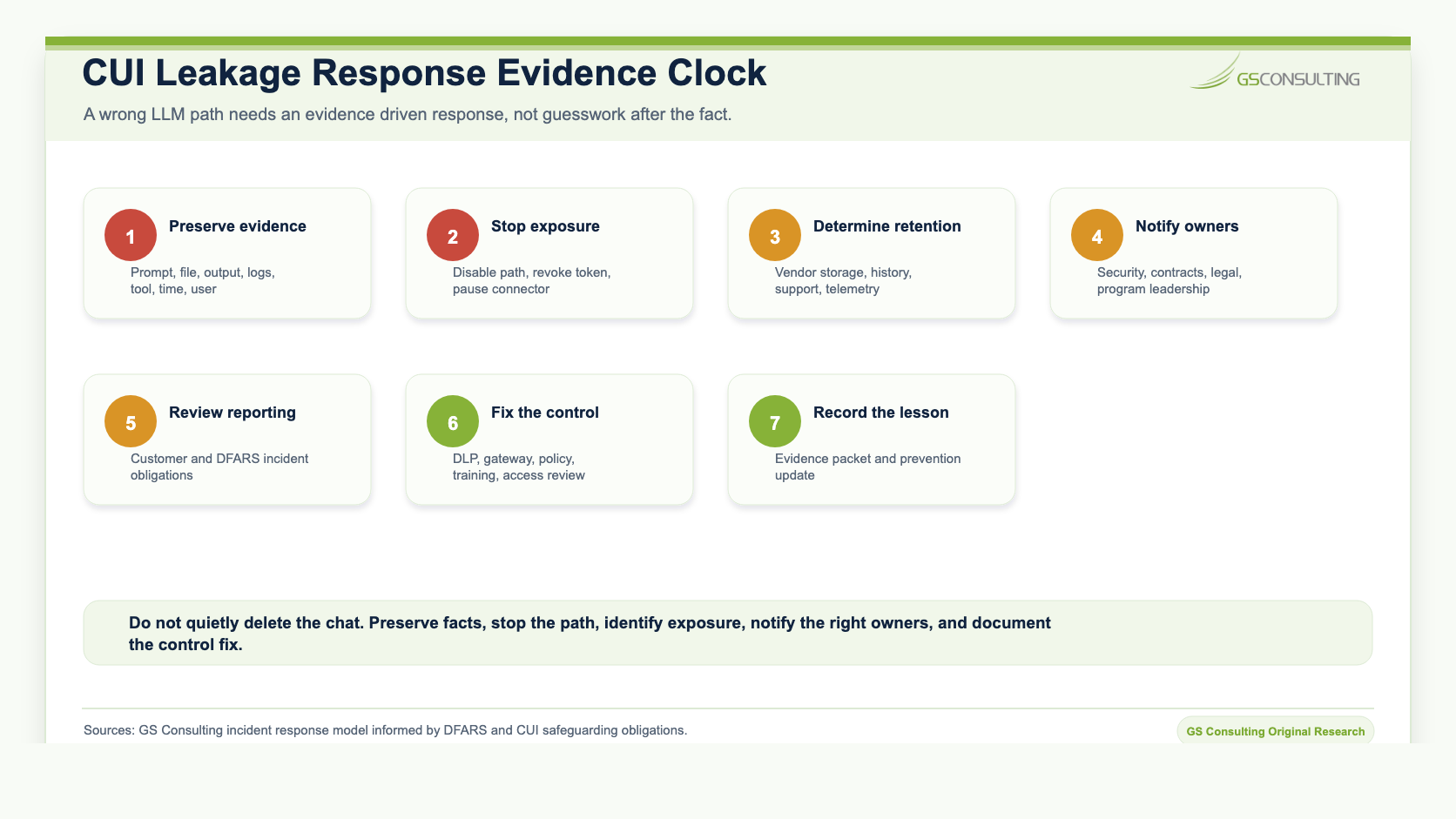
If CUI enters the wrong LLM path, do not quietly delete the chat and move on.
Preserve the facts. Stop further exposure. Determine what was entered, uploaded, retained, transmitted, logged, or made visible to vendor support. Notify internal security, contracts, legal, and program leadership. Review whether customer notification or cyber incident reporting is required. Then fix the control gap that allowed the path to exist.
The response should be evidence driven. The organization needs to know what happened, what data was involved, what system held it, who could access it, what actions were taken, and how recurrence will be prevented.
The Policy Controls
Policy should be blunt enough for employees to follow.
- No CUI in public or personal AI tools.
- No CUI in AI browser extensions or page capture assistants unless approved for CUI.
- No CUI file uploads to AI tools unless the workflow is approved for that data.
- No broad connector access to CUI repositories without security review.
- No RAG over CUI without permission preserving ingestion, vector database controls, retrieval filtering, logging, and output handling.
- No AI generated CUI output stored outside the approved boundary.
- No vendor approval based only on marketing language.
- No production use without an owner, monitoring, review rules, and stop authority.
That is not anti AI. It is how serious organizations keep AI usable.
The Engineering Checklist
Before approving an LLM workflow that may touch CUI, the engineering team should be able to answer these questions.
- What CUI sources could the workflow touch?
- Where does the user enter prompts or upload files?
- Can the workflow block CUI in unapproved channels?
- Which model endpoint is used, and is it approved for this data?
- Can prompts, files, outputs, or feedback be used for training?
- How long are prompts, files, outputs, histories, and logs retained?
- Who can view prompt histories, outputs, logs, and support records?
- Which connectors can access CUI repositories?
- Are RAG indexes separated or filtered by CUI status and user authorization?
- Does the vector database inherit CUI access controls?
- Are outputs classified and stored in approved locations?
- What human review is required before release, submission, or writeback?
- Can the organization investigate a suspected CUI leak?
- Who can pause the workflow?
What Good Looks Like
A good CUI LLM program is boring in the right ways.
Employees know what they can and cannot use. Public AI is blocked for CUI. Approved AI lanes exist for reviewed use cases. The model gateway routes requests by data class. DLP catches obvious mistakes. Connectors are scoped. RAG preserves permissions. Vector databases are protected. Outputs inherit sensitivity. Logs support investigation. Human review is clear. Leadership can answer where CUI goes.
That is what mature AI adoption looks like in GovCon.
What Bad Looks Like
Bad looks like speed without boundaries.
Employees paste contract language into personal AI accounts. Teams upload technical files into tools nobody reviewed. Browser extensions read sensitive pages. A broad connector indexes shared drives. A RAG pilot mixes public content, internal records, and CUI. Prompt histories retain controlled content. Logs are visible to administrators outside the CUI boundary. No one knows whether outputs are records.
That is not innovation. That is unapproved data movement with a better user interface.
How This Supports Secure AI Automation Consulting
Secure AI Automation for Regulated Organizations explains how GS Consulting helps teams adopt AI automation with workflow design, data controls, governance, security, compliance, and measurable outcomes.
This guide answers one specific question inside that larger work: how do we prevent CUI from entering the wrong LLM path?
It connects directly to Data Classification Before AI Automation, AI Automation for Sensitive Data Workflows, AI Access Controls and Permission Design, and AI Audit Trails and Activity Logging. The same message shows up across all of them: AI is only safe when the workflow, data path, permissions, logs, and human review are designed together.
The Bottom Line
CUI leakage in LLMs is not a theoretical risk. It is what happens when useful tools meet unclear boundaries.
The answer is not to ban AI. The answer is to build approved lanes, block unsafe paths, map data movement, control connectors, secure RAG, log activity, and make human review part of the workflow.
The companies that get this right will use AI faster because security, contracts, and program leadership will trust the path. The companies that guess will spend the next few years cleaning up shadow AI one incident at a time.
Ready to stop CUI from drifting into unapproved AI tools?
Contact GS Consulting for LLM data path mapping, CUI safe AI architecture, secure RAG review, and practical controls for GovCon AI workflows.
Contact GS ConsultingResearch Sources and Caveats
The CUI Leakage Path Risk Score, CUI LLM Control Burden Score, architecture lane model, incident response clock, and evidence packet are GS Consulting derived planning tools. They are not official CMMC, NIST, DFARS, DoD, legal, audit, or C3PAO determinations.
Actual controls depend on the contractor's contracts, CUI scope, customer direction, SSP, CMMC boundary, cloud architecture, AI vendor terms, data retention obligations, and incident reporting requirements.
- DoD CUI Program
- NIST SP 800 171 Rev. 3
- DFARS 252.204 7012
- OWASP Top 10 for LLM Applications
- OpenAI Help Center: How your data is used to improve model performance
Frequently Asked Questions About Preventing CUI Leakage in LLMs
How can GovCon companies prevent CUI leakage in LLMs?
GovCon companies can prevent CUI leakage in LLMs by blocking CUI from public AI tools, classifying data before AI use, routing sensitive work through approved model lanes, using DLP on prompts and uploads, limiting connectors, securing RAG and vector databases, logging activity, and requiring human review for sensitive outputs.
Is turning off model training enough to protect CUI?
No. Training controls matter, but CUI can also leak through prompts, file uploads, chat history, logs, telemetry, support access, browser extensions, connectors, RAG indexes, vector databases, feedback settings, and downstream workflow tools.
Can CUI be used with ChatGPT or other LLM tools?
CUI should only be used in an LLM tool when the tool, environment, contract terms, security controls, access model, logging, retention, and workflow have been reviewed and approved for that CUI use case. Public or personal AI tools should not receive CUI.
What should happen if CUI enters the wrong LLM path?
The organization should preserve evidence, stop further exposure, determine what was retained or transmitted, notify security, contracts, legal, and program owners, review reporting obligations, fix the control gap, and update training and monitoring.
Related Reading
- Secure AI Automation for Regulated Organizations
- How DoD Contractors Can Use AI Without Putting CUI at Risk
- Secure RAG Architecture for GovCon
- Data Classification Before AI Automation
- AI Automation for Sensitive Data Workflows
- Private AI vs Public AI vs Hybrid AI
- Secure AI Architecture Patterns for Enterprises
- AI Audit Trails and Activity Logging