Secure AI Automation | | 29 min read
Preparing AI Systems for CMMC Assessment

Key Takeaways
Scope AI by the data and protection functions it actually handles.
Trace the AI data path
Identify whether the workflow handles FCI or CUI, creates derived records, or protects the environment.
Document assets and providers
Connect AI components, service providers, permissions, and responsibilities to the assessment boundary.
Prepare operating evidence
Update the SSP, test access, and retain evidence of how the AI workflow is controlled.
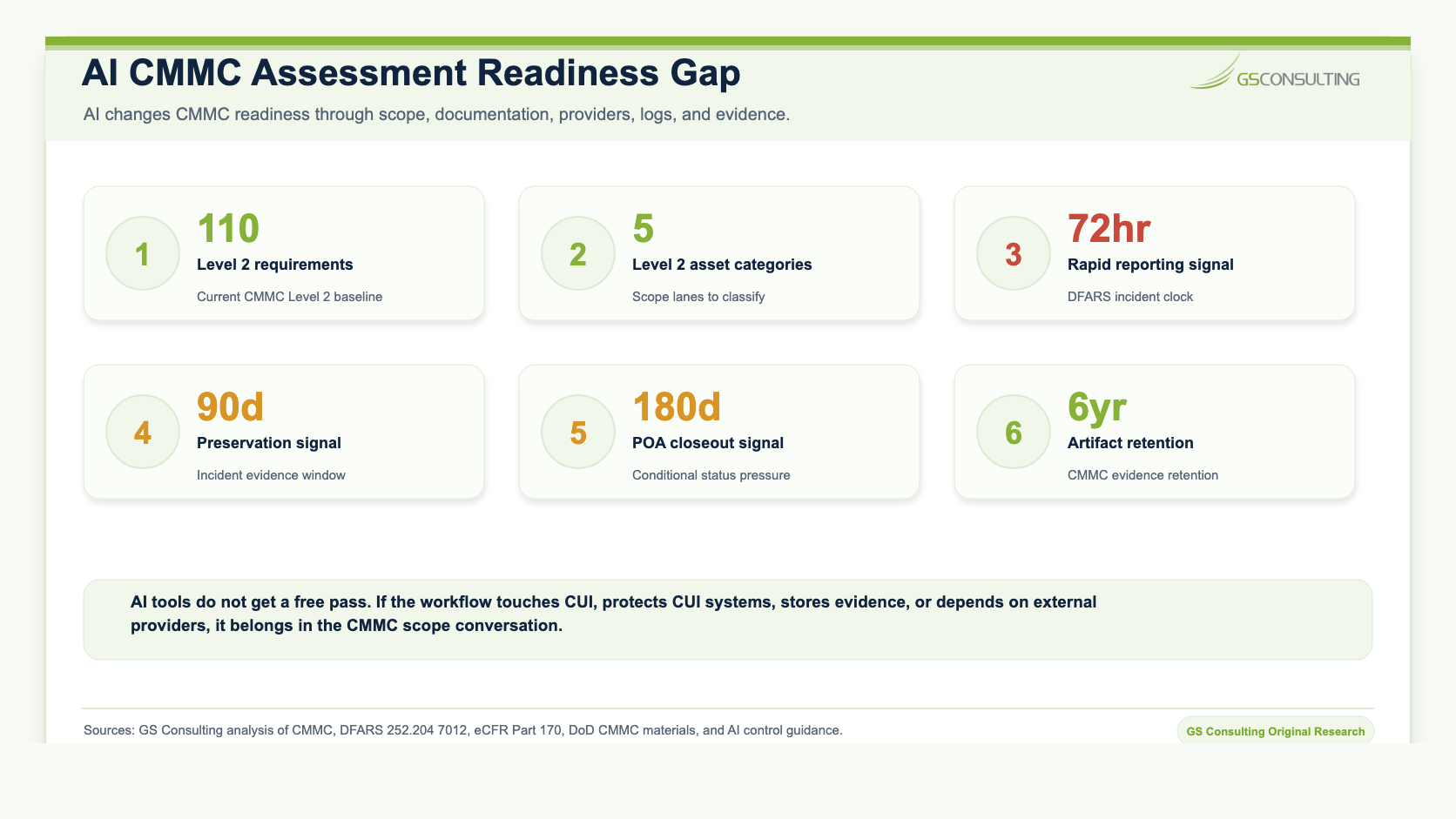
AI tools do not get a free pass in CMMC.
If an AI system touches CUI, protects systems that handle CUI, stores security logs, summarizes controlled documents, connects to the CUI environment, or helps perform contract work with controlled data, it becomes part of the compliance conversation.
That does not mean every AI tool is automatically in scope. It means the organization has to scope it correctly.
If the answer is yes, or even maybe, the AI system needs to be documented before assessment. Waiting until an assessor or customer asks about it is the expensive way to find the boundary.
Need to prepare AI systems for CMMC assessment?
GS Consulting helps GovCon teams scope AI tools, update SSPs, map CUI data flows, review AI vendors, test RAG permissions, and build evidence packages before assessment.
Request an AI CMMC ReviewWhy AI Changes the CMMC Conversation
CMMC is not only about policies. It is about the systems, assets, providers, and evidence involved in protecting FCI and CUI.
AI changes that conversation because it creates new data paths. A user may paste CUI into a prompt. A chatbot may retrieve controlled documents from SharePoint. A RAG system may index CUI in a vector database. An AI agent may write back to a ticketing system. A model gateway may route prompts to different providers. Logs may capture prompts, sources, outputs, approvals, and actions.
The AI model is only one part of the system. The assessment issue is the full data path.
Original Research: The AI CMMC Scope Expansion Index
Original GS Consulting research shows that CMMC compliance for AI tools is a scope control and evidence problem.
GS Consulting analyzed public CMMC, DFARS, eCFR, DoD, and AI control sources to create an AI CMMC Scope Expansion Index across common AI tools, components, and data paths. The highest scoring scope expansion paths were CUI chatbot or model endpoints receiving prompts or uploads, cloud AI providers processing CUI, AI agents or workflow engines with CUI write back, prompt output and chat history stores with CUI derived content, RAG vector databases indexing CUI documents, broad document connectors or service accounts to CUI repositories, and AI audit logs containing prompt, source, or action records.
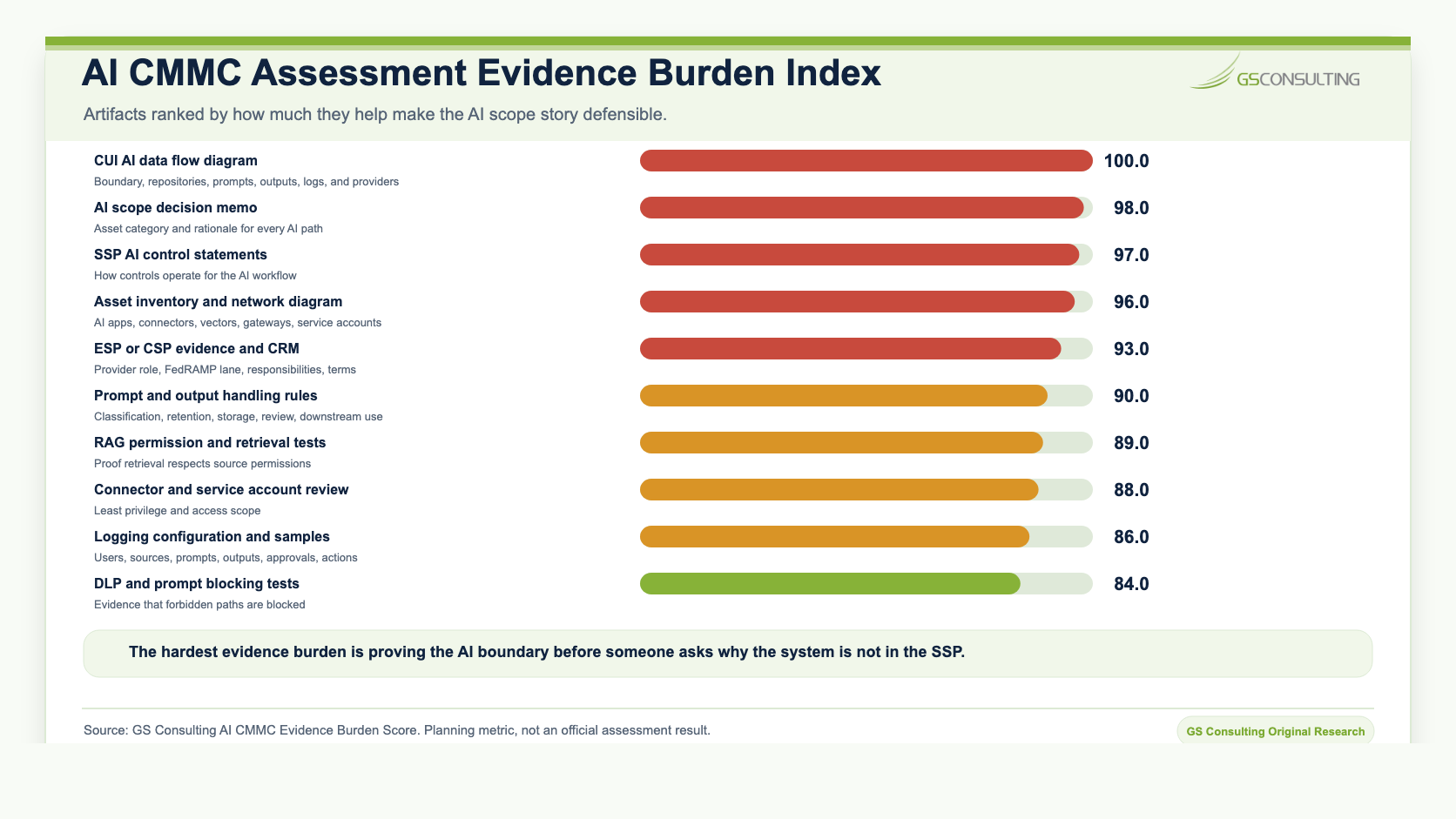
The research also shows that the most important evidence is not a vendor brochure or a general AI policy. It is the documentation that proves the AI boundary: data flow diagrams, scope decision memos, SSP updates, asset inventory entries, network diagrams, customer responsibility matrices, provider evidence, prompt and output handling rules, service account reviews, RAG permission tests, DLP tests, logging configuration, training records, and incident response procedures.
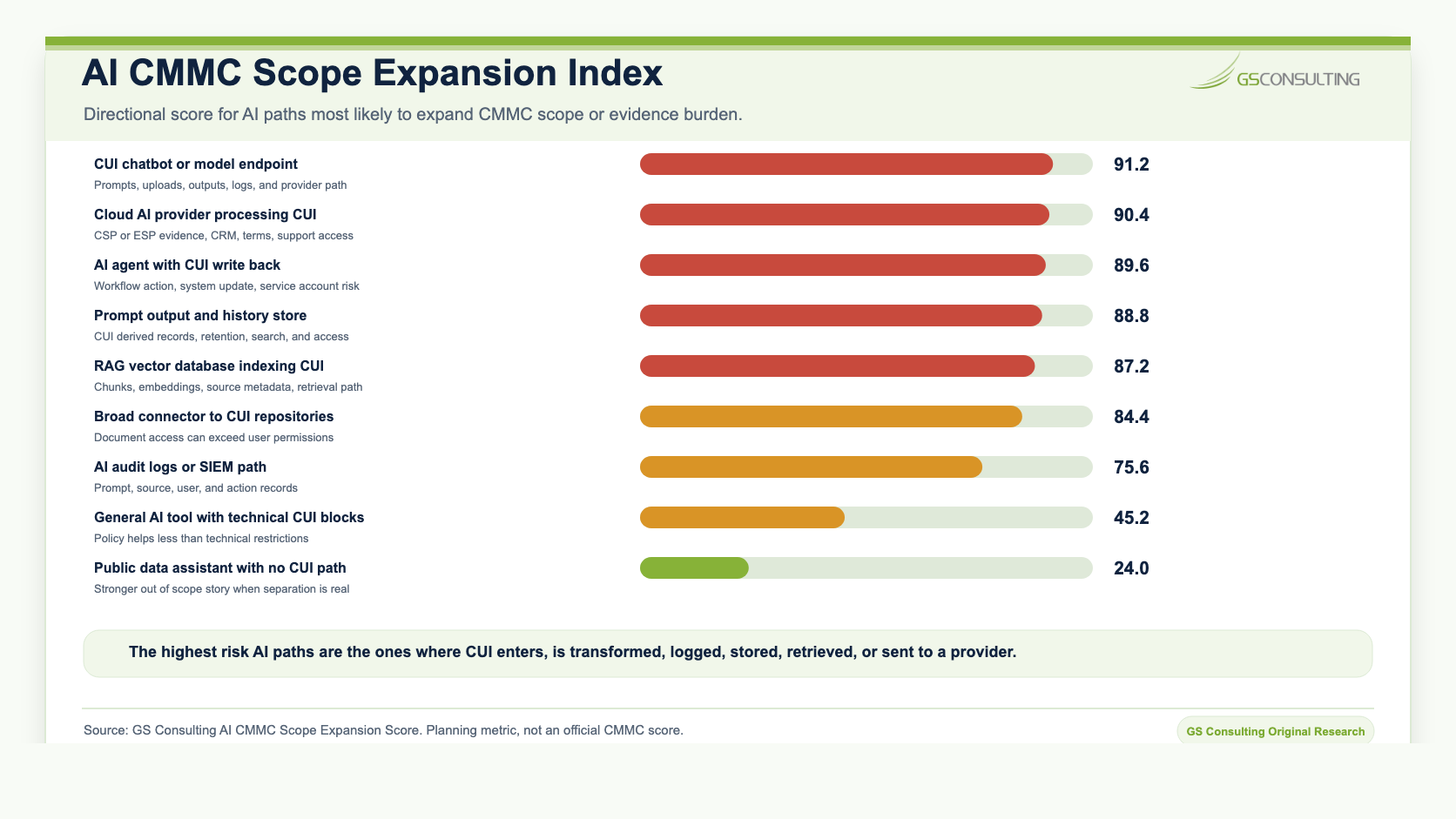
The AI CMMC Scope Expansion Score, AI CMMC Evidence Burden Score, and asset category matrix are GS Consulting derived planning tools. They are not official CMMC scores, NIST determinations, DoD determinations, legal conclusions, audit findings, or C3PAO assessment results.
The CMMC Scoping Rule That Matters Most
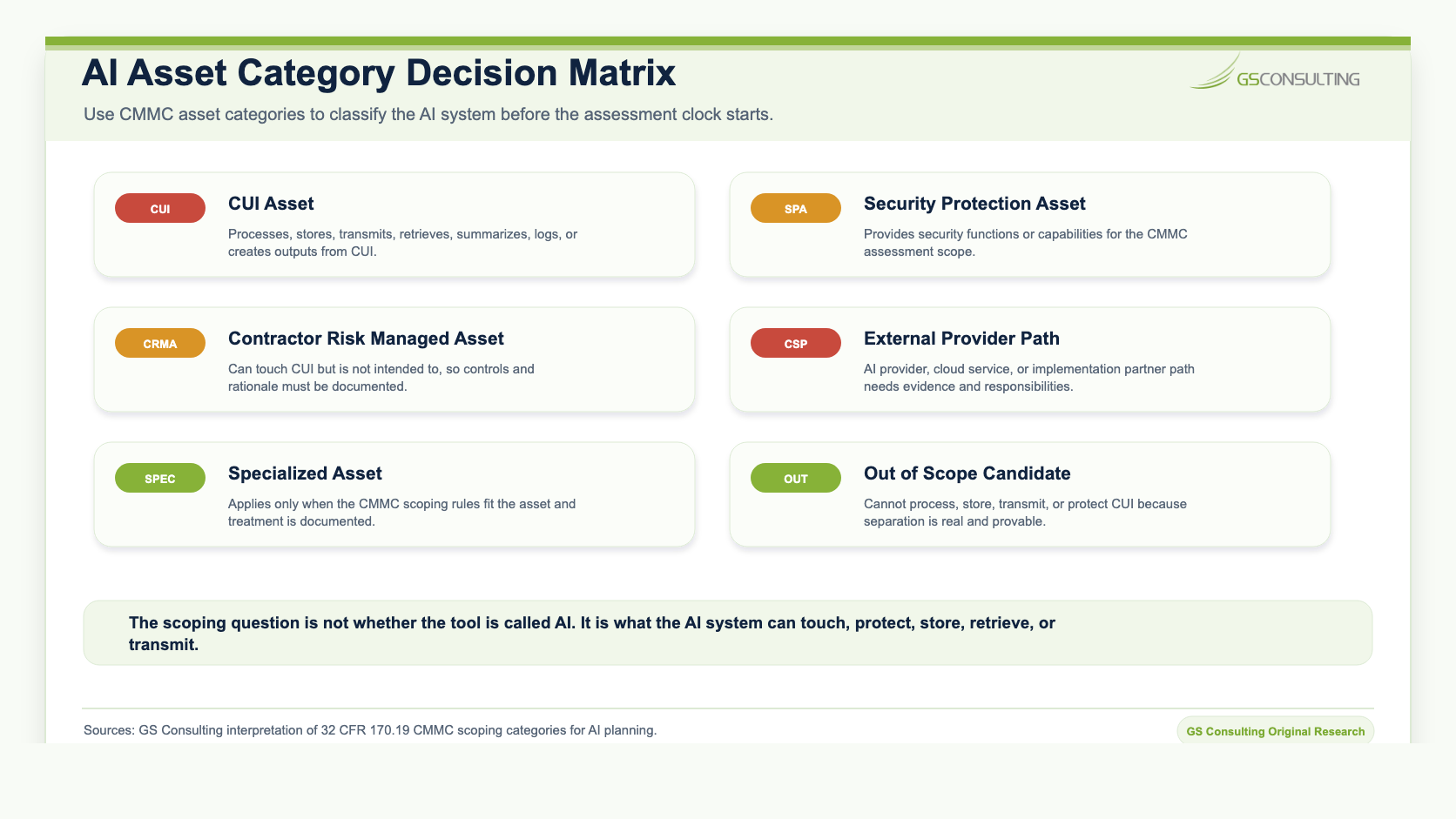
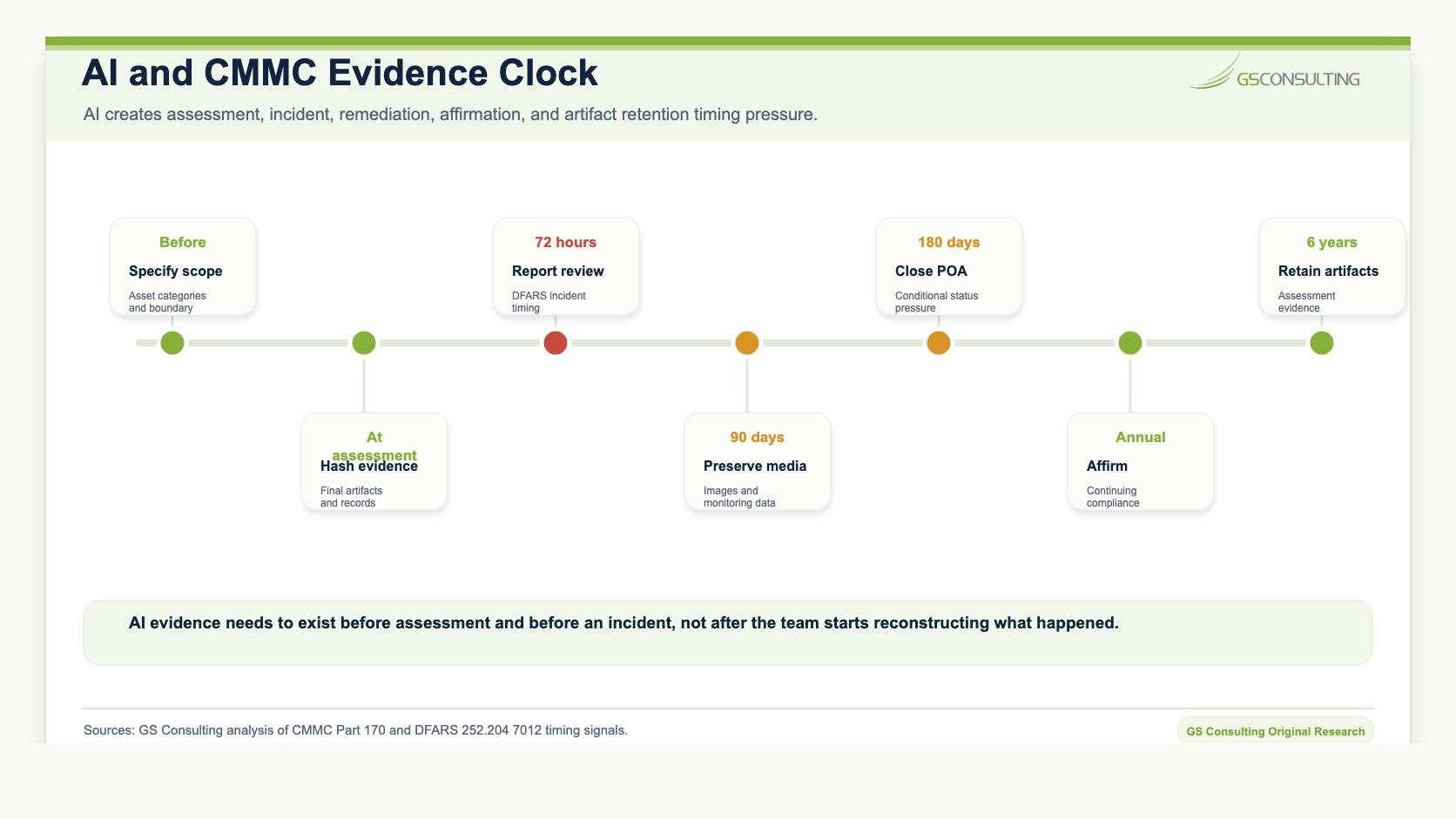
The CMMC assessment scope has to be specified before assessment. Under the CMMC Level 2 scoping structure, assets can fall into categories such as CUI Assets, Security Protection Assets, Contractor Risk Managed Assets, Specialized Assets, and Out of Scope Assets.
That matters for AI because most AI mistakes are scoping mistakes. Teams ask whether a model is approved. They should ask whether the AI system processes, stores, transmits, protects, retrieves, summarizes, indexes, logs, routes, or derives outputs from FCI or CUI.
If it does, the organization needs a defensible scope decision and the documentation to support it.
The Five Ways AI Can Fall Into CMMC Scope
1. AI as a CUI Asset
This is the clearest case. If the AI tool processes, stores, or transmits CUI, treat it like part of the CUI environment.
Examples include a chatbot that receives CUI prompts, a document summarizer that processes controlled technical information, a RAG system that indexes CUI documents, a prompt store that retains CUI derived content, or a workflow agent that writes CUI related output back into a system of record.
2. AI as a Security Protection Asset
AI may also support security operations. If an AI tool analyzes logs, triages alerts, enriches incidents, drafts response notes, or monitors systems that protect the CUI environment, it may become part of the security protection story.
The practical issue is that security logs and monitoring data can be sensitive. If AI sees that data, the AI system needs access controls, logging, monitoring, and documentation.
3. AI as a Contractor Risk Managed Asset
Some AI tools can touch CUI but are not supposed to. That is where organizations often get sloppy.
A policy that says employees should not paste CUI into public AI is useful, but it is not the same as technical evidence. Better evidence includes blocked upload paths, DLP tests, model gateway controls, training records, logs, access restrictions, and monitoring that shows the restriction is real.
4. AI as an External Service Provider or Cloud Service Provider Path
If an AI vendor or cloud service processes, stores, or transmits CUI, vendor evidence becomes part of the story. Do not accept generic enterprise grade language as a substitute for scoping evidence.
Review the provider role, cloud environment, FedRAMP position where applicable, customer responsibility matrix, data retention terms, support access, subcontractors, logging, incident response, and how those duties are documented in the SSP.
5. AI as an Out of Scope Asset
AI can be out of scope, but the organization has to prove why.
The strongest out of scope story is technical separation. The AI tool cannot process, store, or transmit CUI. It does not protect CUI Assets. It has no connector to CUI repositories. It cannot upload controlled documents. It is blocked by policy and technical controls. Its use is trained, monitored, and documented.
What to Document Before Assessment
The goal is not to create paperwork for its own sake. The goal is to make the AI boundary clear enough that leadership, customers, and assessors can understand it.
- Asset inventory: Include AI applications, model gateways, vector databases, connectors, workflow tools, service accounts, logs, admin consoles, cloud services, and vendor access paths.
- SSP: Explain what the AI workflow does, whether it touches FCI or CUI, which controls apply, and how those controls are implemented.
- Network diagram: Show where AI components sit relative to the CUI environment and security protection systems.
- Data flow diagram: Show prompts, uploaded files, retrieved documents, generated outputs, embeddings, logs, API calls, provider paths, and write back destinations.
- Customer responsibility matrix: Document inherited and contractor responsibilities when cloud AI or external provider services are involved.
- AI policy: Define approved tools, prohibited tools, data handling rules, review requirements, output storage, escalation, and incident reporting.
- Training records: Show that users know what data can and cannot go into AI tools.
- Logs and evidence: Capture user activity, prompts where appropriate, sources, outputs, approvals, blocked events, and workflow actions.
How to Limit Assessment Liability
The best way to protect the CMMC investment is to avoid accidental scope expansion.
- Do not connect AI to everything: Broad connectors create broad evidence problems.
- Separate AI environments by data type: Keep public, internal, sensitive, and CUI workflows in different lanes.
- Block CUI in general AI tools: Use technical controls, not only reminders.
- Create a controlled CUI AI environment: If CUI use is needed, build a lane designed for it.
- Use retrieval filters before generation: Do not retrieve restricted content and hope the model behaves.
- Keep AI outputs inside approved systems: Outputs derived from CUI need handling rules too.
- Use human review for high impact outputs: AI can assist. People stay accountable.
- Document the boundary: Boundary decisions should be visible in diagrams, inventory, and the SSP.
- Review vendors early: Provider evidence takes time to collect.
- Test the scope: Prove the AI cannot access, retrieve, upload, or store what it should not.
What Assessors May Ask
Do not wait for the exact question. Prepare for the obvious ones.
- What AI tools are used in the environment?
- Which AI tools can process, store, transmit, retrieve, summarize, log, or create outputs from CUI?
- Where are prompts, uploaded files, outputs, chat histories, embeddings, and logs stored?
- Does the AI system connect to SharePoint, Teams, email, ticketing, source code, contract repositories, security logs, or other CUI related systems?
- What identity does the AI agent or connector use?
- Can the AI retrieve data beyond the user's permissions?
- What cloud or external providers are involved?
- Where is the provider responsibility model documented?
- How are AI outputs reviewed, classified, stored, and retained?
- What happens if CUI enters an unapproved AI path?
Evidence to Prepare
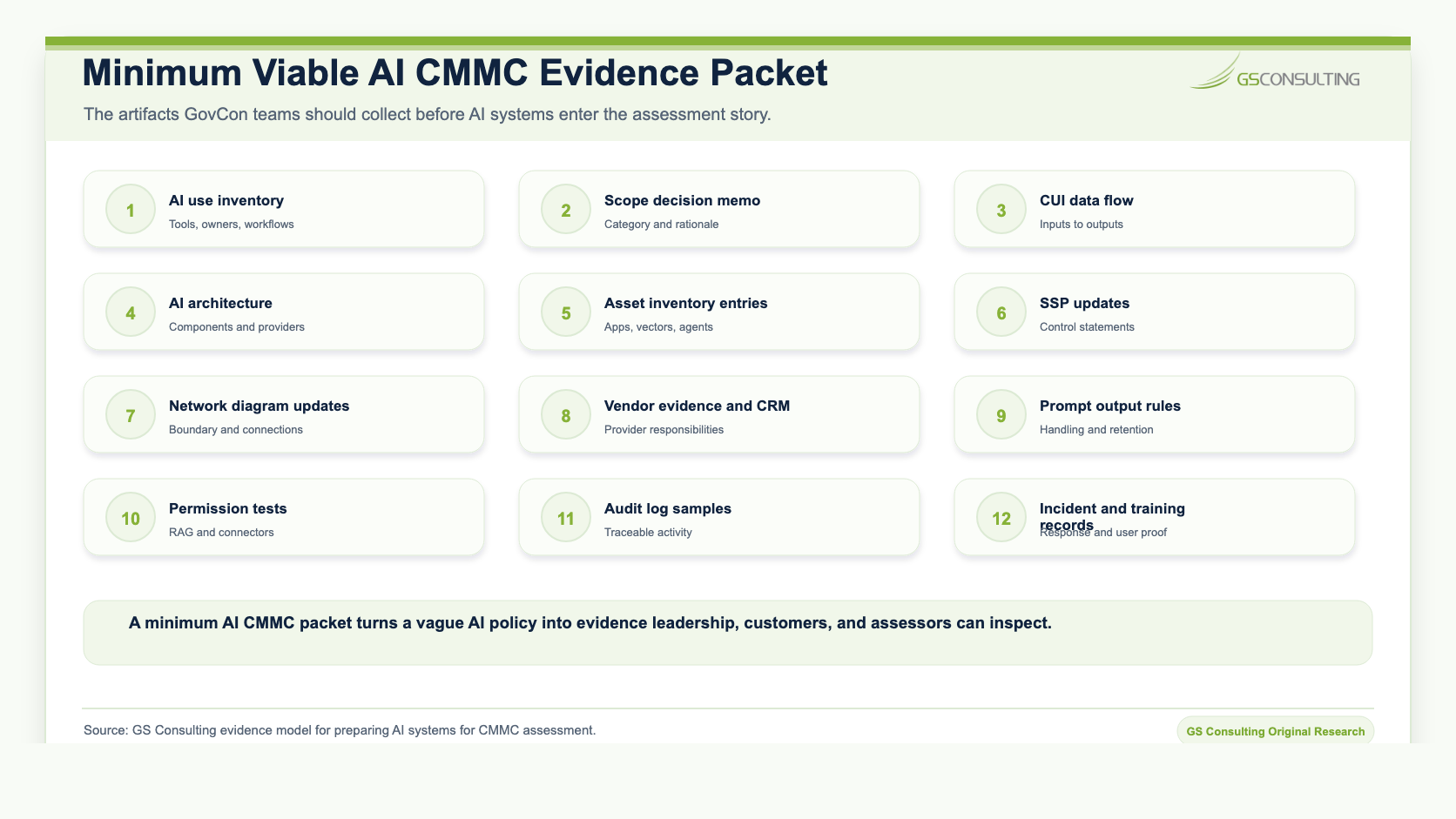
A minimum AI CMMC evidence packet should make the boundary, responsibilities, controls, and test results easy to inspect.
Include an AI use inventory, scope decision memo, CUI data flow map, AI architecture diagram, asset inventory entries, SSP updates, network diagram updates, vendor review records, customer responsibility matrix where applicable, model provider terms, access control configuration, service account permissions, RAG permission testing, DLP or prompt blocking test results, prompt and output handling rules, logging configuration, sample audit logs, training records, incident response updates, human review procedure, monitoring screenshots, and POA items where appropriate.
Common Mistakes
- Scoping only the model: The model is not the whole system. Prompts, outputs, connectors, logs, embeddings, and providers matter.
- Calling AI out of scope without evidence: A claim is not a control.
- Letting public AI handle controlled work: Policy only restrictions are weak if uploads, copy paste, extensions, and chat history are not controlled.
- Ignoring vector databases: RAG indexes can create new scoped assets.
- Using broad service accounts: That can break the least privilege and retrieval story.
- Missing AI logs: If AI logs contain CUI, security protection data, prompts, outputs, sources, or actions, they need handling rules.
- Skipping vendor evidence: AI vendors need to be reviewed like any provider that touches CUI or security protection data.
- Updating policies but not the SSP: The SSP needs to match the environment.
A 30 Day AI and CMMC Readiness Plan
- Week 1Inventory AI Use.
Find every AI tool, pilot, chatbot, agent, connector, summarizer, coding assistant, RAG system, and AI enabled vendor tool. Identify whether any touch FCI, CUI, security protection data, or systems in the CMMC scope.
- Week 2Classify and Scope.
Classify each AI tool as a CUI Asset, Security Protection Asset, Contractor Risk Managed Asset, Specialized Asset where applicable, external provider path, or out of scope candidate. Document the reasoning.
- Week 3Update Documentation.
Update the SSP, asset inventory, network diagram, data flow diagram, vendor records, AI policy, and incident response process.
- Week 4Test and Collect Evidence.
Test permissions, DLP, RAG retrieval, prompt blocking, output storage, logging, service account access, and human review. Collect evidence and fix gaps before assessment.
How This Supports Secure AI Automation Consulting
Secure AI Automation for Regulated Organizations explains how GS Consulting helps organizations automate workflows with the right governance, architecture, data controls, security, compliance, and measurable outcomes.
This guide answers the CMMC question: how do we modernize with AI without putting our CMMC investment at risk?
That question connects directly to Aligning Enterprise AI Strategy with CMMC and NIST, Mapping AI Automations to NIST SP 800-171 Controls, Preventing CUI Leakage in LLMs, Secure RAG Architecture for GovCon, How to Build a CUI Data Flow Map for CMMC, and CMMC Readiness Checklist for Government Contractors.
The Bottom Line
CMMC compliance for AI tools comes down to scoping, documentation, and evidence.
If an AI tool processes, stores, or transmits CUI, treat it like a CUI Asset. If it protects the CUI environment, treat it like a Security Protection Asset. If it can touch CUI but is not intended to, document the controls that prevent it. If you want it out of scope, prove it cannot process, store, transmit, or protect CUI.
The companies that get this right can modernize workflows without blowing up their assessment strategy.
The companies that ignore it will eventually face the hard question: why is this AI system not in the SSP?
Ready to protect your CMMC investment while modernizing with AI?
Contact GS Consulting for Secure AI Automation Consulting and CMMC Readiness Consulting.
Contact GS ConsultingResearch Sources and Caveats
The AI CMMC Scope Expansion Score, AI CMMC Evidence Burden Score, and asset category matrix are GS Consulting derived planning tools. They are not official CMMC scores, NIST determinations, DoD determinations, legal conclusions, audit findings, or C3PAO assessment results.
Actual AI scoping depends on the contractor's contracts, CUI categories, customer direction, CMMC level, system boundary, cloud architecture, provider terms, service descriptions, customer responsibility matrix, RAG design, prompt and output handling, logging, access model, and assessor or customer expectations.
- DoD CIO: About CMMC
- 32 CFR 170.19: CMMC Scoping
- 32 CFR 170.17: CMMC Level 2 Certification Assessment and Affirmation Requirements
- DFARS 252.204-7012
Frequently Asked Questions About Preparing AI Systems for CMMC Assessment
Does CMMC apply to AI tools?
CMMC can apply to AI tools when the AI system processes, stores, transmits, protects, retrieves, summarizes, logs, or creates outputs from FCI or CUI, or when it provides security functions for the CMMC assessment scope. The right question is what the AI system touches, not whether it is labeled as AI.
When does an AI tool become a CUI Asset?
An AI tool may become a CUI Asset when prompts, uploaded files, retrieved documents, outputs, chat histories, embeddings, vector stores, logs, or workflow actions process, store, or transmit CUI. The full AI data path needs to be reviewed, not just the model endpoint.
Can an AI tool be out of scope for CMMC?
Yes, but the out of scope story has to be provable. The tool should be physically or logically separated from CUI systems, unable to process, store, or transmit CUI, and not providing security protections for CUI assets. Policy alone is usually weaker than technical separation, access limits, DLP, monitoring, and documented evidence.
What evidence should DoD contractors prepare for AI systems in CMMC?
Contractors should prepare an AI use inventory, scope decision memo, CUI data flow diagram, AI architecture diagram, asset inventory entries, SSP updates, network diagram updates, vendor evidence, customer responsibility matrix where applicable, prompt and output handling rules, permission tests, logs, training records, and incident response procedures.
Related Reading
- Private LLM and Secure RAG hub
- What Is a Private LLM?
- Private LLM Deployment Options
- Secure AI Automation for Regulated Organizations
- Aligning Enterprise AI Strategy with CMMC and NIST
- Mapping AI Automations to NIST SP 800-171 Controls
- Secure RAG Architecture for GovCon
- How DoD Contractors Can Use AI Without Putting CUI at Risk
- How to Build a CUI Data Flow Map for CMMC
- CMMC Readiness Checklist for Small and Mid Sized Government Contractors
- NIST SP 800-171 Compliance for GovCon