AI Workflow Automation | | 25 min read
Human in the Loop Workflow Architecture

Key Takeaways
Human review becomes a control only when the system makes the decision meaningful and enforceable.
Show the Source
A reviewer needs source evidence, limitations, risk, alternatives, and consequences rather than a polished summary alone.
Bind the Approval
Tie approval to one action, record, version, recipient, parameter set, reviewer, condition, and expiration.
Verify the Result
Confirm that execution stayed inside the approved scope and preserve evidence for audit, rollback, and improvement.
Human in the loop is not a slogan. It is a design requirement.
That is the part most organizations get wrong. They say, “We will keep a human in the loop,” then build a workflow where the person gets a vague summary, clicks approve, and has no practical way to inspect the data, understand the risk, change the output, reject the action, or prove later what happened.
That is not oversight. That is theater.
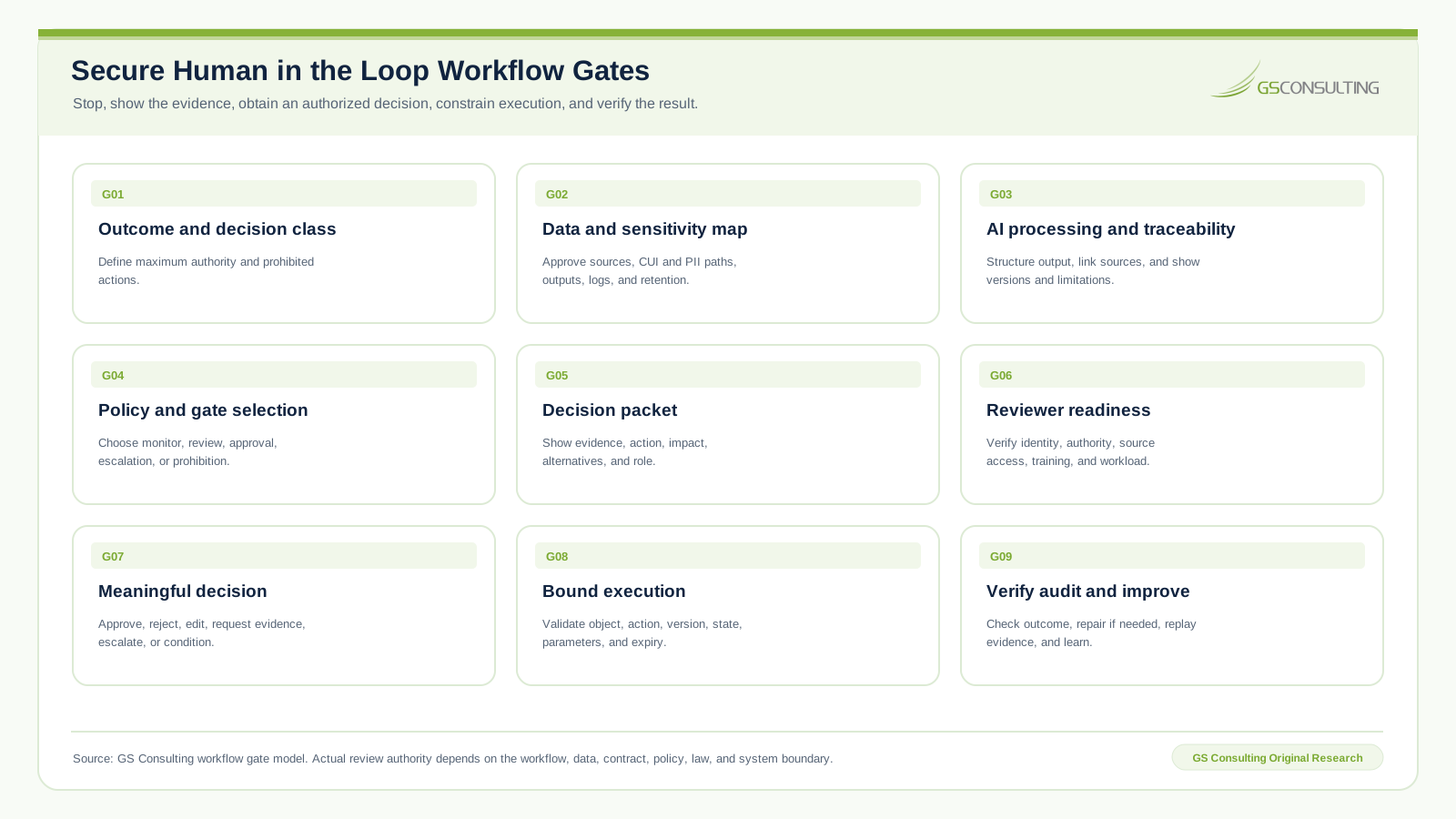
Human in the loop workflow architecture defines the exact points where automation must pause, show its work, request a credentialed human decision, record that decision, and continue only when the approval is valid for the requested action.
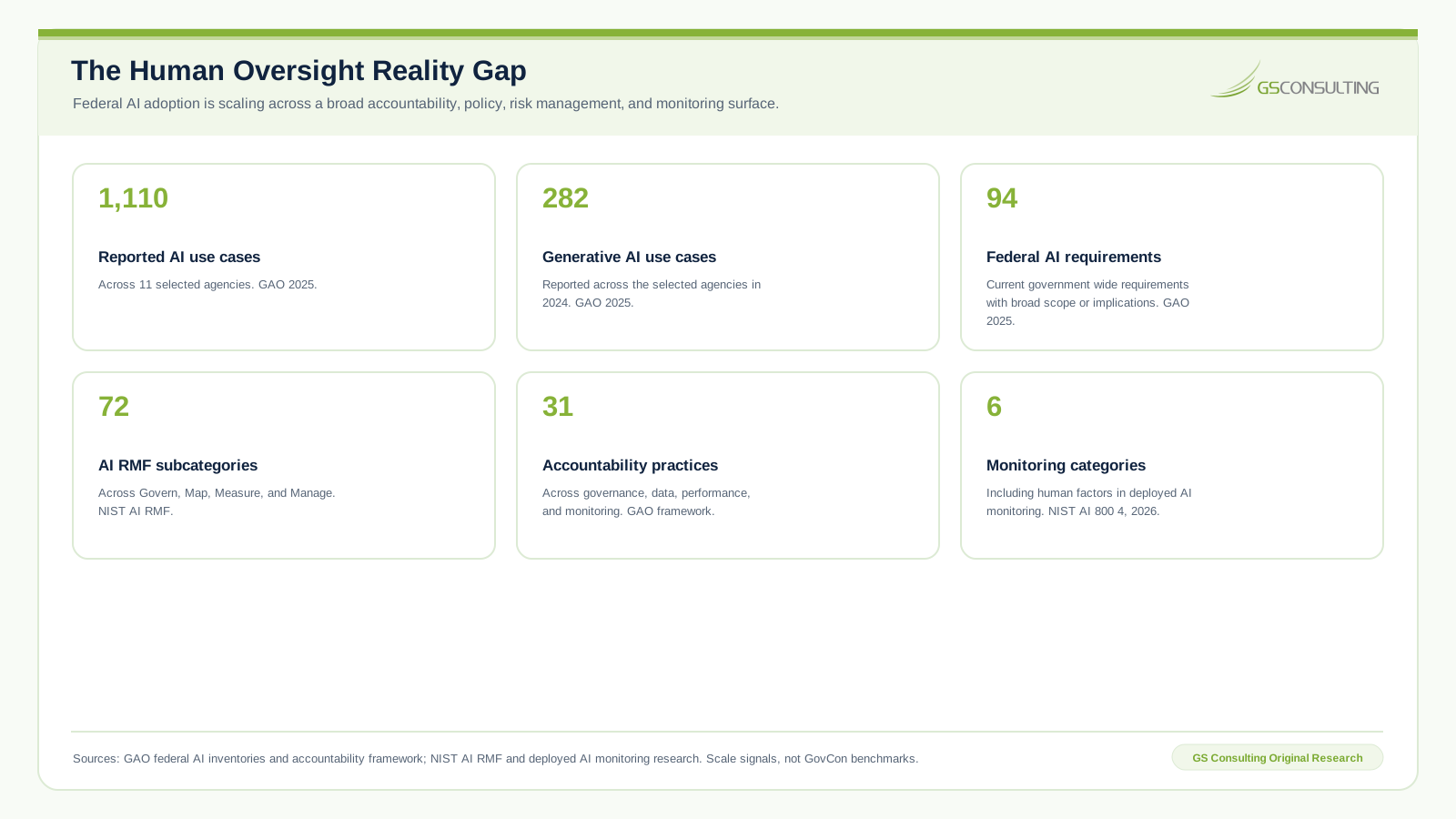
For regulated organizations, GovCon firms, cyber teams, compliance teams, and enterprise technology groups, this matters because AI does more than produce words. It can route documents, extract contract requirements, summarize incidents, create tickets, update systems, trigger API calls, and recommend actions that affect real operations. Once AI can take action, approval design becomes part of the control environment.
Need real approval controls inside an AI workflow?
GS Consulting helps regulated organizations map decisions, design review packets, build secure approval gates, constrain system actions, and preserve audit evidence.
Request a Human Approval Workflow AssessmentThis guide supports our main AI workflow automation service and the Enterprise AI Process Transformation cluster. It connects directly to workflow orchestration for secure environments, human in the loop AI automation, secure API development for AI automation, and AI audit trails and activity logging.
The Bad Assumption: A Human Reviewer Makes the Workflow Safe
A human reviewer only makes the workflow safer when that person has the right information, authority, time, interface, and accountability. Otherwise, the reviewer becomes a rubber stamp.
The AI produces a polished recommendation. The source data is hidden. The risk score is vague. Rejection is annoying. The deadline is close. The interface nudges approval. The person clicks accept. Leadership then claims a human reviewed the decision.
The better question is not whether a human was involved. It is whether that human could make an informed decision. If the answer is no, the workflow was designed to transfer blame rather than create accountability.
Why Human Approval Matters More in GovCon
In an ordinary workflow, a bad automation may create rework. In GovCon it may create compliance exposure, contract risk, CUI exposure, security risk, or loss of customer trust.
A workflow may process contract documents, route CUI, prepare CMMC evidence, summarize an incident, check subcontractor compliance, draft customer communications, update ERP records, change access requests, or support release decisions.
NIST SP 800 171 Revision 3 provides security requirements for protecting CUI in nonfederal systems and organizations. Its scope includes components that process, store, transmit, or protect CUI. A workflow that handles CUI is not merely a productivity tool. Its review queue, decision repository, prompt store, evidence archive, approval API, and downstream services may matter to the protected environment based on what they handle and protect.
The NIST AI Risk Management Framework and NIST Generative AI Profile help organizations identify and manage AI risk. The operational question remains direct: where does risk enter the workflow, and who is accountable for accepting it?
Human in the Loop Is a Control Boundary
Before the boundary, automation can gather data, structure it, summarize it, classify it, enrich it, compare it, draft it, and recommend an action. At the boundary, the workflow stops. A human reviews a decision packet. After the boundary, the workflow continues only if approval is valid for that exact action.
The boundary must answer who reviewed the output, what that person saw, which source data was available, what action was approved, which risk was accepted, which alternatives existed, what changed during review, what happened after approval, and where the evidence is retained.
If the system cannot answer those questions, the design is incomplete.
Original Research: The Meaningful Human Decision Control System
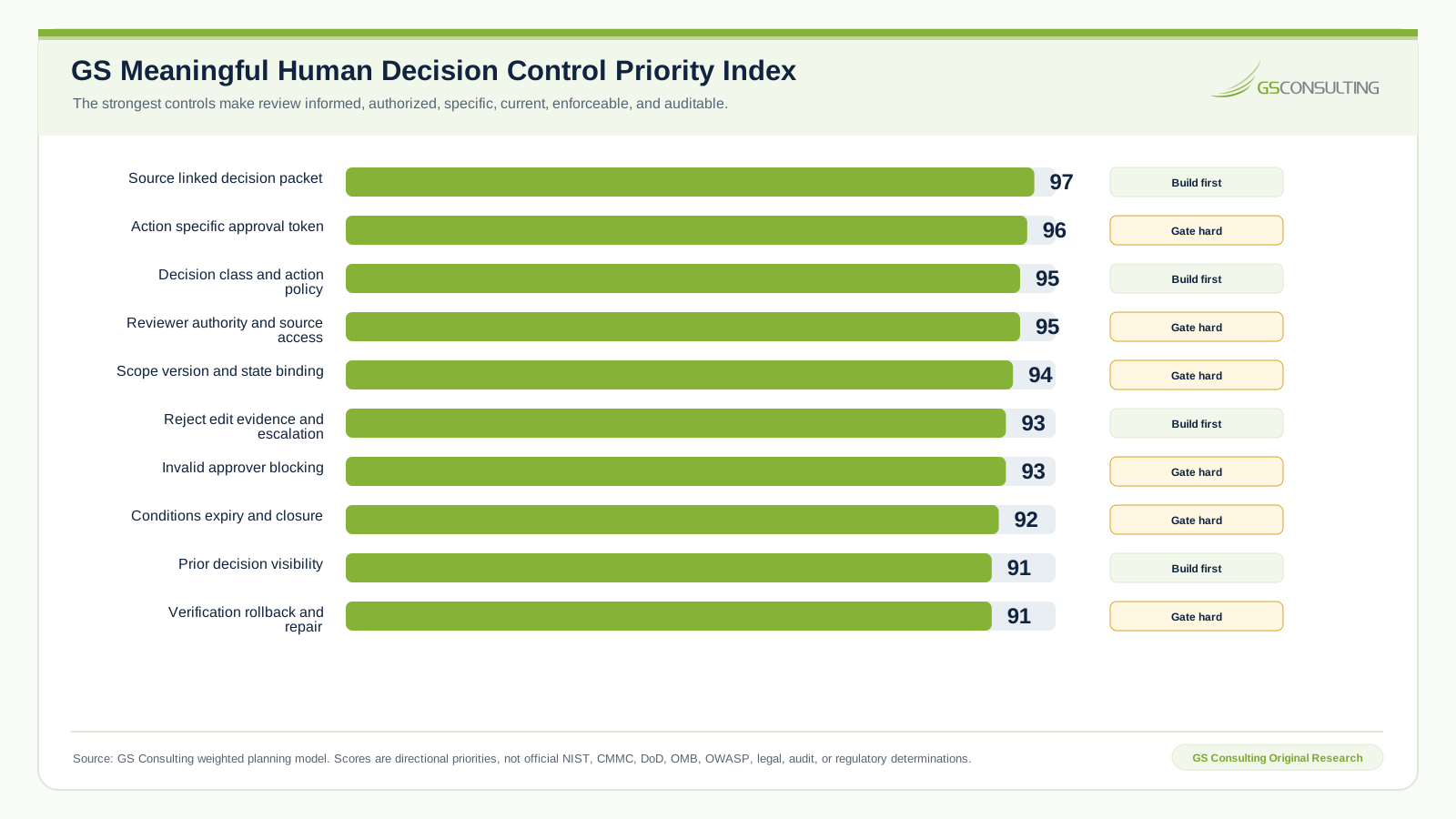
GS Consulting analyzed human review as a decision control problem rather than a user interface feature. The resulting planning model tests whether an approval point is informed, authorized, specific, current, enforceable, and auditable.
The source linked decision packet scored 97 out of 100 in the GS priority model. An action specific approval token and parameter freeze scored 96. Decision class policy and matching reviewer role, authority, and source access each scored 95. Approval scope, version, and workflow state binding scored 94.
The pattern is direct. Strong controls do not merely place a person near automation. They give that person enough information and authority to decide, then make the surrounding system obey the decision.
Start With Decision Classification
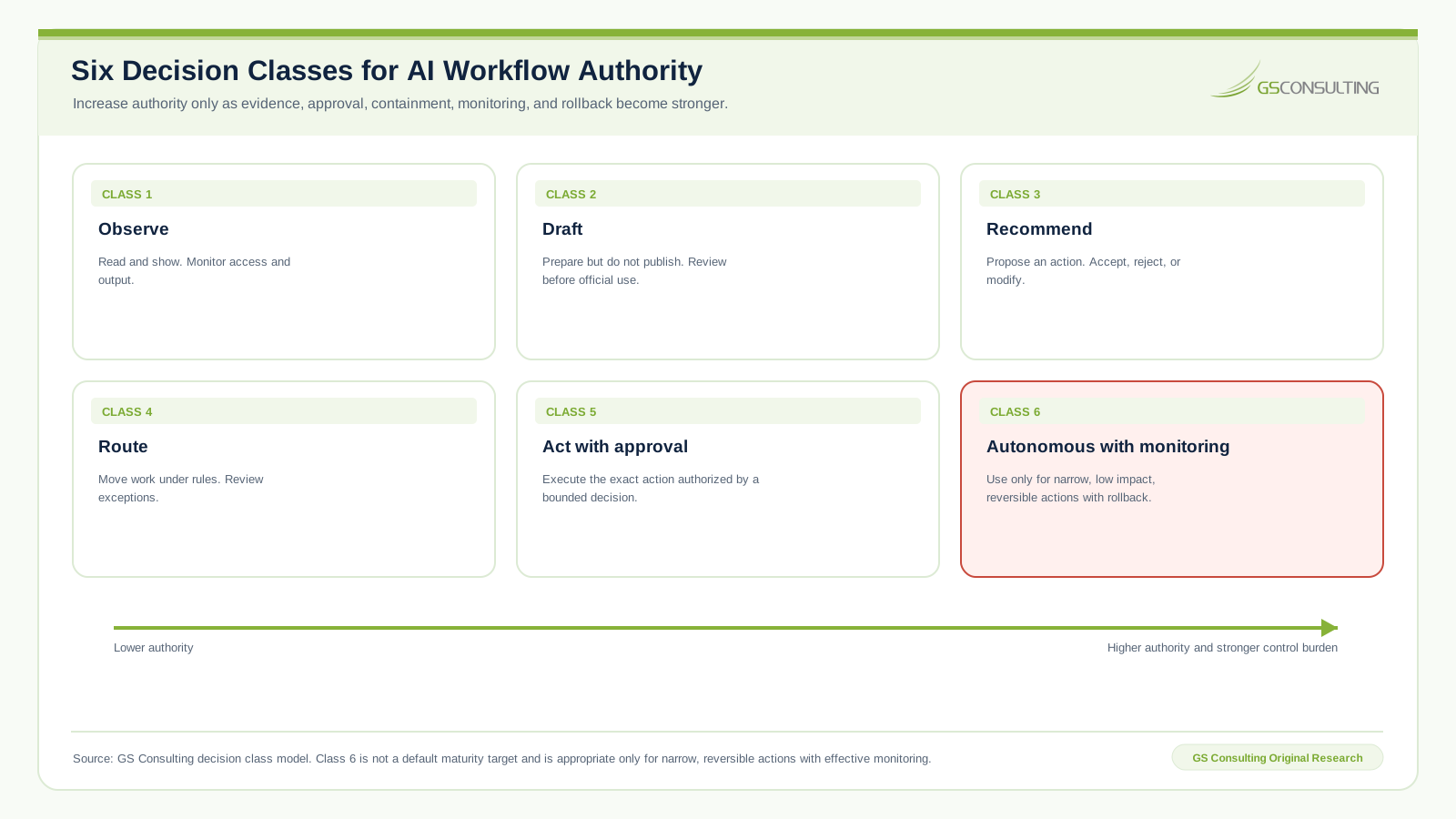
Not every workflow needs the same human gate. Equal approval treatment creates fatigue and trains people to click without thinking. Before designing screens, classify the authority the automation receives.
- Class 1: Observe. The automation reads approved data and produces a view. Access control and logging still apply, but prior approval may not be needed.
- Class 2: Draft. The automation creates a draft but cannot send, submit, close, approve, or update the system of record.
- Class 3: Recommend. The automation proposes an action that a person accepts, rejects, or modifies.
- Class 4: Route. The automation moves work to another approved queue or owner. Exceptions require review.
- Class 5: Act with approval. The system performs a bounded action only after a valid human decision.
- Class 6: Autonomous with monitoring. The system acts inside narrow guardrails with monitoring and rollback. Reserve this for low impact actions with clear rules.
Match Gate Strength to Consequence and Reversibility
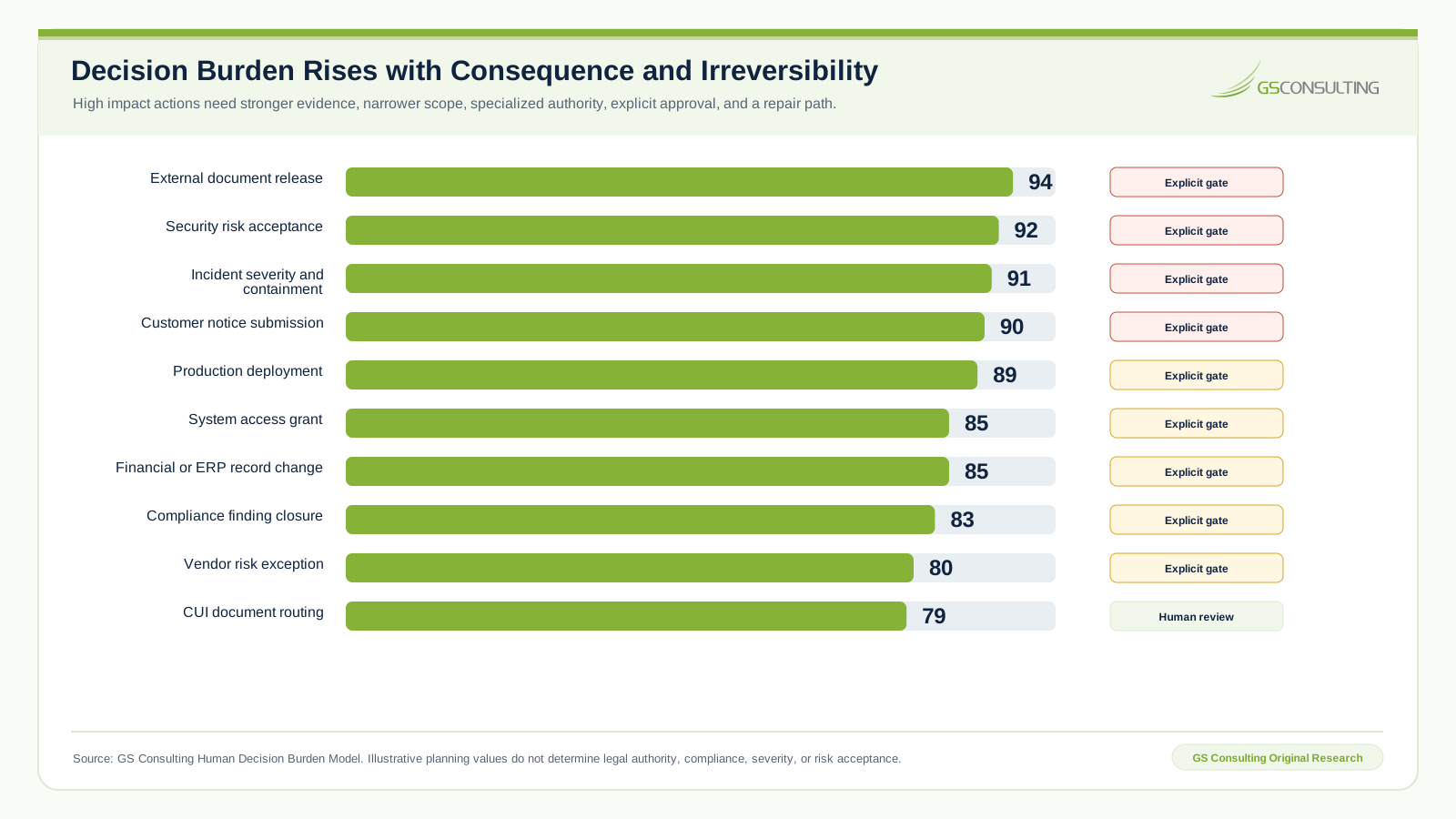
Low risk actions such as drafting a summary, tagging a document, creating a draft ticket, suggesting a reviewer, or pulling approved metadata may need monitoring rather than approval.
Medium risk actions such as routing a CUI document, assigning a contract obligation, prioritizing a security alert, preparing an ERP change, or drafting an external response need human review.
High risk actions such as releasing a document, accepting security risk, submitting a customer notice, closing a compliance finding, granting access, changing financial records, approving deployment, or interpreting a contract need explicit approval from a credentialed person.
The harder an action is to reverse, the stronger the gate should be. A draft task list and an external document release should not use the same approval path.
The Review Packet Is the Product
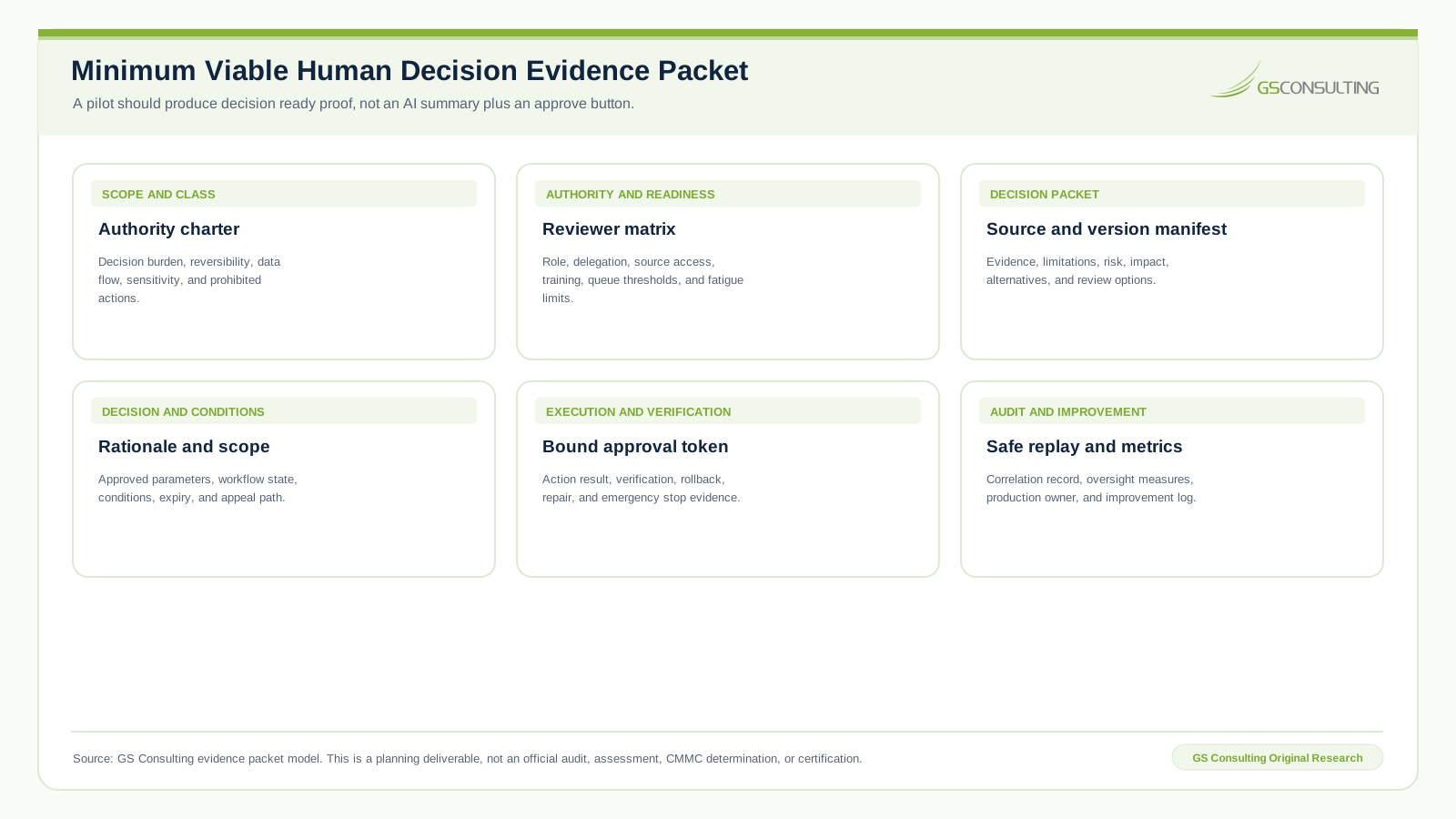
The approval interface is not just a screen. It is the decision packet presented to the reviewer. A strong packet includes the requested action, source records, source links, source version, relevant excerpts, data sensitivity, confidence basis, known limitations, missing evidence, risk category, policy reference, prior decisions, consequences, alternatives, required role, deadline, and a rationale field.
A screen that says “AI recommends approval. Approve?” is not an architecture. It is a liability.
The person must be the right reviewer, not whoever happens to be in the queue. Contracts leads review obligations. Compliance officers review evidence acceptance. A CISO or delegate approves security exceptions. Data owners approve sensitive data handling. Release managers approve software releases. System owners approve access changes.
The reviewer also needs access to the source. Approval without evidence access is not review. It is trust in automation, which defeats the point.
The Workflow Must Support More Than Approval
If rejection is difficult, the system is biased toward approval. A useful interface lets the reviewer reject, request changes, ask for more evidence, edit permitted fields, escalate, send the item back, approve with conditions, approve with expiration, mark it out of scope, or record uncertainty.
Many AI outputs are partly right. A contract obligation may be accurate but assigned to the wrong owner. An incident severity may be correct but lack an evidence preservation step. A redaction recommendation may identify PII while missing context. Human review should improve the decision rather than merely judge it.
Approval Needs Scope, Version, and Technical Enforcement
“Approved AI recommendation” is too vague. Approval must identify the exact record, action, output, recipient, field, version, parameter set, workflow state, conditions, reviewer, and expiration when needed.
A decision applies only to the version reviewed. If the source document, data extract, model, prompt, tool schema, output, recipient, proposed parameter, or workflow state changes materially, the prior approval should become invalid.
The system should issue a bounded approval token that the execution layer validates. A person might approve sending one exact message to one exact recipient, updating one ticket field from Open to Escalated, or creating one access request for one user and one system. The workflow must reject any broader action.
This control pattern depends on secure service identities, parameter validation, object authorization, state checks, and event integrity. Those controls are covered in Secure API Development for AI Automation.
Audit Trails Must Prove the Decision Without Leaking Data
An accountable workflow records who submitted the item, which data was used, which AI output was created, which sources supported it, what the reviewer saw, what changed, what decision was made, which action followed, which system changed, and which version was approved.
Logging too much creates another risk. A workflow may process CUI, PII, security logs, contract information, or vulnerability details. Define which data is stored, referenced, masked, retained, searchable, exportable, and deletable. The audit trail must prove the decision without becoming an uncontrolled copy of every sensitive record.
For a deeper implementation pattern, see AI Audit Trails and Activity Logging.
Prompt Injection and Tool Calls Require Layered Controls
AI workflows read documents, tickets, email, logs, and web content that may contain malicious or misleading instructions. OWASP guidance for large language model applications describes prompt injection and excessive agency risks that can alter behavior or give a model too much power.
Human review can catch dangerous output before action only when the packet shows enough context. It is not the only defense. Separate content from instructions, validate structured output, narrow tool authority, enforce access control, and verify execution after approval.
Every tool needs an authority model: whether AI may call it, whether approval occurs before or after parameters are prepared, which parameters a person may edit, how values are validated, what happens on failure, whether the action can be reversed, what gets logged, and who owns support.
A Practical Human in the Loop Architecture
A strong architecture has eight operating layers:
- Intake. Capture the source, owner, purpose, data type, sensitivity, and requested outcome.
- AI processing. Extract, summarize, classify, draft, recommend, or compare with structured, source referenced output.
- Policy. Select the required gate based on action, data, role, boundary, reversibility, and risk.
- Review packet. Present the source evidence, requested action, limitations, risk, alternatives, and consequences.
- Human decision. Let the right reviewer approve, reject, edit, escalate, or request more information.
- Bounded action. Execute only the approved action through controlled APIs, queues, and system updates.
- Audit and verification. Record the decision and prove that execution matched its scope.
- Monitoring and improvement. Track quality, workload, overrides, errors, drift, exceptions, and reviewer feedback.
Four Practical Workflow Examples
CUI document routing
AI detects possible CUI indicators and proposes a classification and routing path. The compliance reviewer sees the document, markings, relevant excerpts, proposed reviewers, current access, risk notes, and requested route. Only after approval does the system move the document and record the decision.
Contract obligation approval
AI extracts a cybersecurity reporting clause. The contracts reviewer sees clause text, page reference, summary, proposed obligation, owner, contract identifier, flow down effect, due date, and risk. The reviewer edits the owner, adds a note, and approves task creation.
Security incident triage
AI enriches an alert with asset, identity, vulnerability, and program context. Because the system may handle CUI, a SOC manager reviews severity, containment, evidence preservation, and reporting triggers before the workflow isolates an endpoint or opens legal and compliance review. Related design guidance appears in AI Cybersecurity Incident Response Workflows.
DevSecOps release exception
AI summarizes a vulnerability, affected component, exploitability, compensating control, release effect, proposed expiration, and remediation owner. Security may approve with conditions, reject the release, or require a fix. The approval is stored with the exact release record. See Automating DevSecOps Pipelines with AI for the complete release control model.
What Usually Breaks
- The reviewer sees only the AI summary and cannot inspect source evidence.
- The wrong role approves a decision outside its authority.
- Rejection creates so much manual cleanup that people accept weak output.
- Approval remains valid after the source, output, or workflow state changes.
- The log says approved but does not preserve what was approved.
- The automation performs several actions after approval of only one.
- Temporary exceptions never expire.
- One generic queue becomes a dumping ground with no accountable owner.
Metrics That Reveal Whether Review Is Meaningful
Do not measure success by approval count alone. Track approval, rejection, modification, escalation, review time by decision class, queue aging by role and risk, exception expiration, repeated corrections, reviewer overrides, source reference completeness, unauthorized approval attempts, stale approval invalidation, scope drift blocks, execution verification, rollback, errors caught by people, errors missed by people, and reviewer workload concentration.
A 99 percent approval rate may mean excellent automation. It may also mean an exhausted team clicking through a bad queue. Look deeper.
What to Automate First
Start where human approval already exists but is messy: contract obligation extraction, CUI routing, compliance evidence acceptance, vendor risk review, security escalation, RFP compliance review, redaction review, ERP update approval, access request preparation, release exception approval, and customer response drafting.
Do not begin with autonomous external release, access grants, customer notices, legal positions, compliance closure, production deployment, security risk acceptance, financial record changes, external messages, or deletion. Begin with draft and review.
A Practical First 90 Days
- Days 1 to 30Map one decision.
Identify the workflow, owner, source data, sensitive fields, approval authority, current failures, action classes, and what the reviewer must see.
- Days 31 to 60Design the decision packet.
Add structured output, source references, risk classification, reviewer options, approval scope, rejection, escalation, version tracking, and audit fields.
- Days 61 to 90Pilot and harden.
Run real cases, compare recommendations with decisions, measure corrections and review time, test access, inspect logs, train reviewers, and define production ownership.
What Leadership Should Demand Before Production
Leadership should know what AI may do, where it stops, who can approve, what the reviewer sees, whether source data is accessible, which edit and rejection paths exist, how approval binds to a version, whether the action is reversible, what gets logged, how sensitive logs are protected, when approval expires, who reviews exceptions, who supports failures, and how the workflow can be stopped.
If those answers are vague, the workflow is not ready. Human in the loop cannot be vague.
What GS Consulting Builds
GS Consulting helps regulated organizations design secure AI workflows where human approval is part of the architecture rather than an afterthought. Work can include workflow discovery, decision classification, review packet design, role based routing, source traceability, version control, exception handling, audit trails, API action controls, CUI review, interface design, backend workflow engineering, production monitoring, reviewer feedback, governance, and support planning.
This is not generic AI governance. It is practical workflow engineering.
The Bottom Line
Human in the loop workflow architecture is the difference between accountable AI and AI with a permission slip. A real gate shows what happened, which data was used, which action is requested, which risk exists, which alternatives are available, and what follows approval.
It lets a credentialed reviewer reject, edit, escalate, request more evidence, or approve with conditions. It records the decision. It limits automation to the approved action. It verifies execution. It preserves evidence.
Do not say “human in the loop” unless you can point to the loop. Build the checkpoint. Make the decision real. Then automate around it.
Engineer accountability into every high risk action.
GS Consulting helps GovCon firms and regulated organizations map decisions, design human approval architecture, build secure workflow controls, and create the evidence trail around them.
Request a Human Approval Workflow AssessmentResearch Sources and Caveats
The GS Meaningful Human Decision Control Priority Index, Human Decision Burden Model, decision classes, workflow gates, review packet catalog, evidence packet, and metrics catalog are GS Consulting derived planning tools. They are not official legal, audit, compliance, NIST, CMMC, DoD, OMB, CISA, OWASP, privacy, or regulatory determinations.
- GAO: Federal Artificial Intelligence Use and Management
- NIST AI Risk Management Framework Core
- NIST Generative AI Profile
- NIST SP 800 171 Revision 3
- OMB Memorandum M 25 21
- OWASP Top 10 for Large Language Model Applications
Frequently Asked Questions
What is human in the loop workflow architecture?
Human in the loop workflow architecture is the technical and operational design that determines where automation stops, what evidence a reviewer sees, who may decide, which options are available, how approval is limited to a specific action and version, and what audit record remains after execution.
Does adding a human reviewer make an AI workflow safe?
No. Review only works when the person has suitable authority, source access, enough context, meaningful options, time to decide, and the ability to stop or change the action. A vague summary and an approve button create a rubber stamp, not an accountable control.
What should an AI decision review packet include?
A useful packet includes the exact requested action, source records and versions, relevant excerpts, data sensitivity, confidence basis, known limitations, risk factors, consequences, alternatives, prior decisions, required reviewer role, deadline, and fields for rationale, conditions, and expiration.
When should an AI workflow require explicit human approval?
Explicit approval is appropriate when an action affects external release, security risk, incident containment, customer notices, production deployment, system access, financial records, compliance findings, contract interpretation, CUI handling, or another outcome with material consequence or limited reversibility.
How should automated workflow approval be recorded?
The approval should bind one reviewer to one record, action, output, recipient, parameter set, version, workflow state, set of conditions, and expiration where needed. The audit record should preserve what the reviewer saw, changed, decided, and authorized, plus the verified execution result.
Suggested Future Reading
- AI Workflow Automation
- AI Document Processing: A Practical Implementation Guide
- AI Document Processing Hub
- Enterprise AI Process Transformation
- Human in the Loop AI Automation
- Secure API Development for AI Automation
- AI Audit Trails and Activity Logging
- Automating DevSecOps Pipelines with AI
- Workflow Automation Security Risk Assessment