Microsoft GCC High | | 28 min read
GCC High Privileged Access Management: Activation, Approval, and Proof

Key Takeaways
Control the complete life of elevated authority
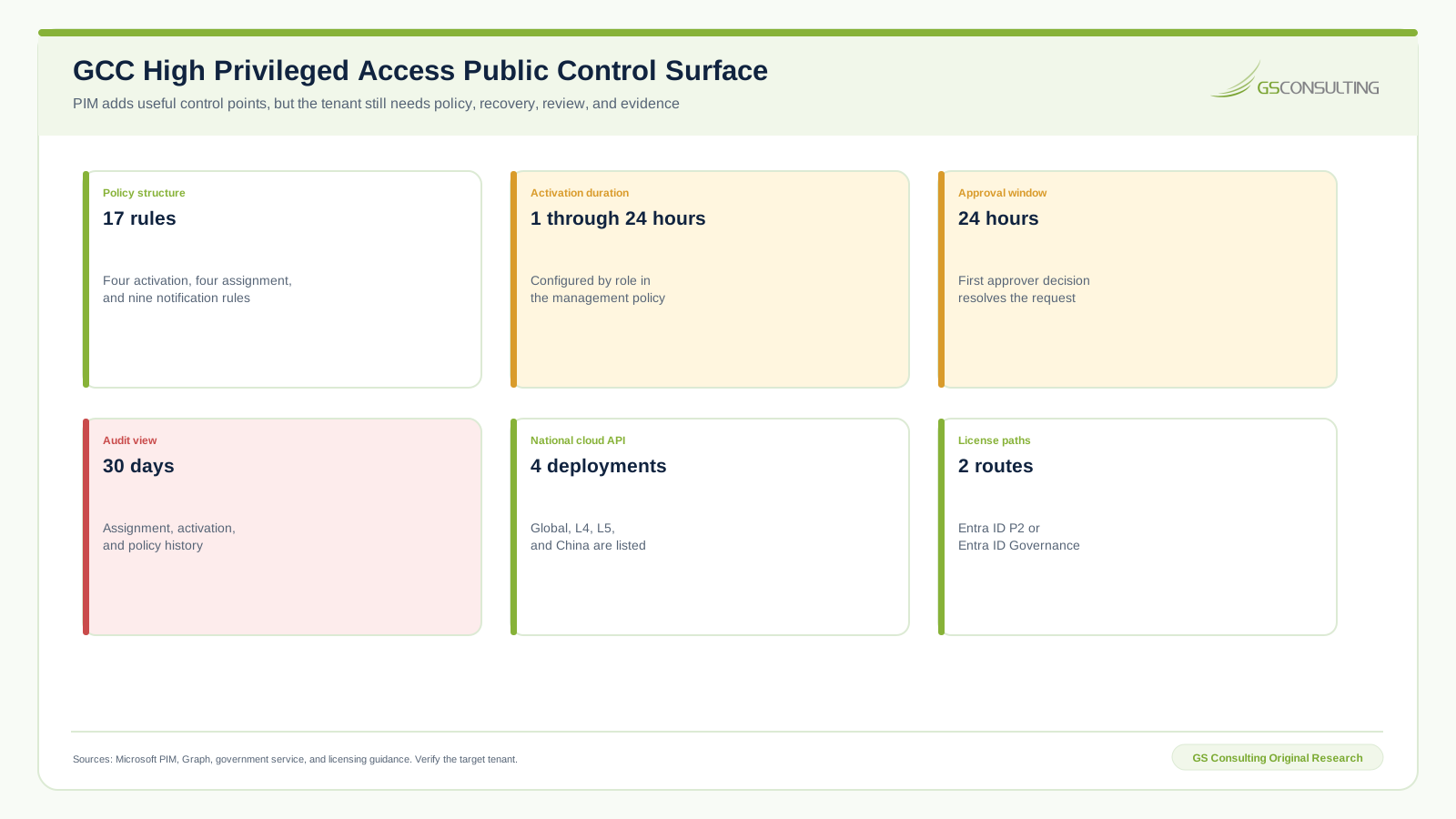
17 policy rules across three groups
Microsoft documents four activation rules, four assignment rules, and nine notification rules in a PIM role policy.
Emergency access scores 100
Recovery leads the model because a failed privileged control can block the same administrators needed to repair it.
The PIM view covers 30 days
Longer investigation and assessment needs require an approved export, durable identifiers, and verified retention.
Not access requests. Privileged authority. GCC High privileged access management must control who can receive elevated power, why they can use it, what they do, when it ends, and how the organization proves the result.
Turning on Microsoft Entra Privileged Identity Management does not finish that job. A tenant can have eligible roles and still keep permanent administrators, orphaned approvers, untested emergency accounts, powerful service principals, weak activation reasons, short audit history, and review decisions that never remove access.
The operating standard is a connected record. One reviewer should be able to follow a role from authority and assignment through activation, authentication, approval, privileged activity, expiration, deactivation, access review, correction, and retained evidence.
This guide extends the Microsoft GCC High hub, the GCC High identity governance model, the Conditional Access guide, and the Secure Score operating model. GS Consulting supports controlled security operations through secure AI and regulated automation services.
Can you reconstruct one privileged activation from request to removal?
GS Consulting helps regulated teams reduce standing authority, test recovery, connect privileged activity to approved work, and build durable evidence.
Request a Privileged Access ReviewGCC High Privileged Access Management: The Short Answer
Inventory every privileged identity and path. Separate people, emergency accounts, groups, applications, service principals, service roles, and local administrative rights. Record whether each assignment is eligible or active, permanent or expiring, direct or inherited, interactive or workload based, and covered or not covered by PIM.
Protect recovery before tightening routine administration. Then set role specific activation, assignment, approval, authentication, justification, notification, duration, and review rules. Move justified human administrators from permanent active assignments to eligible access where the service and operating need support it. Keep application privilege in the same governance boundary even when it does not use an interactive activation.
Every activation should become a case with a stable identifier, approved purpose, role, scope, authentication result, approver, start, expiration, privileged actions, exceptions, and deactivation result. Export the audit record before the portal window becomes an evidence gap. Review both assignments and policy settings, then verify that denied, expired, or removed access is truly gone.
Understand the Public PIM Control Surface
Microsoft documents 17 predefined rules in a PIM role management policy: four activation rules, four assignment rules, and nine notification rules. That structure is useful because it turns a vague claim that PIM is enabled into a configuration set that can be exported, compared, approved, and reviewed by role.
Role settings can require multifactor authentication, an authentication context, justification, ticket information, and approval. Activation duration can be set from one through 24 hours. Assignment rules can limit eligible and active duration. Notification rules can alert administrators, users, and approvers when assignments and activations change.
These settings are not all equal. Microsoft notes that ticket information is only a field; PIM does not validate the entered value against a ticket system. Microsoft also warns that approval design can create a lockout when every Global Administrator or Privileged Role Administrator is eligible, approval is required, and no approver is configured. Configuration needs an operating test.
The Microsoft Graph role schedule request API is listed for the global service, United States Government L4, United States Government L5, and China. That supports controlled collection and workflow design in government environments. It does not prove the feature is licensed, consented, correctly scoped, or working in the target tenant.
GS GCC High Privileged Access Proof Priority Index
GS modeled ten privileged access control domains across five one to five ratings: privilege consequence, exposure breadth, activation and change volatility, evidence value, and recovery urgency. Base weights are 30, 20, 15, 20, and 15 percent. Each score is the sum of rating divided by five and multiplied by its weight, producing a zero to 100 planning scale.
Emergency access and recovery scores 100. Active assignment removal and application privilege score 97. Role settings and approval score 96. The result is not an argument to weaken activation controls. It shows that recovery, standing authority, and nonhuman privilege can defeat a polished activation process if they sit outside the operating boundary.
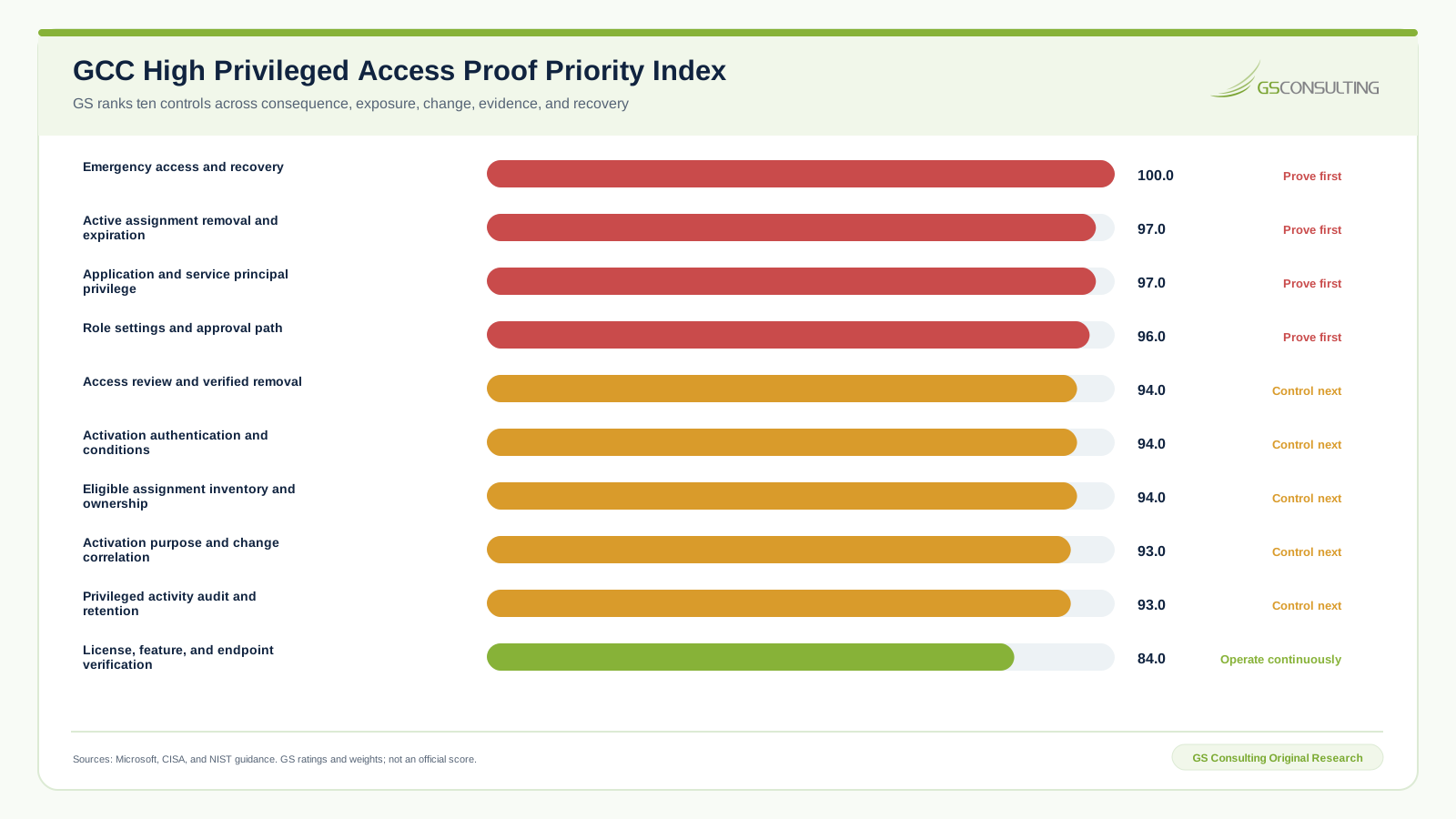
The sensitivity case moves five percentage points from privilege consequence to recovery urgency. No domain moves more than one point and the leading tier remains stable. That is a useful signal for sequencing, not statistical validation.
This is a GS Consulting derived planning tool. It is not a Microsoft score, legal opinion, audit result, contract interpretation, CMMC status, certification, or compliance determination. Public facts, analyst ratings, formulas, sensitivity results, and limitations are separated in the research package.
Start With Effective Privilege, Not the PIM Screen
Build a privilege register that spans Microsoft Entra roles, Azure roles, Microsoft 365 service roles, security products, applications, service principals, managed identities, groups, local administrator rights, emergency accounts, and administrative workstations. The register should name the identity, account type, role, scope, assignment source, active or eligible state, permanence, owner, business reason, start, end, last use, last review, authentication method, and evidence reference.
Direct assignments are only one path. Record group based assignment, nested membership, ownership, application consent, delegated rights, and service specific administration. Effective privilege is what the identity can do now, not what one portal lists.
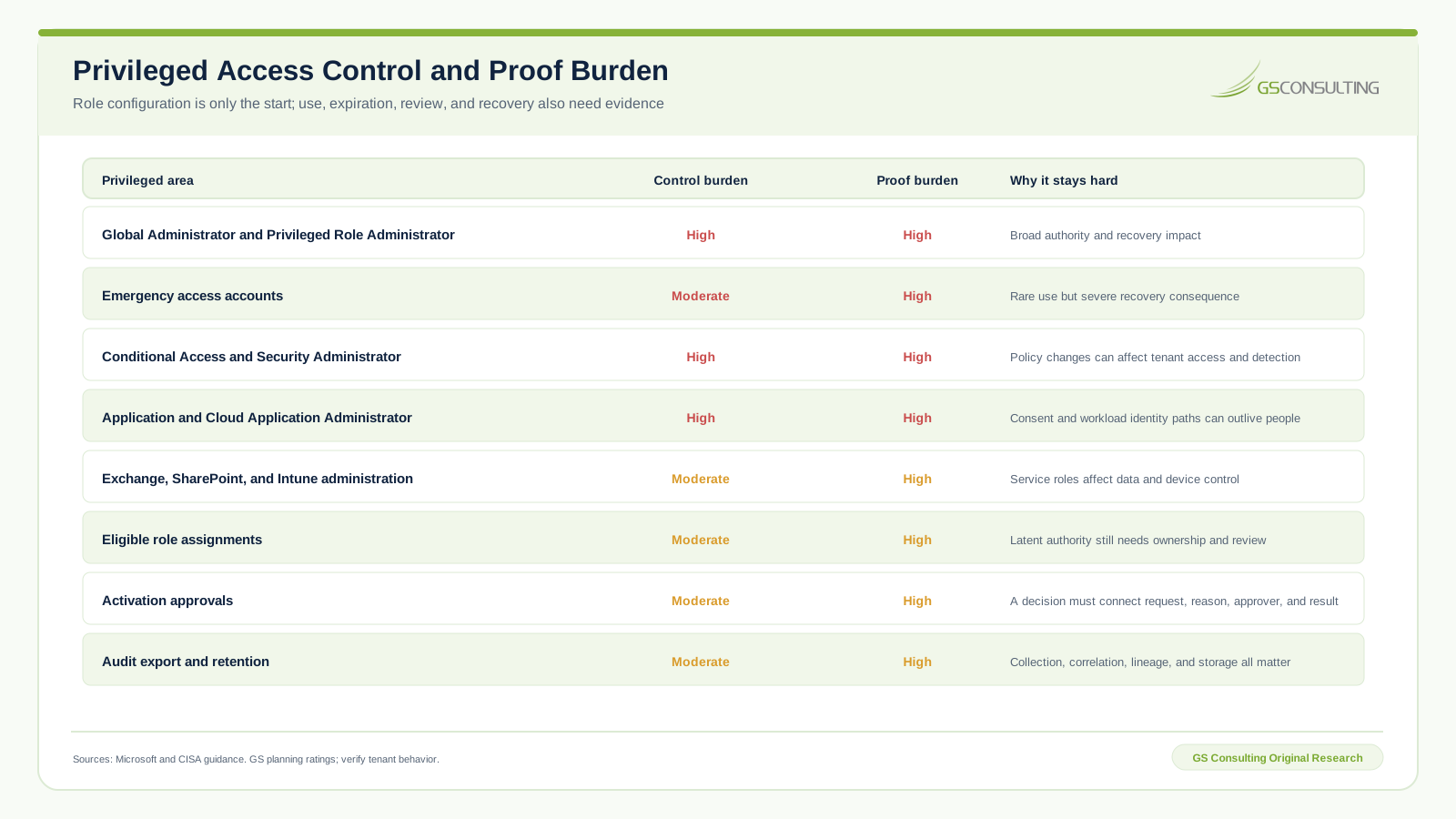
Classify roles by consequence and operating pattern. A Global Administrator, Privileged Role Administrator, Conditional Access Administrator, Security Administrator, Exchange Administrator, and Application Administrator do not need identical settings. The user population, normal task length, after hours need, change process, data reach, recovery route, and monitoring should shape each role policy.
Include nonhuman identities from the start. PIM for human role activation does not eliminate broad application permissions, ownerless service principals, old credentials, or automation that operates with permanent privilege. Give every application privilege an accountable owner, approved purpose, exact permissions, credential or federation method, expected use pattern, review date, and tested removal route.
Configure Each Role as a Decision Policy
| Policy element | Operating question | Proof to retain |
|---|---|---|
| Eligibility | Who may request the role, at what scope, for what reason, and until when? | Authority, assignment request, approval, start, end, and review date |
| Activation duration | What is the shortest safe period for the approved task? | Role setting, task class, actual start, expiration, and deactivation |
| Authentication | Which strong authentication and access conditions must succeed? | Policy version, authentication result, device or context result, and exception |
| Justification and change | What approved work gives the activation purpose? | Reason, change or incident identifier, scope, approver, and later activity |
| Approval | Who can approve, who cannot, and what happens when the route fails? | Approver roster, duty separation, decision time, outcome, and fallback test |
| Notification | Who must know about assignment, activation, and expiration? | Recipients, delivery result, failure, owner, and correction |
| Review | Who confirms the role is still required and the settings remain sound? | Population, reviewer, decision, applied result, exception, and next review |
Use approval where the consequence and task warrant a second decision. Do not add approval as decoration. Microsoft gives a pending activation a 24 hour window, and the first approver decision resolves the request. Maintain enough capable approvers to cover absence and conflict. Test the path with a real eligible account before relying on it during an incident.
Protect approver quality. The approver should see the requestor, role, scope, reason, requested duration, linked change or incident, conflicts, recent use, and risk signals. A one word reason and a green button produce a record, but not a good decision.
Treat Every Activation as a Connected Case
An activation record needs more than the PIM event. Capture the request identifier, identity, role, scope, assignment source, request time, reason, change or incident identifier, authentication result, approval decision, approver, scheduled start, actual start, expiration, deactivation, and every material exception.
Then correlate use. Join the activation to privileged audit events, configuration changes, target resources, administrative sessions, alerts, and change results. Microsoft notes that correlation identifiers can change through a request lifecycle. Preserve the role assignment request identifier and the source event identifiers needed to reconstruct the chain.
Define what should happen when activation fails, approval expires, authentication blocks the request, the role does not become active, the task ends early, the assignment remains after expiration, or the privileged action exceeds the approved scope. Each case needs an owner, response time, recovery route, correction, and repeated test.
Watch for privilege outside the activation. A user can hold another permanent role. An application can act without an interactive request. A group change can alter the effective population. Correlation should begin from the target action and effective authority, not assume every privileged event has a PIM activation.
Protect Emergency Access Before Broad Enforcement
Microsoft recommends two or more cloud only emergency access accounts. The point is independence. A failure in federation, Conditional Access, multifactor authentication, PIM approval, an administrative device, or an ordinary account process should not remove the only route needed to repair the tenant.
Record the account purpose, exact roles, exclusions, credential custody, authentication design, monitoring, alert route, use authority, access procedure, test schedule, test result, defect, correction, and post use review. Do not make the emergency route comfortable enough for routine administration.
Test both success and detection. A custodian must retrieve the approved credential or device, sign in through the intended route, complete a harmless verification, exit, and restore custody. Monitoring must alert the correct people. Review every real use as an incident or exceptional administrative event even when the activity was authorized.
Keep at least one active recovery path when PIM approval is required for critical roles. Microsoft warns about lockout when all relevant administrators are eligible and no approver can act. Recovery design belongs in the role policy review, not a separate document nobody checks.
Make Access Reviews End in Verified Removal
Review active and eligible assignments. Include direct users, groups, inherited populations, emergency accounts, applications, service principals, and roles outside PIM. Give the reviewer enough context to decide: identity status, manager or sponsor, role, scope, assignment type, reason, last activation, last privileged use, conflicts, end date, prior decision, and exception.
Choose a reviewer who can judge the need. A resource owner may understand the task. A security owner may understand the consequence. A manager may understand employment state. One reviewer does not always have all three. Define escalation and fallback rather than accepting blind approval.
The review does not end when someone clicks Deny. Apply the result, verify the assignment is removed, confirm effective access is gone, examine sessions and tokens where relevant, resolve group or application paths, and record the time and evidence. Investigate every result that cannot be applied.
Review role settings too. A clean assignment list can still sit behind a weak activation policy, expired approver roster, disabled notification, excessive duration, missing authentication rule, or broken export. Treat policy drift and assignment drift as separate questions.
Export Audit History With Enough Context to Reconstruct the Decision
Microsoft documents 30 days in the PIM resource audit view for role assignments, activations, and policy changes. That is a portal window, not a statement of your required retention.
Set retention from contract, investigation, security operations, assessment, legal, privacy, and records needs. Route approved events to the organization logging and storage path. Preserve tenant, source, collection time, source event time, event identifier, request identifier, identity, role, scope, action, result, raw record, transformation, destination, retention rule, and integrity check.
Reconcile collection. Count expected sources and event classes. Detect silence, delay, schema change, failed export, duplicate ingestion, and expired credentials. A configured connector is not proof that the record arrived complete.
Use audit history to review patterns, not only individual cases: repeated activations without linked changes, approval by the same person, unusual duration, failed activation, activity outside activation, emergency account use, application permission change, role policy change, and removal failure. Route each material finding to an owner and verified closure.
Use a Five Stage Privileged Access Sequence
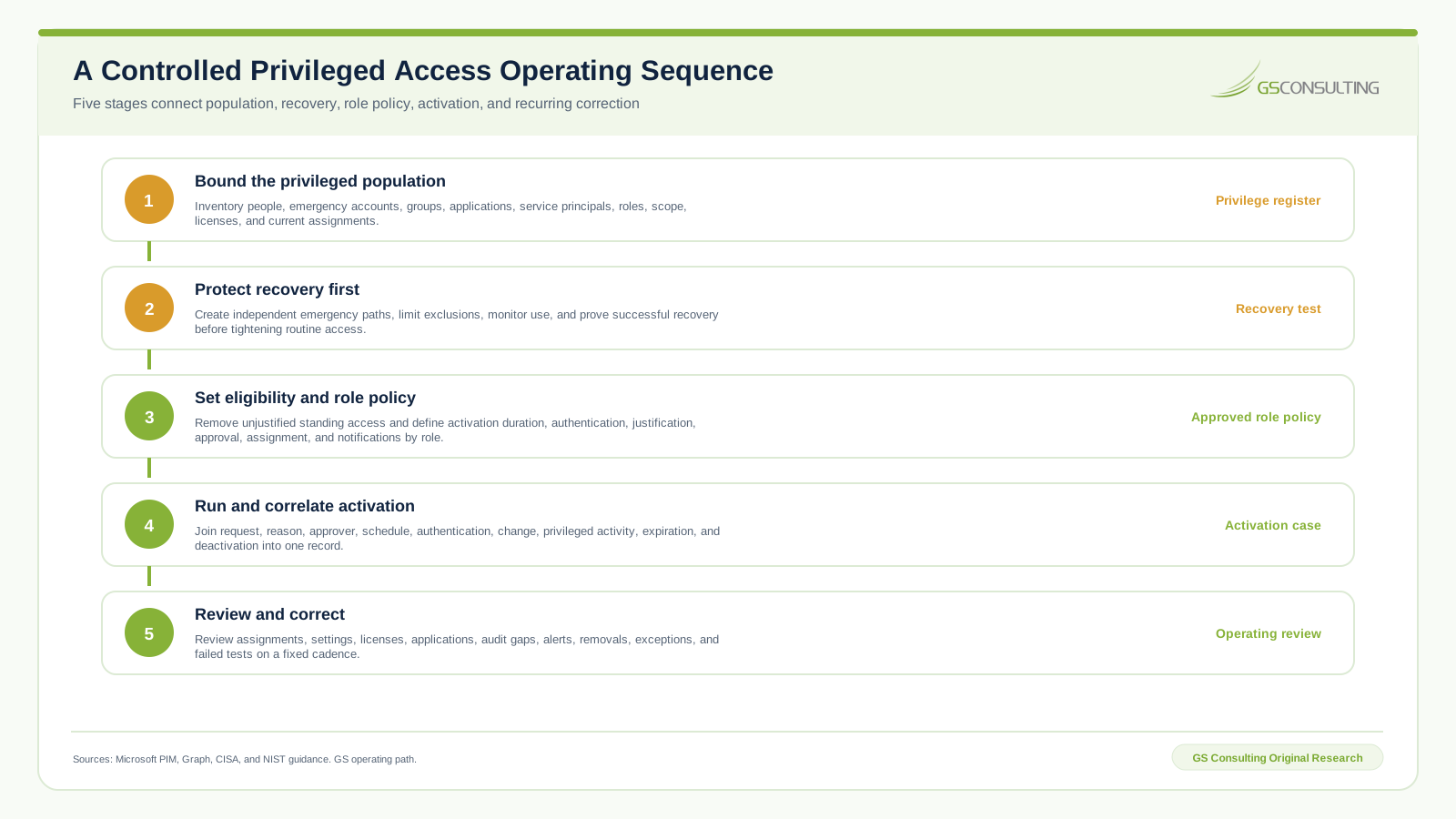
Run the sequence against normal and difficult cases. Test a successful activation, denied activation, missing approver, expired request, short task, overlong task, failed authentication, policy change, permanent assignment removal, emergency access use, application owner departure, access review denial, failed removal, logging interruption, and restored export.
Preserve the first result. A failed test is useful evidence when it produces a named defect, owner, correction, repeat result, and acceptance. Deleting the failed result creates a cleaner folder and a weaker operating record.
Avoid Six Privileged Access Failures
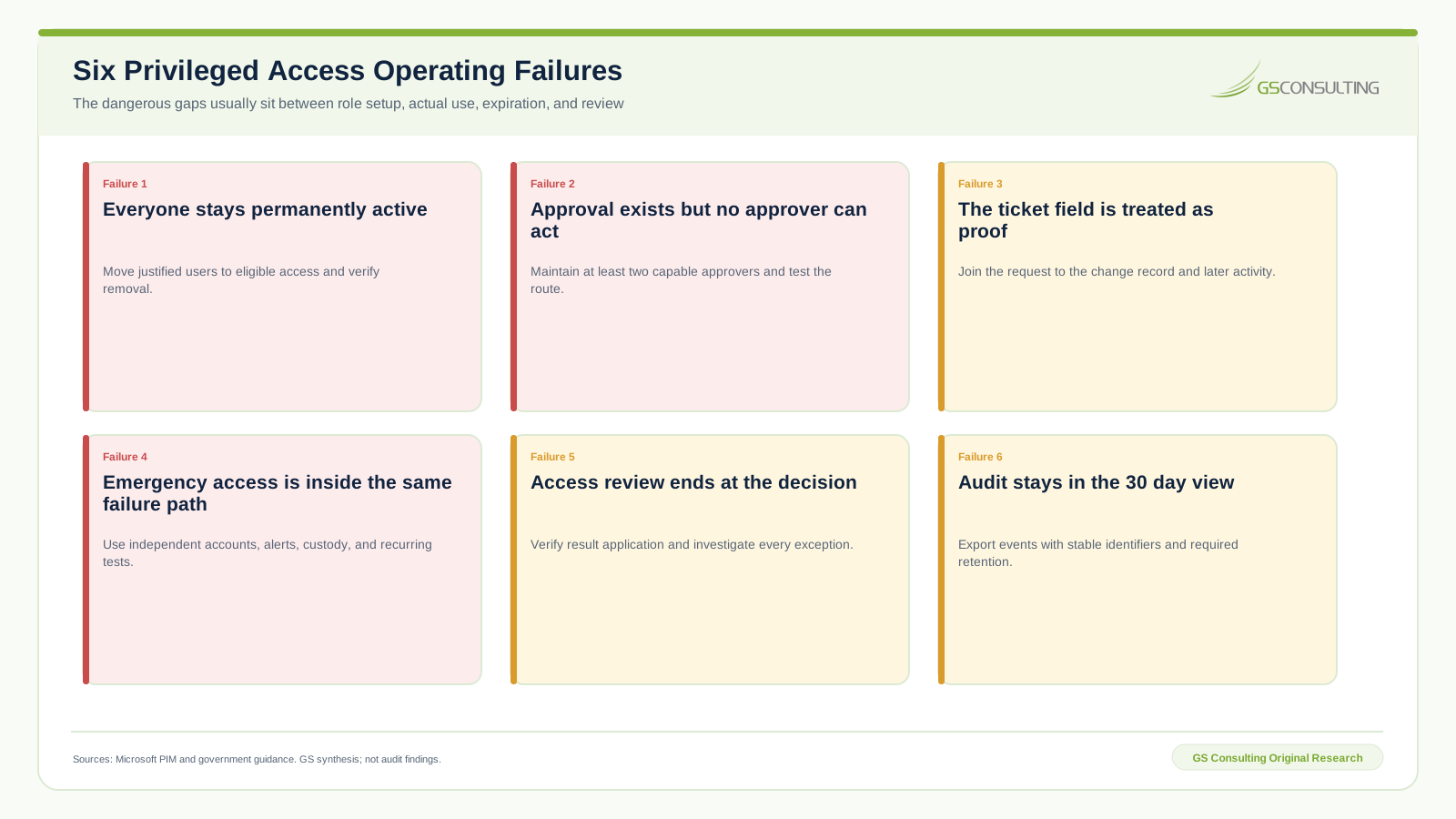
Permanent active roles. PIM becomes an inventory screen while standing authority remains. Orphaned approval. The configured route has nobody available to decide. Ticket text as proof. Entered text is never joined to authorized work or later activity.
Dependent emergency access. The recovery account fails with the same identity or policy path it is meant to repair. Review without removal. A denial closes the review but leaves effective access. Short audit history. The organization discovers the evidence limit after the needed event has left the portal.
Build the Privileged Access Evidence Packet
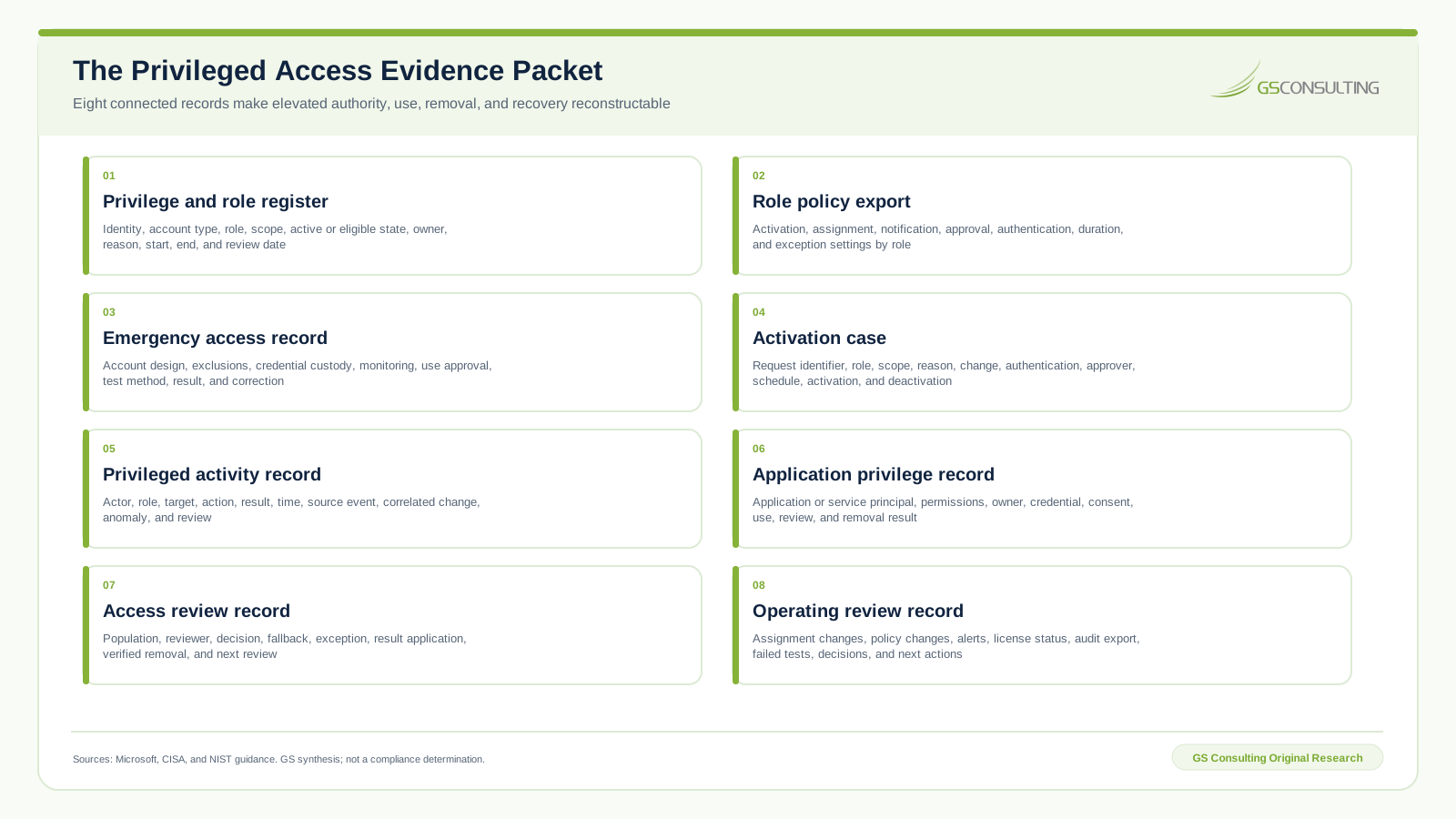
Keep the privilege and role register, role policy export, emergency access record, activation case, privileged activity record, application privilege record, access review record, and recurring operating review. Use stable identifiers for identities, applications, roles, scopes, requests, changes, events, reviews, exceptions, tests, and evidence.
Sample both clean and difficult cases. Include a successful activation, denial, expiration, orphaned approver, policy change, emergency test, real emergency use, permanent assignment removal, application permission change, owner departure, review denial, failed removal, export failure, corrected collection, and an approved exception.
A 60 Day GCC High Privileged Access Plan
| Period | Operator action | Required output |
|---|---|---|
| Days one through ten | Inventory tenants, roles, people, groups, emergency accounts, applications, service principals, assignments, scopes, licenses, approvers, and audit paths. | Privilege and role register |
| Days eleven through twenty | Approve role classifications, emergency design, eligibility rules, activation duration, authentication, approval, notification, review, and exception authority. | Role policy standard and recovery design |
| Days twenty one through thirty five | Remove unjustified standing access, configure a pilot set of critical roles, prove approver coverage, and test emergency access. | Assignment changes, policy exports, and test results |
| Days thirty six through forty five | Run successful, denied, expired, failed, emergency, application, and removal scenarios. Correlate activations with privileged activity and changes. | Activation cases, defect records, and repeated tests |
| Days forty six through sixty | Run assignment and policy reviews, verify removals, validate audit export, publish the evidence packet, and assign the next correction cycle. | Operating review, evidence packet, and next actions |
Research Sources and Limits
The research package uses public sources accessed September 26, 2026:
- Microsoft PIM role settings guidance for activation, authentication, justification, ticket, approval, assignment, notification, and lockout context.
- Microsoft PIM approval guidance for approver decisions and the 24 hour pending window.
- Microsoft Graph PIM rules overview for the 17 role policy rules.
- Microsoft PIM audit guidance for assignment, activation, policy events, and the 30 day resource audit view.
- Microsoft Graph role schedule request API for lifecycle operations and national cloud availability.
- Microsoft government identity service description for the GCC High service boundary and verification context.
- Microsoft Entra licensing guidance for PIM and access review licensing.
- Microsoft PIM deployment guidance for inventory, settings, assignments, reviews, alerts, and recurring operations.
- Microsoft emergency access guidance for independent recovery accounts, monitoring, custody, and validation.
- CISA Microsoft Entra ID Secure Configuration Baseline for separate privileged accounts and privileged access management context.
- NIST SP 800-171A Revision 3 for cautious assessment evidence context.
The research package contains the source register, public signals, model weights, model inputs, formula driven scores, sensitivity analysis, methodology, data dictionary, control and proof burden, operating sequence, failure modes, evidence packet, figure data, editable SVG files, browser rendered PNG files, responsive previews, and an Excel workbook with formulas and cached results.
The GS GCC High Privileged Access Proof Priority Index sequences operating work. It does not assess a tenant, certify Microsoft behavior, determine legal obligations, establish CMMC status, or prove compliance. Verify the current tenant, license, roles, endpoints, contracts, CUI boundary, assessment method, and responsible authority.
GCC High Privileged Access Management FAQ
Suggested Future Reading
- Microsoft GCC High Hub
- What Is GCC High?
- GCC High Identity Governance
- GCC High Conditional Access
- GCC High Tenant Configuration
- GCC High Secure Score Operations
- NIST Identification and Authentication
- Secure AI and Regulated Automation Services
Make elevated authority temporary, explainable, and recoverable.
No orphaned privilege. No untested recovery. No unexplained activation. No unverified removal. Every privileged path needs an owner, a limit, a result, and proof.
Build the Privileged Access Evidence Chain