Microsoft GCC High | | 25 min read
GCC High Mobile Device Management for CUI

Key Takeaways
Mobile access is a CUI boundary decision, not an enrollment count
Authorize the use case first
Name the users, CUI, devices, applications, locations, offline behavior, and prohibited actions before a mobile profile is deployed.
Mobile authorization scores 100
The derived pressure model ranks the CUI access decision first, followed by the managed device gate at 98 and stored CUI encryption at 97.
A green device is not the result
Prove allow, block, transfer, loss, wipe, recovery, and exception behavior with representative users, devices, and applications.
GCC High mobile device management is not about enrolling phones. It is about deciding whether CUI can reach a device, constraining what happens next, and proving the result when the device is lost, stale, compromised, or outside company control.
The easy metric is enrollment. The useful question is harder: can an approved user open CUI only from an approved device, through an approved application, under the expected configuration, without creating an uncontrolled copy? If the team cannot answer that with a test and a record, the mobile boundary is not ready.
Microsoft Intune, Microsoft Entra Conditional Access, SharePoint, OneDrive, Teams, Exchange, app protection, Defender signals, and platform controls can contribute. None of them decides the contract or defines the full CUI use case. The contractor still owns scope, authorization, configuration, exceptions, response, and evidence.
The GCC High hub connects this guide to guest access and external sharing, Conditional Access, CUI data loss prevention, and tenant configuration. GS Consulting supports this work through secure cloud architecture and evidence engineering.
Do not let enrollment become permission.
GS Consulting helps defense contractors define the mobile CUI boundary, configure the government tenant, test access and loss scenarios, and retain defensible operating evidence.
Review the Mobile CUI BoundaryGCC High Mobile Device Management: The Short Answer
Microsoft Intune for GCC High and DoD is a separate government service built on Azure Government. It can manage supported devices and supply compliance or application signals to Microsoft Entra access decisions. The government service does not mirror every commercial Intune feature, and the live service description should be checked before a design depends on a capability.
For CUI, use a deliberate pattern: authorize the mobile use case, prefer company managed devices for high consequence access, enroll in the government tenant, apply secure configuration and encryption, evaluate compliance, gate Microsoft 365 access, restrict application data movement, test loss and offline cases, and keep recurring evidence.
If an unmanaged or personal device cannot meet the protection standard, block CUI. Browser only access can reduce download and sync risk for some collaboration cases. It does not make every unmanaged device appropriate for every CUI category or contract.
The CUI Mobile Rule Is Use Case Specific
NIST SP 800-171 Revision 3 addresses authorization of mobile device connections, full device or container encryption for CUI, use of external systems, configuration, authentication, malicious code protection, and audit. Revision 3 is the current NIST publication, but contracts and CMMC assessment paths may still point to Revision 2. Follow the version that governs the actual award and assessment.
The operating rule should answer these questions before access is granted:
- Users. Which roles need mobile access, under what mission or business condition, and who approves it?
- Data. Which CUI categories may be viewed, edited, stored, shared, or used offline?
- Devices. Which ownership models, platforms, versions, enrollment states, and hardware conditions are accepted?
- Applications. Which mail, file, chat, browser, storage, scanner, camera, clipboard, and backup paths are allowed?
- Locations. Are travel, public networks, foreign locations, restricted spaces, or customer sites subject to added limits?
- Failure. What happens when the device is offline, stale, rooted, threatened, lost, stolen, transferred, or retired?
That is not bureaucracy. It is how a contractor prevents a small screen from becoming a large unrecorded boundary.
Government Intune Is a Separate Service Boundary
Microsoft documents two Intune service instances: the commercial service and the government service used by GCC High and DoD. The government instance is physically separate and uses its own tenant and endpoints. Microsoft also states that a device moving from commercial Intune to the government service must unenroll and reenroll because there is no built in cross service migration.
That detail changes the project. A user account can exist in the new tenant while the device remains enrolled in the old management plane. A profile inventory can look complete while a certificate, compliance state, application assignment, Defender connection, or support process still points to commercial infrastructure.
Build a migration record for each device. Preserve old tenant removal, new tenant enrollment, ownership, primary user, platform, serial, compliance, encryption, applications, Conditional Access result, and retirement of stale records.
The Public Control Surface Has Six Connected Layers
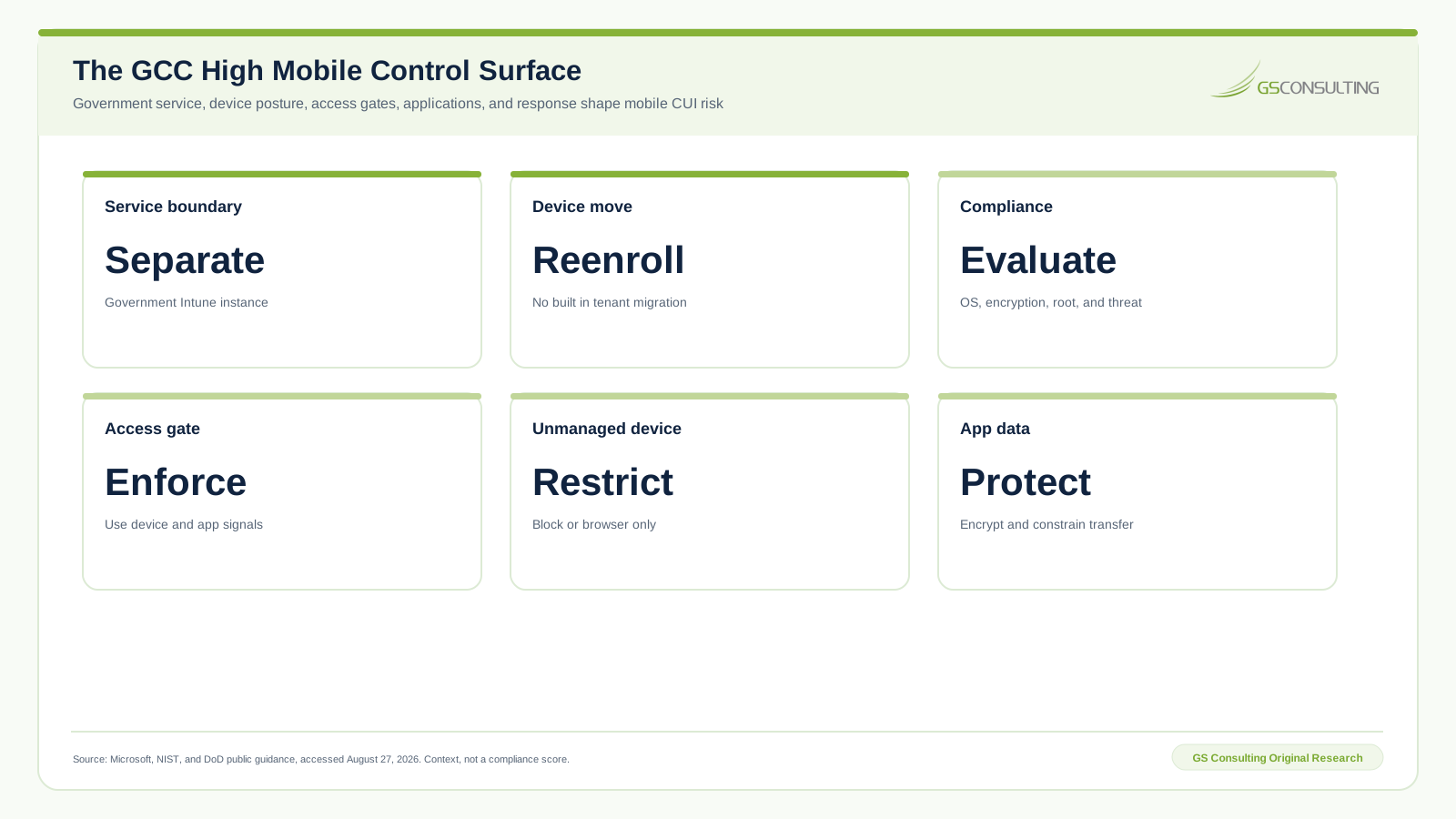
Microsoft documents compliance policy examples that include operating system version, encryption, root or jailbreak state, and threat level. Intune can pass device compliance and application protection signals into Conditional Access. SharePoint and OneDrive can block unmanaged devices or limit them to browser access without download, print, or sync.
Each layer has a gap. A compliant device can use an unapproved application. A protected application can hand data to an allowed but unsafe destination. Browser limits do not govern anonymous links. A remote wipe may wait for an offline device. The architecture must cover the handoffs.
GS GCC High Mobile CUI Access Control Pressure Index
GS Consulting built the Mobile CUI Access Control Pressure Index to identify which control domains deserve the earliest design, testing, and evidence work.
The model scores ten domains from 0 to 100. The weights are CUI exposure at 30 percent, data egress consequence at 25 percent, identity and device assurance at 20 percent, operating burden at 15 percent, and evidence value at 10 percent. Inputs are ordinal GS analyst ratings from one to five based on the cited public control surface.
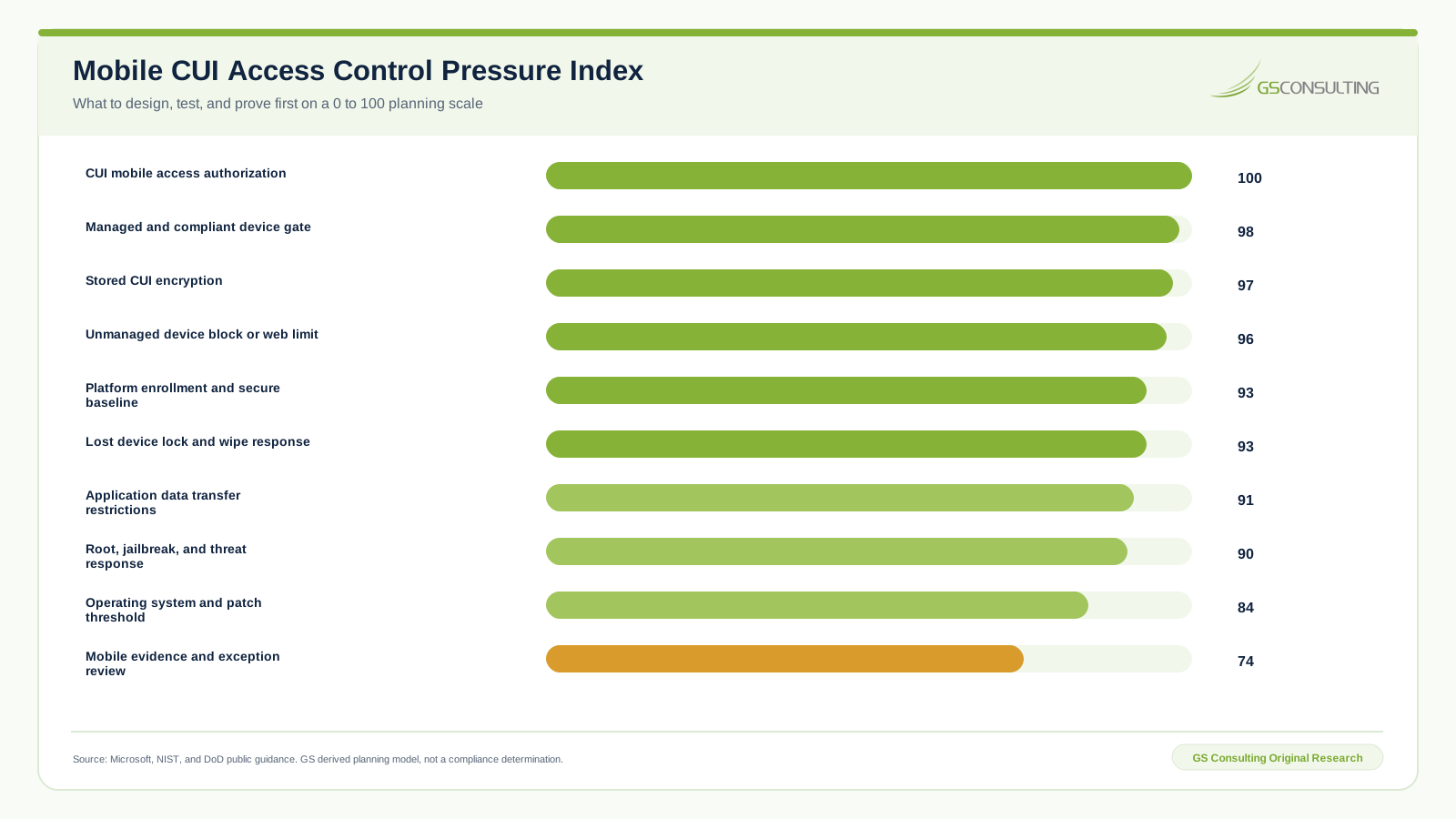
CUI mobile access authorization scores 100. The managed and compliant device gate scores 98. Stored CUI encryption scores 97. Unmanaged device block or web limits score 96. These are dependency scores, not product maturity scores. They tell an operator what must be decided and proved before the rest of the fleet can be trusted.
The sensitivity test moves five weight points from CUI exposure to evidence value. No score changes by more than two points, and the leading action tier remains stable. The research CSV package documents every input, formula, source, limitation, and alternate score.
Choose the Access Architecture Before the Policy
Not every mobile use case deserves the same design. A company owned device that is fully managed, encrypted, current, monitored, and restricted can support controls that a personal phone cannot. An application protection policy can constrain organization data in selected applications without full device enrollment, but it does not prove the external system meets every CUI protection requirement.
| Mobile path | Control position | Good use | Main concern |
|---|---|---|---|
| Company managed device | Full enrollment, compliance, encryption, applications, access gate, and response | Approved mobile CUI use with defined data and actions | Fleet drift, offline data, and operational burden |
| Personal device with app protection | Protected applications and Conditional Access where supported | Selected lower movement business data after explicit review | Device assurance, external system duties, backup, screenshots, and unsupported paths |
| Unmanaged browser | Block or limited web access without download, print, or sync | Narrow review cases where policy and contract allow it | Identity, capture, session, link, browser, and local system risk |
| Unmanaged native application | Block for CUI | No normal CUI use | Local copies, backup, sharing, and weak response evidence |
Use the least permissive architecture that still supports the work. If leaders choose personal device access, record the specific data, applications, limitations, residual risk, approver, expiration, and test cases. Do not call a broad bring your own device policy a technical exception and forget it.
Enrollment and the Secure Baseline Must Agree
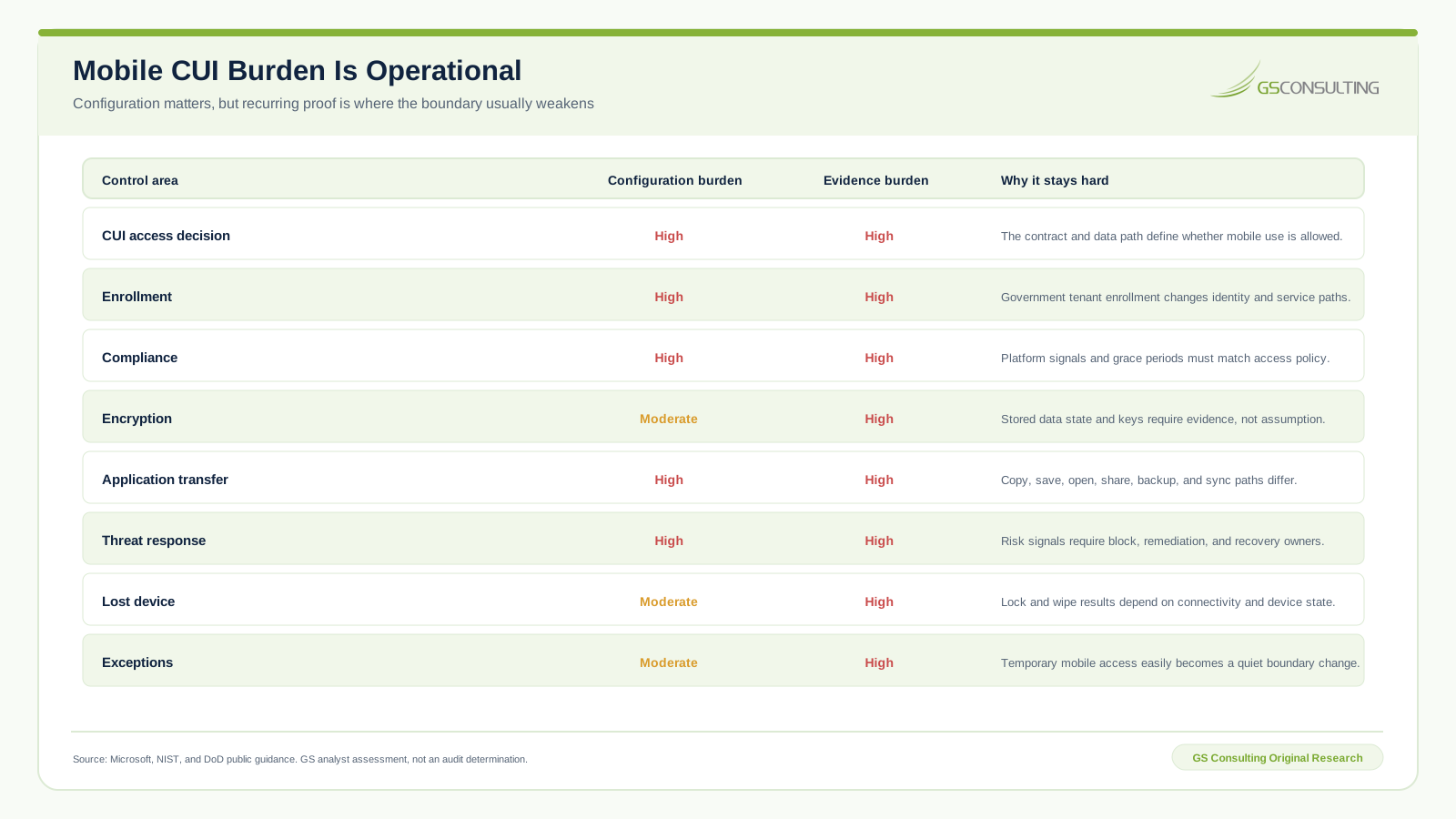
Enrollment establishes a management relationship. It does not establish a secure state. The baseline should configure supported encryption, screen lock, authentication, operating system requirements, application sources, device features, network profiles, certificates, Defender integration, update behavior, and restrictions that match the mobile access standard.
Separate desired configuration from measured compliance. A configuration profile tells the device what to do. A compliance policy evaluates selected conditions and can mark the device noncompliant. Conditional Access then uses that result. If a device has no assigned policy, decide whether that means noncompliant. Unknown should not become trusted by accident.
Test conflicts. Mobile platforms, vendor updates, user choices, and overlapping profiles can produce a different state than the admin center suggests. Use a representative device for every supported platform and ownership model.
Gate Access With Current Device and Application Signals
Conditional Access should connect the approved identity, resource, client, device state, and application requirement. Scope emergency accounts, administrators, service accounts, guests, exclusions, and unsupported clients deliberately. Start in report mode, use pilot groups, verify expected results, and keep a rollback path.
For mobile CUI, test more than the happy path:
- Healthy device. Approved user, device, application, and resource receive the intended access.
- No compliance policy. The device is blocked instead of treated as acceptable.
- Old operating system. Access blocks or follows the approved remediation rule.
- Root or jailbreak state. The application and resource become unavailable under the defined response.
- Threat signal. Risk above the threshold blocks access and routes remediation.
- Offline device. Cached data and application grace periods behave as designed.
Keep the access result in the sign in record and the device state in Intune. Then link both to the test case. Two green dashboards without a common identity and time window are not one proof.
Control Data Inside and Between Applications
App protection can require organization data encryption, an application PIN, minimum versions, and selected data transfer restrictions on supported platforms. It can limit copy, paste, save, backup, print, screen capture, and opening data in unapproved applications where the platform and application support the action.
The key phrase is supported path. Test the actual Outlook, Teams, OneDrive, SharePoint, Office, browser, scanner, camera, file provider, backup, keyboard, and sharing workflow. A policy name can look complete while a native share sheet, file provider, cloud backup, or unsupported application creates the real egress path.
Connect mobile controls to GCC High data loss prevention. DLP may identify selected sensitive content or actions. Device and application controls decide whether that signal can stop, warn, audit, or route the behavior. Neither replaces authoritative CUI identification.
Design for Loss Before the Device Is Lost
A lost device response begins before the incident. Limit stored CUI, require encryption, shorten offline access, keep inventory current, preserve last check in, define lock and wipe authority, and give users a fast reporting path. Then test the commands and the evidence.
Remote lock, selective wipe, full wipe, account disablement, token revocation, certificate action, SIM response, carrier action, and incident assessment are different decisions. The right sequence depends on ownership, device state, data exposure, legal obligations, and recovery need.
Do not report success because a command was queued. Record whether the device received it, what data and applications were affected, what remained uncertain, and who accepted the residual exposure. An offline device can turn a clean dashboard into a waiting problem.
A Five Stage Mobile CUI Sequence
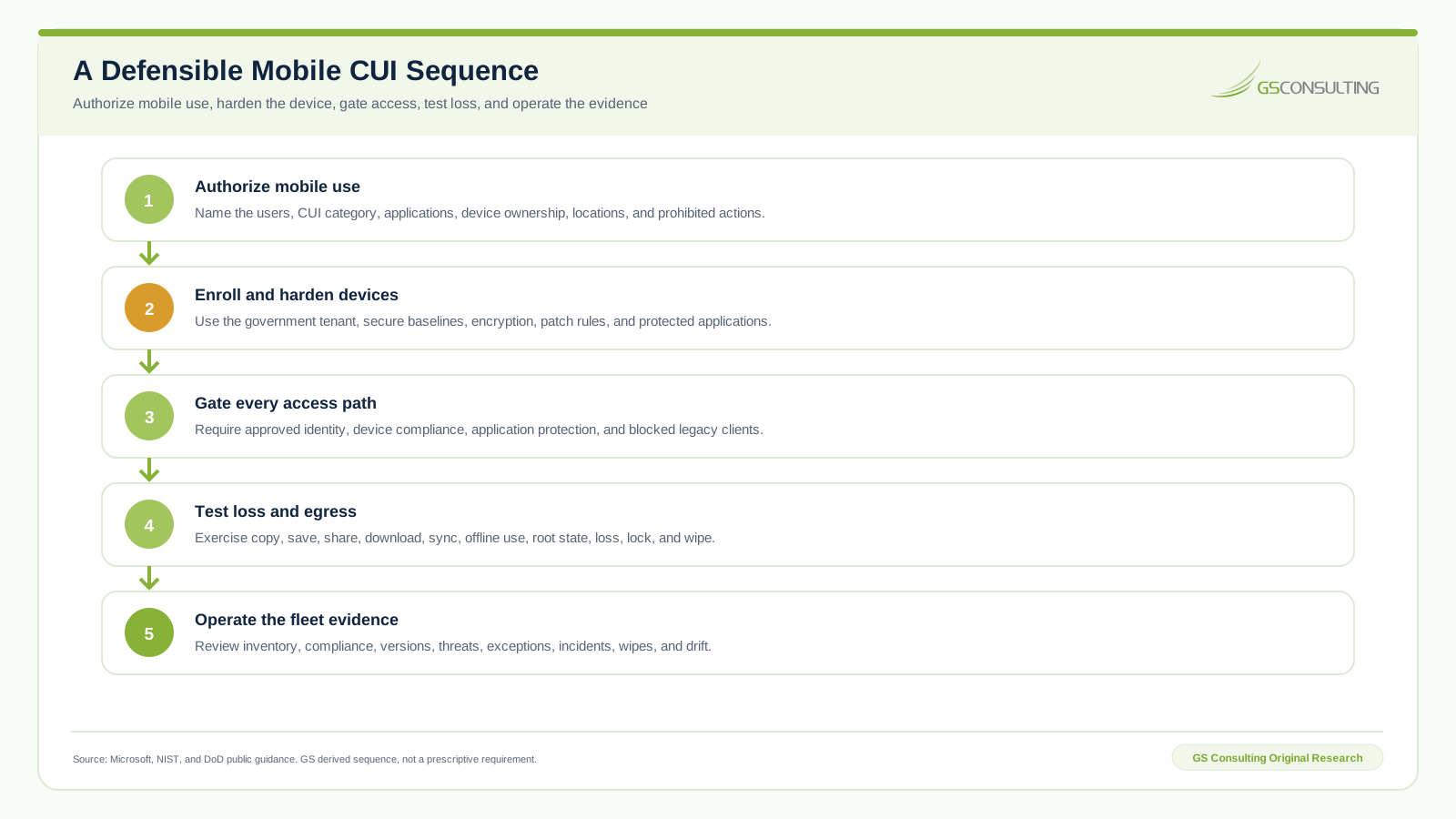
The sequence prevents a common reversal. Teams often buy licenses, enroll devices, and then ask what data can be used. Start with the contract and workflow. The technology should enforce that answer.
Six GCC High Mobile Device Failures
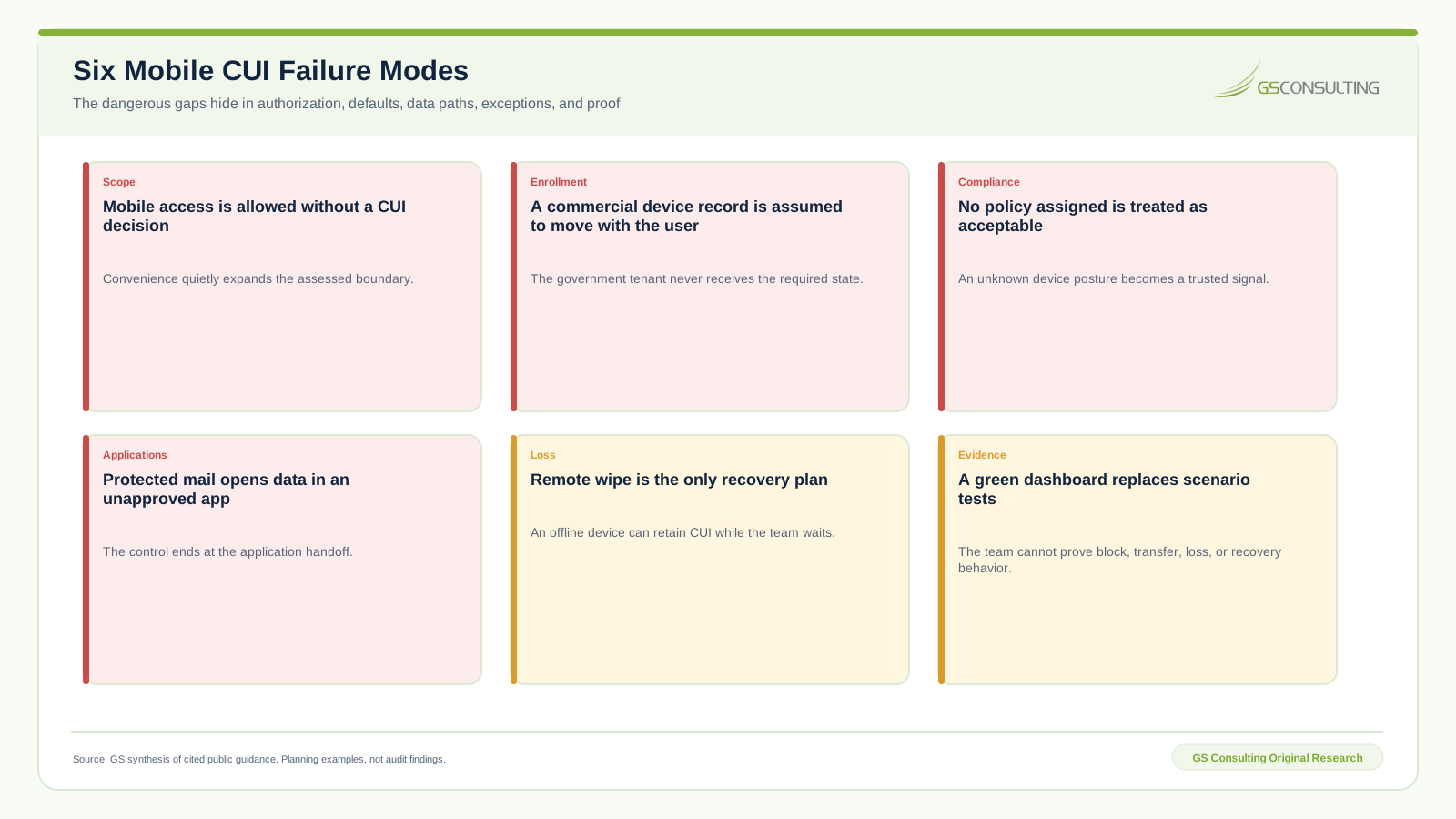
The most expensive failure is silent scope growth. A manager wants email on a phone. That becomes Teams files, OneDrive sync, attachments in another application, photographs, offline copies, and cloud backup. Map the full workflow before the first profile is assigned.
A 90 Day GCC High Mobile Plan
Days 1 through 30: define and inventory. Identify mobile users, devices, ownership, platforms, CUI categories, applications, data paths, current enrollment, compliance state, exceptions, and loss history. Write the permitted and prohibited use standard. Select representative devices and test accounts.
Days 31 through 60: configure and validate. Enroll in the government tenant, deploy baseline settings, define compliance, connect Conditional Access, configure app protection, restrict unmanaged paths, onboard threat signals, and test allow, block, transfer, offline, root, loss, lock, wipe, and recovery scenarios.
Days 61 through 90: operate and reconcile. Review policy coverage, versions, noncompliance, threats, stale devices, exceptions, queued actions, incidents, and support cases. Run a lost device exercise. Reconcile the SSP, CUI data flow, asset inventory, responsibility matrix, incident plan, and evidence repository.
The Mobile CUI Evidence Packet
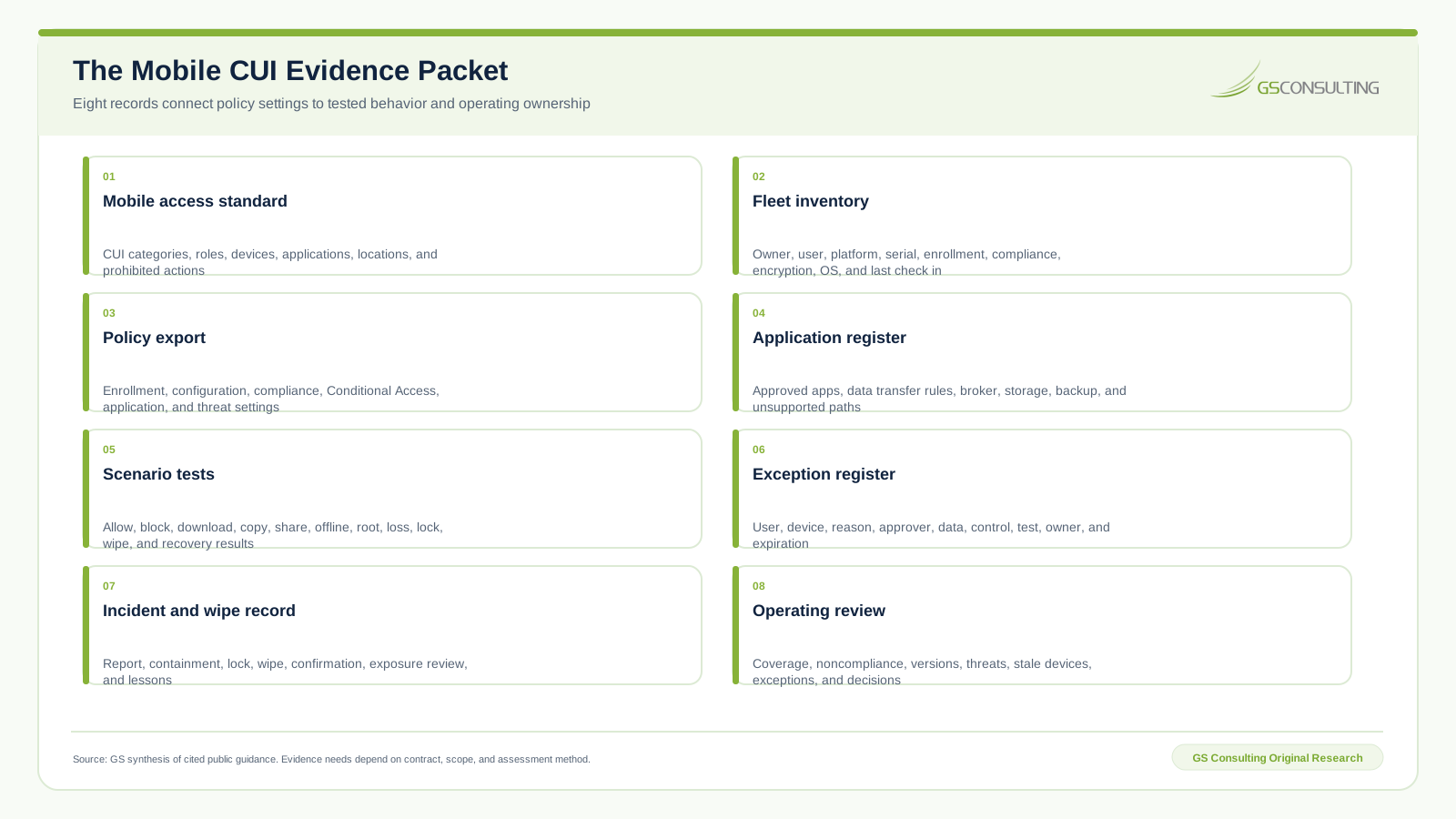
The packet should reconstruct one device across its lifecycle. Who owned it? Who used it? Which tenant managed it? What policy applied? Was it encrypted and current? Which applications could touch CUI? What happened when it failed compliance? When was it lost, wiped, transferred, or retired? Which facts remain uncertain?
Bottom Line
Mobile CUI protection is not proven by enrollment. It is proven by a defined use case, a managed device, a current posture, a controlled application path, a tested access result, and a response record that survives loss.
Do not optimize for the highest mobile adoption rate. Optimize for the smallest useful mobile boundary the organization can operate and defend.
That is the standard: no mobile CUI without authorization, no trusted device without current proof, and no loss response that ends at command queued.
Need mobile access without turning every device into a CUI exception?
GS Consulting helps regulated teams define mobile use, configure GCC High and Intune controls, test device and application paths, and build durable evidence.
Request a Mobile CUI ReviewResearch Sources and Caveats
- Microsoft Intune for US Government GCC High and DoD service description for service separation, enrollment, and feature context.
- Microsoft Intune device compliance overview for operating system, encryption, root, jailbreak, and threat examples.
- Microsoft Conditional Access and Intune guidance for device and application signals in access decisions.
- Microsoft unmanaged device access guidance for block and browser access behavior.
- Microsoft app protection data framework for application encryption and data transfer controls.
- NIST SP 800-171 Revision 3 for mobile device, external system, encryption, access, and CUI system context.
- DFARS 252.204-7012 for covered defense information and external cloud service duties.
Features, licenses, platform support, operating system requirements, cloud endpoints, and government tenant behavior change. Verify the current GCC High service and each supported device platform. Follow the contract and assessment version that governs the organization.
Planning caveat: The Mobile CUI Access Control Pressure Index is a GS Consulting derived planning model based on cited public sources and documented analyst assumptions. It is not an official Microsoft, NIST, DoD, CMMC, legal, audit, compliance, or regulatory determination.
Frequently Asked Questions
Does GCC High include mobile device management?
Microsoft offers a separate Intune government service that interoperates with GCC High and DoD tenants. Licensing, supported features, enrollment endpoints, administration, and platform behavior should be verified in the live government tenant before deployment.
Can CUI be accessed from a mobile device?
The answer depends on the contract, governing security requirements, system boundary, device ownership, authorization, encryption, configuration, applications, access controls, and evidence. A contractor should explicitly authorize the mobile use case and block it when the device or path cannot satisfy the required protections.
Can a personal phone access GCC High CUI?
A personal device creates an external system and data control question. App protection can reduce selected application risks, but it does not by itself prove that the full device and use case meet CUI requirements. For high consequence CUI, a managed company device is easier to constrain and defend.
What should an Intune compliance policy check for mobile CUI?
Common checks include supported operating system version, encryption, root or jailbreak state, threat level, secure lock, configuration state, and whether a policy is assigned. The exact settings and enforcement response depend on platform support, licenses, risk, and the approved mobile standard.
Is remote wipe enough for a lost device?
No. Remote wipe can be valuable, but delivery depends on connectivity, enrollment, application state, and device condition. A defensible plan also limits stored CUI, encrypts it, shortens offline access, defines reporting and containment, tests lock and wipe, and assesses exposure when confirmation is delayed.
Does Intune make a GCC High tenant CMMC compliant?
No. Intune can support selected device, access, configuration, application, response, and evidence practices. CMMC conclusions depend on the governing requirements, entire assessed environment, implementation, interviews, tests, and accepted evidence.