Microsoft GCC High | | 24 min read
GCC High Guest Access and External Sharing Controls

Key Takeaways
External sharing is a CUI release decision, not a guest account setting
Approve the recipient and the data
Identity proof is necessary. It cannot answer whether this recipient, purpose, contract, resource, and device path are authorized for the CUI.
Authorization pressure scores 100
The derived model ranks the CUI and recipient decision first, followed by anonymous link prohibition at 98 and tenant defaults at 97.
Access needs an end state
Every guest path should have a sponsor, owner, expiration, recertification decision, removal test, and record of direct assignments.
GCC High guest access is not a collaboration feature you turn on. It is a controlled release path. If the data, recipient, partner tenant, device, resource, link, duration, and evidence do not agree, the organization is sharing on hope.
The common mistake is to start in the SharePoint admin center. That is too late. The first question is whether this outside person is authorized to receive this exact information for this exact purpose under the governing contract. Microsoft can authenticate a guest. It cannot make that release decision for the contractor.
A defensible design makes external sharing narrow, named, testable, and temporary. It blocks anonymous paths, constrains partner tenants, limits the resources and applications a guest can reach, controls downloads from unmanaged devices, reviews access, and proves that removal actually worked.
The GCC High hub connects this guide to tenant configuration, Conditional Access, CUI data loss prevention, and mobile device management. GS Consulting supports this work through secure cloud architecture and evidence engineering.
Do not approve a guest before you approve the sharing case.
GS Consulting helps defense contractors define partner boundaries, configure GCC High collaboration, test real access paths, and build the operating evidence behind CUI sharing decisions.
Review the External Sharing BoundaryGCC High Guest Access: The Short Answer
GCC High can support external collaboration through Microsoft Entra B2B, SharePoint, OneDrive, Teams, and cross cloud capabilities. The available path depends on the two Microsoft cloud environments, licenses, service support, tenant settings, applications, and client experience. An operator should verify the live tenant instead of assuming that a commercial Microsoft 365 article applies without change.
The secure pattern is simple to state and hard to operate: approve a named business case, use named identities, block anonymous links, apply partner specific access settings, restrict resources, require the intended device posture, prevent unapproved download or sync, test every expected result, expire the access, and keep the record.
External sharing is not automatically prohibited for CUI. It is also not automatically allowed because GCC High hosts the file. The governing contract, CUI category, recipient authorization, cloud role, system boundary, and assessment context decide what is acceptable.
The CUI Sharing Decision Comes First
Before an invitation is sent, record five facts: what the information is, why it must leave the internal team, who will receive it, what system will hold or present it, and when the need ends. If one of those facts is vague, the access request is not ready.
- Data. Name the CUI category, markings, source, owner, and any export or dissemination limits.
- Recipient. Verify the person, employer, contract role, citizenship or person status where relevant, and continuing need.
- Purpose. Tie the access to a work package, deliverable, review, subcontract duty, or customer approved task.
- System path. Identify the home tenant, resource tenant, site or team, device posture, applications, storage, download, and support path.
- End state. Set an expiration, recertification owner, revocation trigger, data return or deletion duty, and evidence retention rule.
DFARS 252.204-7012 includes duties when an external cloud provider stores, processes, or transmits covered defense information. That does not mean every guest account is a separate cloud provider. It means the contractor should trace the actual service role and contract path instead of treating the Microsoft tenant name as the whole answer.
The Public Control Surface Starts Open
Microsoft says external sharing is enabled by default across SharePoint and OneDrive and should be included in permissions planning. Microsoft Entra B2B collaboration is also enabled by default, while B2B direct connect is blocked until both organizations establish the relationship. Cross cloud collaboration between commercial and Azure Government environments requires deliberate cloud settings.
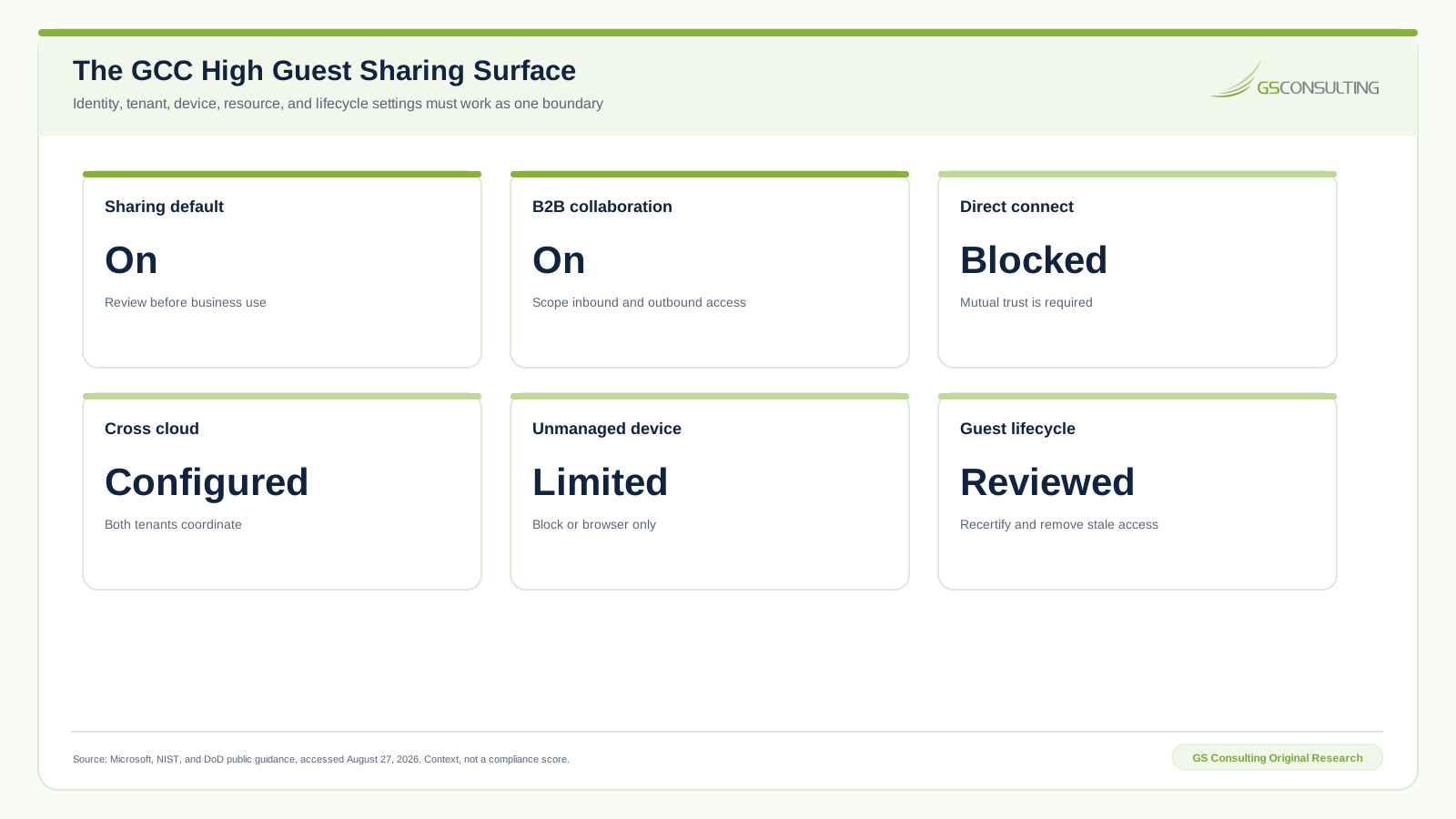
One detail matters more than it looks. Microsoft states that Anyone links are not affected by SharePoint unmanaged device access policies. A person with the link can download the item without the identity and device checks that protect named guests. For CUI collaboration, anonymous links should not be left as a hidden alternative path.
GS GCC High Guest Sharing Control Pressure Index
GS Consulting built the Guest Sharing Control Pressure Index to answer one operating question: which controls deserve the earliest design, testing, and evidence work?
The model scores ten control domains from 0 to 100. The weights are CUI boundary consequence at 30 percent, access breadth at 25 percent, data egress exposure at 20 percent, persistence at 15 percent, and evidence burden at 10 percent. Each input is an ordinal GS analyst rating from one to five based on the cited public control surface.
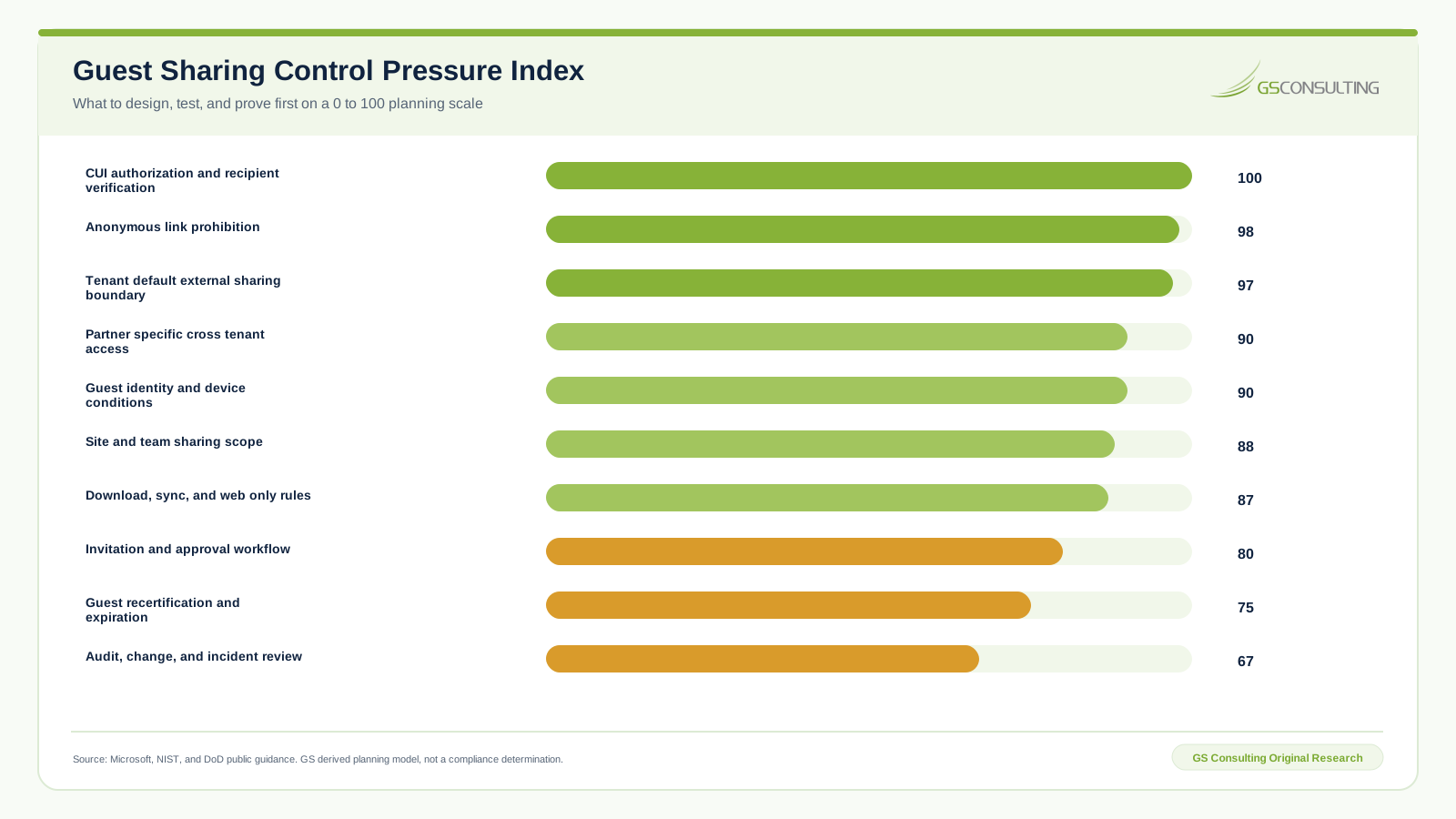
CUI authorization and recipient verification score 100. Anonymous link prohibition scores 98. The tenant default external sharing boundary scores 97. These results are not a claim that other controls can wait indefinitely. They show dependency: if the organization has not approved the sharing case or constrained the broad paths, a perfect access review arrives after the main exposure.
The sensitivity test shifts five weight points from CUI boundary consequence to evidence burden. No score moves by more than two points, and the leading action tier remains stable. Full formulas, source fields, assumptions, and CSV data are in the article research package.
Build One Control Architecture, Not Seven Admin Screens
Guest sharing crosses several control planes. External collaboration settings decide who can invite and what guests can see in the directory. Cross tenant access settings decide inbound and outbound B2B scope. Microsoft cloud settings enable selected cross cloud paths. SharePoint and OneDrive settings define tenant and site sharing levels. Teams adds group, channel, application, meeting, and chat behavior. Conditional Access evaluates sign in and device conditions. Identity Governance can review and remove some guest access.
Those settings need one owner map and one intended result. Otherwise each administrator can produce a reasonable local setting while the combined path stays permissive.
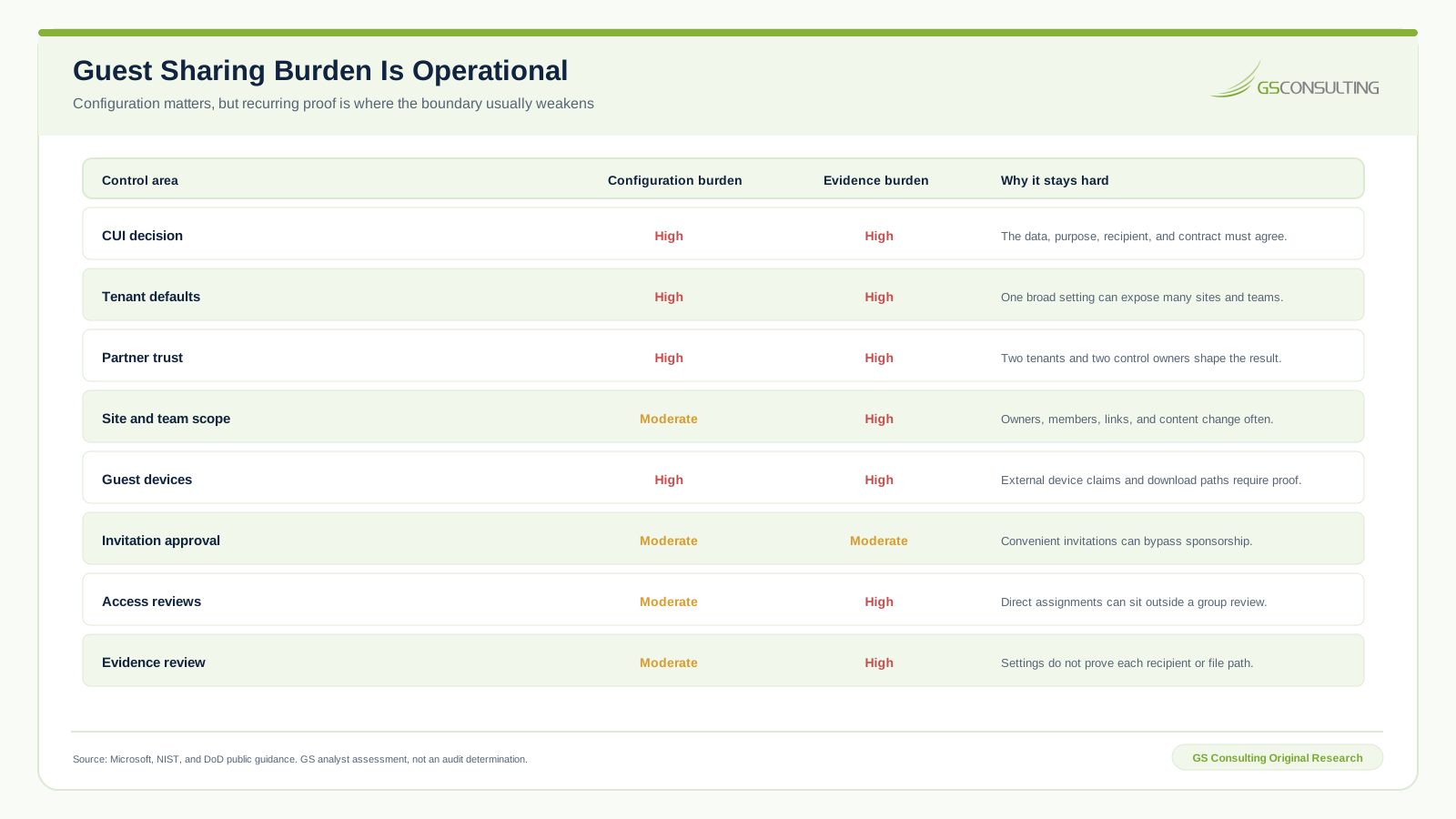
Write the architecture as decisions, not screenshots. State the default, the allowed exception, the owner, the dependent service, the test, the evidence source, and the review period. A reviewer should be able to explain why a named guest can open one resource and cannot open another.
Constrain Partner Tenants in Both Directions
Inbound access controls which external users and groups can reach applications in the GCC High resource tenant. Outbound access controls which internal users can reach an outside tenant. Those are separate risks. A contractor can lock down incoming guests and still let employees move contract work into a partner environment that was never reviewed.
Use a restrictive default where the business can support it, then create named partner rules. Scope users, groups, and applications rather than allowing every identity from a trusted tenant. If the design trusts a partner claim for multifactor authentication, device compliance, or hybrid join, document what the partner actually enforces and how that assurance will be reviewed.
Cross cloud collaboration adds another boundary. Microsoft maps Commercial and GCC to commercial Azure and maps GCC High and DoD to Azure Government. Both organizations may need to enable the cloud relationship. Run a pilot with the real tenants because identity redemption, Teams guest access, shared channels, SharePoint, applications, and device trust do not all behave like one feature.
Control Sites, Teams, Files, and Links Separately
The tenant default is a ceiling, not a complete resource design. Each site and team needs an owner, sensitivity decision, allowed sharing level, guest membership rule, link policy, and review schedule. A broad tenant can still have narrow CUI sites. A narrow tenant cannot rely on local owners to create an unsupported exception.
- Sites. Inventory owners, members, guests, groups, direct permissions, links, labels, applications, and inherited access.
- Teams. Review team membership, standard and shared channels, meeting access, applications, file storage, and guest capabilities.
- Files. Test view, edit, download, sync, print, copy, version, retention, and link behavior with representative CUI examples.
- Links. Prefer named recipients. Expire links, block resharing where appropriate, and search for old links after the work ends.
Do not confuse membership removal with full revocation. A guest can have direct SharePoint access outside the group that an access review covers. The closure test should search the resource inventory and attempt the old path from the former guest account.
Treat the Guest Device as Part of the Data Path
A successful sign in can still create an uncontrolled copy. The guest may download, sync, print, open in a desktop application, move the file into another application, or save it in the home tenant. Decide whether the use case permits those actions before selecting the Microsoft control.
SharePoint and OneDrive can block unmanaged devices or allow limited browser access without download, print, or sync. That can be useful for a low movement collaboration case. It is not a universal answer. The actual result depends on the browser, operating system, identity type, Conditional Access policy, application, and site configuration.
For a partner whose home tenant supplies device claims, establish the trust deliberately. For a guest without a manageable device posture, block CUI or redesign the workflow around a controlled review environment. Convenience is not a compensating control.
Guest Access Needs a Sponsor, Expiration, and Removal Test
Most stale guests began as legitimate collaborators. The project ended, the sponsor changed roles, the partner changed employers, or the site owner assumed somebody else would clean up access. That is why creation needs an end state.
Microsoft Entra access reviews can ask resource owners or guests to recertify group and application access and can apply removal decisions. Licensing matters. Coverage matters too. Microsoft notes that direct rights assigned in SharePoint can sit outside the group or application view. Build the review around the complete resource inventory, not only the easiest report.
Use activity as a question, not an automatic decision. A guest may need access rarely for a contract duty. Another guest may sign in often after the approved task ended. The resource owner should decide continued need and record the reason.
A Five Stage Guest Sharing Sequence
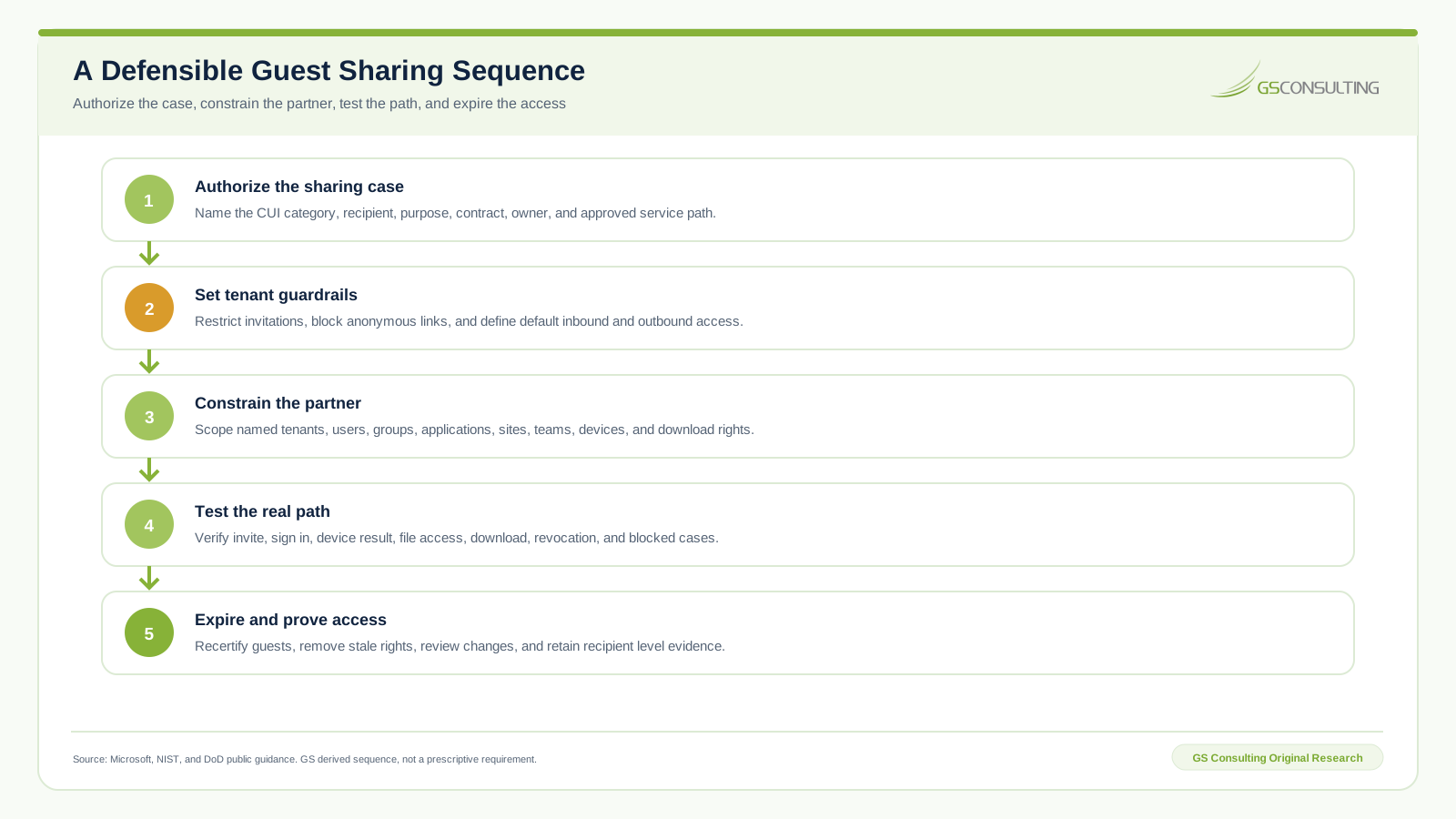
The order matters. Tenant controls cannot repair an unauthorized release. A correct partner rule cannot repair an anonymous link. An access review cannot repair a file that was already downloaded into an uncontrolled system. Start from the consequence and move outward through the technical path.
Six GCC High External Sharing Failures
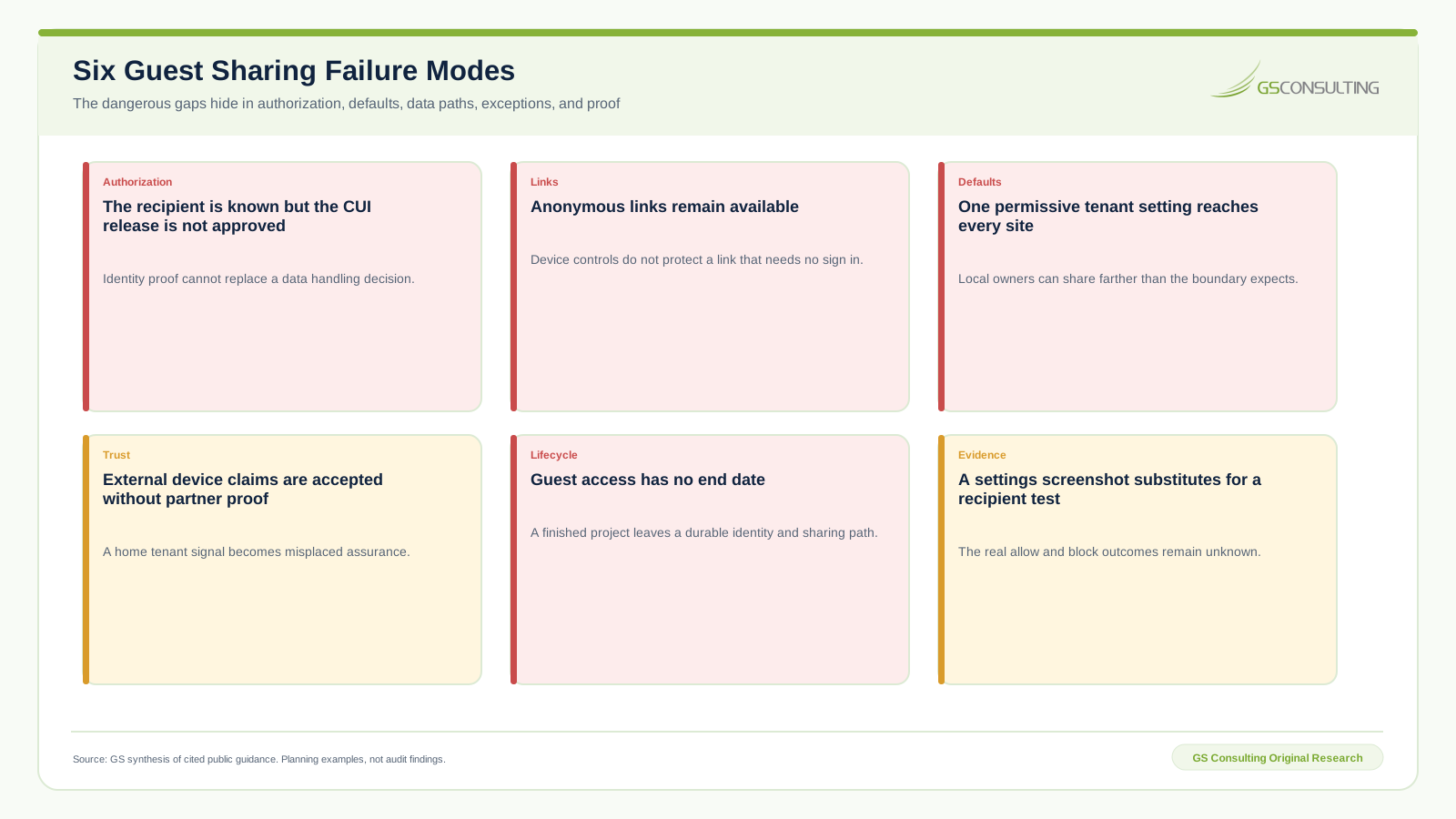
Two failures deserve special attention. First, a contractor may trust a partner device claim without knowing the partner policy behind it. Second, the team may preserve a settings screenshot but never test a named guest on the actual site with the actual device. Both create confidence without proof.
A 90 Day External Sharing Plan
Days 1 through 30: define the boundary. Inventory current guests, partners, sites, teams, groups, direct permissions, links, applications, and external access events. Identify CUI resources and owners. Write the approval standard and default deny cases. Remove anonymous links from CUI sites.
Days 31 through 60: configure and test. Set invitation roles, guest directory limits, default cross tenant rules, named partner rules, cloud settings, SharePoint and OneDrive levels, Teams behavior, Conditional Access, device restrictions, and review policies. Test expected allow, block, download, sync, expiration, and revocation cases.
Days 61 through 90: operate and reconcile. Run resource owner reviews, remove stale access, inspect direct permissions, validate partner trust, review events and exceptions, exercise an emergency revocation, and reconcile the SSP, CUI data flow, asset inventory, responsibility matrix, and evidence repository.
The Guest Sharing Evidence Packet
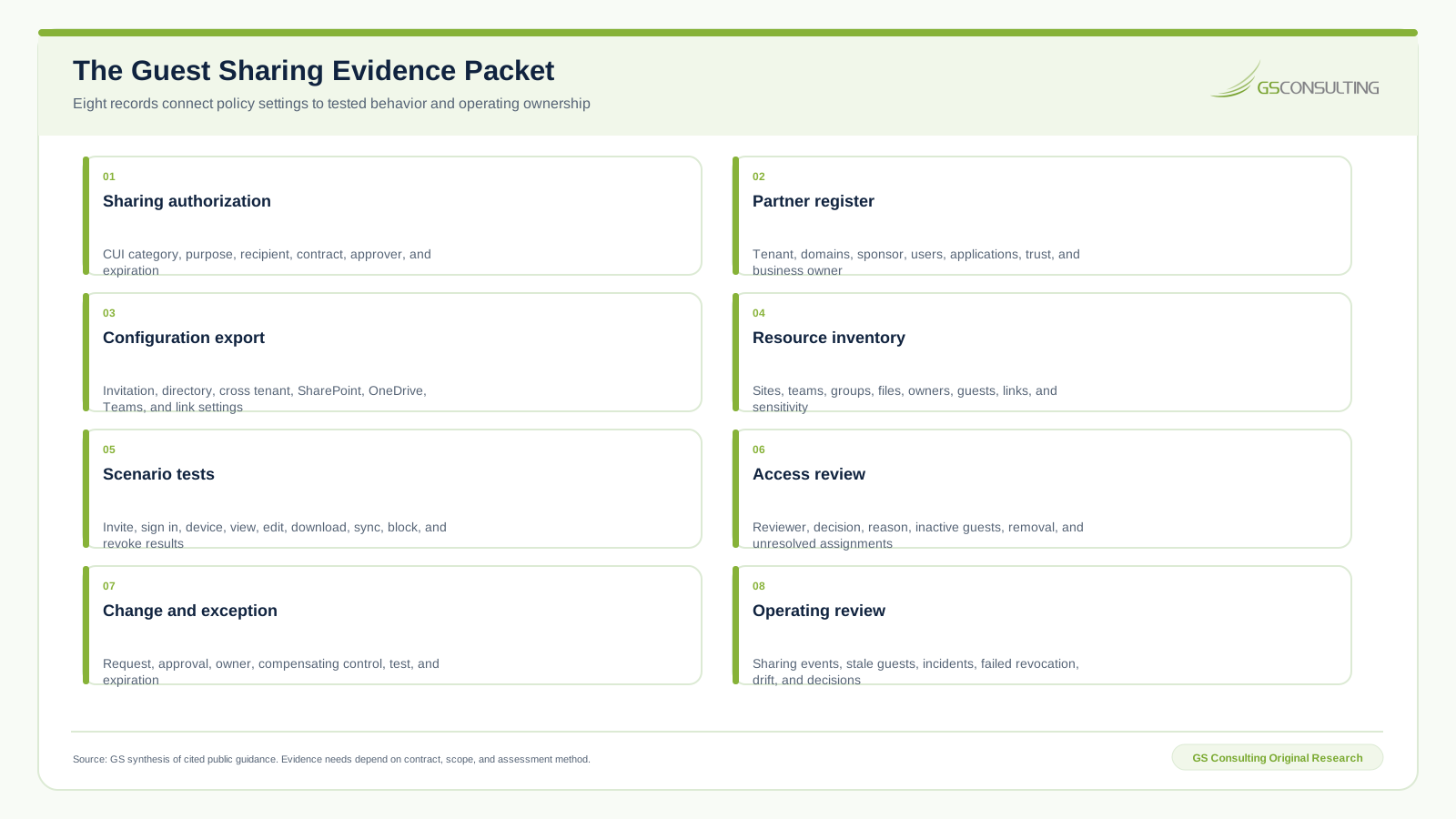
The packet should let a reviewer reconstruct one case from request through removal. Who approved it? What CUI was involved? Which partner tenant and guest identity were used? What resource and device path worked? What actions were blocked? When did the access expire? Did the former guest lose every direct and inherited path?
Bottom Line
GCC High external sharing works when it is specific. Named data. Named recipient. Named purpose. Named tenant. Named resource. Known device result. Fixed expiration. Tested revocation.
Do not measure the control by how quickly a guest can collaborate. Measure it by whether the organization can explain every material allow, block, download, review, and removal decision.
That is the operating standard: no anonymous CUI path, no unowned guest, and no access that survives its business purpose.
Need external collaboration without an invisible CUI boundary?
GS Consulting helps government contractors map the sharing case, configure partner controls, test guest access, and retain evidence that survives review.
Request a GCC High Sharing ReviewResearch Sources and Caveats
- Microsoft external sharing overview for SharePoint and OneDrive for the tenant default and permissions planning context.
- Microsoft Entra B2B collaboration overview for invitation, directory, and cross tenant control roles.
- Microsoft cross cloud collaboration guidance for commercial and Azure Government collaboration paths.
- Microsoft unmanaged device access guidance for block, browser access, download, and Anyone link behavior.
- Microsoft guest access review guidance for recertification and removal options.
- NIST SP 800-171 Revision 3 for CUI system, access, external system, and protection context.
- DFARS 252.204-7012 for covered defense information and external cloud service duties.
NIST SP 800-171 Revision 3 is the current NIST publication, while contracts and CMMC assessment paths may still identify Revision 2 requirements. Follow the governing contract and assessment version. Microsoft features, licenses, defaults, and cross cloud behavior can change. Verify the live GCC High tenant and partner environment before relying on this guide.
Planning caveat: The Guest Sharing Control Pressure Index is a GS Consulting derived planning model based on cited public sources and documented analyst assumptions. It is not an official Microsoft, NIST, DoD, CMMC, legal, audit, compliance, or regulatory determination.
Frequently Asked Questions
Can GCC High users share files with external guests?
Yes, supported GCC High collaboration paths can allow external guests, but the organization still has to authorize the recipient, data, purpose, tenant, resource, device, download rights, duration, and evidence. A guest account does not make every file appropriate to share.
Is guest access enabled by default in GCC High?
Microsoft documents SharePoint and OneDrive external sharing and Microsoft Entra B2B collaboration as enabled by default in the relevant services. GCC High administrators should verify the actual tenant, license, and current service behavior before business use, then set deliberate defaults rather than inheriting convenience settings.
Can GCC High collaborate with commercial Microsoft 365 tenants?
Microsoft documents supported cross cloud collaboration between commercial Microsoft 365 and Azure Government environments, which include GCC High. Both organizations may need cloud and cross tenant settings, and the exact Teams, SharePoint, identity, device, and license behavior should be tested before CUI is shared.
Should GCC High allow Anyone links?
For CUI sites, anonymous Anyone links are a poor fit because they do not require sign in and Microsoft notes that unmanaged device controls do not govern them. A contractor should use named recipients and tested identity controls where external sharing is authorized.
How often should guest access be reviewed?
Set the review period from the contract, data sensitivity, project duration, access breadth, and risk. A practical design uses an expiration date at approval, recurring resource owner review, prompt removal when the work ends, and checks for direct SharePoint assignments that a group review may miss.
Does controlled guest access make CUI sharing compliant?
No single Microsoft setting proves that conclusion. The answer depends on the contract, CUI category, recipient authorization, system boundary, cloud duties, device path, implementation, evidence, and governing assessment version. GS models are planning tools, not compliance determinations.