Microsoft GCC High | | 25 min read
GCC High Data Loss Prevention for CUI

Key Takeaways
Build DLP from the CUI decision outward
The CUI signal is the first control
If the policy searches for the wrong label, marking, type, or context, a perfect block action still protects the wrong content.
Classification and coverage rank first
The derived priority index scores the authoritative CUI chain at 100 and the location and population inventory at 98.
Simulation needs a decision owner
Match volume is not accuracy. Teams need true matches, expected nonmatches, missed cases, exceptions, and alert response before enforcement.
GCC High data loss prevention is not a sensitive information type with a block action. It is a control chain. If the CUI signal, data paths, policy scope, exceptions, alerts, and evidence do not agree, the policy protects a theory instead of the information.
The hardest question comes before Microsoft Purview: what exactly counts as CUI in this business process? A marking can help. A label can help. A sensitive information type can help. None of them knows the contract, category, source, or context by itself.
A defensible design starts with an authoritative CUI definition, representative files and messages, and a complete path inventory. Then the team simulates by location, measures true and false results, enforces the clearest leakage paths, controls overrides, investigates alerts, and keeps evidence of every material decision.
The GCC High hub connects this guide to Conditional Access, tenant configuration, records management, guest access and external sharing, mobile device management, and email security. GS Consulting supports this work through secure AI automation and cloud evidence engineering.
Do not block content before you can explain the match.
GS Consulting helps regulated teams define CUI signals, map data paths, test policies, govern exceptions, investigate alerts, and build durable operating evidence.
Review the CUI Protection DesignGCC High Data Loss Prevention: The Short Answer
Microsoft Purview data loss prevention can evaluate selected content and activity across supported GCC High locations, including Exchange, SharePoint, OneDrive, Teams, and onboarded devices. Policies can audit, notify, warn, request justification, restrict an action, create an alert, or block an action where the location and license support it.
DLP does not decide what CUI means for the organization. It applies the signals and rules the organization gives it. Those signals can include sensitive information types, sensitivity labels, trainable classifiers, document fingerprints, keywords, file properties, and contextual conditions.
The minimum viable control is not “policy enabled.” It is “known CUI examples match, known non CUI examples do not match, every material data path is addressed, exceptions are owned, alerts are investigated, and changes are reviewable.”
What DLP Can and Cannot Prove
DLP can provide useful evidence that a configured rule evaluated content and responded to an action. It can show the policy state, matched condition, user, device or service location, activity, response, alert, and investigation history where those records are available.
It cannot prove that every CUI item was classified correctly. It cannot see an unsupported path. It cannot prove that a user did not photograph a screen, retype information, use an unmanaged application, or move data through a system outside the tenant boundary. It cannot turn a weak contract interpretation into an authoritative CUI category.
Write these limits into the design. A control that names its blind spots is easier to strengthen than a broad claim that nobody can test.
| Layer | Question | What DLP contributes | What remains outside DLP |
|---|---|---|---|
| CUI decision | What information requires protection? | Content and label signals | Contract, category, source, owner, and handling decision |
| Data path | Where can the information move? | Supported cloud and endpoint locations | Unsupported systems, people, paper, voice, and physical paths |
| Action | What should happen on a match? | Audit, notice, warning, override, restriction, block, or alert | Business approval, incident authority, legal review, and recovery |
| Evidence | Did the control operate? | Policy, event, alert, activity, and investigation records | Complete scope, sustained review, accepted risk, and assessment conclusion |
The Public Baseline Names Five Locations and Five Policy Layers
GS reviewed the CISA ScubaGear Security Suite baseline at repository commit 4d34e9a48e38ce5c2e14c0fdfbaee53e57594ae2, dated August 20, 2026. Section 3 contains five data loss prevention policy sections. It calls for sensitive information protection, broad location coverage, sharing restrictions, user notice and education, and selected endpoint restrictions.
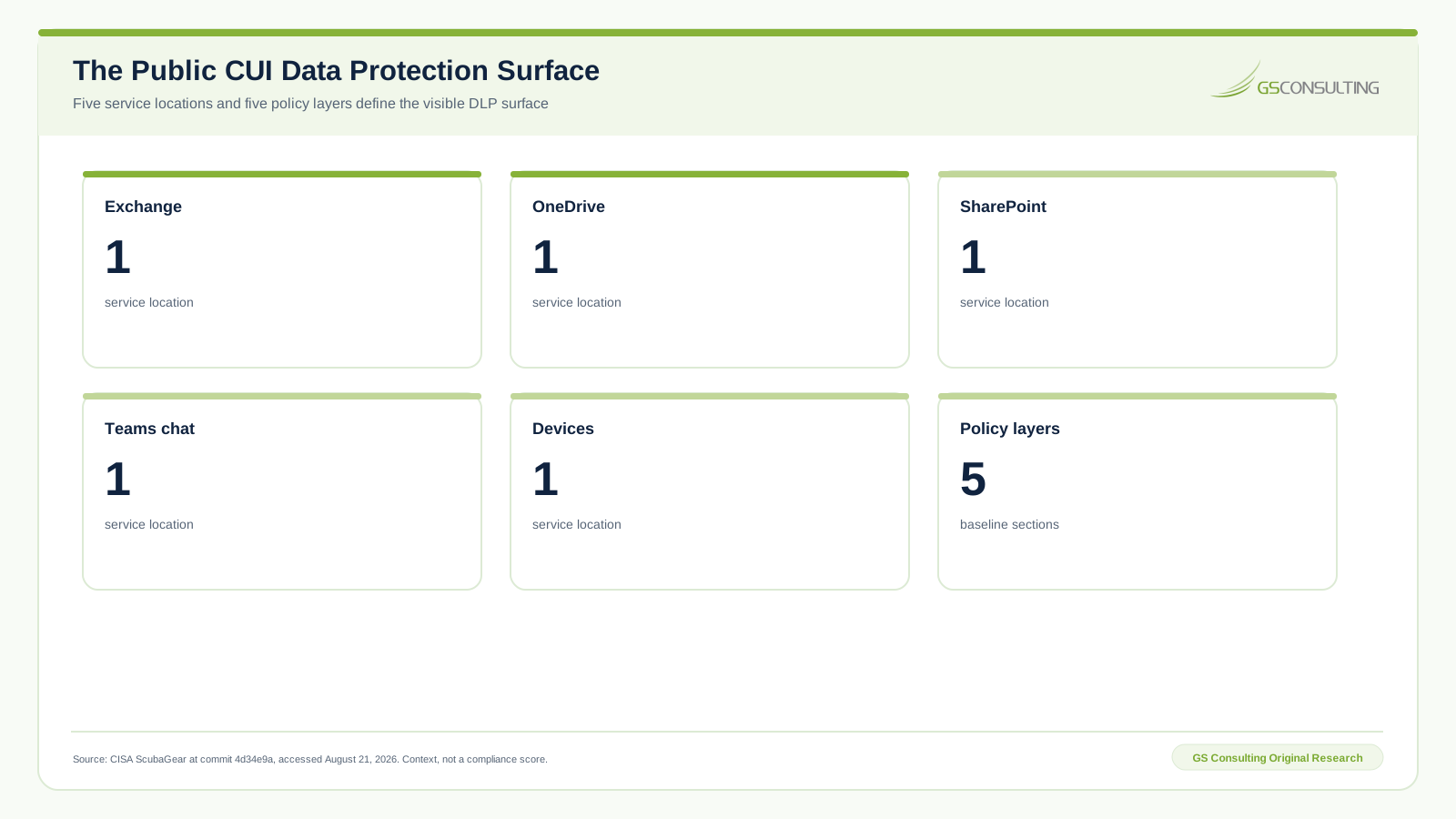
The five named locations are Exchange, OneDrive, SharePoint, Teams chat, and devices. They are a useful starting point. They are not a complete data flow map. Browsers, approved and unapproved cloud applications, synced folders, print, clipboard, removable media, interfaces, backups, external partners, mobile devices, and line of business systems can alter the real boundary.
CISA wrote this baseline for federal civilian agencies. Contractors can use it as public design context, but should not call it a contractor compliance mandate. The applicable contract, system boundary, and assessment method still govern.
GS CUI Data Loss Prevention Control Priority Index
GS Consulting built a derived planning model across ten control domains. It weights leakage coverage at 30 percent, CUI boundary reach at 25 percent, enforcement value at 20 percent, evidence reuse at 15 percent, and operating reliability at 10 percent. Each input is an explicit one to five GS analyst rating supported by the cited public guidance.
The sensitivity case moves five points from leakage coverage to operating reliability. No item moves by more than two points. The first six controls remain in the same action tier.
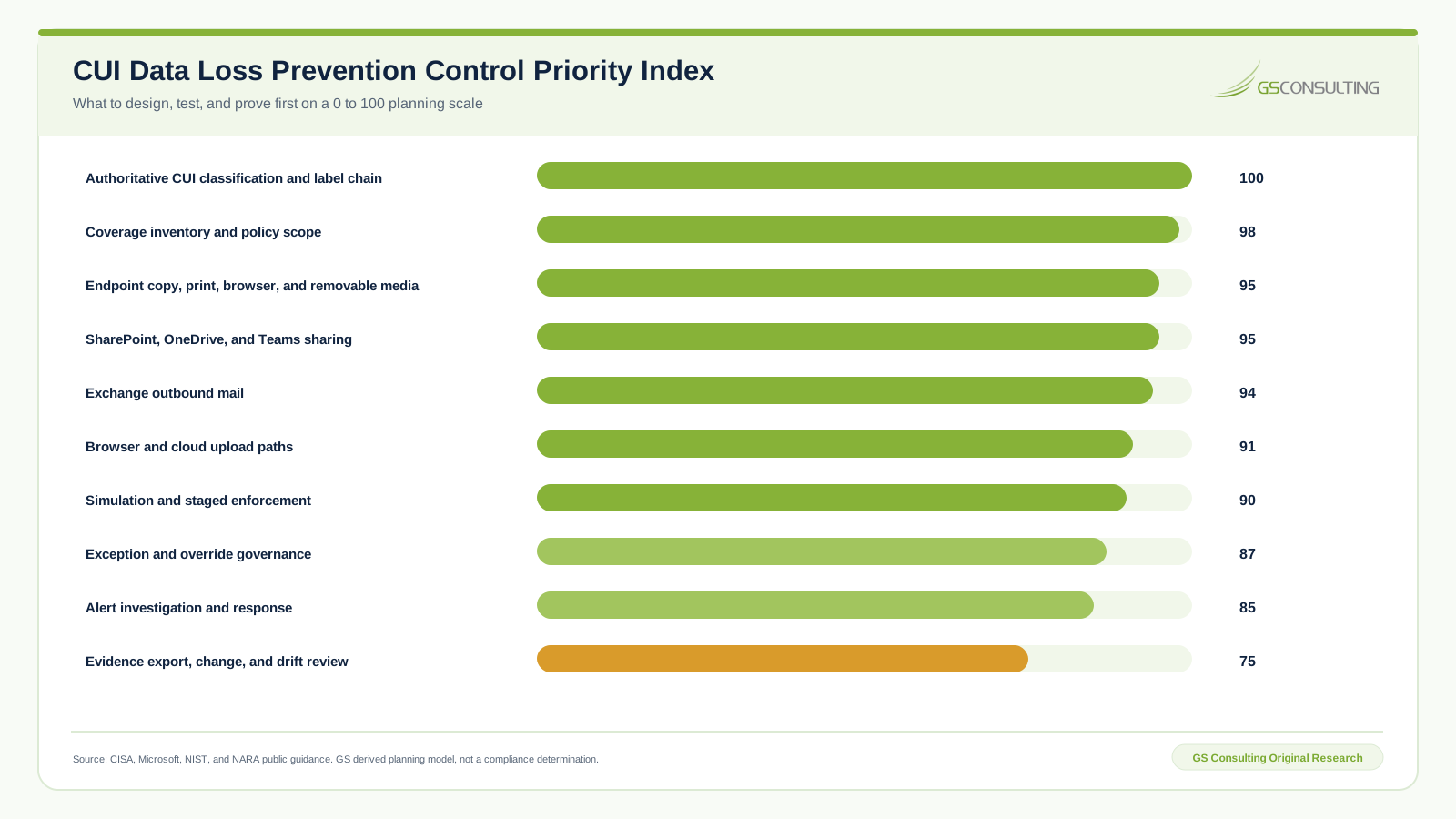
The CUI classification and label chain scores 100. Coverage inventory and policy scope score 98. Endpoint actions and collaboration sharing each score 95. Exchange outbound mail scores 94. Browser and cloud upload paths score 91.
Evidence export, change, and drift review score 75. That is not permission to postpone evidence. It means evidence should be built into the higher priority controls rather than treated as a separate final project.
This is a GS Consulting derived planning tool. It is not an official Microsoft, CISA, NIST, NARA, DoD, CMMC, legal, audit, compliance, or regulatory determination. The workbook, source register, CSV files, formulas, sensitivity results, and editable SVG figures are preserved in the research package.
Start with an Authoritative CUI Signal
The NARA CUI Marking Handbook explains formal markings and portion markings. Those markings can become a useful signal. They are not the whole definition. Unmarked CUI can still exist, and a copied marking can appear on content that no longer has the same status.
Build a CUI definition record with the contract, information category, source, owner, approved markings, approved labels, structured identifiers, example files, example messages, and known exclusions. For each detector, say what it can see and what it cannot.
Use representative test sets. Include true matches, true nonmatches, close lookalikes, incomplete markings, copied templates, scanned documents, password protected files, images, archives, source code, spreadsheets, and common business language. Record false matches and missed cases separately.
Microsoft acknowledges that classifiers and sensitive information types can produce both false positives and false negatives. Match volume is not accuracy. A thousand events can reflect one noisy footer instead of one thousand protected CUI items.
Design Cloud Policies by Location and Action
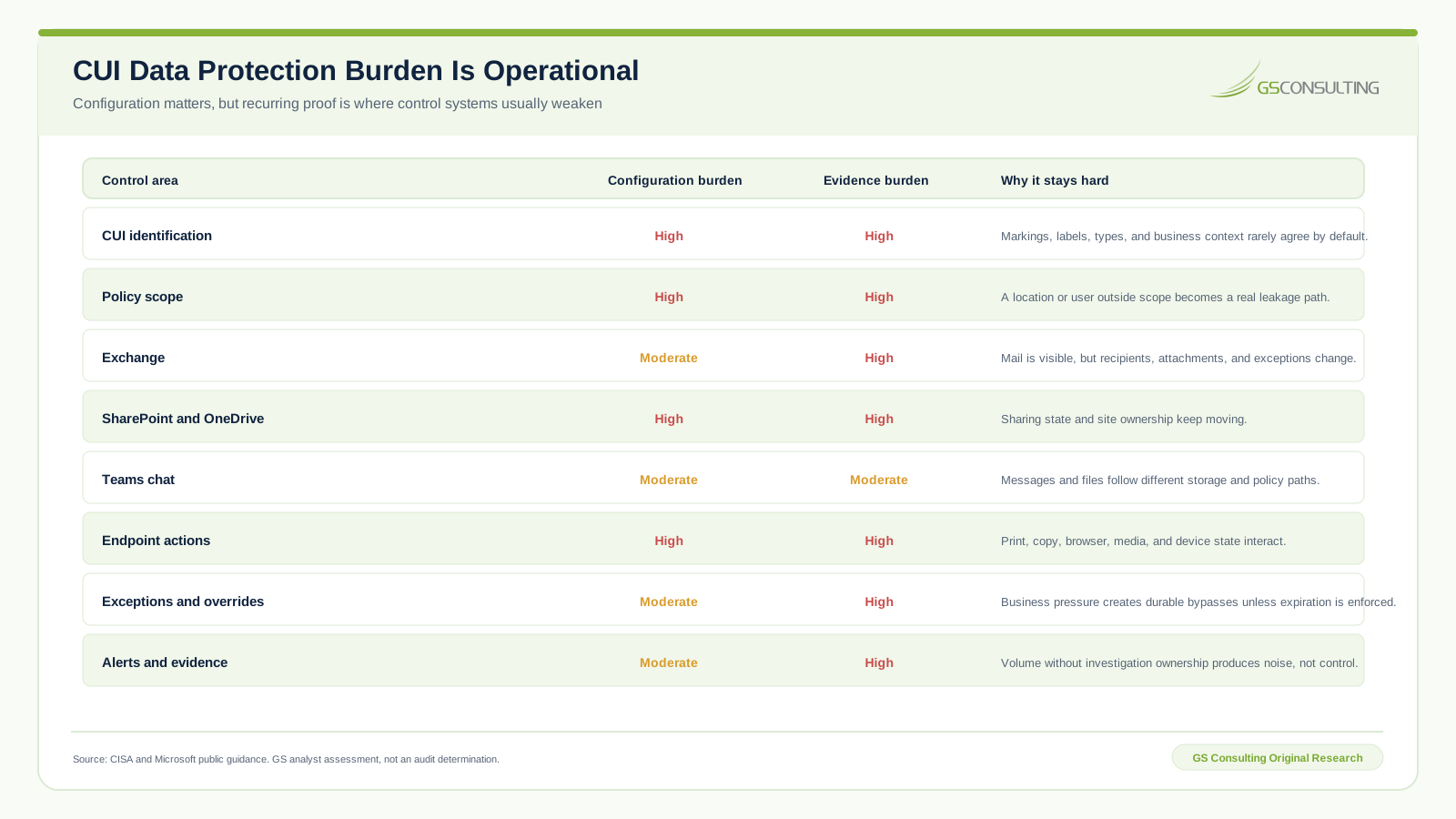
One policy can cover several locations, but the same condition or action may behave differently across Exchange, SharePoint, OneDrive, Teams, and devices. Use a coverage matrix rather than assuming a checked box means equal control.
Exchange
Test outbound mail, internal mail, guest recipients, distribution lists, forwarded messages, attachments, encrypted content, automatic replies, shared mailboxes, approved partner domains, and mail sent through applications. Connect DLP to the GCC High email security boundary so connectors and forwarding paths are not reviewed twice in isolation.
SharePoint and OneDrive
Test new files, existing files, synced files, guest sharing, broad links, external domains, inherited site permissions, downloads, and changes after a label or policy update. Site ownership and sharing state change constantly. Review scope against the live site inventory.
Teams
Separate chat and channel messages from files. Files are stored in SharePoint or OneDrive and follow those locations. Messages have their own policy path. Test both. Include guests, federated participants, copied content, meeting chat, and files shared through links.
Give every location a named owner and expected outcomes. A central policy team can manage logic. Workload owners still need to confirm that the protected path matches how people use the service.
Endpoint and Browser Controls Close Different Gaps
Endpoint DLP can monitor or restrict selected actions on sensitive items, including copy, print, removable media, browser upload, and other supported activities. The user and device must be in the intended scope, and the device must be onboarded and supported.
Test the exact action, platform, browser, file state, and destination. An audit event for a file copy does not prove that an upload, print, clipboard action, sync client, remote session, archive, or unsupported application is covered.
Browser and cloud application controls need a separate inventory. List approved storage services, personal accounts, upload sites, collaboration tools, source repositories, webmail, and interfaces. Decide which are blocked, monitored, or handled through another control. Document unsupported routes instead of hiding them.
Connect device policy to GCC High Conditional Access. Conditional Access can limit session entry based on identity and device signals. Endpoint DLP can govern selected data actions after entry. The controls fail differently and need different evidence.
A Defensible Deployment Sequence
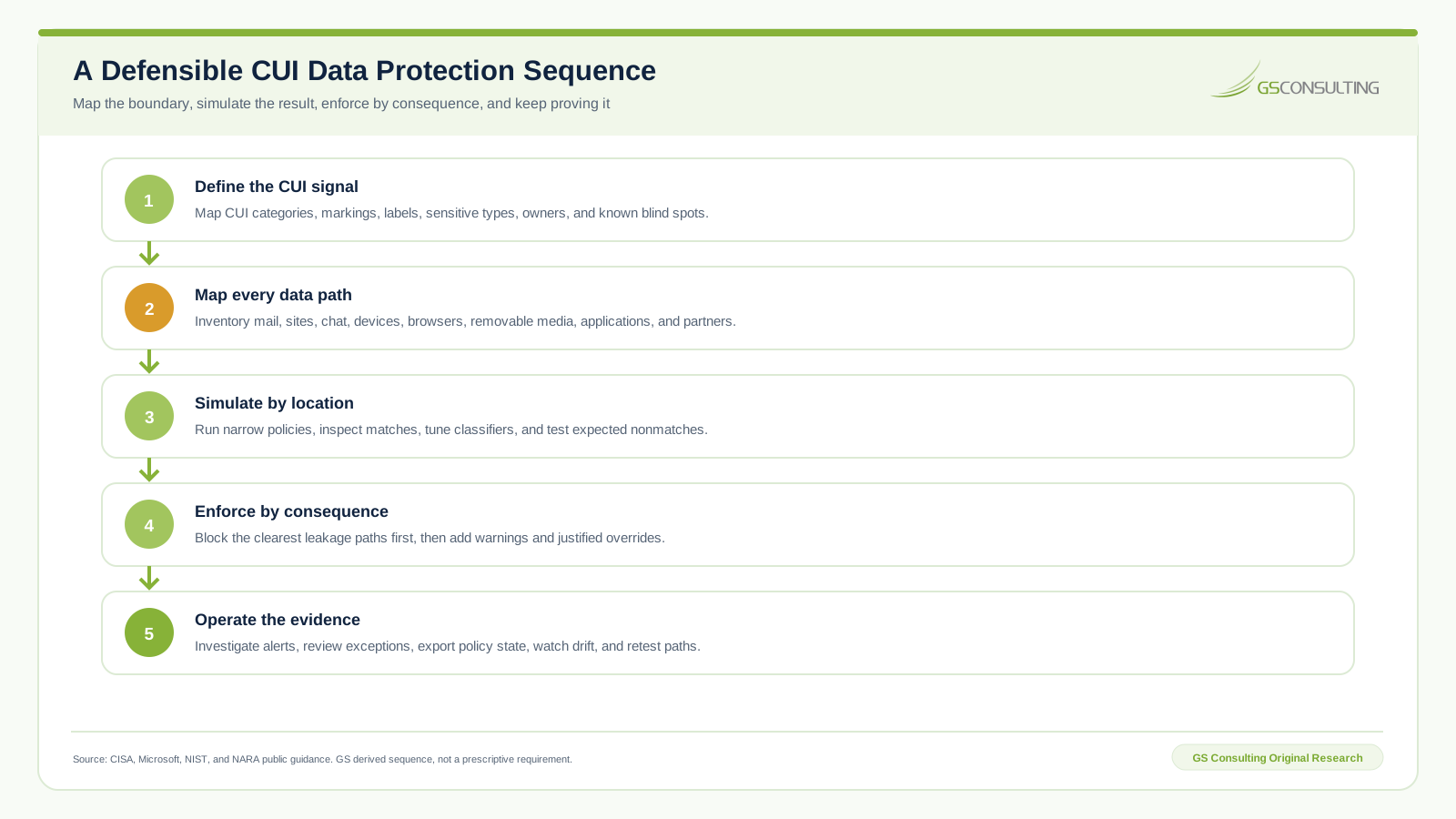
- Define the CUI signal. Map categories, markings, labels, sensitive types, representative examples, owners, and known blind spots.
- Map every data path. Inventory mail, sites, chat, devices, browsers, removable media, applications, partners, and unsupported systems.
- Simulate by location. Run narrow policies, inspect true and false results, tune detectors, and test expected nonmatches.
- Enforce by consequence. Block the clearest leakage paths first. Add notices and justified overrides only with operating ownership.
- Operate the evidence. Investigate alerts, review exceptions, export policy state, watch scope and policy drift, and retest material paths.
Microsoft simulation mode evaluates matches without enforcing the policy. Use it to learn, not to wait. Set entry and exit criteria: minimum test coverage, acceptable false match range, named alert owner, resolved blind spots, approved notices, tested override path, and rollback authority.
Exceptions, Overrides, and Alerts Are the Control
A block that stops legitimate work will create pressure for bypass. Design the exception path before enforcement. Decide who can override, what justification is required, which data and destination are allowed, how long the exception lasts, and who reviews the event.
Do not use a free text justification as the approval. It is a statement from the person taking the action. High consequence exceptions may need a separate approver, a named partner, encryption, a controlled transfer method, or an incident record.
Give alerts an operating threshold and owner. Separate routine user coaching from potential CUI exfiltration. Define severity from data, destination, action, user context, device state, repeat behavior, and policy intent. Escalation should lead to a decision, not simply another queue.
Review overrides and exceptions for concentration. One team, site, device group, partner, or policy may reveal a bad detector or a business process that needs a safer transfer path.
Build Evidence from Tests and Investigations
Policy exports show configured intent. Test records and investigations show whether the rule understood the content and affected the action. Keep both.
| Evidence layer | Question answered | Minimum record |
|---|---|---|
| Classification | Why should this content match? | CUI category, source, owner, example, signal, expected result, and limitation |
| Scope | Where does the policy operate? | Locations, users, groups, devices, sites, applications, exclusions, and time |
| Configuration | What was set? | Policy export, priority, mode, conditions, actions, notices, owner, and approval |
| Testing | Did content and actions behave correctly? | Test file, location, action, expected result, actual result, evidence, and reviewer |
| Operation | What happened after deployment? | Alert, investigation, override, exception, incident, tuning, drift, and owner decision |
Keep false matches and missed cases. They are control evidence, not embarrassment. A tuning decision without the rejected evidence is hard to review later.
How DLP Supports CUI and CMMC Work
NIST SP 800-171 Revision 3 applies to components that process, store, or transmit CUI and components that protect those components. DLP can support selected practices by limiting or monitoring data actions and producing evidence inside that boundary.
Do not state that a DLP policy makes the environment compliant. Map each policy to the actual system security plan, information flow, control owner, supported requirement, test case, and evidence. Document adjacent controls for identity, device management, access, encryption, incident response, media, physical handling, applications, and external services.
Prepare evidence of sustained operation for a CMMC assessment. That includes policy scope, representative tests, alerts, investigations, exceptions, changes, failures, and recurring review. A clean dashboard on the assessment day does not prove the control operated during the period under review.
Keep legal and compliance conclusions cautious. Be strong about preparation: define the boundary, prove the signals, test the paths, retain the decisions, and be ready to explain limitations.
Six CUI Data Loss Prevention Failure Modes
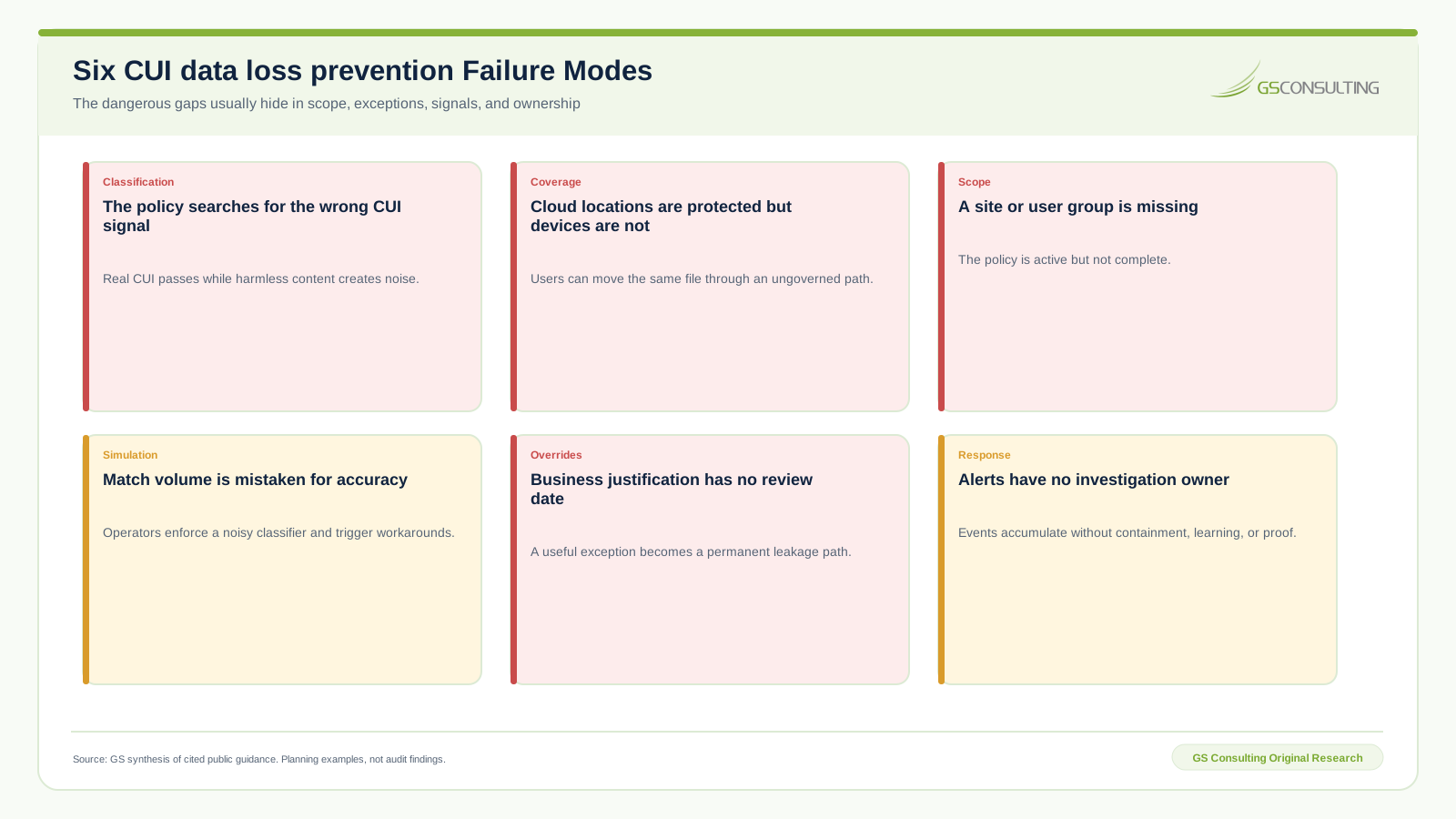
- The policy searches for the wrong CUI signal. Real CUI passes while harmless content creates noise.
- Cloud locations are protected but devices are not. The same file moves through an ungoverned path.
- A site or user group is missing. The policy is active but incomplete.
- Match volume is mistaken for accuracy. A noisy detector is enforced and users create workarounds.
- Business justification has no review date. A useful exception becomes a permanent leakage path.
- Alerts have no investigation owner. Events accumulate without containment, learning, or proof.
A 90 Day CUI Data Loss Prevention Plan
Days 1 through 30: define and map
- Document CUI categories, sources, markings, labels, sensitive types, owners, examples, close nonexamples, and known blind spots.
- Inventory mail, sites, chat, devices, browsers, media, applications, interfaces, partners, approved transfers, and unsupported paths.
- Verify current GCC High licenses, Purview availability, endpoint support, device onboarding, audit data, alert routing, and retention.
Days 31 through 60: simulate and tune
- Create narrow simulation policies by CUI signal, location, population, and action.
- Test true matches, true nonmatches, false matches, missed cases, protected files, archives, scans, browsers, devices, mail, sharing, and chat.
- Design user notices, business justification, approval, exception, alert, investigation, escalation, rollback, and evidence procedures.
Days 61 through 90: enforce and operate
- Enforce the clearest high consequence leakage paths first. Expand only after location and population results are understood.
- Review match quality, overrides, exceptions, alerts, missed paths, scope changes, user friction, and incident outcomes.
- Export policy state, link changes to approvals and tests, assign recurring owners, and schedule classifier and coverage review.
Minimum CUI Data Protection Evidence Packet
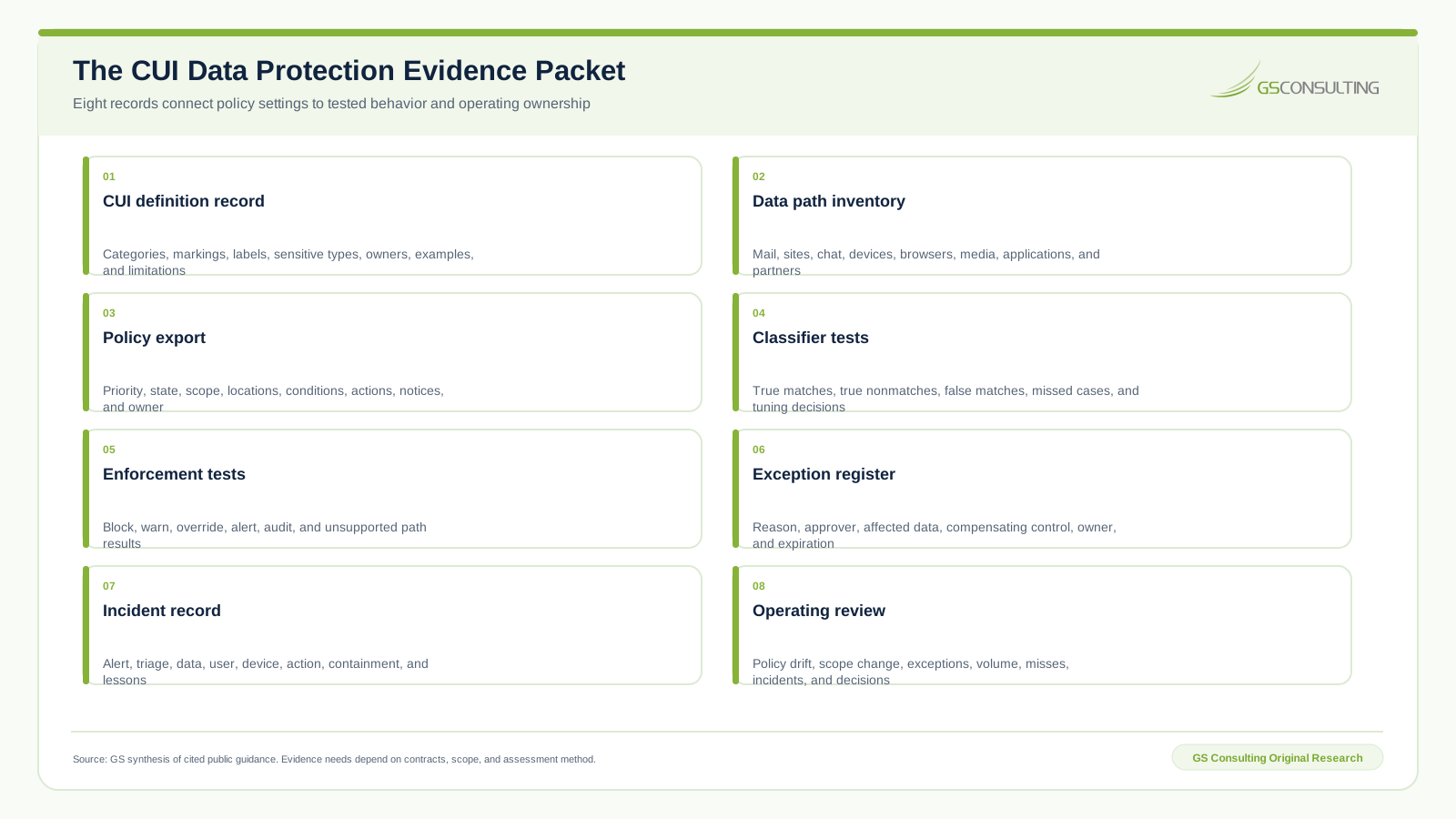
Keep this packet under change control and preserve history. A current export cannot explain why a detector changed, why an exception was granted, or what the team learned from a missed case.
Bottom Line
GCC High data loss prevention works when the organization can identify CUI with documented limits, map every material path, simulate realistic actions, enforce by consequence, control exceptions, investigate alerts, and retain the decisions.
Do not begin with the block action. Begin with the CUI definition and the data flow. Then prove the detector, prove the location, prove the action, and keep the operating record current.
That is the standard: known information, known paths, tested outcomes, expiring exceptions, and no alert without an owner.
Need a CUI protection system that works outside the policy screen?
GS Consulting helps government contractors connect CUI definition, GCC High configuration, endpoint controls, testing, alert response, and assessment evidence.
Request a GCC High DLP ReviewResearch Sources and Caveats
- CISA Microsoft 365 Security Suite secure configuration baseline, repository commit dated August 20, 2026.
- Microsoft Purview GCC High deployment guidance for current service availability context.
- Microsoft data loss prevention policy reference for locations, conditions, actions, and priority behavior.
- Microsoft endpoint data loss prevention guidance for device scope and monitored actions.
- Microsoft simulation mode guidance for staged policy testing.
- NARA CUI Marking Handbook for marking conventions.
- NIST SP 800-171 Revision 3 for the CUI system and protection boundary.
Features, licenses, supported locations, classifier behavior, baselines, contracts, and assessment rules can change. Verify the current GCC High tenant and governing requirement before relying on this guide. GS models are derived planning tools, not official Microsoft, CISA, NIST, NARA, DoD, CMMC, legal, audit, compliance, or regulatory determinations.
Frequently Asked Questions
What is GCC High data loss prevention?
GCC High data loss prevention uses Microsoft Purview policies and related controls to identify selected sensitive content and govern actions across supported GCC High locations such as Exchange, SharePoint, OneDrive, Teams, and onboarded devices. Actual capability depends on license, location, platform, configuration, and current service availability.
Can Microsoft Purview detect all CUI?
No. CUI is a handling designation tied to category, context, markings, source, and business meaning. Sensitive information types, labels, trainable classifiers, document fingerprints, and keywords can help, but each can produce missed cases or false matches. An authoritative CUI definition and tested examples are required.
Is data loss prevention available in GCC High?
Microsoft documents many Purview data loss prevention capabilities as available in GCC High, including controls for files, email, Teams, alerts, Activity Explorer, and endpoint scenarios. Availability, preview status, license, and supported actions can change, so verify the current tenant before committing a design.
Should GCC High DLP policies start in block mode?
Usually no. Start with a narrow simulation, inspect true matches and expected nonmatches, tune the CUI signal, test each location, and define alert and exception ownership. Enforce the clearest leakage paths first after the operating team understands the result and rollback decision.
Does GCC High DLP make a contractor CMMC compliant?
No. DLP can support selected data handling, monitoring, access, and evidence practices inside a defined CUI boundary. CMMC and NIST SP 800-171 conclusions depend on the full system, contract, implementation, assessment scope, and accepted evidence.
What GCC High DLP evidence should a contractor keep?
Keep the CUI definition and examples, data path inventory, policy exports, location and population scope, classifier tests, enforcement tests, exception records, alerts and investigations, change approvals, drift reviews, incident records, and operating decisions.