Microsoft GCC High | | 24 min read
GCC High Conditional Access: Policy Design and Evidence

Key Takeaways
Treat Conditional Access as an operating system for access decisions
Small policies expose logic
Separate populations, conditions, controls, exclusions, and recovery paths so a reviewer can explain the result before enforcement.
Scope and recovery rank first
The derived priority index gives policy scope, exclusions, and emergency access 100 because they shape both security and outage risk.
A setting is not a tested outcome
Policy exports show intent. Scenario results, sign in records, exception history, and operating reviews show whether the access system works.
GCC High Conditional Access is not a policy count. It is an access decision system. If scope, exclusions, recovery, testing, and monitoring do not agree, the tenant can be both restrictive and exposed.
The dangerous policy is rarely the one with an obviously weak setting. It is the polished policy that misses a group, trusts the wrong signal, excludes an application forever, or blocks the people needed to recover the tenant.
A defensible design starts with the real access boundary. Name every user population, administrator, guest, application, workload identity, device state, network condition, and CUI path. Then build small policies, test the result, enforce by consequence, and keep evidence that connects configuration to behavior.
The GCC High hub connects this guide to tenant configuration, CUI data loss prevention, guest access and external sharing, mobile device management, and email security. GS Consulting supports this work through secure AI automation and cloud evidence engineering.
Do not enforce access logic nobody has proved.
GS Consulting helps regulated teams map identities, design policies, test recovery, control exceptions, and build evidence that survives an operating review.
Review the Access DesignGCC High Conditional Access: The Short Answer
Conditional Access in GCC High uses Microsoft Entra signals to decide whether an identity can reach an application and what controls apply. A policy can consider users, groups, roles, applications, device state, location, risk, authentication strength, and other conditions. It can then block access, require multifactor authentication, require an approved device state, or apply session controls where supported.
That sounds like one decision. It is a chain of decisions. Who is included? Which application is targeted? Which condition is known at sign in? Which control wins when policies overlap? Who is excluded? What happens when the device service, authentication method, or administrator path fails?
The operating standard is not “we turned on MFA.” It is “we can explain and reproduce the access result for every material identity and CUI path, including failure and recovery.”
Build Policy Architecture, Not One Giant Rule
One broad policy feels efficient until an operator has to explain why a sign in was allowed, challenged, or blocked. Conditional Access evaluates every applicable policy. A single sign in can be shaped by several conditions and controls. Broad exclusions make that logic harder to see.
Use a policy naming standard that exposes population, resource, condition, action, mode, owner, and version. Keep administrator policies separate from general user policies. Keep legacy authentication blocking separate from device conditions. Keep guest access separate from employee access. Give workload identities their own design rather than assuming user policies cover them.
| Policy layer | Primary decision | Evidence needed | Common trap |
|---|---|---|---|
| Recovery | Can approved operators regain access during failure? | Account health, authentication test, alert test, owner, and review date | Emergency access exists but has never been used |
| Administrators | What strength and device state protect privileged work? | Role population, policy scope, authentication result, and exception record | A role changes but the policy group does not |
| General users | Which applications and access conditions apply to the workforce? | Population comparison, sign in samples, and expected outcome tests | A pilot group becomes permanent coverage |
| Guests | How do external identities reach shared data? | Guest lifecycle, sponsor, resource, policy result, and review history | Internal assumptions are applied to an external identity |
| Workloads | How are applications and service principals governed? | Identity inventory, permissions, owner, secret or certificate state, and access record | User policy coverage is assumed |
Policy count does not measure security. Clarity does. An operator should be able to identify the policy that created a result and the owner who can approve a change.
The Public Entra Baseline Has 34 Policy Sections
GS reviewed the CISA ScubaGear Microsoft Entra baseline at repository commit 4d34e9a48e38ce5c2e14c0fdfbaee53e57594ae2, dated August 20, 2026. We counted 34 policy sections across nine control domains. Strong authentication and highly privileged access each account for nine. Application registration and consent accounts for six.
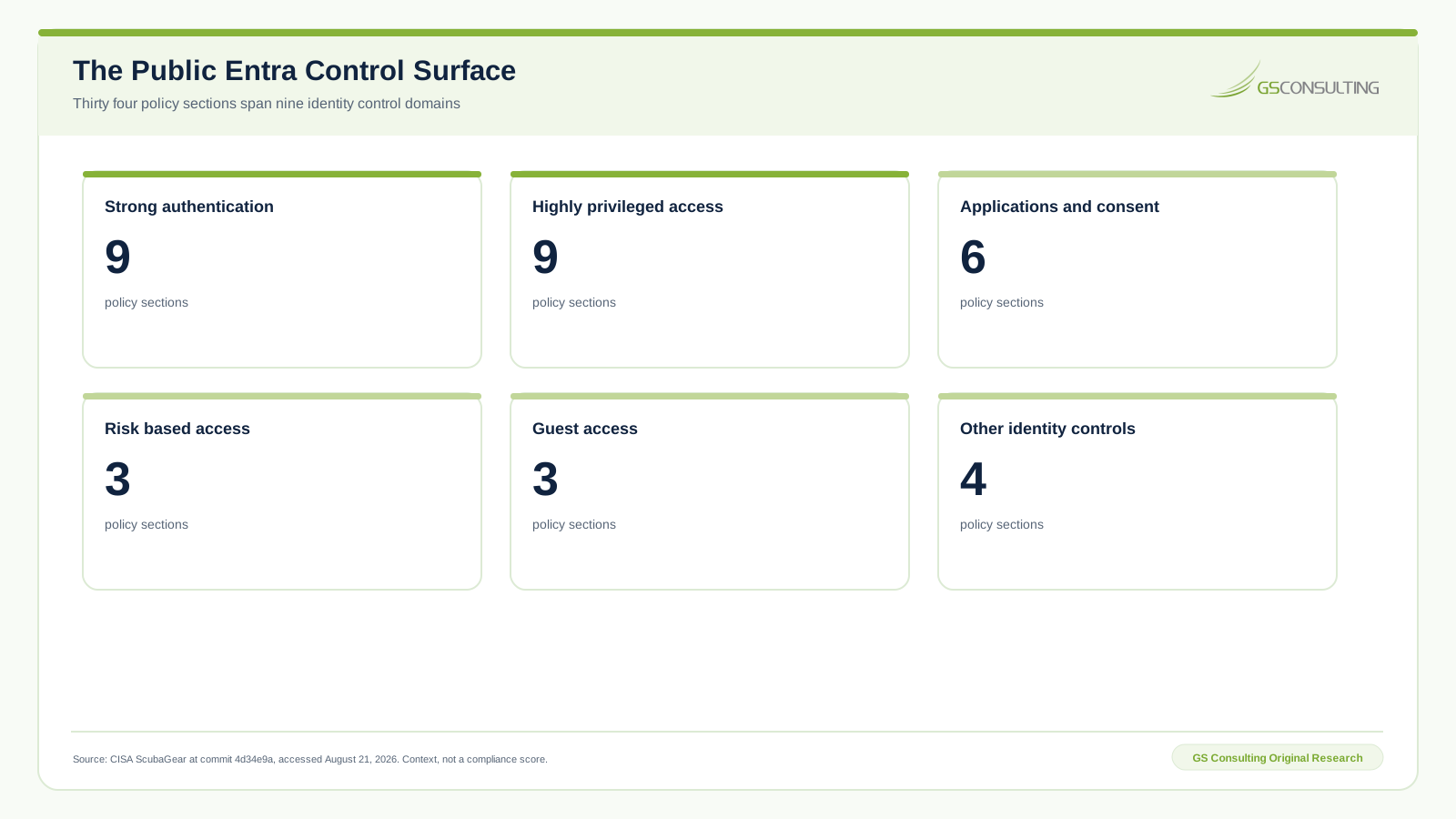
This count is context, not a score. CISA says its automated checks do not assess every Conditional Access condition. The baseline also warns that interacting conditions, exclusions, and a changing environment can create coverage gaps even when individual settings appear correct.
CISA wrote the baseline for federal civilian agencies. Contractors can use it as a public reference and test source. They should not present it as a contractor mandate or as proof that a GCC High tenant meets a contract.
GS Conditional Access Control Priority Index
GS Consulting built a derived planning model for ten control domains. The model weights security leverage at 30 percent, outage exposure at 25 percent, coverage breadth at 20 percent, evidence value at 15 percent, and change pressure at 10 percent. Each input is an explicit one to five GS analyst rating grounded in the cited public guidance.
The sensitivity case moves five points from security leverage to change pressure. No item moves by more than two points. The leading action tier stays intact.
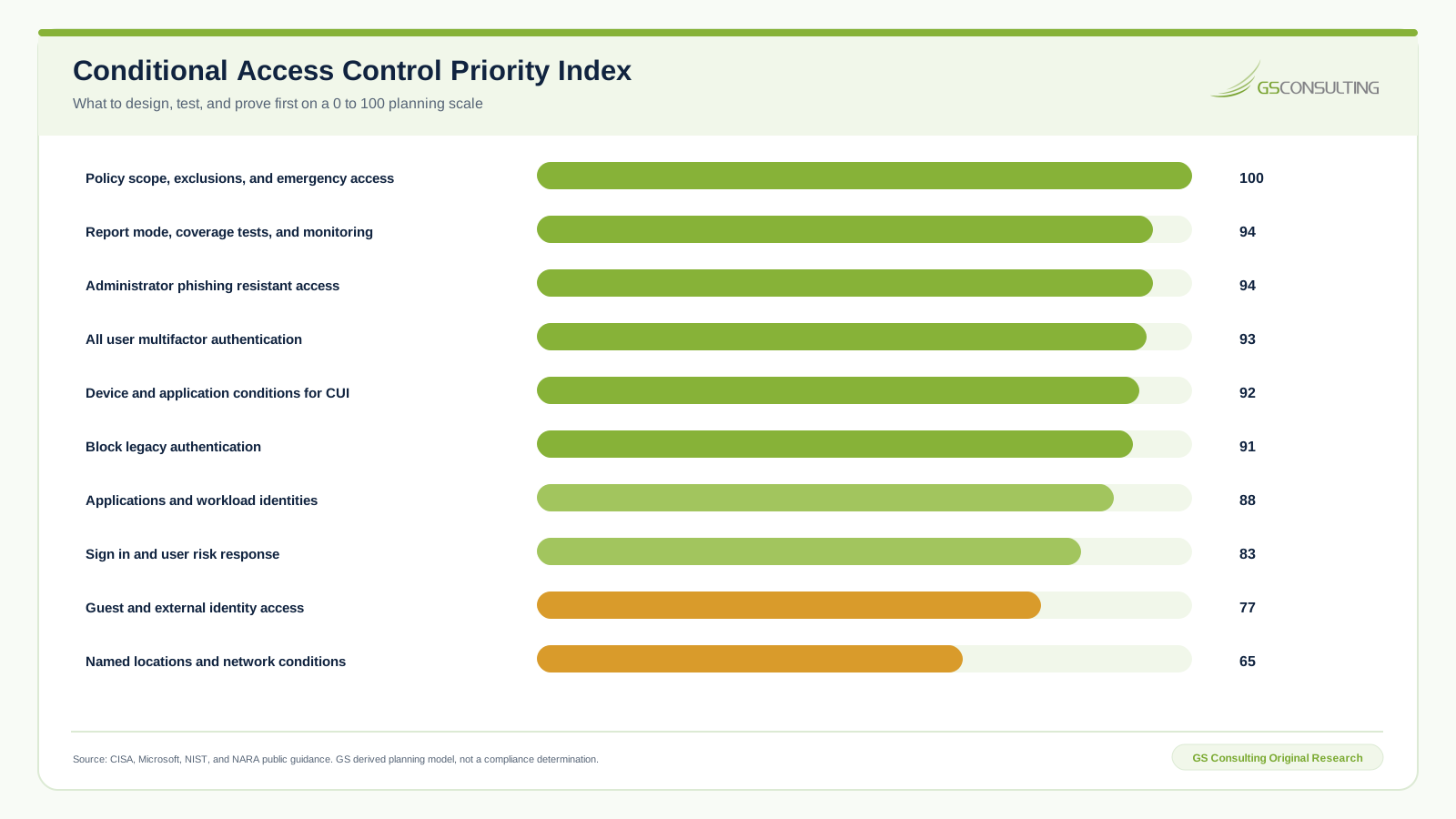
Scope, exclusions, and emergency access score 100. Report mode, coverage tests, and monitoring score 94. Administrator phishing resistant access also scores 94. General user multifactor authentication scores 93. Device and application conditions for CUI score 92. Blocking legacy authentication scores 91.
Named locations score lower at 65. That does not make them unimportant. It means the model places the access boundary, recovery, strong authentication, and verified coverage ahead of a network condition that can be stale, shared, or misunderstood.
This is a GS Consulting derived planning tool. It is not an official Microsoft, CISA, NIST, DoD, CMMC, legal, audit, compliance, or regulatory determination. The workbook, source register, CSV files, formulas, sensitivity results, and editable SVG figures are preserved in the research package.
Scope and Exclusions Decide Whether the Policy Exists
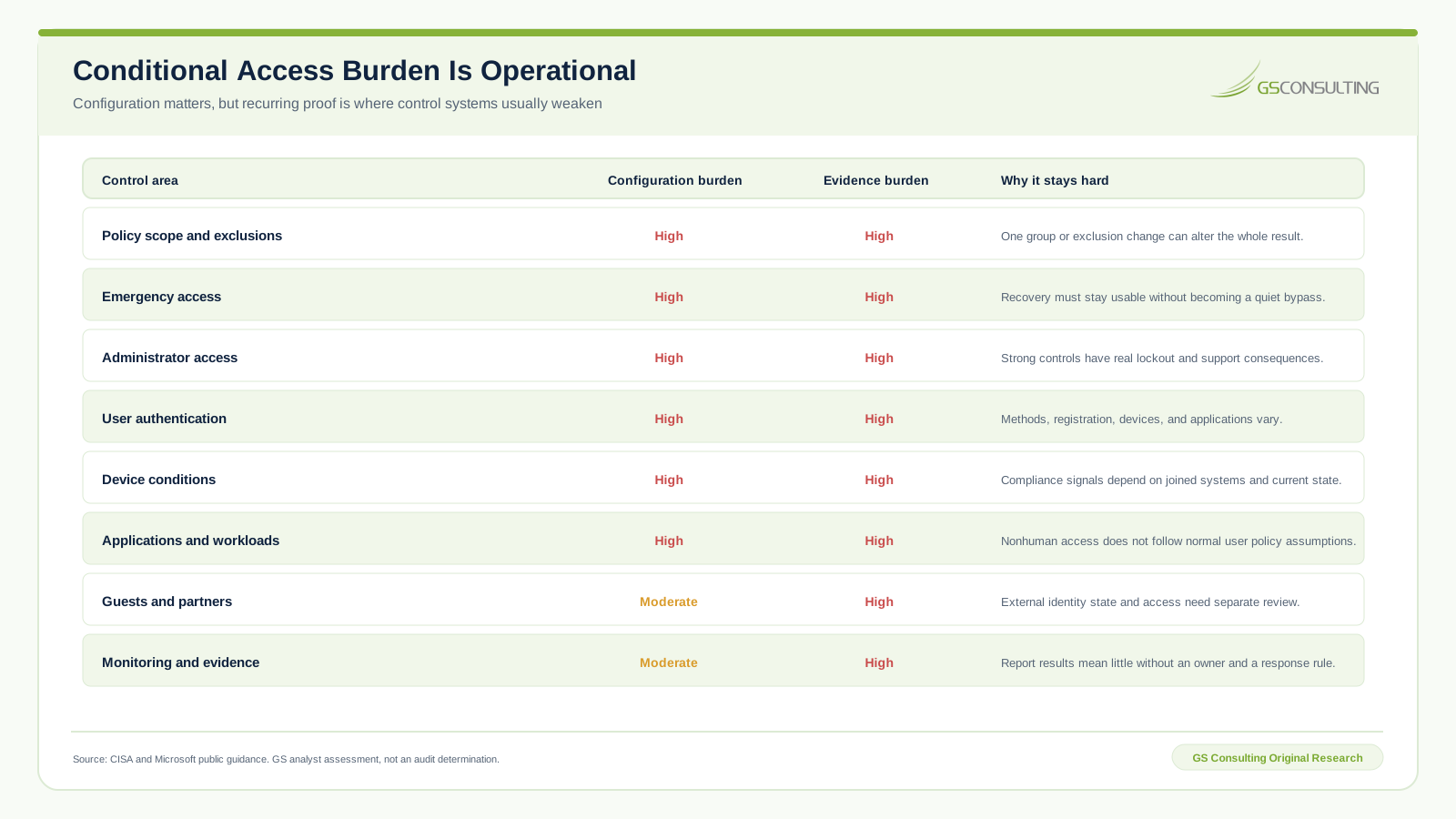
A policy can have strong controls and still protect nobody who matters. Start every review by comparing the intended population with the actual target population. Do not stop at group names. Resolve members, roles, guests, nested logic, application assignments, inactive accounts, service accounts, and emergency access.
Every exclusion is a separate control decision. Record the business reason, affected population, approver, owner, compensating control, test result, and expiration. If there is no expiration, say why the exception is permanent and what event will trigger review.
Emergency access needs deliberate exclusion from policies that could block recovery. That does not mean invisible access. Use separate cloud only accounts, strong authentication appropriate to the recovery scenario, monitored sign in, restricted use, and regular validation. Microsoft recommends regular review and testing. The test record matters more than the account creation date.
Protect Administrators Before Broad User Enforcement
Administrator access combines high consequence with a small population that can be tested carefully. Inventory roles first. Separate permanent assignment from eligible assignment. Identify service accounts and automation that still depend on privileged permissions. Remove old privilege before building a policy around it.
Require strong authentication for privileged work, with phishing resistant methods where the licensed tenant and operating model support them. Treat registration as part of deployment. A policy that requires a method users have not registered creates an outage, not a control.
Test administrator scenarios from the devices and locations actually used. Include portal access, command line tools, PowerShell, mobile access, remote administration, password reset, authentication method change, role activation, and emergency recovery. A browser test is not coverage for the administrative estate.
Do not combine every administrator role into one permanent exception when an old tool fails. Isolate the dependency, set an owner, document the compensating control, create an expiration, and plan its removal.
Device Conditions Must Follow the CUI Path
Device state can be useful when CUI should only be reached from managed equipment. It can also create false confidence. Conditional Access receives a signal. It does not inspect every business process or prove that a person handled a file correctly.
Map how device compliance is produced. Which management service supplies it? Which operating systems are supported? What happens when the device record is stale? How quickly does a failed requirement change the access result? Can unmanaged browser access still download, sync, print, or copy information?
Then connect access policy to GCC High data loss prevention for CUI. Conditional Access decides whether the session starts. Purview and endpoint controls govern selected data actions after access. Neither replaces the other.
Test CUI paths by application and action. A compliant laptop opening SharePoint is one case. A guest using Teams, an administrator using PowerShell, a user reaching webmail from a personal browser, and a service principal reading through an interface are different cases.
Applications and Workload Identities Need Their Own Boundary
User policies do not automatically solve nonhuman access. Build an application register with owners, permissions, data purpose, authentication method, credential age, tenant consent, network path, and review date. Link it to the GCC High tenant configuration baseline.
For every application, ask whether it is targeted by the intended policy and whether its protocol can satisfy the required control. Identify legacy authentication and any client that does not support the chosen method. Block legacy authentication in a staged policy, then prove that necessary workflows use modern authentication.
Workload identity controls and risk capabilities can help where available, but availability and licensing must be verified in the actual GCC High tenant. Do not copy a commercial tenant reference architecture and assume feature parity.
A Defensible Deployment Sequence
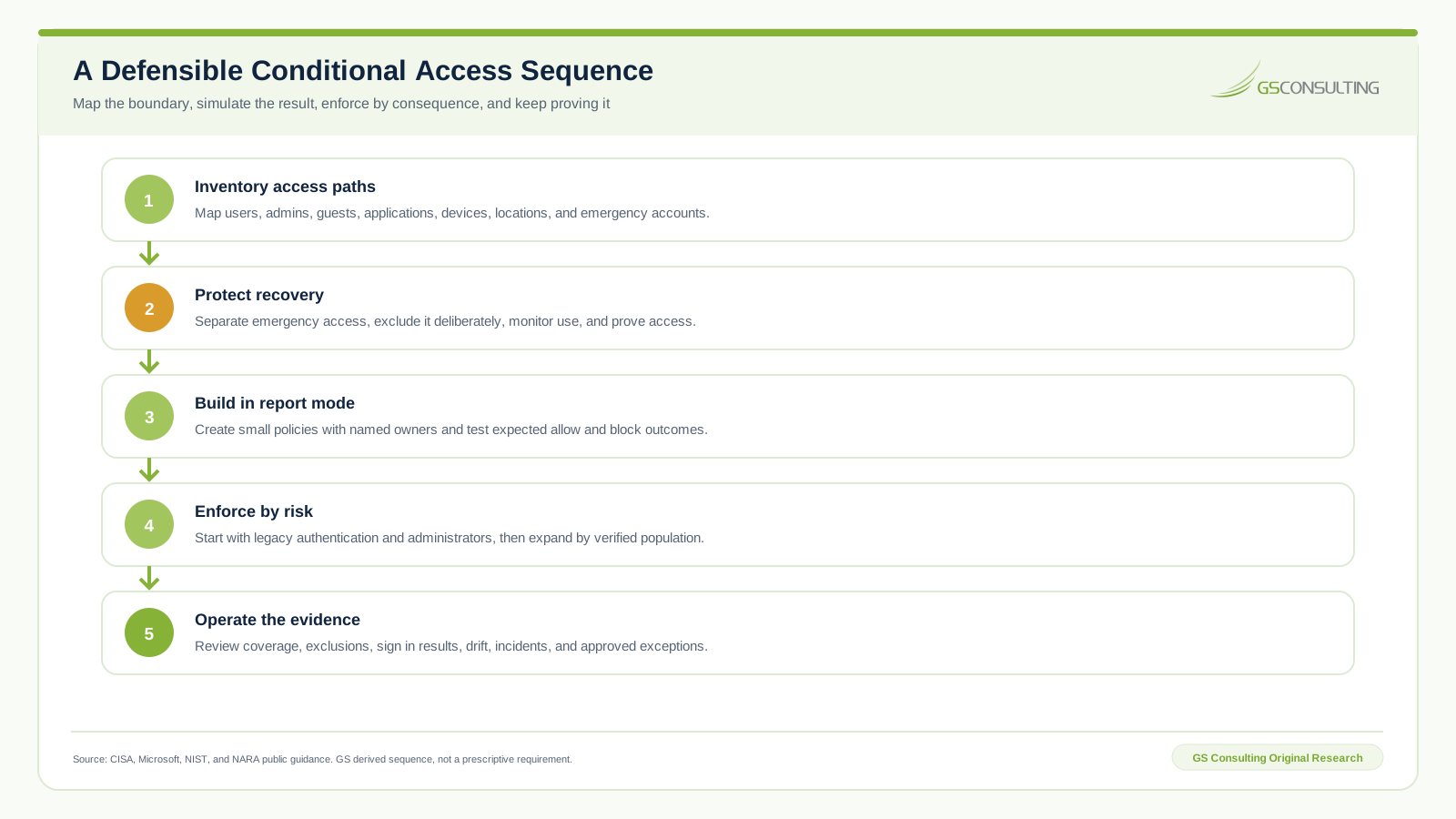
- Inventory access paths. Map users, administrators, guests, applications, workload identities, devices, networks, and CUI resources.
- Protect recovery. Separate emergency access, exclude it deliberately, monitor every use, and prove the path works.
- Build in report only mode. Use small policies with named owners. Run What If analysis and test expected allow, block, and challenge outcomes.
- Enforce by consequence. Start with legacy authentication and privileged access. Expand only after the target population and support path are verified.
- Operate the evidence. Review sign in results, coverage, exclusions, failures, changes, incidents, and approved exceptions on a defined cadence.
Microsoft report only mode evaluates a policy without enforcing it and records the result in sign in logs. That is useful, not sufficient. A report result reflects the sign ins that happened. It does not prove a scenario that never occurred, a dependency that was not exercised, or a future population change.
Design Evidence Around Decisions and Outcomes
Policy exports answer what the tenant was told to do. Evidence must also answer who approved it, which identities and applications were covered, what the expected result was, what actually happened, how an exception was controlled, and who reviewed the operating state.
| Evidence layer | Question answered | Minimum record |
|---|---|---|
| Design | Why does this policy exist? | Threat or requirement, population, resource, owner, approval, and dependency |
| Configuration | What was set? | Policy export, state, conditions, controls, priority, exclusions, and time |
| Testing | Did expected cases behave correctly? | Test identity, device, application, condition, expected result, actual result, and reviewer |
| Operation | Does coverage remain current? | Sign in review, population comparison, failures, alerts, drift, and owner decision |
| Exception | Why is a gap accepted? | Reason, scope, compensating control, approver, expiration, and retest |
Keep machine exports where possible. Screenshots help a reviewer see context, but they are weak as the system of record. They hide omitted rows, make comparison hard, and rarely carry durable ownership.
How Conditional Access Supports CUI and CMMC Work
NIST SP 800-171 Revision 3 applies to components that process, store, or transmit CUI and components that protect those components. Conditional Access may sit in that protection boundary because it controls access to GCC High resources. That does not turn a Microsoft feature into a complete security requirement.
Map policies to the system security plan only after the boundary and implementation are known. State which identities, resources, conditions, controls, and evidence support the practice. Document what happens outside Conditional Access, such as device management, user lifecycle, privileged role governance, data protection, incident response, and application security.
For a CMMC assessment, prepare evidence that shows sustained implementation. A policy screenshot may support a discussion. It does not prove population coverage, correct exclusions, tested recovery, change control, or recurring review.
Use cautious compliance language. The contract, applicable assessment guide, system scope, assessor method, and current program rules determine what evidence is accepted. Preparation can be decisive even when legal conclusions must remain qualified.
Six Conditional Access Failure Modes
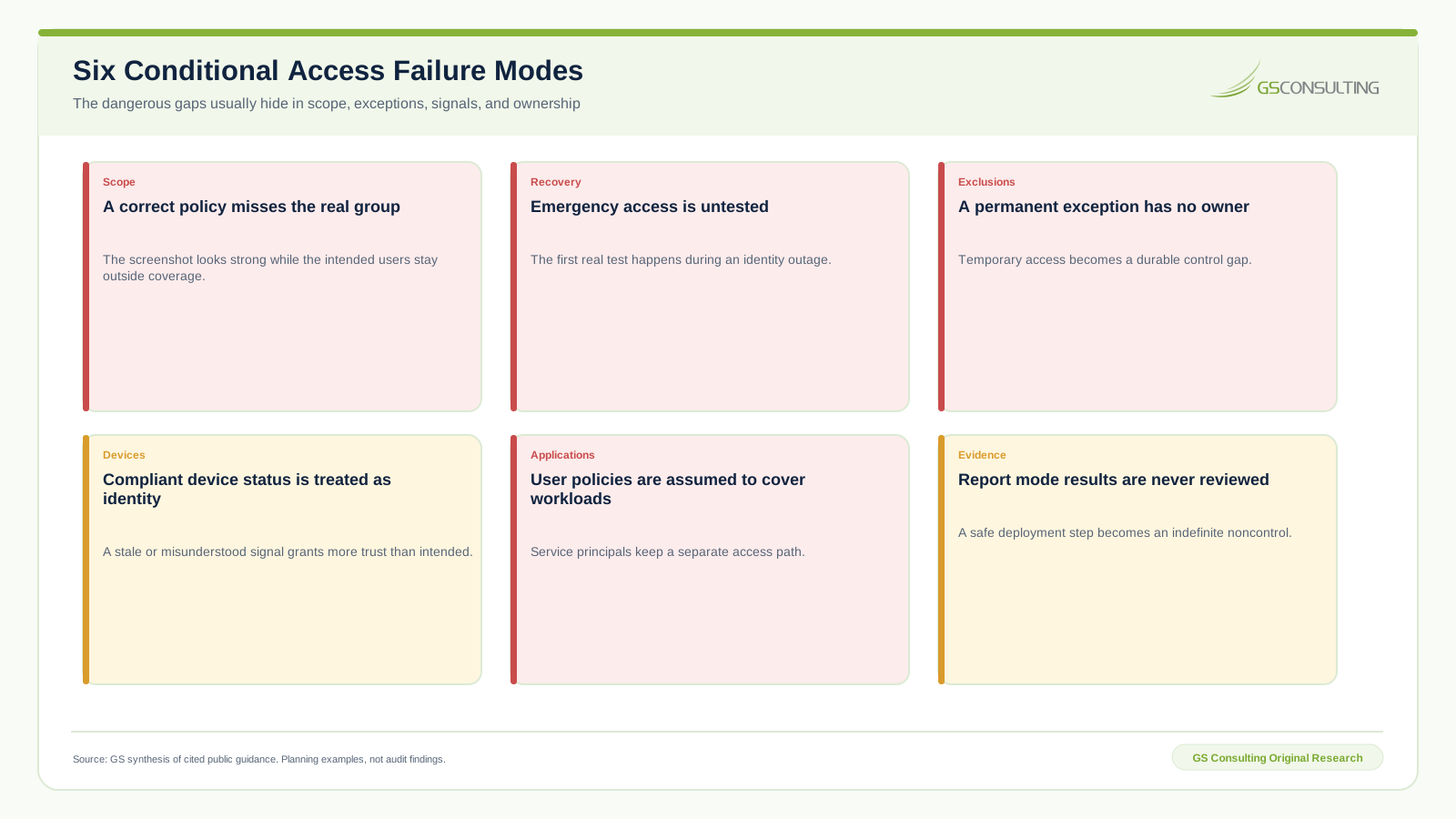
- A correct policy misses the real group. The intended population and resolved membership were never compared.
- Emergency access is untested. The first real validation happens during an outage.
- A permanent exception has no owner. Temporary access becomes a quiet control gap.
- Device status is treated as identity. A stale or misunderstood signal grants more trust than intended.
- User policies are assumed to cover workloads. Service principals retain a separate access path.
- Report results are never reviewed. A safe deployment state becomes an indefinite noncontrol.
A 90 Day Conditional Access Plan
Days 1 through 30: map and stabilize
- Inventory identities, roles, applications, workload identities, devices, networks, authentication methods, and CUI resources.
- Create and validate emergency access. Monitor its use and document a recovery test.
- Export current policies and resolve actual target populations, exclusions, overlaps, and unsupported clients.
Days 31 through 60: build and test
- Create small policies in report only mode for legacy authentication, administrators, general users, devices, guests, and selected resources.
- Run What If analysis and hands on tests for allow, challenge, block, recovery, application, device, and location scenarios.
- Give every exception an owner, approval, compensating control, expiration, and removal plan.
Days 61 through 90: enforce and operate
- Enforce the clearest high consequence policies first, with support and rollback decisions ready.
- Compare resolved populations with real sign in activity and investigate uncovered applications or identities.
- Set recurring reviews for roles, groups, guests, applications, device state, exclusions, failures, drift, incidents, and evidence retention.
Minimum Conditional Access Evidence Packet
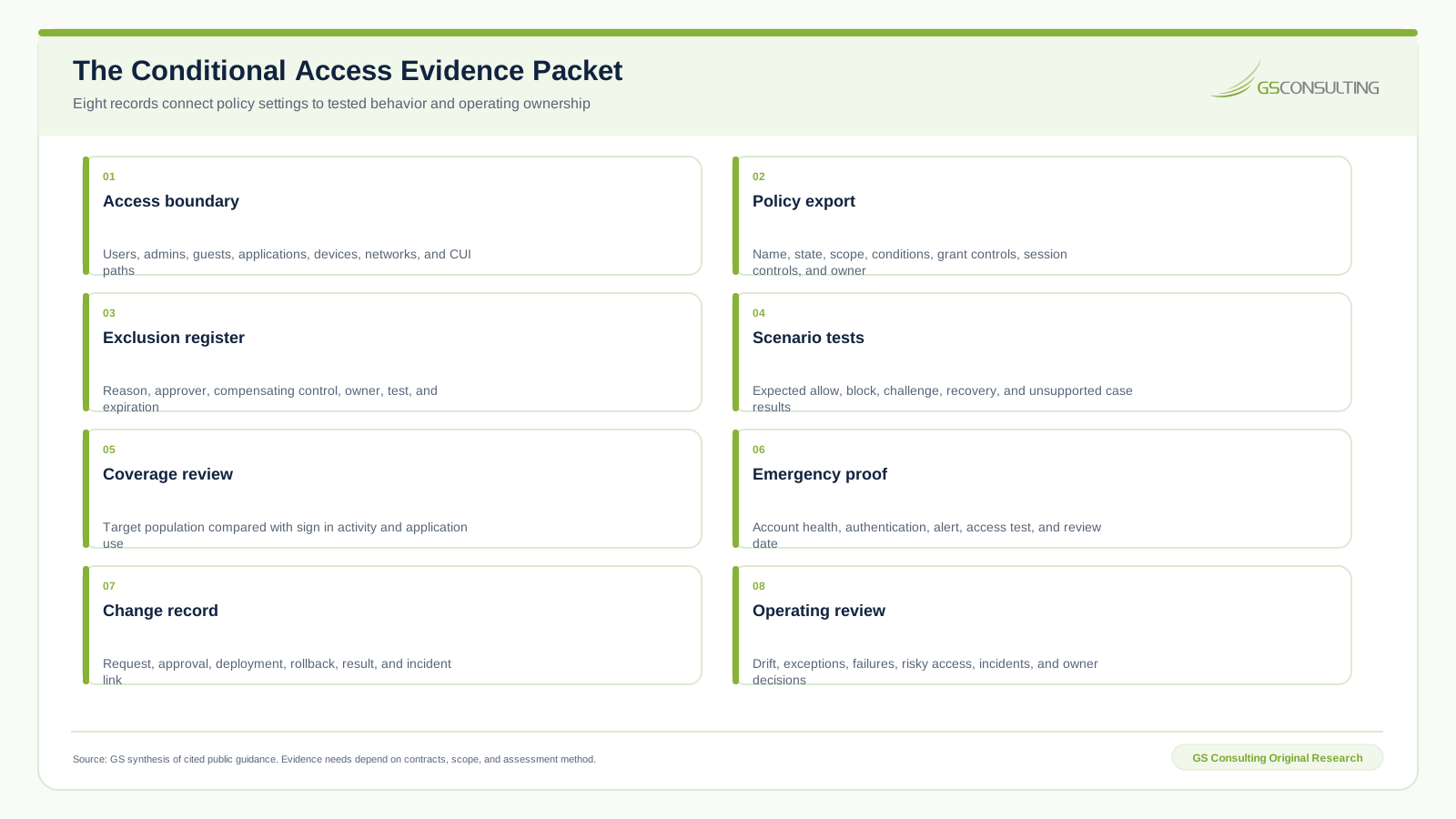
Keep these records under change control. Link policies to test cases, exceptions, incidents, and review decisions. Preserve enough history to explain why access changed, not only what the tenant shows today.
Bottom Line
GCC High Conditional Access works when the decision boundary is explicit, recovery is protected, small policies are tested, exceptions expire, and evidence follows the operating result.
Do not start with a copied policy library. Start with identities, resources, data paths, and consequences. Then design the policy, test the behavior, enforce by risk, and keep proving coverage.
That is the standard: every material access result explainable, every exception owned, and every recovery path tested before it is needed.
Need a Conditional Access design you can defend?
GS Consulting helps government contractors turn GCC High identity requirements into policy architecture, scenario tests, exception governance, and recurring evidence.
Request a GCC High ReviewResearch Sources and Caveats
- CISA Microsoft Entra ID secure configuration baseline, repository commit dated August 20, 2026.
- Microsoft Conditional Access overview for policy signals and access controls.
- Microsoft report only mode guidance for staged evaluation and sign in results.
- Microsoft emergency access account guidance for recovery design and validation.
- Microsoft GCC High and DoD service description for environment and feature context.
- NIST SP 800-171 Revision 3 for the CUI system and protection boundary.
Features, licenses, service behavior, baselines, contracts, and assessment rules can change. Verify the current tenant and governing requirement before relying on this guide. GS models are derived planning tools, not official Microsoft, CISA, NIST, DoD, CMMC, legal, audit, compliance, or regulatory determinations.
Frequently Asked Questions
What is GCC High Conditional Access?
GCC High Conditional Access is the use of Microsoft Entra access policies in a GCC High tenant to evaluate identity, application, device, location, risk, and related signals before applying grant or session controls. It is a policy engine, not a single switch.
Does GCC High include Conditional Access?
Conditional Access capabilities depend on the purchased Microsoft Entra and Microsoft 365 licenses, the GCC High service offering, and current feature availability. Confirm the exact license and tenant behavior before designing policies around a commercial cloud feature description.
Which GCC High Conditional Access policies should be implemented first?
Start with emergency access protection, a controlled block on legacy authentication, and strong administrator authentication. Build each policy in report only mode, verify scope and exclusions, test expected allow and block cases, then enforce in stages.
How do you test Conditional Access without locking out users?
Keep separate monitored emergency accounts, use report only mode, test with named pilot populations, run Microsoft What If analysis, validate real sign in logs, and maintain a rollback decision before enforcement. Automated analysis does not replace hands on scenario testing.
Does Conditional Access make a GCC High tenant CMMC compliant?
No. Conditional Access can support identity, access, device, and evidence practices inside a defined CUI boundary. CMMC and NIST SP 800-171 decisions depend on the full system, contract, assessment scope, implementation, and evidence. A policy screenshot is not a compliance determination.
What Conditional Access evidence should a contractor retain?
Retain the approved access boundary, policy exports, scope and exclusion records, emergency account tests, expected and actual scenario results, sign in evidence, change approvals, exception expirations, incidents, drift reviews, and named operating owners.