DevSecOps & Software Supply Chain | | 25 min read
DevSecOps Container Security: Control the Image Through Runtime

Key Takeaways
Control the image before and after it starts
Privileged host access scores 97
The scenario leads the container planning model because one workload can gain severe authority, broad reach, difficult recovery, and a heavy evidence burden.
Deploy the reviewed digest
The build, SBOM, scan, signature, provenance, approval, admission result, and deployment inventory should name the same immutable image.
Restricted defaults need enforcement
Nonroot identity, narrow capabilities, read only storage, seccomp, resource limits, and expected network paths should be policy, not suggestions.
DevSecOps container security is not image scanning. It is control of the exact image from build through runtime.
A clean scan does not prove that the base image was trusted, the build was isolated, the image was signed, production admitted the reviewed digest, the workload runs without excess privilege, network paths are constrained, or the team can replace a compromised image quickly.
Containers compress application code, operating system packages, configuration, and execution defaults into a portable object. That portability helps delivery. It also lets one weak build or unsafe runtime setting spread across registries, clusters, customers, and environments with impressive efficiency.
The DevSecOps and Secure Software Delivery hub connects container controls to DevSecOps Code Signing, software bill of materials operations, DevSecOps Vulnerability Management, and Infrastructure as Code Security. GS Consulting applies the model through DevSecOps and Software Supply Chain.
Can you prove which image is running and why?
GS Consulting helps regulated teams bind image identity, component evidence, admission policy, runtime controls, deployment inventory, and recovery into one operating system.
Review Your Container ControlsDevSecOps Container Security: The Short Answer
Choose a trusted and minimal base. Pin it by digest and maintain an update path. Use multiple build stages so compilers, package tools, credentials, and debug utilities do not enter the production image. Build from protected source in an isolated environment. Generate the SBOM and provenance, scan every layer, resolve required findings, and sign the final digest.
Publish through a registry with narrow write authority, controlled retention, reliable evidence storage, and protected promotion. At admission, verify the digest, signature, provenance, vulnerability policy, approved registry, workload settings, and exception state. Deny unsafe workloads before creation.
At runtime, use a nonroot identity, disable privilege escalation, remove unnecessary capabilities, apply seccomp and platform isolation, prefer a read only root file system, set resource requests and limits, avoid default service accounts, and allow only expected network paths. Observe the running digest and behavior. Recover by rebuilding and replacing the image, not by changing a running container.
Secure Six Container Control Surfaces
Container security crosses six surfaces, each with a different owner and failure mode:
- Build: source, base image, packages, build stages, builder identity, credentials, tests, and output.
- Image: digest, layers, configuration, user, entry point, component inventory, scan, signature, and provenance.
- Registry: write and read authority, immutability, retention, replication, promotion, deletion, and event records.
- Admission: approved source, digest, signature, vulnerability rule, namespace, workload settings, exception, and deny behavior.
- Runtime: service account, user, groups, capabilities, file system, kernel controls, resources, network, node, and secrets.
- Operations: deployment inventory, telemetry, drift, threat detection, vulnerability response, quarantine, rebuild, replacement, and closure.
Do not hand the problem from one team to another and assume coverage. The product team knows the application. The platform team controls admission and runtime defaults. Security interprets findings and detects threats. Operations owns health and replacement. The evidence chain must join their decisions around the same image digest and workload identity.
Public Guidance Covers More Than the Image
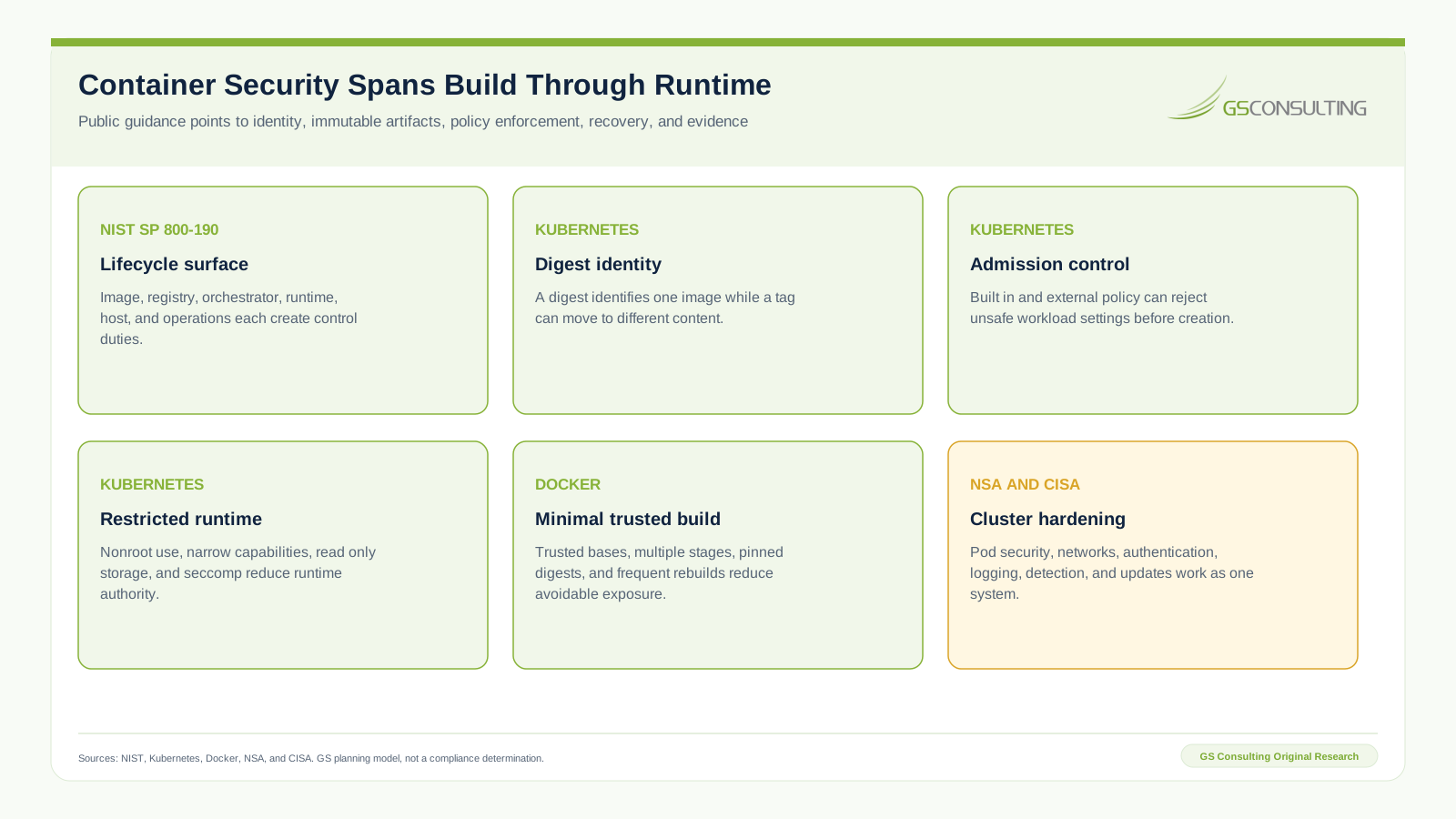
NIST SP 800-190 organizes container risk around images, registries, orchestrators, runtimes, hosts, and operations. The publication predates several current platform features, but its architectural lesson remains useful: a secure image cannot compensate for a weak orchestrator, host, registry, or operating process.
The Kubernetes Security Checklist recommends digest references or signature verification, regular scanning, minimal images, unprivileged users, Pod Security Standards, seccomp where supported, resource controls, protected audit records, narrow service account use, and appropriate admission controllers. Kubernetes also notes that a digest uniquely identifies image content while a tag can move.
Docker build guidance recommends trusted and small base images, multiple build stages, regular rebuilds, nonroot users where possible, and digest pinning for supply chain integrity. Digest pinning creates reproducibility, but it also creates an update duty. A pinned base does not receive a security fix until the team deliberately updates and rebuilds.
NSA and CISA Kubernetes Hardening Guidance is tailored to National Security Systems and critical infrastructure, yet its emphasis on pod security, authentication, network separation, logging, threat detection, and timely updates provides useful design questions for other regulated teams. Applicability and required settings still depend on the system.
GS Container Release Control Priority Index
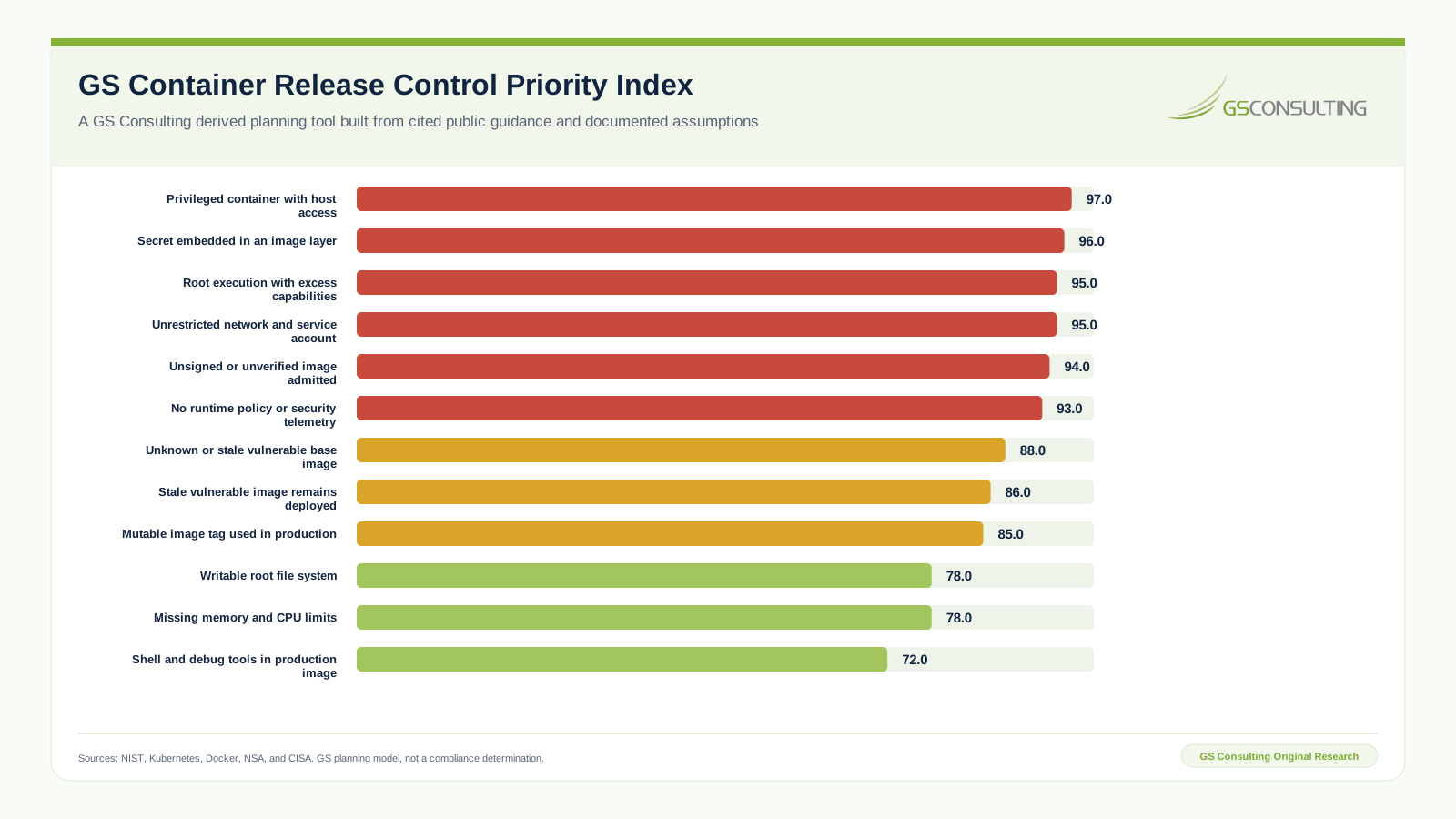
GS Consulting built a twelve scenario model to identify which container failures should receive the strongest prevention, admission, runtime, and recovery controls first. Each scenario receives a one to five rating across consequence, exposure reach, privilege, change pressure, recovery pressure, and evidence duty. The base weights are 25, 20, 20, 15, 10, and 10 percent respectively.
The score equals the sum of each factor rating divided by five and multiplied by its weight, then multiplied by 100. A score of 90 or more is labeled Gate before release. Scores from 80 through 89.9 are Strong control, 65 through 79.9 are Managed control, and lower scores are Basic control. The labels are GS planning bands, not external requirements.
A privileged container with host access scores 97. A secret embedded in an image layer scores 96 because the value can persist in distributed content even after a later layer deletes the file. Root execution with excess capabilities and an unrestricted network plus service account both score 95. Admitting an unsigned or unverified image scores 94. A writable root file system and missing memory and CPU limits each score 78.
The alternative weighting increases privilege and recovery while reducing consequence and exposure. No scenario moves by more than two points. The six leading failure scenarios remain release gates. The research package retains the workbook, source register, source observations, inputs, formulas, sensitivity case, exact figure data, editable SVG files, and browser rendered PNG files.
Planning caveat: the index is a GS Consulting derived planning tool using cited public guidance and documented analyst ratings. It is not an official NIST, Kubernetes, Docker, NSA, CISA, legal, audit, certification, or compliance determination. Validate controls against the workload, platform, data, threat model, customer, contract, and system duties.
Connect Eight Container Control Surfaces
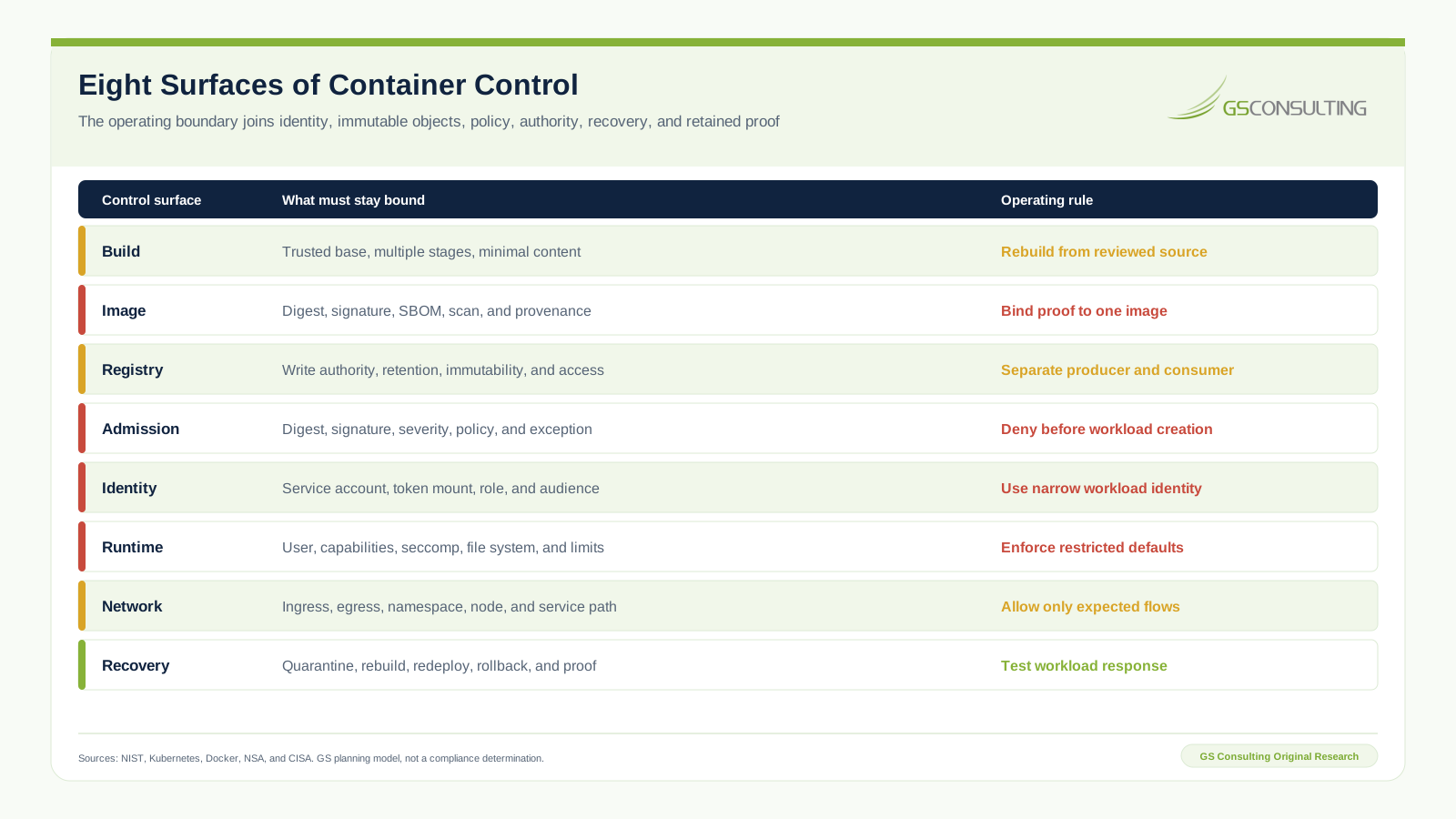
Define an approved container baseline before selecting enforcement tools. Specify trusted base sources, digest policy, permitted package sources, required build stages, prohibited content, scanning rules, signature and provenance rules, registry paths, runtime profiles, service account patterns, network expectations, exception authority, and recovery objectives.
Use policy at the earliest reliable point. A Dockerfile check can catch a missing user declaration. A build test can verify file permissions. A registry policy can control promotion. Admission can reject an untrusted digest or unsafe workload. Runtime controls can limit what a process does after start. Observation can detect behavior that static checks could not predict. Each layer has a job.
Keep the default path easy. Provide reviewed base images, reusable build patterns, standard workload identities, restricted pod templates, network policy templates, and an evidence collector. Teams bypass controls when the secure path requires them to invent every setting and negotiate every exception from scratch.
Build a Minimal and Reproducible Image
Start with a base from an approved source and pin the digest used for the build. Record both the human friendly version and the digest. Maintain an automated or scheduled review that identifies a newer approved digest, opens a change, rebuilds the image, runs tests, and records the decision. Reproducibility without update discipline becomes stable exposure.
Use multiple build stages. Compile, test, and package in one stage, then copy only the required runtime output into the final image. Do not carry package managers, source code, build tools, shells, debuggers, or credentials into production unless the workload has a documented need. Add a precise ignore file so local secrets, keys, logs, test data, and repository metadata do not enter the build context.
Never pass a secret in a way that writes it into an image layer or build history. Use the build platform secret mechanism, limit the receiving step, and confirm the value is absent from layers, metadata, logs, caches, and exported artifacts. If exposure occurs, revoke the value. Removing a file in a later layer does not erase it from an earlier layer.
Generate a component inventory and provenance during the controlled build. Scan operating system packages, language packages, application binaries, configuration, and known malware patterns according to the product risk. Triage findings with the exact digest, deployed scope, exploitability, privilege, network exposure, mission effect, fix availability, owner, due date, and exception expiry.
Set the intended user, entry point, file ownership, and health behavior in the image. Test the image under the same restrictions production will enforce. A nonroot declaration is not useful if the application can only write to a root owned path.
Control Registry Promotion and Admission
The registry is a production boundary. Separate producer write authority from consumer read authority. Limit deletion and tag movement. Protect administrative actions. Record pushes, copies, promotions, signature and attestation writes, policy changes, and deletes. Test replication, backup, restore, retention, and evidence retrieval.
Promote the same digest across environments. Do not rebuild for production. A rebuild creates a new object that did not receive the earlier checks, even when the source revision is unchanged. Record environment specific configuration outside the image and control it through its own change path.
Admission should validate the approved registry, immutable digest, signature, signer identity, provenance, vulnerability decision, workload identity, runtime settings, namespace, network expectations, and exception state as applicable. Start in audit or warn mode to understand impact, but set a date and owner for enforce mode. A warning that never becomes a decision is not a gate.
Fail deliberately. Decide what happens when the registry, signature service, policy engine, or vulnerability data is unavailable. For a mandatory control, silent allow is usually the wrong result. A controlled emergency path can preserve operations without pretending that verification succeeded.
Enforce Restricted Runtime Defaults
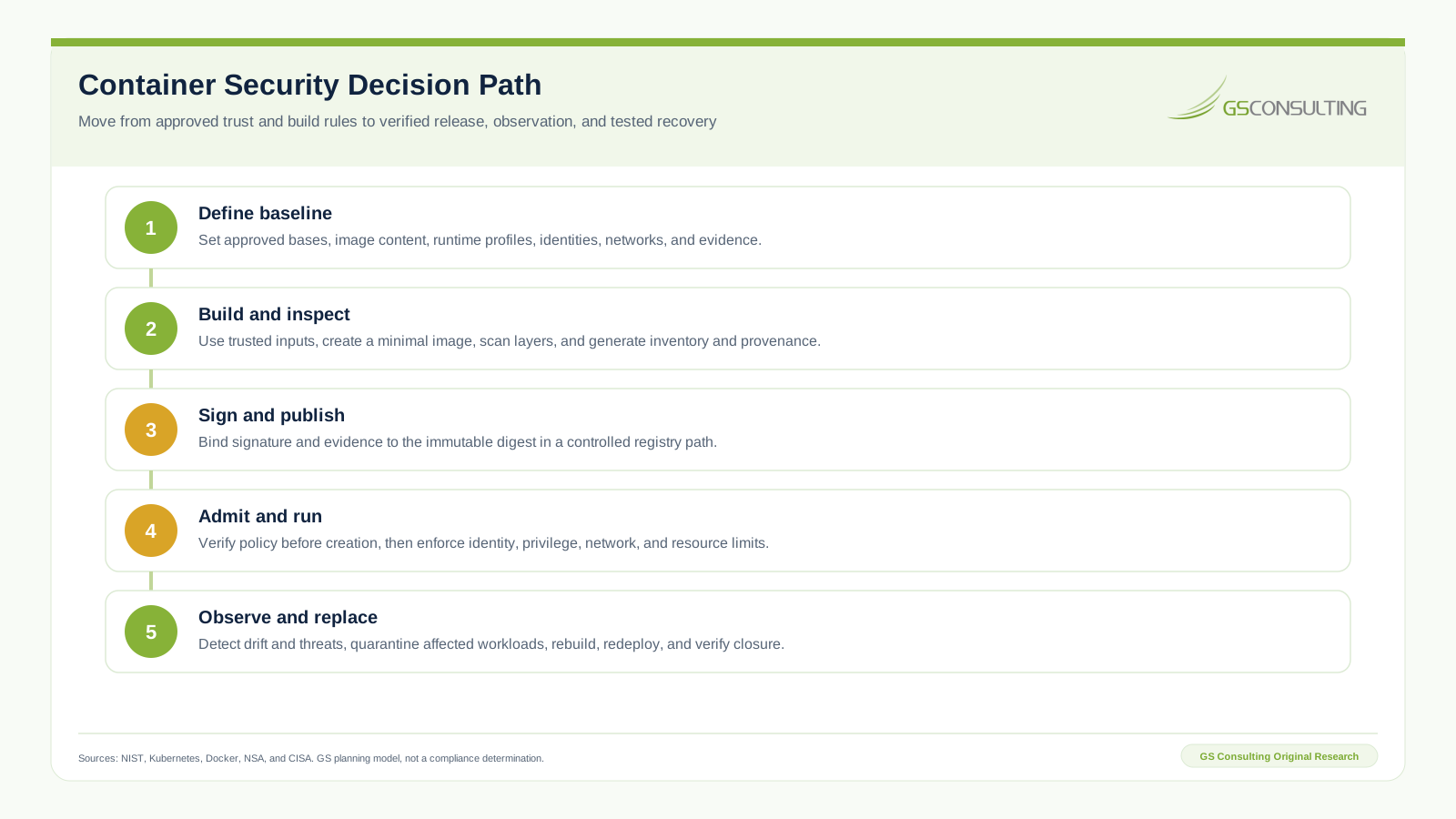
Default to a nonroot user. Disable privilege escalation. Drop all Linux capabilities, then add back only what the application proves it needs. Avoid privileged mode and host namespaces. Use seccomp and the platform security controls supported by the operating system. Prefer a read only root file system with explicit writable volumes for required state.
Give each workload a dedicated service account when it needs platform access. Disable automatic token mounting when it does not. Scope roles to the smallest practical resource and action set. Bound token audience and lifetime where supported. A container with narrow process privilege but broad cluster credentials is still highly privileged.
Set memory requests and limits. Set CPU controls based on workload behavior and test the effect, since aggressive CPU limits can create throttling and performance surprises. Apply namespace quotas where shared capacity creates risk. Treat repeated restarts, out of memory events, and unusual resource use as security and reliability signals.
Allow only expected ingress and egress. Name dependencies, destinations, ports, protocols, and identity expectations. Test denied paths. Separate workloads by sensitivity, tenant, mission, and trust where consequence justifies it. For sensitive workloads, consider stronger runtime isolation and node placement based on the threat model and platform capabilities.
Inject secrets at runtime through a controlled path. Do not bake them into the image or general configuration. Limit which identity may retrieve each value, where it may be used, how long it remains valid, and how revocation reaches the running workload.
Observe the Digest and Replace the Workload
Maintain a current deployment inventory that maps image digest to cluster, namespace, workload, replica, owner, service account, exposure, data class, and release. A vulnerability finding is only actionable when the team can determine which reviewed artifact is running where.
Observe admission denials, unexpected registries, digest drift, privilege changes, new capabilities, service account use, network deviations, process execution, file changes, suspicious system calls, crashes, resource anomalies, and image age. Tune detection to the workload. Runtime telemetry without an owner and response path becomes expensive storage.
When an image is vulnerable or compromised, quarantine affected workloads where necessary, restrict network paths, protect evidence, fix the source or build input, build a new image, repeat the checks, sign the new digest, redeploy, and confirm the old digest is no longer running. Do not log into a running container and patch it by hand. That destroys reproducibility and leaves the registry artifact unchanged.
Test replacement under load and during registry or node failure. Record recovery time, affected digest discovery time, admission policy update time, redeployment success, residual old digest count, and closure approval.
Six Container Security Failure Modes
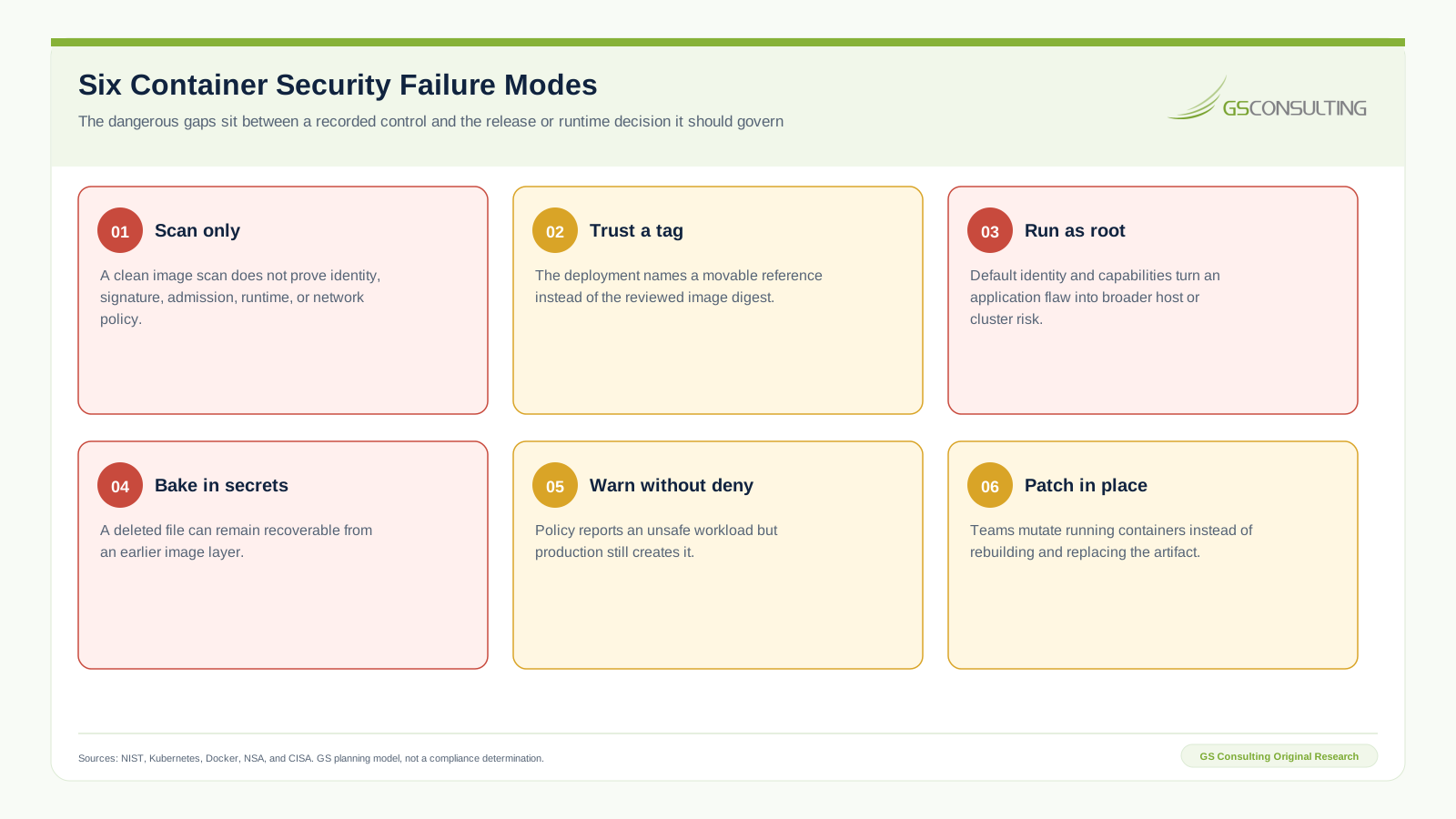
Scan only programs confuse one useful signal with a complete control system. Trusting a tag lets deployment pull bytes that the earlier evidence did not cover. Running as root and retaining broad capabilities magnify application flaws. Baking in secrets distributes credentials through layers and caches.
Warning without denial documents unsafe workloads but allows them to start. Patching in place creates drift between running systems and the image registry. The correction is consistent across all six: bind policy and evidence to the digest, enforce at the right boundary, and replace the workload through the controlled release path.
Minimum Container Security Evidence Packet
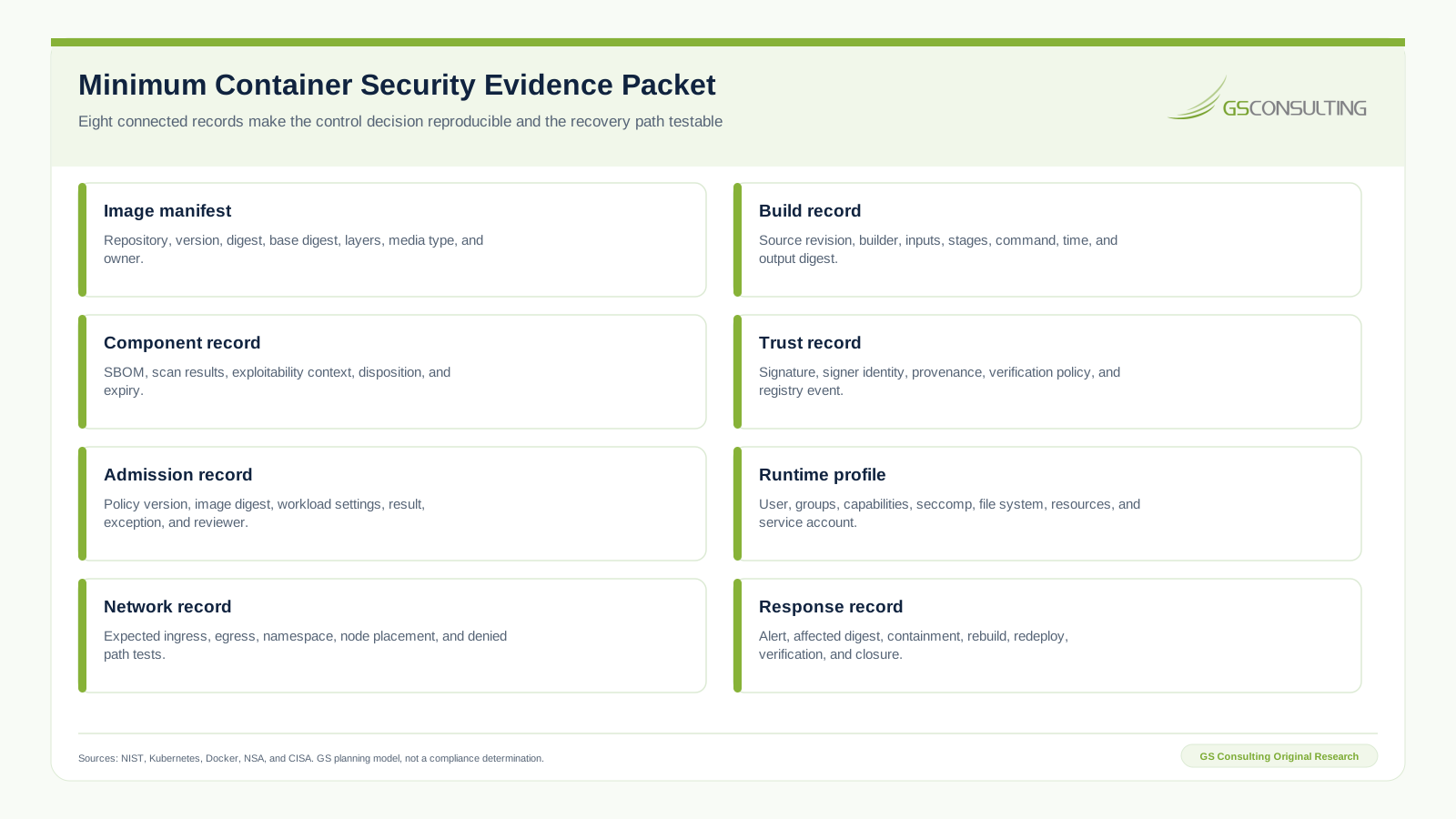
Retain the image manifest, build record, component record, trust record, admission record, runtime profile, network record, and response record. Each should reference the digest, workload or product owner, environment, policy version, time, result, exception if any, and evidence location.
Keep source facts separate from analyst decisions. The scanner reports packages and findings. The platform reports admission and runtime facts. The product and security owners decide priority, exception, and remediation. Mixing those layers makes later review look more certain than it was.
Test the packet by choosing one running workload and replaying the decision. Can a reviewer trace it back to protected source, identify the base digest and components, verify the signature, reproduce the admission result, inspect the runtime profile and network policy, and find the latest vulnerability and recovery decision? If not, the packet is an archive, not operating evidence.
A 90 Day Container Security Implementation Plan
By day 30, inventory registries, clusters, namespaces, image sources, base images, builders, admission controls, service accounts, runtime profiles, and owners. Map running tags to digests. Find privileged workloads, root execution, host access, broad capabilities, embedded secrets, missing limits, unrestricted network paths, and images without current owners.
By day 60, publish approved base images and build patterns. Pin digests with an update workflow. Add multiple build stages, SBOM generation, scanning, provenance, signing, and controlled registry promotion. Define restricted runtime defaults, workload identity patterns, network templates, and an exception process.
By day 90, enforce digest and signature policy for a bounded production scope. Enforce the runtime baseline. Test denied images and unsafe workload settings. Exercise a vulnerable base image rebuild and a compromised workload replacement. Reconcile the deployment inventory and review the evidence packet with product, platform, security, and operations owners.
The operating standard is direct: production runs only an identified and reviewed digest, admitted under current policy, constrained at runtime, visible in deployment inventory, and replaceable through a tested build and release path.
Sources and Suggested Future Reading
- NIST SP 800-190, Application Container Security Guide
- Kubernetes Security Checklist
- Kubernetes Application Security Checklist
- Kubernetes Images
- Kubernetes Pod Security Standards
- Docker Build Best Practices
- NSA and CISA, Kubernetes Hardening Guidance version 1.2
- NIST SP 800-204D, Software Supply Chain Security in DevSecOps Pipelines
Frequently Asked Questions
What is DevSecOps container security?
DevSecOps container security is the lifecycle control system for the source, base image, build, image layers, registry, digest, signature, component evidence, admission policy, workload identity, runtime settings, network paths, monitoring, replacement, and recovery of container workloads.
Is container image scanning enough?
No. Scanning can identify known vulnerabilities and risky content, but it does not prove who built the image, whether the exact digest was signed, whether production verifies it, which identity and privileges the workload receives, which network paths are open, or whether recovery works.
Why should production use an image digest instead of a tag?
A digest identifies one immutable image manifest. A tag can be moved to different content. Using the digest keeps the build, scan, signature, approval, admission, deployment, and incident records bound to the same image.
Should containers run as root?
Default to a nonroot user with privilege escalation disabled and all unnecessary capabilities removed. Validate file permissions and application behavior during the build. Permit broader authority only when a documented workload need, compensating controls, approval, and test evidence justify it.
How should teams handle container vulnerabilities?
Link findings to the exact image digest and deployed scope. Evaluate severity, exploitability, exposure, privilege, mission effect, and available fixes. Rebuild from reviewed source and updated inputs, repeat checks, sign a new digest, redeploy, and verify that the affected image is no longer running.
What evidence should container security retain?
Retain the image manifest, build record, SBOM and scan record, signature and provenance, registry events, admission result, runtime profile, workload identity, network policy, deployment inventory, alerts, exceptions, rebuild, redeployment, and closure verification.