Cybersecurity Compliance | | 23 min read
How to Build a CUI Data Flow Map for CMMC

Key Takeaways
A CUI data flow map explains the assessment boundary.
Trace entry and derivation
Identify where CUI arrives and where new controlled records may be created.
Map systems and people
Document storage, processing, transmission, access, providers, and subcontractor exchanges.
Keep the map operational
Connect it to asset categories, the SSP, and evidence as the environment changes.
A CUI data flow map is not artwork. It is the evidence trail for your CMMC boundary.
Many contractors can say, "We handle CUI." Fewer can prove where it enters, where it gets copied, where it is stored, which systems process it, who can access it, which tools index it, which providers touch it, which subcontractors receive it, and how it is retained, returned, destroyed, or decontrolled.
That gap matters. If you cannot explain the path of CUI, you cannot defend the CMMC scope, update the SSP with confidence, classify assets cleanly, evaluate cloud and AI tools, or prepare an evidence package that matches the real environment.
Do not wait for the assessment to find out where CUI really lives.
GS Consulting helps government contractors map CUI flows, define CMMC scope, update SSPs, classify assets, evaluate cloud, SaaS, MSP, MSSP, AI, and search tools, review subcontractor data flows, and prepare evidence that matches the real environment.
Request a CUI Mapping AssessmentCUI mapping is where a lot of CMMC programs get real.
Before the map, the company may believe CUI lives in one approved repository. After the map, leadership may discover CUI in email attachments, Teams chats, ticketing systems, proposal folders, engineering repositories, source code pipelines, vulnerability reports, backups, logs, AI prompts, search indexes, subcontractor exchanges, and cloud tools that were never reviewed for the boundary.
That discovery can be uncomfortable. Good. The purpose of a CUI data flow map is not to make the environment look clean. It is to show the environment as it actually operates.
A useful map helps the company answer the questions that matter: what CUI do we handle, where does it enter, where is it created, where does it live, which tools process it, who can access it, which providers touch it, which subcontractors receive it, which assets are in scope, and what evidence supports those decisions?
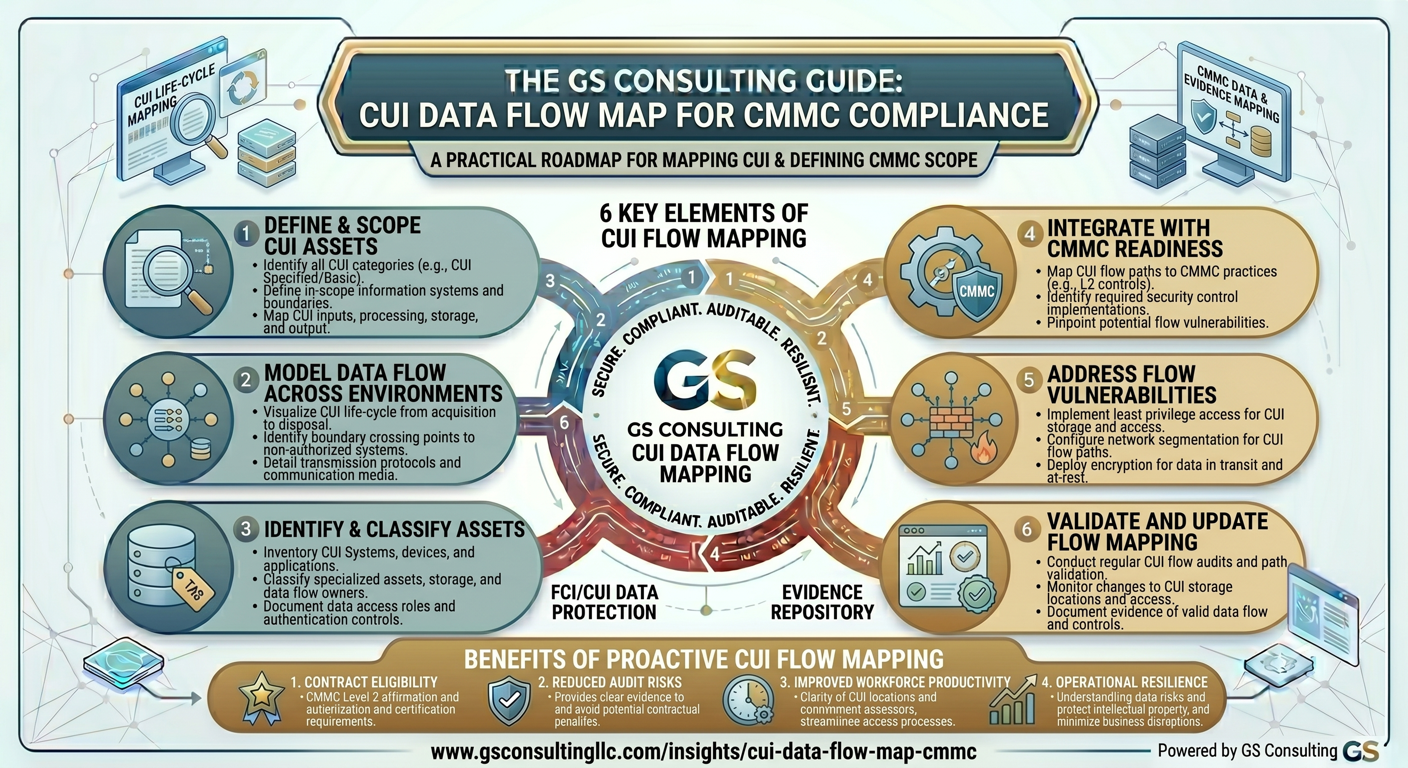
Why a CUI Data Flow Map Matters for CMMC
A CUI data flow map is not just a diagram. It is the foundation for a defensible CMMC boundary.
CMMC scoping depends on where FCI and CUI are processed, stored, transmitted, protected, copied, indexed, backed up, logged, and shared. That means the question is not "What cybersecurity tools do we own?" The question is "Which systems and providers matter because of the data they touch?"
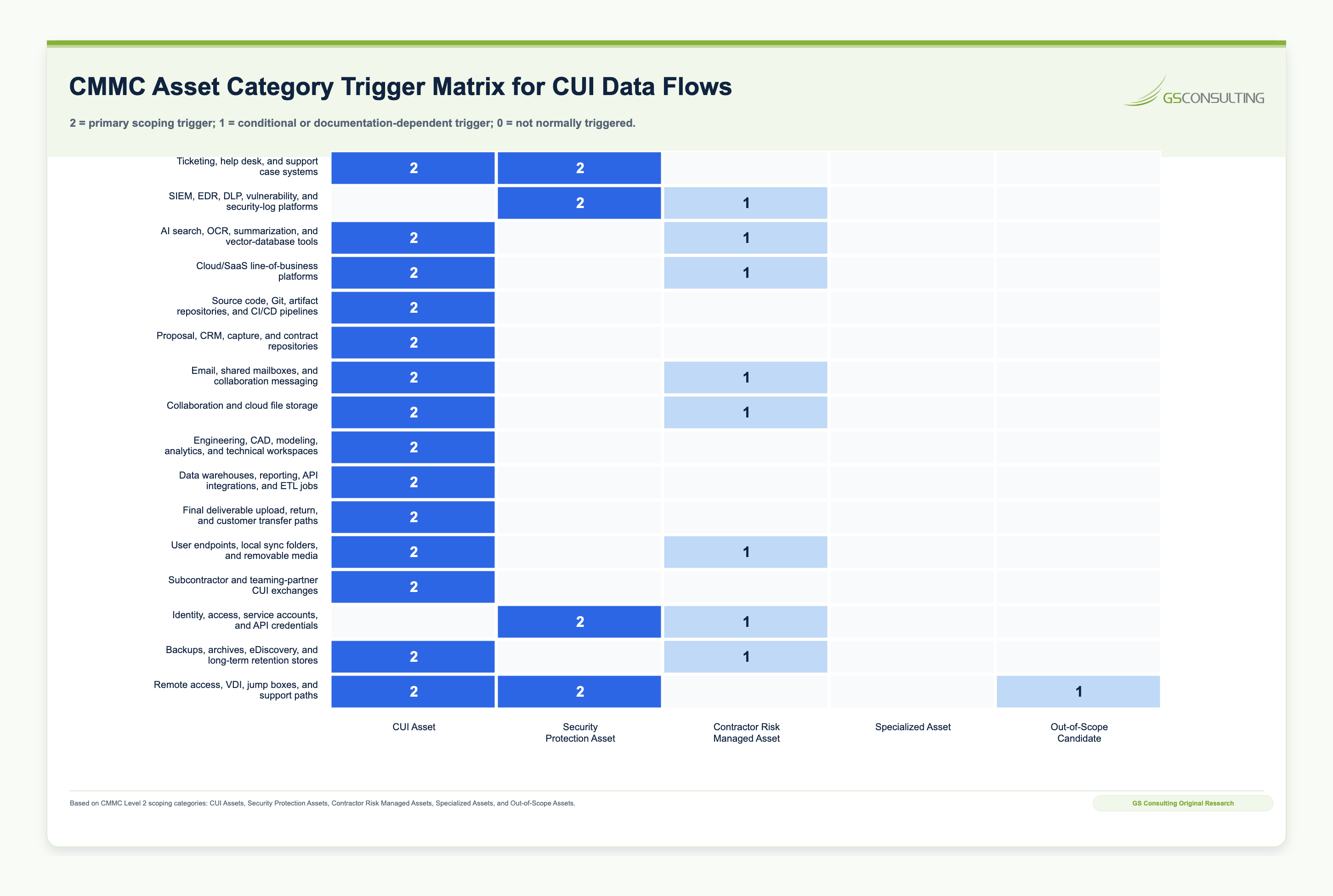
For CMMC Level 2, scoping addresses CUI assets, security protection assets, contractor risk managed assets, specialized assets, and out of scope assets.
If leadership cannot explain where CUI enters, where it lives, who touches it, which providers and subcontractors handle it, and what evidence supports the scope, the boundary is not ready.
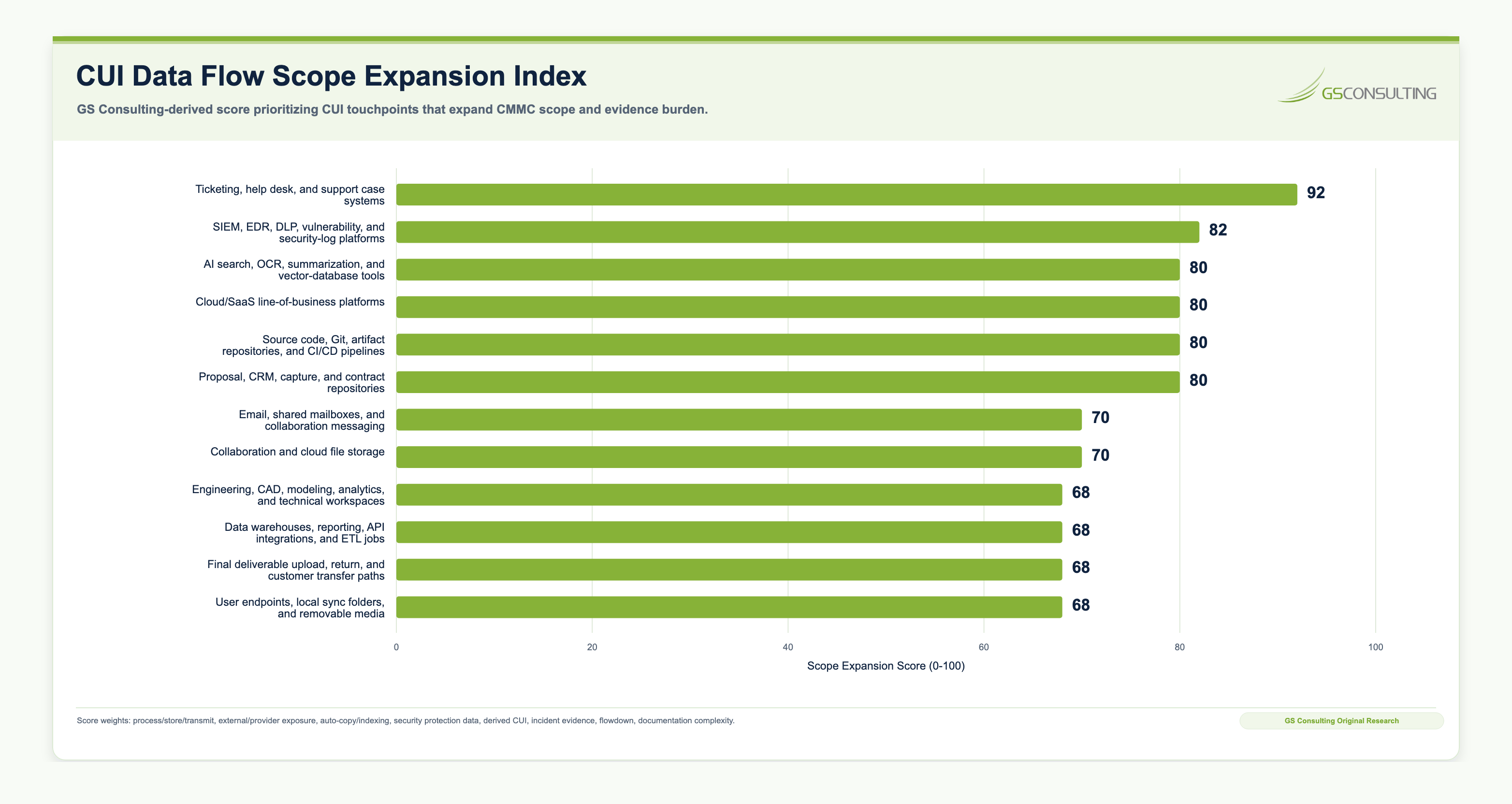
Original Research: Where CUI Data Flows Expand CMMC Scope
The biggest CUI scope drivers are often not the obvious storage locations.
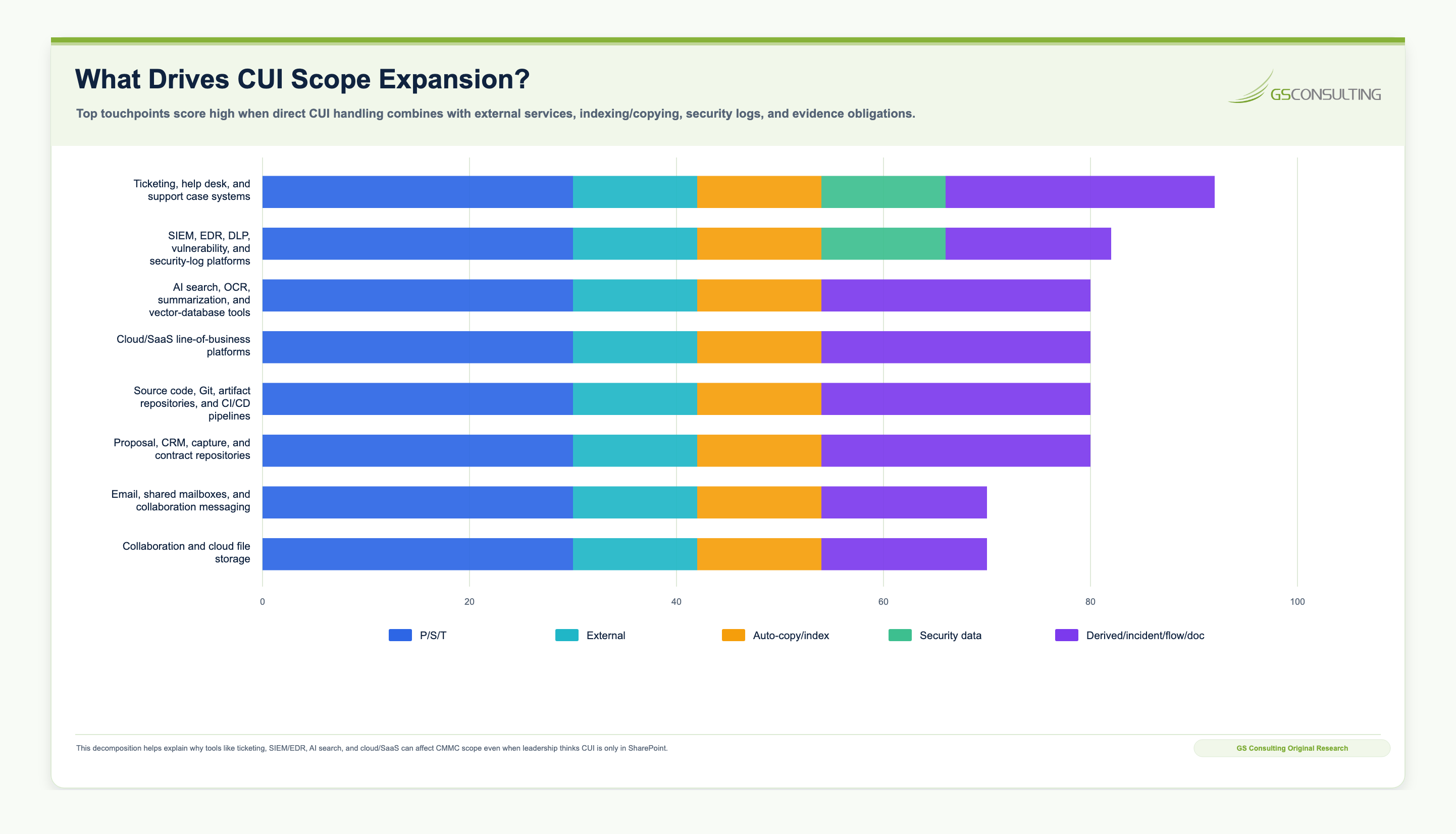
GS Consulting scored 20 common GovCon CUI data flow touchpoints based on whether they process, store, transmit, copy, index, protect, derive, preserve, or externally share CUI. The pattern was clear: contractors need to map the systems that create secondary copies, derivative records, searchable indexes, security evidence, support tickets, and provider dependencies, not just the primary repository where CUI is supposed to live.
Methodology and caveat
The CUI Scope Expansion Score, asset trigger matrix, and lifecycle evidence load are GS Consulting derived planning tools based on public CUI and CMMC sources including the NARA CUI Registry, DoD CMMC Level 2 scoping guidance, DoD CMMC Level 2 assessment guidance, NIST SP 800 171, DFARS 252.204-7012, 32 CFR Part 170, and DoD CUI Program materials. They are not official CMMC scores, legal conclusions, certification results, or C3PAO assessment determinations.
The practical takeaway is simple: map the places where CUI is copied, attached, indexed, logged, backed up, summarized, transformed, transmitted, or touched by providers. Those are the places where scope quietly expands.
What Is a CUI Data Flow Map?
A CUI data flow map shows information movement, not just infrastructure.
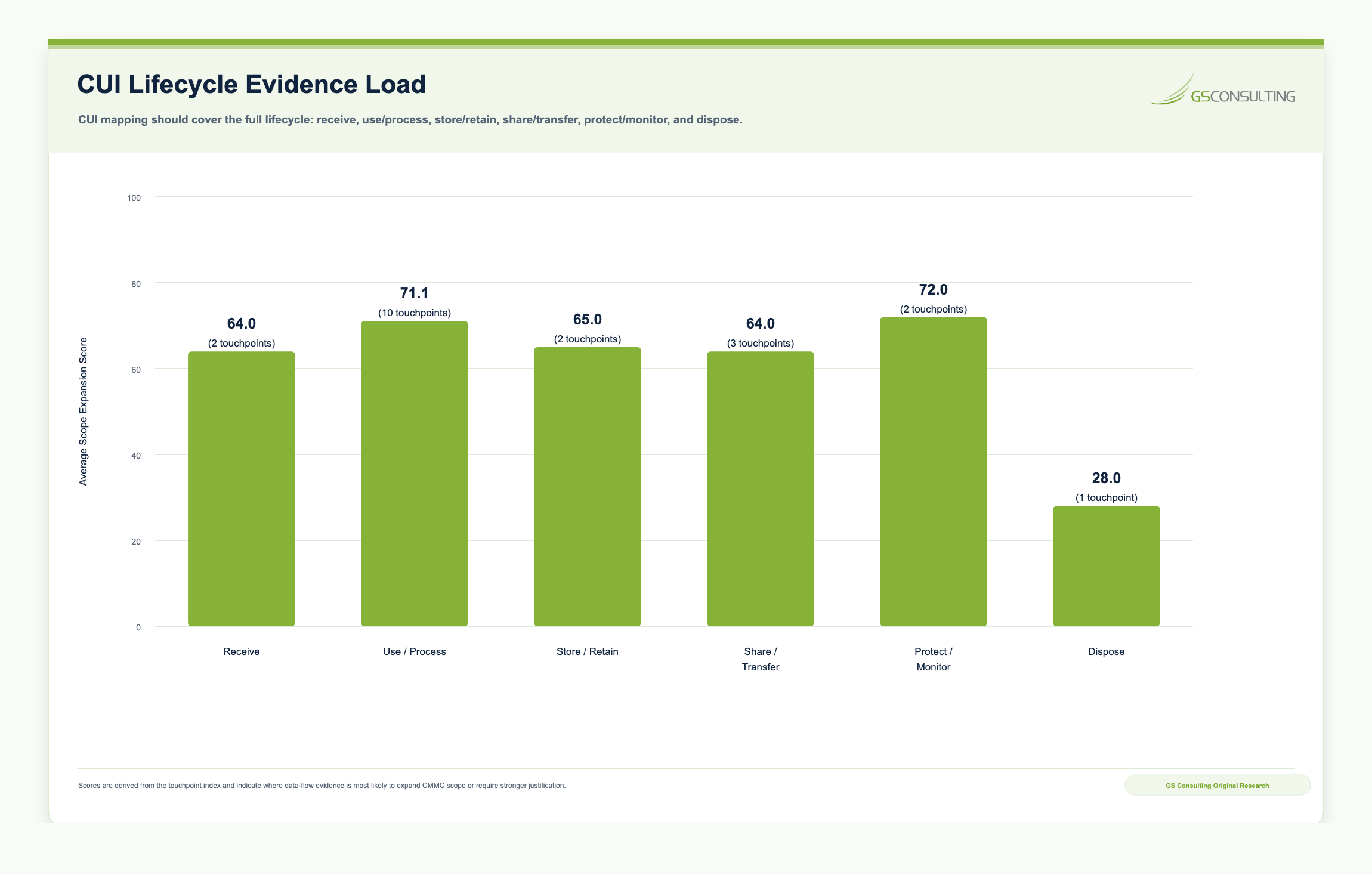
A network diagram can show servers, firewalls, cloud environments, and network paths. That matters, but it is not enough. A CUI data flow map shows how controlled information is received, created, stored, processed, accessed, transmitted, shared, backed up, logged, retained, returned, destroyed, or decontrolled.
- ReceiveHow CUI enters from government customers, primes, portals, systems, encrypted email, secure transfer, kickoff packages, or subcontractor materials.
- UseWhere CUI is stored, accessed, processed, transformed, analyzed, summarized, indexed, logged, backed up, and turned into deliverables.
- ShareWhich cloud providers, SaaS tools, MSPs, MSSPs, AI and search tools, subcontractors, consultants, customer systems, and support providers touch the information.
- DisposeHow CUI is retained, archived, returned, destroyed, decontrolled, or removed from systems, backups, repositories, tickets, logs, and indexes.
Step 1: Confirm the Contract and Data Drivers
Do not start by drawing systems. Start with the contract.
That is not a slogan. The contract tells you what data matters, where it may come from, what markings may apply, which clauses are relevant, what flow downs exist, and which deliverables may create new controlled information.
Review current contracts, target opportunities, prime contractor flow downs, task orders, attachments, CDRLs, DD Form 254s where applicable, CUI markings, security classification guides, and customer instructions.
The goal is to identify whether the company handles Federal Contract Information, CUI, Covered Defense Information, controlled technical information, export controlled information, PII, procurement sensitive information, or other restricted data.
- Contract number or opportunity name.
- Customer or prime contractor.
- Applicable clauses and required CMMC level if known.
- Types of CUI expected and how CUI will be received.
- Agency specific handling rules and subcontractor flow down requirements.
The goal is to prevent the map from becoming a generic IT diagram disconnected from the contract work that actually creates the CUI exposure.
Step 2: Identify the CUI Categories and Markings
CUI discovery cannot rely on file banners alone.
Some CUI is marked clearly. Some is identified in the contract. Some arrives through customer instructions. Some is created by the contractor during performance. Some is embedded inside deliverables, test reports, drawings, vulnerability records, program data, or procurement material.
Common CUI types may include controlled technical information, export controlled information, engineering drawings, system specifications, vulnerability information, procurement sensitive information, program data, personally identifiable information, or other government furnished information.
- CUI category, source contract, and customer.
- Whether the information is received or contractor generated.
- Required handling rules and authorized users.
- Authorized systems, sharing methods, and third party restrictions.
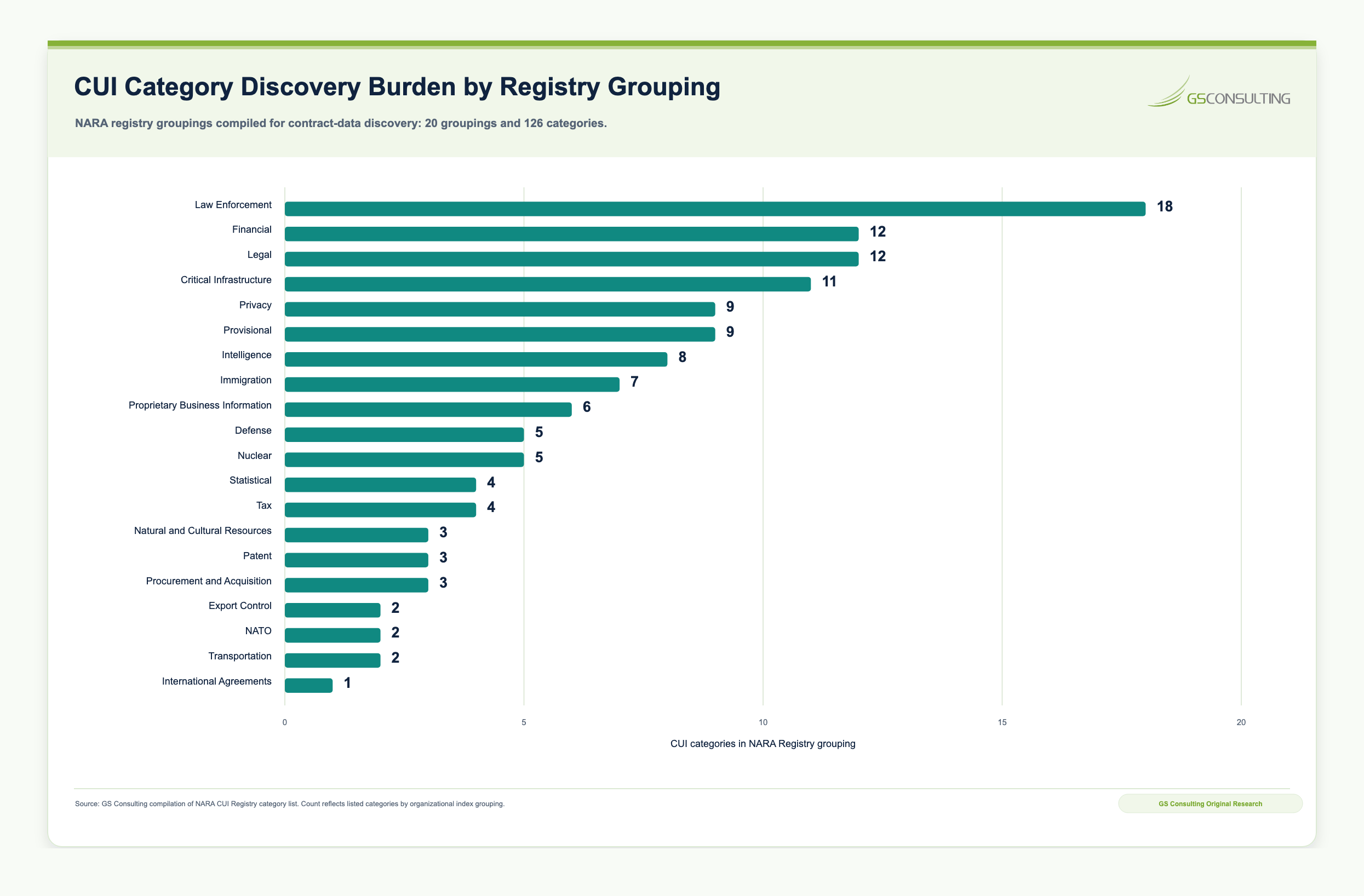
GS Consulting compiled 126 listed CUI categories across 20 organizational groupings from the NARA CUI Registry category list. The NARA CUI Registry is broader than many contractors expect. That is why category discovery should start with contracts, markings, customer instructions, deliverables, generated work products, and the actual data flows, not with assumptions about a handful of familiar labels.
Step 3: Map Where CUI Enters the Company
CUI often enters through the side door.
Leadership may think the official entry point is a government portal or approved repository. In practice, CUI may arrive through email, prime portals, secure file transfer, shared folders, support tickets, engineering repositories, kickoff packages, scanned documents, customer furnished systems, or subcontractor provided materials.
For each entry point, document the receiving system, receiving owner, authentication method, file storage location, and whether the data is automatically copied, synced, indexed, backed up, or routed into another tool.
This step usually exposes the first gap. A company may believe CUI lives only in a controlled SharePoint site while employees are first receiving it by email, saving it locally, discussing it in chat, uploading screenshots into tickets, and attaching it to proposal or program files.
Step 4: Map Where CUI Is Created or Derived
CUI is not always handed to the contractor. Sometimes the contractor creates it.
Contractors can create CUI during performance through engineering analysis, test reports, technical drawings, cybersecurity findings, vulnerability reports, inspection records, design documents, meeting minutes, operational data, analytical products, or deliverables that incorporate government furnished information.
Teams often track customer provided CUI but miss contractor generated CUI. If a work product includes CUI from a government source, derives from CUI, includes controlled technical information, contains sensitive vulnerability or system information, becomes a contract deliverable, or will be shared with the government, a prime, or a subcontractor, that workflow belongs on the map.
Step 5: Identify Every System That Stores CUI
Storage locations are usually the easiest place to start, but they are also where sprawl becomes visible.
CUI may be stored in email mailboxes, SharePoint, OneDrive, Teams channels, Google Drive, file sharing platforms, network shares, engineering repositories, source code repositories, ticketing systems, CRM tools, proposal repositories, backups, endpoint devices, databases, security tools, AI prompt or output history, vector databases, search indexes, and archives.
For each system, record whether it is approved for CUI, who owns it, who administers it, what access controls exist, whether MFA is enforced, whether logging exists, where data is backed up, how long data is retained, and whether the system is included in the SSP.
Step 6: Identify Every System That Processes CUI
Processing is broader than storage. A system processes CUI when it transforms, analyzes, indexes, summarizes, scans, renders, compiles, converts, searches, or otherwise uses the information.
Examples include managed workstations, CAD and modeling tools, analytics platforms, document management systems, email security tools, DLP tools, EDR tools, SIEM tools, ticketing platforms, contract lifecycle management tools, AI summarization or search tools, OCR tools, build pipelines, and backup platforms.
The research model gave especially high scores to systems that create secondary copies or derivative records. Ticketing systems may collect CUI attachments, screenshots, incident notes, vulnerability details, support session context, and remediation evidence. Security tools may create Security Protection Data even when they are not intended to store CUI directly. AI and search tools may read, summarize, embed, OCR, or generate outputs from controlled information.
Step 7: Map How CUI Is Transmitted
Transmission includes any movement of CUI between people, systems, organizations, or environments. Common paths include email, secure file transfer, customer portals, prime contractor portals, API integrations, collaboration platforms, chat tools, ticket attachments, remote access, database replication, backup replication, cloud synchronization, subcontractor exchanges, printing, scanning, physical handoff, uploads, and downloads.
For each path, document the source system, destination system, data type, user or process initiating transfer, authentication method, encryption method, approval requirement, logging capability, retention or copy behavior, and subcontractor or third party involvement.
Step 8: Identify Users, Roles, and Access Paths
A CUI data flow map should show who can access CUI and how. Document user groups such as executives, program managers, engineers, analysts, contracts staff, proposal teams, IT administrators, security staff, help desk personnel, MSP administrators, subcontractors, auditors, and customer users.
Then identify direct file access, role based application access, privileged administrator access, remote access, shared mailboxes, guest accounts, service accounts, API access, emergency accounts, and support access by external providers.
This helps answer a core CMMC question: are access controls aligned to actual data exposure?
Step 9: Identify External Service Providers, Cloud Providers, and Subcontractors
External parties are often the most important part of the CUI map. This includes cloud service providers, managed service providers, managed security service providers, IT support providers, SaaS vendors, AI vendors, data analytics providers, subcontractors, consultants, prime contractors, government furnished systems, incident response providers, backup providers, and compliance platforms.
Capture the service, data types, access method, administrator privileges, FedRAMP status where applicable, and customer responsibility matrix.
Capture sharing method, CMMC status expectations, contract flow downs, retention terms, and incident reporting obligations.
Step 10: Classify Assets for CMMC Scoping
Once the data flows are understood, classify assets for CMMC scoping.
- CUI AssetsProcess, store, or transmit CUI.
These assets are central to the Level 2 assessment boundary and should be documented in the asset inventory, SSP, and network diagram.
- Security Protection AssetsProtect the CUI environment.
These systems provide security functions or capabilities to the assessment scope and need clear ownership and evidence.
- Risk Managed AssetsCan, but are not intended to, touch CUI.
Policies, procedures, and practices should show why CUI is not intended to flow to these assets.
Specialized assets and out of scope assets should also be documented where applicable. Each system on the map should be assigned an asset category and cross referenced to the SSP, asset inventory, network diagram, and evidence repository.
Step 11: Convert the Map Into an SSP Update
The CUI data flow map should not sit in a folder as a one time exercise. It should directly improve the System Security Plan.
Use the map to update the system boundary, asset inventory, network diagrams, data flow diagrams, CUI types and categories, user roles, external service provider descriptions, cloud responsibility matrices, inherited controls, control implementation statements, incident response procedures, subcontractor handling procedures, AI tool governance, and evidence references.
A strong SSP should show that the company understands not only what controls exist, but why they apply to the systems in scope.
Step 12: Use the Map to Prioritize Remediation
A CUI data flow map almost always reveals gaps. That is a good thing.
Common remediation findings include CUI stored in unapproved locations, transmitted through unmanaged email or chat, copied to local devices unnecessarily, backed up to unapproved systems, included in ticketing systems without review, shared with subcontractors without documented flow downs, accessible to too many users, indexed by search or AI tools without approval, protected by undocumented inherited controls, touching cloud tools without FedRAMP or responsibility review, or missing from the SSP and asset inventory.
Use the map to prioritize remediation based on risk and scope impact. High priority issues usually include unauthorized CUI storage, unapproved cloud or AI tools, weak access controls, missing MFA, unmanaged endpoints, lack of audit logging, unclear external provider responsibilities, and uncontrolled subcontractor sharing.
What a Simple CUI Data Flow Map Should Include
A practical CUI data flow map does not need to be beautiful. It needs to be accurate.
Track the data source, CUI category, receiving system, storage location, processing system, transmission path, backups, archives, and final disposition.
Track roles, cloud providers, AI tools, subcontractors, contract clauses, asset categories, SSP references, evidence, and open gaps.
Example: CUI Flow for an Engineering Support Contractor
A simplified CUI flow might begin with a DoD customer uploading controlled technical information to an approved government portal. The contractor’s program manager downloads the files to an approved CUI storage environment. Engineers access the files from managed workstations and perform technical analysis using approved engineering software.
Draft deliverables are stored in a controlled project repository. A subcontractor receives a limited set of files through approved secure transfer. The final deliverable is uploaded to the government portal. Related evidence, access logs, and transmission records are retained according to contract and company policy. AI tools are prohibited for the workflow unless specifically approved for CUI.
That simple flow can then be expanded into a system boundary, asset inventory, access model, SSP language, subcontractor flow down review, and evidence checklist.
Common Mistakes to Avoid
The first mistake is treating a network diagram as a data flow map. Infrastructure matters, but CMMC scoping depends on how FCI and CUI move through the environment.
The second mistake is ignoring contractor generated CUI. Deliverables, reports, analysis, drawings, test results, and vulnerability information may become CUI even if they were created internally.
The third mistake is missing email, chat, tickets, and collaboration tools. These platforms often contain more CUI than leadership realizes.
The fourth mistake is overlooking backups and logs. If backup systems, SIEM tools, EDR platforms, or ticketing systems contain CUI or security protection data, they may affect scope.
The fifth mistake is forgetting AI and search tools. If a tool indexes CUI, creates embeddings from CUI, stores prompts containing CUI, or generates outputs derived from CUI, it must be reviewed.
The sixth mistake is failing to maintain the map. A CUI data flow map should be updated when the company adds a contract, changes cloud platforms, introduces AI tools, brings in a new subcontractor, changes storage locations, or modifies delivery workflows.
CUI Data Flow Map Checklist
Use this checklist to test whether the CUI map can support real CMMC planning.
The map is not ready if it only shows the happy path. It should show the contract driver, the CUI category, the lifecycle, the users, the systems, the providers, the asset classification, the SSP references, and the remediation issues.
- Does the asset inventory match the CUI map?
- Does the network diagram match the CUI map?
- Does the SSP match the CUI map?
- Can we explain why each asset is in scope, limited scope, or out of scope?
- Have we identified unauthorized CUI locations, weak transmission paths, users with too much access, and unapproved tools?
- Have we mapped provider and subcontractor access?
- Have we reviewed AI and search, ticketing, backup, and security tools for CUI exposure?
- Do remediation priorities reflect both risk and scope impact?
A 30 / 60 / 90 Day CUI Mapping Plan: Move From Assumptions to Scope
Ninety days is enough time to stop guessing.
The goal is not to create a perfect enterprise data map in one quarter. The goal is to identify the contracts and CUI types that matter, map the main flows, classify the systems and providers that affect scope, update the SSP, and build a remediation list leadership can act on.
- Days 1 to 30Discover contracts, CUI, systems, and flows.
Review contracts, target opportunities, prime flow downs, clauses, CDRLs, DD Form 254s where applicable, CUI markings, customer instructions, and generated work products. Interview program, contracts, engineering, IT, security, proposal, and operations teams. Collect system lists, storage locations, entry points, exit points, provider dependencies, subcontractor exchanges, and known shadow workflows.
- Days 31 to 60Build the map and classify assets.
Create the CUI data flow diagram, update the asset inventory, identify storage, processing, transmission, backup, logging, ticketing, security, AI and search, and cloud touchpoints. Identify external providers and subcontractors. Classify assets as CUI assets, security protection assets, contractor risk managed assets, specialized assets, or out of scope candidates. Compare the map against the current SSP, network diagram, and evidence repository.
- Days 61 to 90Remediate and operationalize.
Remove CUI from unauthorized locations, restrict excessive access, update cloud and AI or search tool policies, document provider responsibility, document subcontractor flows, update the SSP, update the network diagram, create evidence references, assign remediation owners, and define when the map must be reviewed again.
By the end of 90 days, leadership should be able to answer eight questions without scrambling: What CUI do we handle? Where does it enter? Where is it created? Where does it live? Which systems process, index, back up, or transmit it? Who can access it? Which providers and subcontractors touch it? Which assets are in the CMMC scope, and what gaps must be remediated before assessment?
Minimum Viable CUI Mapping Evidence Packet
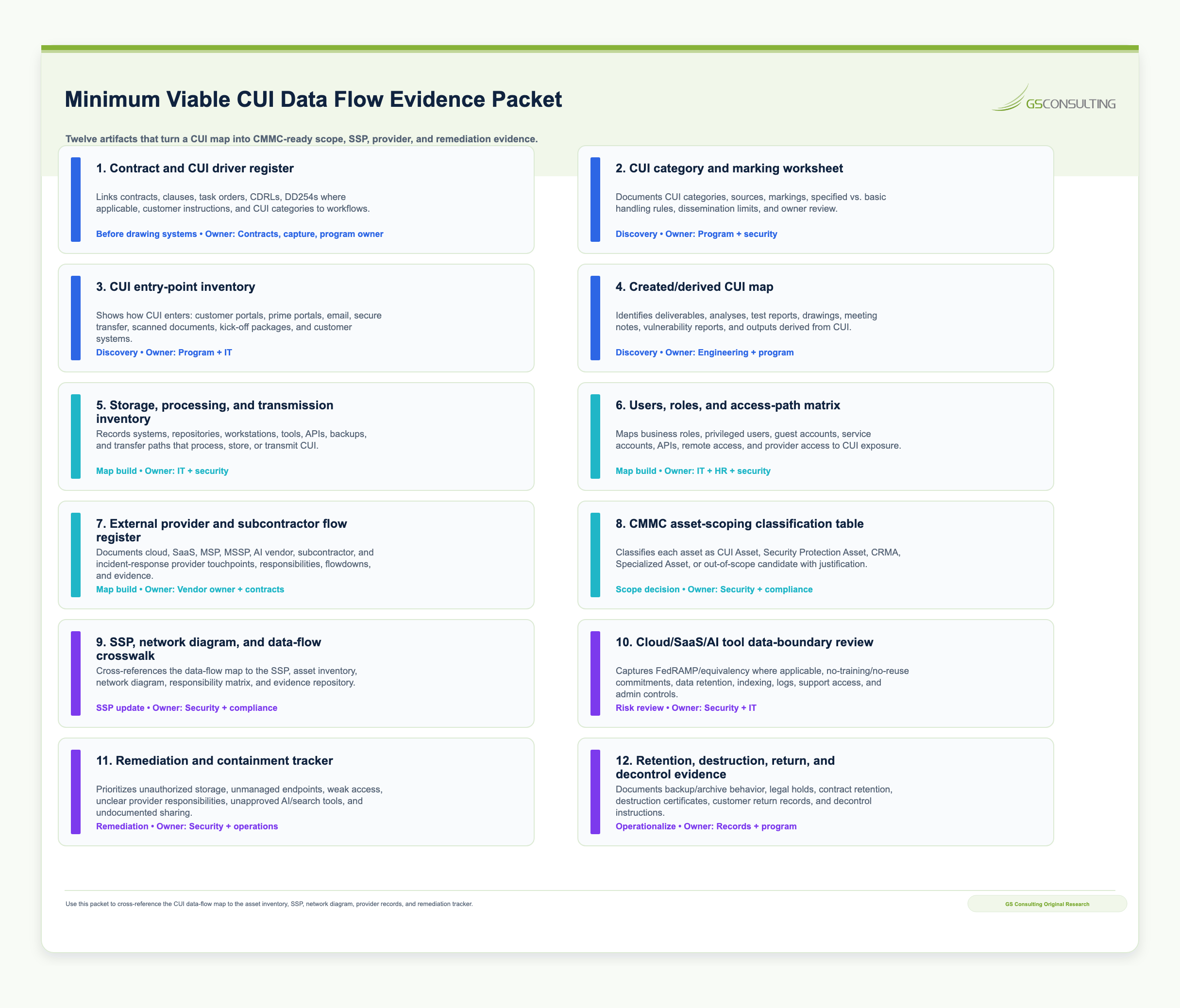
A useful CUI map should produce evidence, not just a diagram.
The goal is to create a package that connects contract drivers, CUI categories, data movement, asset classification, provider dependencies, subcontractor flows, SSP updates, remediation, and validation records.
- Contract and CUI driver register showing contracts, customers, primes, clauses, CDRLs, CUI markings, flow downs, and generated CUI.
- CUI category and marking log tied to the NARA CUI Registry, customer instructions, deliverables, and contractor generated work products.
- CUI lifecycle diagram showing receive and create, store and retain, use and process, transmit and share, protect and monitor, and dispose and decontrol stages.
- System and storage inventory showing approved and unapproved repositories, cloud services, endpoints, backups, archives, ticketing systems, security tools, AI and search tools, and source code platforms.
- Processing and indexing inventory showing tools that transform, summarize, scan, OCR, embed, search, analyze, or generate outputs from CUI.
- Transmission map showing email, secure transfer, portals, APIs, collaboration platforms, remote access, backups, uploads, downloads, printing, scanning, and subcontractor exchanges.
- User and access matrix showing roles, privileged users, administrators, guests, service accounts, API access, remote access, shared mailboxes, and support access.
- Provider and subcontractor matrix showing cloud, SaaS, MSP, MSSP, AI and search, backup, incident response, compliance platform, and subcontractor responsibilities.
- Asset classification crosswalk showing CUI assets, security protection assets, contractor risk managed assets, specialized assets, and out of scope candidates.
- SSP update log showing boundary, asset inventory, network diagram, CUI flows, provider descriptions, inherited controls, AI tool governance, and evidence references.
- Remediation register showing unauthorized locations, weak access, missing MFA, unapproved tools, provider gaps, subcontractor gaps, SSP mismatches, owners, due dates, and evidence.
- Validation record showing who reviewed the map, which teams were interviewed, what systems were sampled, what assumptions remain, and when the map must be updated.
The Bottom Line
A CUI data flow map is one of the most valuable CMMC readiness artifacts a contractor can build if it shows the real workflow.
The value is not the diagram. The value is the visibility: where CUI enters, where it is created, where it gets copied, which systems process it, which users touch it, which providers and subcontractors handle it, which tools create secondary records, which assets fall into scope, and what evidence supports those decisions.
Contractors that skip this work end up guessing at the boundary, patching the SSP after the fact, missing provider dependencies, underestimating ticketing and security tools, ignoring AI and search exposure, and discovering subcontractor flow gaps too late.
That is a bad way to prepare for CMMC.
The standard is simple: follow the CUI, define the boundary, update the SSP, fix the gaps, and keep the evidence current.
How GS Consulting Helps
GS Consulting helps government contractors turn CUI mapping from a diagramming exercise into a defensible CMMC scoping process.
That means identifying CUI categories, mapping how CUI enters and moves through the business, classifying assets, reviewing cloud, SaaS, MSP, MSSP, AI, search, ticketing, backup, and security tool exposure, updating SSPs, reviewing subcontractor data flows, preparing assessment evidence, and building practical remediation roadmaps aligned to contract requirements.
The goal is not to make the map look better. The goal is to help the company understand where CUI actually goes and what that means for scope, controls, evidence, and readiness.
Ready to find where CUI actually moves through your organization?
GS Consulting helps government contractors map CUI flows, classify assets, update SSPs, evaluate cloud and AI or search tools, review subcontractor data sharing, and prepare practical evidence for CMMC scoping and remediation.
Contact GS ConsultingFrequently Asked Questions About CUI Data Flow Mapping
Does a network diagram count as a CUI data flow map for CMMC?
No.
A network diagram shows infrastructure: servers, firewalls, subnets, cloud environments, and connectivity. A CUI data flow map shows the lifecycle of the information itself: how CUI is received, created, stored, processed, transmitted, shared with providers or subcontractors, backed up, logged, retained, returned, destroyed, or decontrolled.
You usually need both. The network diagram helps explain the environment. The CUI data flow map helps explain the boundary.
Are IT ticketing systems considered in scope for CMMC?
They can be.
If employees attach CUI to help desk tickets, paste controlled information into support notes, upload screenshots, include vulnerability details, or use the ticketing system to manage remediation evidence for in scope assets, the ticketing system may affect the CMMC boundary or evidence package.
Do not assume it is only a support tool means it is out of scope. Review what the ticketing system actually stores, processes, logs, indexes, backs up, and exposes.
How do we handle contractor generated CUI in our data flow map?
Map the workflows that create it.
Contractor generated CUI may appear in engineering analysis, test reports, drawings, technical outputs, vulnerability findings, inspection records, meeting notes, operational data, analytical products, or deliverables that incorporate or derive from government furnished CUI.
If the work product inherits CUI handling obligations, it should be mapped like any other CUI: where it is created, where it is stored, who accesses it, which systems process it, how it is transmitted, which providers or subcontractors touch it, and how it is retained or destroyed.
Do AI or search tools need to be included in the CUI data flow map?
Yes, if they can read, summarize, index, embed, OCR, store, transmit, or generate output from CUI.
That includes enterprise search, AI assistants, document summarization tools, vector databases, prompt history, output logs, OCR tools, code assistants, and analytics tools. The review should cover what data the tool can access, where prompts and outputs are stored, whether embeddings or indexes are created, whether vendors retain data, who can access results, and whether the tool is reflected in the SSP, asset inventory, and evidence package.
Suggested Future Reading
- GovCon Cybersecurity & Compliance Hub: CMMC, NIST, CUI, Cloud, and AI Enabled Readiness
- CMMC Readiness Checklist for Small and Midsized Government Contractors
- NIST SP 800 171 Compliance: What GovCon Leaders Need to Know
- How DoD Contractors Can Use AI Without Putting CUI at Risk
- Secure Cloud Architecture for Federal Contractors Handling CUI
- CMMC Compliance hub
- CMMC Compliance: The Complete Guide for Defense Contractors