Cybersecurity | | 25 min read
CMMC Enclave Architecture: Scope, Boundaries, and Tradeoffs

Key Takeaways
A CMMC enclave is a controlled operating boundary, not a diagram
Security protection assets still count
A system can enter scope because it protects the CUI environment even when it never stores the information. Identity, network, logging, endpoint, and provider services need explicit treatment.
Virtual desktop and managed cloud lead
The virtual desktop pattern scores 93 and the dedicated managed cloud pattern scores 92 in the GS fit model. Both concentrate evidence, but each still depends on disciplined endpoints and provider duties.
Try every way CUI can escape
Test email, local downloads, print, clipboard, removable media, support access, backups, collaboration tools, and system changes. A path that works in practice belongs in the scope decision.
A CMMC enclave is not a smaller network on a diagram. It is a smaller set of CUI paths that the contractor can actually control and prove.
The attraction is obvious. Put covered work inside one deliberate environment and keep ordinary business systems outside the assessment scope. Fewer users, devices, services, and interfaces can mean less implementation and evidence work.
The trap is equally obvious once the system runs. A user downloads a file. Email carries an attachment. A printer keeps a copy. A local backup captures a folder. The identity platform, VPN, logging service, or managed provider protects the enclave and enters the scope analysis. The diagram stays small while the operating boundary grows.
Design from the CUI path. Classify every asset. Assign every provider duty. Test the separation. Then approve the enclave.
The CMMC Compliance hub connects this architecture guide to the full program. Use the CMMC scoping guide to classify the complete boundary, the CUI data flow map guide to trace the information, and the CMMC assessment evidence guide to prove it. Contractors comparing an FCI only path can use the CMMC Level 1 requirements guide. GS Consulting supports this work through secure AI automation.
Make the boundary true in operation.
GS Consulting helps contractors trace CUI, compare enclave patterns, assign shared responsibilities, test separation, and produce a scope package that matches the system.
Review the Enclave DesignCMMC Enclave Architecture: The Short Answer
The DoD CMMC Level 2 Scoping Guide, version 2.13, permits an assessment scope that covers the enterprise or one or more specific enclaves. An enclave can therefore contain the covered work while other enterprise systems remain outside the assessment boundary.
That permission is not an architecture approval. The contractor still needs to identify CUI assets, security protection assets, Contractor Risk Managed Assets, specialized assets, and out of scope assets. The inventory, network diagram, data flow, and system security plan must support the same boundary.
Logical separation can use controls such as firewalls, routers, VPNs, and VLANs. Physical separation uses systems with no wired or wireless connection to assets outside the enclave, with controlled manual transfer where needed. A combined design can use both.
The correct design is the smallest boundary that still supports the actual work without creating unmanageable transfer, endpoint, provider, or evidence friction.
What a CMMC Enclave Is and Is Not
An enclave is a bounded environment where specific people and systems handle or protect CUI. It can be a dedicated cloud tenant, virtual desktop environment, isolated group of workstations, project network segment, controlled collaboration service, or another documented arrangement.
An enclave is not:
- A product label or vendor promise.
- A network segment with unmonitored exits.
- A document that excludes systems users still rely on.
- A reason to omit security protection assets.
- A permanent scope decision that never changes.
Start with the work. Identify the CUI source, category, users, tasks, locations, entry path, creation points, storage, transfer, sharing, archive, incident response, and disposal. Then design the environment around those facts.
A useful boundary sentence is concrete: named users access named CUI types through named endpoints and services; the information can enter, move, and leave only through named paths; named security services protect those paths; all other systems are separated and tested. If the sentence needs vague terms such as secure platform or protected network, the design is not ready.
The Five Asset Categories Set the Scope
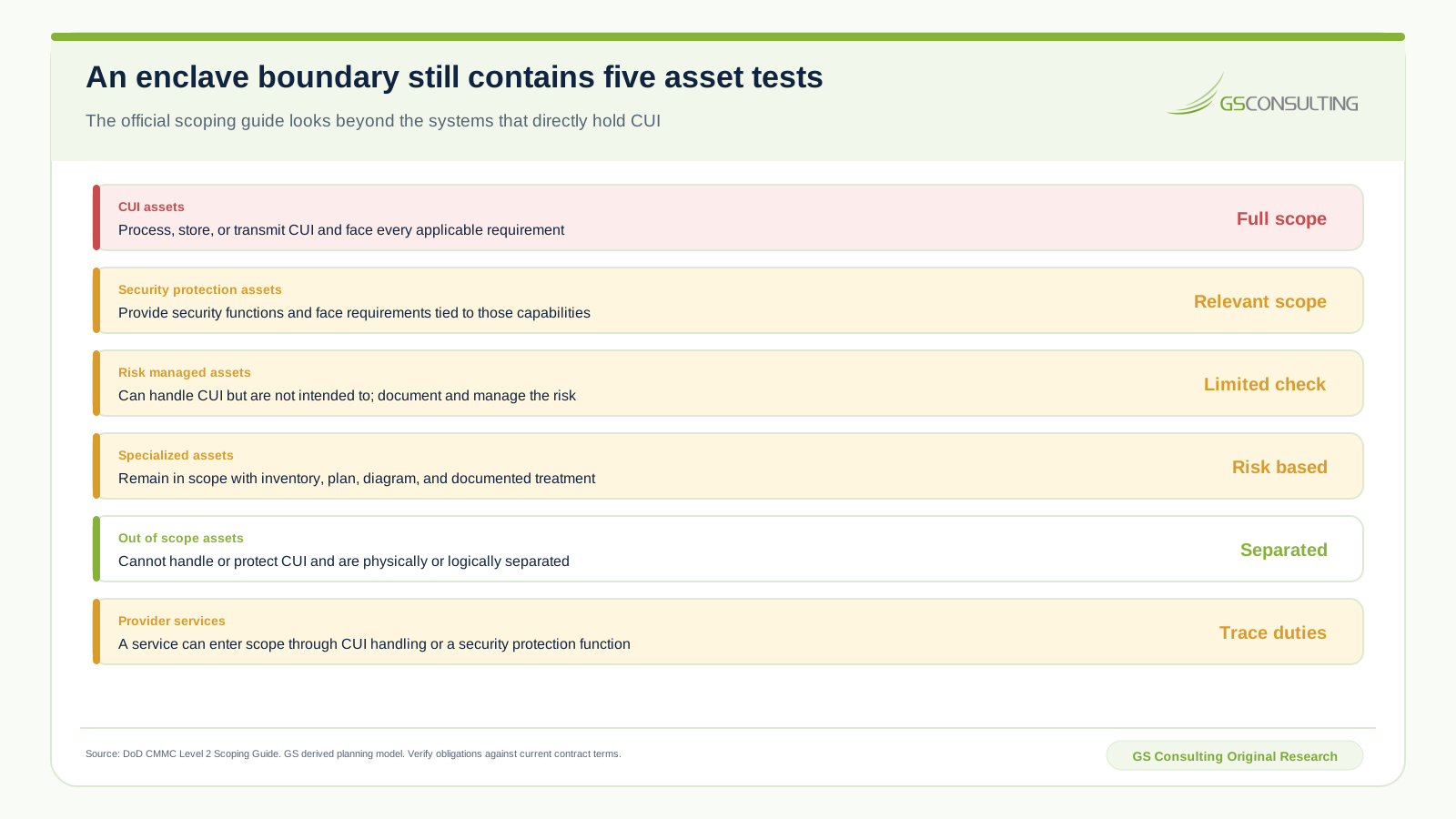
CUI assets process, store, or transmit CUI. They belong in the asset inventory, network diagram, data flow, and system security plan and are assessed against all applicable Level 2 requirements.
Security Protection Assets provide security functions or capabilities for the CUI environment. Assessors evaluate the relevant requirements for those functions. Examples can include identity platforms, VPNs, firewalls, logging services, endpoint tools, security operations, facilities, and provider personnel.
Contractor Risk Managed Assets can process, store, or transmit CUI but are not intended to do so. Keep them in the inventory, system plan, and diagram, document the risk based treatment, and make the intended restriction real. Poor documentation or an observed concern can lead to more assessment attention.
Specialized Assets can include operational technology, government property, restricted information systems, and other defined classes. They remain in scope, are documented, and receive the treatment described by the scoping guide and the contractor's risk management process.
Out of scope assets cannot process, store, or transmit CUI, do not provide security protection for CUI assets, and are physically or logically separated. If any of those facts changes, revisit the category.
Asset category is not a wish. It is a factual claim that the architecture and operating behavior need to support.
Physical and Logical Separation Tradeoffs
| Design choice | Primary advantage | Primary burden | Evidence to preserve |
|---|---|---|---|
| Logical separation | Supports normal network operations and remote work | Rules, identities, interfaces, and changes need strong control | Rules, routes, segmentation tests, access records, and change history |
| Physical separation | Creates a clear network boundary | Manual transfer, support, patching, and user friction increase | Connection inventory, media process, transfer log, and physical inspection |
| Combined separation | Uses physical isolation for selected assets and logical controls elsewhere | More boundary types and dependencies to explain | Integrated diagram, interface register, tests, and responsibility map |
| Virtual desktop access | Can concentrate CUI processing and reduce endpoint exposure | Clipboard, print, download, cache, support, and session settings must hold | Client policy, technical tests, logs, exception records, and endpoint category |
The scoping guide provides a narrow virtual desktop example. An endpoint can be outside scope when it serves only as keyboard, video, and mouse and no CUI is processed, stored, or transmitted beyond that interaction. Do not turn the example into a blanket rule. Test local storage, cache, clipboard, print, screen capture, redirection, offline mode, browser behavior, support access, and any endpoint security function.
Physical isolation also creates transfer work. Patches, signatures, files, reports, logs, and support activity still need approved paths. A network cable may be absent while removable media becomes the weak link.
GS CMMC Enclave Architecture Fit Index
GS Consulting built a derived planning model across eight common architecture patterns. Each pattern receives a one to five analyst rating for containment clarity, endpoint control, provider responsibility clarity, evidence concentration, transfer simplicity, and operating fit.
The base model weights containment clarity at 25 percent, endpoint control and evidence concentration at 20 percent each, provider responsibility clarity at 15 percent, and transfer simplicity and operating fit at 10 percent each. The alternate case moves five points from containment clarity to operating fit.
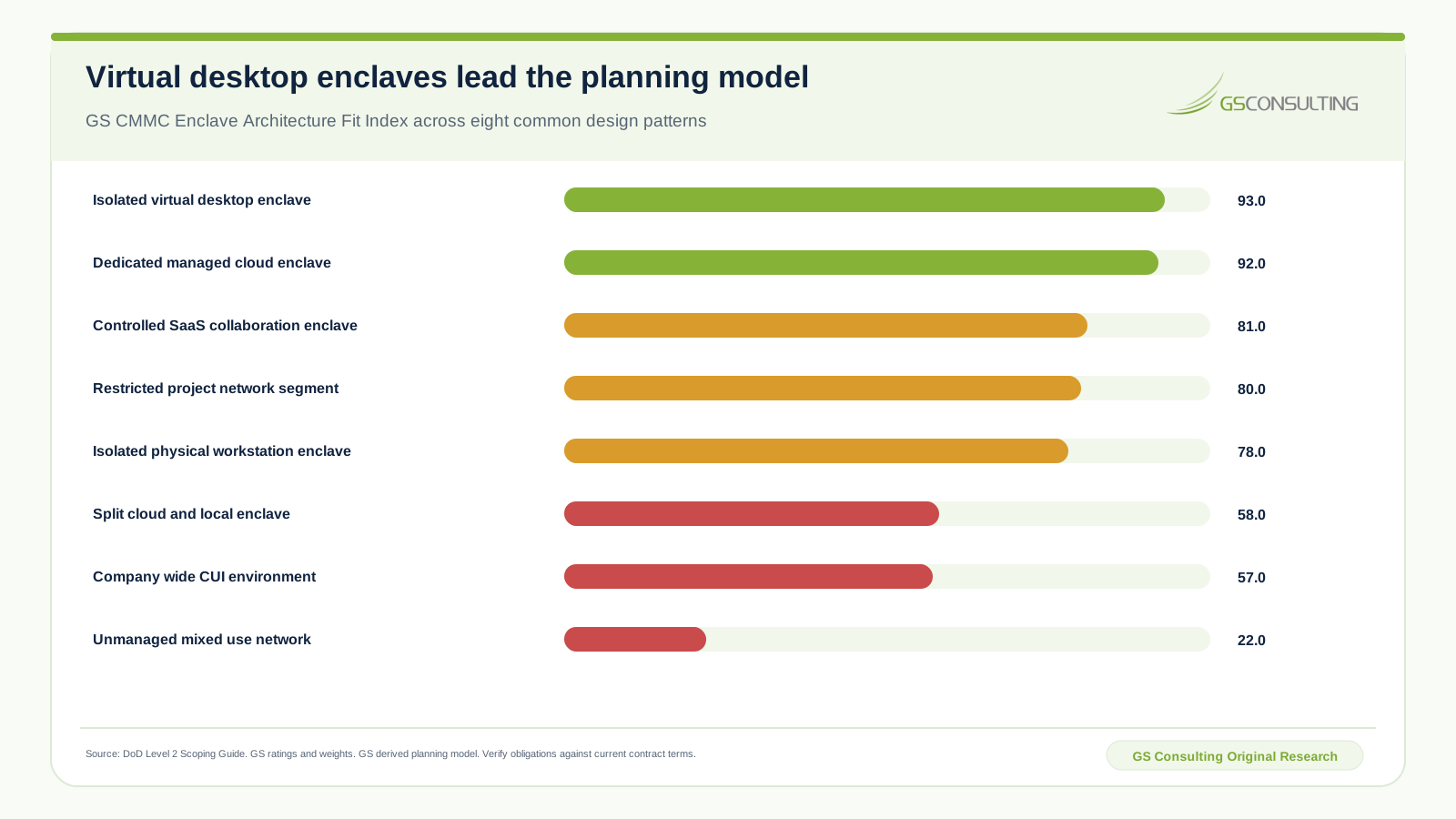
The isolated virtual desktop enclave scores 93.0. The dedicated managed cloud enclave scores 92.0. A controlled SaaS collaboration enclave scores 81.0, a restricted project network segment scores 80.0, and isolated physical workstations score 78.0.
The split cloud and local enclave scores 58.0 because interfaces, transfers, endpoints, and proof are spread across more operating paths. A company wide CUI environment scores 57.0 because transfer simplicity improves while containment clarity and evidence concentration decline. An unmanaged mixed use network scores 22.0.
The sensitivity case preserves the top two positions and changes every score by three points or less. That stability does not make the ranking universal. A contractor with unusual field work, engineering tools, latency constraints, facilities, data volume, or customer rules may choose a different design.
This is a GS Consulting derived planning model, not an approved architecture list, certification result, or DoD benchmark. Replace the ratings with local facts before using it for a decision.
Compare the Eight Enclave Patterns
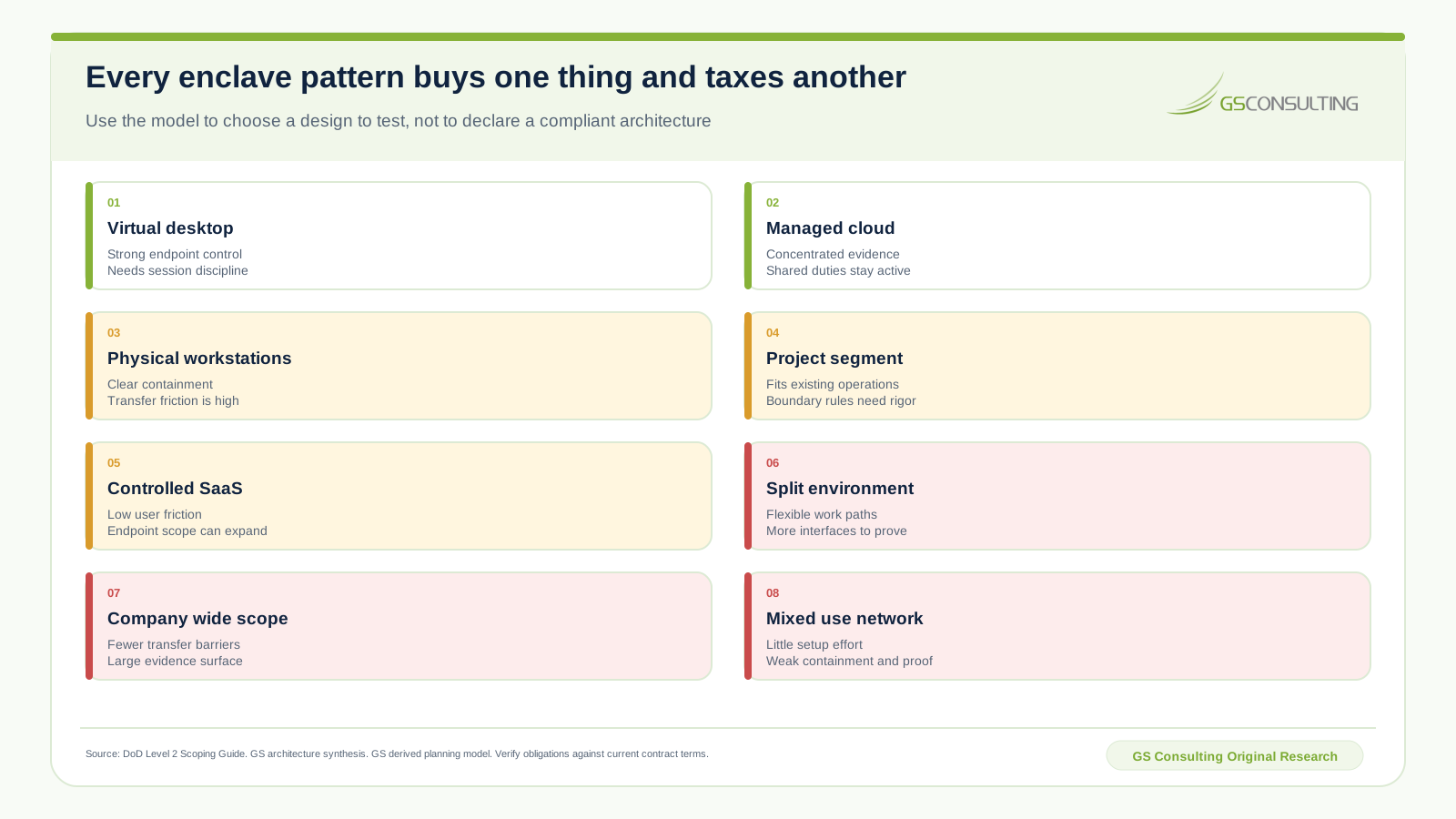
Isolated virtual desktop enclave: CUI remains in a controlled hosted session. This can strengthen endpoint control and evidence concentration. The design depends on redirection settings, identity, session controls, local client behavior, administrative access, logging, and provider proof.
Dedicated managed cloud enclave: compute, storage, identity, logging, and administrative paths sit in a deliberate tenant or subscription. This can make scope and evidence coherent. Shared responsibility, privileged support, service boundaries, and customer configuration remain active work.
Isolated physical workstations: dedicated devices and networks create clear containment. The price is manual transfer, patching, backup, collaboration, travel, user experience, and support friction. A clear boundary can still be hard to operate well.
Restricted project network segment: a segment inside the enterprise can fit engineering and business processes. It demands rigorous identity, routing, firewall, service, endpoint, logging, and change control because the rest of the enterprise is nearby.
Controlled SaaS collaboration enclave: a configured service can support common document and communication work with lower user friction. Confirm CUI handling, endpoint paths, tenant settings, logging, retention, export, support, incident, and assessment evidence before purchase.
Split cloud and local enclave: the design can support tools that do not fit one platform. Every interface creates another transfer rule, identity dependency, log source, responsibility boundary, and assessment path.
Company wide CUI environment: users face fewer transfer barriers, but more systems, endpoints, services, people, and evidence enter scope. This can be rational for an organization where covered work dominates. It is expensive when only a small team handles CUI.
Unmanaged mixed use network: ordinary business and CUI activity share systems without a controlled boundary. The setup cost looks low because the scope decision was avoided. The implementation and assessment risk are high.
Cloud and Managed Provider Duties
A provider can host the enclave or operate security capabilities. It cannot make the contractor's responsibility disappear. The contractor still needs to know what the provider does, what the customer configures, what evidence exists, who can retrieve it, and how incidents and assessment support work.
Build a responsibility matrix with one row per relevant requirement and capability. Record:
- The provider function and service boundary.
- The customer configuration and operating duty.
- The shared action or dependency.
- The evidence source, owner, access method, and retention period.
- The incident, support, change, and assessment contact.
- The contract term that supports the claimed responsibility.
A provider certification or marketing statement is useful context, not proof that the contractor configured and operates its part of the system. Test customer duties in the actual tenant and preserve the result.
The provider map should include services that protect the enclave, not only those that store CUI. Identity, endpoint, network, logging, backup, ticketing, monitoring, and security operations can shape the scope and the evidence plan.
A Five Stage Enclave Decision Path
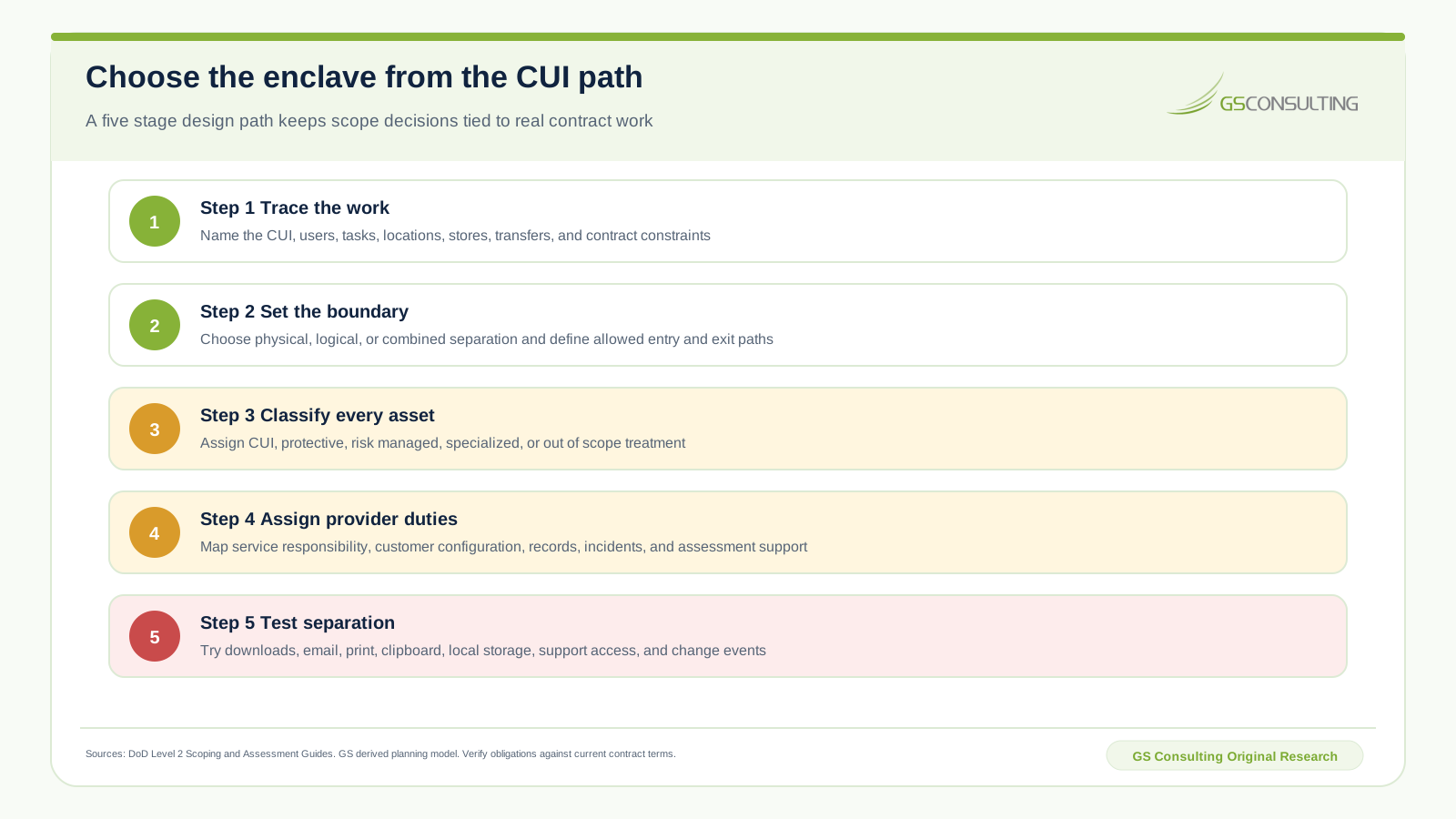
- Trace the work. Record the contract, CUI type, users, tasks, locations, entry, creation, storage, transfer, sharing, archive, incident, and disposal paths.
- Set the boundary. Choose physical, logical, or combined separation and define every allowed entry and exit. Name the systems and people on both sides.
- Classify every asset. Assign CUI, security protection, risk managed, specialized, or out of scope treatment. Record the rationale and responsible owner.
- Assign provider duties. Map service scope, customer configuration, shared actions, evidence, incidents, support access, and change responsibilities.
- Test separation. Exercise downloads, email, print, clipboard, local storage, removable media, backups, collaboration, support, administration, and change events.
The decision record should compare at least two viable patterns. Include implementation effort, recurring labor, user friction, provider dependence, evidence retrieval, failure impact, change cost, and assessment support. A cheap setup can create an expensive operating year.
Six Enclave Failures That Expand Scope
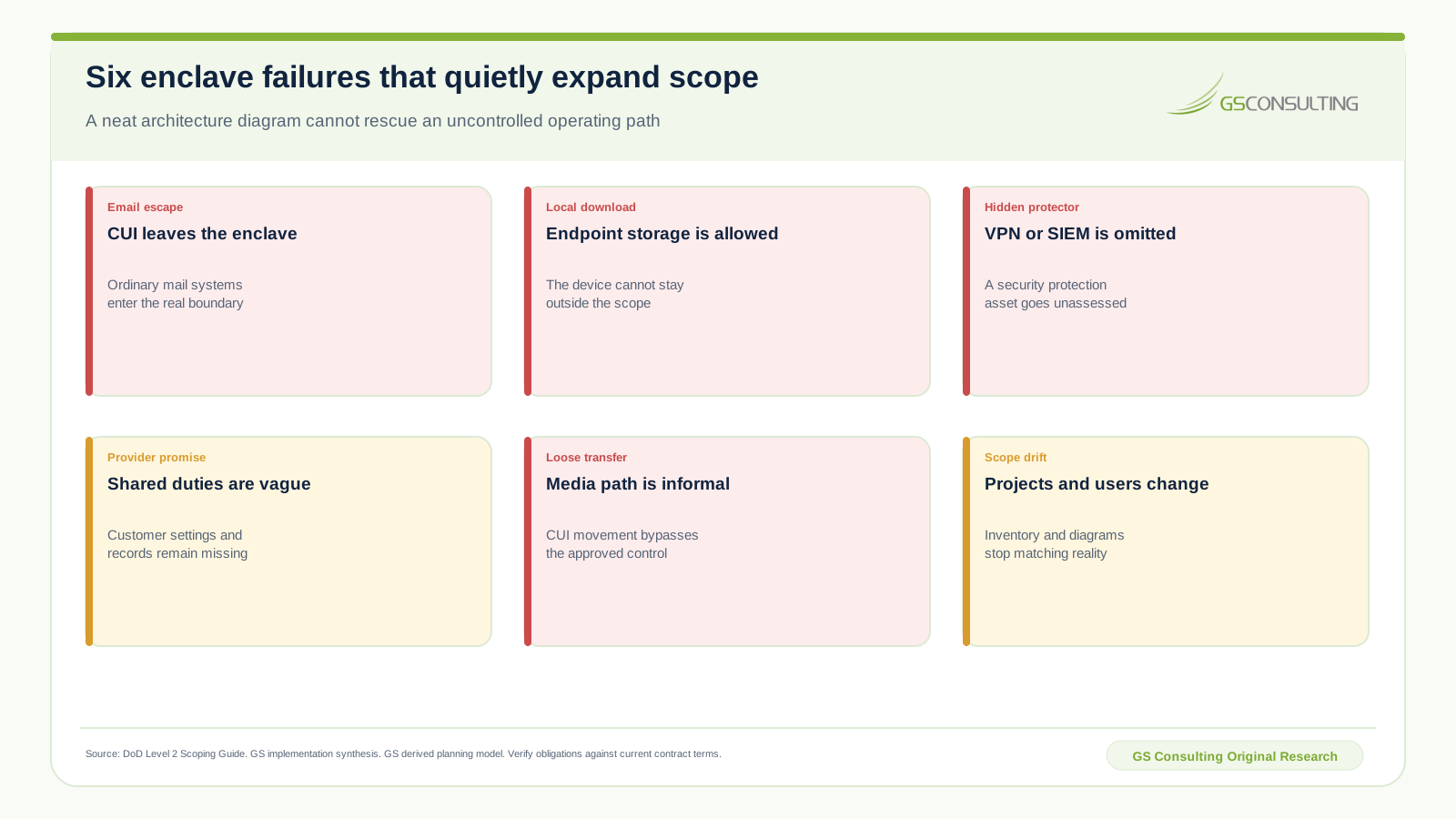
Email escape: users move CUI into an ordinary mail tenant, archive, mobile client, or gateway that the diagram excludes.
Local download: browser, virtual desktop, sync, cache, print, or export behavior stores CUI on an endpoint assumed to be outside scope.
Hidden protector: identity, VPN, firewall, SIEM, endpoint, security operations, or facilities provide a security function but are absent from the asset treatment.
Provider promise: the provider states that the service supports CMMC, while customer settings, responsibility, evidence, support access, and incident duties remain vague.
Loose transfer: removable media, file exchange, patching, report delivery, or support workflow bypasses the approved path.
Scope drift: new projects, users, locations, providers, tools, integrations, and data types change the real environment without updating the scope package.
The Minimum CMMC Enclave Evidence Packet
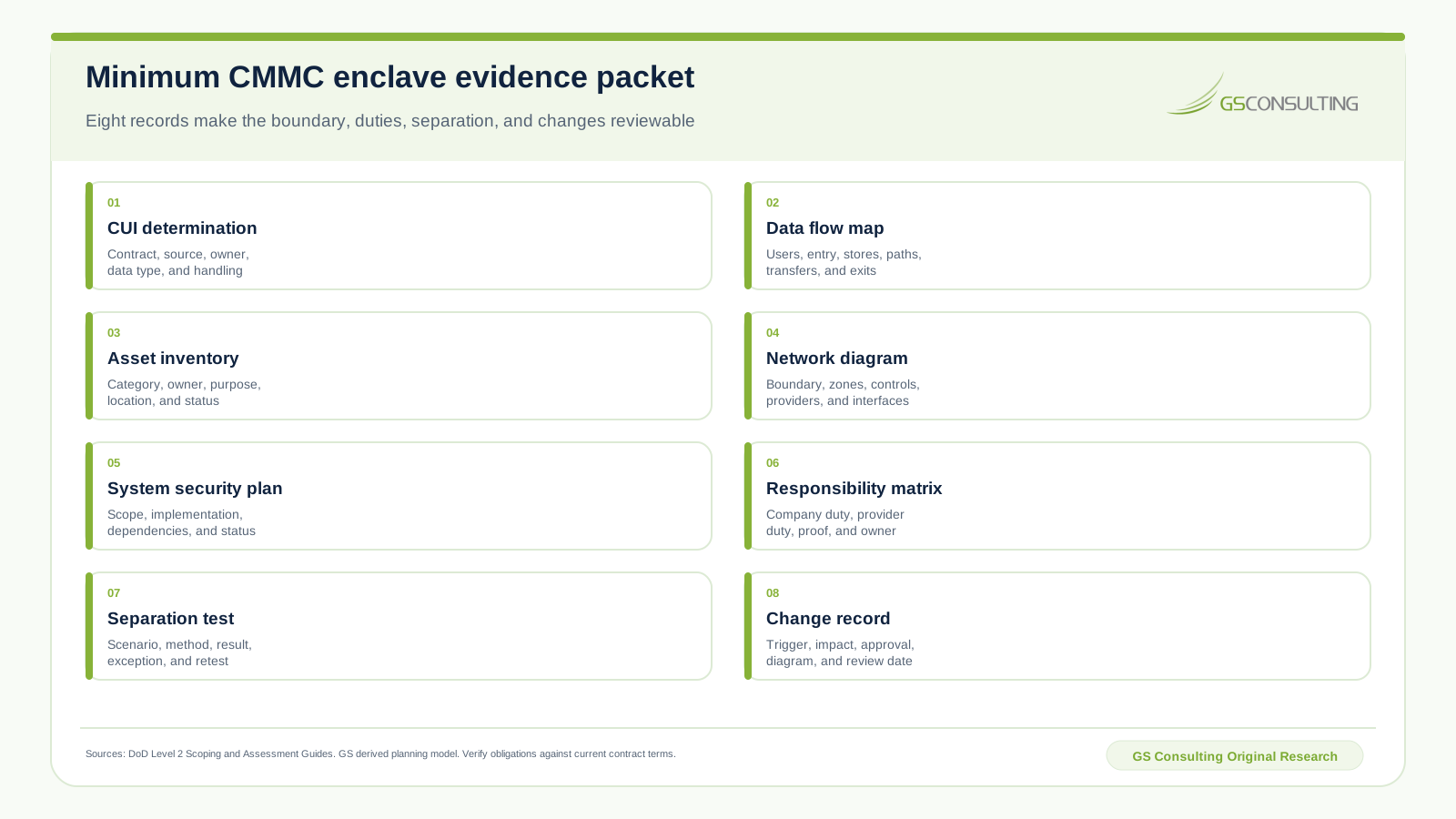
- CUI determination: contract, source, category, owner, use, marking, handling, and required environment.
- Data flow map: users, locations, entry, creation, stores, processing, transfers, shares, archives, incidents, and exits.
- Asset inventory: asset identifier, category, owner, purpose, location, service, data relationship, security function, and status.
- Network diagram: boundary, zones, connections, interfaces, protections, providers, administration, and approved transfer paths.
- System security plan: assessed scope, environment, implementation, dependencies, responsibilities, status, and change control.
- Responsibility matrix: company duty, provider duty, shared action, evidence, owner, access, retention, and support.
- Separation test: scenario, method, expected result, actual result, capture, exception, owner, retest, and approval.
- Change record: trigger, scope impact, risk decision, approval, updated inventory and diagrams, evidence impact, and review date.
Review the packet whenever the contract, CUI type, user population, location, provider, integration, security service, endpoint behavior, or transfer path changes. Scope is maintained through change control.
The decisive operating standard is this: CUI follows only approved paths, every protective asset is named, every outside asset is truly separated, and the contractor can reproduce the boundary under observation.
Frequently Asked Questions
What is a CMMC enclave?
It is a defined part of the enterprise where named people, systems, and services process, store, transmit, or protect CUI under an assessed boundary.
Does an enclave reduce CMMC scope?
It can, when unneeded systems and people are truly separated. CUI assets and security protection assets still remain in the scope analysis.
Can virtual desktop access keep an endpoint outside scope?
Potentially, when the endpoint provides only keyboard, video, and mouse interaction, no CUI exists beyond that session path, and the endpoint does not protect the CUI environment. Test the actual configuration.
Are security tools in scope?
They can be security protection assets when they provide security functions for the CUI environment, even if they do not directly store CUI.
Is physical separation required?
No. The official guide recognizes physical separation, logical separation, or a combination. The design must prevent unapproved CUI paths and be documented and tested.
What proves the boundary?
A CUI determination, data flow, categorized inventory, network diagram, system plan, provider responsibility map, separation tests, and controlled change record should agree with the operating system.
Choose the enclave you can operate.
GS Consulting helps contractors reduce unnecessary scope without hiding real dependencies, then turn the chosen boundary into tested controls and assessment evidence.
Plan the CMMC Enclave