AI Workflow Automation | | 25 min read
Building Audit Trails for Automated Workflows

Key Takeaways
Auditability is reconstruction readiness, not log volume.
Connect the Story
Use structured events and one correlation spine from trigger through data, decision, action, exception, and closure.
Bound the Authority
Record what evidence a reviewer saw and the exact object, action, version, conditions, and expiration approved.
Protect the Evidence
Minimize sensitive content, restrict access, preserve integrity, apply retention, and test independent replay.
If an automation cannot explain what it did, it should not be trusted with regulated work.
A real audit trail answers the hard questions: what data did the workflow access, which records did it use, what did it recommend, which model or rule produced the output, who reviewed it, what was approved, which system changed, what failed, and can the organization prove all of that later?
Building audit trails for automated workflows is not log collection for its own sake. It is operational proof. For GovCon firms and regulated organizations, that proof separates controlled automation from a black box that happens to move quickly.
Need an audit trail that can reconstruct the workflow?
GS Consulting combines compliance advisory with automation engineering to design structured events, protected evidence, approval records, and audit reporting.
Request a Workflow Audit AssessmentThis guide supports our main AI workflow automation service and the Enterprise AI Process Transformation cluster. It connects to workflow orchestration for secure environments, automating NIST SP 800 171 compliance evidence, human in the loop workflow architecture, and secure API development for AI automation.
The Bad Assumption: The System Log Is the Audit Trail
A log records activity. An audit trail proves the workflow operated under the right authority, with the right data, and with enough context for another person to understand it later.
“Job completed,” “API call succeeded,” and “user clicked approve” help debugging. They do not identify the triggering record, source version, access reason, delegated identity, AI output, evidence shown, approval boundary, prior state, resulting state, exception, or retained proof.
If compliance must reconstruct that story from email, chat, dashboards, and five technical systems, the workflow was not audit ready.
Why Audit Trails Matter More With AI
AI workflows summarize, classify, extract, route, recommend, call tools, and combine data across systems. Their outputs can change when prompts, models, rules, context, or source data change. The audit trail therefore needs the path to the answer, not only the answer.
GovCon workflows may touch CUI, contract obligations, CMMC evidence, subcontractor records, incidents, ERP data, access decisions, and external releases. NIST SP 800 171 Revision 3 includes audit and accountability requirements for systems protecting CUI, while CMMC uses evidence to verify implementation.
What an Audit Trail Must Prove
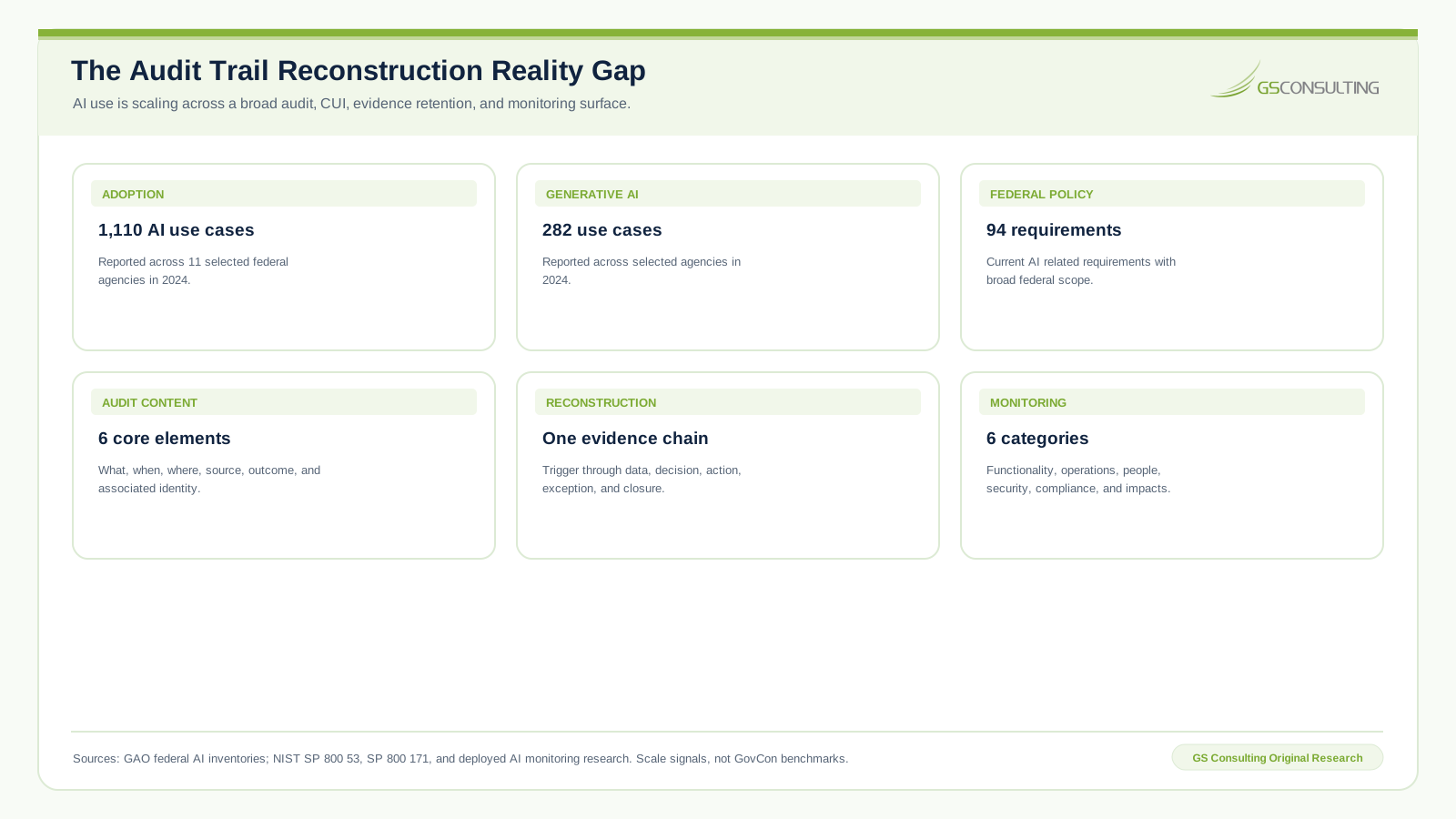
- Identity. Distinguish the initiating person, workflow, agent, service account, API client, reviewer, approver, and administrator.
- Data access. Record source system, object, version, sensitivity, access time, purpose, user context, and technical identity without copying unnecessary content.
- Decision logic. Record workflow, rule, prompt, model, policy, configuration, threshold, schema, and data extract versions.
- Human approval. Preserve evidence shown, reviewer edits, decision, exact scope, conditions, expiration, rejection, and escalation.
- System action. Identify the target, object, field, prior value, approved value, resulting value, API, result, and rollback status.
- Outcome. Record completion, failure, retry, escalation, timeout, manual review, exception, rollback, and closure evidence.
Original Research: The Audit Trail Reconstruction Control System
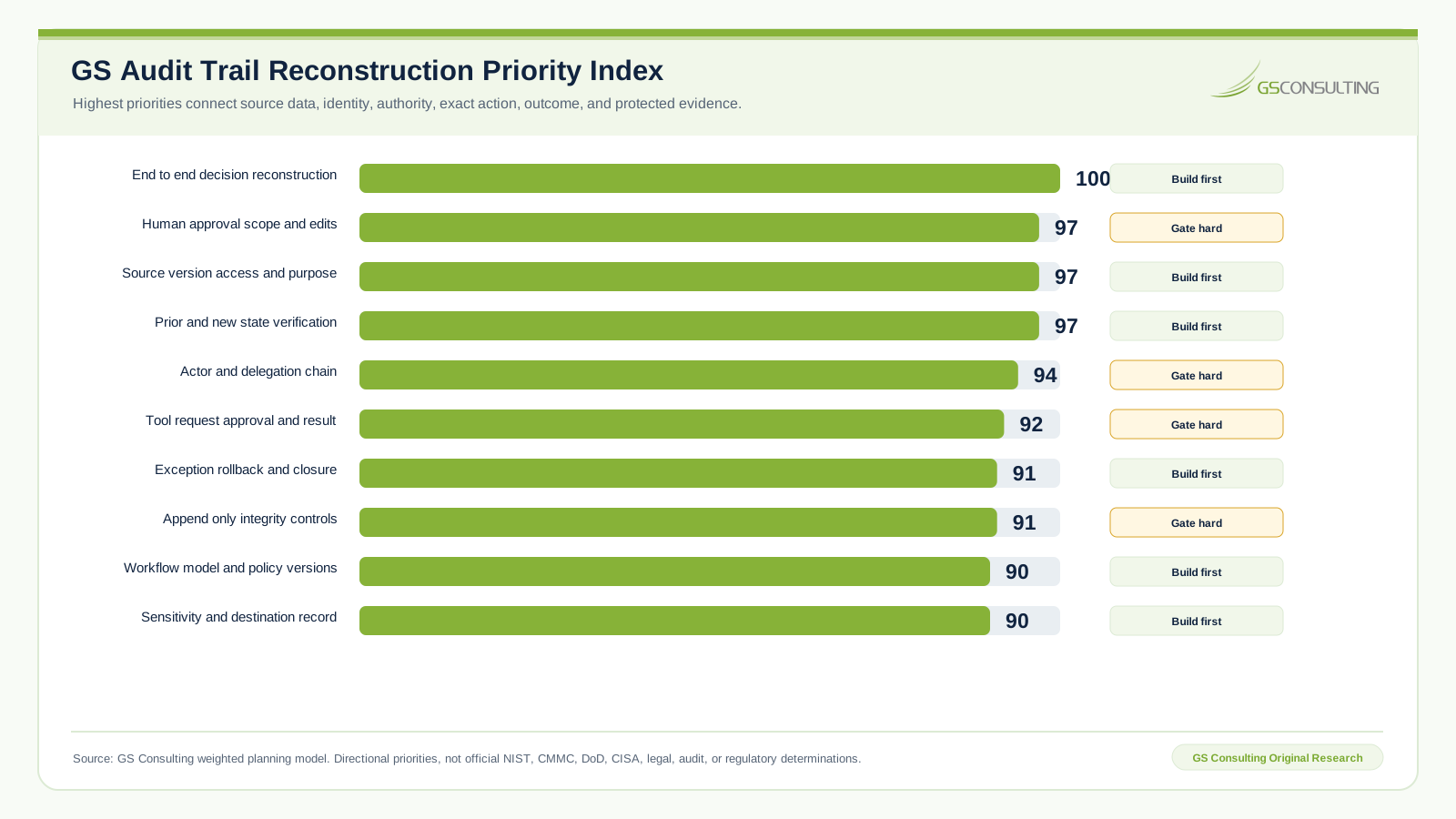
GS Consulting analyzed auditability as a reconstruction problem rather than a log volume problem. End to end correlation and decision to action reconstruction scored 100 out of 100. Human approval scope, source provenance, and system action verification each scored 97. Identity and service delegation scored 94. Tool call accountability scored 92.
Automated Process Logging Needs a Data Model
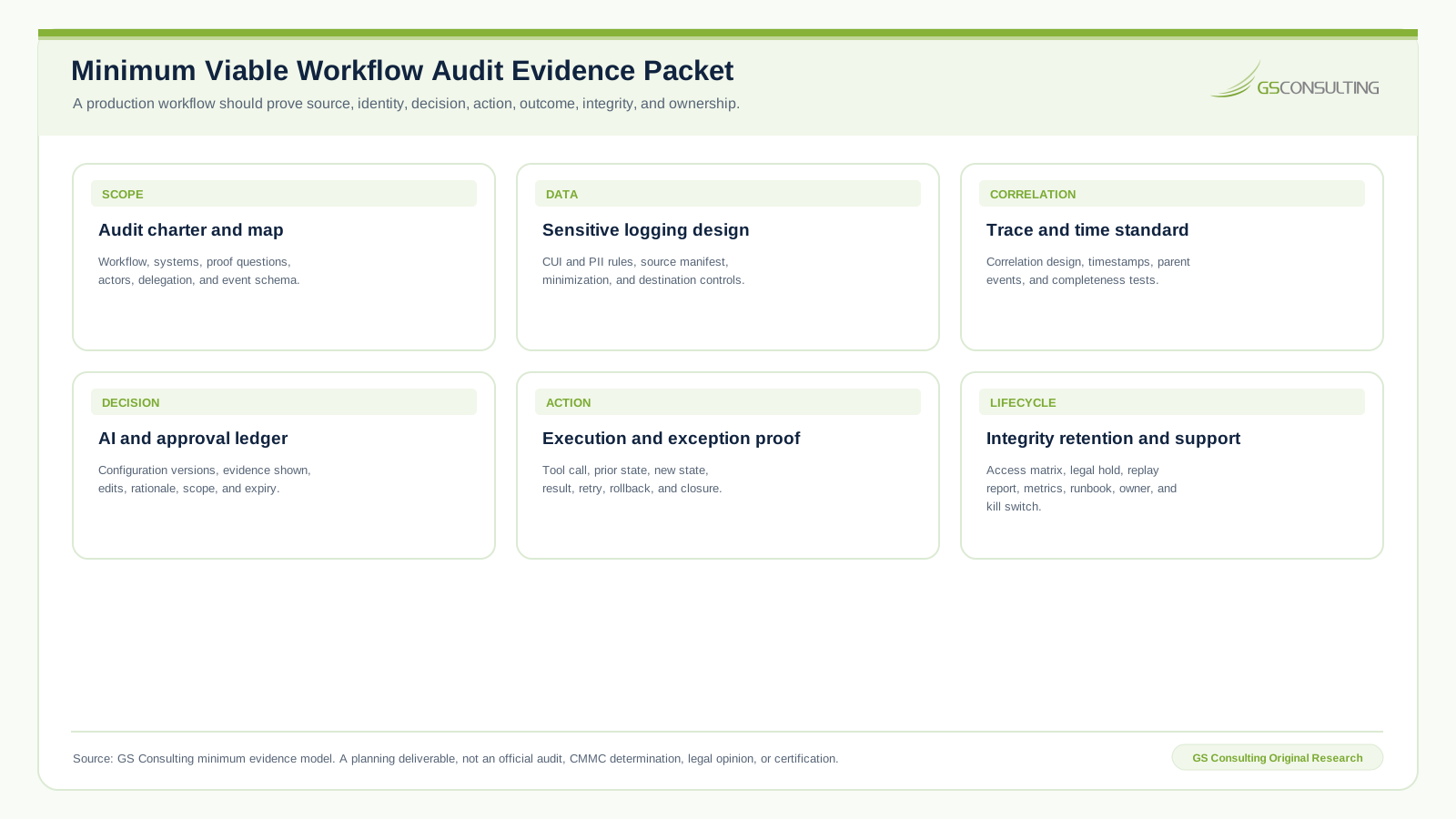
Do not store random text messages. Use consistent fields for event ID, correlation ID, workflow and version, step, event type, actor, delegated user, source and target system, object and version, sensitivity, requested action, approved action, performed action, prior and new value, approval ID, timestamp, result, error, exception, evidence reference, and retention category.
The model should be conditional. A source access event does not need rollback fields. An approval event may not need a database value. Consistent semantics matter more than maximum payload size.
Correlation IDs and Time Hold the Story Together
One workflow may cross a repository, AI service, event broker, approval queue, API gateway, ticketing system, GRC platform, and evidence store. Generate one correlation ID at intake and propagate it through every step, tool call, exception, and child event.
Use synchronized clocks, a clear time standard, and enough precision to distinguish generation, review, approval, action, retry, and closure. W3C Trace Context and OpenTelemetry provide technical foundations for distributed trace identity, but regulated workflows also need business object, authority, decision, and evidence context.
Capture Human Edits and Approval Boundaries
Human edits are evidence of judgment and useful feedback. Record when a person changes an owner, classification, severity, response, evidence status, or exception decision.
“Approved” is one of the weakest possible audit records. Approval must identify the document, version, object, field, recipient, system, action, time window, authority, conditions, and expiration. Approving a draft response does not approve external transmission. Approving incident severity does not approve a reporting determination.
Audit Tool Calls, Reads, Exceptions, and External Outputs
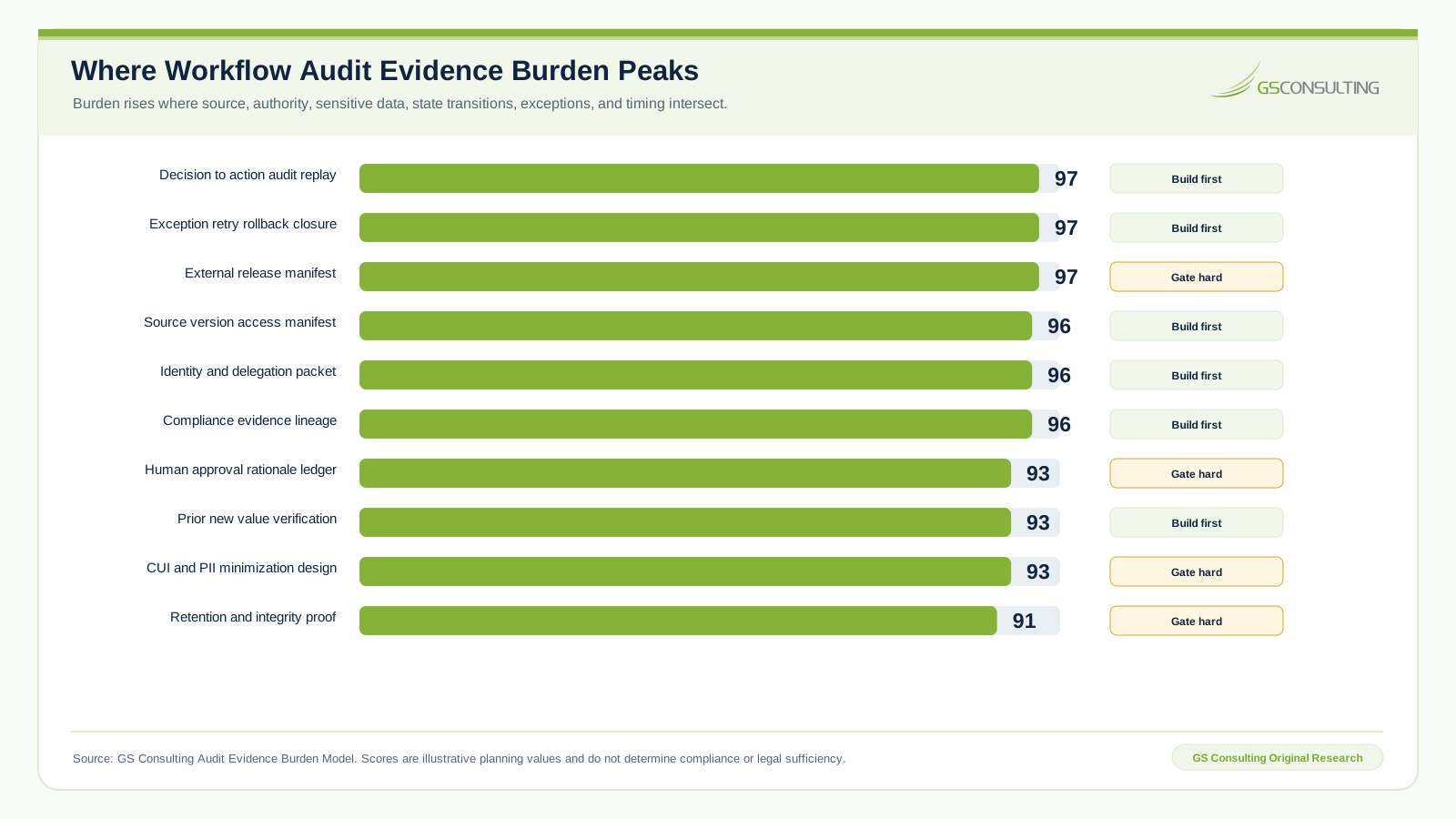
For each tool call, record the tool, requested action, parameters, workflow, user context, service identity, target, validation, approval, result, output reference, and follow up. Never record credentials or secrets.
Read only access still creates risk. Record who or what accessed CUI, incidents, ERP data, vendor records, employee information, contracts, or vulnerabilities, why access occurred, and where the output went.
Exceptions must remain in the workflow with type, step, source, issue, owner, severity, due date, escalation, decision, status, and closure evidence. Email and chat are not an exception ledger.
Protect the Audit Trail Without Logging Everything
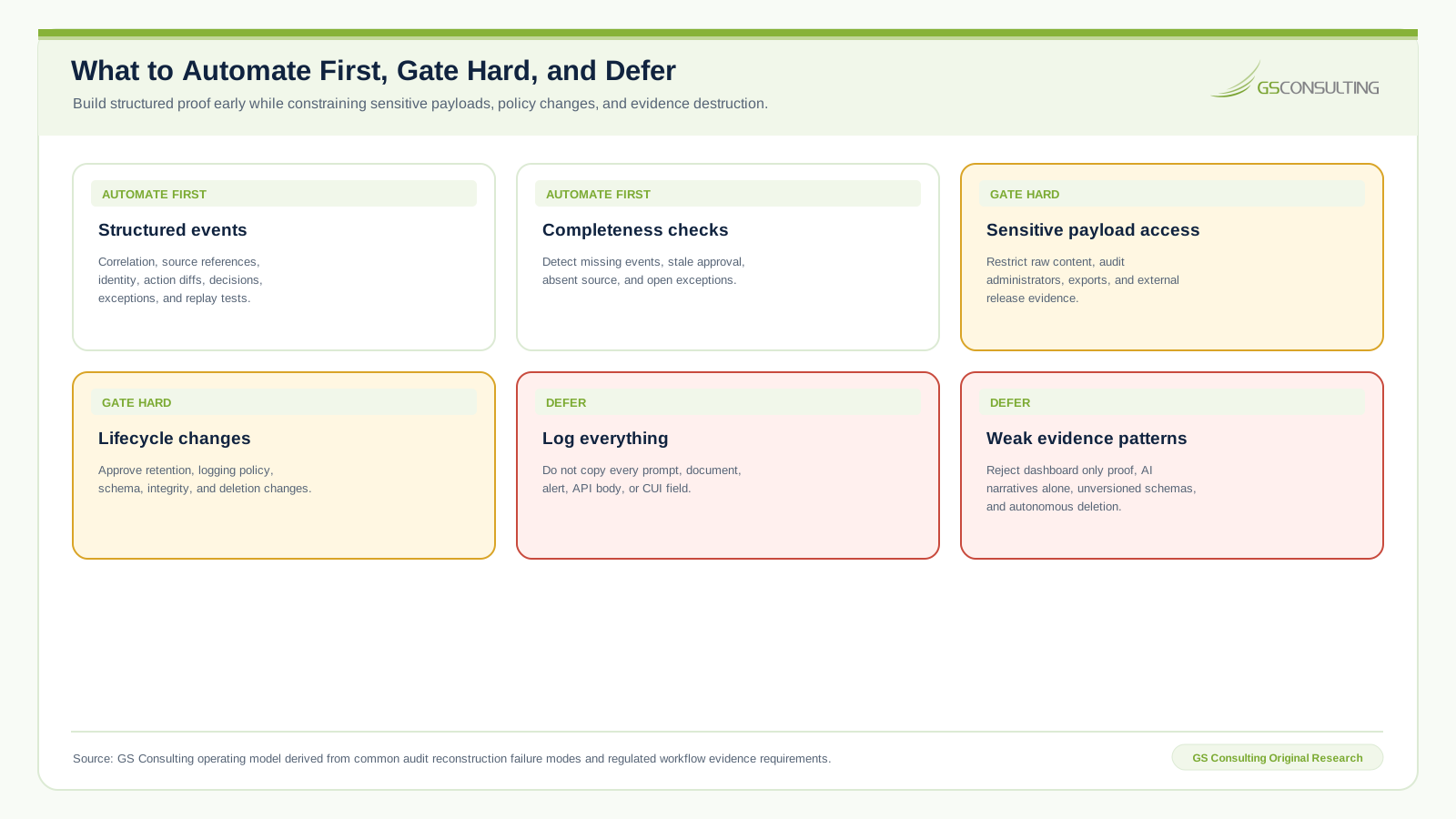
Full prompts, documents, API bodies, alerts, user records, CUI, and PII can turn an audit platform into a sensitive data spill. Prefer document IDs, record IDs, version IDs, controlled source links, sensitivity tags, and hashes where appropriate.
Apply restricted write access, separation of duties, append only patterns for critical events, administrator activity logs, change history, backups, deletion monitoring, retention categories, legal hold, and authorized disposal. Audit evidence needs privacy controls too.
NIST SP 800 92 provides enterprise log management guidance, while NIST SP 800 53 addresses both security and privacy controls. The goal is trustworthy proof, not permanent surveillance.
A Practical Audit Trail Architecture
- Event capture. Emit structured events from every material step.
- Correlation. Connect parent and child events across systems.
- Classification. Tag sensitivity, action, workflow, and retention.
- Storage. Protect searchable audit records and related evidence.
- Review. Search by workflow, object, actor, date, action, and exception.
- Alerting. Detect bypass, failure, sensitive access, external release, and missing evidence.
- Reporting. Produce activity, approval, exception, access, and evidence reports.
- Integrity. Detect unauthorized alteration or deletion.
What Usually Breaks
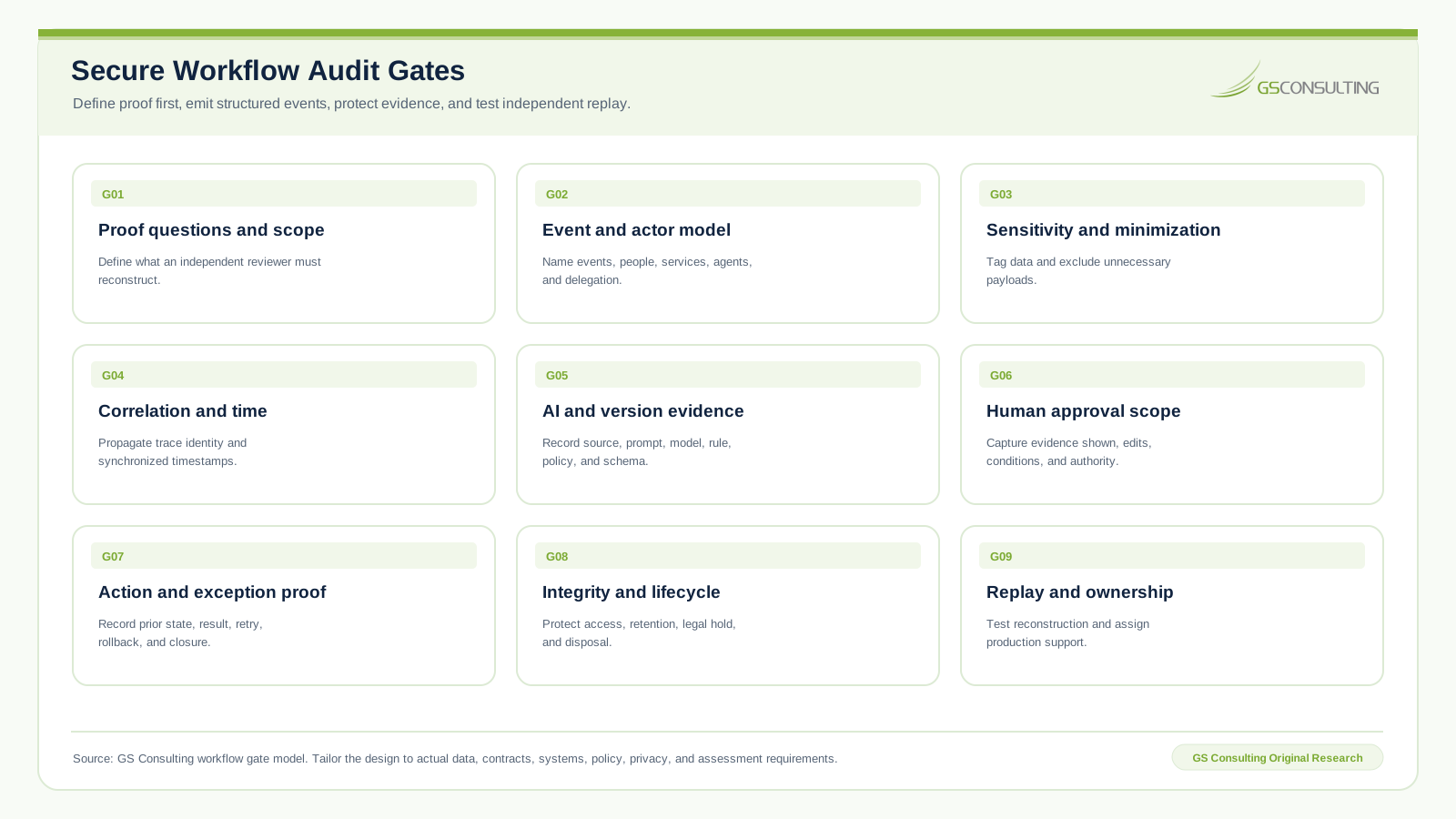
Teams log results but not inputs, clicks but not approval scope, changes but not prior values, AI output without sources, service accounts without user context, and failures resolved outside the workflow. They scatter records across systems with no correlation ID or overcorrect by copying every sensitive payload.
A Practical First 90 Days
- Days 1 to 30Define proof requirements.
Choose one workflow, map regulated data, systems, approvals, actions, evidence, current gaps, and audit questions.
- Days 31 to 60Design the event model.
Define schema, correlation, actors, source and target objects, sensitivity, approval, exceptions, retention, and excluded content.
- Days 61 to 90Instrument and test.
Test normal, rejected, failed, unauthorized, and sensitive data cases. Validate reconstruction with security and compliance.
Measure audit event coverage, high risk actions with approval records, AI outputs with source references, updates with prior and new values, exception closure, search time, missing evidence, blocked actions, stale approvals, sensitive logging findings, and manual reconstruction effort.
The Bottom Line
Building audit trails for automated workflows is about proving the workflow can be trusted. That proof cannot be reconstructed after the fact. It must be engineered into identity, data access, AI processing, human review, system action, exception handling, and evidence retention.
Do not let AI workflows become black boxes with better interfaces. Build the audit trail first. Then automate the work.
Build automated workflows that can prove what happened.
GS Consulting can design the event model, logging architecture, approval evidence, sensitive data controls, integrity protections, and audit reporting your teams need.
Request a Workflow Audit AssessmentResearch Sources and Caveats
The GS Audit Trail Reconstruction Priority Index, Evidence Burden Model, workflow gates, event model, operating model, and evidence packet are GS Consulting derived planning tools, not official legal, audit, compliance, NIST, CMMC, DoD, CISA, privacy, or regulatory determinations.
- NIST SP 800 53 Revision 5
- NIST SP 800 171 Revision 3
- NIST SP 800 92 Log Management Guide
- W3C Trace Context
- 32 CFR Part 170 CMMC Program
Frequently Asked Questions
What should an automated workflow audit trail record?
It should record the trigger, actor, source data and versions, access purpose, workflow and AI configuration, human review and approval scope, exact system action, prior and new state, outcome, exceptions, rollback, and retained evidence.
What is the difference between a system log and an audit trail?
A system log records activity. An audit trail connects activity to business context, authority, source evidence, decisions, system changes, outcomes, and protected records so an independent reviewer can reconstruct what happened.
Should an AI workflow log full prompts and documents?
Not by default. Prefer controlled references, identifiers, versions, sensitivity tags, and hashes where appropriate.
Why are correlation IDs important?
A correlation ID connects events across repositories, model services, workflow engines, approval queues, APIs, target systems, and exception paths.
How should human approval appear in an audit trail?
Record the reviewer, role, evidence displayed, source versions, AI output, edits, decision, exact action approved, conditions, expiration, and execution result.