Secure AI Automation | | 24 min read
AI Automation for IT and Security Operations

Key Takeaways
Use AI to reduce operational noise while preserving response authority.
Start with support tasks
Use summarization, triage, routing, and analysis to assist IT and security teams.
Limit consequential actions
Keep access changes, production changes, and security response behind defined approvals.
Measure operational quality
Track workflow outcomes and review accuracy rather than counting automated activity.
IT and security teams do not need more noise.
They already have enough of it.
Tickets. Alerts. Vulnerabilities. Access requests. Incident notes. Status reports. Vendor notices. Asset data. User complaints. False positives. Logs. Dashboards. Escalations. Meetings about dashboards.
The problem is not that teams lack information. The problem is that too much of the work still requires people to read, sort, enrich, summarize, route, document, and explain information before they can act.
That is where AI automation can help.
Not by replacing the help desk. Not by replacing the SOC. Not by letting AI decide what is an incident, who gets access, or which system gets shut down.
Reduce operational noise without giving AI too much control.
GS Consulting helps regulated organizations design secure AI workflows for help desks, SOC support, alert triage, vulnerability management, ticket enrichment, incident documentation, access request intake, reporting, and audit trails.
Request an IT and Security AI AssessmentThe Real Problem in IT and Security Operations
Most IT and security work does not fail because the team is lazy. It fails because the workflow is overloaded.
A help desk ticket comes in with missing details. Someone has to read it, classify it, ask for more information, search the knowledge base, check user history, find the asset, route it, and document the answer.
A SOC alert fires. Someone has to check the user, device, recent logins, related alerts, asset value, known threat context, prior incidents, and whether the activity is normal or suspicious.
A vulnerability scan creates a long list. Someone has to decide which findings matter based on exploitability, asset exposure, business impact, patch availability, and whether the system supports a sensitive workflow.
A manager needs a weekly report. Someone has to pull data from tickets, alerts, incidents, vulnerability tools, service metrics, and project notes.
That is the work AI can help with. Not the final judgment. The prep work.
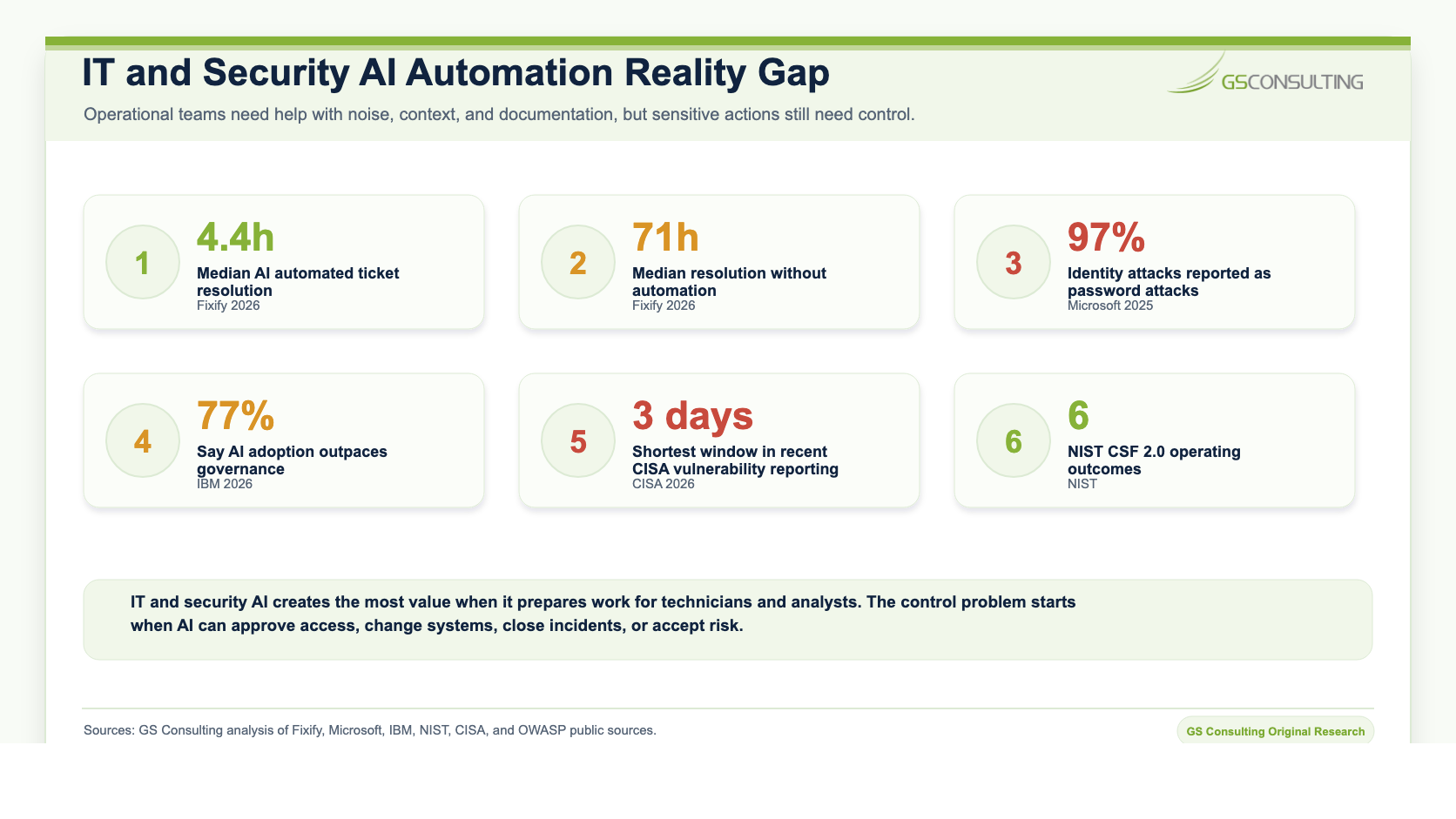
The companion SOC automation guide scores ten common security operations tasks and separates unattended preparation, analyst review, and human response authority. The SOC Automation hub connects that decision model to the wider security workflow series.
Original Research: The IT and Security AI Workflow Readiness Index
GS Consulting analyzed public help desk benchmarks, AI governance research, cybersecurity guidance, LLM security guidance, and common IT and security workflows to create an IT and Security AI Workflow Readiness Index.
The research compared help desk triage, ticket enrichment, knowledge base support, SOC alert triage, incident documentation, vulnerability management, access request intake, operational reporting, and change or problem management. Each workflow was scored for business value, workflow volume, source readiness, measurement clarity, human review fit, control ease, action safety, and public benchmark support.
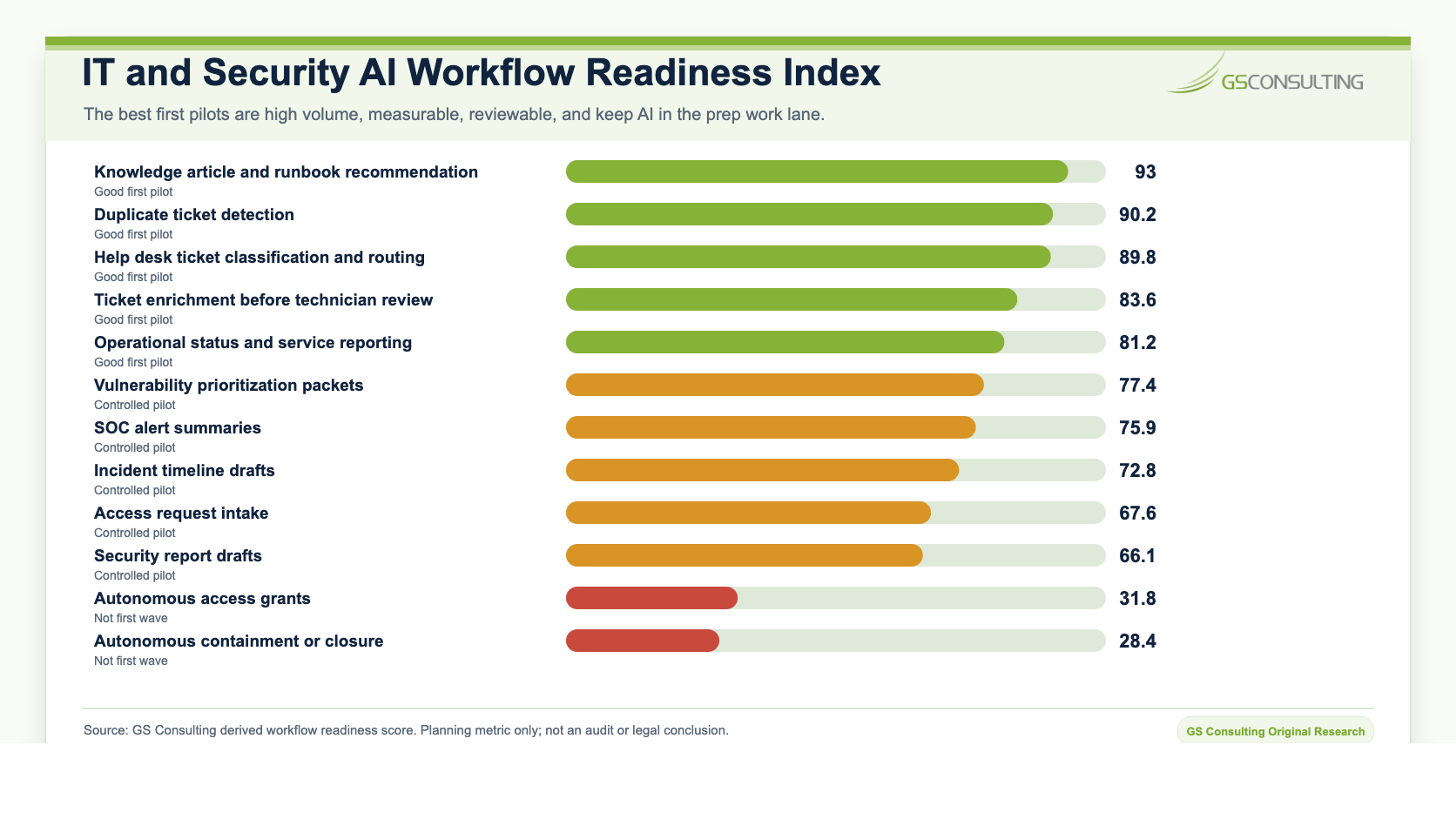
The highest scoring first wave candidates were knowledge article and runbook recommendations, duplicate ticket detection, help desk ticket classification and routing, ticket enrichment before technician review, and operational status reporting.
Controlled pilots include vulnerability prioritization packets, SOC alert summaries, incident timeline drafts, access request intake, change and problem management summaries, and security report drafts. These can reduce manual analyst and technician workload, but they need approved environments, least privilege access, human review, source references, output protection, and audit logs.
Why Secure AI Matters Here
IT and security data is sensitive by default.
A ticket can include user information, system names, access issues, device details, customer impact, and internal process gaps. A SOC alert can include IP addresses, user behavior, endpoint details, suspicious commands, and incident indicators. A vulnerability report can reveal where the organization is exposed. An incident timeline can show how the organization detects, responds, and recovers.
That is not data you casually paste into a random AI tool.
Secure AI automation means the workflow is built with approved tools, access control, data handling rules, logging, human review, and clear action limits.
NIST Cybersecurity Framework 2.0 organizes cybersecurity outcomes around Govern, Identify, Protect, Detect, Respond, and Recover. That structure is useful here because AI in IT and security operations should support the operating model, not sit outside it as an unmanaged shortcut.
What AI Should Do in IT and Security
AI is strong at the work that happens before a human decision.
Help Desk Ticket Triage
Help desk ticket triage is one of the best early AI automation use cases. It is high volume, repetitive, measurable, and usually has clear categories and outcomes.
AI can read the ticket, identify the request type, ask for missing information, summarize the issue, recommend the right queue, suggest urgency, detect duplicates, recommend knowledge articles, and draft a first response.
Good first use: AI classifies tickets and recommends routing. Risky first use: AI closes tickets or approves access without review.
Ticket Enrichment
Ticket enrichment is less flashy than chatbots. It is also more useful.
A ticket by itself often does not give the technician enough context. AI can add user role, device information, recent related tickets, known issues, application involved, relevant knowledge articles, asset criticality, recent changes, similar resolved tickets, and missing information.
The key is permission design. AI should only enrich the ticket with information the technician is allowed to see.
Knowledge Base Support
IT knowledge bases are often messy. Some articles are outdated. Some are duplicated. Some are too long. Some solved problems live only in old tickets or in the head of one senior technician.
AI can search approved knowledge articles, recommend likely fixes, draft new articles from resolved tickets, flag outdated articles, group repeated issues, and turn long runbooks into step summaries.
But source quality matters. If the knowledge base is stale, AI will make stale guidance easier to find. That is not success.
SOC Alert Triage
SOC teams live with alert fatigue. AI can group related alerts, summarize the timeline, identify affected users and assets, pull recent authentication context, summarize endpoint activity, highlight related alerts, draft an analyst note, and recommend likely next investigation steps.
This can reduce the time analysts spend assembling context. But AI should not decide that an event is harmless just because the summary looks clean. The analyst still owns the investigation.
Incident Documentation
Incident documentation is necessary. It is also painful.
AI can build an incident timeline, summarize actions taken, list affected systems, capture open questions, draft status updates, prepare handoff notes, draft post incident review notes, identify missing documentation, and group related evidence.
AI can draft the incident record. The incident owner approves it.
Vulnerability Management
Vulnerability management is not just a scanning problem. It is a prioritization problem.
AI can combine severity, exploitability, asset criticality, internet exposure, known exploitation, patch availability, business owner, data sensitivity, compensating controls, and remediation history. It can summarize the risk and prepare a remediation packet for the owner.
Do not let AI mark vulnerabilities as accepted, remediated, or not applicable without validation.
Access Request Intake
Access requests are common and risky. AI can structure the request, identify the system, summarize the business reason, detect missing approval, match the request to standard access packages, flag privileged access, flag unusual requests, route to the right approver, and draft the approval request.
AI structures the request. The system owner approves. The identity workflow executes. The action is logged.
Operational Reporting
IT and security leaders spend too much time building reports. AI can summarize ticket trends, explain alert volume changes, summarize open incidents, draft vulnerability status, highlight overdue remediation, prepare executive summaries, identify repeated issues, and draft operational updates.
A good report workflow shows sources and lets the owner approve the final message.
What AI Should Not Do Too Early
This is where teams need discipline.
AI should not get broad authority in IT and security workflows just because it produces good summaries.
- Do not let AI grant access without approval.
- Do not let AI disable users without approval.
- Do not let AI reset privileged credentials without approval.
- Do not let AI change firewall rules without approval.
- Do not let AI push patches without approval.
- Do not let AI close incidents without approval.
- Do not let AI declare breach status.
- Do not let AI submit customer or regulator notices.
- Do not let AI accept risk.
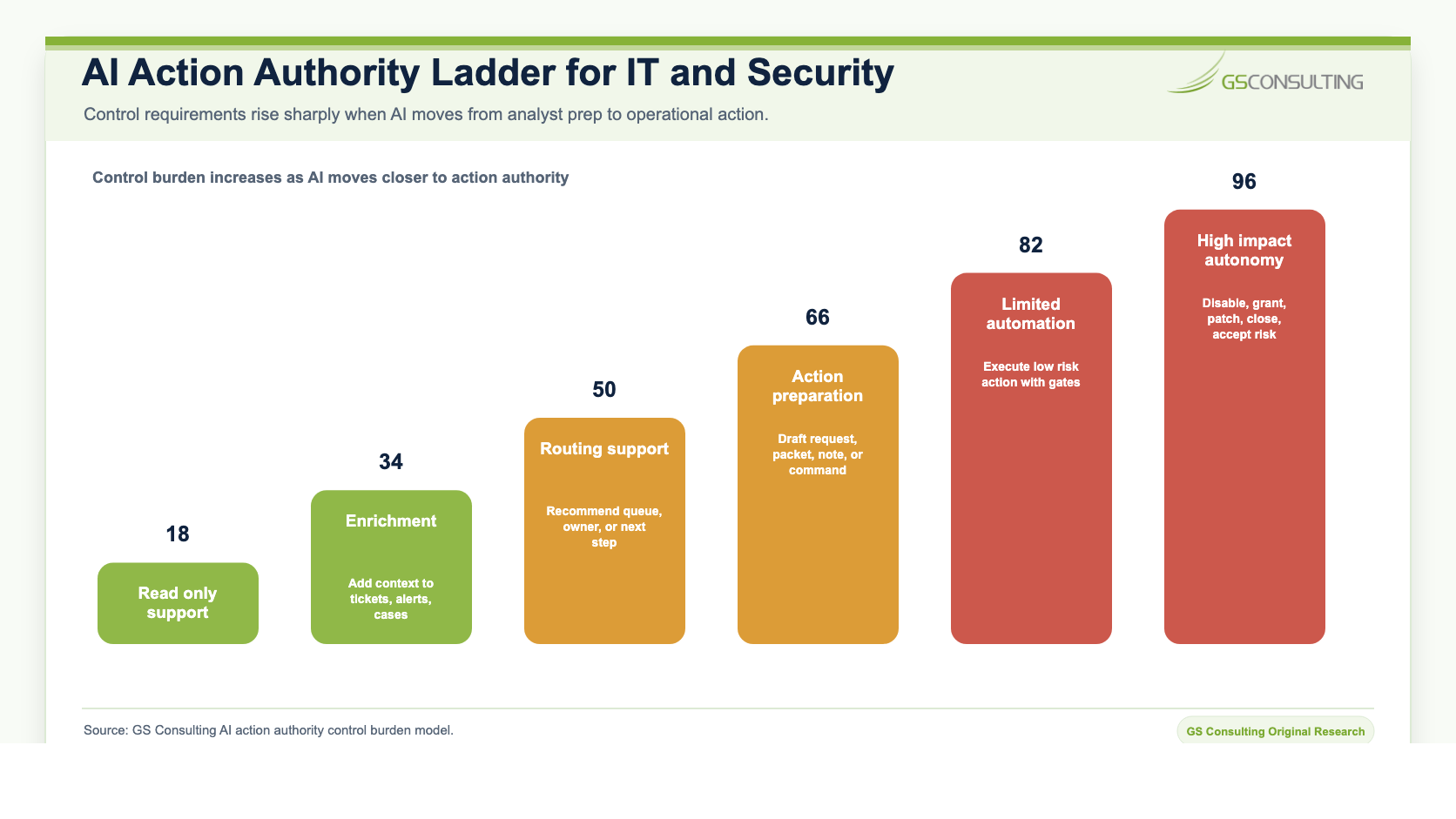
Some of those actions may be automated later in narrow cases. They should not be first wave use cases. The safer first model is simple: AI prepares the work. A person approves the action.
Use Case Risk Levels
Not every IT or security AI workflow carries the same level of risk. The launch model should reflect that.
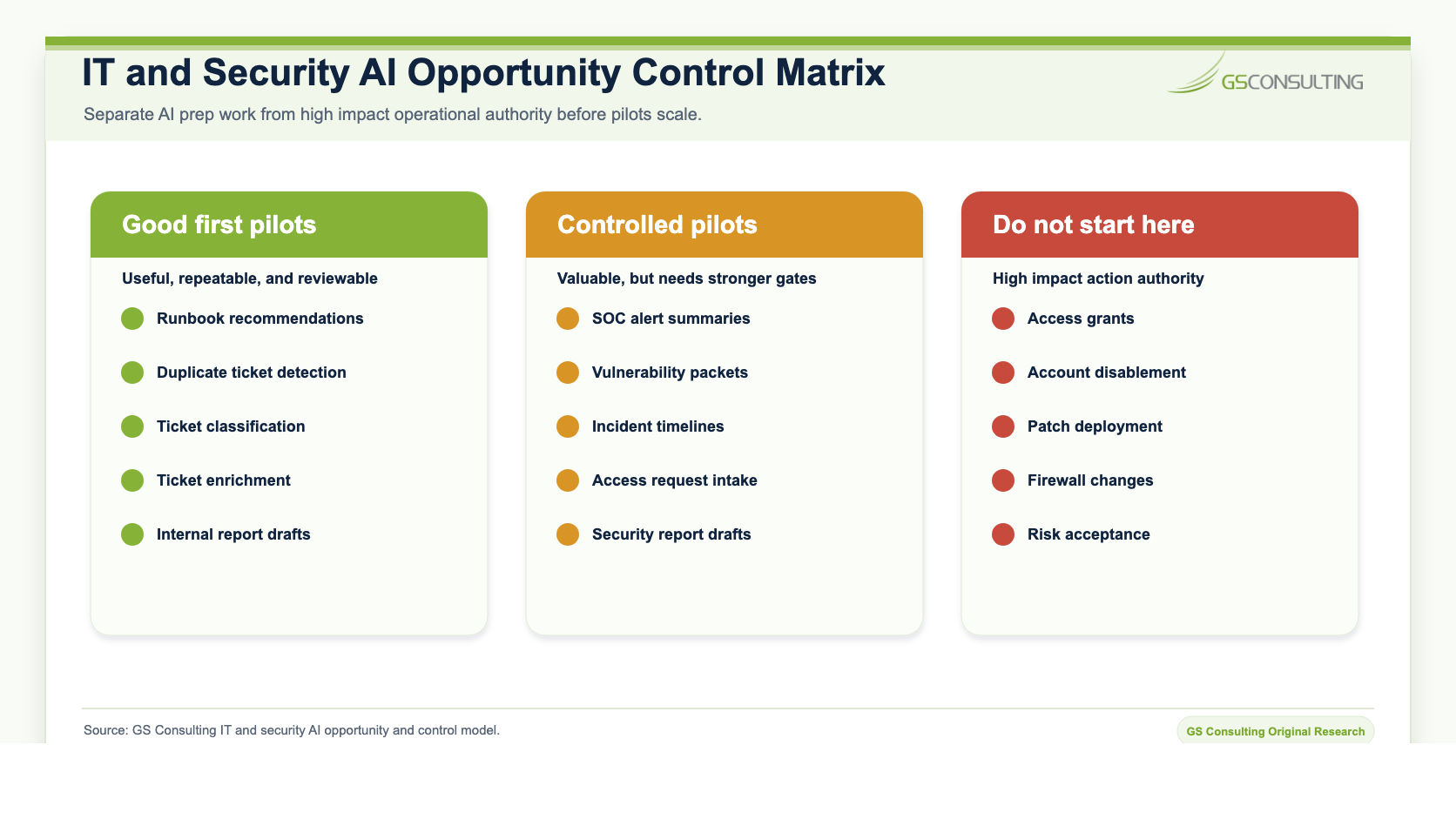
Green use cases include ticket summaries, knowledge article recommendations, internal report drafts, runbook search, duplicate ticket detection, and basic status summaries.
Yellow use cases include SOC alert summaries, vulnerability prioritization support, access request intake, incident documentation, customer impact summaries, and security report drafting. These need access control, logging, human review, and approved environments.
Red use cases include autonomous account disablement, autonomous patch deployment, autonomous firewall changes, autonomous incident closure, autonomous access grants, breach determination, customer or regulator notice submission, and risk acceptance. Do not start there.
The Secure AI Control Model for IT and Security
AI in IT and security operations needs a clear control model.
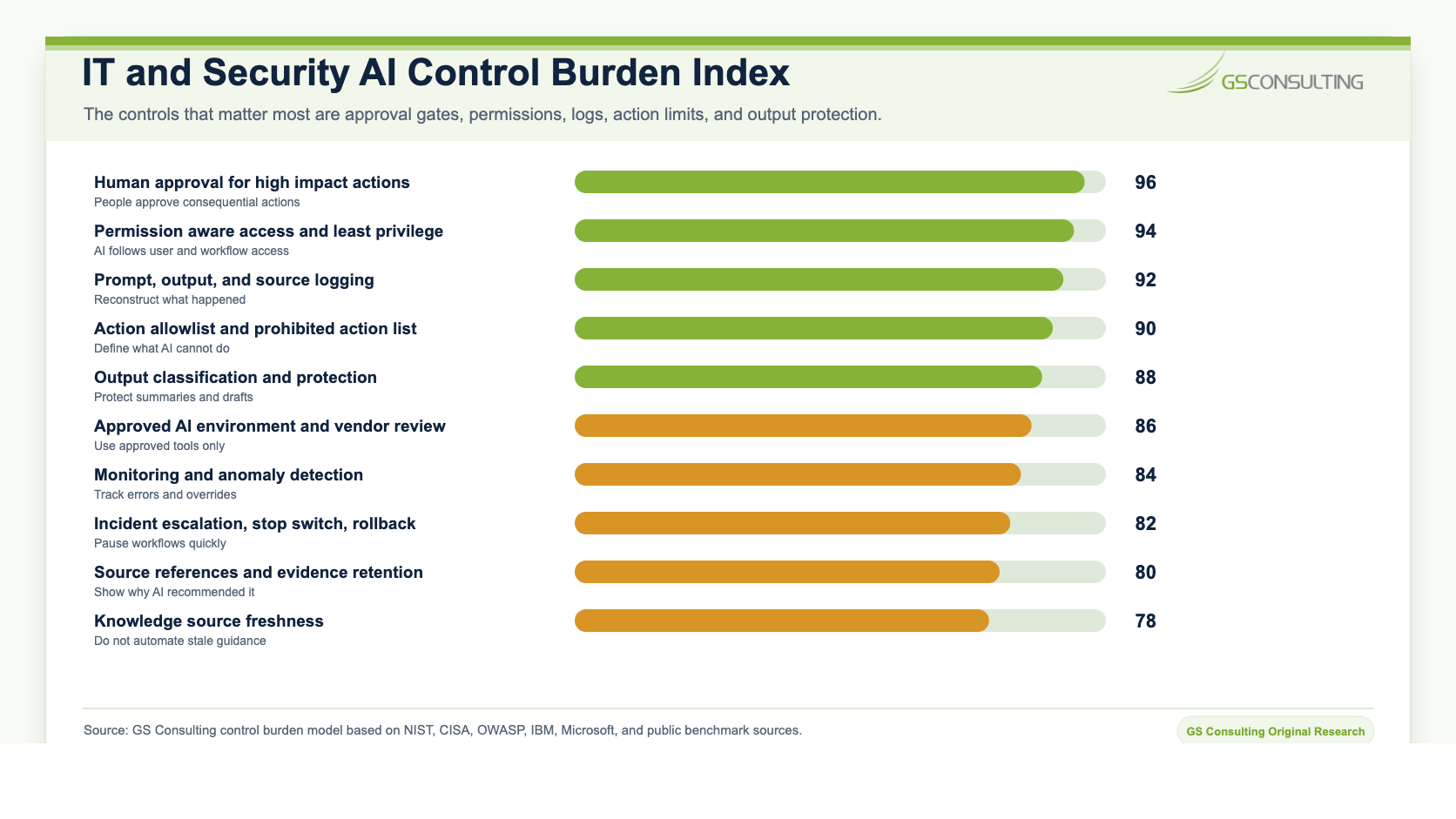
- 1Approved tools only.
Do not let analysts paste logs, tickets, vulnerabilities, or incident notes into unapproved public tools.
- 2Role based access.
A help desk technician, SOC analyst, system administrator, security engineer, and IT manager should not all see the same information through AI.
- 3Least privilege.
Give AI the minimum access needed for the workflow. Do not connect it to every log source, ticket queue, and system just because it can.
- 4Human approval.
Require approval before AI triggers high impact actions such as access grants, account disablement, production changes, firewall changes, patch deployment, customer notices, and incident closure.
- 5Logging.
Log what the AI accessed, produced, recommended, and triggered.
- 6Output protection.
AI summaries of tickets, alerts, vulnerabilities, or incidents may be sensitive. Store them in the right system, not a general chat history.
- 7Monitoring.
Track AI errors, analyst overrides, bad routing, missing context, unusual access, and user complaints.
OWASP lists risks for large language model applications such as prompt injection, sensitive information disclosure, insecure plugin or tool design, improper output handling, and excessive agency. Those risks matter when AI is connected to tools, logs, tickets, and operational systems.
Metrics That Matter
Measure the workflow, not the hype.
Useful metrics include ticket triage time, ticket routing accuracy, first response time, mean time to acknowledge, mean time to resolve, analyst time saved, alert grouping accuracy, false positive reduction, incident documentation time, vulnerability remediation cycle time, overdue vulnerability count, access request cycle time, knowledge article use, human override rate, escalation rate, user satisfaction, security exception count, and operational reporting time.
Suppose a help desk handles 70,000 tickets a year. Manual triage takes five minutes per ticket. AI reduces triage by three minutes. The loaded labor rate is $55 per hour. Adoption is 80 percent. Usable output rate is 85 percent.
The productivity value is roughly 70,000 times 0.05 hours times $55 times 0.80 times 0.85. That is about $130,900 per year.
Now add value from fewer misroutes, faster first response, and less backlog. That is how ROI starts to become real. But only if the workflow is controlled.
The First 30 Days
Start with one controlled pilot.
Good candidates include help desk ticket classification, ticket enrichment, knowledge article recommendation, SOC alert summary, incident timeline draft, vulnerability review packet, and operational report draft.
Then map the workflow. What data is involved? What tool will process it? What can AI read? What can AI write? Who reviews the output? What actions require approval? What gets logged? What happens if AI is wrong? Who can pause the workflow?
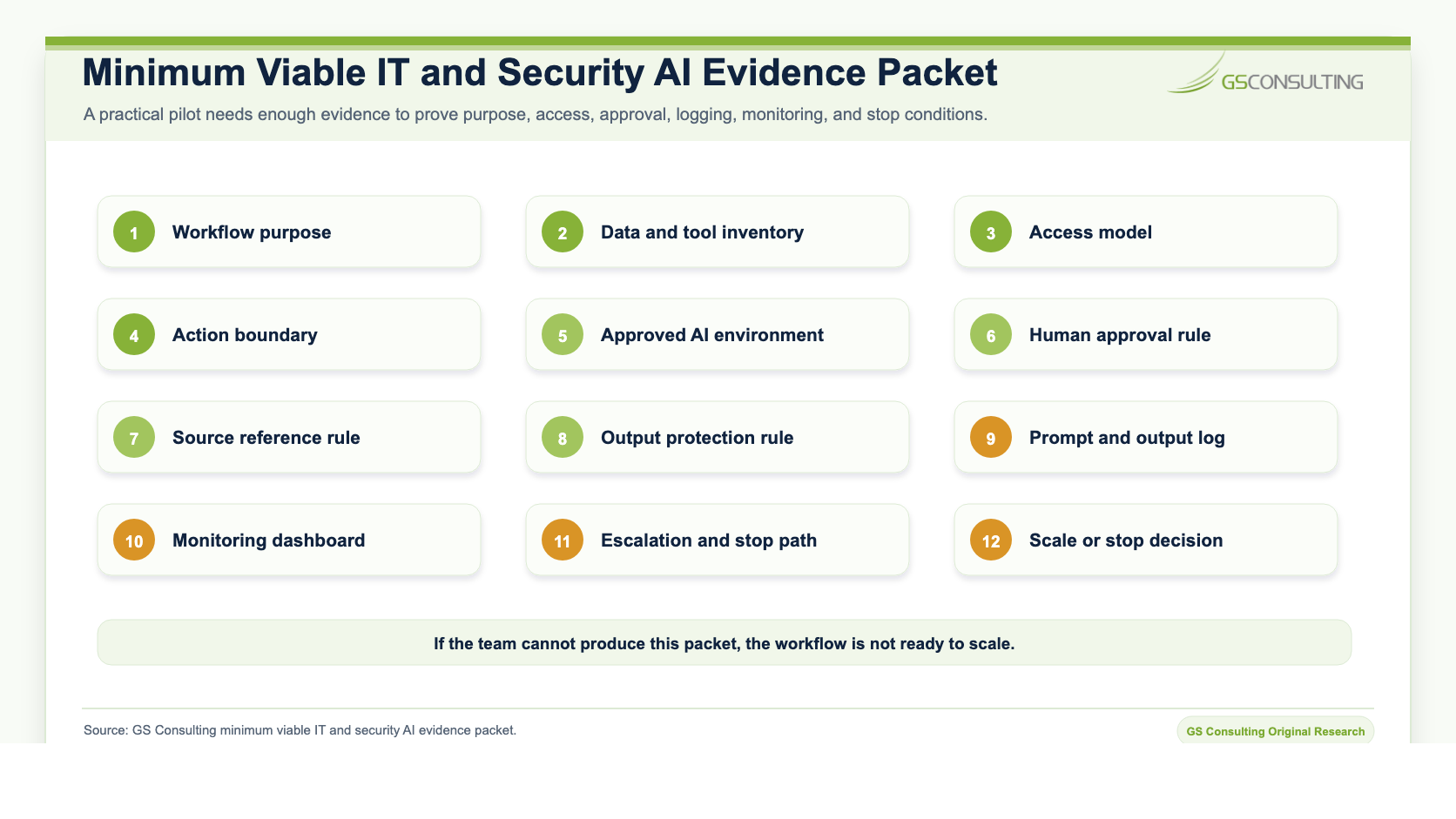
Build the pilot with limited users and limited access. Measure the result. Then decide what to scale.
The Practical Architecture
For IT and security operations, a secure AI architecture usually needs an approved AI environment, identity integration, role based access, secure connectors, read only access where possible, controlled APIs, human approval gates, output classification, prompt and output logging, source references, monitoring dashboard, incident response process, and a stop mechanism.
Do not start by giving AI broad access to every system.
Start narrow. Prove the value. Expand carefully.
The Bottom Line
AI automation is a strong fit for IT and security operations.
It can help with help desk triage, SOC workflows, alert summaries, vulnerability management, ticket enrichment, incident documentation, access request intake, and operational reporting.
But AI should not become an uncontrolled operator inside your environment.
Use AI to prepare the work. Use people to approve high impact actions. Use logs to prove what happened. Use permissions to keep AI inside the right boundaries. Use monitoring to catch drift and mistakes.
That is how IT and security teams get the benefit of AI without turning operations into a risk experiment.
Build IT and security AI workflows that can be trusted later.
GS Consulting helps regulated organizations implement secure AI automation for help desk workflows, SOC support, alert triage, vulnerability management, ticket enrichment, incident documentation, reporting, access controls, and audit trails.
Contact GS ConsultingFrequently Asked Questions About IT and Security AI Automation
How can AI automation help IT and security operations?
AI automation can help IT and security teams classify tickets, enrich cases, suggest knowledge articles, summarize alerts, draft incident timelines, prepare vulnerability review packets, structure access requests, and create operational reports.
What IT and security AI workflows are good first pilots?
Good first pilots include knowledge article recommendations, duplicate ticket detection, help desk ticket classification, ticket enrichment, runbook search, internal report drafts, and basic status summaries.
What should AI not do in IT and security operations?
AI should not grant access, disable accounts, reset privileged credentials, push patches, change firewall rules, close incidents, declare breach status, submit customer notices, or accept risk without accountable human approval.
What controls are needed for AI in IT and security workflows?
Secure IT and security AI workflows need approved tools, role based access, least privilege, human approval gates, prompt and output logging, output protection, source references, monitoring, escalation paths, and a way to pause the workflow quickly.
Related Reading
- Secure AI Automation for Regulated Organizations
- AI Audit Trails and Activity Logging
- AI Access Controls and Permission Design
- AI Automation for Sensitive Data Workflows
- Measuring ROI from Secure AI Automation
Sources
- NIST Cybersecurity Framework 2.0
- CISA JCDC AI Cybersecurity Collaboration Playbook
- OWASP Top 10 for Large Language Model Applications
- IBM AI control gap research
- ITPro coverage of Microsoft's 2025 Digital Defense Report
- Fixify 2026 IT Help Desk Benchmark Report, cited in GS Consulting research notes.