Secure AI Automation | | 25 min read
AI Automation for Document Heavy Business Processes

Key Takeaways
Document AI needs a controlled path from source to final record.
Retain source evidence
Show what document and version the AI used and who was allowed to access it.
Define approval ownership
Keep consequential document decisions with an accountable reviewer.
Verify the destination record
Connect extraction and review to the approved system of record and measure errors and rework.
Document automation does not fail because AI cannot read.
Use the AI document processing hub to choose a processing pattern, then apply this guide to the evidence and approval path around the documents.
It fails because the organization cannot prove what the AI read, who was allowed to see it, who approved the result, and where the final record went.
That is the real issue with AI automation for document heavy business processes. The technology can summarize contracts, policies, SOPs, manuals, reports, tickets, case files, forms, and evidence packets. The harder question is whether the workflow is controlled enough to trust.
Most organizations already have document work everywhere. Contracts move through legal and operations. SOPs sit in shared drives. Reports arrive by email. Tickets contain customer, system, and incident context. Case files mix facts, judgment, and approvals. Compliance evidence lives across tools. Everyone wants AI to make that work faster.
That is where secure AI automation matters. The goal is not to let a model become the decision maker. The goal is to remove the drag around document review, extraction, routing, summarization, comparison, and evidence preparation while keeping people accountable for judgment.
Turn document AI into a controlled business workflow.
GS Consulting helps regulated organizations design secure AI workflows for document review, summarization, extraction, routing, decision support, audit trails, and human approval.
Request a Document AI AssessmentThe Real Problem With Document Automation
Document heavy workflows are usually messy for a simple reason. The document is only part of the work.
A contract clause matters because of the customer, the commitment, the risk owner, the approval history, and the system where the obligation is tracked. A policy matters because it maps to controls, training, exceptions, and audit evidence. A ticket matters because it may include customer data, system details, diagnosis, action history, and a decision trail.
AI can read the words. It does not automatically understand the operating context unless the workflow gives it that context.
That is why many document AI pilots look useful in a demo and then stall in the business. The model can summarize a document, but the organization still has unanswered questions:
- Which documents are approved sources?
- Which versions are current?
- Which users are allowed to retrieve each document?
- What sensitive data is inside?
- Who reviews the AI output?
- Where is the final approved record stored?
- What gets logged for audit, customer review, or internal investigation?
If those questions are not answered, document AI becomes a shortcut around the process instead of an improvement to the process.
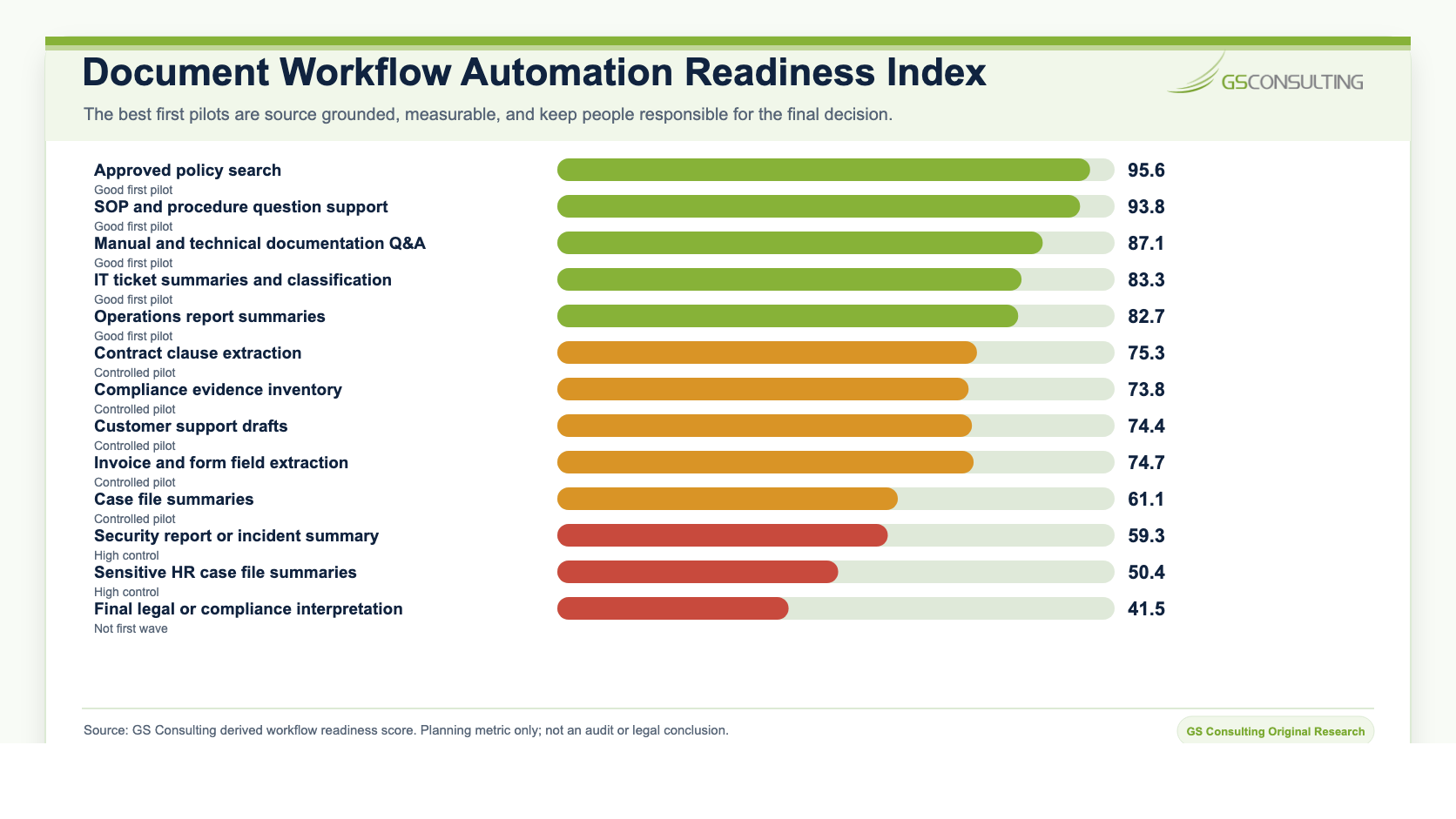
Original Research: Document Workflow Automation Readiness Index
GS Consulting analyzed public AI, security, document intelligence, and governance sources against common document heavy business workflows. The goal was practical: identify which document workflows are good first candidates for secure AI automation and which ones need stronger controls before scaling.
The source set included NIST AI RMF, NIST SP 800-53, OWASP guidance for large language model applications, public document AI datasets including RVL CDIP, DocVQA, and Kleister, enterprise AI adoption research from McKinsey, IBM AI control gap research, and public control catalogs from CISA and the Cloud Security Alliance.
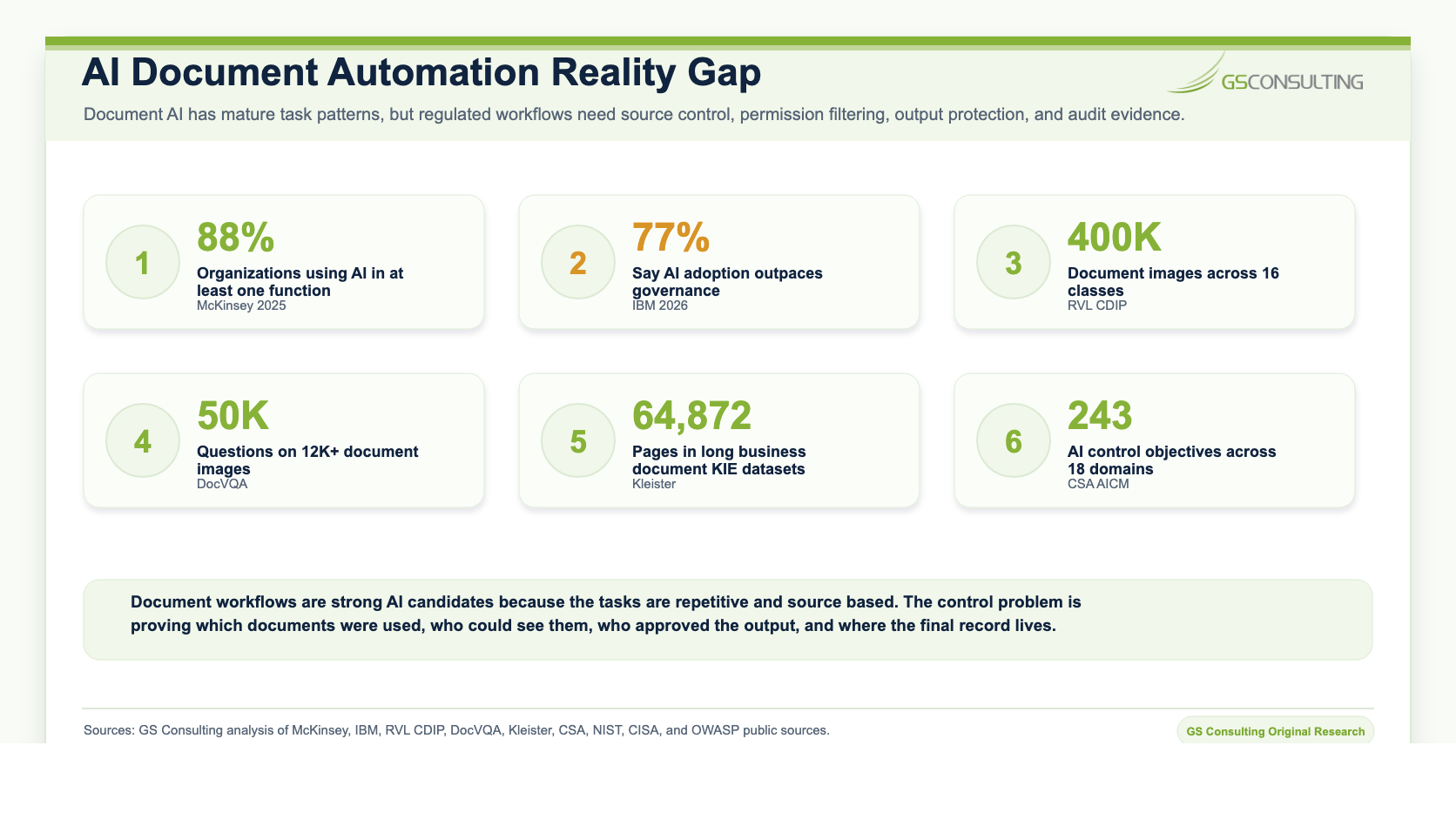
The research points to a blunt conclusion. The best document AI candidates are not always the documents with the most words. They are the workflows where the source set is known, the output is reviewable, the decision stays with a person, and the final record can be retained.
That matters because document automation creates two kinds of value. It reduces manual reading and routing work. It also creates better control over document movement if the workflow is designed correctly.
Where Document Heavy Work Shows Up
Document heavy work is not limited to back office paperwork. It sits inside the workflows that keep the business moving.
- Contracts: clause review, obligation tracking, redline summaries, renewal terms, vendor commitments, customer requirements, and risk exceptions.
- Policies and SOPs: policy comparison, procedure updates, control mapping, exception review, training alignment, and version cleanup.
- Reports and manuals: technical report summarization, equipment manuals, system documentation, inspection reports, and lessons learned.
- Tickets and cases: support tickets, incident records, service requests, claims, HR cases, security tickets, and customer issue histories.
- Compliance evidence: audit packets, access reviews, screenshots, exports, control owner attestations, vendor responses, and questionnaire libraries.
- Forms and invoices: field extraction, exception review, missing data detection, routing, and reconciliation support.
These workflows have one thing in common. The document is rarely the final outcome. The outcome is a decision, response, approval, update, payment, remediation action, or record.
That is why document AI should be designed around the workflow, not around the file.
The Secure Design Pattern
A secure document AI workflow starts before the model sees anything.
First, the organization defines the approved source set. That may be a policy library, contract repository, ticket system, case management platform, knowledge base, evidence folder, or document management system. Then the organization classifies the data, applies permissions, defines the AI task, sets the human review rule, stores the final record, and monitors the workflow.
NIST's AI Risk Management Framework is useful here because it separates AI risk work into Govern, Map, Measure, and Manage. For document workflows, that translates into ownership, context, measurement, and ongoing control. NIST SP 800-53 is also relevant because document AI often touches access control, audit logging, configuration, data protection, system monitoring, and records retention.
The pattern is straightforward:
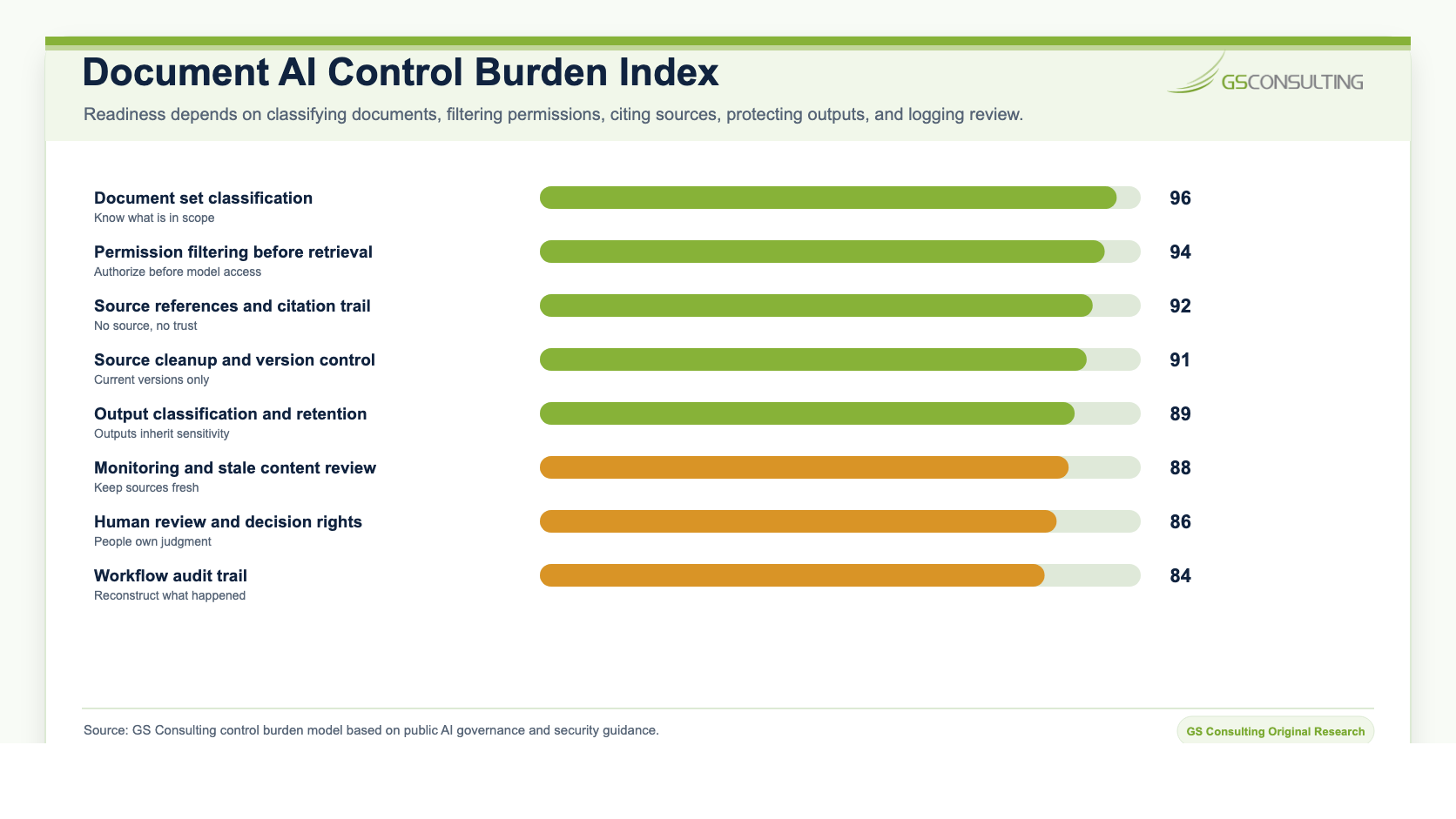
- Classify the source set. Know whether documents contain public, internal, confidential, regulated, customer, contract, security, employee, or controlled information.
- Approve the source library. AI should not answer from random folders, stale PDFs, personal exports, or forgotten attachments.
- Filter by permission. Users should only retrieve document content they are already allowed to access.
- Limit the AI task. Decide whether AI is summarizing, extracting, comparing, routing, drafting, or recommending.
- Require source references. If AI produces an answer, it should show the document, section, clause, ticket, page, or record it used.
- Keep approval with people. AI prepares the work. The accountable owner approves the result.
- Log the workflow. Capture source, user, prompt or task, output, reviewer, decision, changes, final record, and exceptions.
Good Use Cases for Document AI
The best early use cases are useful, narrow, source based, and easy for a person to review.
Approved Policy Search
Policy search is a strong first candidate because the source set can be controlled. AI can answer questions from approved policies, cite the relevant section, summarize differences between policy versions, and route gaps to policy owners.
SOP and Procedure Question Support
Teams often waste time looking for the right procedure. AI can help users find the current SOP, summarize the relevant step, and point back to the source. The value is speed without making the procedure unofficial.
Manual and Technical Documentation Q&A
Technical manuals, system documents, product guides, and engineering notes are hard to search manually. AI can answer from approved documentation and show the page, section, or source document used.
Ticket Summaries and Classification
Support, IT, security, and operations tickets often contain a lot of repeated text. AI can summarize status, classify issue type, identify missing information, suggest routing, and prepare handoff notes.
Operations Report Summaries
Daily, weekly, and monthly reports are good candidates when the output is an internal summary. AI can pull out open issues, blockers, repeated exceptions, overdue actions, and changes from prior periods.
Contract Clause Extraction
AI can extract renewal terms, payment terms, data handling clauses, security commitments, flowdown language, insurance requirements, termination rights, and reporting obligations. Legal or contract owners still review the result.
Compliance Evidence Inventory
AI can group evidence by control, flag stale artifacts, identify missing owners, summarize evidence quality, and prepare review packets. It should not certify compliance without qualified human review.
What AI Should Not Own
Document AI gets risky when teams confuse preparation with approval.
AI can read a contract. It should not approve a contract. AI can summarize an HR case file. It should not make the employment decision. AI can draft a customer response from approved sources. It should not submit the answer without review. AI can organize compliance evidence. It should not certify that the organization is compliant.
That boundary needs to be explicit in the workflow.
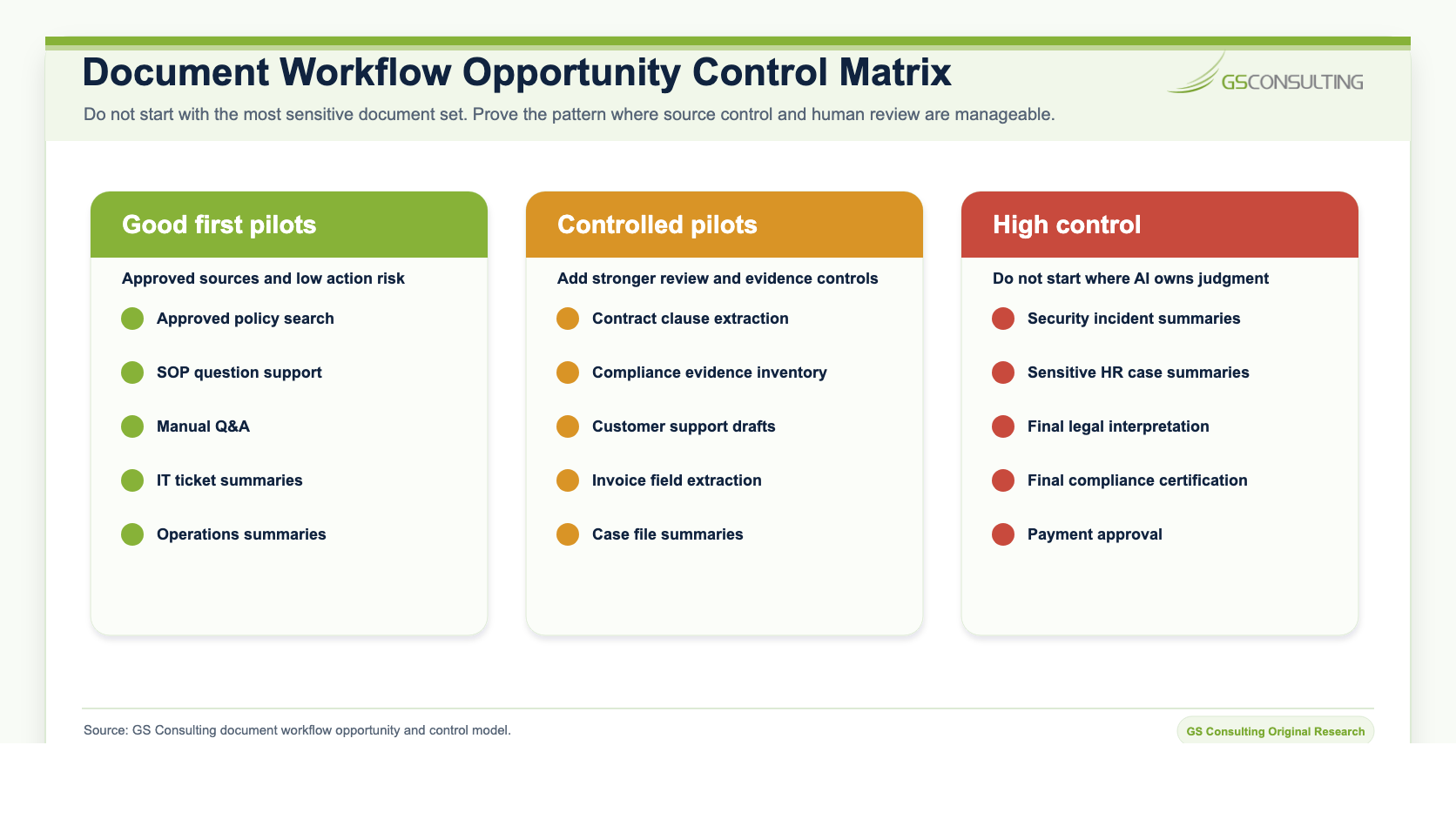
- AI should not make final legal interpretations.
- AI should not approve contract commitments.
- AI should not accept risk.
- AI should not certify compliance.
- AI should not deny claims, benefits, access, or support without accountable review.
- AI should not submit customer, auditor, regulator, or executive facing documents without approval.
- AI should not bypass permission controls to retrieve sensitive document content.
How to Choose the First Document Workflow
Do not start with the workflow that has the most executive attention. Start with the workflow that can be controlled.
A strong first candidate has a known source set, stable document types, measurable volume, clear owner, low to moderate sensitivity, reviewable output, and a final system of record. That is why approved policy search, SOP support, manual Q&A, ticket summaries, and internal operations report summaries often beat more glamorous use cases.
Use a simple test:
- Can we define the approved documents?
- Can we classify the data?
- Can we enforce current user permissions?
- Can AI cite the source it used?
- Can a person review the output quickly?
- Can we store the final answer in the right place?
- Can we measure quality, time saved, rework, and exceptions?
If the answer is yes, the workflow may be a good pilot. If the answer is no, the first project is not AI. The first project is cleaning up the workflow.
The Core Evidence Flow
The safest document AI pattern is not complicated. It is disciplined.
Classify the source set. Clean and approve the content. Filter by permissions. Let AI prepare the work. Show source references. Require human review. Store and log the final record.
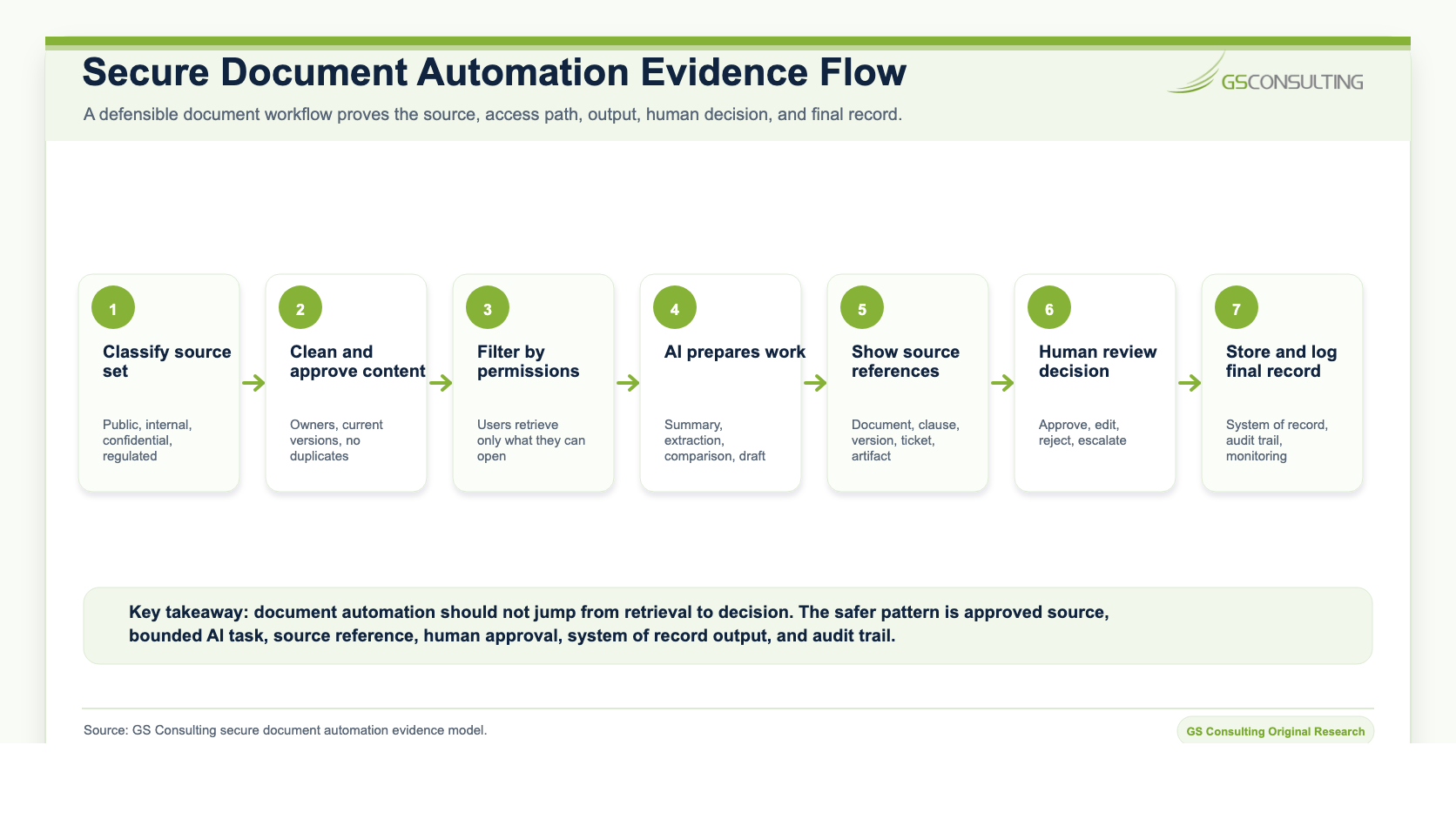
This pattern keeps AI in the right role. It prepares, accelerates, and organizes. The organization still owns judgment, approval, and recordkeeping.
Metrics That Matter
Document AI should be measured by business value and control quality, not just model output.
Useful metrics include document volume, cycle time, review time, routing accuracy, extraction accuracy, source citation quality, human edit rate, rejected output rate, sensitive data incidents, permission violations, stale source usage, missing record rate, exception volume, and final approval time.
The simple math matters. If a five person operations team each spends six hours a week reading, routing, and summarizing document based work, that is 30 hours a week. At a loaded labor rate of $85 per hour, the annual labor value is roughly $132,600. If AI removes 30% of that effort after review time and control overhead, the direct productivity value is about $39,780 per year.
That is not the whole story. The bigger value may be faster decisions, fewer missed obligations, cleaner handoffs, better evidence, lower rework, and less dependence on tribal knowledge.
The First 30 Days
Start with one workflow. Do not connect AI to every document repository and hope discipline appears later.
In the first 30 days, pick one document heavy workflow, identify the owner, define the approved source set, classify the data, map permissions, define the AI task, write the human review rule, decide where the final record lives, and define the evidence packet.
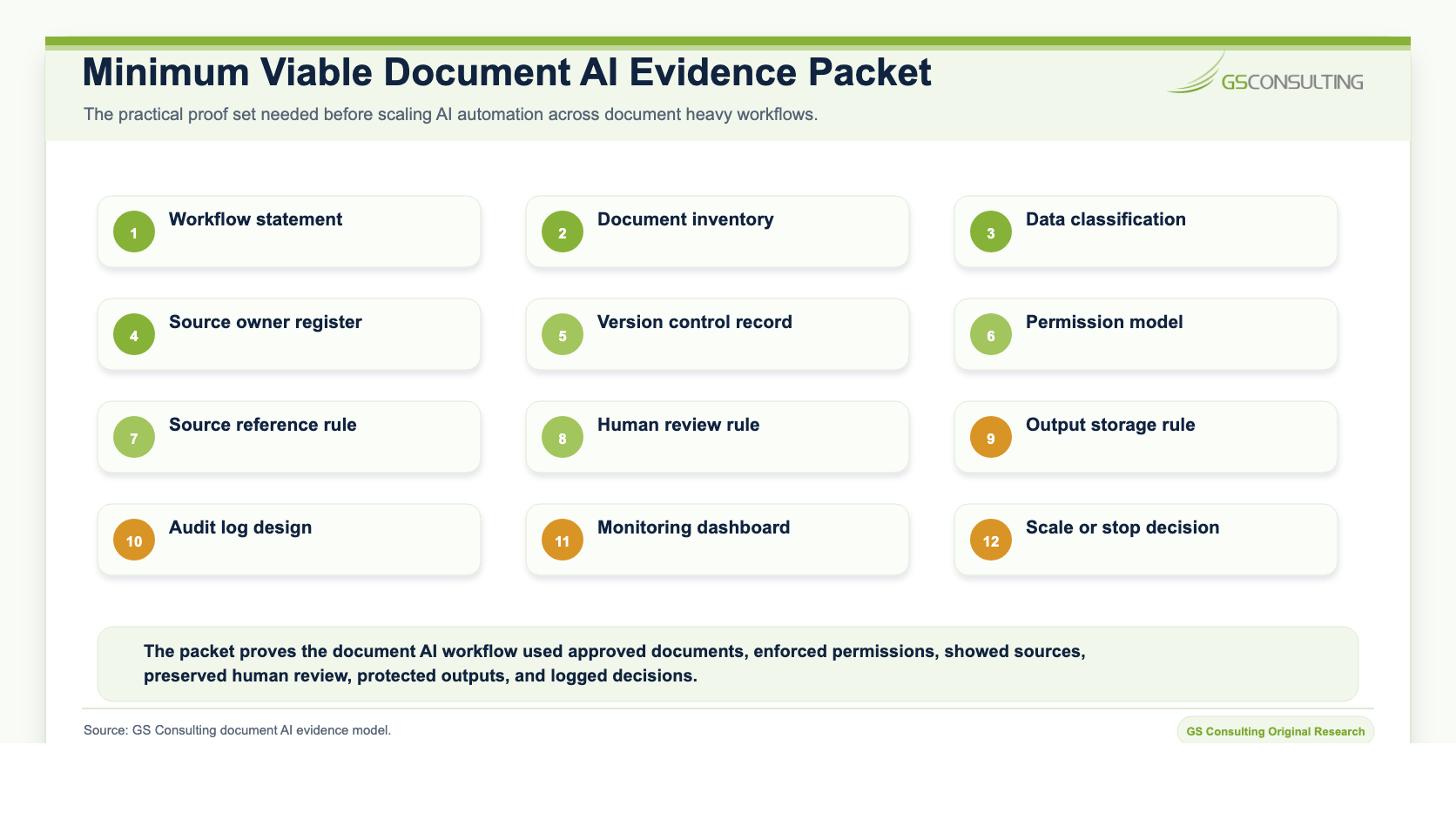
The minimum viable evidence packet should include:
- Workflow purpose and business owner.
- Approved source register.
- Data classification and sensitivity notes.
- Permission model.
- AI task boundary.
- Source citation rule.
- Human review and approval rule.
- Final record location.
- Audit log requirements.
- Monitoring metrics.
- Exception and escalation path.
- Scale, pause, or stop decision.
The Bottom Line
AI automation for document heavy business processes is useful when it removes real friction from real workflows.
It can help teams review, summarize, extract, compare, route, draft, and prepare evidence faster. But it should not become an invisible decision maker. The organization still needs source control, permission filtering, human approval, audit trails, monitoring, and a final system of record.
The right question is not, can AI read this document?
The better question is, can we control the workflow well enough to trust what happens after AI reads it?
Build document AI workflows that hold up under review.
GS Consulting helps teams identify the right document automation use cases, design secure workflow controls, create evidence packets, and measure value without losing accountability.
Contact GS ConsultingFrequently Asked Questions About Document AI Automation
What are document heavy business processes?
Document heavy business processes are workflows where the work depends on reading, comparing, classifying, extracting, summarizing, routing, approving, or retaining documents. Common examples include contracts, policies, SOPs, manuals, reports, tickets, case files, invoices, forms, proposals, and compliance evidence.
Where can AI help with document heavy workflows?
AI can help summarize long documents, extract key fields, compare versions, classify document types, route work to the right owner, prepare review packets, draft responses from approved sources, and flag missing or inconsistent information.
What controls are needed before automating document workflows with AI?
Secure document AI workflows need approved source sets, data classification, permission filtering, source references, human approval rules, output retention, audit trails, monitoring, and clear escalation paths for exceptions.
What document AI workflows should not be fully automated?
AI should not make final legal interpretations, approve contract commitments, certify compliance, accept risk, deny benefits, make final employment decisions, or submit customer, auditor, regulator, or executive facing outputs without accountable human review.
Related Reading
- Secure AI Automation for Regulated Organizations
- Data Classification Before AI Automation
- AI Automation for Sensitive Data Workflows
- AI Audit Trails and Activity Logging
- Measuring ROI from Secure AI Automation