Secure AI Automation | | 22 min read
AI Audit Trails and Activity Logging: What to Capture

Key Takeaways
An AI audit trail should let a reviewer reconstruct the workflow.
Connect the request to the action
Keep the initiating identity, source records, AI output, approval, and system change connected. A final answer alone does not explain what happened.
Preserve the evidence behind decisions
Record the source and version information needed to review an output. Keep human decisions distinct from AI recommendations.
Capture failures and exceptions
Permission denials, rejected actions, errors, and rollbacks belong in the record. Successful runs do not show whether the controls work under pressure.
Protect the audit trail itself
Set access, retention, and export rules for the evidence. Log detail should follow workflow risk and data sensitivity.
An AI audit trail is the evidence record that reconstructs who initiated a workflow, what data and sources AI used, what it produced, who reviewed it, what actions followed, and which model and workflow versions were active.
Use this guide to design the evidence for one workflow, then test whether another reviewer can reconstruct a successful run and its exceptions. Start with the worked agent audit trail and the downloadable evidence checklist.
Start an AI audit trail review in five steps
- Choose a run. Identify the workflow, review period, initiating user, agent, and stable run identifier.
- Retrieve the sources. Resolve the exact source and output versions the reviewer saw, using approved evidence access.
- Match authority to action. Connect the human approval to the exact proposed change and the identity that executed it.
- Verify the outcome. Inspect the target response and resulting state, including denials, timeouts, retries, and recovery.
- Record the gaps. Note missing evidence, collection failures, retention issues, and the owner responsible for each correction.
The invoice exception example shows how these records connect. It is a fictional implementation pattern, not a client result or an official audit requirement.
Build the evidence model before AI becomes part of the workflow.
GS Consulting helps regulated organizations design AI audit trails, prompt records, source traceability, decision history, human approval records, and compliance evidence for secure AI automation.
Explore Secure AI Automation ConsultingThis guide connects the Agentic AI insights hub to the evidence needed for operating and reviewing agents. Download the evidence checklist to apply it to one workflow.
AI Logging Is Not Normal Application Logging
Most organizations already log application activity: a user signed in, a record changed, a file was downloaded, a ticket was updated, or an admin changed a setting.
That is useful. It is not enough for AI automation.
AI workflows need a different kind of traceability because AI does more than process clicks. It interprets information, generates outputs, retrieves sources, recommends actions, and may trigger steps across systems.
A normal application log may tell you that a user submitted a request. An AI audit trail should tell you what the user asked, what the AI retrieved, what answer it generated, what sources were used, what action was recommended, who approved it, and what happened next.
NIST SP 800 53 includes audit and accountability controls as part of a broader security and privacy control catalog. AI automation still has to fit into real security and compliance programs. It should not sit outside them.
Original Research: The AI Audit Trail Evidence Burden Index
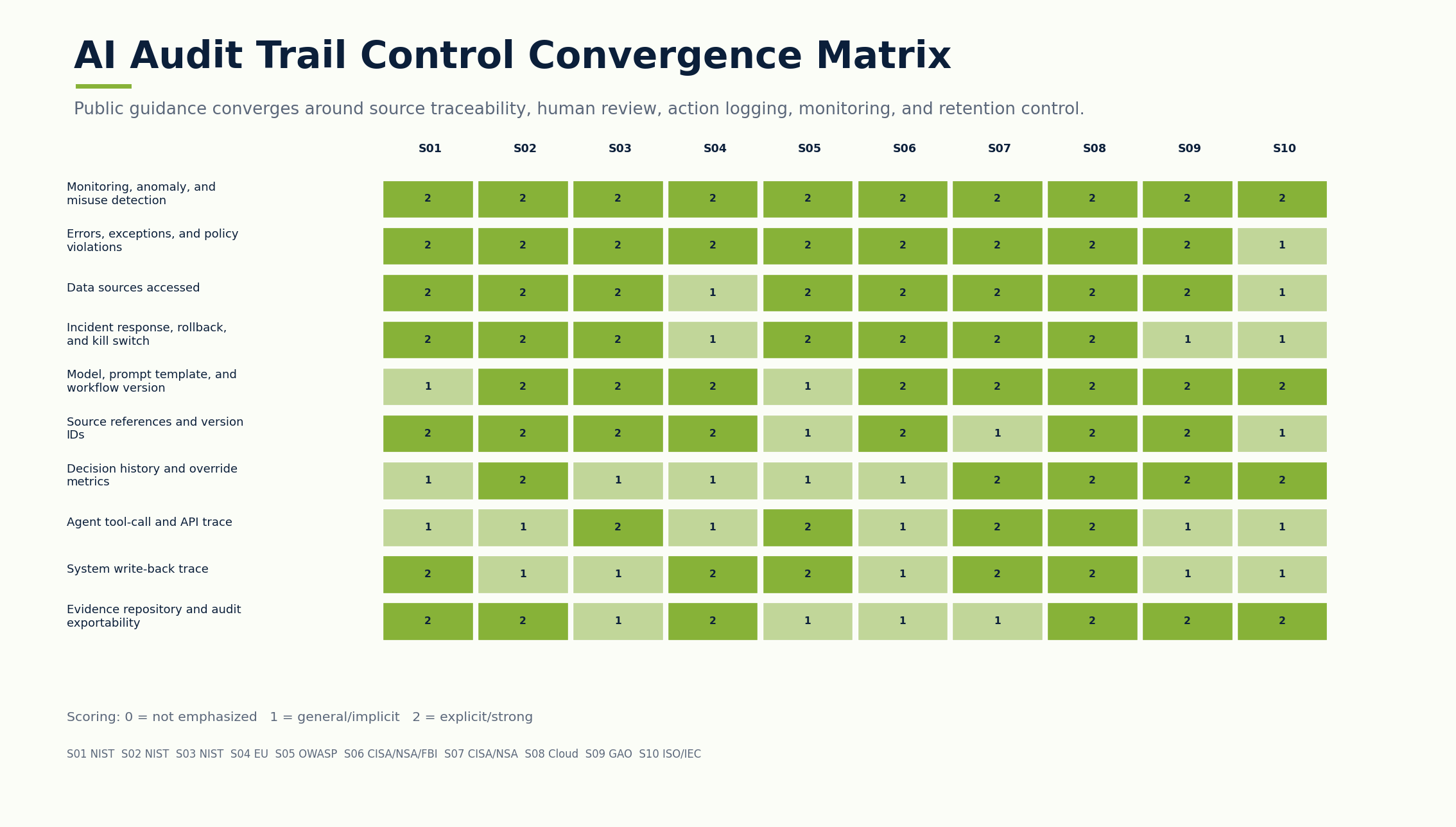
Original GS Consulting research shows that AI audit readiness is a reconstruction problem, not a logging volume problem.
GS Consulting analyzed public AI governance, security, accountability, regulatory, and enterprise adoption sources against 17 AI logging and evidence controls. The source set included NIST SP 800 53, NIST AI RMF, NIST Generative AI Profile, the EU AI Act, OWASP LLM Top 10, CISA and NSA AI guidance, CSA AI Controls Matrix, GAO's AI Accountability Framework, ISO 42001 public information, McKinsey's 2025 State of AI, IBM's 2026 AI control gap study, and Microsoft's 2025 Digital Defense Report.
The analysis produced GS Consulting derived planning metrics: AI Audit Trail Evidence Burden Score, Workflow Traceability Score, and a logging depth model by AI risk tier. These are planning tools, not official legal, audit, regulatory, security, NIST, CISA, EU, OWASP, CSA, GAO, ISO, IBM, McKinsey, Microsoft, or compliance determinations.
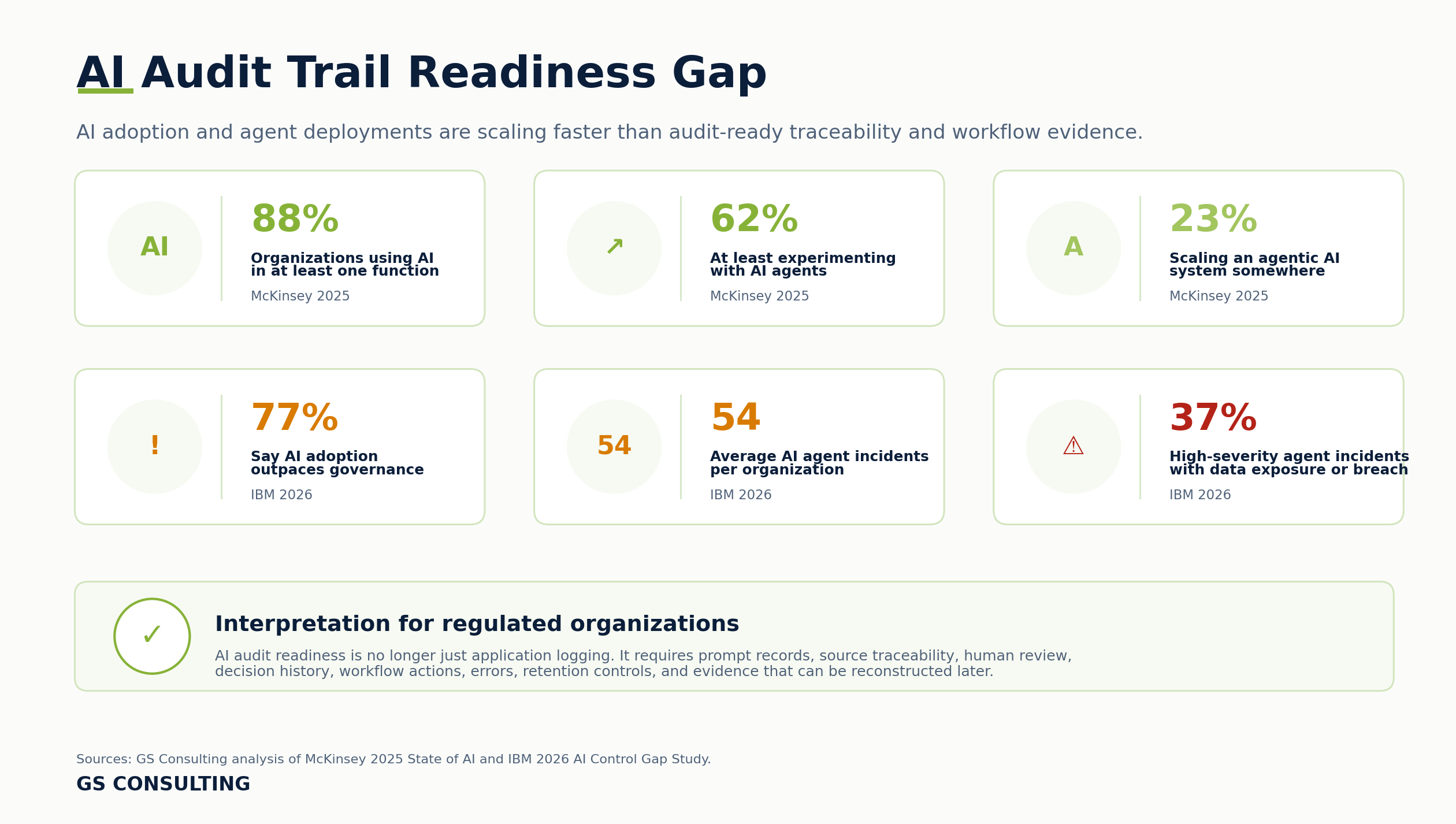
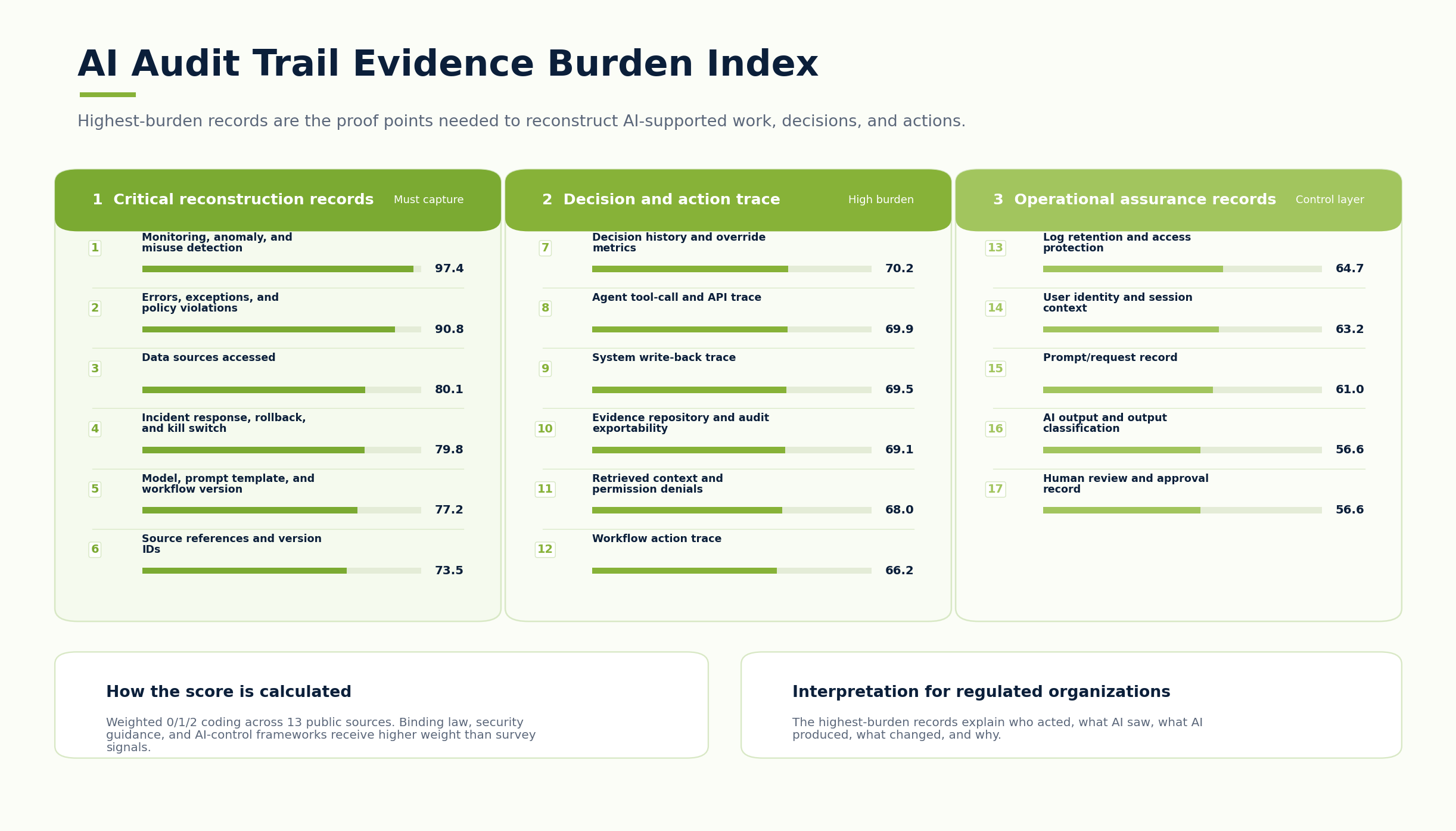
The practical takeaway is clear: regulated organizations should not only log the final AI output. They should capture enough evidence to answer what happened later.
The Problem: AI Creates New Evidence
AI does not just use evidence. It creates evidence.
A prompt can become evidence. An AI output can become evidence. A source reference can become evidence. A human approval can become evidence. An AI generated summary can become evidence. An escalation can become evidence. A rejected recommendation can become evidence. A model error can become evidence.
If AI is used in HR, finance, contracts, customer support, compliance, security, GovCon, healthcare, or operations, those artifacts may matter later.
An auditor may ask how a conclusion was reached. A customer may ask why a response was sent. A contracting officer may ask how controlled information was handled. A security team may ask whether sensitive data was exposed.
If the organization cannot reconstruct the workflow, it does not have control. It has a story. Stories are not evidence.
What an AI Audit Trail Should Capture
A useful AI audit trail should capture the full path of the workflow, not just the final answer.
- IdentityWho used the workflow?
Capture user ID, role, team, session, authentication method, and permissions at the time of request.
- RequestWhat did they ask AI to do?
Capture the prompt or request when AI touches sensitive data, regulated workflows, or decision support.
- SourcesWhat did AI access?
Track documents, tickets, records, APIs, policies, contracts, logs, invoices, evidence, and source references.
- OutputWhat did AI produce?
Record summaries, classifications, recommendations, drafts, extracted fields, and action plans where appropriate.
- ReviewWho reviewed it?
Log approvals, edits, rejections, escalations, reviewer notes, and decisions.
- ActionWhat happened next?
Track tickets routed, messages sent, records updated, tasks assigned, reports generated, and downstream actions.
If AI writes back to a system, the audit trail needs to be stronger. Capture the system updated, field changed, old value, new value, approval, automation status, reversibility, and downstream triggers.
Do not only log success. Log retrieval failures, permission denials, missing sources, conflicting sources, rejected outputs, escalations, policy violations, model failures, connector failures, and unusual access events.
Why Source Traceability Matters
Source traceability is what separates a useful AI answer from an unsupported claim.
A regulated organization should not rely on AI outputs that cannot point back to approved sources.
If AI says, "The policy requires manager approval," the user should be able to see which policy and which section. If AI says, "This contract includes a reporting obligation," the reviewer should be able to see the clause. If AI says, "This ticket looks like a security incident," the analyst should see the signals that led to that recommendation.
NIST's AI RMF Core emphasizes governance, mapping, measurement, and management of AI risk. Logs help organizations map what happened, measure performance, and manage issues over time.
Prompt Records Need Rules
Some organizations avoid logging prompts because prompts may contain sensitive data. That concern is valid.
But the answer is not to ignore prompts completely. The answer is to define prompt logging rules.
The key is that prompt records should be protected based on the data inside them. A prompt can contain sensitive information. Treat it that way.
Logs Can Become Sensitive Too
Logging is not free from risk.
Logs may contain user names, customer identifiers, employee data, contract details, security findings, system names, prompt text, AI outputs, source references, decision history, and API responses.
That means AI logs need access controls, retention rules, encryption, monitoring, export controls, review procedures, deletion rules where appropriate, and legal or compliance input where needed.
The AI Governance Data Retention and Deletion guide shows how to separate the content that may need disposition from the proof that a logging, hold, backup, provider, and deletion decision was executed.
Do not create a log repository that becomes the most sensitive system in the company and then give broad access to it.
What to Log by Risk Level
Not every AI workflow needs the same logging depth. If you log everything everywhere forever, you create cost, privacy, and operational problems. If you log too little, you lose accountability.
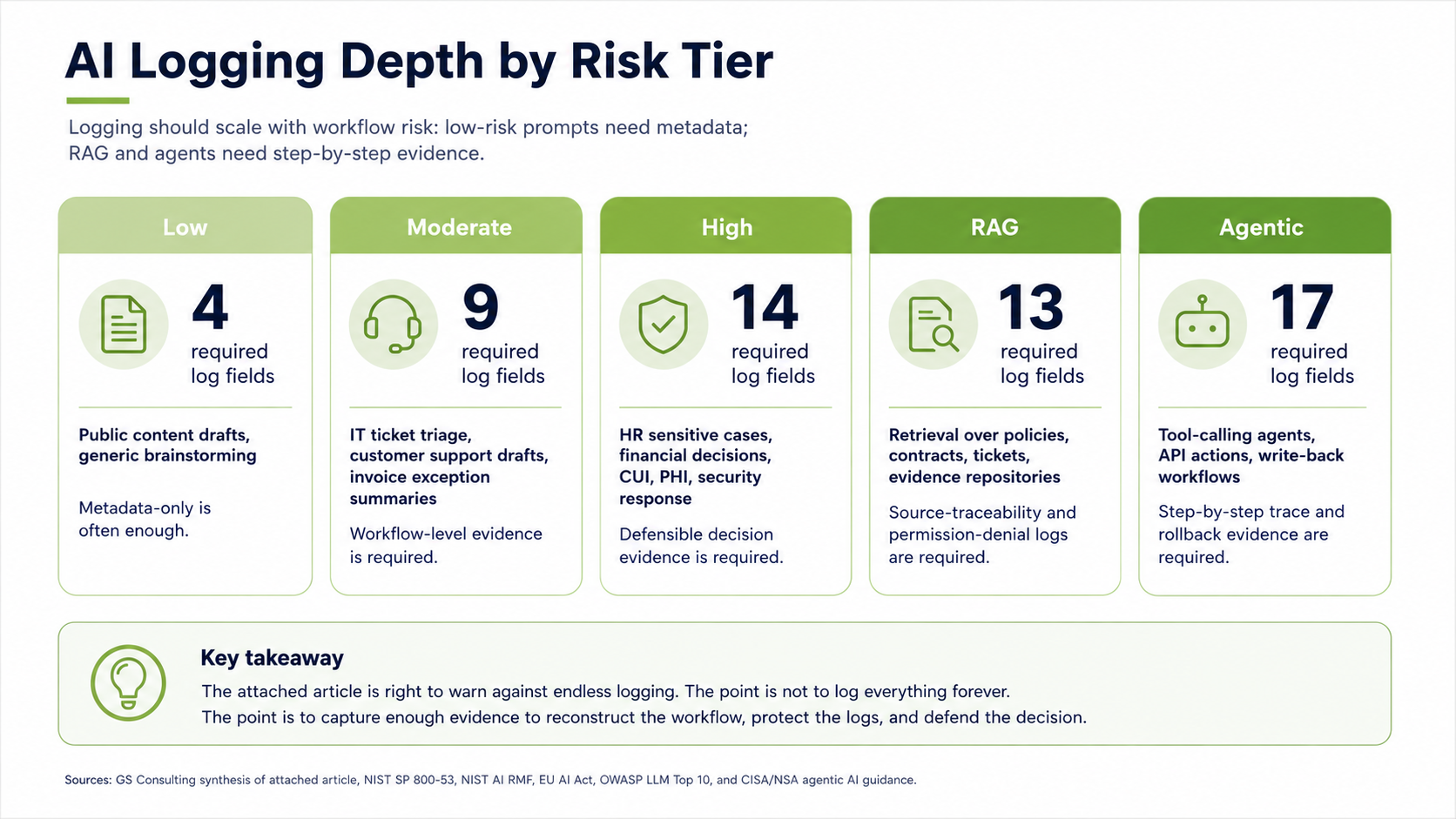
- LowPublic or low sensitivity AI work.
Log user, tool, time, basic usage, and output when needed.
- ModerateOperational support and decision preparation.
Log prompt, data sources, AI output, source references, human review, workflow action, errors, and overrides.
- HighSensitive data, regulated workflows, or high impact decisions.
Log full prompt records, source references, model and workflow version, approval history, decision notes, system changes, escalations, exceptions, monitoring, and retention.
AI Logging for RAG Systems and Agents
Retrieval based AI needs special logging. A RAG system can reduce unsupported answers by grounding responses in approved sources, but only if the organization can see what was retrieved.
For RAG, log user identity, question asked, search query, documents retrieved, documents excluded because of permissions, source references used, answer generated, whether the user opened the source, whether the answer was copied or exported, user feedback, and required human review.
AI agents need even stronger logging. A chatbot answers. An agent can act. That changes the evidence requirement.
If an AI agent can call tools, retrieve records, update fields, trigger workflows, send messages, or assign tasks, the audit trail needs to show every step: user request, agent plan, tools called, data accessed, API requests, API responses, intermediate steps, approval gates, actions taken, records updated, messages generated, errors, rollbacks, and final outcome.
OWASP's LLM Top 10 highlights risks such as prompt injection, sensitive information disclosure, insecure plugin design, and excessive agency. These risks matter more when AI has tools and action rights.
AI agent audit trail example: an invoice exception
An AI agent audit trail should show how an authorized request became a controlled action. The following fictional example uses an invoice exception workflow. It is an implementation pattern, not a client result or a required industry schema.
A finance analyst asks an agent to review invoice INV-1042. The agent can read the invoice and purchase order and propose an exception status. It cannot release payment. A finance reviewer must approve the exact proposed update before the workflow changes the record.
Every event below belongs to run RUN-1042. Each has its own event ID, occurrence time in UTC, and relationship to the preceding event. In a workflow with parallel tasks, retain parent and child relationships as well. Timestamps alone do not establish causality.
| Event | What happened | Evidence retained |
|---|---|---|
| E01 — Request | Analyst USR-17 requests an invoice review. |
Authenticated subject, agent identity AGENT-AP-01, purpose, permissions, and controlled request reference. |
| E02 — Source access | The connector reads invoice version 7 and purchase order version 3. | Source IDs, versions, authorization outcome, and retrievable snapshots or records sufficient to review the evidence used. |
| E03 — Proposal | The agent proposes setting the exception status to Needs review. |
Output reference OUT-1042-v1, relevant source references, and model, prompt, workflow, and policy versions. |
| E04 — Approval | Reviewer USR-42 approves that exact status change. |
Approval APR-81, reviewer authority, timestamp, target record, approved output version, and permitted change. |
| E05 — Action | The connector updates the exception status. | Tool invocation, request identifier, authorization result, before/after values, approval reference, and target system acknowledgement. |
| E06 — Verification | The workflow reads back the record and confirms version 8 contains the approved status. | Read back reference, actual outcome, discrepancies if any, and completion status. |
The distinction between E05 and E06 matters. An agent saying “updated” is not evidence that the target system accepted the change. Preserve the target response and verify the resulting state where the workflow requires it.
A sample action event
This shortened JSON illustrates E05. The values are fictional, and the evidence paths are example identifiers rather than public URLs. Production implementations should define required fields, trusted event producers, and validation rules for their environment.
{
  "schema_version": "1.0",
  "event_id": "E05",
  "run_id": "RUN-1042",
  "parent_event_id": "E04",
  "occurred_at": "2026-09-01T14:02:11Z",
  "recorded_at": "2026-09-01T14:02:12Z",
  "event_type": "tool.action.completed",
  "initiating_subject_id": "USR-17",
  "agent_id": "AGENT-AP-01",
  "executing_identity": "SVC-AP-CONNECTOR",
  "workflow_version": "invoice-review-2.3",
  "model_deployment_version": "approved-model-2026-08",
  "prompt_template_version": "invoice-exception-1.4",
  "policy_version": "ap-exception-3",
  "source_refs": ["INV-1042@7", "PO-882@3"],
  "output_ref": "OUT-1042-v1",
  "approval_id": "APR-81",
  "authorization_result": "allowed",
  "tool": "erp.update_invoice_exception",
  "request_id": "REQ-55",
  "idempotency_key": "RUN-1042-status-v1",
  "target_record": "INV-1042",
  "target_version_before": 7,
  "change": {
    "field": "exception_status",
    "before": "Open",
    "after": "Needs review"
  },
  "outcome": "accepted_by_target",
  "target_response_ref": "evidence/RUN-1042/erp-response-55",
  "target_version_after": 8,
  "retention_policy_id": "FIN-AI-LOGS",
  "classification": "Internal"
}
Keep sensitive prompt text and response bodies in an approved evidence store when appropriate. The event can point to those records without copying their contents into every monitoring system. A reference is useful only if an authorized reviewer can retrieve the right version for the required retention period.
Capture observable requests, outputs, tool events, and human decisions. Do not require or claim to capture a model’s hidden chain of thought. A generated explanation is an output to evaluate, not independent proof of the model’s internal reasoning.
How a reviewer reconstructs the run
- Retrieve all events for
RUN-1042and resolve their parent relationships. Identify missing events or collection delays. - Verify who initiated the work and which service identity performed the update. Check their authority at the time of the action.
- Retrieve the source versions and output the reviewer saw. Confirm approval
APR-81applies toOUT-1042-v1and the exact change in E05. - Compare the approved change with the connector response and E06 read back. Confirm that no payment release or other unapproved action occurred.
- Export the linked evidence and document any unresolved gaps. Preserve access restrictions on the export.
A readable sequence is only part of the design. Restrict who can write, change, delete, and export evidence. Monitor collection failures. If the organization requires protection against alteration, test the storage controls and verification process. A hash stored beside an editable record does not by itself make that record tamper resistant.
Test the exceptions before relying on the logs
Use separate test runs for each scenario:
- Denied source access: the system records a denial without exposing the restricted document or its contents to an unauthorized viewer.
- Changed proposal: approval for one output version cannot authorize a different proposed action. The workflow requests a new approval.
- Connector timeout: the run records an unknown result, checks target state, and follows the retry policy before repeating a write. Preserve each attempt under the same run and logical operation.
- Evidence collection failure: the workflow follows its defined pause or escalation policy. It does not silently record the run as fully evidenced.
- Reversal: where reversal is supported, a compensating action creates a new linked event. It does not erase the original action.
For the surrounding control design, see AI access controls and permission design and human in the loop AI automation.
Decision History Is the Part Leaders Care About
Technical logs matter. But leaders usually care about decision history.
They want to know what AI recommended, what the human decided, whether the AI was right, whether the recommendation was ignored, whether the person overrode it, whether the workflow escalated, and whether the action created an issue later.
This is especially important for customer commitments, employee decisions, compliance conclusions, financial exceptions, security response, contract obligations, operational escalations, and legal review.
Decision history is what turns AI from a mysterious assistant into a managed workflow.
When the audit trail crosses business systems, pair it with integration observability and reconciliation. For security workflows, use security case management integration to define evidence handoffs. The documented private AI cyber analysis case study describes GS Consulting implementation work; it does not validate the fictional invoice example above.
The Audit Trail Architecture
A practical AI audit trail architecture has several parts. It does not need to be overly complex, but it does need to be deliberate.
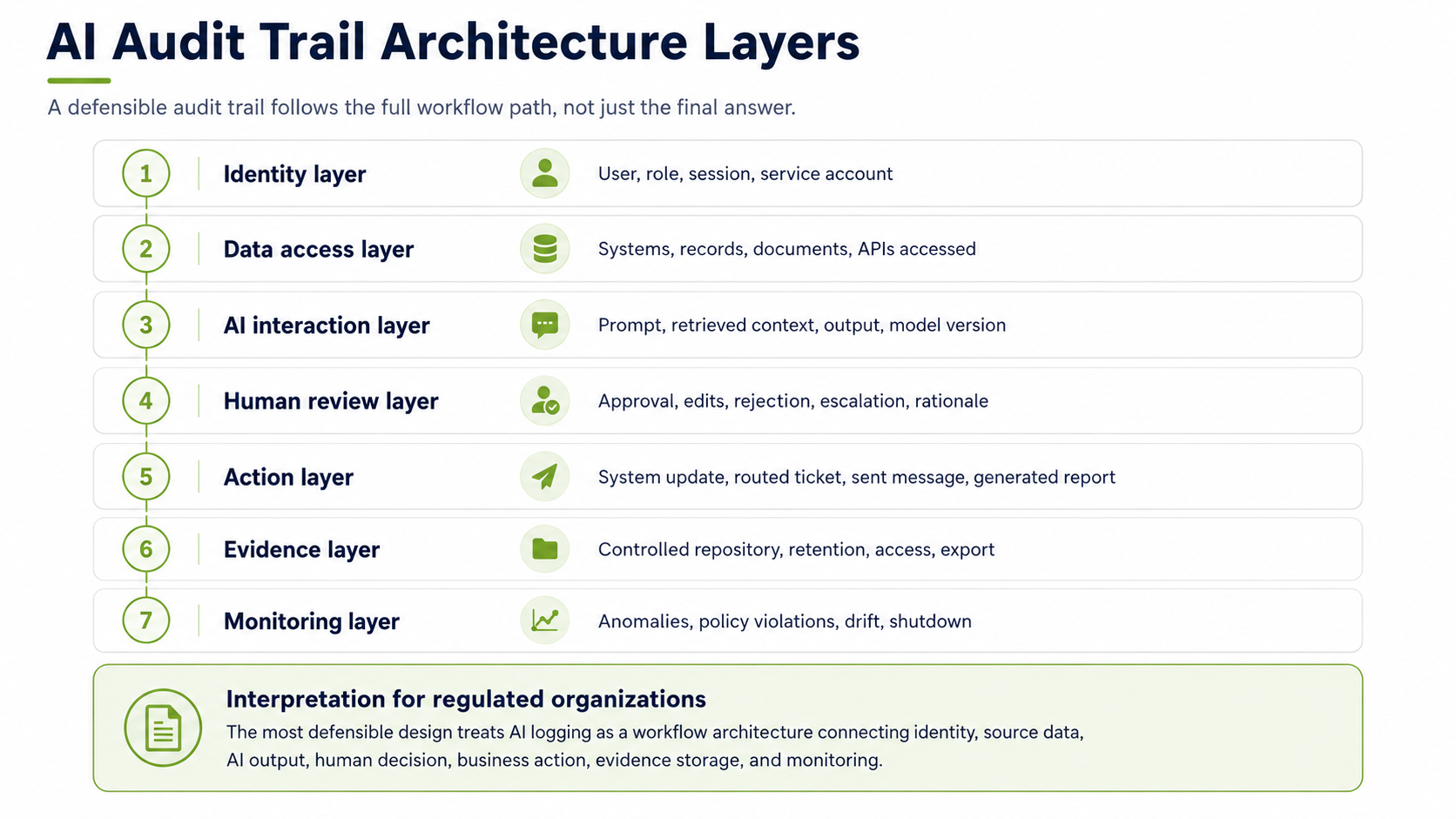
- IdentityConnect AI activity to users, roles, groups, and service accounts.
- AccessRecord systems, documents, records, and APIs touched by the workflow.
- ReviewCapture approvals, edits, rejections, escalations, and reviewer notes.
- EvidenceStore controlled records with retention, search, export, and monitoring.
How to evaluate AI audit trail software
Evaluate a product against a complete workflow. Ask the vendor to demonstrate a request, a source retrieval, a proposed action, an approval, a system update, and an evidence export using a test environment.
| Ask the vendor to demonstrate | Evidence to inspect |
|---|---|
| Connect events across systems | Stable run and event identifiers, parent relationships, and timing information in the export. |
| Retain prompts and responses under your rules | Configurable capture, redaction, restricted retrieval, and references that resolve to the retained versions. |
| Bind approval to an action | The exact output or proposed change approved, reviewer identity, and handling of changes after approval. |
| Prove an action occurred | Tool requests, target responses, errors, retries, and resulting system state. |
| Preserve access and retention controls | Evidence of who can read, change, delete, and export records, with retention and hold behavior demonstrated for your scope. |
| Export usable evidence | A sample export an independent reviewer can follow without relying on the vendor’s dashboard. |
Identify the gaps between the application, model provider, orchestration layer, and target system. One product may capture model interactions while another records approvals or business record changes. The implementation needs to connect those records and assign ownership for missing evidence.
See the AI vendor evaluation guide for broader procurement questions.
What Not to Do
- Do not rely on vendor chat history as your audit trail. It may not capture source references, approvals, retention needs, or workflow actions.
- Do not store logs in a general workspace. AI logs can contain sensitive information.
- Do not log everything without classification. That creates unnecessary privacy and security risk.
- Do not let each team invent its own logging method. Enterprise review becomes almost impossible.
- Do not treat AI outputs as temporary notes when they support business decisions. They may become records.
- Do not forget service accounts and agents. Non human identities still need traceability.
AI audit trail evidence checklist
Start with one workflow and one review scope. Assign an owner to each evidence requirement, record where the evidence is retained, and test whether an authorized reviewer can use it. A configured logging feature is not the same as a verified record.
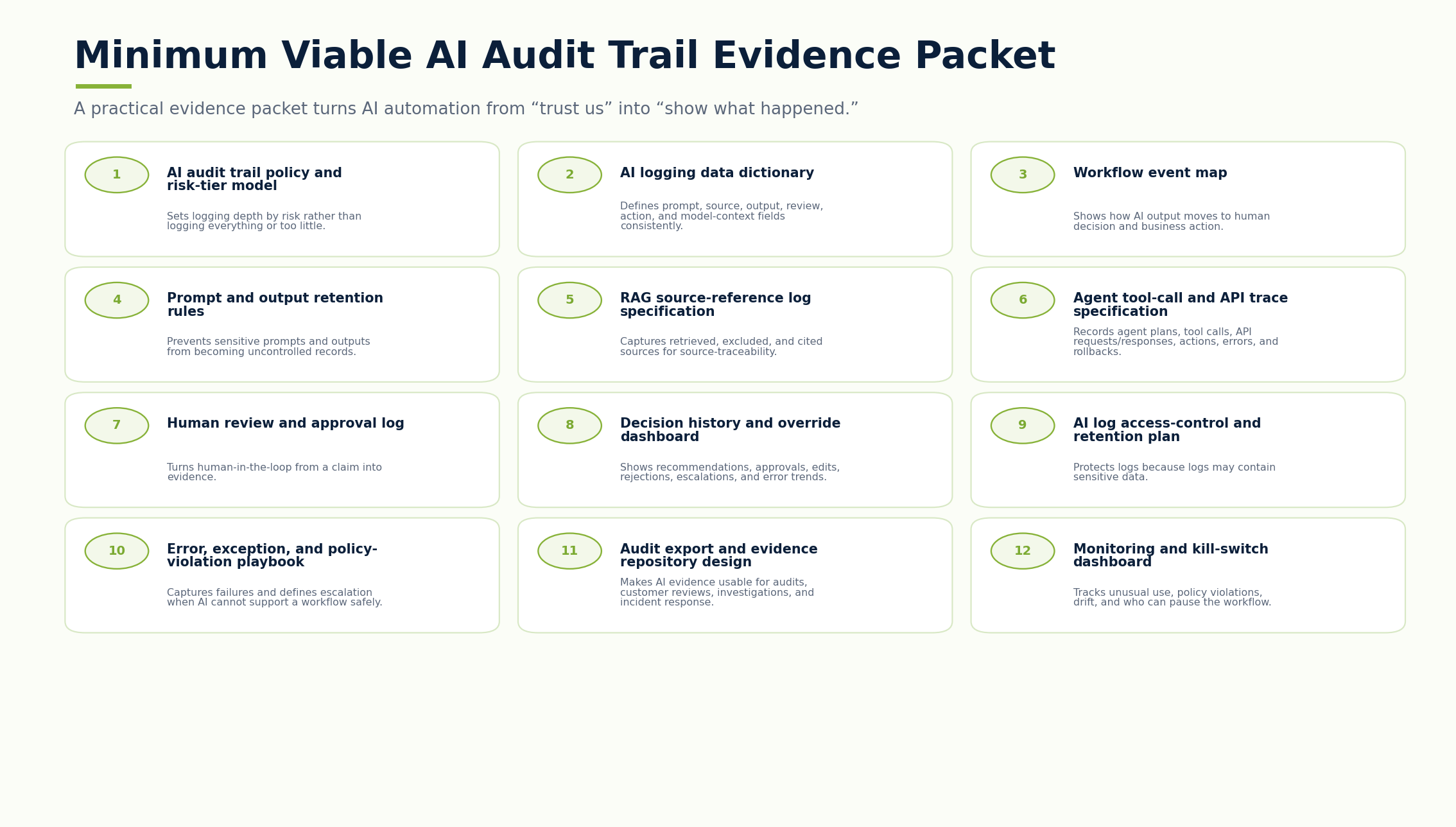
Use the accompanying AI Audit Trail Evidence Checklist to record:
- The identity, request, source, output, approval, and action evidence for a run.
- The versions, errors, retries, and recovery records needed to investigate exceptions.
- The storage, access, retention, monitoring, and export controls that protect the evidence.
- The test result, reviewer, review date, and action required for each gap.
Mark an item “Pass” only after performing its verification test and linking the evidence. Use “Not applicable” only with a documented reason and reviewer acceptance. Neither a completed checklist nor a successful sample establishes compliance for all workflows.
Put the evidence review into practice
The Excel workbook includes 22 verification checks, editable review fields, instructions, and a fictional worked example.
Download the AI Audit Trail Evidence ChecklistExcel workbook (.xlsx). GS Consulting planning template, not an official legal, audit, compliance, or regulatory determination.
The First 30 Days
Start with one workflow. Pick a workflow where AI touches something important but manageable: IT ticket triage, compliance evidence summaries, contract obligation summaries, customer support drafts, invoice exception review, security alert summaries, or operations exception reports.
- Week 1Map the workflow.
Define the users, systems, data, AI task, source repositories, approval points, outputs, and downstream actions.
- Week 2Define the evidence model.
Decide what prompts, sources, outputs, approvals, exceptions, versions, and actions need records.
- Week 3Protect the logs.
Set access controls, retention rules, classification, encryption, monitoring, export paths, and review ownership.
- Week 4Test reconstruction.
Run sample cases and prove the team can explain who used AI, what it accessed, what it produced, who reviewed it, and what changed.
How This Supports Secure AI Automation
Audit trails and logging are part of a broader secure AI automation approach. Secure AI Automation Consulting explains how GS Consulting helps organizations automate workflows with the right governance, architecture, data controls, security, and measurable outcomes.
This guide answers one specific control question: how do we prove what AI did once it becomes part of real workflows?
That question matters because AI automation without traceability is just trust without evidence. Regulated organizations cannot operate on trust alone.
How GS Consulting applies auditability in a real system
In a private AI cyber analysis implementation, GS Consulting used a controlled Python pipeline, locally hosted model, defined structured JSON, workflow orchestration, processing status, exception visibility, and human review. Those surrounding layers made it possible to validate outputs, route results to an approved SIEM or database, and preserve operational accountability beyond a model response.
Read the Private AI Case Study Review Implementation ServicesThe Bottom Line
AI audit trails are not a nice to have. They are the evidence layer for secure AI automation.
If AI reads data, generates outputs, recommends actions, supports decisions, or updates systems, the organization needs to know what happened.
That means logging user actions, prompts, source references, AI outputs, human review, decision history, workflow actions, errors, exceptions, and system changes.
The goal is not to create endless logs. The goal is to capture the right evidence for the risk of the workflow.
GS Consulting helps regulated organizations design AI audit trails, activity logging, prompt records, source traceability, decision history, human approval records, and compliance evidence for secure AI automation workflows.
Ready to make your AI automation audit ready?
Contact GS Consulting for an AI Audit Trail and Logging Assessment.
Contact GS ConsultingResearch Sources and Caveats
The AI Audit Trail Evidence Burden Score, Workflow Traceability Score, and logging depth model are GS Consulting derived planning tools. They are not official legal, regulatory, audit, NIST, CISA, EU AI Act, OWASP, CSA, GAO, ISO, IBM, McKinsey, Microsoft, or compliance determinations.
Actual logging requirements depend on the organization's contracts, systems, data sensitivity, AI vendor terms, retention obligations, privacy requirements, incident response process, regulated workflow exposure, and legal review.
The worked example and checklist are GS Consulting proposed implementation guidance, not client results or official compliance determinations. The example uses a custom event schema. The OpenTelemetry Logs Data Model provides background on event and observation timestamps and record correlation; the example does not claim schema conformance.
- NIST SP 800 53 Rev. 5: Security and Privacy Controls for Information Systems and Organizations
- NIST AI RMF Core
- NIST AI 600 1: Generative Artificial Intelligence Profile
- OWASP Top 10 for Large Language Model Applications
- CISA: Careful Adoption of Agentic AI Services
- GAO Artificial Intelligence Accountability Framework
- EU AI Act Article 12: Record Keeping
- McKinsey: The State of AI
- IBM: AI Control Gap Study
Frequently Asked Questions About AI Audit Trails
What should an AI audit trail capture?
An AI audit trail should capture the user, request, data sources, source references, AI output, human review, workflow action, system write back, errors, exceptions, model context, workflow version, and where the evidence is stored.
Are AI audit logs the same as normal application logs?
No. Normal application logs often show sign ins, clicks, downloads, and record changes. AI audit logs need to reconstruct the full workflow: what the user asked, what AI retrieved, what answer it generated, what sources were used, who reviewed it, and what happened next.
Should organizations log every AI prompt?
Not always. Prompt logging should follow workflow risk. Low risk use may only need usage metadata. Moderate and high risk workflows usually need prompt records, outputs, source references, review actions, and stronger retention and access controls.
Why do AI agents need stronger logging?
AI agents can call tools, retrieve records, update fields, trigger workflows, send messages, and take operational steps. The audit trail needs to show tool calls, API requests, intermediate steps, approvals, errors, rollbacks, and final outcomes.
How do you audit an AI agent?
Audit an AI agent by reconstructing the complete run: initiating identity and request, retrieved data, agent plan, model and prompt version, tool calls, API requests and responses, approvals, actions, errors, rollbacks, final outcome, and the evidence retained for review.
How do I implement an audit trail for AI agents acting on behalf of users?
Start with one workflow. Connect the initiating user, agent identity, source access, model output, approval, and system action with a stable run identifier. Record the versions and permissions in effect. Then test whether a reviewer can reconstruct a successful run, a denied request, and a failed action from retained evidence.
Can software capture AI prompts and responses for audit review?
Prompt and response capture is one part of an audit trail. Evaluate whether your implementation also preserves source versions, approvals, tool actions, exceptions, and target system outcomes. Define what content may be retained and who can access it. Test the evidence export against a complete workflow.
What evidence should an AI audit trail checklist include?
Include identity, request, source, output, review, and action records. Add the versions and exception history needed to reconstruct the run. Record how evidence is protected, retained, monitored, and exported. Assign an owner and verify each applicable item with a reviewer and evidence reference.