Secure AI Automation | | 25 min read
AI Access Controls and Permission Design

Key Takeaways
AI access must preserve user and system boundaries.
Follow the requesting user
Do not let retrieval or connectors expose records the user cannot access.
Give agents scoped identities
Limit service accounts and tools to the permissions required for the workflow.
Test document and action access
Verify retrieval filters, connector permissions, and write authority rather than relying on roles alone.
AI should not get more access than the people using it.
That sounds obvious.
It is also one of the first things organizations get wrong.
A company connects AI to a document library, ticketing system, CRM, HR tool, finance platform, contract repository, or security dashboard. The demo works. People ask questions and get answers. The business sees value.
Then someone asks the question that should have been asked before the demo: can the AI see things the user is not allowed to see?
That is the access control problem.
Secure AI automation depends on a simple rule: AI must respect the same authorization boundaries the organization already depends on.
- If a user cannot open a document, the AI should not summarize it for them.
- If a manager cannot see an employee record, the AI should not reveal it in a response.
- If a support agent cannot approve a refund, the AI should not trigger one.
- If an analyst cannot access a security system, the AI should not pull data from it on their behalf.
Do not connect AI to sensitive systems before permissions are designed.
GS Consulting helps regulated organizations design AI access controls, permission boundaries, identity integration, document level retrieval, action approval gates, and audit evidence for secure AI automation.
Request an AI Access Control AssessmentWhy AI Access Control Is Different
Access control is not new. Organizations already manage users, groups, roles, permissions, systems, folders, applications, and approval rights.
AI changes the risk because it sits across those boundaries.
A traditional user logs into one system and sees what that system allows. An AI workflow may connect to several systems at once. It may retrieve documents, summarize tickets, search contracts, read customer records, draft responses, call APIs, and write outputs into another tool.
That makes permission design more important, not less.
NIST SP 800-53 includes access control, audit, identification, authentication, assessment, authorization, and monitoring control families. The NIST AI Risk Management Framework Core organizes AI risk work around Govern, Map, Measure, and Manage. That fits AI permissions well because the organization has to own, map, test, monitor, and adjust AI access over time.
The issue is not just whether the model is safe. The issue is whether the whole AI workflow is allowed to access what it is accessing.
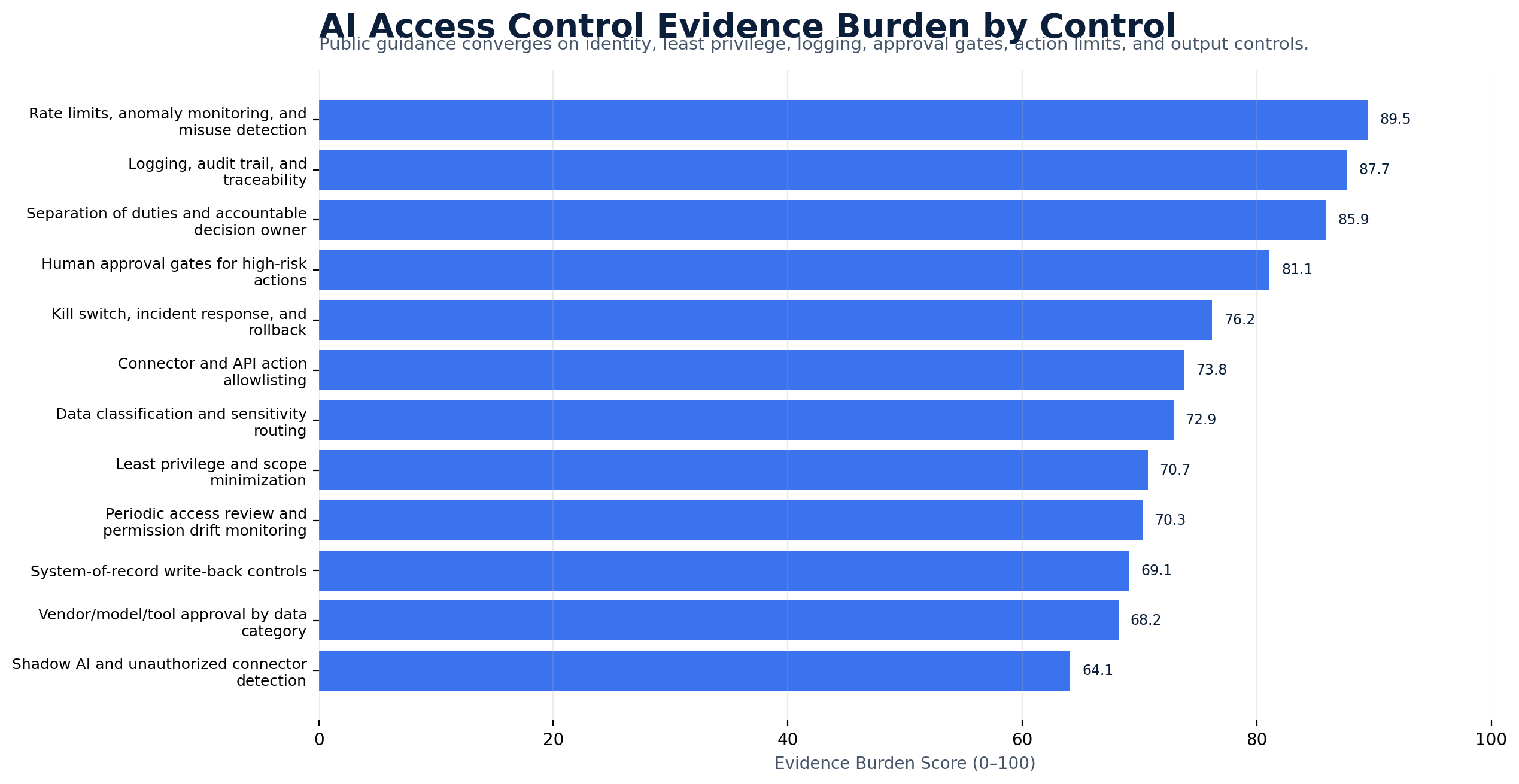
Original Research: The AI Permission Boundary Risk Index
Original GS Consulting research shows that AI access control is a workflow boundary problem, not just an identity problem.
GS Consulting analyzed public AI security, access control, agentic AI, data security, governance, and enterprise adoption sources against 18 AI access control requirements. The source set included NIST SP 800-53, NIST AI RMF, OWASP Top 10 for LLM Applications, CISA and NSA agentic AI guidance, AI data security guidance, CSA's AI Controls Matrix, GAO's AI Accountability Framework, the EU AI Act, IBM's AI control gap study, McKinsey's 2025 State of AI survey, and public research on Model Context Protocol agent tools.
The analysis created two GS Consulting derived planning scores: AI Permission Boundary Risk Score and AI Access Control Evidence Burden Score. These are planning metrics, not official legal, audit, security, NIST, CISA, NSA, OWASP, CSA, EU, GAO, IBM, or McKinsey determinations.
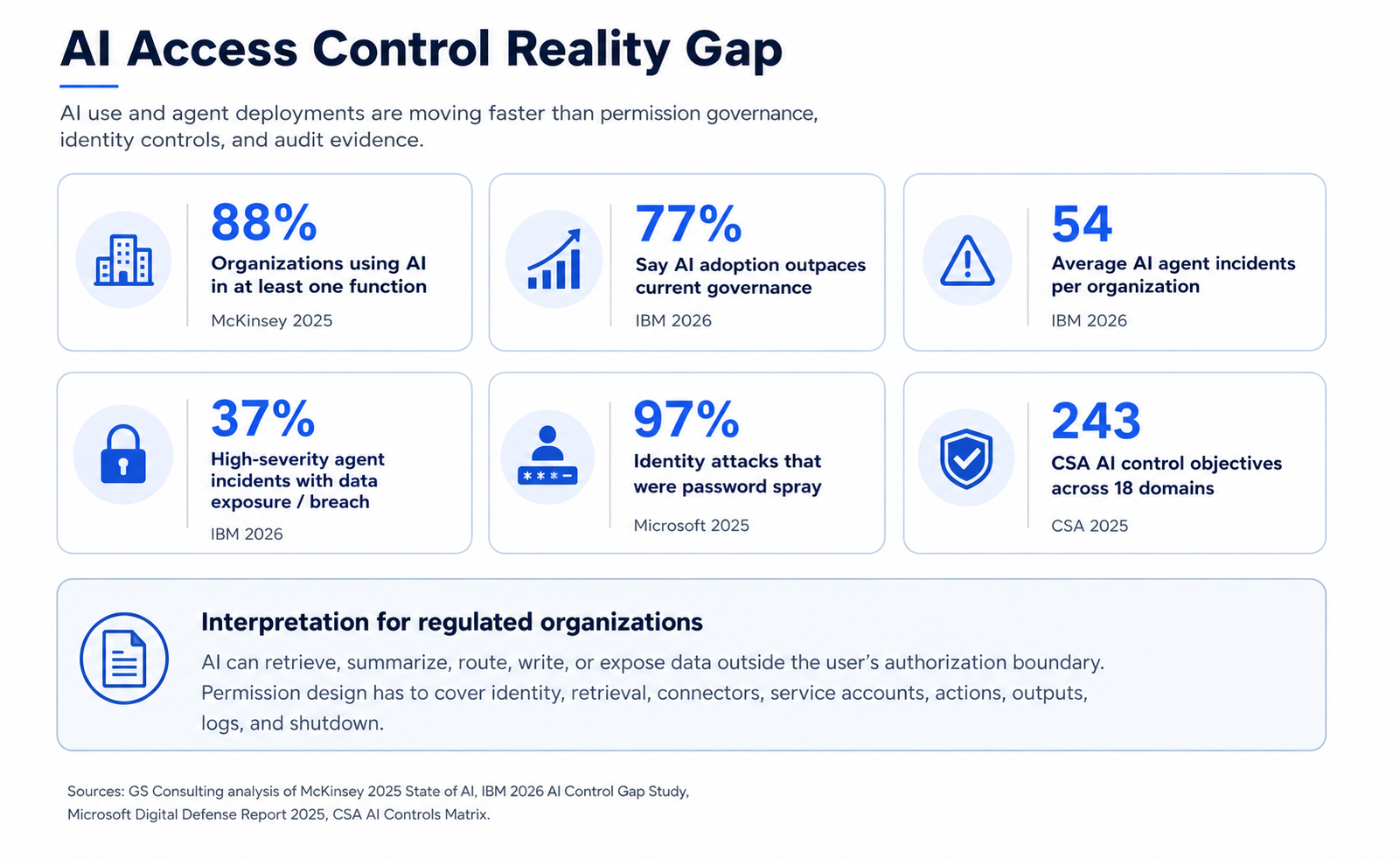
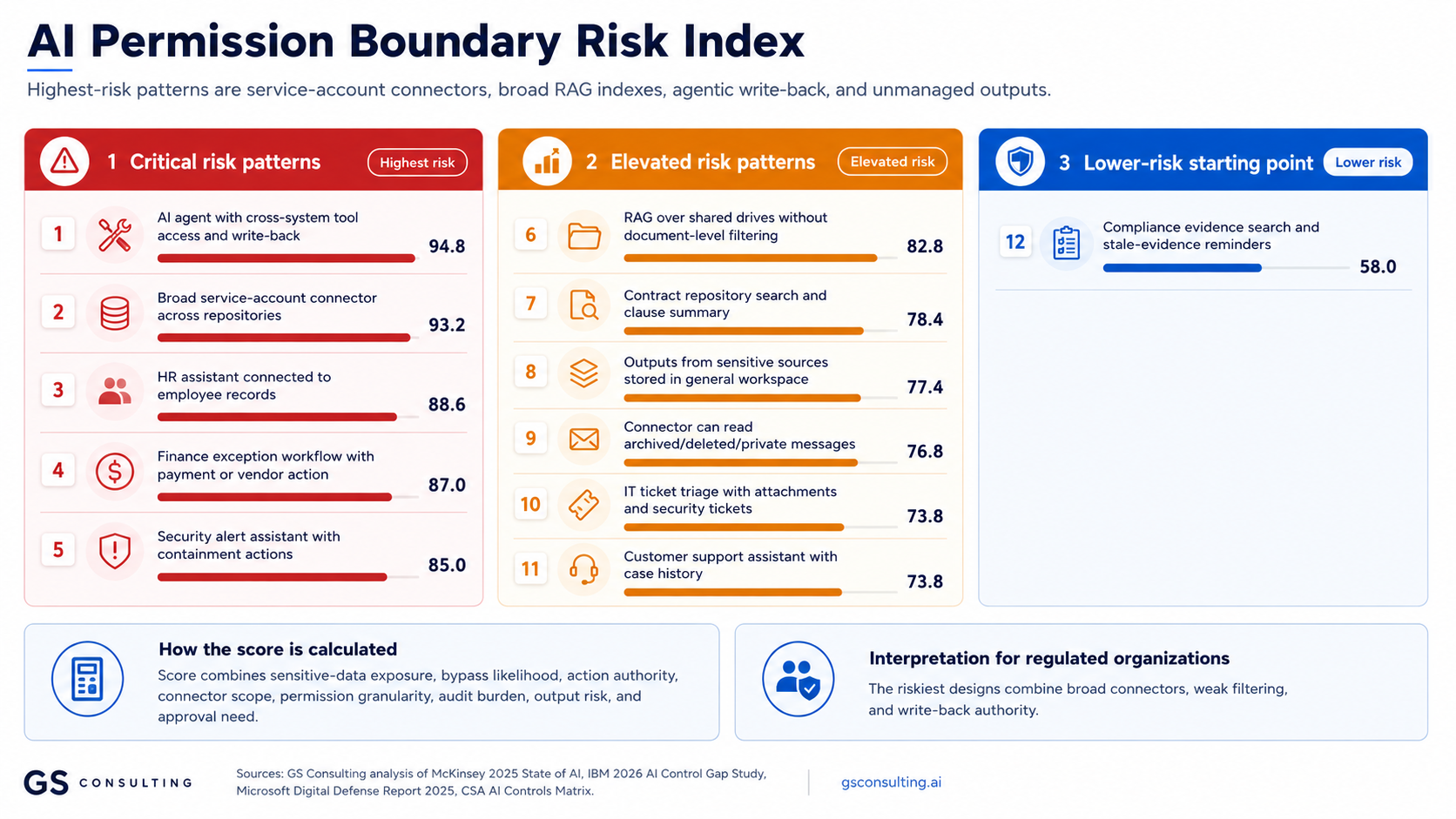
The practical takeaway is simple: AI should not get one giant permission set. It should operate in the context of the user, the data, the record, the connector, the action, and the output location.
The Real Risk: AI as a Permission Bypass
Here is the problem in plain English.
AI can become a back door into data.
Not because someone intended it. Because the architecture allowed it.
A user asks, "What does the latest contract say about termination rights?" The user does not have permission to open the contract. But the AI has access to the repository. The AI retrieves the contract, summarizes it, and gives the user the answer.
The user never opened the file. The access violation still happened.
The same issue can happen with HR files, customer records, financial data, legal documents, CUI, PHI, PII, security logs, board materials, pricing models, internal strategy, sensitive tickets, and confidential contracts.
AI does not need to show the file to expose the data. A summary is enough.
Access Control Must Follow the User
A secure AI system should answer every request in the context of the user.
The AI should not have one giant permission set. That is the dangerous pattern.
The safer pattern is user aware access. The AI retrieves and acts only within the permissions of the person using it, unless there is a clearly approved service role with strict limits and logging.
If the user has access, the AI may help. If the user does not have access, the AI should stop.
Role Based Access Is Not Enough by Itself
Role based access is useful. It is not enough by itself.
Roles are often too broad. A person may be in the finance group but should not see every finance record. A manager may supervise one team but should not see all employee records. A contract specialist may support one customer but should not see every contract.
AI permission design needs layers.
Role based access defines the broad lane, but it should not be the only gate.
Document permissions matter when AI searches shared drives, contract repositories, wikis, and knowledge bases.
Record level access prevents AI from crossing business, team, customer, or matter boundaries.
Reading, drafting, routing, approving, writing, and triggering workflows are different permissions.
Least Privilege Applies to AI Too
Least privilege means users and systems should only get the access they need to do the job. NIST defines least privilege around limiting users and processes acting for users to the minimum access necessary for assigned tasks.
That principle matters even more with AI.
AI can read faster than people. It can search more broadly than people. It can summarize more cleanly than people. It can call tools faster than people. It can move data across systems faster than people.
So if AI has too much access, the blast radius is larger.
Do not ask, "Can we give the AI access?" Ask, "What is the minimum access needed for this workflow to work?"
AI Agents Need Identities
AI agents should not be invisible.
If an AI agent can retrieve data, call tools, update systems, send messages, or trigger workflows, it needs an identity. That identity should be managed like any other identity with risk attached to it.
- A named owner.
- A defined purpose.
- A limited scope.
- A limited tool list.
- A limited data boundary.
- A logging requirement.
- A review cycle.
- A way to disable it.
CISA guidance on careful adoption of agentic AI services highlights risk tied to autonomy, tool use, external data, memory, planning workflows, and integration with IT environments. The lesson is simple: do not let AI agents operate as mystery users.
Document Level Access Is Critical for RAG
Retrieval Augmented Generation, or RAG, is one of the most useful AI patterns for regulated organizations. It lets AI answer from approved internal sources instead of guessing.
But RAG can become risky if document access is wrong.
If a RAG system indexes a whole shared drive and does not enforce document permissions, users may get answers from documents they should never see. That is not a model problem. That is an access design problem.
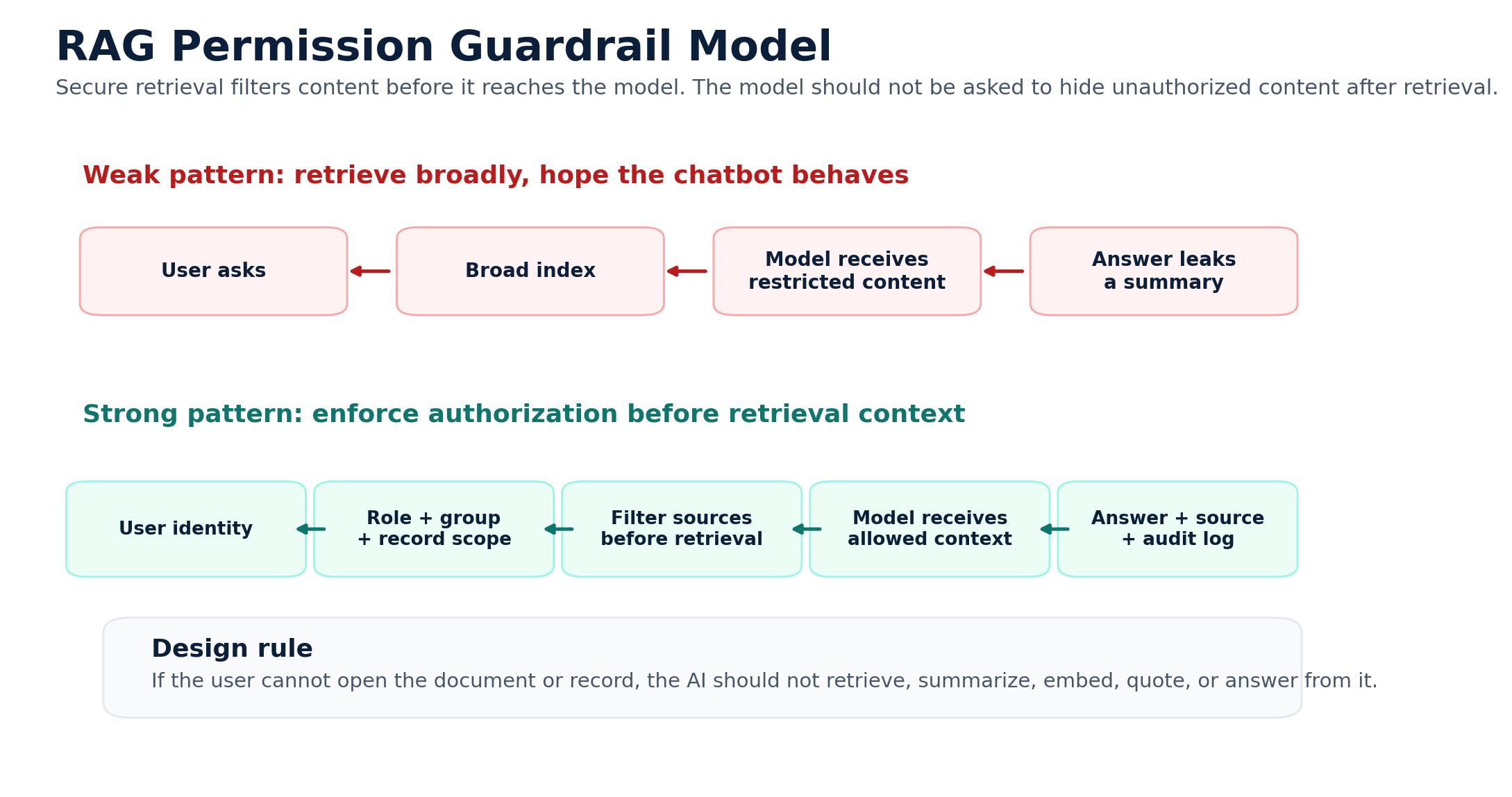
A secure RAG system should identify the user, search only approved sources, filter results based on document and record permissions, provide the model only content the user can access, include source context when appropriate, and log the interaction.
Permission Design for AI Connectors
Connectors are where access control often gets messy.
An AI connector may connect to SharePoint, Google Drive, Box, ServiceNow, Salesforce, Workday, Jira, Teams, Slack, ERP systems, CRM systems, HR systems, finance systems, security tools, contract repositories, and data warehouses.
Each connector needs a permission model. Before approving a connector, ask whether it uses the user's permissions or a service account, what the account can access, whether it can retrieve restricted documents or private messages, whether it can see attachments, whether it can index sensitive fields, whether it can write back to the source system, and what gets logged.
If the connector has broader access than the user, you have a problem.
The Service Account Trap
Service accounts are useful. They are also dangerous.
A service account is often created so an application can access data or systems. The problem is that service accounts are frequently given broad permissions because it is easier.
That may work for a normal integration. It is risky for AI.
If the AI uses a service account with access to all documents, all tickets, all contracts, all customers, or all employee records, then user permissions may not matter. The AI can retrieve far more than the user should see.
If a service account is necessary, limit it. Give it only the repositories, fields, records, and actions needed for the workflow. Log everything it does. Review it regularly. Do not let the service account become the most powerful user in the company.
Action Permissions Matter as Much as Data Permissions
A lot of teams focus only on what AI can read. They also need to focus on what AI can do.
Reading a ticket is one thing. Closing the ticket is another. Reading an invoice is one thing. Approving payment is another. Reading an HR case is one thing. Changing employee status is another. Reading a security alert is one thing. Disabling an account is another.
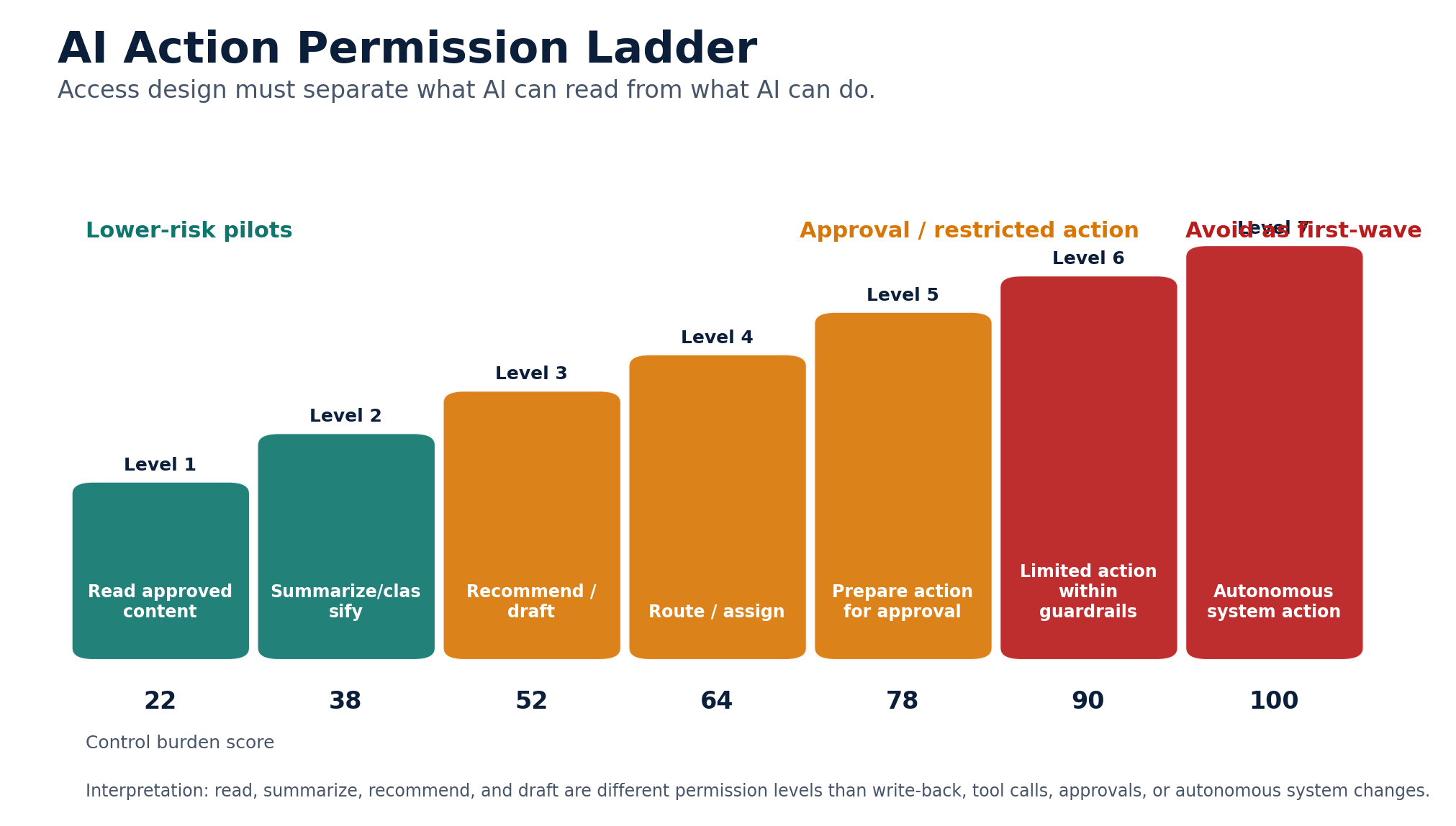
A clean model separates read rights from action rights. AI can read approved data. AI can summarize approved data. AI can recommend a next step. AI can draft an action. AI can act only after approval. AI cannot perform certain actions at all.
Do not give AI action rights just because it can produce a good recommendation.
High Risk Actions Need Approval Gates
Some actions should require human approval no matter how confident the AI sounds: granting access, changing privileged roles, approving payments, changing vendor records, sending customer commitments, submitting compliance reports, closing security incidents, changing production systems, making HR decisions, publishing external statements, and issuing legal positions.
AI can prepare the work. A person should approve the action.
OWASP's LLM Top 10 highlights risks including prompt injection, sensitive information disclosure, insecure plugin design, excessive agency, and insecure output handling. Approval gates help stop a bad prompt, bad retrieval, or bad recommendation from becoming a real business action.
Output Permissions Are Often Forgotten
AI output needs access control too. This is one of the most common gaps.
A sensitive document is protected. The AI summarizes it. The summary gets saved to a general workspace. Now the sensitive information has moved. The source was controlled. The output was not.
AI outputs should inherit the sensitivity of the source when they contain or summarize sensitive information. This applies to summaries, drafts, extracted fields, classifications, recommendations, reports, embeddings, logs, ticket notes, customer responses, and compliance summaries.
If AI produces something from sensitive data, protect the output.
Permission Design by Workflow
Access controls become clearer when they are designed around a workflow, not around a generic chatbot.
Main risk: the AI answers from documents the user should not see.
Main risk: AI routes or exposes sensitive tickets to the wrong team.
Main risk: AI reveals employee information or handles sensitive cases without HR review.
Main risk: AI exposes financial data or triggers payment related action without approval.
Main risk: AI summarizes confidential contract terms to unauthorized users.
Main risk: AI exposes security details or acts on systems without approval.
The Permission Design Checklist
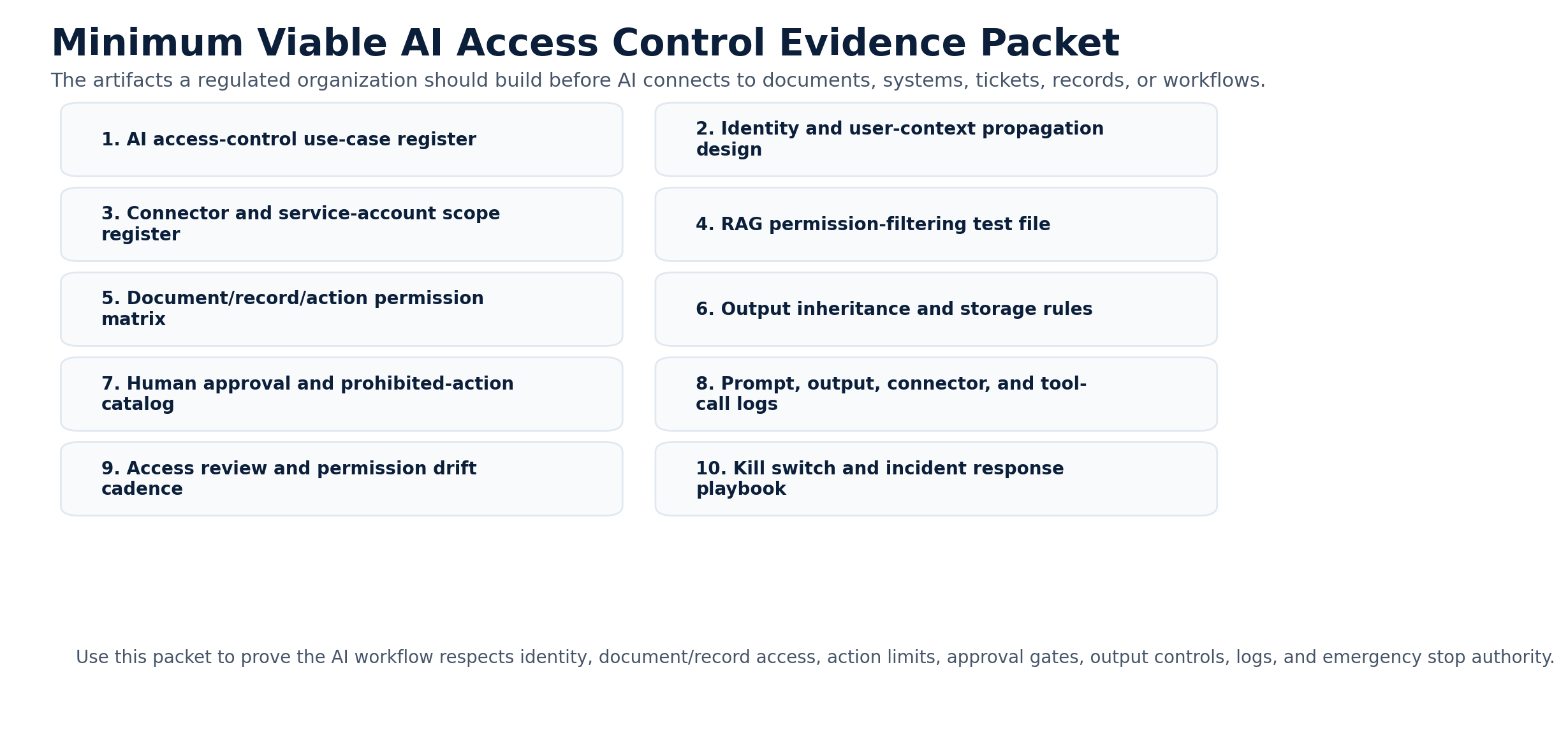
Before launching an AI workflow, leaders should be able to answer the operating questions.
- Who will use the AI workflow?
- How is user identity verified?
- What roles can access it?
- What data can each role see?
- Can permissions be enforced at the document level?
- Can permissions be enforced at the record level?
- Does AI use user permissions or a service account?
- If it uses a service account, what is the scope?
- Can AI access sensitive repositories, attachments, or archived records?
- Can AI write back to systems?
- What actions require human approval?
- What actions are prohibited?
- Where are outputs stored?
- Do outputs inherit source classification?
- What logs are created?
- Who reviews access regularly?
- Who can disable the workflow?
If you cannot answer these questions, the workflow is not ready.
Common Mistakes
- Giving AI broad repository access. This is the fastest way to create a data leak. Start narrow.
- Assuming the chatbot handles permissions. Do not assume. Verify. Permissions must be enforced by the system architecture.
- Using one service account for everything. That may be easy, but it is risky. Service accounts need tight scope.
- Forgetting document level access. Folder access is not enough when sensitive documents are mixed with general documents.
- Letting AI output land anywhere. Outputs need classification and storage rules.
- Giving AI action rights too early. Read first. Recommend second. Act later.
- Not reviewing access over time. Permissions drift. People change roles. Projects end. Vendors change. Systems change.
- Ignoring shadow AI. Fix the access model, but also give people a usable approved path.
A Practical First 30 Days
Start with one AI workflow. Do not try to solve all enterprise access control at once.
Good first candidates include approved policy search, IT ticket summaries, contract clause summaries, operations report drafts, compliance evidence search, and customer case summaries.
- Week 1Choose one controlled workflow.
Pick a workflow with real value, defined users, known repositories, and limited action authority.
- Week 2Map data, identity, and permissions.
Document who uses it, what data it needs, which systems it touches, what permissions exist, and where permissions are too broad.
- Week 3Define action and output rules.
Decide what AI can read, draft, route, write, store, and trigger. Define what requires approval and what is prohibited.
- Week 4Test, log, and review.
Validate permission filtering, service account scope, output storage, audit logs, approval gates, stop paths, and access review ownership.
How This Supports Secure AI Automation
Access control is one part of a broader secure AI automation approach. Secure AI Automation for Regulated Organizations explains how GS Consulting helps organizations automate workflows with the right security, governance, data controls, architecture, and measurable outcomes.
This guide answers one specific control question: how do we make sure AI respects authorization boundaries when it connects to documents, systems, tickets, records, and workflows?
That question matters because access control is where secure AI automation either holds together or falls apart.
The Bottom Line
AI access control is not optional.
If AI can retrieve data, summarize records, call tools, or trigger workflows, it needs permission design.
That means role based access, least privilege, identity integration, document level permissions, record level access, action limits, approval gates, output controls, and logs.
The rule is simple. AI should not see more than the user is allowed to see. AI should not do more than the workflow allows it to do. AI should not become a back door into sensitive data.
GS Consulting helps regulated organizations design AI access controls, permission models, identity integration, document level retrieval, least privilege architecture, approval gates, and secure AI automation workflows that respect existing authorization boundaries.
Ready to design AI permissions before connecting AI to sensitive systems?
Contact GS Consulting for a Secure AI Access Control Assessment.
Contact GS ConsultingResearch Sources and Caveats
The AI Permission Boundary Risk Score, AI Access Control Evidence Burden Score, and AI Action Permission Ladder are GS Consulting derived planning tools. They are not official legal, audit, security, compliance, NIST, CISA, NSA, OWASP, CSA, EU, GAO, IBM, or McKinsey determinations.
Actual permission design depends on the organization's identity architecture, data classification, document repositories, record level permissions, connector model, service accounts, API scopes, vendor terms, workflow actions, approval requirements, logs, and risk tolerance.
- NIST SP 800-53 Rev. 5: Security and Privacy Controls for Information Systems and Organizations
- NIST CSRC Glossary: Least Privilege
- NIST AI RMF Core
- OWASP Top 10 for Large Language Model Applications
- CISA: Careful Adoption of Agentic AI Services
- GAO Artificial Intelligence Accountability Framework
- How are AI agents used? Evidence from 177,000 MCP tools
- McKinsey: The State of AI
- IBM: AI Control Gap Study
Frequently Asked Questions About AI Access Controls
What are AI access controls?
AI access controls define what an AI workflow can retrieve, summarize, write, trigger, and store based on the user, data source, record, connector, action, output location, and approval requirement. The goal is to make sure AI does not see more than the user is allowed to see or do more than the workflow allows.
Why is AI permission design different from normal application access control?
AI workflows often cross several systems at once. They may retrieve documents, search tickets, summarize records, call APIs, draft responses, and write outputs into another tool. That makes permission design a workflow boundary problem, not just a login or role problem.
Should AI use a service account or the user's permissions?
User based permissions are usually safer because AI acts within the user's existing authorization boundary. Service accounts can be necessary, but they should be tightly scoped, logged, reviewed, owned, and limited to the minimum repositories, records, fields, and actions needed for the workflow.
How should RAG systems handle document permissions?
RAG systems should enforce authorization before content reaches the model. The retrieval layer should identify the user, check role, group, document, and record permissions, filter the search results, send only allowed content to the model, and log the interaction.